Tutorials
Tutorials are long-form, guided articles for learning Linux, networking, Docker, Kubernetes, and other server-side topics, with an interactive Playground attached.
Unlike Challenges, which hand you a problem and expect you to find the solution yourself, Tutorials walk you through a topic step by step. They explain the concepts, show reproducible commands, and let you run those commands yourself as you read.
What a Tutorial looks like
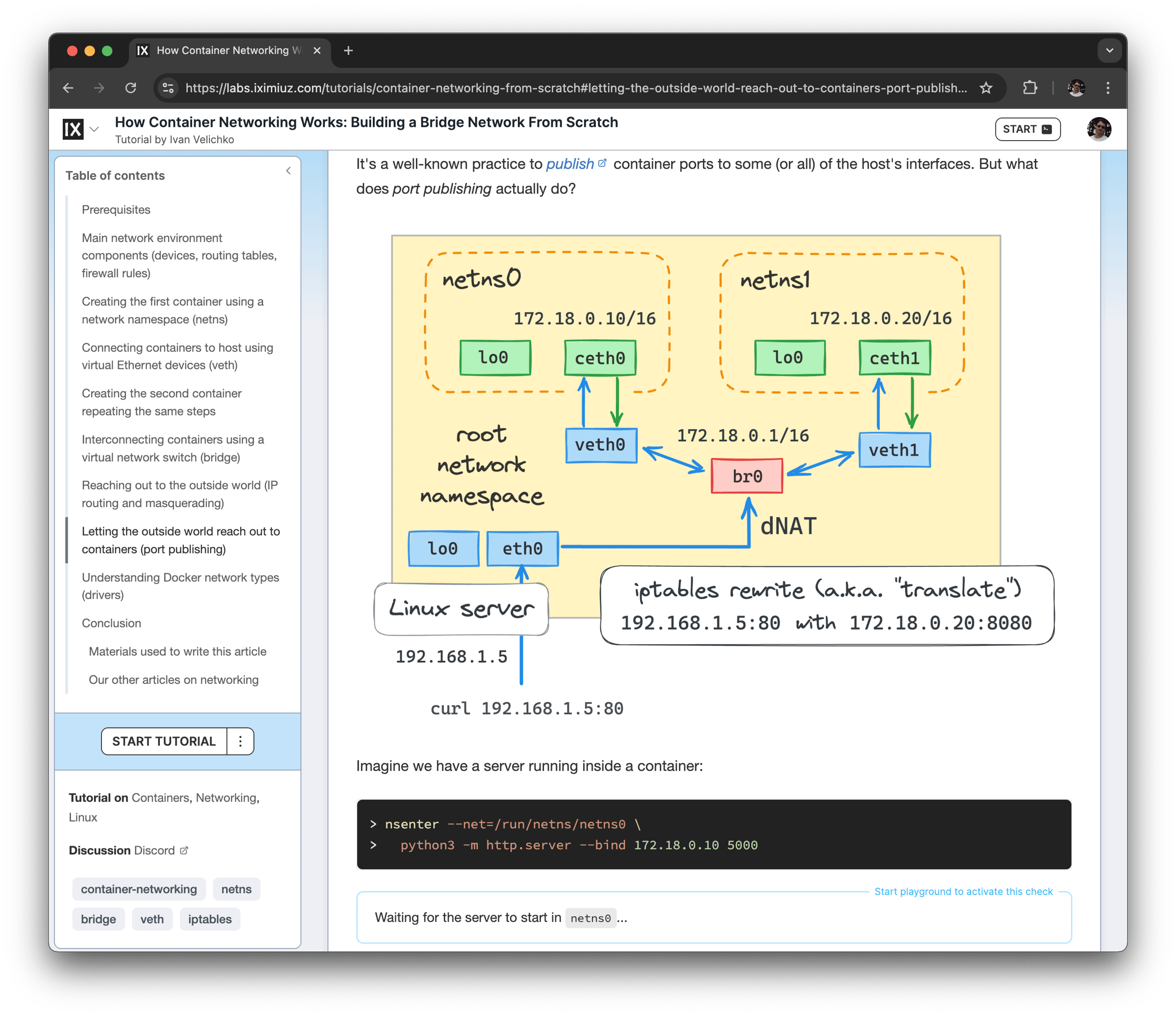
A Tutorial reads like a technical article: explanations, diagrams, screenshots, and code snippets, organized into sections. The difference from an ordinary blog post is the Playground on the side - a remote Linux environment you can use directly from the browser, without installing anything locally.
This means you don't just read about a command - you run it, see the real output, break things, and try again, all within the environment the author prepared for the topic.
A Tutorial can be a few paragraphs long or as large as a small book. Topics range from container internals and networking fundamentals to Kubernetes troubleshooting and CI/CD pipelines.
The Playground
Most Tutorials come with a Playground tailored to the material.
Depending on the Tutorial, it may contain one or more VMs, preinstalled tools, a running Kubernetes cluster, or a partially prepared setup. The author decides what's available and how it's configured, so the environment matches the steps in the text.
Beyond a terminal, a Playground may also expose:
- A built-in web IDE for editing files and code
- A Kubernetes visual explorer for cluster-oriented Tutorials
- Web UIs of services running inside the Playground (dashboards, Grafana, etc.)
You're free to explore the Playground beyond the prescribed steps. Experimenting on the side is encouraged - the environment is yours for the duration of the session.
Tasks and progress
Many Tutorials include tasks - small checks embedded in the text that verify you've actually performed a step before moving on.
A task watches the Playground and updates automatically: it stays open until the expected condition is met, then marks itself complete. Some tasks ask you to enter a value (for example, a name or a number read from a log) and validate it. Tasks often show dynamic hints that react to the current state of the Playground when you're stuck.
The number of completed and total tasks is shown in the Tutorial's header and serves as the main completion indicator.
Only Tutorials that come with a Playground can be started and completed. A Tutorial without a Playground can still be read like an article.
Reading vs. completing
Published Tutorials can usually be read without an account.
To start the Playground and mark a Tutorial as completed, you need to be signed in. Your progress - started and completed Tutorials - is tracked in your personal dashboard, so you can pick up where you left off.
How to approach Tutorials
Tutorials reward active reading.
You'll get the most out of them if you:
- Run the commands yourself instead of just reading them
- Pause to inspect the system between steps (files, processes, logs, cluster state)
- Try small variations to see what changes
- Use the embedded tasks to confirm your understanding before moving on
- Follow links to related Challenges to practice what you just learned
As with Challenges, handing the whole thing to an autonomous coding agent will technically get you through the steps, but the learning happens in the doing.
Tutorials, Challenges, and Courses
Tutorials are one of several learning formats on iximiuz Labs.
Challenges start with a problem and ask you to solve it in a prepared Playground.
Tutorials are guided, long-form articles that explain a topic and let you follow along in a Playground.
Courses combine Tutorial-like Lessons and Challenges into a structured sequence with stricter completion criteria.
A common learning loop:
- Try a Challenge.
- Get stuck.
- Read the linked Tutorial.
- Return to the Challenge.
- Solve it.
Many Challenges link to relevant Tutorials, so you'll often arrive at a Tutorial exactly when you need it.
Where to start
Browse the catalog and pick a Tutorial that matches your current interests and skill level, or follow a Tutorial linked from a Challenge you're working on.
If a Tutorial feels too advanced, look for an earlier one on the same topic, or practice the basics with a few easy Challenges first.
- Previous
- Challenges
- Next
- Courses