Playground Building Blocks
The building blocks
Every playground on iximiuz Labs - from the simplest Ubuntu sandbox to a multi-node Kubernetes cluster - is assembled from the same small set of building blocks. Once you know these blocks, you can mix and match them to produce new playgrounds of arbitrary complexity (or simplicity!):
- Playground - the top-level object: a named, reusable template that describes a set of virtual machines, the networks connecting them, and the UI presented to the user. Starting a playground creates a fresh, isolated instance of this template.
- Machine - a full-fledged virtual machine (see What are Playgrounds). A playground can have up to 5 machines, each with its own drives, network interfaces, users, and CPU/RAM resources.
- Drive - a virtual block device attached to a machine. The drive mounted at
/provides the machine's root filesystem (built from a rootfs image), while extra drives can serve as pre-formatted data volumes or raw devices for partitioning practice. - Network - an isolated L2 bridge network with its own IPv4 subnet. Machines join networks via network interfaces, and a machine with multiple interfaces can act as a router, gateway, or bastion between networks.
- Init tasks - shell scripts that run inside the machines during playground startup, so the environment comes up ready to use (packages installed, services running, files in place).
- Tabs - the UI panes of the playground page: terminals, an IDE, exposed HTTP ports, or embedded web pages.
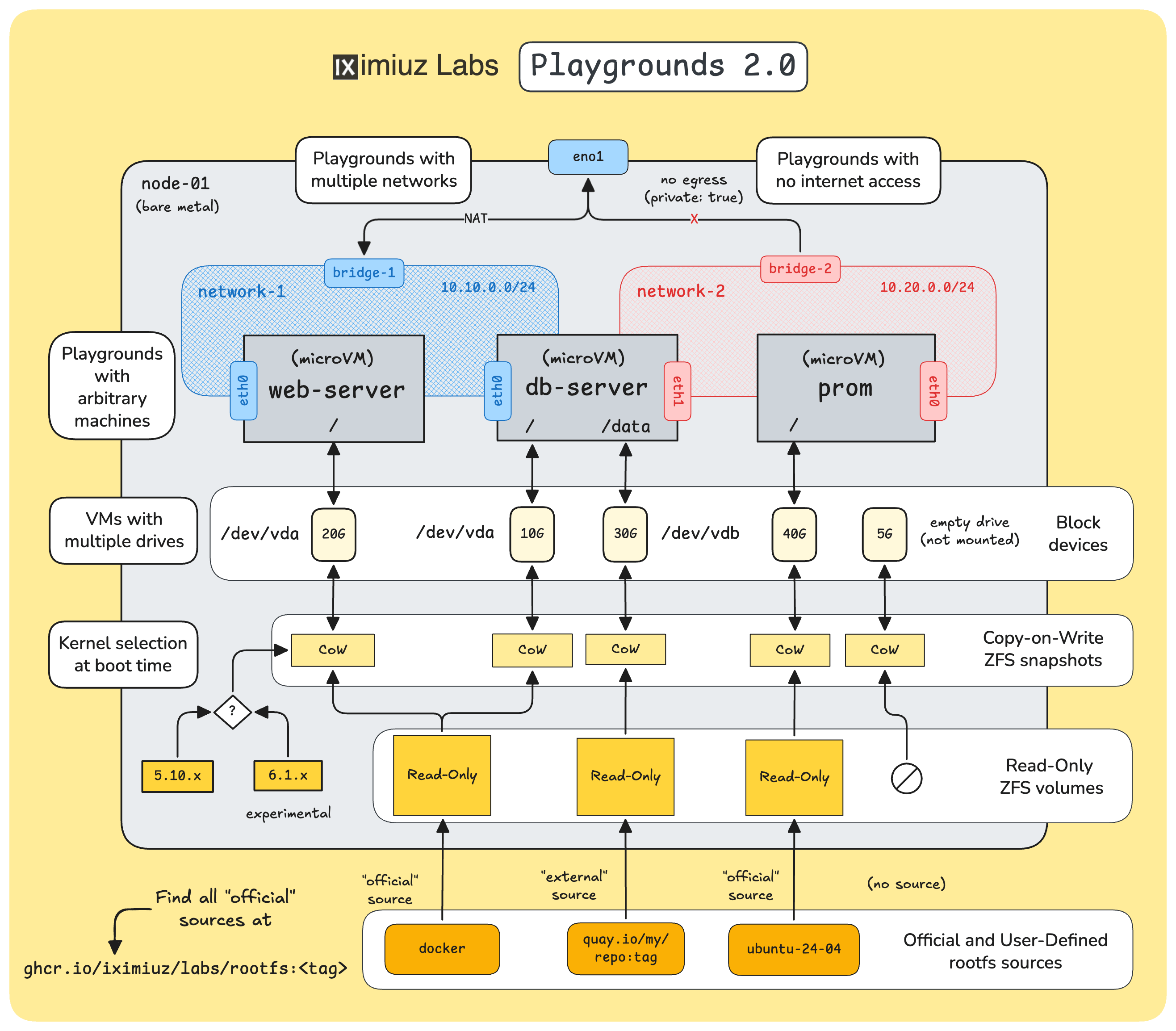
iximiuz Labs Playgrounds: multi-network, multi-VM, multi-disk setups with a rich collection of base rootfs images and the ability to bring your own rootfs.
Key facts about iximiuz Labs Playgrounds:
- Machines are lightweight microVMs, not containers - they run their own kernels, so Docker, Kubernetes, systemd, iptables, and friends all work without workarounds.
- The kernel is supplied by the platform (you can pick a version), while the root filesystem comes from a rootfs image - either one of the official images or your own OCI image.
- If you don't configure something, sensible defaults kick in: a single
localnetwork shared by all machines, auto-assigned IP addresses, a defaultlaborantuser, and one terminal tab per machine.
This module walks you through the blocks one by one, starting from the smallest possible playground and gradually working up to multi-drive, multi-machine, and multi-network setups. The concluding manifest reference describes every configuration field in one place.
Ways to create a custom playground
There are three ways to create a custom playground on iximiuz Labs:
- YAML manifests +
labctl- describe the playground in a Kubernetes-style manifest and manage it from the command line. This is the most powerful and reproducible approach, and it's what this module focuses on. - The Playground Constructor UI - navigate to /new/playground and follow the wizard. The constructor covers the same building blocks in a point-and-click fashion.
- Saving a running playground - start a playground, install and configure whatever you need, then save the stopped instance as a new custom playground with all filesystem modifications preserved.
The three methods can be used together: for example, you can bootstrap a playground in the UI, then dump its manifest with labctl and keep evolving it in Git.
The manifest + labctl workflow
Every custom playground is derived from a base playground - one of the official environments such as ubuntu-24-04, docker, k3s, or the "blank canvas" multi-VM flexbox.
The base provides the defaults (machines, networks, UI tabs), and your manifest overrides the parts you want to change.
The choice of the base also determines how far the customization can go:
flexboxis the only base that allows a fully arbitrary set of machines - any number of VMs (up to 5), any hostnames, any rootfs per machine. Use it whenever you're designing a topology from scratch.- All other bases keep their original machine set: you can drop machines (use a subset) and tweak the remaining ones - resources, users, welcome messages, extra drives, networks, tabs, init tasks - but you can't add or rename machines (e.g., an
ubuntu-24-04-based playground always has theubuntu-01machine) or change the machine's rootfs drive completely.
The core commands (see How to Use Playgrounds for installing and authenticating labctl):
labctl playground catalog --filter base    # list available base playgrounds
labctl playground create <name> --base <base> [-f manifest.yaml]
labctl playground manifest <name>          # dump the YAML manifest of a playground
labctl playground update <name> -f manifest.yaml
labctl playground start <name>
labctl playground remove <name>            # delete a playground you authored
A handy trick: labctl playground manifest works for any playground on the platform, so you can peek at how existing playgrounds are put together and borrow the ideas -
the same information is also available by adding /settings to a playground's URL in the browser.
Additional Resources
- Previous
- Playground Container Registry