Multi-Network Playgrounds
By default, all machines of a playground share a single local network. But for routing, firewalling, NAT, or bastion-host scenarios,
you'll want to design the topology yourself: several subnets, machines pinned to specific addresses, and gateways connecting the segments.
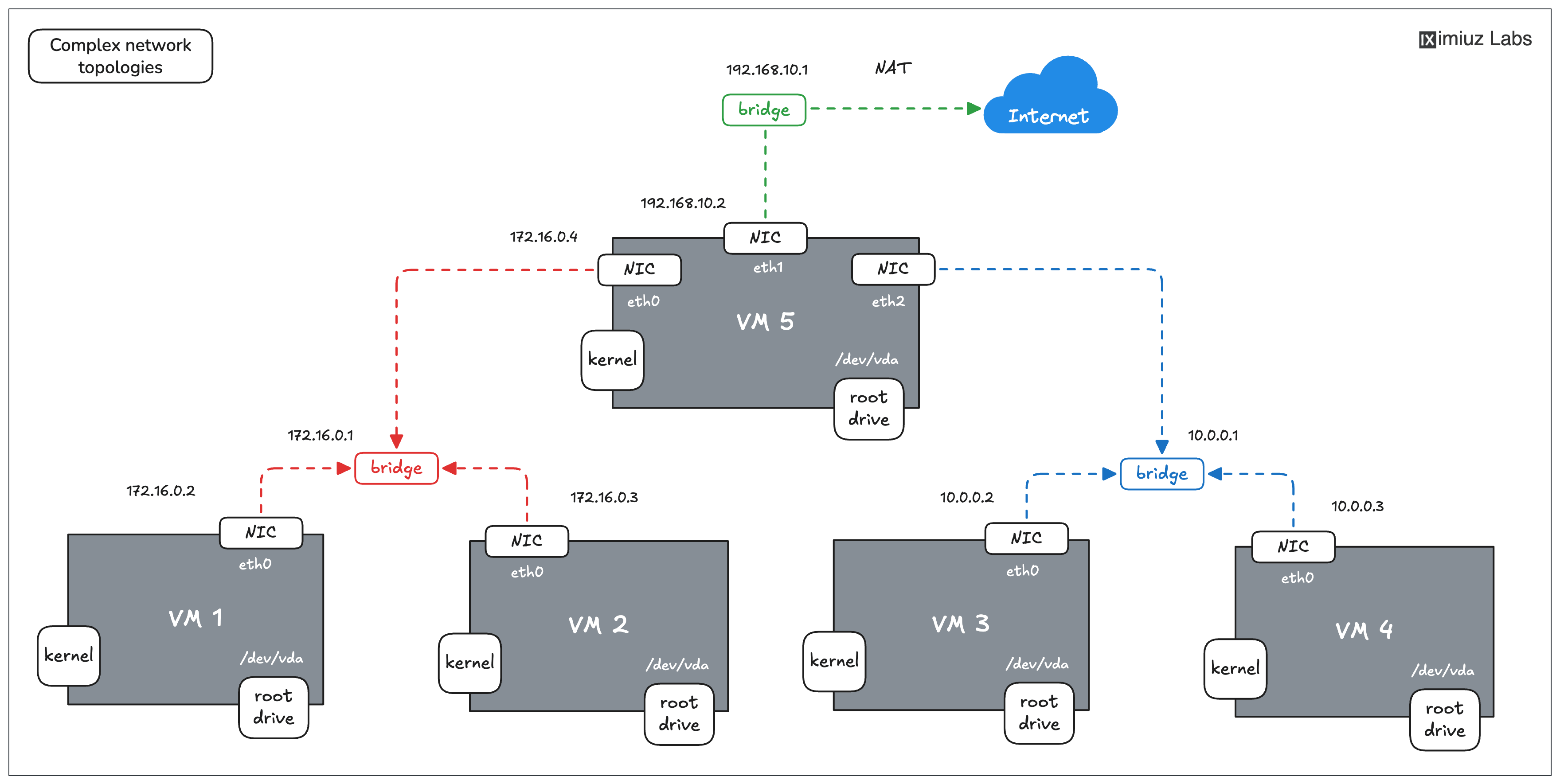
An example of a setup you can configure using a 5-node Flexbox playground.
Networks are declared at the playground level, and machines join them through network interfaces:
kind: playground
name: routing-lab
title: Routing Lab
playground:
  networks:
    - name: frontend
      subnet: 10.0.1.0/24
    - name: backend
      subnet: 10.0.2.0/24
      private: true
  machines:
    - name: web-01
      users:
        - name: root
          default: true
      drives:
        - source: ubuntu-24-04
          mount: /
      network:
        interfaces:
          - network: frontend
            address: 10.0.1.10
          - network: backend
            address: 10.0.2.10
    - name: db-01
      users:
        - name: root
          default: true
      drives:
        - source: ubuntu-24-04
          mount: /
      network:
        interfaces:
          - network: backend
            address: 10.0.2.20
  accessControl:
    canList:
      - owner
    canRead:
      - owner
    canStart:
      - owner
labctl playground create routing-lab --base flexbox -f manifest.yaml
In this playground, web-01 is multi-homed: its eth0 lives on the frontend network and eth1 on backend, so it can reach both the internet and the database:
PLAY_ID=$(labctl playground start routing-lab-...)
labctl ssh $PLAY_ID -m web-01 -- ip -brief addr
lo               UNKNOWN        127.0.0.1/8 ::1/128
eth0             UP             10.0.1.10/24 fe80::1cfa:33ff:fe1b:7552/64
eth1             UP             10.0.2.10/24 fe80::74bb:feff:fe85:9e06/64
db-01 sits on the private backend network only - it can talk to web-01 but has no route to the outside world (not even a default route).
How playground networking works
- Each network is an isolated L2 bridge with its own IPv4 subnet. Networks don't route to each other - if you want traffic to flow between segments, add a multi-homed machine and configure forwarding yourself (that's the fun part!).
- Internet access is NATed per network. Setting
private: truecuts a network off entirely: no NAT, no default route - ideal for simulating air-gapped or internal-only segments. addresspins a machine to a static IP (with or without a mask -10.0.1.10and10.0.1.10/24both work). If omitted, the machine gets the first free address in the subnet.- The gateway address defaults to the first free IP of the subnet; override it with the network's
gatewayfield if your scenario requires a specific one. - A machine's default route goes via the first non-
privatenetwork among its interfaces. - Machines resolve each other by name (
web-01) and by network-qualified name (web-01.backend) - handy when a machine has several addresses.
A classic example: NAT gateway
A private network plus a dual-homed machine is all it takes to practice building a NAT gateway from scratch:
  networks:
    - name: private
      subnet: 192.168.178.0/24
      private: true
    - name: public
      subnet: 10.0.0.0/16
  machines:
    - name: node-01
      users:
        - name: root
          default: true
      drives:
        - source: ubuntu-24-04
          mount: /
      network:
        interfaces:
          - network: private
            address: 192.168.178.101
    - name: gateway
      users:
        - name: root
          default: true
      drives:
        - source: ubuntu-24-04
          mount: /
      network:
        interfaces:
          - network: private
            address: 192.168.178.100
          - network: public
            address: 10.0.0.10
node-01 has no internet until someone configures IP forwarding and masquerading on gateway - which is exactly the kind of task you can then wrap into a challenge or a guided tutorial.
Additional Resources
- 📚 Bridge vs Switch - the networking fundamentals behind playground bridges
- 🎯 Routing challenges - real multi-network playgrounds in action
- Previous
- Multi-Machine Playgrounds
- Next
- Init Tasks