How to Expose Local Endpoints
You can expose an HTTP(S) service running on your local machine to the public internet with a single labctl command:
labctl expose local <local_addr>:<local_port> [--remote-port <port>]
Under the hood, this command combines remote port forwarding (labctl port-forward -R) with HTTP(S) port exposure (labctl expose port). It forwards the chosen remote port on the playground VM to your local address and then generates a unique public URL that routes traffic to the forwarded port - effectively turning a service running on localhost (or any local interface) into a URL accessible from anywhere in the world.
Typical use cases are:
- Sharing a web application you're developing on your laptop with teammates or clients without deploying it anywhere
- Testing webhooks from third-party services (Stripe, GitHub, Slack, etc.) against a local dev server
- Previewing a local site on a mobile device or from a different network
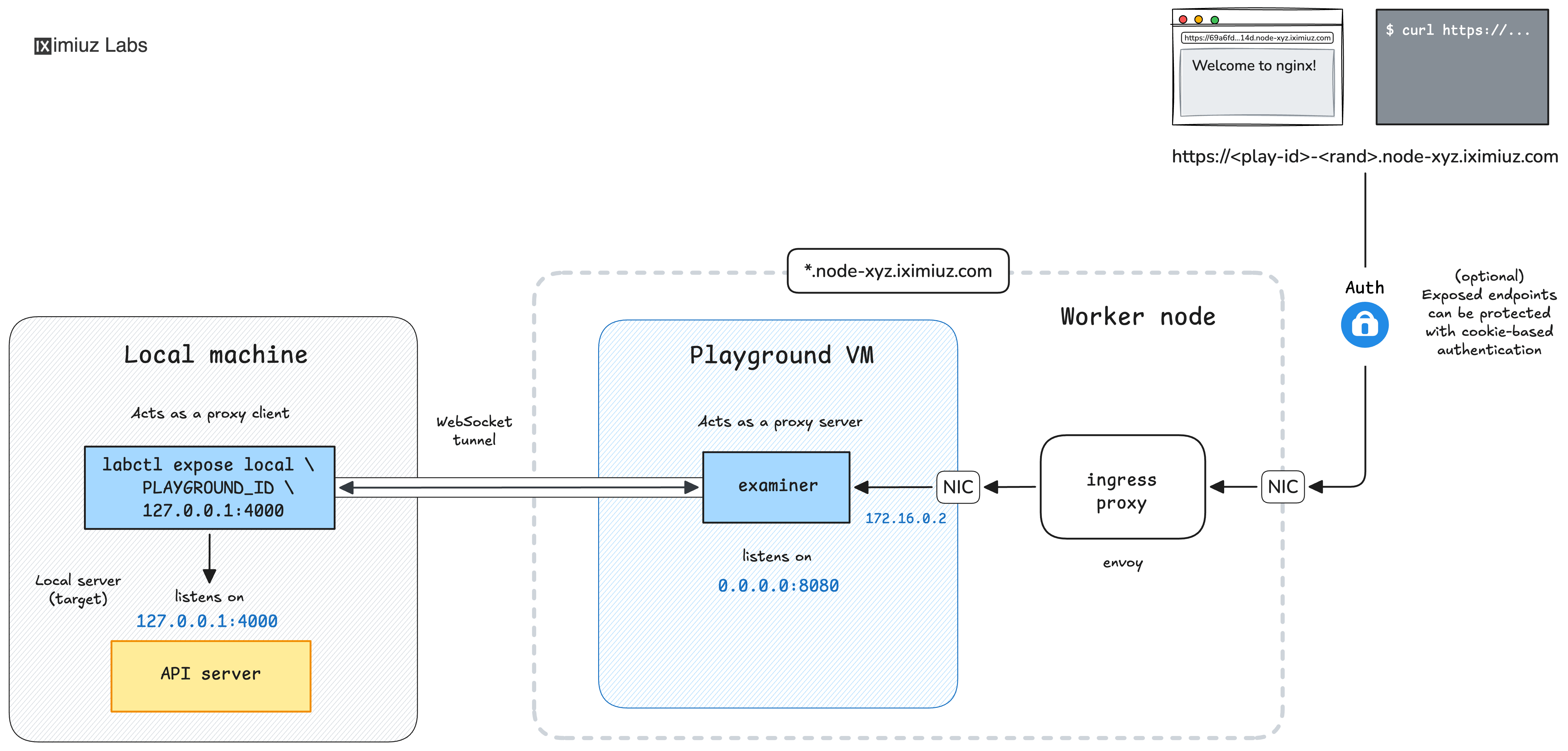
The labctl expose local command generates a unique URL that can be used to access your local service from anywhere in the world.
Usage
The minimal invocation requires only the local address and port. The command will automatically start a new Alpine Linux playground and use it as an ingress point to expose your local service:
labctl expose local 127.0.0.1:3000
There is also a longer form that allows you to specify the playground ID in case you already have a playground running and want to reuse it:
labctl expose local $PLAY_ID 127.0.0.1:3000
By default, the remote port on the playground VM will match the local port.
If it's already used by another service running in the playground, you can override it with --remote-port:
labctl expose local 127.0.0.1:3000 --remote-port 8080
If your local service uses HTTPS (including self-signed certificates), add the --https flag:
labctl expose local 127.0.0.1:3000 --https
Exposed URLs are private by default - only the playground owner can access them.
To make the URL accessible to anyone (including anonymous users), use the --public flag:
labctl expose local 127.0.0.1:3000 --public
To open the generated URL in your browser automatically, add --open:
labctl expose local 127.0.0.1:3000 --open
Example: Sharing a local development server
- Start a local web server on your machine:
python3 -m http.server 4000
- In another terminal, expose the local server as a public URL:
labctl expose local 127.0.0.1:4000 --public --open
The command will print the generated URL and (with --open) launch it in your default browser.
The URL will keep working as long as the labctl expose local process is running and the playground is alive.
Press Ctrl+C will both terminate the port exposure and stop the temporary playground.
Related commands
labctl port-forward -R- the low-level primitive for forwarding a local port into a playground VM.labctl expose port- exposes an HTTP(S) port already listening inside the playground VM.
- Previous
- How to Forward Remote Ports