Running VMs Inside Playground VMs (Nested Virtualization)
Nested virtualization has been disabled since July 13, 2026.
The Cloud Hypervisor backend was turned off following the recently reported guest-to-host escape vulnerabilities in KVM - first Januscape, and later Zapscape. Until a fix is in place, playgrounds can only run on the Firecracker backend, so the recipe below is currently non-functional.
Motivation
This recipe shows how to run virtual machines inside playground VMs - useful for trying Docker's sbx, Kubernetes' Agent Sandboxes, Kata Containers, Incus VMs, QEMU/KVM workloads, and other tools that need a hardware-virtualized guest.
By default, iximiuz Labs playground VMs run on top of Firecracker, which doesn't expose the host's CPU virtualization capabilities (Intel's VMX or AMD's SVM) to its microVMs. This keeps the attack surface small but also makes it impossible to spin up a "real" VM inside a playground.
To unblock nested virtualization use cases, iximiuz Labs offers an alternative VMM backend: Cloud Hypervisor. Cloud Hypervisor exposes VMX/SVM to the guest, at the cost of a slightly larger attack surface.
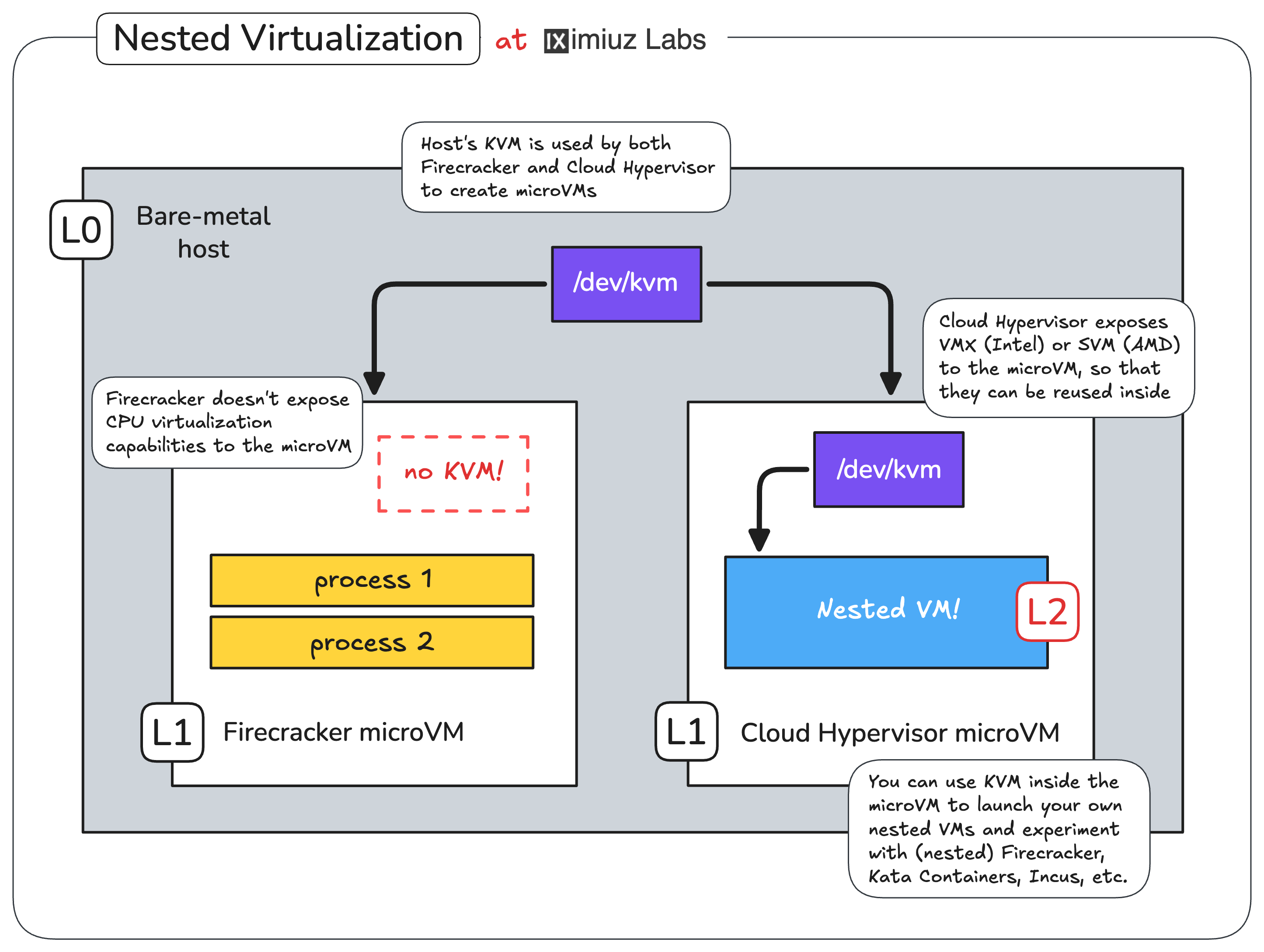
Running VMs inside playground VMs via a Cloud Hypervisor backed with CPU virtualization support (VMX/SVM) and KVM.
Switching a playground to Cloud Hypervisor
There are two ways to opt into the Cloud Hypervisor backend:
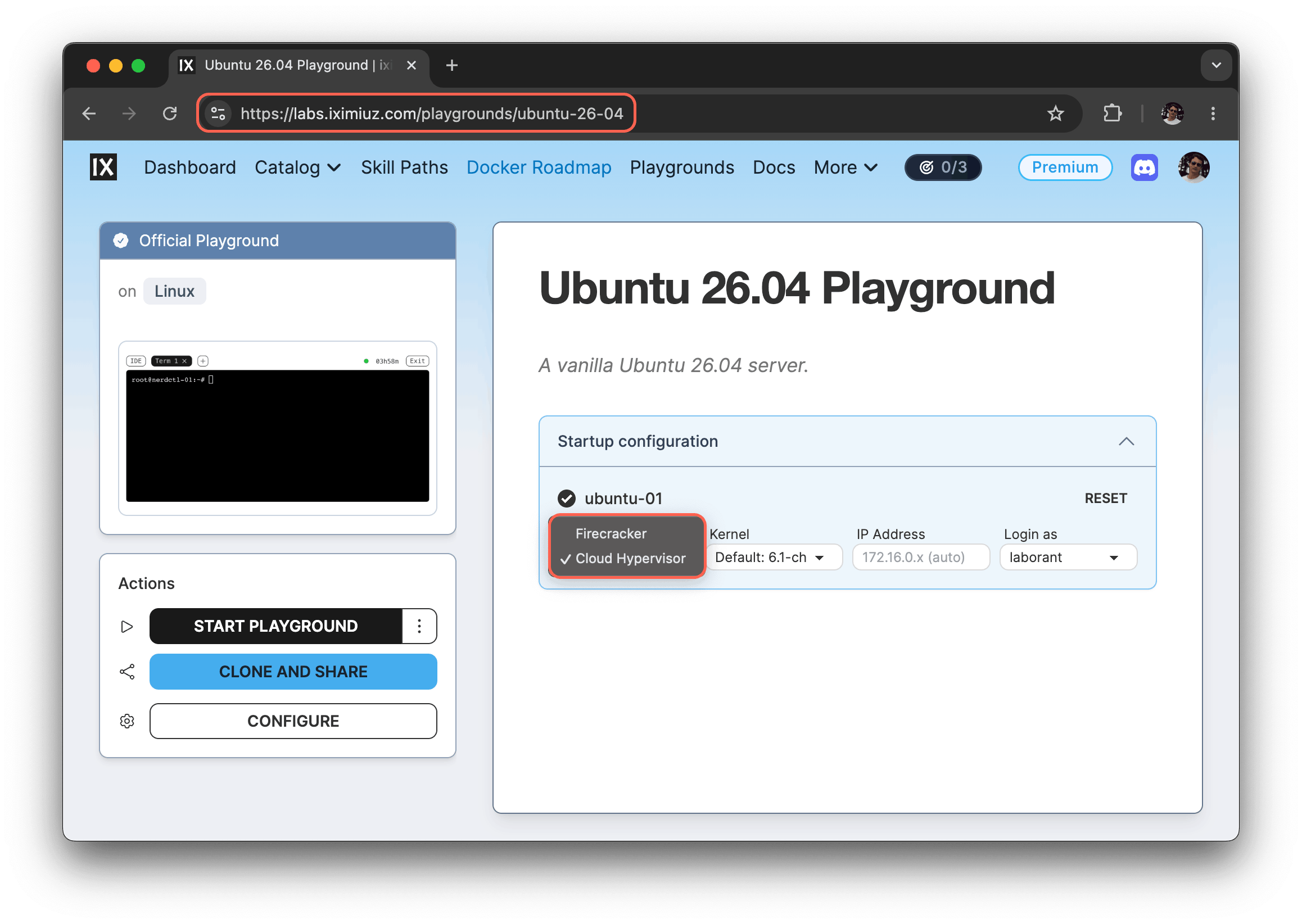
From the UI - on the playground page, switch the Backend setting of a VM from "Firecracker" to "Cloud Hypervisor" before starting the playground.
From the CLI - pass the --backend flag to labctl playground start:
labctl playground start --backend cloud-hypervisor ubuntu-26-04
Example: Kata Containers on Kubernetes
Once the playground is up with Cloud Hypervisor as the backend, you can install Kata Containers on top of the cluster and use it to launch Pods inside lightweight QEMU VMs (with hardware-assisted CPU virtualization):
- Start a Kubernetes Omni playground with the Cloud Hypervisor backend:
PLAY_ID=$(labctl playground start k8s-omni --backend cloud-hypervisor)
- SSH into the
dev-machineVM:
labctl ssh $PLAY_ID
- Install the official Kata Containers Helm chart:
export VERSION=$(curl -sSL https://api.github.com/repos/kata-containers/kata-containers/releases/latest | jq .tag_name | tr -d '"')
export CHART="oci://ghcr.io/kata-containers/kata-deploy-charts/kata-deploy"

helm install kata-deploy "${CHART}" --version "${VERSION}"
- Deploy a sandboxed Pod using the
kata-qemuruntime class:
kubectl apply -f - <<EOF
apiVersion: v1
kind: Pod
metadata:
  name: nginx-kata-qemu
spec:
  runtimeClassName: kata-qemu
  containers:
    - name: nginx
      image: nginx:alpine
EOF
- Verify that the Nginx's container is running inside a QEMU VM:
kubectl exec -it nginx-kata-qemu -- uname -a
Linux nginx-kata-qemu 6.18.15 #1 SMP Sat May 2 16:07:11 UTC 2026 x86_64 Linux
The same setup also lets you experiment with the upcoming Kubernetes Sandbox CRD and other agent-sandboxing tooling.
Example: Incus VMs
The Cloud Hypervisor backend also unlocks Incus's VM mode (incus launch --vm),
which previously couldn't run on Firecracker-backed playgrounds:
- Start an Incus playground using the Cloud Hypervisor backend:
PLAY_ID=$(labctl playground start incus --backend cloud-hypervisor)
- SSH into the playground's VM:
labctl ssh $PLAY_ID
- Launch a nested Incus VM:
incus launch --vm images:ubuntu/24.04 my-vm
- Exec into the nested VM and check the VM's kernel version:
incus exec my-vm -- uname -a
Linux my-vm 6.8.0-111-generic #111-Ubuntu SMP PREEMPT_DYNAMIC Sat Apr 11 23:16:02 UTC 2026 x86_64 x86_64 x86_64 GNU/Linux
This boots a real VM under Incus inside the playground - convenient for testing kernels, init systems, or any workload that doesn't fit the container model.
- Previous
- Use Kubernetes MCP Server
- Next
- What is Labs MCP