Lucee Server — Configuration & Administration
What is Lucee?
Lucee is a free, open-source CFML engine — it executes the same ColdFusion Markup Language that Adobe ColdFusion runs, but under a community-maintained open-source project licensed under LGPL. Most CFML code written for Adobe CF runs on Lucee without changes. The differences are in administration, configuration format, and a handful of engine-specific features.
In this lab: Adobe CF 2025 runs on port 8500, Lucee 7 runs on port 8888. You can switch between them by changing the port in your browser.
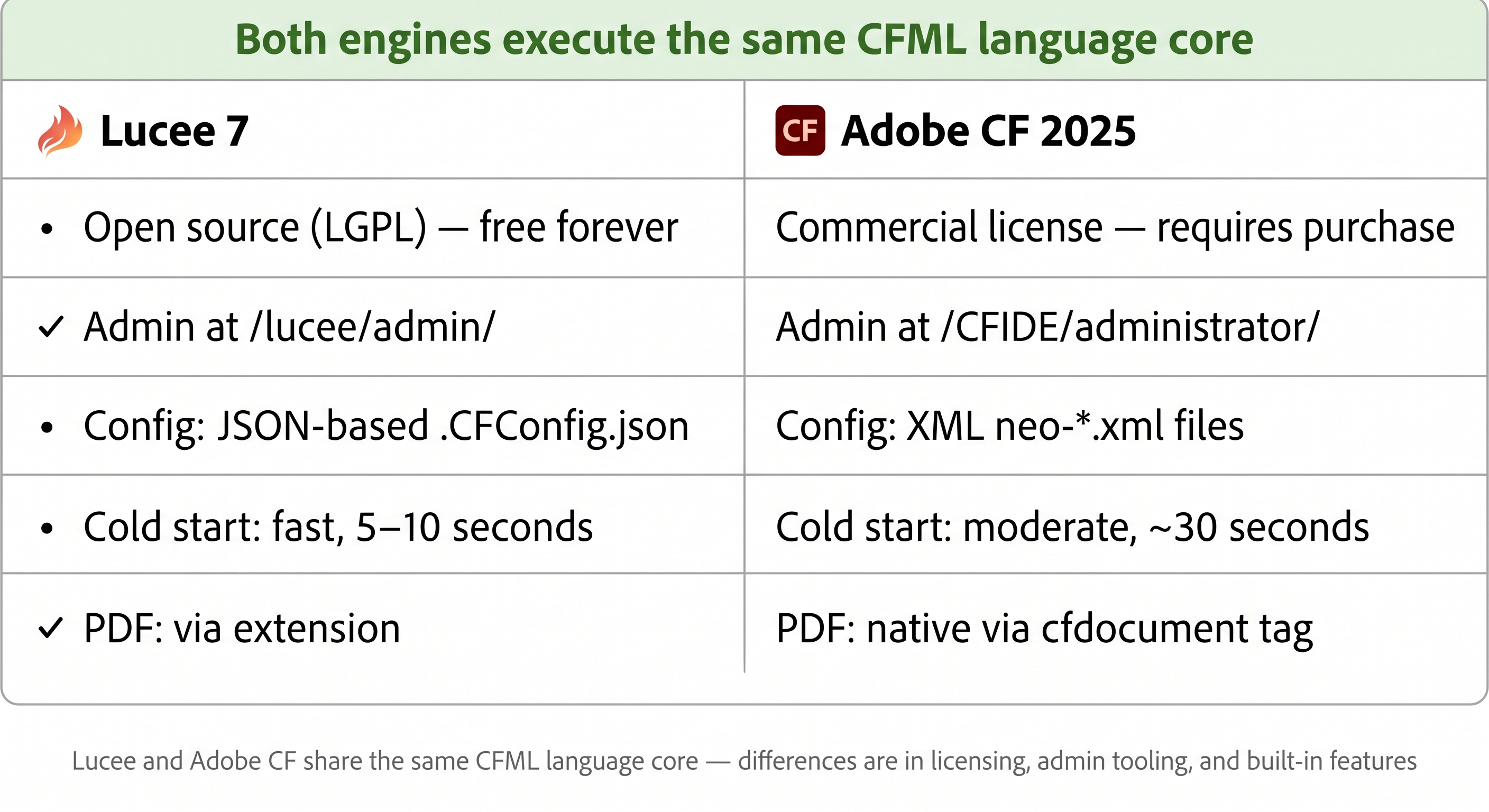
Lucee and Adobe CF share the same CFML language core — the differences are in licensing, admin tooling, and some built-in features.
| Feature | Lucee 7 | Adobe CF 2025 |
|---|---|---|
| License | Open source (LGPL) — free forever | Commercial — requires paid license |
| Admin | CLI via box cfconfig — no web UI in Lucee 7 | Web UI at /CFIDE/administrator/ |
| Config format | JSON (.CFConfig.json) | XML (neo-*.xml) |
| Cold start speed | Fast (~5–10 s) | Moderate (~30 s) |
| PDF generation | Via extension | Native (<cfdocument>) |
| Null support | isNull() works natively | Requires fullnullsupport setting |
systemOutput() | Built-in | Use <cflog> instead |
| Managed by | Lucee Association Switzerland | Adobe Inc. |
What is a cold start — and why is Lucee faster at it?
A cold start is what happens the very first time a CFML engine boots from zero — loading the JVM, initialising the engine internals, compiling Application.cfc, and making the first request ready to serve. Everything after that is a warm start — the engine is already running and requests are handled quickly.
Why cold start speed matters: In traditional always-on servers, cold start happens once and you forget about it. It matters a lot in modern deployments:
- Containers (Docker/Kubernetes) — new container instances spin up on demand; a slow cold start means slow scale-out
- Serverless — functions start fresh per request in some architectures; a 30-second cold start is unacceptable
- Local development — developers restart the server dozens of times a day; 5 seconds vs 30 seconds adds up fast
Why Lucee is faster than Adobe CF:
| Reason | Detail |
|---|---|
| Lighter engine core | Lucee loads fewer built-in subsystems at startup — no PDF engine, no Flash gateway, no legacy CORBA layer |
| On-demand loading | Lucee loads most optional features only when first used, not at startup |
| Smaller footprint | Lucee's core JAR is significantly smaller than Adobe CF's — less bytecode to initialise |
| No setup wizard check | Adobe CF checks for first-run wizard completion on every boot; Lucee skips this entirely |
In this playground, Lucee typically starts in 5–8 seconds. Adobe CF 2025 takes 25–35 seconds. You can observe this by restarting each service and timing how long until HTTP responses return.
Lucee vs Adobe CF — which should you use?
Both engines are production-grade. The choice depends on your context:
Use Lucee when:
- You want zero licensing cost — Lucee is free, including for commercial use
- You are building on ColdBox / CommandBox ecosystem — Lucee is the primary target
- You need fast cold starts — important for containerised / serverless deployments
- Your team prefers JSON-based, version-controlled server configuration (
.CFConfig.json) - You are building a new project and want community-driven, actively developed engine
Use Adobe CF when:
- Your organisation already has Adobe CF licenses and existing applications
- You need native
<cfdocument>PDF generation without an extension - You rely on Adobe-specific tags or functions not available in Lucee
- Your client or compliance requirement mandates Adobe support
- You need Adobe's official enterprise support contract
The practical reality: Most modern CFML development targets both. The ColdBox framework and TestBox run identically on both engines. If you write standard CFML without engine-specific features, your code will run on either. Many teams run Lucee in development (free, fast) and Adobe CF in production (for client requirements or legacy reasons).
In this lab you have both — port 8500 for Adobe CF, port 8888 for Lucee. The core CFML exercises work on both.
📁 Files created in this lesson
All files in this lesson live in the Lucee webroot: /home/laborant/app/
| File | Activity | Purpose |
|---|---|---|
Application.cfc | 3 & 4 | App config — datasource, session management, schema seed |
lucee_info.cfm | 2 | Outputs Lucee version, Java version, OS from server scope |
lucee_ds_check.cfm | 3 | Verifies the in-memory H2 datasource is reachable |
lucee_tickets.cfm | 4 | Ticket list + submission form (the main exercise page) |
index.cfm | 4 | Landing page with Open Ticket Manager → link |
To open any file in the browser: Right-click the Lucee Dev Server link in the lab panel → Open Link in New Tab → append the filename to the URL in the address bar.
Lucee administration
No web admin UI in Lucee 7 — use the CLI instead
Lucee 7 removed the web-based admin console (/lucee/admin/server.cfm) from its default distribution. This was a deliberate decision — the web UI is a security risk (an admin panel exposed on every server), and modern infrastructure practice treats server config as code, not as something clicked through a browser.
The correct way to administer Lucee 7 is via the CommandBox CLI:
# Show all current server settings
box cfconfig show

# Set a specific value
box cfconfig set adminPassword=training

# Export current config to a portable JSON file
box cfconfig export to=.CFConfig.json

# Apply config from file (use on every environment, in CI/CD)
box cfconfig import from=.CFConfig.json
Commit .CFConfig.json to git alongside your application code — any developer or pipeline runs box cfconfig import and gets an identical server configuration. This is the same "infrastructure as code" principle that Terraform applies to cloud resources, applied to your CFML engine.
CFConfig — JSON-based server configuration
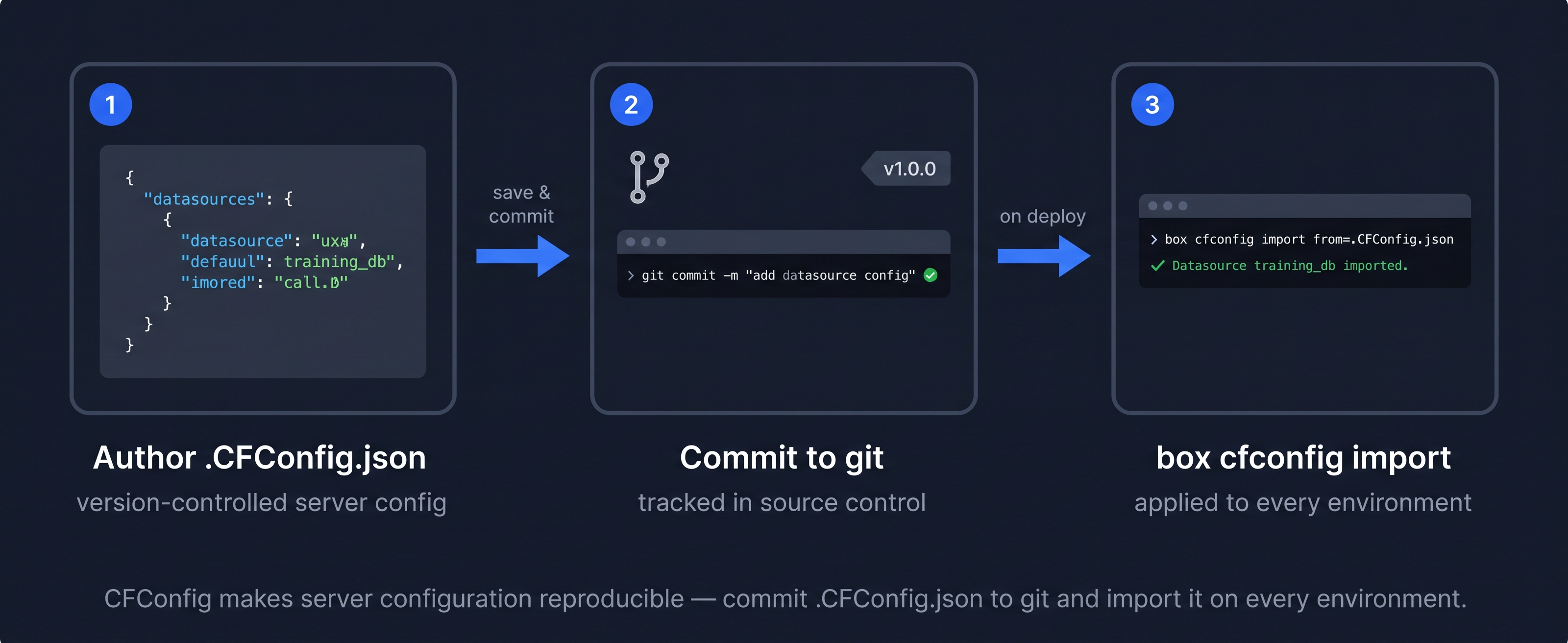
CFConfig makes server configuration reproducible — commit .CFConfig.json to git and import it on every environment.
CommandBox ships with the cfconfig module that reads and writes Lucee settings as a single JSON file. Instead of clicking through the admin UI, you define your datasources, mail servers, and settings in .CFConfig.json and apply it with one command — making server configuration repeatable and version-controlled:
{
  "datasources": {
    "training_db": {
      "type": "H2",
      "database": "/opt/lucee/db/training",
      "username": "sa",
      "password": ""
    }
  },
  "mailServers": [
    {
      "host": "smtp.example.com",
      "port": 587,
      "username": "user@example.com"
    }
  ]
}
Apply it to a running server:
box cfconfig import from=.CFConfig.json
Why CFConfig matters — config as code
Without CFConfig, Lucee server settings live in XML/JSON files deep inside the engine directory — files you cannot easily diff, review, or reproduce. The first time a new developer sets up the environment they manually recreate datasources through the admin UI and inevitably forget something.
With CFConfig, you commit .CFConfig.json to your repository alongside your application code. Any developer — or any CI/CD pipeline — runs box cfconfig import and gets an identical server configuration. This is the same "infrastructure as code" principle that Terraform and Ansible apply to servers, applied to your CFML engine settings.
Activity 1 — Verify Lucee is running on port 8888
What you are doing: Confirm the Lucee server is responding. Lucee can take a few seconds to finish booting after the lab starts — run this wait loop in the Terminal tab, which retries until it gets a 200 or times out after 30 seconds:
for i in $(seq 1 10); do
  STATUS=$(curl -s -o /dev/null -w "%{http_code}" http://localhost:8888/index.cfm)
  [ "$STATUS" = "200" ] && echo "HTTP 200 — Lucee is up" && break
  echo "Waiting... (attempt $i, got HTTP $STATUS)"
  sleep 3
done
You should see HTTP 200 — Lucee is up within a few seconds. If you see HTTP 000 on the first attempt that is normal — it just means Lucee is still starting.

HTTP 200 on port 8888 — Lucee is running and serving the Help Desk application.
Activity 2 — Create lucee_info.cfm and check the version
What you are doing: Create a small CFML page that outputs the Lucee engine version and Java version using the server scope — a built-in struct available in every CFML request.
File to create: /home/laborant/app/lucee_info.cfm
In the Terminal tab, run:
sudo tee /home/laborant/app/lucee_info.cfm << 'EOF'
<!DOCTYPE html>
<html lang="en">
<head>
  <meta charset="UTF-8">
  <title>Lucee Info</title>
  <style>
    body { font-family: sans-serif; max-width: 600px; margin: 2rem auto; }
    .box { padding: 1rem; background: #f0f4ff; border-left: 4px solid #3b82d4; margin: 1rem 0; }
  </style>
</head>
<body>
  <h1>Lucee Server Info</h1>
  <cfscript>
    info = {
      luceeVersion : server.lucee.version,
      javaVersion  : server.java.version,
      osName       : server.os.name,
      cfmlEngine   : server.coldfusion.productname
    };
  </cfscript>
  <div class="box">
    <cfoutput>
      <strong>Lucee version:</strong> #info.luceeVersion#<br>
      <strong>Java version:</strong> #info.javaVersion#<br>
      <strong>OS:</strong> #info.osName#<br>
      <strong>CFML engine:</strong> #info.cfmlEngine#
    </cfoutput>
  </div>
</body>
</html>
EOF
Verify it from the terminal — this also confirms the CFML was executed (not just served as plain text):
curl -s http://localhost:8888/lucee_info.cfm | grep -i "lucee\|java\|os"
You should see output like:
<strong>Lucee version:</strong> 7.0.0.x<br>
<strong>Java version:</strong> 21.0.x<br>
<strong>OS:</strong> Linux<br>
Activity 3 — Register a datasource on Lucee and verify it
What you are doing: Lucee and Adobe CF each have their own datasource registry. The H2 database that Adobe CF uses is locked to that process — Lucee cannot open the same file simultaneously. Instead, you will declare an independent in-memory H2 datasource directly in Application.cfc using this.datasources. Lucee reads this on every request with no restart needed, and the test file creates its own table to verify the connection works end-to-end.
Step 1 — Add the datasource to Application.cfc:
sudo tee /home/laborant/app/Application.cfc << 'EOF'
component {
  this.name       = "HelpdeskApp";
  this.datasource = "training_db";
  this.datasources["training_db"] = {
    class:            "org.h2.Driver",
    connectionString: "jdbc:h2:mem:training_db;DB_CLOSE_DELAY=-1",
    username:         "sa",
    password:         ""
  };
}
EOF
Step 2 — Create a test file and verify the datasource:
sudo tee /home/laborant/app/lucee_ds_check.cfm << 'EOF'
<cfscript>
  try {
    queryExecute("CREATE TABLE IF NOT EXISTS hd_tickets (id INT PRIMARY KEY, title VARCHAR(100))", {}, {datasource: "training_db"});
    queryExecute("MERGE INTO hd_tickets KEY(id) VALUES (1, 'Test ticket')", {}, {datasource: "training_db"});
    q = queryExecute("SELECT COUNT(*) AS total FROM hd_tickets", {}, {datasource: "training_db"});
    writeOutput("OK — hd_tickets row count: " & q.total);
  } catch (any e) {
    writeOutput("ERROR — " & e.message);
  }
</cfscript>
EOF
curl -s http://localhost:8888/lucee_ds_check.cfm
You should see:
OK — hd_tickets row count: 1
💡 Why an in-memory database — and why not share Adobe CF's H2 file?
H2 in embedded mode uses an exclusive file lock — only one JVM process can open the database file at a time. Adobe CF holds that lock while it is running, so Lucee cannot connect to the same file.
jdbc:h2:mem:training_db creates a private in-memory database inside Lucee's JVM. It is not shared with Adobe CF and it resets on server restart — but it is enough to prove that Lucee's JDBC stack, datasource config, and query execution all work correctly.
In a real Lucee-only deployment you would point this at a proper database (PostgreSQL, MySQL) that both engines can reach over TCP — no file locking issues.
💡 What is an in-memory database — and what are the options?
An in-memory database stores all its data in RAM instead of on disk. There is no file to read or write — data lives entirely inside the process's memory. This makes reads and writes extremely fast (no I/O), but everything is lost when the process stops. They are used for caching, testing, session state, and any workload where speed matters more than durability.
Do in-memory databases follow the relational model?
It depends on the product — there is no single answer:
| Database | Model | Open source? | Notes |
|---|---|---|---|
| H2 | Relational (SQL) | ✅ Open source | What this lab uses in mem: mode — full SQL, JDBC, transactions |
| SQLite (in-memory mode) | Relational (SQL) | ✅ Open source | File-based by default; :memory: mode runs entirely in RAM |
| Redis | Key-value + data structures | ✅ Open source (BSD) | Not relational — no joins, no SQL; excels at caching, pub/sub, leaderboards |
| Memcached | Key-value only | ✅ Open source | Simpler than Redis — pure cache, no persistence option |
| Apache Ignite | Relational + key-value | ✅ Open source | Supports SQL queries over distributed in-memory data |
| VoltDB | Relational (SQL) | Proprietary (community ed. free) | ACID-compliant, built for high-throughput transactional workloads |
| SingleStore (MemSQL) | Relational (SQL) | Proprietary | Hybrid in-memory/on-disk; targets real-time analytics |
| Oracle TimesTen | Relational (SQL) | Proprietary | Oracle's in-memory relational engine, often used alongside Oracle DB |
| SAP HANA | Relational + columnar | Proprietary | In-memory columnar store; used heavily in enterprise ERP/analytics |
The key distinction to remember:
- Relational in-memory (H2 mem, VoltDB, TimesTen) — you write SQL, use JOINs, have transactions. The only difference from a regular RDBMS is where the data lives.
- Non-relational in-memory (Redis, Memcached) — no SQL, no joins. You store and retrieve by key, or use specialised data structures (lists, sets, sorted sets). Much faster for simple lookups, but not a replacement for a relational database.
In practice, most production architectures use both: a relational database (PostgreSQL, MySQL) for durable structured data, and Redis or Memcached as a caching layer in front of it.
Activity 4 — Build a ticket submission form on Lucee
This activity brings together everything from the lesson: the in-memory datasource, Application.cfc lifecycle, session management, a JOIN query, and a safe POST form. Read each section before running it — there are no surprises in the code, just patterns you have already seen.
The finished page will:
- list all tickets with status and priority colour-coded badges
- accept a new ticket via a form (Title, Category, Priority, Requester, Assignee)
- display a session countdown banner — the session expires after 2 minutes
![[object Object]](/content/files/courses/ColdFusion-2025-Foundations-5151cba6/module-3/2.lesson-lucee/__static__/lucee-activity4-architecture-v1.png?v=1791349307475)
Application.cfc runs once on startup to configure the datasource, session, and schema — lucee_tickets.cfm handles every request from there.
Part A — Application.cfc: datasource + schema + session
Three things are happening in this file. Read them before you paste:
① Session management — two lines enable the session scope and set a 2-minute timeout:
this.sessionManagement = true;
this.sessionTimeout    = createTimeSpan(0, 0, 2, 0);
② Inline datasource — the same in-memory H2 config from Activity 3, carried forward so the whole app shares it:
this.datasources["training_db"] = { class: "org.h2.Driver", connectionString: "jdbc:h2:mem:..." };
③ onApplicationStart() — runs once when Lucee first boots the application. It creates the two tables and inserts three seed users. The IF NOT EXISTS guard and the COUNT(*) check make it safe to call repeatedly — nothing breaks if the tables already exist.
Now create the file:
sudo tee /home/laborant/app/Application.cfc << 'EOF'
component {
  this.name              = "HelpdeskApp";
  this.datasource        = "training_db";
  this.sessionManagement = true;
  this.sessionTimeout    = createTimeSpan(0, 0, 2, 0);

  this.datasources["training_db"] = {
    class:            "org.h2.Driver",
    connectionString: "jdbc:h2:mem:training_db;DB_CLOSE_DELAY=-1",
    username:         "sa",
    password:         ""
  };

  public void function onApplicationStart() {
    queryExecute("
      CREATE TABLE IF NOT EXISTS hd_users (
        id   INT PRIMARY KEY,
        name VARCHAR(100)
      )", {}, {datasource: "training_db"});

    queryExecute("
      CREATE TABLE IF NOT EXISTS hd_tickets (
        id           INT AUTO_INCREMENT PRIMARY KEY,
        title        VARCHAR(200),
        status       VARCHAR(20) DEFAULT 'open',
        priority     VARCHAR(20) DEFAULT 'medium',
        category     VARCHAR(50),
        requester_id INT,
        assignee_id  INT
      )", {}, {datasource: "training_db"});

    // Seed users only if the table is empty
    var u = queryExecute("SELECT COUNT(*) AS total FROM hd_users", {}, {datasource: "training_db"});
    if (u.total == 0) {
      queryExecute("INSERT INTO hd_users VALUES (1, 'Alice')", {}, {datasource: "training_db"});
      queryExecute("INSERT INTO hd_users VALUES (2, 'Bob')",   {}, {datasource: "training_db"});
      queryExecute("INSERT INTO hd_users VALUES (3, 'Carol')", {}, {datasource: "training_db"});
    }
  }
}
EOF
Because we previously had an Application.cfc without onApplicationStart, Lucee already has the application initialized and won't re-run it automatically. Force a clean start:
sudo systemctl restart lucee-server.service && sleep 8
Confirm Lucee is back up before continuing:
curl -s -o /dev/null -w "HTTP %{http_code}\n" http://localhost:8888/index.cfm
Part B — lucee_tickets.cfm: three logical sections
The page has three distinct CFML sections. Read what each one does before pasting the full file.
① Session countdown — on every request, the code calculates how many seconds remain in the session and stores the start time in session.startedAt if it is not already there. The banner colour changes from yellow to urgent when under 30 seconds:
sessionAge  = dateDiff("s", session.startedAt, now());
sessionLeft = 120 - sessionAge;
② POST handler — if the request method is POST and the title field is not blank, a queryExecute INSERT runs with named bind parameters (:title, :priority, etc.). Every value goes through cfsqltype — no raw form data ever touches the SQL string:
if (cgi.request_method == "POST" && len(trim(form.title ?: ""))) {
  queryExecute("INSERT INTO hd_tickets ...", { title: { value: ..., cfsqltype: "cf_sql_varchar" }, ... });
}
③ JOIN query — the ticket list uses a LEFT JOIN to resolve requester_id and assignee_id to names, so the table shows "Alice" instead of 1:
SELECT t.*, r.name AS requester, a.name AS assignee
FROM   hd_tickets t
LEFT JOIN hd_users r ON r.id = t.requester_id
LEFT JOIN hd_users a ON a.id = t.assignee_id
Now create the full file:
sudo tee /home/laborant/app/lucee_tickets.cfm << 'EOF'
<!DOCTYPE html>
<html lang="en">
<head>
<meta charset="UTF-8">
<title>Help Desk — Lucee</title>
<style>
body { font-family: sans-serif; max-width: 900px; margin: 2rem auto; color: #1f2328; }
h1 { font-size: 1.4rem; margin-bottom: .25rem; }
.sub { color: #57606a; font-size: .875rem; margin-bottom: 1.5rem; }
.warn { background: #fef9c3; border-left: 4px solid #ca8a04; padding: .75rem 1rem;
font-size: .875rem; margin-bottom: 1.5rem; border-radius: 3px; }
.ok { background: #dcfce7; border-left: 4px solid #16a34a; padding: .75rem 1rem;
font-size: .875rem; margin-bottom: 1.5rem; border-radius: 3px; }
table { width: 100%; border-collapse: collapse; margin-bottom: 2rem; }
th { background: #3b82d4; color: #fff; padding: .5rem .75rem; text-align: left; font-size: .875rem; }
td { padding: .45rem .75rem; border-bottom: 1px solid #e5e7eb; font-size: .875rem; }
tr:hover td { background: #f7f8fa; }
.badge { display:inline-block; padding:2px 8px; border-radius:10px; font-size:.75rem; font-weight:600; }
.open { background:#dbeafe; color:#1e40af; }
.closed { background:#f3f4f6; color:#374151; }
.resolved { background:#dcfce7; color:#166534; }
.high { background:#fee2e2; color:#991b1b; }
.medium { background:#fef9c3; color:#854d0e; }
.low { background:#f0fdf4; color:#166534; }
fieldset { border: 1px solid #e5e7eb; border-radius: 6px; padding: 1rem 1.25rem; margin-bottom: 1.5rem; }
legend { font-weight: 600; font-size: .9rem; padding: 0 .5rem; color: #3b82d4; }
.grid { display: grid; grid-template-columns: 1fr 1fr; gap: .75rem 1.5rem; }
label { display:block; font-size:.8rem; font-weight:600; color:#57606a; margin-bottom:3px; }
input, select { width:100%; padding:.4rem .6rem; border:1px solid #d1d5db;
border-radius:4px; font-size:.875rem; box-sizing:border-box; }
button { background:#3b82d4; color:#fff; border:none; padding:.5rem 1.25rem;
border-radius:4px; font-size:.875rem; cursor:pointer; margin-top:.75rem; }
button:hover { background:#2563eb; }
</style>
</head>
<body>
<cfscript>
// ── ① session countdown ────────────────────────────────────────────────────
sessionStart = session.keyExists("startedAt") ? session.startedAt : now();
if (!session.keyExists("startedAt")) session.startedAt = sessionStart;
sessionAge = dateDiff("s", sessionStart, now());
sessionLeft = 120 - sessionAge;
// ── ② POST handler — insert new ticket ────────────────────────────────────
submitted = false;
if (cgi.request_method == "POST" && len(trim(form.title ?: ""))) {
queryExecute("
INSERT INTO hd_tickets (title, status, priority, category, requester_id, assignee_id)
VALUES (:title, :status, :priority, :category, :req, :asgn)",
{
title: { value: trim(form.title), cfsqltype: "cf_sql_varchar" },
status: { value: "open", cfsqltype: "cf_sql_varchar" },
priority: { value: form.priority ?: "medium", cfsqltype: "cf_sql_varchar" },
category: { value: form.category ?: "General", cfsqltype: "cf_sql_varchar" },
req: { value: val(form.requester_id ?: 1), cfsqltype: "cf_sql_integer" },
asgn: { value: val(form.assignee_id ?: 1), cfsqltype: "cf_sql_integer" }
},
{ datasource: "training_db" }
);
submitted = true;
}
// ── ③ JOIN query — resolve IDs to names ───────────────────────────────────
tickets = queryExecute("
SELECT t.id, t.title, t.status, t.priority, t.category,
r.name AS requester, a.name AS assignee
FROM hd_tickets t
LEFT JOIN hd_users r ON r.id = t.requester_id
LEFT JOIN hd_users a ON a.id = t.assignee_id
ORDER BY t.id DESC",
{}, { datasource: "training_db" }
);
users = queryExecute("SELECT id, name FROM hd_users ORDER BY name",
{}, { datasource: "training_db" });
</cfscript>
<h1>Help Desk — Ticket Manager</h1>
<p class="sub">Running on Lucee #server.lucee.version# · port 8888</p>
<cfoutput>
<cfif sessionLeft lte 30>
<div class="warn">⚠️ Your session expires in <strong>#max(0, sessionLeft)# seconds</strong>. Any unsaved form data will be lost.</div>
<cfelse>
<div class="warn">⏱ Session active — expires in <strong>#int(sessionLeft / 60)#m #sessionLeft mod 60#s</strong>. Sessions in this app are set to 2 minutes.</div>
</cfif>
<cfif submitted>
<div class="ok">✅ Ticket submitted successfully.</div>
</cfif>
</cfoutput>
<cfoutput><p><strong>#tickets.recordCount#</strong> ticket(s) in the system.</p></cfoutput>
<table>
<tr>
<th>##</th><th>Title</th><th>Status</th><th>Priority</th>
<th>Category</th><th>Requester</th><th>Assignee</th>
</tr>
<cfoutput query="tickets">
<tr>
<td>#id#</td>
<td>#encodeForHTML(title)#</td>
<td><span class="badge #encodeForHTMLAttribute(status)#">#encodeForHTML(status)#</span></td>
<td><span class="badge #encodeForHTMLAttribute(priority)#">#encodeForHTML(priority)#</span></td>
<td>#encodeForHTML(category)#</td>
<td>#encodeForHTML(requester)#</td>
<td>#encodeForHTML(assignee)#</td>
</tr>
</cfoutput>
</table>
<form method="post" action="lucee_tickets.cfm">
<fieldset>
<legend>Submit a New Ticket</legend>
<div class="grid">
<div>
<label for="title">Title *</label>
<input type="text" id="title" name="title" required maxlength="200" placeholder="Brief description of the issue">
</div>
<div>
<label for="category">Category</label>
<select id="category" name="category">
<option>General</option><option>Hardware</option>
<option>Software</option><option>Network</option><option>Training</option>
</select>
</div>
<div>
<label for="priority">Priority</label>
<select id="priority" name="priority">
<option value="low">Low</option>
<option value="medium" selected>Medium</option>
<option value="high">High</option>
</select>
</div>
<div>
<label for="requester_id">Requester</label>
<select id="requester_id" name="requester_id">
<cfoutput query="users"><option value="#id#">#encodeForHTML(name)#</option></cfoutput>
</select>
</div>
<div>
<label for="assignee_id">Assignee</label>
<select id="assignee_id" name="assignee_id">
<cfoutput query="users"><option value="#id#">#encodeForHTML(name)#</option></cfoutput>
</select>
</div>
</div>
<button type="submit">Submit Ticket</button>
</fieldset>
</form>
</body>
</html>
EOF
Part C — Verify, open in the browser, and submit a ticket
Confirm the page is up:
curl -s -o /dev/null -w "HTTP %{http_code}\n" http://localhost:8888/lucee_tickets.cfm
You should see HTTP 200. Now open it in the browser and use the form for real.
Add a link to the Lucee landing page:
So you can reach lucee_tickets.cfm with one click, add a link to index.cfm:
sudo tee /home/laborant/app/index.cfm << 'EOF'
<!DOCTYPE html>
<html lang="en">
<head>
  <meta charset="UTF-8">
  <title>Lucee Dev Server</title>
  <style>
    body { font-family: sans-serif; max-width: 600px; margin: 3rem auto; color: #1f2328; }
    h1   { font-size: 1.3rem; margin-bottom: .5rem; }
    p    { color: #57606a; font-size: .9rem; margin-bottom: 1.5rem; }
    a    { display: inline-block; background: #3b82d4; color: #fff; padding: .5rem 1.25rem;
           border-radius: 4px; text-decoration: none; font-size: .9rem; }
    a:hover { background: #2563eb; }
  </style>
</head>
<body>
  <h1>Lucee Dev Server — port 8888</h1>
  <p>Running on Lucee <cfoutput>#server.lucee.version#</cfoutput></p>
  <a href="/lucee_tickets.cfm">Open Ticket Manager →</a>
</body>
</html>
EOF
Open the page in the browser:
- In the lab panel, right-click the Lucee Dev Server link → Open Link in New Tab
- The landing page loads — click Open Ticket Manager →
You will see the full styled page: the session countdown banner, the ticket table with colour-coded status and priority badges, and the submission form. Fill in the form and submit — the page reloads with the new ticket at the top of the list.
Note: the session countdown is tied to your browser session, not the
curlsession. Reload the page a few times to watch the timer count down.
💡 What is session management — and why does it expire?
Sessions were covered in Module 1, Lesson 4 — Application Lifecycle. If you need a refresher on
onSessionStart,onSessionEnd, and thesessionscope lifetime, head back there before continuing.
A session is server-side storage tied to a specific browser visitor. ColdFusion and Lucee identify the visitor using a cookie (CFID / CFTOKEN or JSESSIONID) set on the first request. Every subsequent request from that browser sends the cookie back, and the server looks up the matching session struct in memory.
this.sessionTimeout = createTimeSpan(0, 0, 2, 0) sets the idle timeout to 2 minutes. If no request arrives within that window, the session is destroyed and its memory reclaimed. The next request starts a fresh session.
Why does timeout matter?
- Memory — sessions live in JVM heap. Thousands of abandoned sessions with no timeout would eventually exhaust it.
- Security — a short timeout limits the window an attacker has to hijack a stolen session cookie.
- State — anything stored in
sessionscope (shopping carts, login state, wizard steps) is gone after expiry. The app must handle this gracefully.
In this activity the warning banner counts down the remaining session time so you can observe the expiry in real time.
When all the checks above are green, this lesson is complete. Your progress is saved automatically — move straight on to the next lesson.
- Previous lesson
- CommandBox CLI & Server Management
- Next lesson
- Building REST APIs with CFML