CFML Syntax — Tags and Script
Tag syntax (classic)
CFML started as an HTML-like templating language. Every built-in operation is also available as an HTML-style tag.
<cfset name = "World">
<cfoutput>Hello, #name#!</cfoutput>
Tags are case-insensitive and must be paired (or self-closed). The hash signs #name# signal variable interpolation inside a <cfoutput> block.
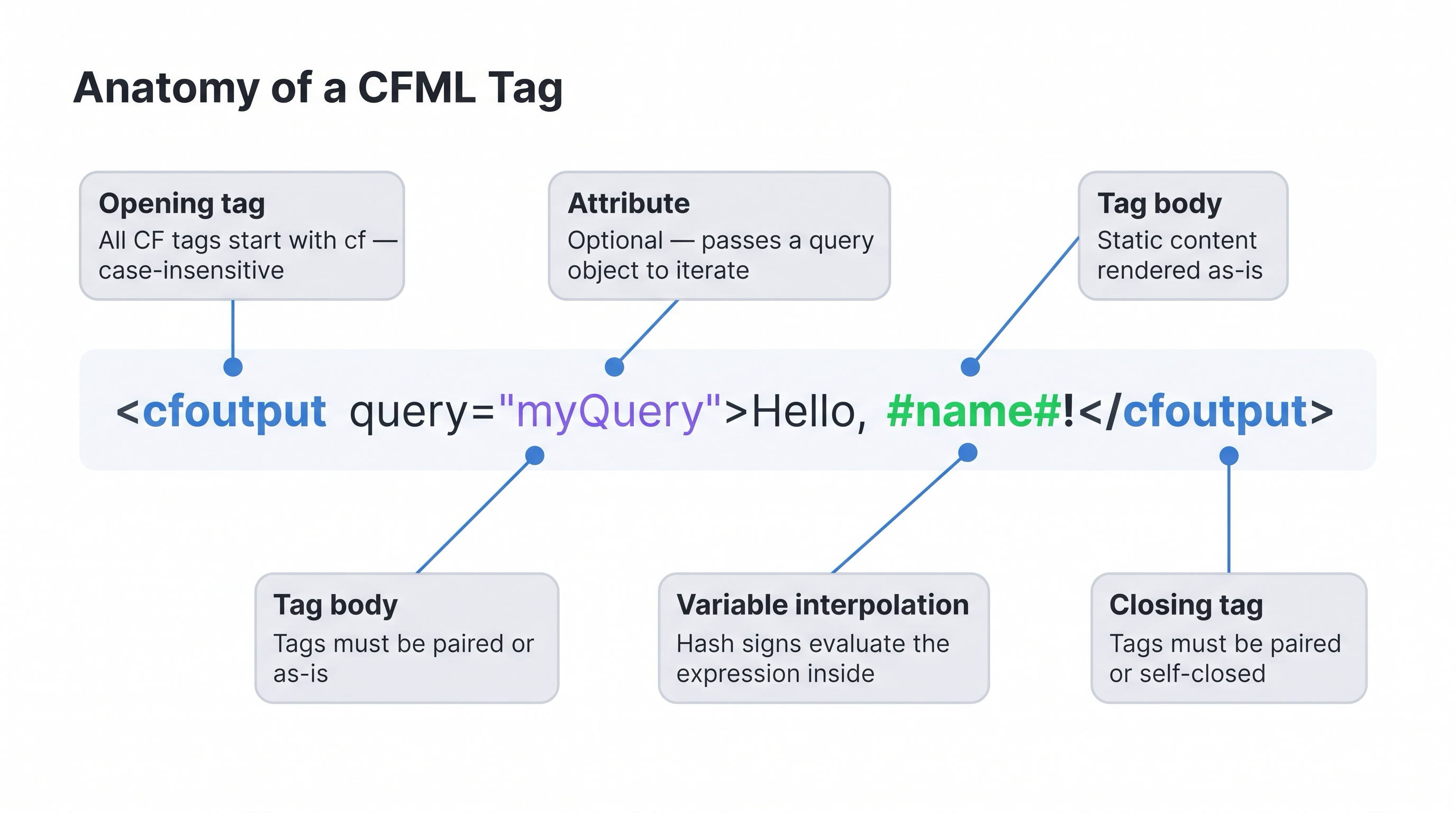
Anatomy of a CFML tag: opening tag, optional attributes, hash-delimited interpolation, and closing tag.
Activity: Create syntax_tag.cfm in the ColdFusion web root.
Terminal tab:
sudo tee /opt/coldfusion2025/cfusion/wwwroot/student/syntax_tag.cfm << 'EOF'
<cfset message = "I am using tag syntax">
<cfoutput>#message# — tag</cfoutput>
EOF
✏️ Using the IDE tab instead? Create the file here
In the IDE tab, click File → Open Folder…, type /opt/coldfusion2025/cfusion/wwwroot/student and press Enter. If VS Code asks "The folder does not exist. Would you like to create it?" — click Yes. Then right-click in the Explorer panel → New File → name it syntax_tag.cfm, paste the content below, and save with Ctrl+S:
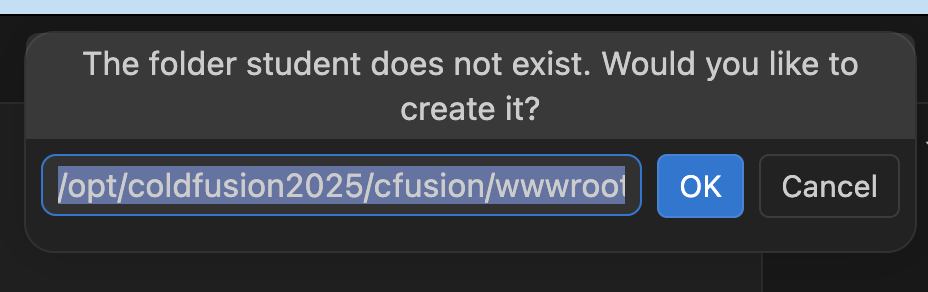
VS Code will offer to create the student folder — click Yes.
<cfset message = "I am using tag syntax">
<cfoutput>#message# — tag</cfoutput>
To see the rendered page in the browser:
- Click the ColdFusion 2025 tab in your lab — it shows the CF Admin login page inside the lab frame.
- Right-click that tab button and choose "Open Link in New Tab" — this opens the engine's root URL in a real browser window with a full address bar.
- In the address bar, replace whatever path is shown with
/syntax_tag.cfmand press Enter.
Why can't I just type the URL directly?
Each lab VM gets a unique, temporary hostname that changes every time you start a new session — something like https://6aa4b837d4c87b4fa0370284-3ec630.node-eu-13e2.iximiuz.com/. That prefix is yours alone and only valid for the current session, so there is no fixed URL to share or bookmark. The reliable way to get it is to open the ColdFusion tab in a new browser window (right-click → Open Link in New Tab) and read it from the address bar. Then append your filename:
https://<your-session-id>.iximiuz.com/syntax_tag.cfm
You can also verify from the Terminal without opening a browser at all:
curl -s http://localhost:8500/student/syntax_tag.cfm
# Expected output: I am using tag syntax — tag
Script syntax (modern)
Since ColdFusion 9, the full language is available in ECMAScript-style syntax inside a <cfscript> block. Modern CF codebases tend to use script exclusively.
<cfscript>
  name = "World";
  writeOutput("Hello, #name#!");
</cfscript>
Both syntaxes compile to the same bytecode. You can mix them freely — a common pattern is to keep business logic in <cfscript> and HTML structure in tags.
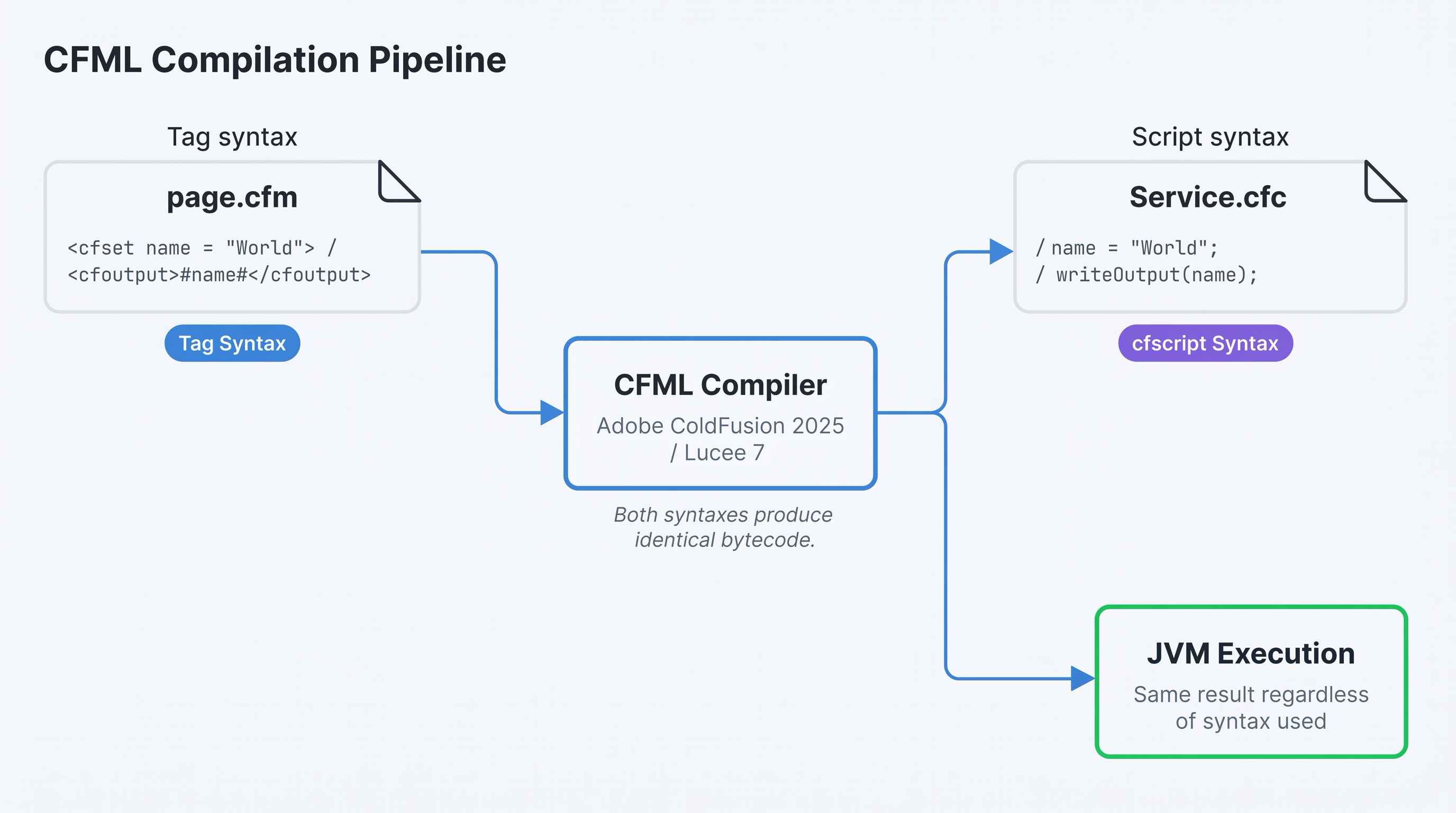
Both syntaxes are compiled by the same CFML engine to identical JVM bytecode.
Activity: Create syntax_script.cfm:
Terminal tab:
sudo tee /opt/coldfusion2025/cfusion/wwwroot/student/syntax_script.cfm << 'EOF'
<cfscript>
  writeOutput("I am using cfscript — script syntax");
</cfscript>
EOF
✏️ Using the IDE tab instead? Create the file here
In the IDE tab, right-click in the Explorer panel → New File → name it syntax_script.cfm, paste the content below, and save with Ctrl+S:
<cfscript>
  writeOutput("I am using cfscript — script syntax");
</cfscript>
In the browser window you opened earlier, change the path to /syntax_script.cfm and reload. Or from the Terminal:
curl -s http://localhost:8500/student/syntax_script.cfm
# Expected output: I am using cfscript — script syntax
When to use each
| Use case | Recommendation |
|---|---|
| New code | <cfscript> — cleaner, less noise |
| Embedded SQL | <cfquery> tags are still idiomatic |
| Legacy templates | Keep tag syntax to avoid breaking changes |
| CFCs (components) | Script-only files (.cfc) are preferred |
What does production look like today?
In modern CFML codebases (2020 onward), cfscript dominates. Here's why:
- Frameworks are script-first. ColdBox, the most widely adopted CFML MVC framework, writes everything in cfscript. If you work on any ColdBox application — which covers a large share of active CF projects — you write script exclusively.
- Tooling favours script. Code formatters (CFFormat), linters (CFLint), and IDE plugins all have better support for script syntax. Tag-heavy files produce more false positives and formatting noise.
- Readability at scale. In a large CFC with 20+ functions, tag syntax adds significant visual noise. Script reads closer to Java or JavaScript, which most CF developers already know.
- The one exception:
<cfquery>. Even in fully script-based codebases, many teams keep SQL in<cfquery>tags because the SQL sits naturally inside the tag body without string concatenation.queryExecute()is the script alternative, but<cfquery>is still widely accepted and idiomatic.
So should I learn tag syntax at all?
Yes — for two reasons. First, you will encounter tag syntax in legacy codebases and online examples written before 2015. Being able to read it is essential. Second, a handful of tags (<cfquery>, <cfmail>, <cffile>) remain idiomatic even in script-first projects because they read more clearly than their function equivalents.
The practical rule: write all new logic in cfscript, keep <cfquery> for SQL, and read tag syntax fluently.
Conditionals
CFML conditionals work in both syntaxes. The cfscript form mirrors JavaScript; the tag form uses attribute-style operators like GTE, LTE, EQ, NEQ.
<cfscript>
  score = 85;
  if (score >= 90) {
    writeOutput("A");
  } else if (score >= 80) {
    writeOutput("B");
  } else {
    writeOutput("C");
  }
</cfscript>
Tag equivalent:
<cfset score = 85>
<cfif score GTE 90>
  A
<cfelseif score GTE 80>
  B
<cfelse>
  C
</cfif>
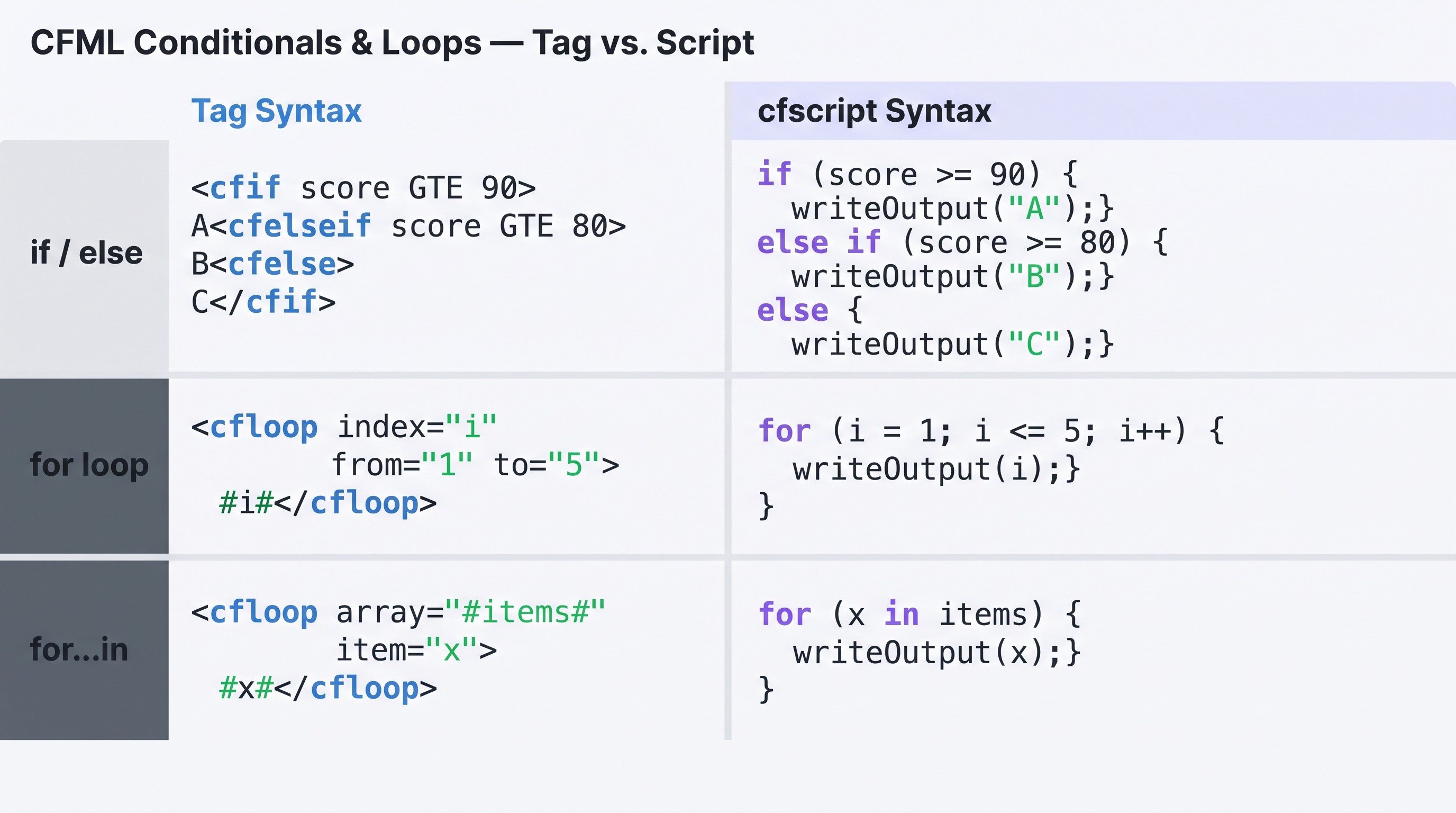
Quick reference: CFML tag syntax (left) vs. cfscript syntax (right) for conditionals and loops.
Activity: Update syntax_script.cfm to add a conditional.
Terminal tab — overwrite the file:
sudo tee /opt/coldfusion2025/cfusion/wwwroot/student/syntax_script.cfm << 'EOF'
<cfscript>
  writeOutput("I am using cfscript — script syntax");
  score = 85;
  if (score >= 90) {
    writeOutput(" — Grade: A");
  } else if (score >= 80) {
    writeOutput(" — Grade: B");
  } else {
    writeOutput(" — Grade: C");
  }
</cfscript>
EOF
✏️ Using the IDE tab instead? Edit the file here
In the IDE tab, open syntax_script.cfm from the Explorer, select all the existing content, replace it with the code below, and save with Ctrl+S:
<cfscript>
  writeOutput("I am using cfscript — script syntax");
  score = 85;
  if (score >= 90) {
    writeOutput(" — Grade: A");
  } else if (score >= 80) {
    writeOutput(" — Grade: B");
  } else {
    writeOutput(" — Grade: C");
  }
</cfscript>
Reload /syntax_script.cfm in the browser window to see the grade appended to the output. Or from the Terminal:
curl -s http://localhost:8500/student/syntax_script.cfm
# Expected: I am using cfscript — script syntax — Grade: B
Loops
ColdFusion supports for, while, and for...in in cfscript, and <cfloop> in tag syntax. The most common is the index loop:
<cfscript>
  for (i = 1; i <= 5; i++) {
    writeOutput("Item #i#<br>");
  }
</cfscript>
Tag equivalent:
<cfloop index="i" from="1" to="5">
  Item #i#<br>
</cfloop>
ColdFusion also supports iterating over arrays and structs:
<cfscript>
  fruits = ["apple", "banana", "cherry"];
  for (fruit in fruits) {
    writeOutput("#fruit#<br>");
  }
</cfscript>
Activity: Create syntax_loop.cfm:
Terminal tab:
sudo tee /opt/coldfusion2025/cfusion/wwwroot/student/syntax_loop.cfm << 'EOF'
<cfscript>
  for (i = 1; i <= 5; i++) {
    writeOutput(i & "<br>");
  }
</cfscript>
EOF
✏️ Using the IDE tab instead? Create the file here
In the IDE tab, right-click in the Explorer panel → New File → name it syntax_loop.cfm, paste the content below, and save with Ctrl+S:
<cfscript>
  for (i = 1; i <= 5; i++) {
    writeOutput(i & "<br>");
  }
</cfscript>
Change the path to /syntax_loop.cfm in the browser window — the <br> tags render properly so the numbers appear on separate lines. Or from the Terminal:
curl -s http://localhost:8500/student/syntax_loop.cfm
# Expected: 1<br>2<br>3<br>4<br>5<br>
All loop forms — putting it together
CFML has four loop constructs you will encounter in real codebases. This exercise writes them all into a single file so you can see how they look side by side.
| Form | Use when |
|---|---|
for (i = 1; i <= n; i++) | You need a numeric counter |
for (item in array) | Iterating every element of an array |
for (key in struct) | Iterating every key of a struct |
while (condition) | Repeating until a condition is false |
Activity: Create syntax_loop_all.cfm:
Terminal tab:
sudo tee /opt/coldfusion2025/cfusion/wwwroot/student/syntax_loop_all.cfm << 'EOF'
<cfscript>
  // 1. Index loop — numeric counter
  writeOutput("<strong>Index loop:</strong><br>");
  for (i = 1; i <= 3; i++) {
    writeOutput("  step #i#<br>");
  }

  // 2. For-in loop — array
  writeOutput("<br><strong>Array loop:</strong><br>");
  languages = ["CFML", "Java", "JavaScript"];
  for (lang in languages) {
    writeOutput("  #lang#<br>");
  }

  // 3. For-in loop — struct
  writeOutput("<br><strong>Struct loop:</strong><br>");
  info = {engine: "ColdFusion", version: "2025", port: "8500"};
  for (key in info) {
    writeOutput("  #key# = #info[key]#<br>");
  }

  // 4. While loop
  writeOutput("<br><strong>While loop:</strong><br>");
  count = 1;
  while (count <= 3) {
    writeOutput("  count is #count#<br>");
    count++;
  }
</cfscript>
EOF
✏️ Using the IDE tab instead? Create the file here
In the IDE tab, right-click in the Explorer panel → New File → name it syntax_loop_all.cfm, paste the content below, and save with Ctrl+S:
<cfscript>
  // 1. Index loop — numeric counter
  writeOutput("<strong>Index loop:</strong><br>");
  for (i = 1; i <= 3; i++) {
    writeOutput("  step #i#<br>");
  }

  // 2. For-in loop — array
  writeOutput("<br><strong>Array loop:</strong><br>");
  languages = ["CFML", "Java", "JavaScript"];
  for (lang in languages) {
    writeOutput("  #lang#<br>");
  }

  // 3. For-in loop — struct
  writeOutput("<br><strong>Struct loop:</strong><br>");
  info = {engine: "ColdFusion", version: "2025", port: "8500"};
  for (key in info) {
    writeOutput("  #key# = #info[key]#<br>");
  }

  // 4. While loop
  writeOutput("<br><strong>While loop:</strong><br>");
  count = 1;
  while (count <= 3) {
    writeOutput("  count is #count#<br>");
    count++;
  }
</cfscript>
Change the path to /syntax_loop_all.cfm in your browser window to see all four loop types rendered. Or from the Terminal:
curl -s http://localhost:8500/student/syntax_loop_all.cfm
![[object Object]](/content/files/courses/ColdFusion-2025-Foundations-5151cba6/module-1/2.lesson-cfml-syntax/__static__/browser-output-syntax-loop-all-v1.png?v=1791349307475)
The browser renders all four loop forms — this is what you should see at /syntax_loop_all.cfm.
Need to fix a file? Edit it with vi
If a file has a typo or you want to tweak it without rewriting the whole thing, vi (or vim) is available in the lab Terminal.
Open the file:
vi /opt/coldfusion2025/cfusion/wwwroot/student/syntax_loop_all.cfm
Basic vi commands:
| Key | What it does |
|---|---|
i | Enter insert mode — you can now type and edit |
Esc | Leave insert mode, go back to normal mode |
dd | Delete the current line (normal mode) |
u | Undo the last change (normal mode) |
:w + Enter | Save the file (normal mode) |
:q + Enter | Quit vi (normal mode, only if no unsaved changes) |
:wq + Enter | Save and quit in one step |
:q! + Enter | Quit without saving (discard changes) |
Quickest edit workflow:
vi filename.cfm— open the file- Navigate to the line you want to change (arrow keys work)
- Press
ito enter insert mode - Make your edit
- Press
Escto return to normal mode - Type
:wqand press Enter to save and exit
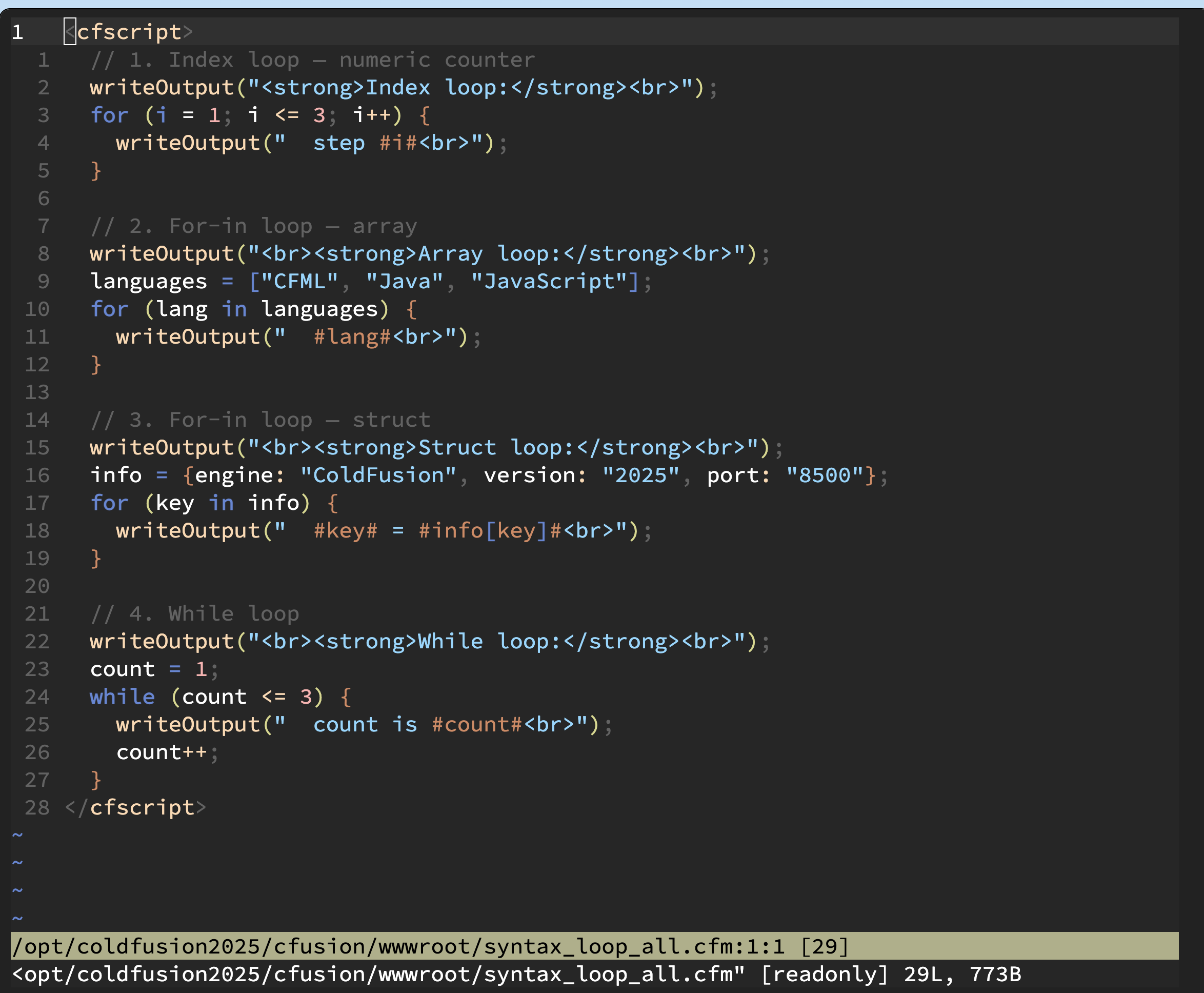
vi open with syntax_loop_all.cfm — press i to start editing, Esc then :wq to save and exit.
Is cfscript similar to JavaScript?
Yes — deliberately so. When Adobe introduced cfscript as the full-language syntax in ColdFusion 9 (2009), they modelled it closely on ECMAScript to lower the learning curve for web developers already familiar with JavaScript.
cfscript is NOT ECMAScript. It runs on the JVM — on the server — never in a browser engine. The resemblance is purely syntactic. You cannot run cfscript in a browser, import ES modules, use
Promise,fetch, or touch the DOM.
| cfscript | JavaScript | |
|---|---|---|
| Runs on | JVM (server) | Browser engine / Node.js |
| ECMAScript compliant | No — inspired by, not conforming | Yes (ES5/ES6+) |
| Accesses | Databases, filesystem, mail, HTTP | DOM, Web APIs, fetch |
| Compiled to | Java bytecode | V8 bytecode / interpreted |
| Standard | Adobe / Lucee spec | ECMA-262 |
What feels the same: curly-brace blocks, if/else, for, while, array literals [1,2,3], struct literals {key: "value"}, ternary condition ? a : b.
What is different: string concatenation uses & not +, hash interpolation "Hello, #name#!" is CF-only, and there is no async/await — CF handles concurrency through cfthread.
How does ColdFusion interact with React, Angular, or Vue?
The pattern: ColdFusion as a JSON API backend.
ColdFusion handles everything the browser cannot — database queries, authentication, file I/O, email, third-party integrations — and exposes the results as a JSON REST API. The frontend framework consumes that API over fetch or axios, exactly as it would with a Node.js or Java backend.
React / Vue / Angular        ColdFusion 2025
─────────────────────        ───────────────────────
fetch("/api/tickets")  →     tickets.cfm queries DB
                       ←     returns JSON array
renders ticket list          done — CF is invisible
This is covered in depth in the REST APIs lesson.
When all the checks above are green, this lesson is complete. Your progress is saved automatically — move straight on to the next lesson.
- Previous lesson
- Introduction to ColdFusion
- Next lesson
- Variables, Data Types & Scopes