Caching Strategies in ColdFusion
Why cache?
ColdFusion applications spend most of their time waiting for database queries and expensive computations. Caching stores a computed result so subsequent requests skip the work entirely — the database is never hit again until the cache expires.
![[object Object]](/content/files/courses/ColdFusion-2025-Foundations-5151cba6/module-2/6.lesson-caching/__static__/cf-cache-hit-miss-flow-v1.png?v=1791349307475)
Cache hit/miss pattern — on a miss the engine queries the DB and warms the cache; on a hit it skips the DB entirely.
ColdFusion provides four caching tiers you can combine in the same application:
| Tier | API / Tag | Scope | Best for |
|---|---|---|---|
| Query cache | cachedwithin on <cfquery> | Per-query | Repeated identical SQL queries |
| Application cache | cacheGet / cachePut | Application-wide | Any computed value — queries, structs, arrays |
| Function cache | cachedWithin on <cffunction> | Per function call | CFC methods that return the same result for the same inputs |
| Page cache | <cfcache> | Full page output | Static or near-static pages |
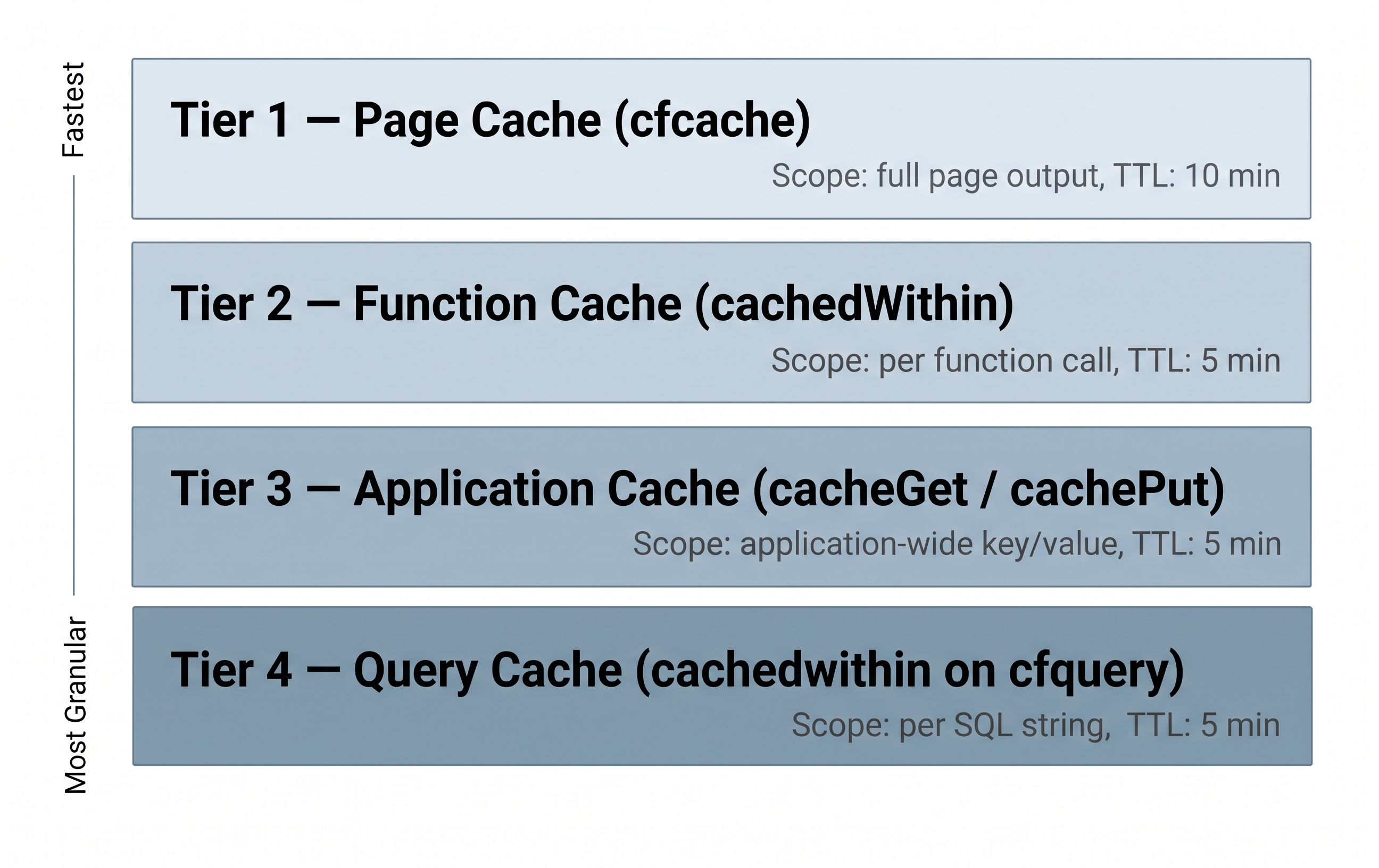
ColdFusion's four caching tiers — use the highest applicable tier to maximise cache hit rate.
1. Query caching — cachedwithin
Add cachedwithin to any <cfquery> to cache its result for a time span. The second call within the window returns the cached recordset without touching the database:
<cfquery name="openTickets" datasource="training_db"
         cachedwithin="#createTimeSpan(0,0,5,0)#">
  SELECT id, title, status, priority
  FROM   hd_tickets
  WHERE  status = 'open'
  ORDER  BY id DESC
</cfquery>
createTimeSpan(days, hours, minutes, seconds) — (0,0,5,0) = 5 minutes.
When does query caching NOT help?
Query caching caches the exact SQL string as the cache key. If anything in the query changes between calls — a different parameter, a different WHERE clause — ColdFusion treats it as a cache miss and re-runs the query. For parameterised queries with changing values, use cacheGet/cachePut with a computed key instead (e.g. "tickets_open_dept_" & deptId).
Also note: cachedwithin only works on <cfquery> — it does not apply to queryExecute(). Use cacheGet/cachePut around queryExecute() calls.
2. Application cache — cacheGet / cachePut
ColdFusion's built-in ehcache layer lets you store any value — a query result, a struct, an array — under a string key with a TTL:
What is TTL (Time-To-Live)?
TTL stands for Time-To-Live — it is the maximum age a cached value is allowed to reach before ColdFusion automatically discards it.
You set a TTL using createTimeSpan(days, hours, minutes, seconds):
createTimeSpan(0, 0, 5, 0)   // 5 minutes
createTimeSpan(0, 1, 0, 0)   // 1 hour
createTimeSpan(1, 0, 0, 0)   // 1 day
Once the TTL expires, the next request finds nothing in the cache (a cache miss), re-runs the original work, and stores a fresh value with a new TTL. Until then, every request gets the cached copy without touching the database.
A related concept you will see in the ehcache section is TTI (Time-To-Idle) — that clock resets every time the cached value is accessed, so a frequently-read entry can stay in cache indefinitely as long as it keeps getting hit.
<cfscript>
  data = cacheGet("openTickets");

  if (isNull(data)) {
    // Cache miss — run the query
    data = queryExecute(
      "SELECT id, title, status, priority FROM hd_tickets WHERE status = 'open'",
      {},
      { datasource: "training_db" }
    );
    // Warm the cache for 5 minutes
    cachePut("openTickets", data, createTimeSpan(0,0,5,0));
  }
</cfscript>
The pattern is always the same:
cacheGet(key)— if not null, use it and skip the work- On null (cache miss): do the work, then
cachePut(key, value, ttl)
ehcache — the engine behind ColdFusion's application cache
ehcache (now Terracotta ehcache) is an open-source, in-process Java caching library originally created by Greg Luck in 2003. ColdFusion has bundled ehcache since ColdFusion 9 as the engine behind cacheGet, cachePut, and cachedWithin.
What ehcache provides:
- In-memory storage — all cached values live in JVM heap memory (fast, but limited by your server's RAM)
- TTL (time-to-live) — entries expire automatically after the duration you pass to
cachePut - TTI (time-to-idle) — optional: entries expire if not accessed for a set period, regardless of TTL
- LRU eviction — when the cache reaches its size limit, the least-recently-used entries are evicted first
- Named caches — ColdFusion exposes a default cache region; advanced config in
ehcache.xmllets you define multiple named regions with different policies
Useful functions beyond the basics:
| Function | What it does |
|---|---|
cacheGet(key) | Returns the cached value, or null if not found / expired |
cachePut(key, value, ttl) | Stores a value with a TTL (createTimeSpan) |
cachePut(key, value, ttl, tti) | Stores with both TTL and TTI |
cacheRemove(key) | Removes a single key |
cacheRemoveAll() | Clears the entire application cache |
cacheGetAllIds() | Returns an array of all current cache keys |
cacheGetMetadata(key) | Returns hit count, last accessed time, TTL remaining |
Where the cache lives:
By default, ehcache is configured in /opt/coldfusion2025/cfusion/lib/ehcache.xml. The default region stores up to 10,000 objects in memory. You can tune this for high-traffic applications, but the defaults work well for learning and moderate production load.
Important: the cache is scoped to the ColdFusion application (the this.name in Application.cfc). Two applications on the same CF server have separate cache regions. Restarting ColdFusion clears all cached values.
3. Function-level caching — cachedWithin on a CFC method
Add cachedWithin to a <cffunction> declaration to cache its return value. ColdFusion uses the function name + argument values as the cache key — the same call with the same arguments returns the cached result:
component {

  public query function getOpenTickets() cachedWithin="#createTimeSpan(0,0,5,0)#" {
    return queryExecute(
      "SELECT id, title, status, priority FROM hd_tickets WHERE status = 'open'",
      {},
      { datasource: "training_db" }
    );
  }

}
Function cache vs application cache — which to use?
Both cachedWithin on a function and cacheGet/cachePut use the same ehcache layer under the hood. The difference is where the cache key is managed:
cachedWithinon a function — ColdFusion auto-generates the key from function name + argument signature. Zero boilerplate. Use this when the function is always called with the same arguments, or when each unique argument set should get its own cached result.cacheGet/cachePut— you control the key. Use this when you need a shared key across multiple pages/CFCs, when you want to invalidate specific keys on a write (cacheRemove("openTickets")after an INSERT), or when caching non-function results like complex structs.
4. Invalidating the cache
Cache invalidation — knowing when to throw away a cached value — is one of the genuinely hard problems in caching. ColdFusion gives you three options:
<cfscript>
  // Remove a specific key (e.g. after a write operation)
  cacheRemove("openTickets");

  // Remove multiple keys matching a pattern (CF 2016+)
  cacheRemove("tickets_dept_*", false);

  // Clear everything in the application cache
  cacheRemoveAll();
</cfscript>
The write-through pattern — always invalidate on writes:
<cfscript>
  // INSERT a new ticket
  queryExecute(
    "INSERT INTO hd_tickets (title, status, priority) VALUES (:t, 'open', 'medium')",
    { t: { value: form.title, cfsqltype: "cf_sql_varchar" } },
    { datasource: "training_db" }
  );

  // Immediately invalidate the stale cache key
  cacheRemove("openTickets");
</cfscript>
TTL vs explicit invalidation — which strategy?
| Strategy | When to use |
|---|---|
| TTL only (let it expire) | Data that can tolerate being stale for a few minutes — dashboards, ticket lists, statistics |
Explicit invalidation (cacheRemove on write) | Data that must be fresh immediately after a change — user profile, ticket status shown to the owner |
| Both | Cache with a safety-net TTL (e.g. 10 min) AND invalidate explicitly on write — belt-and-suspenders for critical data |
For this training environment, TTL-only is fine. In production, always invalidate explicitly after writes to high-visibility data.
Activity 1 — Query caching with cachedwithin
You are going to create a new file called cache_demo.cfm in the ColdFusion web root. This file does not exist yet — the command below creates it for you.
File to create: /opt/coldfusion2025/cfusion/wwwroot/student/cache_demo.cfm
In the Terminal tab, run the sudo tee command below. It writes the full file in one step — no editor needed:
sudo tee /opt/coldfusion2025/cfusion/wwwroot/student/cache_demo.cfm << 'EOF'
<!DOCTYPE html>
<html lang="en">
<head>
  <meta charset="UTF-8">
  <title>ColdFusion Cache Demo</title>
  <style>
    body  { font-family: sans-serif; max-width: 860px; margin: 2rem auto; }
    table { width: 100%; border-collapse: collapse; margin-top: 1rem; }
    th    { background: #3b82d4; color: #fff; padding: .5rem .75rem; text-align: left; }
    td    { padding: .45rem .75rem; border-bottom: 1px solid #e5e7eb; }
    tr:hover td { background: #f7f8fa; }
    .box  { padding: 1rem; background: #f0f4ff; border-left: 4px solid #3b82d4; margin: 1rem 0; }
  </style>
</head>
<body>
  <h1>ColdFusion Caching Demo</h1>

  <h2>1. Query Cache — cachedwithin</h2>

  <cfquery name="openTickets" datasource="training_db"
           cachedwithin="#createTimeSpan(0,0,5,0)#">
    SELECT id, title, status, priority
    FROM   hd_tickets
    WHERE  status = 'open'
    ORDER  BY id DESC
  </cfquery>

  <div class="box">
    <strong>cachedwithin query:</strong>
    <cfoutput>#openTickets.recordCount#</cfoutput> open ticket(s) — cached for 5 minutes
  </div>

  <table>
    <tr><th>ID</th><th>Title</th><th>Status</th><th>Priority</th></tr>
    <cfoutput query="openTickets">
      <tr>
        <td>#id#</td>
        <td>#encodeForHTML(title)#</td>
        <td>#encodeForHTML(status)#</td>
        <td>#encodeForHTML(priority)#</td>
      </tr>
    </cfoutput>
  </table>

</body>
</html>
EOF
✏️ Using the IDE tab instead? Create the file here
In the IDE tab, click File → Open Folder…, type /opt/coldfusion2025/cfusion/wwwroot/student and press Enter. If VS Code asks "The folder does not exist. Would you like to create it?" — click Yes. Then right-click in the Explorer panel → New File → name it cache_demo.cfm, paste the content below, and save with Ctrl+S:
<!DOCTYPE html>
<html lang="en">
<head>
  <meta charset="UTF-8">
  <title>ColdFusion Cache Demo</title>
  <style>
    body  { font-family: sans-serif; max-width: 860px; margin: 2rem auto; }
    table { width: 100%; border-collapse: collapse; margin-top: 1rem; }
    th    { background: #3b82d4; color: #fff; padding: .5rem .75rem; text-align: left; }
    td    { padding: .45rem .75rem; border-bottom: 1px solid #e5e7eb; }
    tr:hover td { background: #f7f8fa; }
    .box  { padding: 1rem; background: #f0f4ff; border-left: 4px solid #3b82d4; margin: 1rem 0; }
  </style>
</head>
<body>
  <h1>ColdFusion Caching Demo</h1>

  <h2>1. Query Cache — cachedwithin</h2>

  <cfquery name="openTickets" datasource="training_db"
           cachedwithin="#createTimeSpan(0,0,5,0)#">
    SELECT id, title, status, priority
    FROM   hd_tickets
    WHERE  status = 'open'
    ORDER  BY id DESC
  </cfquery>

  <div class="box">
    <strong>cachedwithin query:</strong>
    <cfoutput>#openTickets.recordCount#</cfoutput> open ticket(s) — cached for 5 minutes
  </div>

  <table>
    <tr><th>ID</th><th>Title</th><th>Status</th><th>Priority</th></tr>
    <cfoutput query="openTickets">
      <tr>
        <td>#id#</td>
        <td>#encodeForHTML(title)#</td>
        <td>#encodeForHTML(status)#</td>
        <td>#encodeForHTML(priority)#</td>
      </tr>
    </cfoutput>
  </table>

</body>
</html>
Verify cachedwithin is in the file:
grep -i "cachedwithin" /opt/coldfusion2025/cfusion/wwwroot/student/cache_demo.cfm

cachedwithin on <cfquery> — ColdFusion caches the result set for 5 minutes after the first execution.
Open /student/cache_demo.cfm in the ColdFusion 2025 browser tab to confirm the page loads and the ticket count is shown:
![[object Object]](/content/files/courses/ColdFusion-2025-Foundations-5151cba6/module-2/6.lesson-caching/__static__/browser-cachedwithin-query-v1.png?v=1791349307475)
cache_demo.cfm after Activity 1 — the cachedwithin query result rendered in the browser; every reload within 5 minutes skips the database.
Activity 2 — Application cache with cacheGet / cachePut
You are going to replace the cache_demo.cfm file you created in Activity 1 with an extended version that adds a second section using cacheGet / cachePut. The sudo tee command overwrites the file completely — that is intentional.
File to overwrite: /opt/coldfusion2025/cfusion/wwwroot/student/cache_demo.cfm
In the Terminal tab, run:
sudo tee /opt/coldfusion2025/cfusion/wwwroot/student/cache_demo.cfm << 'EOF'
<!DOCTYPE html>
<html lang="en">
<head>
  <meta charset="UTF-8">
  <title>ColdFusion Cache Demo</title>
  <style>
    body  { font-family: sans-serif; max-width: 860px; margin: 2rem auto; }
    table { width: 100%; border-collapse: collapse; margin-top: 1rem; }
    th    { background: #3b82d4; color: #fff; padding: .5rem .75rem; text-align: left; }
    td    { padding: .45rem .75rem; border-bottom: 1px solid #e5e7eb; }
    tr:hover td { background: #f7f8fa; }
    .box  { padding: 1rem; background: #f0f4ff; border-left: 4px solid #3b82d4; margin: 1rem 0; }
    .miss { border-left-color: #ef4444; background: #fff0f0; }
    .hit  { border-left-color: #22c55e; background: #f0fff4; }
  </style>
</head>
<body>
  <h1>ColdFusion Caching Demo</h1>

  <h2>1. Query Cache — cachedwithin</h2>

  <cfquery name="openTickets" datasource="training_db"
           cachedwithin="#createTimeSpan(0,0,5,0)#">
    SELECT id, title, status, priority
    FROM   hd_tickets
    WHERE  status = 'open'
    ORDER  BY id DESC
  </cfquery>

  <div class="box">
    <strong>cachedwithin query:</strong>
    <cfoutput>#openTickets.recordCount#</cfoutput> open ticket(s) — cached for 5 minutes
  </div>

  <h2>2. Application Cache — cacheGet / cachePut</h2>

  <cfscript>
    cacheKey = "highPriorityTickets";
    highTickets = cacheGet(cacheKey);
    cacheHit = !isNull(highTickets);

    if (!cacheHit) {
      highTickets = queryExecute(
        "SELECT id, title, priority, category FROM hd_tickets WHERE priority = 'high' ORDER BY id DESC",
        {},
        { datasource: "training_db" }
      );
      cachePut(cacheKey, highTickets, createTimeSpan(0,0,5,0));
    }
  </cfscript>

  <cfoutput>
  <div class="box #cacheHit ? 'hit' : 'miss'#">
    <strong>Cache #cacheHit ? 'HIT' : 'MISS'#:</strong>
    #highTickets.recordCount# high-priority ticket(s) from #cacheHit ? 'cache' : 'database'#
  </div>
  </cfoutput>

  <table>
    <tr><th>ID</th><th>Title</th><th>Priority</th><th>Category</th></tr>
    <cfoutput query="highTickets">
      <tr>
        <td>#id#</td>
        <td>#encodeForHTML(title)#</td>
        <td>#encodeForHTML(priority)#</td>
        <td>#encodeForHTML(category)#</td>
      </tr>
    </cfoutput>
  </table>

</body>
</html>
EOF
✏️ Using the IDE tab instead? Edit the file here
In the IDE tab, open cache_demo.cfm, select all (Ctrl+A), replace with the content below, and save with Ctrl+S:
<!DOCTYPE html>
<html lang="en">
<head>
  <meta charset="UTF-8">
  <title>ColdFusion Cache Demo</title>
  <style>
    body  { font-family: sans-serif; max-width: 860px; margin: 2rem auto; }
    table { width: 100%; border-collapse: collapse; margin-top: 1rem; }
    th    { background: #3b82d4; color: #fff; padding: .5rem .75rem; text-align: left; }
    td    { padding: .45rem .75rem; border-bottom: 1px solid #e5e7eb; }
    tr:hover td { background: #f7f8fa; }
    .box  { padding: 1rem; background: #f0f4ff; border-left: 4px solid #3b82d4; margin: 1rem 0; }
    .miss { border-left-color: #ef4444; background: #fff0f0; }
    .hit  { border-left-color: #22c55e; background: #f0fff4; }
  </style>
</head>
<body>
  <h1>ColdFusion Caching Demo</h1>

  <h2>1. Query Cache — cachedwithin</h2>

  <cfquery name="openTickets" datasource="training_db"
           cachedwithin="#createTimeSpan(0,0,5,0)#">
    SELECT id, title, status, priority
    FROM   hd_tickets
    WHERE  status = 'open'
    ORDER  BY id DESC
  </cfquery>

  <div class="box">
    <strong>cachedwithin query:</strong>
    <cfoutput>#openTickets.recordCount#</cfoutput> open ticket(s) — cached for 5 minutes
  </div>

  <h2>2. Application Cache — cacheGet / cachePut</h2>

  <cfscript>
    cacheKey = "highPriorityTickets";
    highTickets = cacheGet(cacheKey);
    cacheHit = !isNull(highTickets);

    if (!cacheHit) {
      highTickets = queryExecute(
        "SELECT id, title, priority, category FROM hd_tickets WHERE priority = 'high' ORDER BY id DESC",
        {},
        { datasource: "training_db" }
      );
      cachePut(cacheKey, highTickets, createTimeSpan(0,0,5,0));
    }
  </cfscript>

  <cfoutput>
  <div class="box #cacheHit ? 'hit' : 'miss'#">
    <strong>Cache #cacheHit ? 'HIT' : 'MISS'#:</strong>
    #highTickets.recordCount# high-priority ticket(s) from #cacheHit ? 'cache' : 'database'#
  </div>
  </cfoutput>

  <table>
    <tr><th>ID</th><th>Title</th><th>Priority</th><th>Category</th></tr>
    <cfoutput query="highTickets">
      <tr>
        <td>#id#</td>
        <td>#encodeForHTML(title)#</td>
        <td>#encodeForHTML(priority)#</td>
        <td>#encodeForHTML(category)#</td>
      </tr>
    </cfoutput>
  </table>

</body>
</html>
Open /student/cache_demo.cfm in the ColdFusion 2025 browser tab. The first load will show Cache MISS (red); refresh and it switches to Cache HIT (green).
curl -s http://localhost:8500/student/cache_demo.cfm | grep -i "cache"
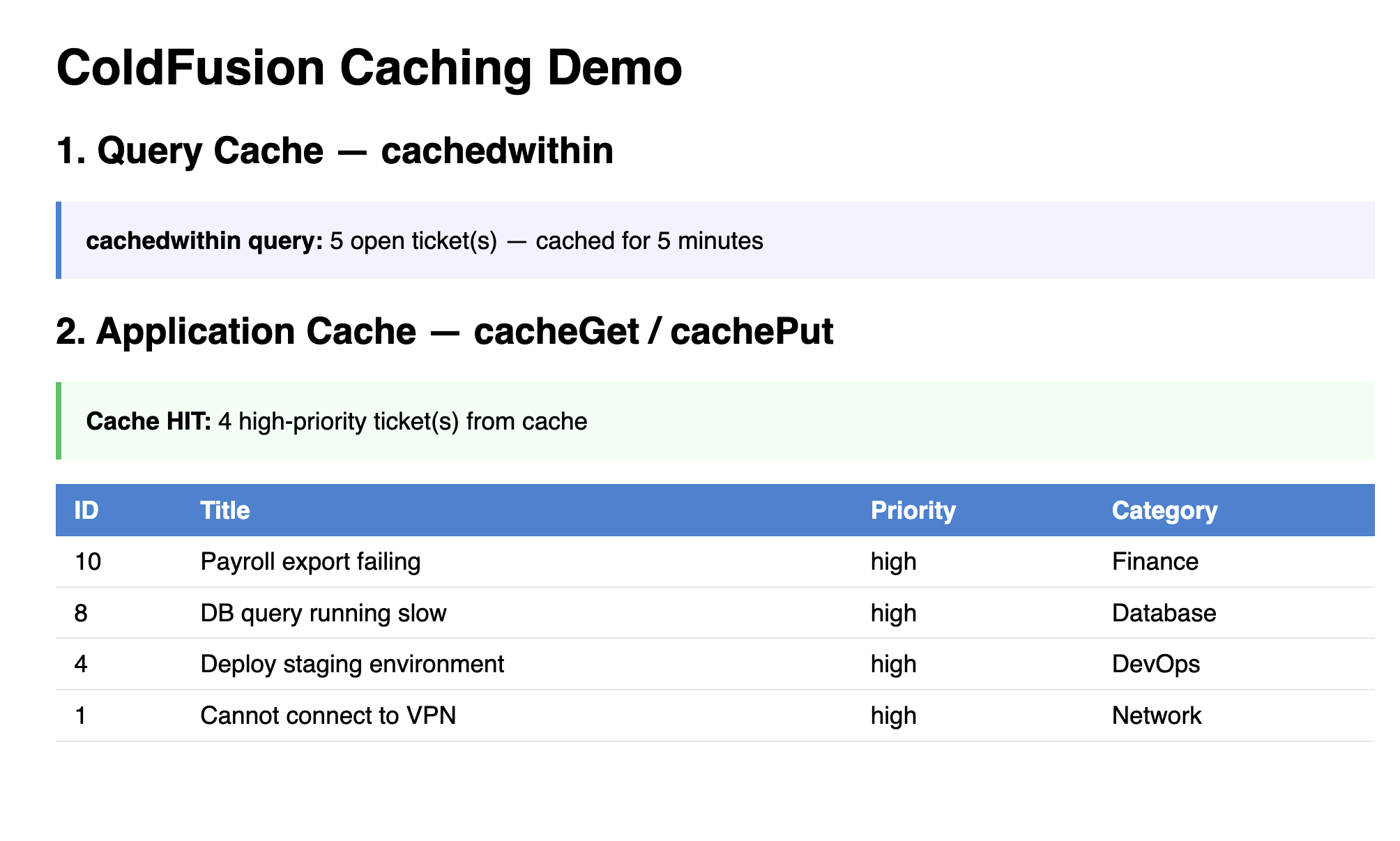
First request shows Cache MISS (red) as data is fetched from the DB and stored; refresh shows Cache HIT (green) — DB skipped.
What you just achieved with cacheGet / cachePut:
On the first load (Cache MISS), the code called cacheGet("highPriorityTickets") and got back null — nothing was stored yet. ColdFusion then ran the queryExecute against the database, got the results, and immediately called cachePut("highPriorityTickets", data, createTimeSpan(0,0,5,0)) to store them in ehcache for 5 minutes. The page rendered the data and showed the red MISS indicator.
On the second load (Cache HIT), cacheGet("highPriorityTickets") returned the stored query object — the if (isNull(data)) block was skipped entirely. No SQL was sent to the database. The same ticket data was rendered from memory in ehcache and the green HIT indicator confirmed it.
The result: for the next 5 minutes, every request to this page serves the high-priority ticket list from memory — the database is not involved at all. After 5 minutes the TTL expires, the next request gets a MISS, re-queries the database, and the cycle starts again. This is the core pattern behind nearly every ColdFusion caching strategy.
Activity 3 — Verify the cache is working on repeated requests
What this activity proves:
The first curl request is a cache miss — ColdFusion has nothing stored yet, so it runs the cfquery against the database and calls cachePut to store the result. The second curl request — sent immediately after — is a cache hit: ColdFusion finds the stored value in ehcache and returns it without touching the database at all. Both requests return HTTP 200 and produce identical output, which is exactly how caching should behave. If the cache were broken (wrong key, serialisation error, ORM session conflict), the second request would either throw an exception or return an error page — you would see error or exception in the output.
In summary: two clean HTTP 200 responses with identical output and no errors = the cache read/write cycle is working correctly.
Run the two requests back-to-back in the Terminal tab:
curl -s -o /dev/null -w "HTTP %{http_code}\n" http://localhost:8500/student/cache_demo.cfm
curl -s -o /dev/null -w "HTTP %{http_code}\n" http://localhost:8500/student/cache_demo.cfm
Then confirm there are no errors in the rendered output:
curl -s http://localhost:8500/student/cache_demo.cfm | grep -i "error\|exception" || echo "No errors found"
Both status lines should read HTTP 200 and the grep should return No errors found. If you open the page in the browser and refresh, you will also see the Section 2 box switch from red Cache MISS to green Cache HIT — visual confirmation that the second request was served entirely from ehcache.
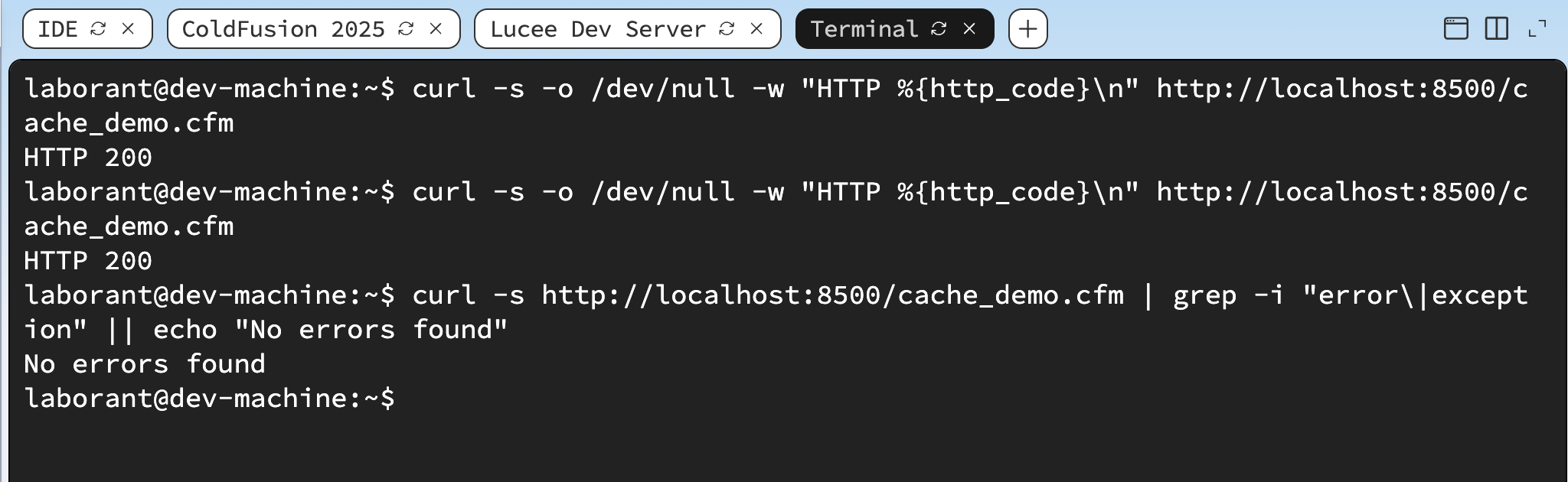
Two HTTP 200 responses with no errors — first request warms the cache, second request is served from ehcache without hitting the database.
Activity 4 — Invalidate the cache with cacheRemove
What this activity proves:
You have seen that cachePut stores a value and cacheGet retrieves it. Now you will prove the other side of the cycle: explicit invalidation. After calling cacheRemove, the next cacheGet for that key returns null — a forced cache miss — so ColdFusion re-queries the database and stores a fresh value. This is exactly what you would do in production after a write operation (INSERT, UPDATE, DELETE) to ensure stale data is never served.
File to update: /opt/coldfusion2025/cfusion/wwwroot/student/cache_demo.cfm
In the Terminal tab, overwrite cache_demo.cfm with this final version that adds a Section 3 — Cache Invalidation:
sudo tee /opt/coldfusion2025/cfusion/wwwroot/student/cache_demo.cfm << 'EOF'
<!DOCTYPE html>
<html lang="en">
<head>
  <meta charset="UTF-8">
  <title>ColdFusion Cache Demo</title>
  <style>
    body  { font-family: sans-serif; max-width: 860px; margin: 2rem auto; }
    table { width: 100%; border-collapse: collapse; margin-top: 1rem; }
    th    { background: #3b82d4; color: #fff; padding: .5rem .75rem; text-align: left; }
    td    { padding: .45rem .75rem; border-bottom: 1px solid #e5e7eb; }
    tr:hover td { background: #f7f8fa; }
    .box  { padding: 1rem; background: #f0f4ff; border-left: 4px solid #3b82d4; margin: 1rem 0; }
    .miss { border-left-color: #ef4444; background: #fff0f0; }
    .hit  { border-left-color: #22c55e; background: #f0fff4; }
    .warn { border-left-color: #f59e0b; background: #fffbeb; }
  </style>
</head>
<body>
  <h1>ColdFusion Caching Demo</h1>

  <h2>1. Query Cache — cachedwithin</h2>

  <cfquery name="openTickets" datasource="training_db"
           cachedwithin="#createTimeSpan(0,0,5,0)#">
    SELECT id, title, status, priority
    FROM   hd_tickets
    WHERE  status = 'open'
    ORDER  BY id DESC
  </cfquery>

  <div class="box">
    <strong>cachedwithin query:</strong>
    <cfoutput>#openTickets.recordCount#</cfoutput> open ticket(s) — cached for 5 minutes
  </div>

  <h2>2. Application Cache — cacheGet / cachePut</h2>

  <cfscript>
    cacheKey = "highPriorityTickets";
    highTickets = cacheGet(cacheKey);
    cacheHit = !isNull(highTickets);

    if (!cacheHit) {
      highTickets = queryExecute(
        "SELECT id, title, priority, category FROM hd_tickets WHERE priority = 'high' ORDER BY id DESC",
        {},
        { datasource: "training_db" }
      );
      cachePut(cacheKey, highTickets, createTimeSpan(0,0,5,0));
    }
  </cfscript>

  <cfoutput>
  <div class="box #cacheHit ? 'hit' : 'miss'#">
    <strong>Cache #cacheHit ? 'HIT' : 'MISS'#:</strong>
    #highTickets.recordCount# high-priority ticket(s) from #cacheHit ? 'cache' : 'database'#
  </div>
  </cfoutput>

  <table>
    <tr><th>ID</th><th>Title</th><th>Priority</th><th>Category</th></tr>
    <cfoutput query="highTickets">
      <tr>
        <td>#id#</td>
        <td>#encodeForHTML(title)#</td>
        <td>#encodeForHTML(priority)#</td>
        <td>#encodeForHTML(category)#</td>
      </tr>
    </cfoutput>
  </table>

  <h2>3. Cache Invalidation — cacheRemove</h2>

  <cfscript>
    // Check if the key exists before invalidation
    beforeRemove = !isNull(cacheGet("highPriorityTickets"));

    // Invalidate the key
    cacheRemove("highPriorityTickets");

    // Check immediately after — must be null now
    afterRemove = isNull(cacheGet("highPriorityTickets"));
  </cfscript>

  <cfoutput>
  <div class="box warn">
    <strong>Before cacheRemove:</strong> key was #beforeRemove ? 'PRESENT in cache' : 'already absent'#<br>
    <strong>After cacheRemove:</strong> key is #afterRemove ? 'GONE — next request will be a cache miss' : 'still present (unexpected)'#
  </div>
  </cfoutput>

</body>
</html>
EOF
✏️ Using the IDE tab instead? Edit the file here
In the IDE tab, open cache_demo.cfm, select all (Ctrl+A), replace with the content below, and save with Ctrl+S:
<!DOCTYPE html>
<html lang="en">
<head>
  <meta charset="UTF-8">
  <title>ColdFusion Cache Demo</title>
  <style>
    body  { font-family: sans-serif; max-width: 860px; margin: 2rem auto; }
    table { width: 100%; border-collapse: collapse; margin-top: 1rem; }
    th    { background: #3b82d4; color: #fff; padding: .5rem .75rem; text-align: left; }
    td    { padding: .45rem .75rem; border-bottom: 1px solid #e5e7eb; }
    tr:hover td { background: #f7f8fa; }
    .box  { padding: 1rem; background: #f0f4ff; border-left: 4px solid #3b82d4; margin: 1rem 0; }
    .miss { border-left-color: #ef4444; background: #fff0f0; }
    .hit  { border-left-color: #22c55e; background: #f0fff4; }
    .warn { border-left-color: #f59e0b; background: #fffbeb; }
  </style>
</head>
<body>
  <h1>ColdFusion Caching Demo</h1>

  <h2>1. Query Cache — cachedwithin</h2>

  <cfquery name="openTickets" datasource="training_db"
           cachedwithin="#createTimeSpan(0,0,5,0)#">
    SELECT id, title, status, priority
    FROM   hd_tickets
    WHERE  status = 'open'
    ORDER  BY id DESC
  </cfquery>

  <div class="box">
    <strong>cachedwithin query:</strong>
    <cfoutput>#openTickets.recordCount#</cfoutput> open ticket(s) — cached for 5 minutes
  </div>

  <h2>2. Application Cache — cacheGet / cachePut</h2>

  <cfscript>
    cacheKey = "highPriorityTickets";
    highTickets = cacheGet(cacheKey);
    cacheHit = !isNull(highTickets);

    if (!cacheHit) {
      highTickets = queryExecute(
        "SELECT id, title, priority, category FROM hd_tickets WHERE priority = 'high' ORDER BY id DESC",
        {},
        { datasource: "training_db" }
      );
      cachePut(cacheKey, highTickets, createTimeSpan(0,0,5,0));
    }
  </cfscript>

  <cfoutput>
  <div class="box #cacheHit ? 'hit' : 'miss'#">
    <strong>Cache #cacheHit ? 'HIT' : 'MISS'#:</strong>
    #highTickets.recordCount# high-priority ticket(s) from #cacheHit ? 'cache' : 'database'#
  </div>
  </cfoutput>

  <table>
    <tr><th>ID</th><th>Title</th><th>Priority</th><th>Category</th></tr>
    <cfoutput query="highTickets">
      <tr>
        <td>#id#</td>
        <td>#encodeForHTML(title)#</td>
        <td>#encodeForHTML(priority)#</td>
        <td>#encodeForHTML(category)#</td>
      </tr>
    </cfoutput>
  </table>

  <h2>3. Cache Invalidation — cacheRemove</h2>

  <cfscript>
    // Check if the key exists before invalidation
    beforeRemove = !isNull(cacheGet("highPriorityTickets"));

    // Invalidate the key
    cacheRemove("highPriorityTickets");

    // Check immediately after — must be null now
    afterRemove = isNull(cacheGet("highPriorityTickets"));
  </cfscript>

  <cfoutput>
  <div class="box warn">
    <strong>Before cacheRemove:</strong> key was #beforeRemove ? 'PRESENT in cache' : 'already absent'#<br>
    <strong>After cacheRemove:</strong> key is #afterRemove ? 'GONE — next request will be a cache miss' : 'still present (unexpected)'#
  </div>
  </cfoutput>

</body>
</html>
Now reload /student/cache_demo.cfm twice in the browser:
- First reload — Section 2 shows Cache HIT (green) because the key is still warm from before. Section 3 shows Before: PRESENT → After: GONE.
- Second reload — Section 2 shows Cache MISS (red) again —
cacheRemovewiped the key so ColdFusion had to re-query the database.
This is the complete invalidation cycle: store → serve from cache → invalidate → forced miss → re-store.
Verify cacheRemove is in the file:
grep -i "cacheremove" /opt/coldfusion2025/cfusion/wwwroot/student/cache_demo.cfm
![[object Object]](/content/files/courses/ColdFusion-2025-Foundations-5151cba6/module-2/6.lesson-caching/__static__/browser-cache-invalidation-v1.png?v=1791349307475)
Section 3 confirms the invalidation cycle — the key was present, cacheRemove wiped it, and the next request is forced back to a cache miss.
When all the checks above are green, this lesson is complete. Your progress is saved automatically — move straight on to the next lesson.
- Previous lesson
- ORM Relationships — One-to-Many, Many-to-One, and Beyond
- Next lesson
- Chart Generation and Management