ORM Relationships — One-to-Many, Many-to-One, and Beyond
ORM entity mapping in detail
The ORM basics lesson introduced a simple Ticket.cfc with a handful of properties. This lesson goes deeper — looking at the full set of mapping attributes available on cfcomponent and cfproperty, then building on that foundation to define relationships between entities.
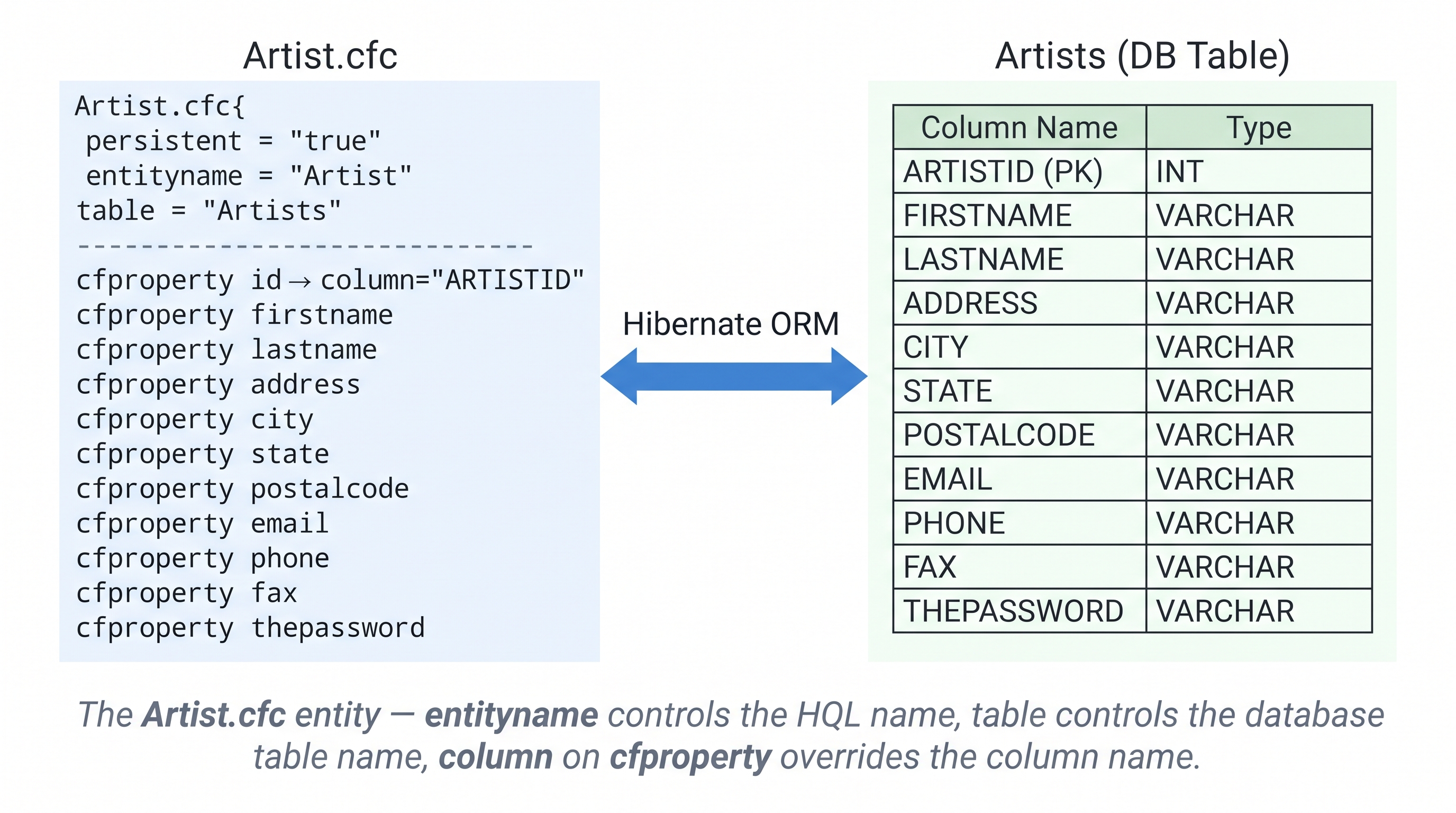
The Artist.cfc entity — entityname controls the HQL name, table controls the database table name, column on cfproperty overrides the column name.
cfcomponent mapping attributes
| Attribute | Default | Description |
|---|---|---|
persistent | false | Required. Set true to make this CFC an ORM entity |
entityname | CFC file name | The name Hibernate uses internally — used in HQL queries and EntityLoad calls |
table | entityname | The database table this entity maps to |
schema | — | Database schema name |
catalog | — | Database catalog name |
lazy | true | Whether instances are loaded lazily when navigating associations |
batchsize | — | Number of entities to batch-load at once when lazy-loading |
dynamicupdate | false | Only include changed columns in the UPDATE SQL — useful for wide tables |
dynamicinsert | false | Only include non-null columns in the INSERT SQL |
readonly | false | If true, no insert/update/delete is ever issued — useful for views |
discriminatorvalue | entityname | Used in table-per-hierarchy inheritance |
discriminatorcolumn | — | Column that distinguishes subclasses in a single-table hierarchy |
cfproperty mapping attributes
// Artist.cfc — full mapping example
component persistent="true" entityname="Artist" table="Artists" {
  property name="id"          column="ARTISTID"   fieldtype="id"  generator="increment";
  property name="firstname";
  property name="lastname";
  property name="address";
  property name="city";
  property name="state";
  property name="postalcode";
  property name="email";
  property name="phone";
  property name="fax";
  property name="thepassword";
}
Key points in this example:
entityname="Artist"— the name used in HQL (FROM Artist) andEntityLoad("Artist", ...), which can differ from the CFC filenametable="Artists"— maps to theArtistsdatabase table (different from the entityname)column="ARTISTID"on theidproperty — maps to the actual database column nameARTISTIDrather than the defaultidgenerator="increment"— Hibernate manages the PK sequence itself (use"native"to delegate to the database's AUTO_INCREMENT)- Properties without attributes (
firstname,lastname, etc.) auto-map to columns with the same name
cfproperty column-mapping attributes reference
| Attribute | Default | Description |
|---|---|---|
name | — | Required. Property name — used for getter/setter names |
column | property name | Override the database column name (useful when names differ) |
fieldtype | column | column, id, version, timestamp, one-to-one, one-to-many, many-to-one, many-to-many |
ormtype | string | Data type: string, integer, long, float, double, boolean, date, timestamp, text, binary |
generator | native | PK generation strategy: native, increment, identity, sequence, foreign, assigned |
length | — | Column length — adds a VARCHAR(n) constraint when ORM creates the table |
notnull | false | Adds a NOT NULL constraint |
unique | false | Adds a UNIQUE constraint |
default | — | Default value inserted when no value is set |
dbdefault | — | Default value at the database level |
insert | true | Include this column in INSERT statements |
update | true | Include this column in UPDATE statements — set false for created-at timestamps |
optimisticlock | true | Whether changes to this property acquire an optimistic lock |
lazy | false | Load this property lazily (useful for text/binary large-value columns) |
formula | — | A SQL expression evaluated as a computed column — read-only |
Working with ORM objects
Once your entities are defined you interact with them using ColdFusion's built-in ORM functions. These functions wrap Hibernate's session API in a simple ColdFusion interface.
EntityNew — create an object without saving
EntityNew(entityName) creates a new instance of the entity in memory without touching the database:
<cfscript>
  artist = EntityNew("Artist");
  artist.setFirstname("Georgia");
  artist.setLastname("O'Keeffe");
  artist.setCity("Abiquiú");
  artist.setState("NM");
  // Not yet in the database — no SQL issued yet
</cfscript>
You can also pass an initial struct of values as the second argument:
artist = EntityNew("Artist", { firstname: "Frida", lastname: "Kahlo", city: "Mexico City" });
EntitySave — persist an object
EntitySave(entity) issues an INSERT for new objects and an UPDATE for objects loaded from the database. Hibernate's dirty checking means EntitySave on an already-loaded object only issues an UPDATE if a property actually changed:
<cfscript>
  // INSERT — new object
  employee = EntityNew("Employee");
  employee.setFirstName("Tom");
  employee.setLastName("Jones");
  employee.setSalary(100000);
  employee.setContract("Y");
  EntitySave(employee);

  // UPDATE — loaded object
  employee.setSalary(125000);
  EntitySave(employee);   // issues UPDATE only for the salary column
</cfscript>
EntityLoadByPK — load a single record by primary key
EntityLoadByPK(entityName, pkValue) returns the entity whose primary key matches pkValue, or null if no row is found:
<cfscript>
  employee = EntityLoadByPK("Employee", 1958);
  if (isNull(employee)) {
    writeOutput("No employee with that ID");
  } else {
    writeOutput(employee.getFirstName() & " " & employee.getLastName());
  }
</cfscript>
EntityLoad — load a collection
EntityLoad(entityName) returns all rows. Pass a struct as the second argument to filter by property values:
<cfscript>
  // All employees
  all = EntityLoad("Employee");

  // Only employees in New York, ordered by lastname
  nyEmployees = EntityLoad("Employee", { city: "New York" }, "lastname asc");
</cfscript>
EntityDelete — remove a record
EntityDelete(entity) deletes the row from the database. You must first load the object with EntityLoadByPK:
<cfscript>
  employee = EntityLoadByPK("Employee", 1958);
  EntityDelete(employee);
  // Row with PK 1958 is now deleted from the Employee table
</cfscript>
Always load before you delete — never pass an un-loaded object to EntityDelete
EntityDelete requires a managed entity — an object that Hibernate is tracking in the current session. Passing a manually constructed object (not loaded via EntityLoad or EntityLoadByPK) will throw a TransientObjectException.
If you need to delete by PK, always call EntityLoadByPK first:
// CORRECT
toDelete = EntityLoadByPK("Ticket", 42);
if (!isNull(toDelete)) EntityDelete(toDelete);

// WRONG — throws TransientObjectException
fake = new Ticket();
fake.setId(42);
EntityDelete(fake);   // ✗
Getters and setters — auto-generated methods
ColdFusion generates get<PropertyName>() and set<PropertyName>() methods for every cfproperty. You never write these yourself:
<cfscript>
  artist = EntityLoadByPK("Artist", 1);
  // Auto-generated getters
  name     = artist.getFirstname();    // → "Georgia"
  city     = artist.getCity();         // → "Abiquiú"

  // Auto-generated setters
  artist.setEmail("g@example.com");
  artist.setPhone("505-555-0100");
  EntitySave(artist);
</cfscript>
You can override these methods in the CFC body if you need custom behaviour — your implementation takes precedence over the generated one.
ORMReload — reload after config changes
Hibernate builds its session factory when the application starts. If you change Application.cfc ORM settings or add/modify a persistent CFC, call ORMReload() to rebuild the session factory without restarting ColdFusion:
<cfscript>
  ORMReload();   // rebuilds the Hibernate session factory
  employees = EntityLoad("Employee");
  writeDump(employees);
</cfscript>
When to call ORMReload — and when not to
Call ORMReload() when:
- You added a new persistent CFC
- You changed
cfcomponentorcfpropertymapping attributes - You changed
ormsettingsinApplication.cfc - You renamed an entity or changed
table/columnattributes
Do NOT call ORMReload() on every page request. It is expensive — it discards the Hibernate session factory and rebuilds it from scratch. In production the session factory is built once at application start. ORMReload() is a development tool only.
If you need ORMReload() in a CFM page during development, place it inside a condition:
if (structKeyExists(url, "reload")) ORMReload();
Access the page with ?reload=1 when you need it, normal requests skip it.
Why relationships matter in ORM
In a relational database, tables are linked via foreign keys. In an object model, the same connections are expressed as associations — one object holds a reference (or a collection of references) to another.
ColdFusion Hibernate ORM lets you declare those associations directly on cfproperty using the fieldtype attribute. Once declared, Hibernate manages the SQL JOINs, lazy loading, and cascaded saves/deletes automatically.
Key concepts — source, target, direction, and multiplicity
Before writing any code it helps to understand the vocabulary:
| Term | Meaning |
|---|---|
| Source object | The object that holds the reference to the related object |
| Target object | The object being referred to |
| Unidirectional | Only the source knows about the target; the target has no reference back |
| Bidirectional | Both objects hold a reference to each other |
| Multiplicity | How many objects can be on each side — one-to-one, one-to-many, many-to-one, many-to-many |
Bidirectional example — Person and Address:
// Make the association bidirectional
person.setAddress(address);   // person → address (unidirectional so far)
address.setPerson(person);    // address → person (now bidirectional)
In a bidirectional relationship one side must set inverse="true" to avoid Hibernate writing the relationship twice to the database (see the Inverse section below).
The four relationship types
Set fieldtype on cfproperty to one of:
| fieldtype | When to use |
|---|---|
one-to-one | Each source has exactly one target, and vice-versa |
one-to-many | One source has many targets (source holds a collection) |
many-to-one | Many sources reference the same target (foreign key on source table) |
many-to-many | Both sides hold collections — requires a link table |
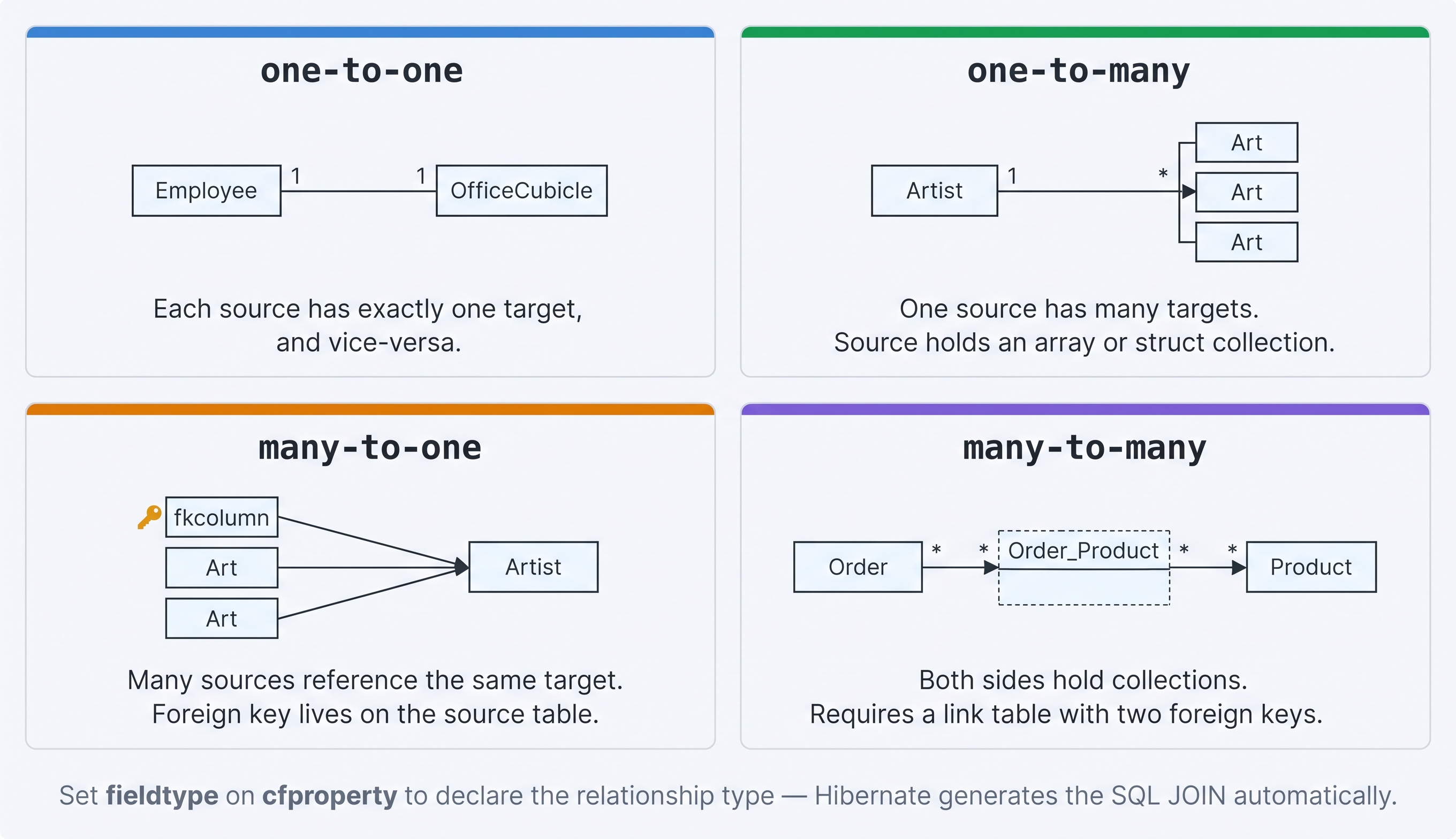
The four ORM relationship types — each maps directly to a fieldtype value on cfproperty.
One-to-one relationships
A one-to-one relationship means the source object has one, and only one, associated target object.
Example: An Employee has one OfficeCubicle.
There are two variants:
Primary key association
Both tables share the same primary key. The dependent table's PK is a foreign key to the primary table's PK.
// Employee.cfc
component persistent="true" table="Employee" {
  property name="id"             fieldtype="id"       generator="native";
  property name="firstname";
  property name="lastname";
  property name="officecubicle"  fieldtype="one-to-one" cfc="OfficeCubicle";
}
// OfficeCubicle.cfc  — PK is a foreign key to Employee.id
component persistent="true" table="OfficeCubicle" {
  property name="id"       fieldtype="id"       generator="foreign"
                           params="{property='Employee'}" ormtype="int";
  property name="Employee" fieldtype="one-to-one" cfc="Employee" constrained="true";
  property name="Location";
  property name="Size";
}
constrained="true" on the OfficeCubicle side means the OfficeCubicle table's PK has a foreign-key constraint referencing the Employee PK. generator="foreign" tells Hibernate to copy the PK value from the related Employee object rather than generating a new one.
Unique foreign key association
The dependent table has its own auto-generated PK plus a unique foreign key column pointing to the other table.
// Employee.cfc — the "mappedby" side
component persistent="true" table="Employee" {
  property name="EmployeeID"    fieldtype="id"       generator="native";
  property name="firstname";
  property name="lastname";
  property name="officecubicle" fieldtype="one-to-one" cfc="OfficeCubicle"
                                mappedby="Employee";
}
// OfficeCubicle.cfc — holds the FK column
component persistent="true" table="OfficeCubicle" {
  property name="id"       fieldtype="id"       generator="native";
  property name="Employee" fieldtype="one-to-one" cfc="Employee"
                           fkcolumn="EmployeeID";
  property name="Location";
  property name="Size";
}
fkcolumn="EmployeeID" identifies the foreign key column in OfficeCubicle. The Employee side uses mappedby="Employee" to point back to that property — fkcolumn must not be specified on the mappedby side.
One-to-many relationships
A one-to-many relationship means one source object is associated with a collection of target objects. The foreign key lives in the target table and points back to the source.
Example: One Artist has many Art pieces.
ColdFusion supports the collection as either an array or a struct.
Array collection
// Artist.cfc
component persistent="true" table="Artists" {
  property name="id"   fieldtype="id" generator="native";
  property name="name";
  property name="art"  fieldtype="one-to-many" cfc="Art"
                       fkcolumn="ARTISTID" type="array";
}
// Art.cfc
component persistent="true" table="Art" {
  property name="id"       fieldtype="id"      generator="native";
  property name="title";
  property name="issold"   ormtype="boolean";
  property name="artist"   fieldtype="many-to-one" cfc="Artist"
                           fkcolumn="ARTISTID";
}
fkcolumn="ARTISTID"— the foreign key column in theArttable that referencesArtists.idtype="array"— theartist.getArt()method returns an array ofArtobjects
Struct collection
property name="art" fieldtype="one-to-many" cfc="Art" fkcolumn="ARTISTID"
         type="struct" structkeycolumn="ArtID" structkeytype="int";
structkeycolumn specifies which column in the target table to use as the struct key.
Filtering the collection
Use the where attribute to load only a subset of associated objects:
// Only unsold artwork for this artist
property name="unsoldArts" cfc="Art" fieldtype="one-to-many"
         fkcolumn="ARTISTID" where="issold=0";
Lazy loading — collections are not loaded until accessed
By default (lazy="true"), Hibernate does not hit the database when you load an Artist. The Art collection is fetched only when you call artist.getArt() for the first time. This avoids loading large collections you may not need.
Set lazy="false" to load the collection immediately with a JOIN — useful when you always need the related objects and want to avoid the extra query.
Set lazy="extra" for very large collections — individual items are loaded on demand rather than all at once.
Many-to-one relationships
A many-to-one relationship is the inverse of one-to-many. Many source objects reference the same target object. The foreign key lives in the source table.
Example: Many Art pieces belong to one Artist.
// Art.cfc
component persistent="true" table="Art" {
  property name="id"     fieldtype="id"       generator="native";
  property name="title";
  property name="artist" fieldtype="many-to-one" cfc="Artist"
                         fkcolumn="ARTISTID";
}
fkcolumn="ARTISTID" is the column in the Art table that holds the foreign key to Artists.
In practice, many-to-one and one-to-many are two sides of the same relationship. Declare many-to-one on the child (the table holding the FK) and one-to-many on the parent (the table whose PK is referenced).
Many-to-many relationships
A many-to-many relationship means both sides hold collections of each other. It requires a link table containing foreign keys to both participating tables.
Example: An Order has many Product objects, and a Product appears in many Order objects. The link table Order_Product holds (orderId, productId) pairs.
// Order.cfc
component persistent="true" table="Orders" {
  property name="id"       fieldtype="id" generator="native";
  property name="products" fieldtype="many-to-many" cfc="Product"
                           linktable="Order_Product"
                           fkcolumn="orderId"
                           inversejoincolumn="productId"
                           cascade="all"
                           lazy="true"
                           orderby="productId";
}
// Product.cfc
component persistent="true" table="Products" {
  property name="id"     fieldtype="id" generator="native";
  property name="name";
  property name="orders" fieldtype="many-to-many" cfc="Order"
                         linktable="Order_Product"
                         fkcolumn="productId"
                         inversejoincolumn="orderId"
                         cascade="all"
                         lazy="true"
                         orderby="orderId";
}
linktable— name of the join tablefkcolumn— foreign key in the link table pointing to this entity's PKinversejoincolumn— foreign key in the link table pointing to the other entity's PK
Relationship attributes reference table
| Attribute | Applies to | Default | Description |
|---|---|---|---|
cfc | all | — | Required. Name of the associated CFC |
fieldtype | all | column | Required. Relationship type: one-to-one, one-to-many, many-to-one, many-to-many |
fkcolumn | all | auto | Foreign key column name |
inversejoincolumn | all | auto | FK column in the link table pointing to the target PK |
linktable | all | — | Name of the link table (many-to-many) |
cascade | all | — | Cascade behaviour — see Cascade options below |
lazy | all | true | true, false, or extra (one-to-many/many-to-many) |
fetch | all | select | join or select — how related objects are loaded |
inverse | one-to-many, many-to-many | false | Suppress SQL for this side of a bidirectional relationship |
mappedby | all | — | Property name in the referenced CFC whose FK column drives this side |
type | one-to-many, many-to-many | array | Collection type: array or struct |
orderby | one-to-many, many-to-many | — | SQL ORDER BY string for the collection |
where | one-to-many, many-to-many | — | SQL WHERE filter applied when loading the collection |
constrained | one-to-one | false | Add a FK constraint on this table's PK referencing the other table |
batchsize | one-to-many, many-to-many | — | Number of collections loaded at once when lazy-loading |
structkeycolumn | one-to-many, many-to-many (struct) | — | Column in the target table to use as struct key |
structkeytype | one-to-many, many-to-many (struct) | — | Data type of the struct key |
Cascade options
Cascade tells Hibernate to automatically apply an operation performed on the parent to its children.
| Value | What it does |
|---|---|
all | Cascade every operation (save, update, delete, refresh) to child objects |
save-update | Save/update child objects when the parent is saved |
delete | Delete child objects when the parent is deleted |
delete-orphan | Delete children whose association has been removed (one-to-many only) |
all-delete-orphan | all + delete-orphan — the most common choice for owned collections |
refresh | Cascade the refresh action — reloads the child from the database |
// Artist owns its Art — deleting the artist removes all art pieces
property name="art" fieldtype="one-to-many" cfc="Art" fkcolumn="ARTISTID"
         cascade="all-delete-orphan";
Rules of thumb:
- For owned one-to-many collections: use
all-delete-orphan - When children can exist independently (e.g. tags shared across many records): use
save-update - Avoid
cascadeonmany-to-oneandmany-to-many— it can cause unintended deletes
Inverse
In a bidirectional relationship both sides reference each other. Without inverse, Hibernate would issue SQL to persist the association twice — once from each side. Use inverse="true" on one side to tell Hibernate to ignore that side when generating SQL.
Rule: Set inverse="true" on the one-to-many side (the parent's collection property). The many-to-one side (the child that holds the FK column) is the authoritative side.
// Artist.cfc — parent — set inverse here
property name="art" fieldtype="one-to-many" cfc="Art"
         fkcolumn="ARTISTID" inverse="true" cascade="all-delete-orphan";
// Art.cfc — child — owns the FK column, so this side persists the link
property name="artist" fieldtype="many-to-one" cfc="Artist"
         fkcolumn="ARTISTID";
For many-to-many relationships, set inverse="true" on either side — just pick one consistently.
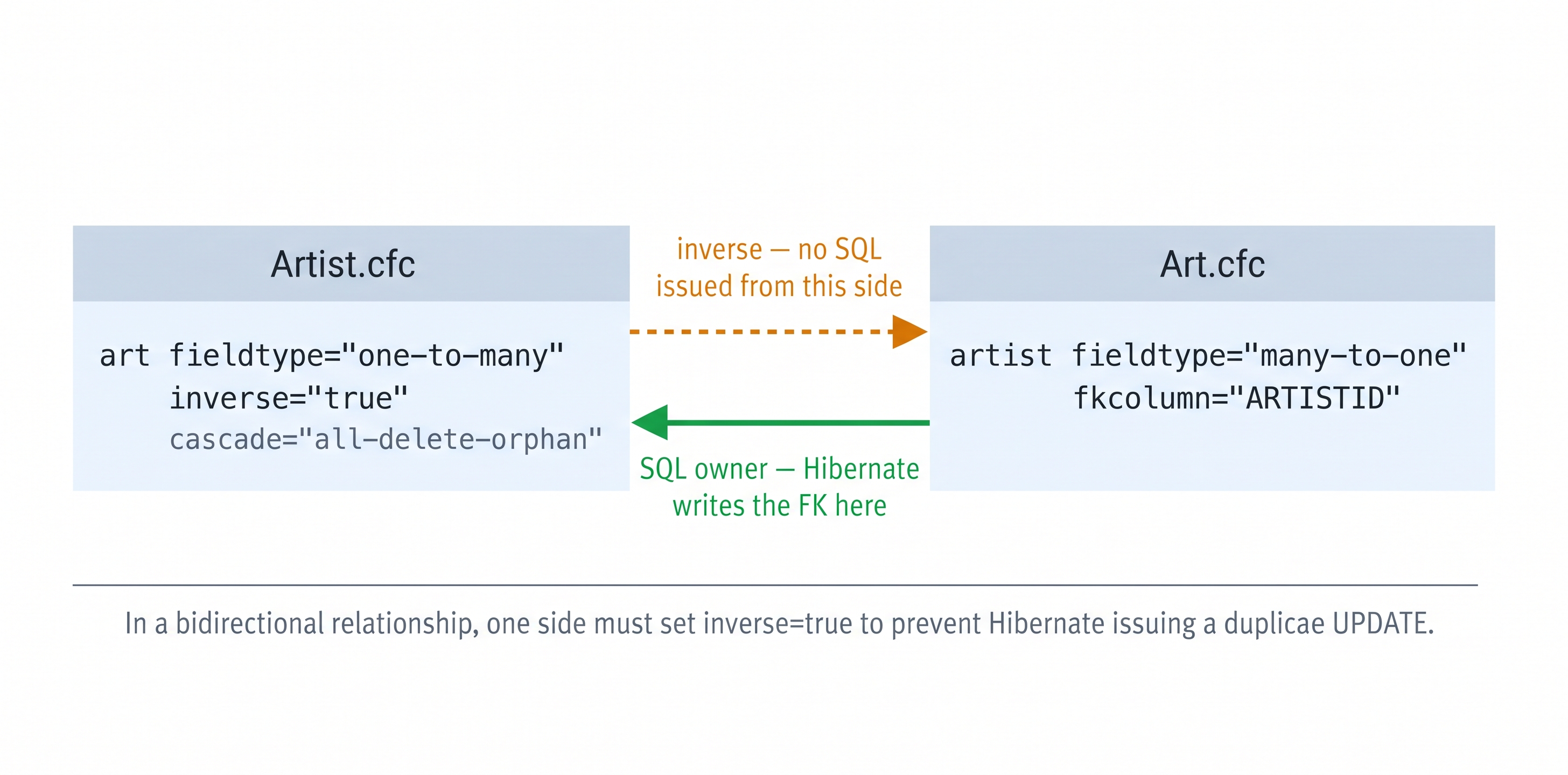
Setting inverse="true" on the one-to-many side prevents Hibernate from issuing a duplicate UPDATE to set the FK — the many-to-one side owns the SQL.
Activity 1 — Define a one-to-many relationship
Prerequisite — ORM must be enabled in Application.cfc
This activity requires ormenabled = true in Application.cfc. If you completed the ORM Basics lesson this is already in place. If not, or if the file was reset, run this first:
sudo tee /opt/coldfusion2025/cfusion/wwwroot/Application.cfc << 'EOF'
component {
  this.name       = "HelpdeskApp";
  this.datasource = "training_db";
  this.ormenabled = true;
  this.ormsettings = {
    datasource : "training_db",
    dbcreate   : "update",
    logsql     : false
  };
}
EOF
✏️ Using the IDE tab instead? Edit the file here
In the IDE tab, open Application.cfc at /opt/coldfusion2025/cfusion/wwwroot, select all (Ctrl+A), replace with the content below, and save with Ctrl+S:
component {
  this.name       = "HelpdeskApp";
  this.datasource = "training_db";
  this.ormenabled = true;
  this.ormsettings = {
    datasource : "training_db",
    dbcreate   : "update",
    logsql     : false
  };
}
Activity: Create Category.cfc and update Ticket.cfc so that each category has many tickets and each ticket belongs to one category.
Terminal tab:
sudo tee /opt/coldfusion2025/cfusion/wwwroot/Category.cfc << 'EOF'
component persistent="true" table="hd_categories" {

  property name="id"      fieldtype="id"       generator="native";
  property name="name"    ormtype="string";
  property name="tickets" fieldtype="one-to-many" cfc="Ticket"
                          fkcolumn="category_id" type="array"
                          cascade="all-delete-orphan" inverse="true";

}
EOF
✏️ Using the IDE tab instead? Create the file here
In the IDE tab, click File → Open Folder…, type /opt/coldfusion2025/cfusion/wwwroot and press Enter. Right-click in the Explorer panel → New File → name it Category.cfc, paste the content below, and save with Ctrl+S:
component persistent="true" table="hd_categories" {

  property name="id"      fieldtype="id"       generator="native";
  property name="name"    ormtype="string";
  property name="tickets" fieldtype="one-to-many" cfc="Ticket"
                          fkcolumn="category_id" type="array"
                          cascade="all-delete-orphan" inverse="true";

}
Terminal tab:
sudo tee /opt/coldfusion2025/cfusion/wwwroot/Ticket.cfc << 'EOF'
component persistent="true" table="hd_tickets" {

  property name="id"          fieldtype="id"         generator="native";
  property name="title"       ormtype="string";
  property name="description" ormtype="string";
  property name="status"      ormtype="string"       default="open";
  property name="priority"    ormtype="string"       default="medium";
  property name="userId"      column="USER_ID"       ormtype="integer"  notnull="false";
  property name="category"    fieldtype="many-to-one" cfc="Category"
                              fkcolumn="category_id";

}
EOF
✏️ Using the IDE tab instead? Edit the file here
In the IDE tab, open Ticket.cfc (already in /opt/coldfusion2025/cfusion/wwwroot), select all (Ctrl+A), replace with the content below, and save with Ctrl+S:
component persistent="true" table="hd_tickets" {

  property name="id"          fieldtype="id"         generator="native";
  property name="title"       ormtype="string";
  property name="description" ormtype="string";
  property name="status"      ormtype="string"       default="open";
  property name="priority"    ormtype="string"       default="medium";
  property name="userId"      column="USER_ID"       ormtype="integer"  notnull="false";
  property name="category"    fieldtype="many-to-one" cfc="Category"
                              fkcolumn="category_id";

}
Verify the relationship fieldtype is present:
grep -h "fieldtype" /opt/coldfusion2025/cfusion/wwwroot/Category.cfc \
                    /opt/coldfusion2025/cfusion/wwwroot/Ticket.cfc
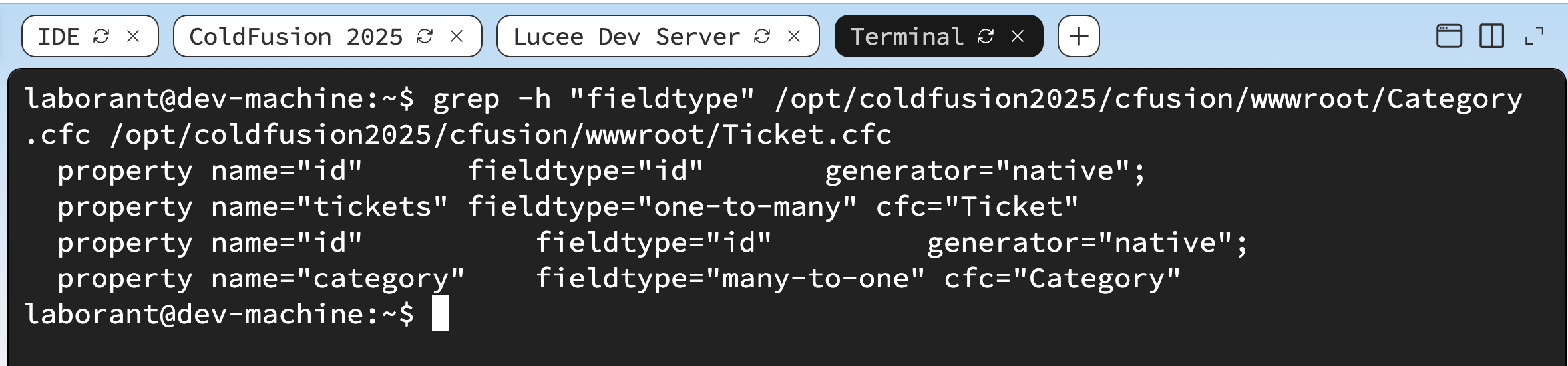
Category.cfc owns the collection; Ticket.cfc holds the foreign key column category_id.
Activity 2 — Test the relationship with a CFM page
Activity: Create orm_rel_test.cfm to reload ORM, create a category, add a ticket to it, and read the relationship back:
Terminal tab:
sudo tee /opt/coldfusion2025/cfusion/wwwroot/orm_rel_test.cfm << 'EOF'
<!DOCTYPE html>
<html lang="en">
<head>
  <meta charset="UTF-8">
  <title>ORM Relationship Test</title>
  <style>
    body  { font-family: sans-serif; max-width: 820px; margin: 2rem auto; }
    .box  { padding: 1rem; background: #f0f4ff; border-left: 4px solid #3b82d4; margin: 1rem 0; }
    table { width: 100%; border-collapse: collapse; margin-top: 1rem; }
    th    { background: #3b82d4; color: #fff; padding: .5rem .75rem; text-align: left; }
    td    { padding: .45rem .75rem; border-bottom: 1px solid #e5e7eb; }
  </style>
</head>
<body>
  <h1>ORM Relationship Test</h1>

  <cfscript>
    ORMReload();

    // Create a Category and a Ticket linked to it
    cat = EntityNew("Category");
    cat.setName("Hardware");
    EntitySave(cat);

    t = EntityNew("Ticket");
    t.setTitle("Monitor flickering");
    t.setStatus("open");
    t.setPriority("high");
    t.setUserId(1);
    t.setCategory(cat);
    EntitySave(t);

    ORMFlush();

    // Navigate the many-to-one: ticket → category
    loaded = EntityLoadByPK("Ticket", t.getId());
    catName = loaded.getCategory().getName();

    // Navigate the one-to-many: category → tickets
    tickets = EntityLoad("Ticket");
  </cfscript>

  <div class="box">
    <strong>Ticket category (many-to-one):</strong>
    <cfoutput>#encodeForHTML(catName)#</cfoutput>
  </div>

  <h2>All Tickets</h2>
  <table>
    <tr><th>ID</th><th>Title</th><th>Priority</th><th>Category</th></tr>
    <cfoutput>
      <cfloop array="#tickets#" index="tk">
        <tr>
          <td>#tk.getId()#</td>
          <td>#encodeForHTML(tk.getTitle())#</td>
          <td>#encodeForHTML(tk.getPriority())#</td>
          <td>
            <cfif isObject(tk.getCategory())>
              #encodeForHTML(tk.getCategory().getName())#
            <cfelse>
              —
            </cfif>
          </td>
        </tr>
      </cfloop>
    </cfoutput>
  </table>

</body>
</html>
EOF
✏️ Using the IDE tab instead? Create the file here
In the IDE tab, open the folder /opt/coldfusion2025/cfusion/wwwroot, right-click in the Explorer panel → New File → name it orm_rel_test.cfm, paste the content below, and save with Ctrl+S:
<!DOCTYPE html>
<html lang="en">
<head>
  <meta charset="UTF-8">
  <title>ORM Relationship Test</title>
  <style>
    body  { font-family: sans-serif; max-width: 820px; margin: 2rem auto; }
    .box  { padding: 1rem; background: #f0f4ff; border-left: 4px solid #3b82d4; margin: 1rem 0; }
    table { width: 100%; border-collapse: collapse; margin-top: 1rem; }
    th    { background: #3b82d4; color: #fff; padding: .5rem .75rem; text-align: left; }
    td    { padding: .45rem .75rem; border-bottom: 1px solid #e5e7eb; }
  </style>
</head>
<body>
  <h1>ORM Relationship Test</h1>

  <cfscript>
    ORMReload();

    // Create a Category and a Ticket linked to it
    cat = EntityNew("Category");
    cat.setName("Hardware");
    EntitySave(cat);

    t = EntityNew("Ticket");
    t.setTitle("Monitor flickering");
    t.setStatus("open");
    t.setPriority("high");
    t.setUserId(1);
    t.setCategory(cat);
    EntitySave(t);

    ORMFlush();

    // Navigate the many-to-one: ticket → category
    loaded = EntityLoadByPK("Ticket", t.getId());
    catName = loaded.getCategory().getName();

    // Navigate the one-to-many: category → tickets
    tickets = EntityLoad("Ticket");
  </cfscript>

  <div class="box">
    <strong>Ticket category (many-to-one):</strong>
    <cfoutput>#encodeForHTML(catName)#</cfoutput>
  </div>

  <h2>All Tickets</h2>
  <table>
    <tr><th>ID</th><th>Title</th><th>Priority</th><th>Category</th></tr>
    <cfoutput>
      <cfloop array="#tickets#" index="tk">
        <tr>
          <td>#tk.getId()#</td>
          <td>#encodeForHTML(tk.getTitle())#</td>
          <td>#encodeForHTML(tk.getPriority())#</td>
          <td>
            <cfif isObject(tk.getCategory())>
              #encodeForHTML(tk.getCategory().getName())#
            <cfelse>
              —
            </cfif>
          </td>
        </tr>
      </cfloop>
    </cfoutput>
  </table>

</body>
</html>
Open /orm_rel_test.cfm in the ColdFusion 2025 browser tab. You should see the ticket's category name loaded via the many-to-one association, and the full ticket list with their categories.
curl -s http://localhost:8500/orm_rel_test.cfm | grep -i "hardware"
⚠️ Error — "ORM is not configured for the current application"
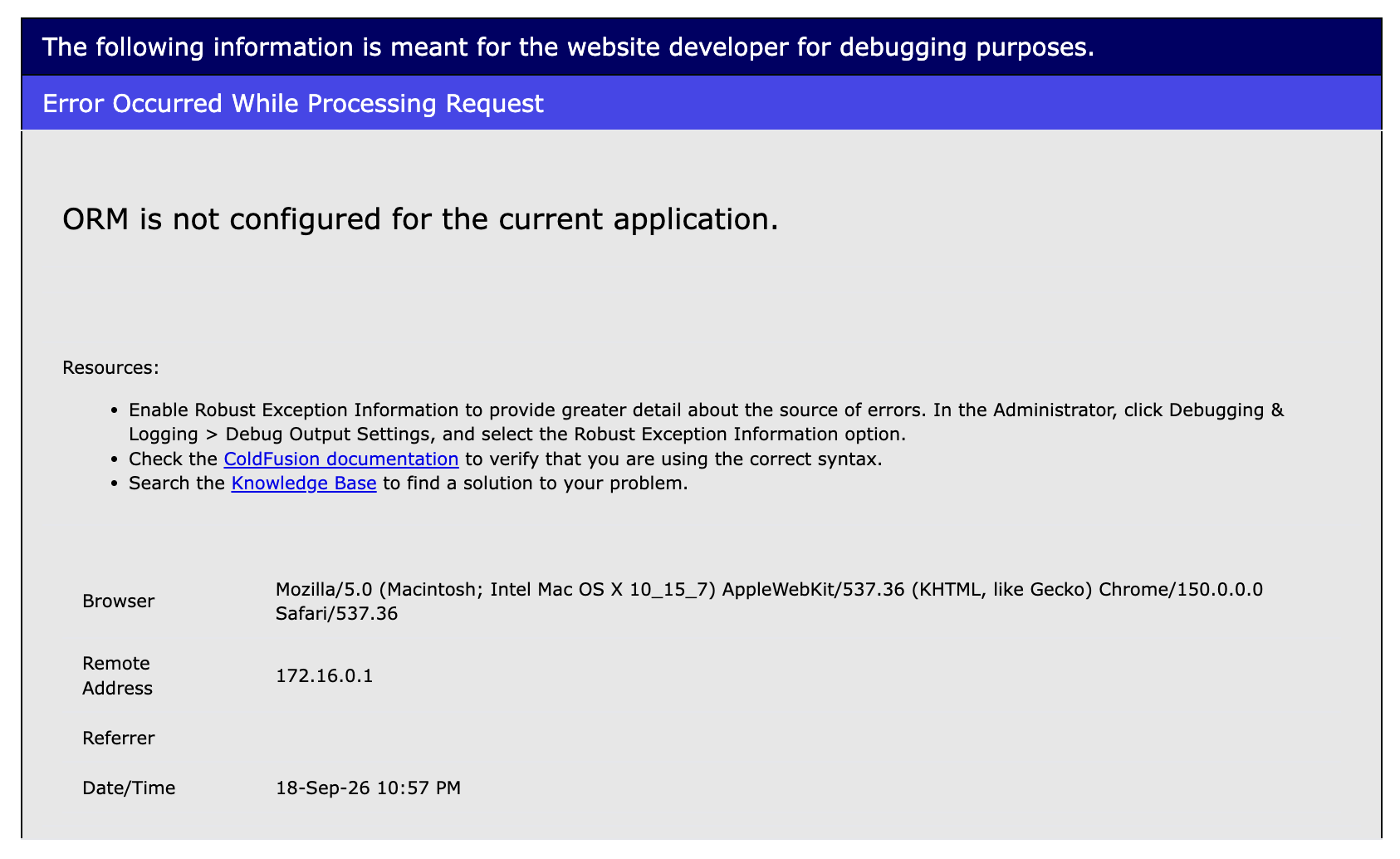
This error means Application.cfc is missing ormenabled = true — the fix is one command.
This error always means the same thing: Application.cfc in the wwwroot does not have this.ormenabled = true. It typically happens when:
- You skipped the ORM Basics lesson and
Application.cfcwas never updated - A previous activity overwrote
Application.cfcwithout the ORM settings - The lab environment was reset
Fix — run this in the Terminal tab:
sudo tee /opt/coldfusion2025/cfusion/wwwroot/Application.cfc << 'EOF'
component {
  this.name       = "HelpdeskApp";
  this.datasource = "training_db";
  this.ormenabled = true;
  this.ormsettings = {
    datasource : "training_db",
    dbcreate   : "update",
    logsql     : false
  };
}
EOF
✏️ Using the IDE tab instead? Edit the file here
In the IDE tab, open Application.cfc at /opt/coldfusion2025/cfusion/wwwroot, select all (Ctrl+A), replace with the content below, and save with Ctrl+S:
component {
  this.name       = "HelpdeskApp";
  this.datasource = "training_db";
  this.ormenabled = true;
  this.ormsettings = {
    datasource : "training_db",
    dbcreate   : "update",
    logsql     : false
  };
}
Then reload the page. The ORMReload() call at the top of orm_rel_test.cfm will reinitialise Hibernate automatically.
![[object Object]](/content/files/courses/ColdFusion-2025-Foundations-5151cba6/module-2/5.lesson-orm-relationships/__static__/browser-orm-rel-test-v1.png?v=1791349307475)
orm_rel_test.cfm — the many-to-one association navigated in both directions: ticket → category and category name resolved without a manual JOIN.
Key takeaways
| Topic | What to remember |
|---|---|
| entityname vs table | entityname is the name used in HQL and EntityLoad; table is the database table name — they can differ |
| column attribute | Use column="ARTISTID" on cfproperty to map a property to a differently-named database column |
| EntityNew | Creates an in-memory object — no SQL issued until EntitySave |
| EntitySave | Issues INSERT for new objects, UPDATE for dirty loaded objects — Hibernate's dirty-checking skips unchanged properties |
| EntityLoadByPK | Loads a single row by PK — returns null if not found, always check with isNull() |
| EntityDelete | Requires a managed entity loaded via EntityLoad/EntityLoadByPK — never pass a manually created object |
| ORMReload | Rebuilds the session factory — use only in development after changing entity mappings, never on every request |
| one-to-many FK | The foreign key lives in the target (child) table, not the parent |
| many-to-one FK | The foreign key lives in the source (child) table — it's the same FK, just seen from the other side |
| many-to-many link table | Use linktable, fkcolumn, and inversejoincolumn — the link table has no entity of its own |
| cascade="all-delete-orphan" | The standard choice for owned one-to-many collections — deletes children when they are removed from the collection |
| inverse="true" | Put on the one-to-many side of a bidirectional relationship to prevent Hibernate issuing a duplicate SQL UPDATE |
| lazy="true" (default) | Collections are not loaded until accessed — avoids N+1 when you don't need the related objects |
When all the checks above are green, this lesson is complete. Your progress is saved automatically — move straight on to the next lesson.
- Previous lesson
- ORM Basics — ColdFusion Hibernate ORM
- Next lesson
- Caching Strategies in ColdFusion