ORM Basics — ColdFusion Hibernate ORM
What is ColdFusion ORM (Object-Relational Mapping)?
ColdFusion ships with Hibernate as its built-in ORM layer. Mark a CFC as persistent="true" and ColdFusion automatically maps it to a database table, generates getter/setter methods, and provides CRUD functions — no SQL DDL required.
Why use ORM? Real advantages — and honest trade-offs
ORM adds a layer of abstraction. That layer has real benefits — but it is not free. Here is an honest breakdown:
What you genuinely gain:
| Advantage | Why it matters |
|---|---|
| Less boilerplate code | No manual INSERT, UPDATE, or SELECT id, title, status FROM... for every table. entitySave(t) handles it. |
| Schema kept in sync with code | With dbcreate="update", adding a property to your CFC adds the column to the table automatically — no ALTER TABLE scripts to manage. |
| Auto-generated getters/setters | ColdFusion generates getTitle(), setTitle(), etc. from property declarations — one less thing to write. |
| Object graph navigation | With relationships defined (one-to-many, many-to-one), you can write ticket.getAssignee().getEmail() instead of a JOIN query. |
| Database portability | Switch from H2 to MySQL or PostgreSQL by changing the datasource — the same entity code works unchanged. |
| First-level cache | Loading the same entity twice in one request hits the database only once — Hibernate returns the cached object automatically. |
What you do NOT gain (common misconceptions):
| Misconception | Reality |
|---|---|
| "ORM is faster than SQL" | It is not. ORM-generated SQL is often less optimal than hand-written SQL. For complex reports and aggregates, cfquery is faster and easier to tune. |
| "ORM gives you more control" | The opposite — ORM abstracts the SQL away. You have less direct control. Use cfquery when you need precise SQL. |
| "ORM makes data easier to find" | For simple lookups by PK or a single field, yes. For complex searches across multiple tables, HQL is harder to write and debug than SQL. |
| "ORM eliminates the need to know SQL" | No. You still need to understand SQL to debug ORM-generated queries, tune performance, and write HQL correctly. |
The honest summary:
ORM pays off when your application has a clear domain model — objects with state and behaviour (a Ticket that can be opened, assigned, resolved). It saves time on repetitive CRUD. It pays off less when your application is primarily report-driven — reading and aggregating data across many tables. Most real ColdFusion applications use both: ORM for domain objects, cfquery for reporting and complex queries.
What is Hibernate? (the engine behind ColdFusion ORM)

Hibernate — the most widely used Java ORM framework, bundled inside ColdFusion.
Hibernate is an open-source Java ORM (Object-Relational Mapping) framework originally released in 2001 by Gavin King. It is now maintained by Red Hat / JBoss and is one of the most widely deployed Java frameworks in the world. ColdFusion has bundled Hibernate since ColdFusion 9 (2009).
What Hibernate does: Hibernate sits between your application code and the database. Instead of writing SQL manually, you define how your objects (CFCs in ColdFusion's case) map to database tables, and Hibernate generates and executes the SQL for you — selects, inserts, updates, deletes, joins, and even schema creation.
Key Hibernate concepts you will encounter in ColdFusion:
| Concept | What it means |
|---|---|
| Entity | A CFC with persistent="true" — maps to one database table |
| Session | Hibernate's unit of work — CF manages this per-request automatically |
| HQL | Hibernate Query Language — SQL-like but uses entity/property names |
| Lazy loading | Related entities are loaded from the DB only when accessed |
| First-level cache | Hibernate caches loaded entities within a session — repeated entityLoadByPK calls for the same ID don't hit the DB twice |
| Dirty checking | Hibernate tracks changes to loaded entities — calling entitySave() only issues an UPDATE if properties actually changed |
Hibernate versions in ColdFusion:
| CF Version | Hibernate version |
|---|---|
| ColdFusion 9–10 | Hibernate 3.x |
| ColdFusion 11–2016 | Hibernate 4.x |
| ColdFusion 2018–2021 | Hibernate 5.x |
| ColdFusion 2023–2025 | Hibernate 6.x |
Why does the version matter? HQL syntax, lazy loading behaviour, and some mapping annotations changed between major versions. If you find older ColdFusion ORM examples online that behave differently, the Hibernate version is usually why.
Hibernate vs JPA:
Hibernate implements the JPA (Jakarta Persistence API) standard. JPA is the specification; Hibernate is the implementation. ColdFusion exposes Hibernate's native API (entityLoad, ORMExecuteQuery, etc.) rather than the raw JPA API, but under the hood it is all Hibernate.
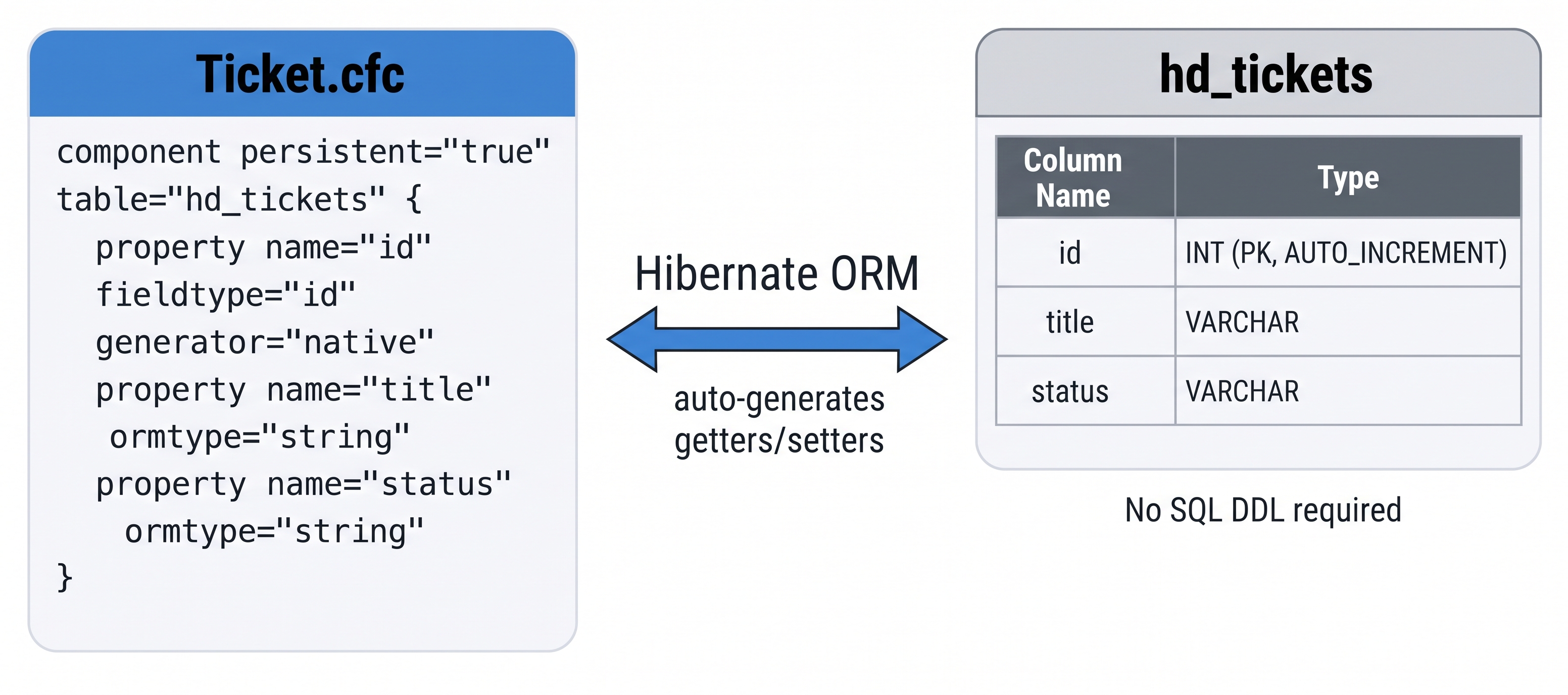
ColdFusion ORM maps persistent CFC properties directly to database columns via Hibernate — no SQL DDL required.
ORM vs cfquery — when to use each?
![[object Object]](/content/files/courses/ColdFusion-2025-Foundations-5151cba6/module-2/4.lesson-orm-basics/__static__/orm-vs-cfquery-decision-v1.png?v=1791349307475)
Use ORM for domain-model CRUD, cfquery for reporting and complex JOINs — they coexist naturally.
| Scenario | Recommendation |
|---|---|
| Simple CRUD on one table | ORM — less boilerplate |
| Complex multi-table JOIN | cfquery / queryExecute — more control |
| Reporting queries | cfquery — easier to optimise |
| Domain model with relationships | ORM — handles lazy loading |
Both can be mixed in the same application — use the right tool for each job.
Enable ORM in Application.cfc
ORM is disabled by default. Add this.ormenabled = true and an ormsettings struct to Application.cfc:
component {
  this.name       = "HelpdeskApp";
  this.datasource = "training_db";
  this.ormenabled = true;
  this.ormsettings = {
    datasource: "training_db",
    dbcreate:   "update",   // "none" | "create" | "update" | "dropcreate"
    logsql:     false
  };
}
dbcreate: "update" tells Hibernate to alter the schema to match your entities without dropping existing data. Use "none" in production once your schema is stable.
What do the dbcreate options mean?
| Value | What Hibernate does |
|---|---|
none | Never touches the schema — use in production |
create | Drops and recreates all tables on every app start |
update | Adds missing columns/tables, never drops existing data |
dropcreate | Drops everything and recreates — wipes all data on restart |
The safe rule for development: use update. It keeps your seed data intact while Hibernate adjusts the schema as you add properties. Switch to none before going to production.
Define an entity CFC
// Ticket.cfc
component persistent="true" table="hd_tickets" {
  property name="id"          fieldtype="id" generator="native";
  property name="title"       ormtype="string";
  property name="description" ormtype="string";
  property name="status"      ormtype="string"  default="open";
  property name="priority"    ormtype="string"  default="medium";
  property name="category"    ormtype="string";
}
Each property maps to a column. fieldtype="id" marks the primary key; generator="native" uses the database's auto-increment. ColdFusion generates getTitle(), setTitle(), etc. automatically.
CRUD operations
<cfscript>
  // CREATE
  t = new Ticket();
  t.setTitle("Keyboard not working");
  t.setStatus("open");
  t.setPriority("medium");
  t.setCategory("Hardware");
  entitySave(t);

  // READ — all open tickets
  tickets = entityLoad("Ticket", { status: "open" });

  // READ — single by primary key
  t = entityLoadByPK("Ticket", 1);

  // UPDATE
  t.setStatus("resolved");
  entitySave(t);

  // DELETE
  entityDelete(t);
</cfscript>
HQL queries
Hibernate Query Language is SQL-like but operates on entity names, not table names:
<cfscript>
  // Return all open tickets ordered by id
  openTickets = ORMExecuteQuery(
    "FROM Ticket WHERE status = :status ORDER BY id DESC",
    { status: "open" }
  );

  // Count high priority tickets (unique=true returns a scalar)
  total = ORMExecuteQuery(
    "SELECT COUNT(*) FROM Ticket WHERE priority = :p",
    { p: "high" },
    true
  );
</cfscript>
Hibernate Query Language (HQL) — deep dive
HQL is an object-oriented query language built into Hibernate. It looks like SQL but operates on persistent objects and their properties — never on raw table or column names. At runtime, Hibernate translates HQL into database-specific SQL automatically, so the same HQL works on H2, MySQL, PostgreSQL, and Oracle without changes.
What makes HQL different from SQL:
| SQL | HQL equivalent | What changed |
|---|---|---|
FROM student_table | FROM Student | Entity class name, not the table name |
WHERE student_table.dept_id = 1 | WHERE s.department = :dept | Property name, not the column name |
JOIN tickets t ON t.assignee = u.id | JOIN t.assignee a | Navigate object relationships — no ON clause needed |
Supported clauses and features:
| Feature | Example |
|---|---|
| Basic select | FROM Ticket |
| Filtering | FROM Ticket WHERE status = :s |
| Ordering | FROM Ticket ORDER BY createdAt DESC |
| Aggregates | SELECT COUNT(*), AVG(t.id) FROM Ticket t |
| GROUP BY / HAVING | SELECT t.priority, COUNT(*) FROM Ticket t GROUP BY t.priority HAVING COUNT(*) > 2 |
| Bulk UPDATE | UPDATE Ticket SET status = 'closed' WHERE priority = 'low' |
| Bulk DELETE | DELETE FROM Ticket WHERE status = 'resolved' AND priority = 'low' |
| Named parameters | WHERE id = :id — safe, reusable, no SQL injection |
| Polymorphic queries | Querying a parent entity returns instances of all mapped subclasses |
HQL in ColdFusion vs raw Hibernate (Java):
In Java/Hibernate you call session.createQuery(hql, Entity.class) directly. In ColdFusion, the same thing is done with ORMExecuteQuery():
<cfscript>
  // Equivalent to: session.createQuery("FROM Ticket t WHERE t.id = :id").setParameter("id", 1).getResultList()
  results = ORMExecuteQuery("FROM Ticket t WHERE t.id = :id", { id: 1 });

  // unique=true → equivalent to getSingleResult() — use for COUNT, MAX, etc.
  total = ORMExecuteQuery("SELECT COUNT(*) FROM Ticket", {}, true);
</cfscript>
HQL vs JPQL: HQL is a superset of JPQL (Jakarta Persistence Query Language — the JPA standard). Any valid JPQL query is valid HQL, but HQL adds extra features (bulk DML, non-standard functions, Hibernate-specific extensions) that JPQL does not support. If you see JPQL examples online, they will work in ColdFusion ORM unchanged.
Key things to remember:
- Always use named parameters (
:paramName) — never concatenate values into an HQL string - Entity and property names are case-sensitive —
FROM ticketwill fail if the entity is namedTicket - HQL operates on the Hibernate session — changes made via bulk UPDATE/DELETE bypass dirty-checking and first-level cache; call
ORMClearAllSession()after bulk operations if you continue loading entities in the same request
Activity 1 — Enable ORM in Application.cfc
Activity: In the Terminal tab, update Application.cfc to enable Hibernate ORM:
sudo tee /opt/coldfusion2025/cfusion/wwwroot/Application.cfc << 'EOF'
component {

  this.name       = "HelpdeskApp";
  this.datasource = "training_db";
  this.ormenabled = true;
  this.ormsettings = {
    datasource : "training_db",
    dbcreate   : "update",
    logsql     : false
  };

}
EOF
Verify ormenabled is present:
grep "ormenabled" /opt/coldfusion2025/cfusion/wwwroot/Application.cfc
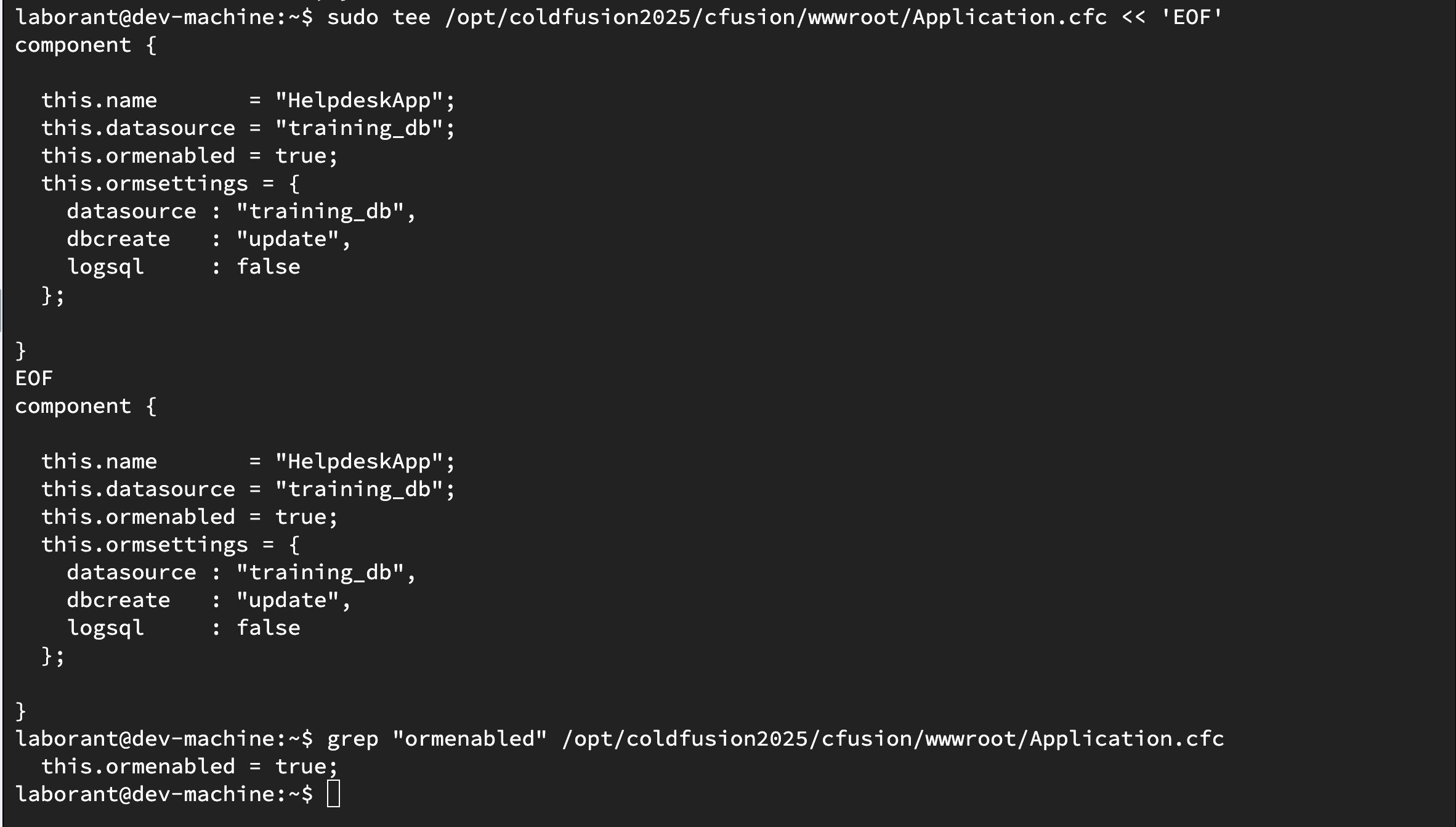
Application.cfc with ORM enabled — Hibernate will now manage entity mapping for this application.
Activity 2 — Create a persistent entity CFC
Activity: Create Ticket.cfc — a persistent entity mapped to the existing hd_tickets table:
sudo tee /opt/coldfusion2025/cfusion/wwwroot/Ticket.cfc << 'EOF'
component persistent="true" table="hd_tickets" {

  property name="id"          fieldtype="id"  generator="native";
  property name="title"       ormtype="string";
  property name="description" ormtype="string";
  property name="status"      ormtype="string" default="open";
  property name="priority"    ormtype="string" default="medium";
  property name="category"    ormtype="string";

}
EOF
Verify the file was created with persistent="true":
grep "persistent" /opt/coldfusion2025/cfusion/wwwroot/Ticket.cfc
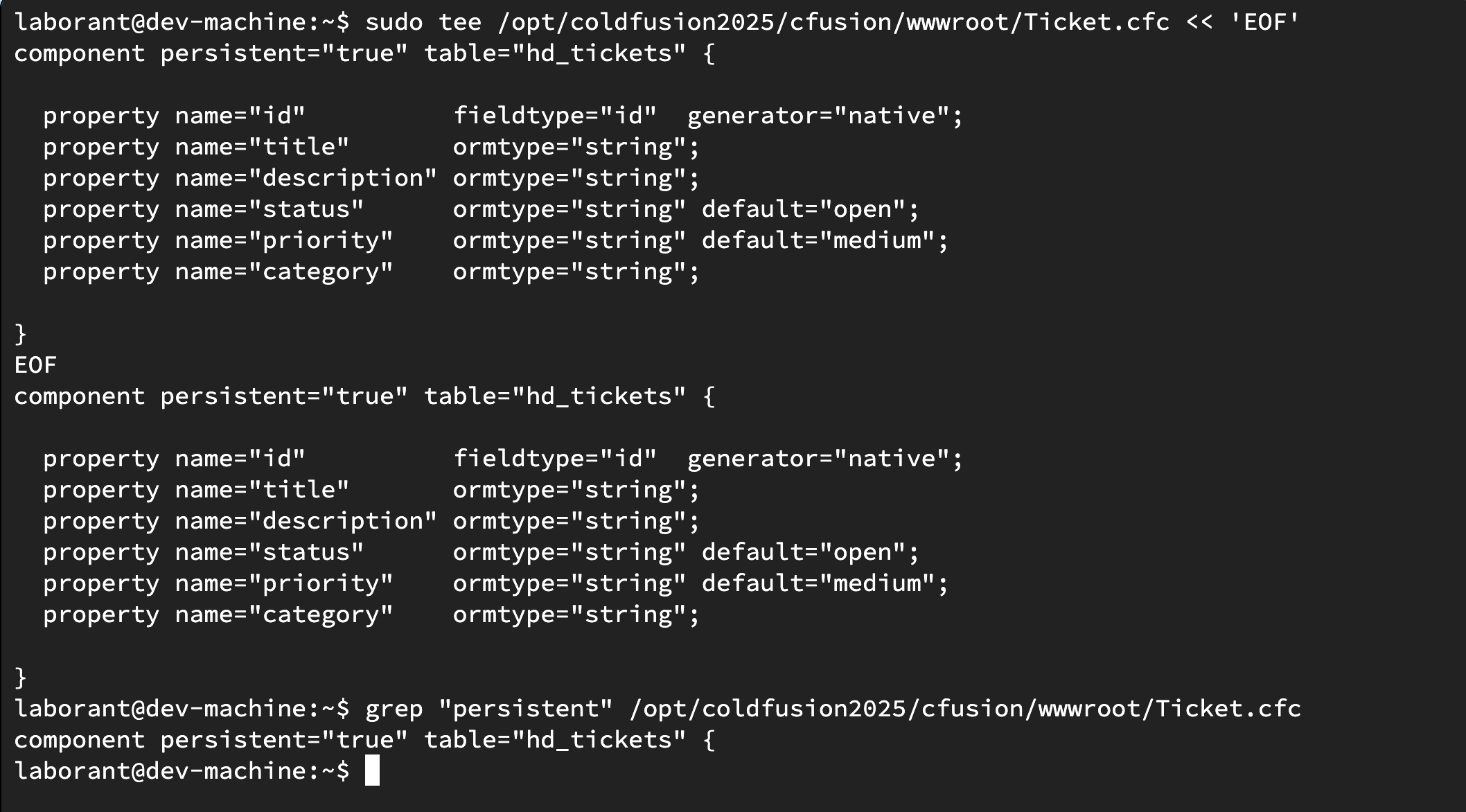
Ticket.cfc as a Hibernate entity — persistent="true" and table="hd_tickets" map it to the existing Help Desk table.
Activity 3 — Load entities and run an HQL query
Activity: Create orm_test.cfm — a page that uses entityLoad and ORMExecuteQuery to read tickets through Hibernate:
sudo tee /opt/coldfusion2025/cfusion/wwwroot/orm_test.cfm << 'EOF'
<!DOCTYPE html>
<html lang="en">
<head>
  <meta charset="UTF-8">
  <title>ORM Test</title>
  <style>
    body  { font-family: sans-serif; max-width: 820px; margin: 2rem auto; }
    table { width: 100%; border-collapse: collapse; margin-top: 1rem; }
    th    { background: #3b82d4; color: #fff; padding: .5rem .75rem; text-align: left; }
    td    { padding: .45rem .75rem; border-bottom: 1px solid #e5e7eb; }
    tr:hover td { background: #f7f8fa; }
    .result { padding: 1rem; background: #f0f4ff; border-left: 4px solid #3b82d4; margin: 1rem 0; }
  </style>
</head>
<body>
  <h1>ColdFusion Hibernate ORM — Test</h1>

  <cfscript>
    // entityLoad — load all open tickets via ORM
    openTickets = entityLoad("Ticket", { status: "open" }, "title asc");

    // ORMExecuteQuery — HQL count of high priority tickets
    highCount = ORMExecuteQuery(
      "SELECT COUNT(*) FROM Ticket WHERE priority = :p",
      { p: "high" },
      true
    );
  </cfscript>

  <div class="result">
    <strong>entityLoad:</strong> <cfoutput>#arrayLen(openTickets)#</cfoutput> open ticket(s) loaded via ORM<br>
    <strong>HQL COUNT:</strong> <cfoutput>#highCount#</cfoutput> high priority ticket(s)
  </div>

  <h2>Open Tickets (via entityLoad)</h2>
  <table>
    <tr><th>ID</th><th>Title</th><th>Priority</th><th>Category</th></tr>
    <cfoutput>
      <cfloop array="#openTickets#" index="t">
        <tr>
          <td>#t.getId()#</td>
          <td>#encodeForHTML(t.getTitle())#</td>
          <td>#encodeForHTML(t.getPriority())#</td>
          <td>#encodeForHTML(t.getCategory())#</td>
        </tr>
      </cfloop>
    </cfoutput>
  </table>

</body>
</html>
EOF
Open /orm_test.cfm in the ColdFusion 2025 browser tab. You should see a count of open tickets loaded by Hibernate and the high priority count from HQL.
curl -s http://localhost:8500/orm_test.cfm | grep -i "entityload"
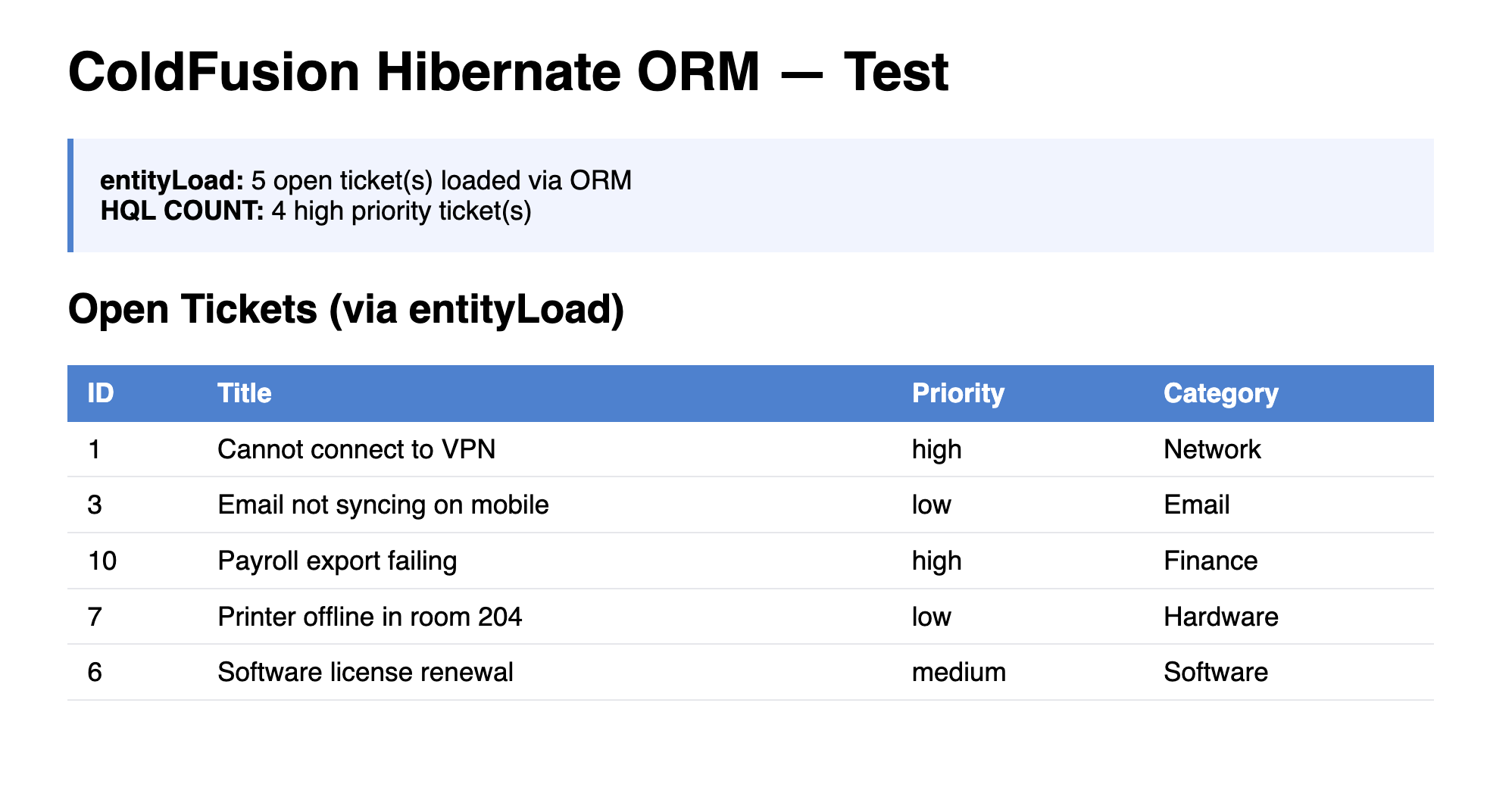
orm_test.cfm — tickets loaded via entityLoad and counted via HQL ORMExecuteQuery.
When all the checks above are green, this lesson is complete. Your progress is saved automatically — move straight on to the next lesson.
- Previous lesson
- SQL with cfquery & queryParam