Integration via Web Services (SOAP)
What is SOAP?
SOAP (Simple Object Access Protocol) is an XML-based messaging protocol for calling remote services over HTTP. Every request and response is wrapped in a SOAP envelope — an XML document with a defined structure. The service contract is described in a WSDL (Web Services Description Language) document that lists all available operations, their input/output parameters, and data types.
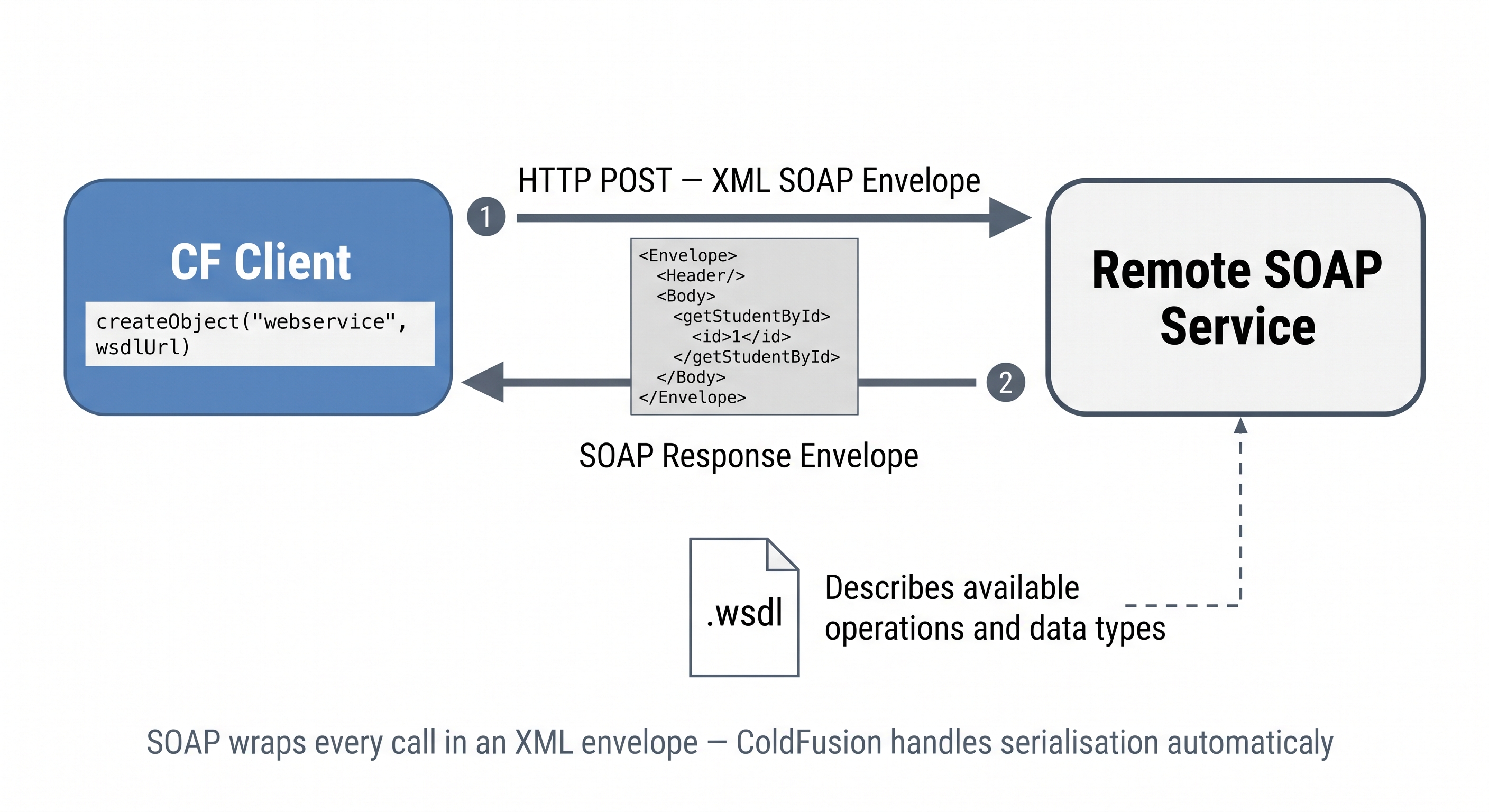
SOAP wraps every call in an XML envelope — ColdFusion handles the serialisation automatically via createObject("webservice", wsdlUrl).
While REST APIs dominate new development, SOAP is still widely used in enterprise systems — banking, government, ERP platforms, and healthcare systems commonly expose SOAP endpoints. ColdFusion has had first-class SOAP support since version 6.
SOAP vs REST — what actually differs and when to use each
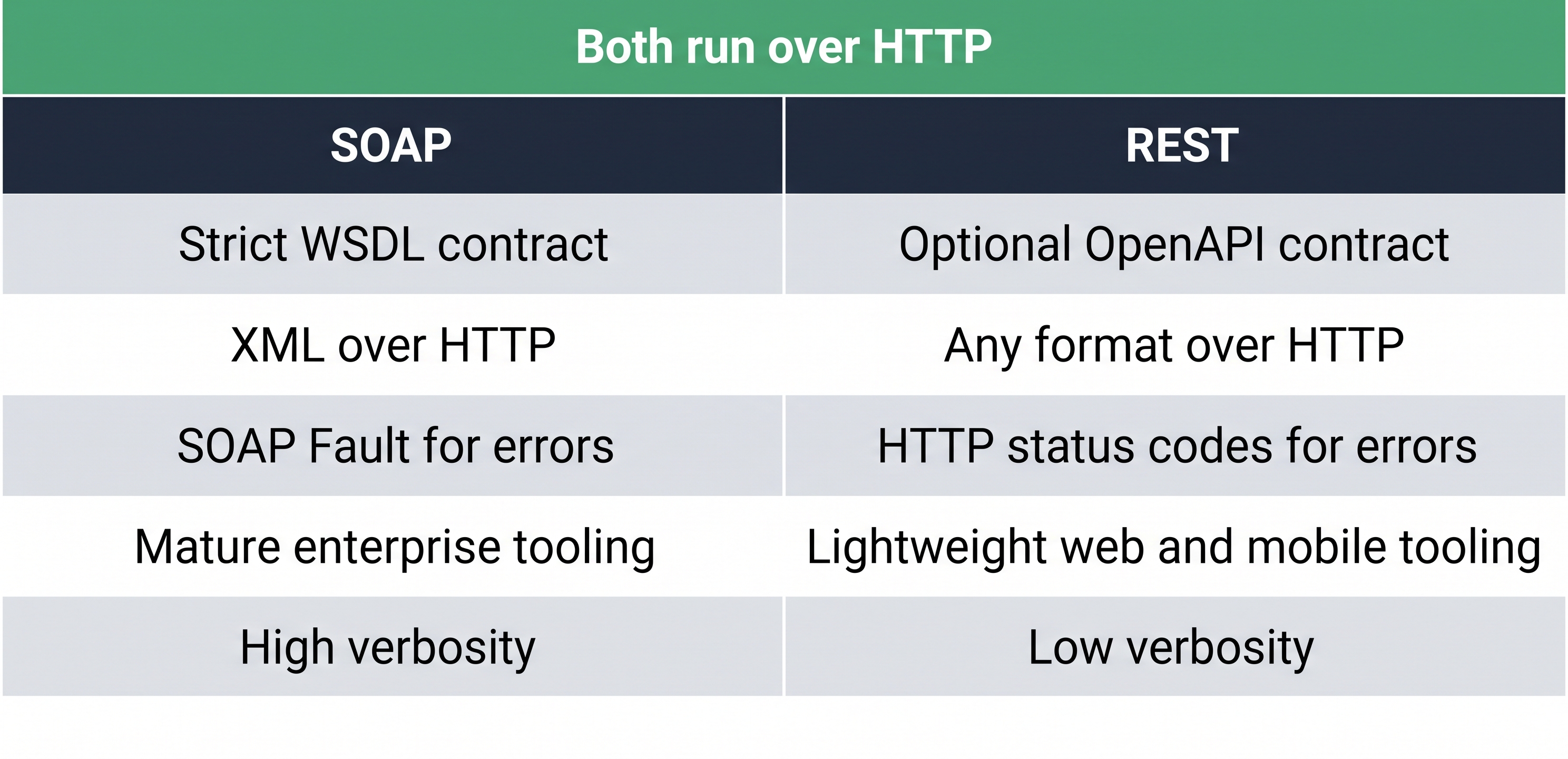
SOAP and REST both use HTTP — the key differences are contract strictness, payload format, and ecosystem.
| Aspect | SOAP | REST |
|---|---|---|
| Protocol | XML over HTTP/HTTPS | Any format (usually JSON) over HTTP |
| Contract | WSDL — strict, machine-readable | OpenAPI/Swagger — optional |
| Error handling | SOAP Fault XML envelope | HTTP status codes (4xx, 5xx) |
| Tooling | Mature enterprise IDEs, WS-Security | Lightweight, any HTTP client |
| Verbosity | High — XML wrapping adds overhead | Low — JSON is compact |
| When to use | Legacy enterprise integration, banking, healthcare | New APIs, mobile, web, public APIs |
The practical rule: if you are integrating with a system built before 2010, expect SOAP. If you are building something new, use REST. ColdFusion handles both equally well.
What about gRPC? ColdFusion has no native gRPC support. gRPC uses HTTP/2 and binary Protocol Buffers — outside CF's built-in web service layer. If you need to call a gRPC service from ColdFusion, put a REST gateway in front of it (gRPC-Gateway, Envoy) and call that via cfhttp. For this course, gRPC is out of scope.
How ColdFusion consumes a SOAP service
ColdFusion reads the WSDL and generates a proxy object automatically. Every method call on the proxy is serialised into a SOAP envelope and dispatched over HTTP — you never write XML manually:
What does "serialised" mean? Think of it like packing a suitcase. Your ColdFusion variables — strings, numbers, structs — exist in memory in a form only your server understands. Serialising means converting them into a standardised text format (XML, in SOAP's case) that any other system on any platform can read and unpack. The remote server receives that XML, unpacks it back into its own variables, runs the function, then serialises its response back to you the same way. You write normal ColdFusion; the serialisation/deserialisation happens invisibly in between.
<cfscript>
  // Create proxy from WSDL URL — CF parses the contract automatically
  ws = createObject("webservice", "http://example.com/StudentService?wsdl");

  // Call a remote method — CF handles XML serialisation
  result = ws.getStudentById(1);

  writeOutput("Name: " & result.name);
</cfscript>
The <cfinvoke> tag is the tag-syntax alternative:
<cfinvoke
  webservice = "http://example.com/StudentService?wsdl"
  method     = "getAll"
  returnvariable = "students">
</cfinvoke>

<cfdump var="#students#">
WSDL caching — why the first call is slow
The first time ColdFusion connects to a WSDL URL it downloads the contract, parses it, and generates a Java proxy class — this can take 2–5 seconds. Subsequent calls use the cached proxy and are fast.
ColdFusion caches WSDL proxies in the CF temp directory. To force a refresh (e.g. after the remote service updates its contract):
<cfscript>
  // refreshWSDL=true forces re-download and regeneration of the proxy
  ws = createObject("webservice", "http://example.com/service?wsdl", {refreshWSDL: true});
</cfscript>
In production, avoid refreshWSDL: true on every request — only use it when you know the contract has changed.
Exposing a CFC as a SOAP web service
Any CFC function marked access="remote" is automatically exposed as a SOAP web service by ColdFusion. No configuration required — ColdFusion generates the WSDL automatically:
// TicketService.cfc
component displayname="TicketService" style="document" {

  remote struct function getTicketById(required numeric id) output="false" {
    var q = queryExecute(
      "SELECT id, title, status, priority FROM hd_tickets WHERE id = :id",
      { id: { value: arguments.id, cfsqltype: "cf_sql_integer" } },
      { datasource: "training_db" }
    );
    if (q.recordCount == 0) { return { error: "not found" }; }
    return {
      id       : q.id,
      title    : q.title,
      status   : q.status,
      priority : q.priority
    };
  }

}
ColdFusion auto-generates the WSDL — append ?wsdl to the CFC URL:
http://localhost:8500/TicketService.cfc?wsdl
And consume it from any SOAP client — including another ColdFusion application:
<cfscript>
  ws     = createObject("webservice", "http://localhost:8500/TicketService.cfc?wsdl");
  ticket = ws.getTicketById(1);
  writeOutput("Ticket: " & ticket.title & " — " & ticket.status);
</cfscript>
WSDL deep dive — what the contract file actually contains
WSDL (Web Services Description Language) is an XML document that fully describes a SOAP web service — every operation, every parameter, every data type, and every endpoint URL. It is the machine-readable contract that allows any SOAP client (Java, .NET, Python, ColdFusion) to auto-generate a proxy without you writing a single line of binding code.
The five key sections of a WSDL document:
| Section | XML element | What it defines |
|---|---|---|
| Types | <types> | XML Schema (XSD) definitions of all input/output data structures |
| Messages | <message> | Named sets of typed parameters — one per operation input/output |
| Port Type | <portType> | The interface — lists all available operations and their messages |
| Binding | <binding> | How operations are transmitted — SOAP encoding style, HTTP verb |
| Service | <service> | The actual endpoint URL where the service is reachable |
A minimal WSDL for getTicketById looks like this:
<?xml version="1.0" encoding="UTF-8"?>
<wsdl:definitions
  name="TicketService"
  targetNamespace="http://localhost:8500/TicketService.cfc"
  xmlns:wsdl="http://schemas.xmlsoap.org/wsdl/"
  xmlns:soap="http://schemas.xmlsoap.org/wsdl/soap/"
  xmlns:xsd="http://www.w3.org/2001/XMLSchema">

  <!-- 1. Types — data structure definitions -->
  <wsdl:types>
    <xsd:schema>
      <xsd:element name="getTicketByIdRequest">
        <xsd:complexType>
          <xsd:sequence>
            <xsd:element name="id" type="xsd:int"/>
          </xsd:sequence>
        </xsd:complexType>
      </xsd:element>
    </xsd:schema>
  </wsdl:types>

  <!-- 2. Messages — named parameter sets -->
  <wsdl:message name="getTicketByIdRequest">
    <wsdl:part name="parameters" element="tns:getTicketByIdRequest"/>
  </wsdl:message>
  <wsdl:message name="getTicketByIdResponse">
    <wsdl:part name="return" type="xsd:anyType"/>
  </wsdl:message>

  <!-- 3. Port Type — the interface (list of operations) -->
  <wsdl:portType name="TicketServicePortType">
    <wsdl:operation name="getTicketById">
      <wsdl:input  message="tns:getTicketByIdRequest"/>
      <wsdl:output message="tns:getTicketByIdResponse"/>
    </wsdl:operation>
  </wsdl:portType>

  <!-- 4. Binding — SOAP transport details -->
  <wsdl:binding name="TicketServiceBinding" type="tns:TicketServicePortType">
    <soap:binding style="document" transport="http://schemas.xmlsoap.org/soap/http"/>
    <wsdl:operation name="getTicketById">
      <soap:operation soapAction="getTicketById"/>
    </wsdl:operation>
  </wsdl:binding>

  <!-- 5. Service — endpoint URL -->
  <wsdl:service name="TicketService">
    <wsdl:port name="TicketServicePort" binding="tns:TicketServiceBinding">
      <soap:address location="http://localhost:8500/TicketService.cfc"/>
    </wsdl:port>
  </wsdl:service>

</wsdl:definitions>
WSDL 1.1 vs WSDL 2.0: ColdFusion generates WSDL 1.1 — the version used by virtually all enterprise SOAP systems. WSDL 2.0 was published in 2007 but never widely adopted. If you see a WSDL in the wild, it is almost certainly 1.1.
How ColdFusion generates it:
When you append ?wsdl to a CFC URL, ColdFusion inspects all remote functions using Java reflection, maps CFML types to XSD types (numeric → xsd:int, string → xsd:string, struct → xsd:anyType), and assembles the five sections above automatically. You never write WSDL by hand — ColdFusion owns it.
Practical tip — reading a WSDL:
When integrating with a third-party SOAP service, always read the <wsdl:portType> section first — it lists every available operation. Then check <wsdl:types> to understand the input/output structures. The <wsdl:service> section gives you the endpoint URL to pass to createObject("webservice", ...).
Can you create a WSDL from scratch — and should you?
Yes, but you almost never should. WSDL is verbose, strict XML with interdependent sections — a single typo in a namespace or a mismatched message name breaks the entire contract. Every major platform generates it automatically:
- ColdFusion — append
?wsdlto any CFC withremotefunctions - Java (JAX-WS) —
wsgengenerates WSDL from annotated classes - .NET (WCF) — generates WSDL from
[ServiceContract]interfaces
The only valid reason to write WSDL by hand is contract-first design — defining the interface before any implementation exists so multiple teams (Java backend, CF consumer, .NET client) can build against a shared contract simultaneously. Even then, use a tool like SoapUI or Apache CXF that validates as you type.
Code-first vs contract-first:
| Approach | When to use | Risk |
|---|---|---|
| Code-first (CF generates WSDL) | Internal services, quick integrations | WSDL changes silently when you rename a function |
| Contract-first (WSDL written first) | Multi-team enterprise integration, public APIs | More upfront work, but the contract is stable |
For ColdFusion and most CF projects — code-first is the right default. Let CF generate it.
WSDL security risks and how to harden your SOAP services
A public ?wsdl URL is an attack map — it tells anyone every operation name, parameter name, and data type your service exposes. Key risks:
| Risk | What it means |
|---|---|
| Service enumeration | Attackers see your entire API surface — every function and its parameter types |
| XXE (XML External Entity) | Malicious <!DOCTYPE> in a SOAP envelope tricks the XML parser into reading local files (/etc/passwd) or making internal HTTP requests |
| WSDL injection | A cached or proxied WSDL is tampered with to redirect operations to a malicious endpoint |
| Verbose SOAP Faults | Default error responses include Java stack traces, class names, and server paths |
| Unauthenticated WSDL | The contract is publicly accessible even when operations require auth — exposing your API design to anyone |
| Accidental remote exposure | Any CFC with access="remote" in wwwroot becomes a SOAP endpoint — a forgotten annotation exposes internal logic |
Hardening checklist for CF SOAP services:
✅ Restrict ?wsdl to internal IPs only — via CF Admin or web server (nginx/Apache) rules
✅ Require authentication before serving operations — use Application.cfc onRequestStart
✅ Only mark functions access="remote" that genuinely need to be public
✅ Never return raw exception detail in SOAP Fault — catch errors and return a generic message
✅ Use HTTPS — SOAP envelopes carry all data as plaintext XML over HTTP
✅ Disable XXE in the CF JVM — add -Djavax.xml.parsers.SAXParserFactory to jvm.config
Tools to validate and test SOAP services:
| Tool | What it does |
|---|---|
| SoapUI | Industry standard — imports WSDL, fires test requests, inspects raw envelopes |
| Postman | Imports WSDL and generates a full test collection |
| Burp Suite | Intercepts and modifies SOAP envelopes in transit — has a built-in WSDL parser |
| WSFuzzer | Fuzzes SOAP operations with malformed inputs to find parser and injection bugs |
Apache CXF wsdlvalidator | CLI tool — validates WSDL against WS-I Basic Profile |
This lesson uses Adobe ColdFusion 2025 (port 8500). SOAP web service support (createObject("webservice", ...), auto-generated WSDL, <cfinvoke webservice=...>) is a mature, well-tested feature of Adobe CF and is the recommended engine for SOAP work.
Lucee 7 also supports SOAP but its implementation is less complete — some edge cases in WSDL generation and complex type mapping behave differently. For enterprise SOAP integration, Adobe CF is the safer choice.
Quick reference — which port is which:
| Engine | Port | Use for |
|---|---|---|
| Adobe ColdFusion 2025 | 8500 | This lesson — SOAP services |
| Lucee 7 / CommandBox | 8888 | Previous lesson — CFConfig, CLI admin |
All files in this lesson go into /opt/coldfusion2025/cfusion/wwwroot/ and are accessed via the ColdFusion 2025 browser tab.
Activity 1 — Create a SOAP consumer page
What you are building: soap_consumer.cfm — a page that calls a public SOAP web service and displays the result. We use a local SOAP call (CF calling itself via TicketService.cfc) so the exercise works without internet access.
File to create: /opt/coldfusion2025/cfusion/wwwroot/student/soap_consumer.cfm
Make sure the database is seeded before running this activity
The TicketService.cfc queries the hd_tickets table in training_db. If the database has not been seeded yet, the SOAP call will return a database error.
Seed the database now — open the ColdFusion 2025 tab and visit:
http://localhost:8500/seed-db.cfm
You should see a success message confirming the tables and sample data were created. It is safe to run multiple times — it skips rows that already exist.
First, create TicketService.cfc — the CFC that will be exposed as a SOAP service.
Terminal tab:
sudo tee /opt/coldfusion2025/cfusion/wwwroot/TicketService.cfc << 'EOF'
component displayname="TicketService" style="document" {

  remote struct function getTicketById(required numeric id) output="false" {
    var q = queryExecute(
      "SELECT id, title, status, priority FROM hd_tickets WHERE id = :id",
      { id: { value: arguments.id, cfsqltype: "cf_sql_integer" } },
      { datasource: "training_db" }
    );
    if (q.recordCount == 0) { return { error: "not found" }; }
    return {
      id       : q.id,
      title    : q.title,
      status   : q.status,
      priority : q.priority
    };
  }

  remote array function getAllTickets() output="false" {
    var q = queryExecute(
      "SELECT id, title, status, priority FROM hd_tickets ORDER BY id",
      {},
      { datasource: "training_db" }
    );
    var result = [];
    for (var row in q) {
      arrayAppend(result, {
        id       : row.id,
        title    : row.title,
        status   : row.status,
        priority : row.priority
      });
    }
    return result;
  }

}
EOF
✏️ Using the IDE tab instead? Create the file here
In the IDE tab, click File → Open Folder…, type /opt/coldfusion2025/cfusion/wwwroot and press Enter. Right-click in the Explorer panel → New File → name it TicketService.cfc, paste the content below, and save with Ctrl+S:
component displayname="TicketService" style="document" {

  remote struct function getTicketById(required numeric id) output="false" {
    var q = queryExecute(
      "SELECT id, title, status, priority FROM hd_tickets WHERE id = :id",
      { id: { value: arguments.id, cfsqltype: "cf_sql_integer" } },
      { datasource: "training_db" }
    );
    if (q.recordCount == 0) { return { error: "not found" }; }
    return {
      id       : q.id,
      title    : q.title,
      status   : q.status,
      priority : q.priority
    };
  }

  remote array function getAllTickets() output="false" {
    var q = queryExecute(
      "SELECT id, title, status, priority FROM hd_tickets ORDER BY id",
      {},
      { datasource: "training_db" }
    );
    var result = [];
    for (var row in q) {
      arrayAppend(result, {
        id       : row.id,
        title    : row.title,
        status   : row.status,
        priority : row.priority
      });
    }
    return result;
  }

}
Now create the consumer page.
Terminal tab:
sudo tee /opt/coldfusion2025/cfusion/wwwroot/student/soap_consumer.cfm << 'EOF'
<!DOCTYPE html>
<html lang="en">
<head>
  <meta charset="UTF-8">
  <title>SOAP Consumer Demo</title>
  <style>
    body  { font-family: sans-serif; max-width: 860px; margin: 2rem auto; }
    table { width: 100%; border-collapse: collapse; margin-top: 1rem; }
    th    { background: #3b82d4; color: #fff; padding: .5rem .75rem; text-align: left; }
    td    { padding: .45rem .75rem; border-bottom: 1px solid #e5e7eb; }
    .box  { padding: 1rem; background: #f0f4ff; border-left: 4px solid #3b82d4; margin: 1rem 0; }
  </style>
</head>
<body>
  <h1>SOAP Web Service Consumer</h1>

  <cfscript>
    // Create proxy from the local TicketService WSDL
    ws = createObject("webservice", "http://localhost:8500/TicketService.cfc?wsdl");

    // Call getTicketById — SOAP request/response handled by ColdFusion
    ticket = ws.getTicketById(1);

    // Call getAllTickets
    allTickets = ws.getAllTickets();
  </cfscript>

  <div class="box">
    <strong>SOAP call — getTicketById(1):</strong><br>
    <cfoutput>
      ID: #ticket.id# | Title: #encodeForHTML(ticket.title)# |
      Status: #encodeForHTML(ticket.status)# | Priority: #encodeForHTML(ticket.priority)#
    </cfoutput>
  </div>

  <h2>getAllTickets() — full ticket list via SOAP</h2>
  <table>
    <tr><th>ID</th><th>Title</th><th>Status</th><th>Priority</th></tr>
    <cfoutput>
      <cfloop array="#allTickets#" index="t">
        <tr>
          <td>#t.id#</td>
          <td>#encodeForHTML(t.title)#</td>
          <td>#encodeForHTML(t.status)#</td>
          <td>#encodeForHTML(t.priority)#</td>
        </tr>
      </cfloop>
    </cfoutput>
  </table>

</body>
</html>
EOF
✏️ Using the IDE tab instead? Create the file here
In the IDE tab, open the folder /opt/coldfusion2025/cfusion/wwwroot/student (click File → Open Folder… if needed — create the folder if VS Code asks). Right-click in the Explorer panel → New File → name it soap_consumer.cfm, paste the content below, and save with Ctrl+S:
<!DOCTYPE html>
<html lang="en">
<head>
  <meta charset="UTF-8">
  <title>SOAP Consumer Demo</title>
  <style>
    body  { font-family: sans-serif; max-width: 860px; margin: 2rem auto; }
    table { width: 100%; border-collapse: collapse; margin-top: 1rem; }
    th    { background: #3b82d4; color: #fff; padding: .5rem .75rem; text-align: left; }
    td    { padding: .45rem .75rem; border-bottom: 1px solid #e5e7eb; }
    .box  { padding: 1rem; background: #f0f4ff; border-left: 4px solid #3b82d4; margin: 1rem 0; }
  </style>
</head>
<body>
  <h1>SOAP Web Service Consumer</h1>

  <cfscript>
    // Create proxy from the local TicketService WSDL
    ws = createObject("webservice", "http://localhost:8500/TicketService.cfc?wsdl");

    // Call getTicketById — SOAP request/response handled by ColdFusion
    ticket = ws.getTicketById(1);

    // Call getAllTickets
    allTickets = ws.getAllTickets();
  </cfscript>

  <div class="box">
    <strong>SOAP call — getTicketById(1):</strong><br>
    <cfoutput>
      ID: #ticket.id# | Title: #encodeForHTML(ticket.title)# |
      Status: #encodeForHTML(ticket.status)# | Priority: #encodeForHTML(ticket.priority)#
    </cfoutput>
  </div>

  <h2>getAllTickets() — full ticket list via SOAP</h2>
  <table>
    <tr><th>ID</th><th>Title</th><th>Status</th><th>Priority</th></tr>
    <cfoutput>
      <cfloop array="#allTickets#" index="t">
        <tr>
          <td>#t.id#</td>
          <td>#encodeForHTML(t.title)#</td>
          <td>#encodeForHTML(t.status)#</td>
          <td>#encodeForHTML(t.priority)#</td>
        </tr>
      </cfloop>
    </cfoutput>
  </table>

</body>
</html>
Verify both files exist:
grep -i "cfinvoke\|createObject" /opt/coldfusion2025/cfusion/wwwroot/student/soap_consumer.cfm
Open /student/soap_consumer.cfm in the ColdFusion 2025 browser tab — you should see the ticket loaded via SOAP and the full ticket list.
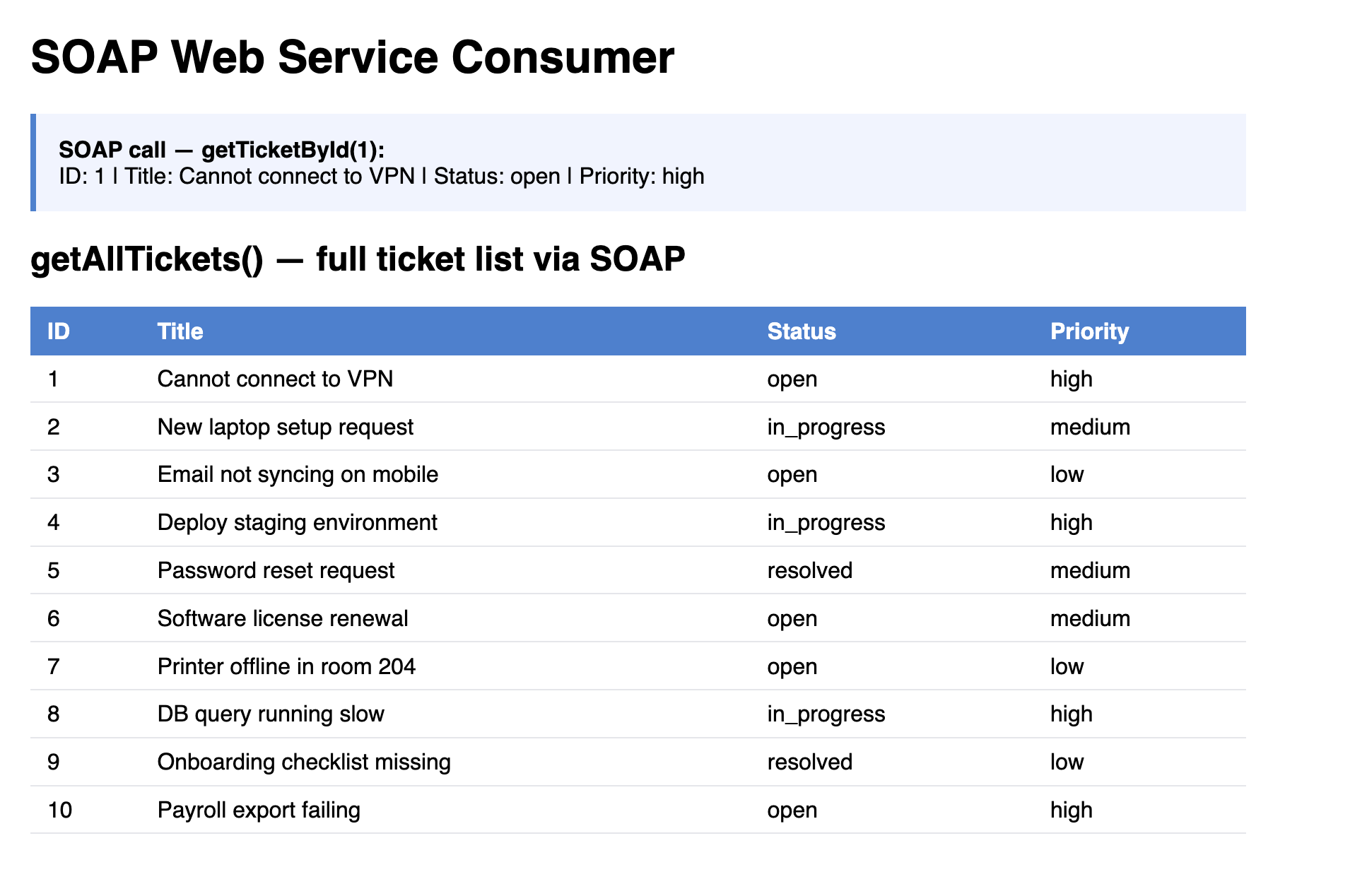
soap_consumer.cfm — tickets loaded via SOAP proxy calls to TicketService.cfc running on the same CF instance.
Activity 2 — Verify the WSDL is accessible
What this proves: When ColdFusion sees ?wsdl appended to a CFC URL it generates a complete WSDL document describing all remote functions. This is the contract that any SOAP client — Java, .NET, Python, or another CF app — uses to know what operations are available and what parameters they accept.
In the Terminal tab, confirm the WSDL returns HTTP 200:
curl -s -o /dev/null -w "HTTP %{http_code}\n" "http://localhost:8500/TicketService.cfc?wsdl"
Then inspect the first few lines of the generated WSDL:
curl -s "http://localhost:8500/TicketService.cfc?wsdl" | head -20
You should see an XML document starting with <?xml and containing <wsdl:definitions — ColdFusion generated this automatically from your CFC's remote function signatures.
Here is what the output means — the five sections CF wrote for you, trimmed and annotated:
<?xml version="1.0" encoding="UTF-8"?>

<!-- ① Root element — names the service and declares XML namespaces.
     targetNamespace is the unique identifier for THIS service contract. -->
<wsdl:definitions name="TicketService"
  targetNamespace="http://localhost:8500/TicketService.cfc"
  xmlns:wsdl="http://schemas.xmlsoap.org/wsdl/"
  xmlns:soap="http://schemas.xmlsoap.org/wsdl/soap/"
  xmlns:xsd="http://www.w3.org/2001/XMLSchema">

  <!-- ② Types — XSD schema for every input and output data structure.
       CF mapped your CFML types: numeric → xsd:int, struct → xsd:anyType.
       Any SOAP client reads this to know what to send and what to expect back. -->
  <wsdl:types>
    <xsd:schema targetNamespace="http://localhost:8500/TicketService.cfc">
      <xsd:element name="getTicketById">
        <xsd:complexType>
          <xsd:sequence>
            <xsd:element name="id" type="xsd:int"/>   <!-- your "numeric id" arg -->
          </xsd:sequence>
        </xsd:complexType>
      </xsd:element>
      <!-- getAllTickets takes no arguments — no input element needed -->
    </xsd:schema>
  </wsdl:types>

  <!-- ③ Messages — named parameter bundles, one per operation input/output.
       Think of these as the typed method signatures in a Java interface. -->
  <wsdl:message name="getTicketByIdRequest">
    <wsdl:part name="parameters" element="tns:getTicketById"/>
  </wsdl:message>
  <wsdl:message name="getTicketByIdResponse">
    <wsdl:part name="return" type="xsd:anyType"/>     <!-- CF struct → anyType -->
  </wsdl:message>

  <!-- ④ PortType — the interface: every available operation listed by name.
       This is the section to read first when you get a third-party WSDL —
       it tells you exactly what operations you can call. -->
  <wsdl:portType name="TicketServicePortType">
    <wsdl:operation name="getTicketById">
      <wsdl:input  message="tns:getTicketByIdRequest"/>
      <wsdl:output message="tns:getTicketByIdResponse"/>
    </wsdl:operation>
    <wsdl:operation name="getAllTickets">
      <wsdl:input  message="tns:getAllTicketsRequest"/>
      <wsdl:output message="tns:getAllTicketsResponse"/>
    </wsdl:operation>
  </wsdl:portType>

  <!-- ⑤ Binding — CF generates TWO bindings: one for SOAP 1.1, one for SOAP 1.2.
       Both use document/literal style ("document" matches style="document" on the component).
       The client's Content-Type header determines which binding is used at runtime:
         SOAP 1.1 → Content-Type: text/xml
         SOAP 1.2 → Content-Type: application/soap+xml                          -->
  <wsdl:binding name="TicketServiceSoap11Binding" type="tns:TicketServicePortType">
    <soap:binding style="document"
                  transport="http://schemas.xmlsoap.org/soap/http"/>
    <wsdl:operation name="getTicketById">
      <soap:operation soapAction="getTicketById"/>
    </wsdl:operation>
    <wsdl:operation name="getAllTickets">
      <soap:operation soapAction="getAllTickets"/>
    </wsdl:operation>
  </wsdl:binding>

  <wsdl:binding name="TicketServiceSoap12Binding" type="tns:TicketServicePortType">
    <soap12:binding style="document"
                    transport="http://www.w3.org/2003/05/soap/bindings/HTTP/"/>
    <wsdl:operation name="getTicketById">
      <soap12:operation soapAction="getTicketById"/>
    </wsdl:operation>
    <wsdl:operation name="getAllTickets">
      <soap12:operation soapAction="getAllTickets"/>
    </wsdl:operation>
  </wsdl:binding>

  <!-- ⑥ Service — CF generates TWO ports inside the same <wsdl:service>:
       one for SOAP 1.1 and one for SOAP 1.2. Both point to the same CFC URL.
       createObject("webservice", ...) reads both and negotiates automatically —
       you never need to choose which port to use. -->
  <wsdl:service name="TicketService">
    <wsdl:port name="TicketServiceHttpSoap11Endpoint"
               binding="tns:TicketServiceSoap11Binding">
      <soap:address location="http://localhost:8500/TicketService.cfc"/>
    </wsdl:port>
    <wsdl:port name="TicketServiceHttpSoap12Endpoint"
               binding="tns:TicketServiceSoap12Binding">
      <soap12:address location="http://localhost:8500/TicketService.cfc"/>
    </wsdl:port>
  </wsdl:service>

</wsdl:definitions>
Why two bindings and two ports? ColdFusion auto-generates both so any client — old or new — can connect without you having to pick a version. The same TicketService.cfc URL serves both. When you call createObject("webservice", "http://localhost:8500/TicketService.cfc?wsdl"), ColdFusion reads the WSDL and negotiates the version automatically based on the client's Content-Type header — you never write any version-handling code.
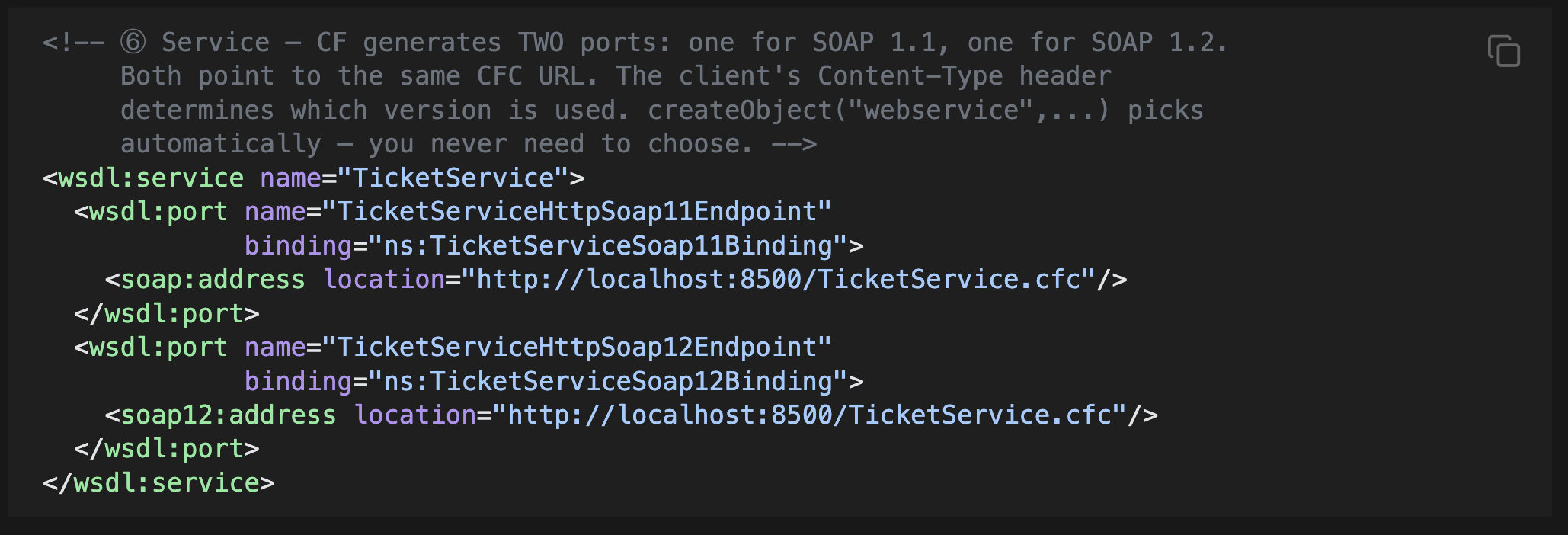
ColdFusion generates one binding and one port per SOAP version — the same CFC URL serves both. createObject("webservice", ...) negotiates the version automatically.
Reading a WSDL at a glance — the one-line version of each section:
| Section | XML element | Plain-English meaning |
|---|---|---|
| Types | <wsdl:types> | "Here are the data shapes" — XSD schemas for inputs and outputs |
| Messages | <wsdl:message> | "Here are the method signatures" — typed parameter bundles |
| Port Type | <wsdl:portType> | "Here are the operations you can call" — start reading here |
| Binding | <wsdl:binding> | "Here is how to call them" — one binding per SOAP version (1.1 and 1.2) |
| Service | <wsdl:service> | "Here are the endpoints" — two ports, same URL, CF picks the right one |
When integrating with a third-party SOAP service, jump straight to <wsdl:portType> to see available operations, then <wsdl:types> to understand the data structures. You never need to read the binding or service sections manually — ColdFusion's createObject("webservice", ...) consumes the whole document automatically.
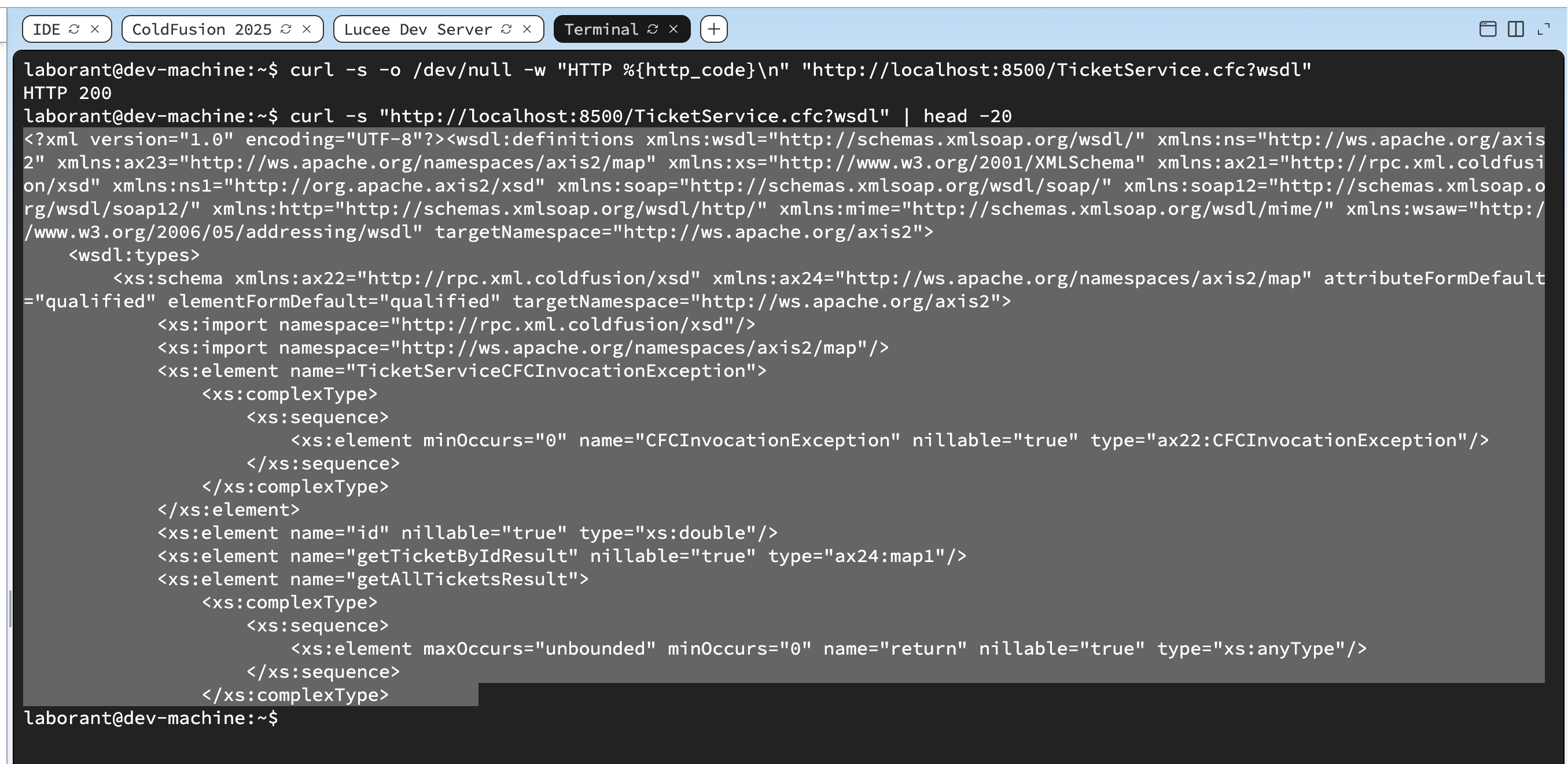
HTTP 200 on ?wsdl — ColdFusion auto-generated the WSDL from the remote function signatures in TicketService.cfc.
When all the checks above are green, this lesson is complete. Your progress is saved automatically — move straight on to the next lesson.
Found a bug or an issue with this lesson? Please reach out — your feedback helps improve the course for everyone.
📧 Alex — mercadoalexatgmail.com
- Previous lesson
- Real-Time Communication with WebSockets
- Next lesson
- Security Hardening ColdFusion