Introduction to ColdFusion
What is ColdFusion?
ColdFusion is a rapid web-application development platform built around CFML (ColdFusion Markup Language). It lets you query databases, send email, consume web services, and render HTML responses with far less ceremony than most general-purpose languages. A single CFML tag can replace dozens of lines of boilerplate in other languages.
The platform has two layers:
- CFML — the language itself: a hybrid of HTML-like tags (
<cfquery>,<cfloop>) and a modern ECMAScript-style scripting block (<cfscript>). - The CFML engine — the Java-based runtime that compiles
.cfm/.cfcfiles to bytecode and executes them inside a servlet container (historically JRun, today Apache Tomcat).
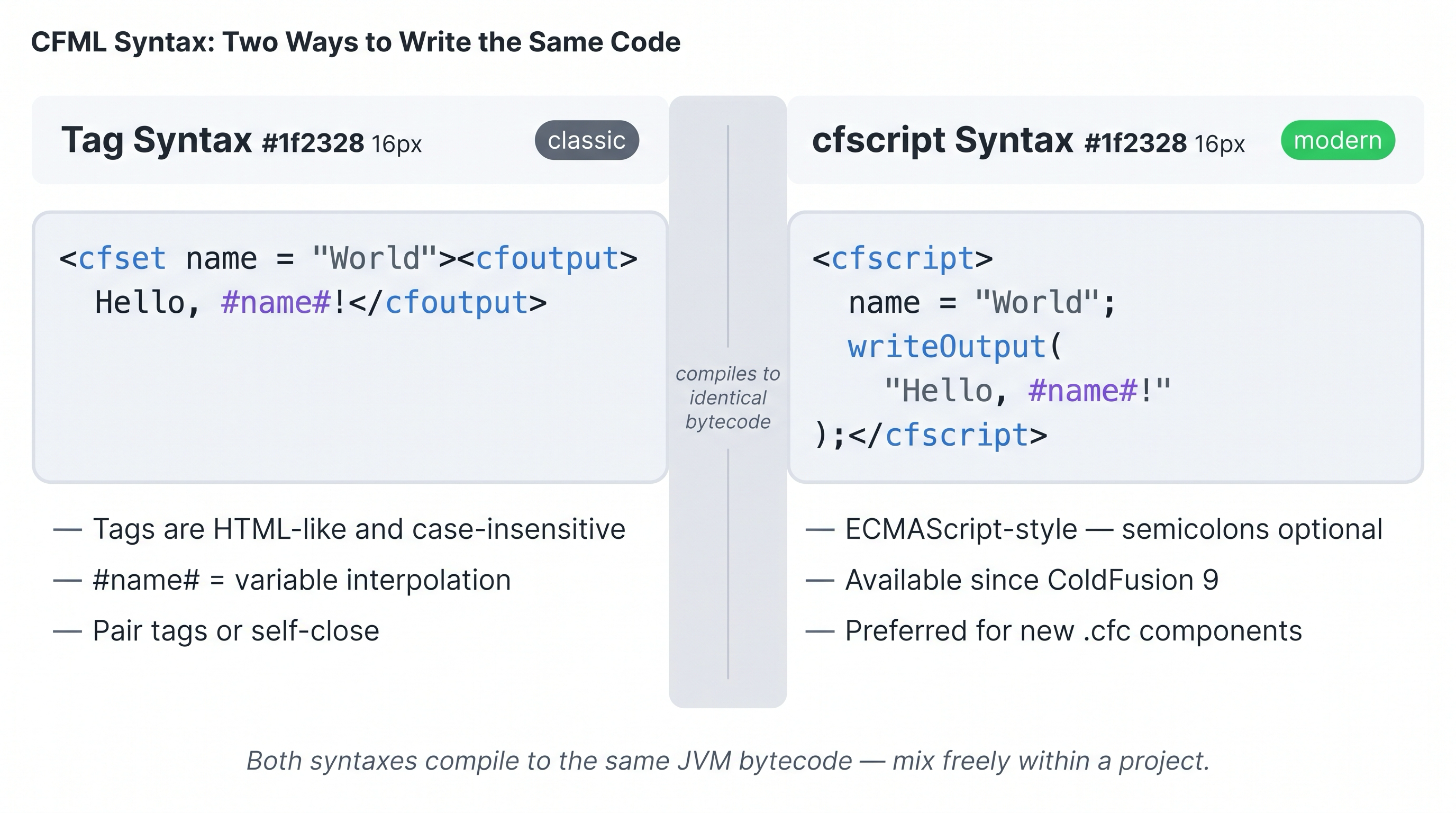
CFML offers two syntaxes that compile to identical bytecode — tags (left) and cfscript (right).
💡 Which syntax should I use — tags or CFScript?
Both syntaxes compile to identical bytecode, so there is no performance difference. The choice is about readability and maintainability:
- CFScript is recommended for business logic, CFCs, controllers, and services. It is more concise, integrates better with unit testing frameworks (like TestBox), and has stronger IDE and linting support.
- Tag syntax is recommended for views —
.cfmfiles that mix HTML markup with dynamic output — because interleaving<cfoutput>and HTML tags is natural and readable.
A practical rule of thumb: if the file outputs HTML, use tags. If the file contains logic, use CFScript.
--
A brief history of CFML
The story of ColdFusion starts in 1995, long before Ruby on Rails or Node.js, with a small startup called Allaire Corporation.

Allaire Corporation, founded in 1995 — the original home of ColdFusion and HomeSite.
| Year | Milestone |
|---|---|
| 1995 | Allaire Corporation ships ColdFusion 1.0 — one of the first server-side web scripting platforms |
| 1999 | Allaire merges with Macromedia; CF gains Flash/Flex integration |
| 2005 | Adobe acquires Macromedia; ColdFusion becomes an Adobe product |
| 2012 | Railo (open-source CFML engine) forks into Lucee |
| 2016 | Lucee Association Switzerland established; Lucee 5 released |
| 2018 | ColdFusion 2018 ships API Manager and enhanced REST support |
| 2021 | ColdFusion 2021 introduces cfThread improvements and PDF services overhaul |
| 2023 | ColdFusion 2023 ships with JVM 21 baseline and enhanced security headers |
| 2025 | ColdFusion 2025 — current release; Lucee 7.0.x in parallel |
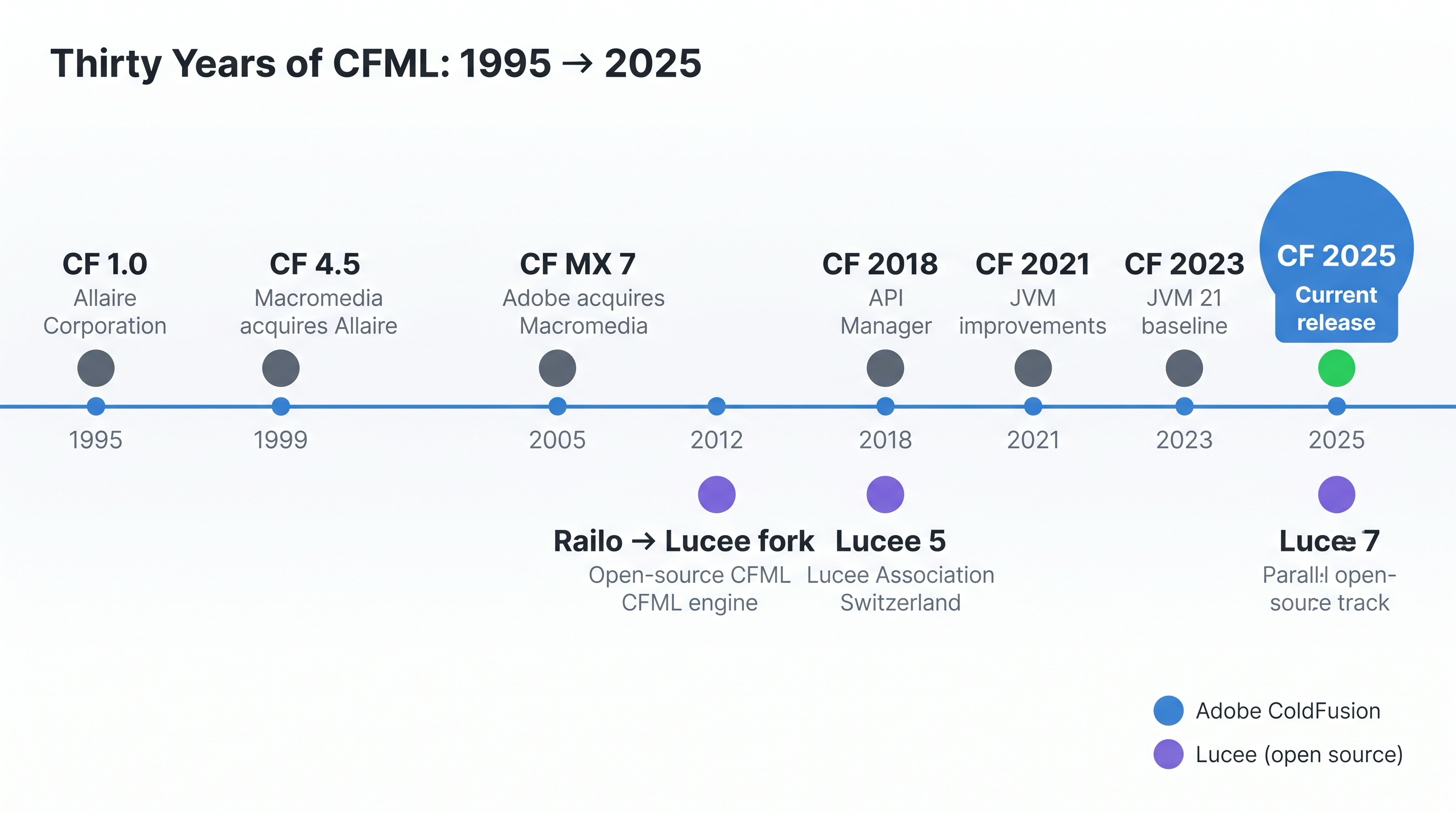
Thirty years of CFML: from Allaire's 1995 launch through three corporate owners to today's Adobe CF 2025 and the parallel open-source Lucee track.
CFML was one of the web's original "batteries included" platforms. While other stacks require composing separate libraries for database access, file I/O, and HTTP clients, ColdFusion ships all of that in the core runtime. This philosophy still defines it today.
Problems ColdFusion solves
1. Database access without boilerplate
In most languages you open a connection, prepare a statement, bind parameters, iterate a result set, and close the connection. In CFML:
<cfquery name="users" datasource="myDB">
  SELECT id, name, email FROM users WHERE active = 1
</cfquery>

<cfoutput query="users">
  #users.name# — #users.email#<br>
</cfoutput>
The engine manages the connection pool, parameterises the query, and returns a strongly-typed query object you can iterate with a single tag.
2. File and email operations in one line
<!--- Send email --->
<cfmail to="user@example.com" from="app@example.com" subject="Welcome" type="html">
  <p>Your account is ready.</p>
</cfmail>

<!--- Upload a file --->
<cffile action="upload" fileField="myFile" destination="/var/uploads" nameConflict="makeUnique">
3. HTTP and web-service consumption
<cfhttp url="https://api.example.com/data.json" method="GET" result="resp">
  <cfhttpparam type="header" name="Authorization" value="Bearer #token#">
</cfhttp>

<cfset data = deserializeJSON(resp.fileContent)>
4. Rapid page rendering
ColdFusion pages are compiled to Java bytecode on first request and cached. Subsequent requests hit the bytecode cache directly, giving competitive throughput without a separate compile step during development.
How ColdFusion's architecture works
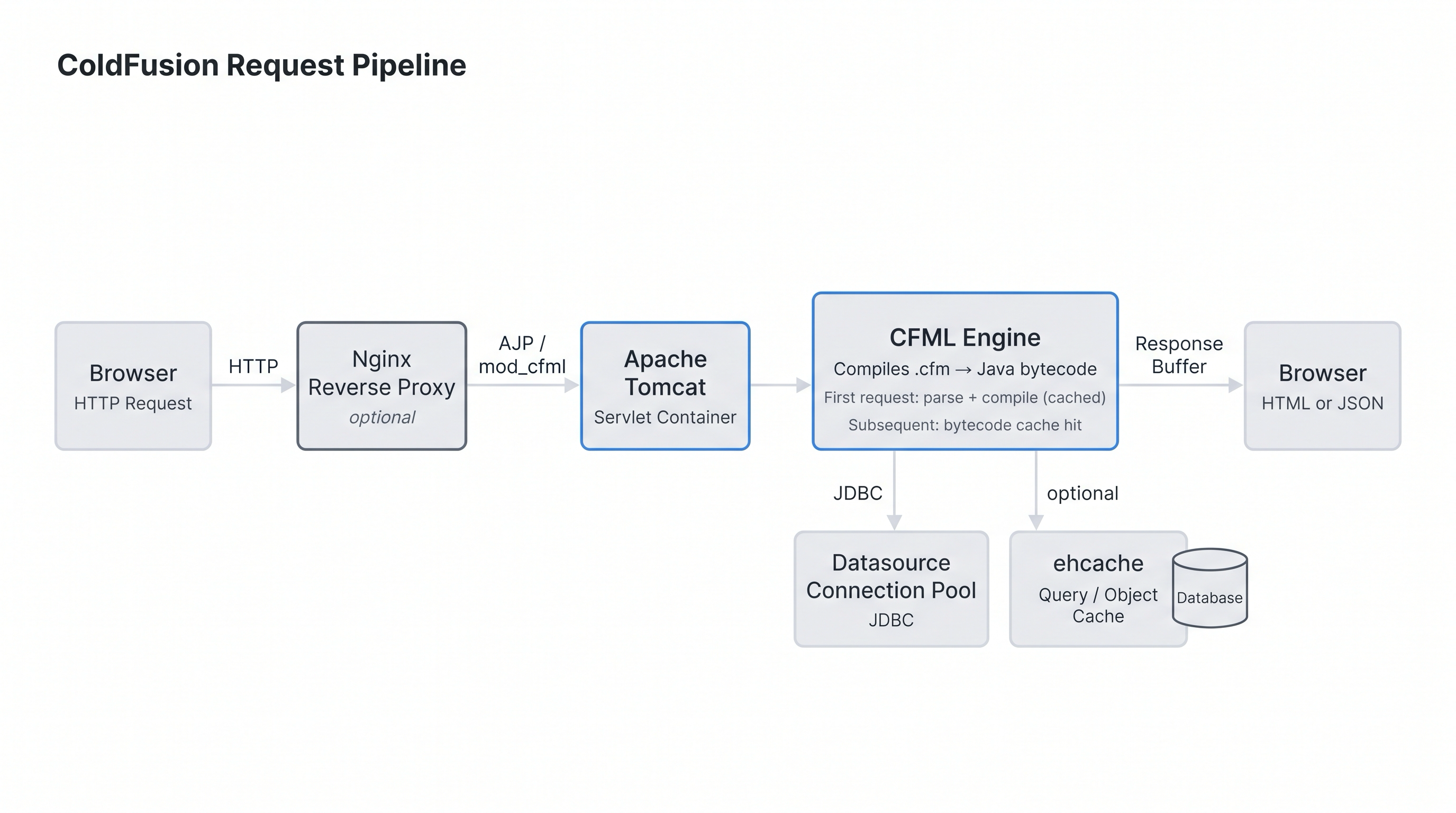
The ColdFusion request pipeline: browser → (optional) reverse proxy → Tomcat → CFML engine → JDBC datasource pool → response.
Key architectural points:
- Everything runs on the JVM. You can call any Java class from CFML, use Java libraries on the classpath, and read JVM metrics with standard tools.
- Datasources are named connection pools configured in the CF Admin or via
Application.cfc. Pages reference them by name, not by connection string. - Application scope is shared across all requests within one application context, making in-memory caching trivial.
- The web root is a folder watched by the engine; dropping a
.cfmfile there makes it immediately accessible with no restart or deploy step.
ColdFusion and the JEE platform
ColdFusion is built on top of the Java Enterprise Edition (JEE) platform and uses a JEE application server for its core services — database connectivity, naming and directory services, and other runtime infrastructure. This is not just an implementation detail: it directly shapes what you can do with ColdFusion applications.
ColdFusion can be deployed in two ways:
- Server configuration — ColdFusion ships with a bundled JEE server (Apache Tomcat). This is the standard setup and what you are using in this lab.
- JEE configuration (Enterprise only) — ColdFusion can be deployed as a WAR/EAR on an independent JEE application server such as IBM WebSphere, Oracle WebLogic, or JBoss.
By running on top of the JEE platform, ColdFusion inherits its power while hiding its complexity behind CFML tags and functions. This also means ColdFusion pages can integrate directly with the Java ecosystem:
| Capability | What it means in practice |
|---|---|
| Share session data with JSPs and Java servlets | CFML and Java code running in the same container can read and write the same session scope |
| Import JSP tag libraries | Custom JSP tags can be imported and used like ColdFusion custom tags |
| Integrate with Java objects | You can call any Java class, JavaBean, or Enterprise JavaBean directly from CFML using createObject("java", ...) |
| Access the full JEE Java API | JDBC drivers, JMS, JNDI, and other JEE APIs are available to CFML code |
💡 Why does this matter for CFML developers?
Understanding that ColdFusion runs inside a JVM servlet container explains several behaviours you will encounter throughout this course:
- Why CF configuration lives in
WEB-INF/andcfclasses/directories - Why restarting CF is sometimes needed to pick up code changes (the JVM class cache)
- Why you can drop
.jarfiles into the classpath and call Java libraries from CFML - Why performance tuning involves JVM flags (
-Xmx,-Xms, GC settings) as much as CFML-level changes
Adobe ColdFusion vs. Lucee
Both engines execute the same CFML language core, but they differ in licensing, extension model, and some built-in capabilities.
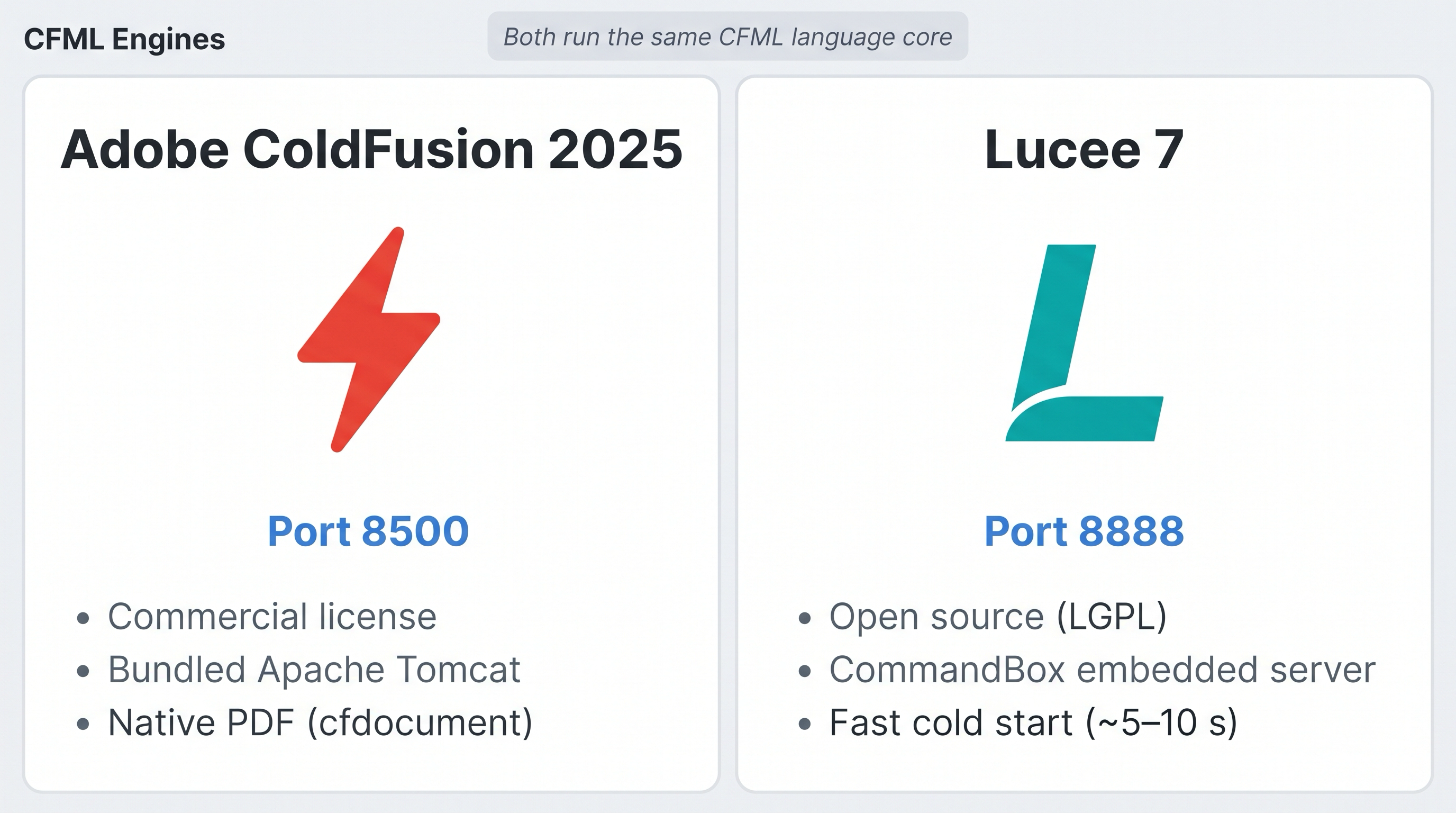
Adobe ColdFusion 2025 (port 8500) and Lucee 7 (port 8888) — both run in your lab environment.
| Feature | Adobe ColdFusion 2025 | Lucee 7 |
|---|---|---|
| License | Commercial (Developer Edition free, production licensed) | Open source (LGPL) |
| Servlet container | Bundled Tomcat | Any container; CommandBox bundles its own |
| Admin console | /CFIDE/administrator | /lucee/admin/ |
| PDF generation | Native (<cfdocument>) | Via extension (PDF extension required) |
| ORM | Hibernate (built-in) | Hibernate (built-in) |
| Language extensions | Adobe-only tags (e.g., <cfpresentation>) | Lucee-only features (e.g., systemOutput()) |
| Script-first style | Both tag and script equally supported | Script-first recommended |
| Cold start speed | Moderate (~30 s typical) | Fast (~5–10 s with CommandBox) |
| Community | Adobe forums, Adobe docs | Lucee community, CommandBox ecosystem |
- Greenfield projects can use either. Lucee + CommandBox is popular for local development because of fast cold starts and zero licensing cost.
- Enterprise Adobe shops use CF for support contracts, CF Admin policies, and built-in PDF/Office features.
- This course uses both: Adobe ColdFusion 2025 on port 8500 is the primary engine; Lucee 7 on port 8888 lets you verify cross-engine compatibility.
Why are two servers running in this lab?
Running both engines side by side reflects the real-world CFML ecosystem — Adobe CF and Lucee coexist in many organisations, and knowing both makes you a stronger developer.
For this course you don't need to master the differences right now. The one thing to remember: all exercises run on Adobe ColdFusion 2025 at port 8500. Lucee is there on port 8888 if you want to explore it on your own, but it won't affect your task completions.
--
Your lab environment
Your lab microVM is pre-configured with both engines running:
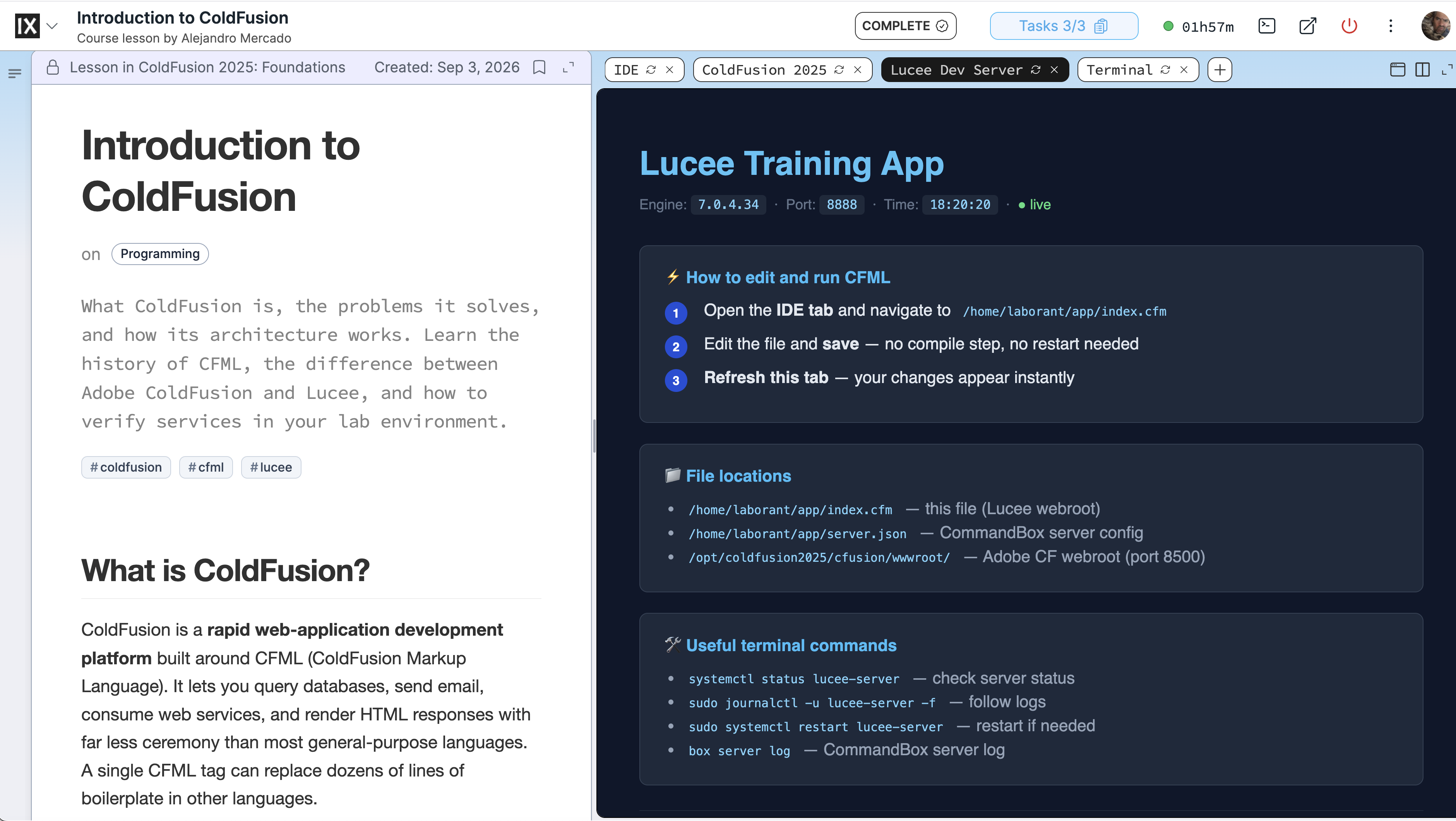
The iximiuz Labs interface: lesson content and task checklist on the left, live lab environment on the right.
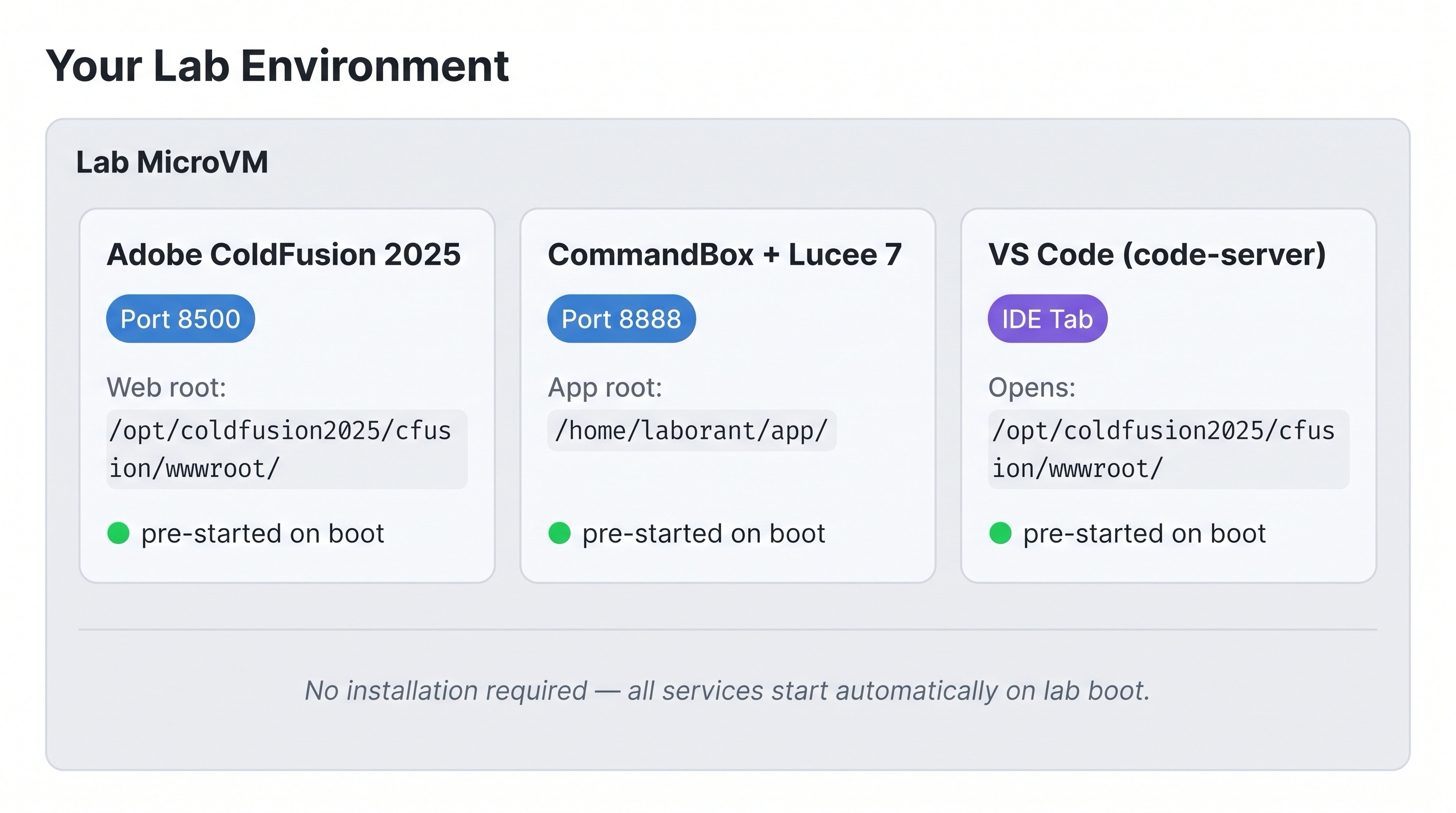
Your lab microVM boots with CF 2025 (8500), Lucee 7 (8888), and VS Code all ready — no installation needed.
| Service | Port | Web root |
|---|---|---|
| Adobe ColdFusion 2025 | 8500 | /opt/coldfusion2025/cfusion/wwwroot/ |
| CommandBox + Lucee 7.0 | 8888 | /home/laborant/app/ |
| VS Code (code-server) | IDE tab | Opens /opt/coldfusion2025/cfusion/wwwroot/student/ |
Tip: Files you create in VS Code land directly in your
student/working folder, immediately accessible athttp://localhost:8500/student/<filename>.cfm.
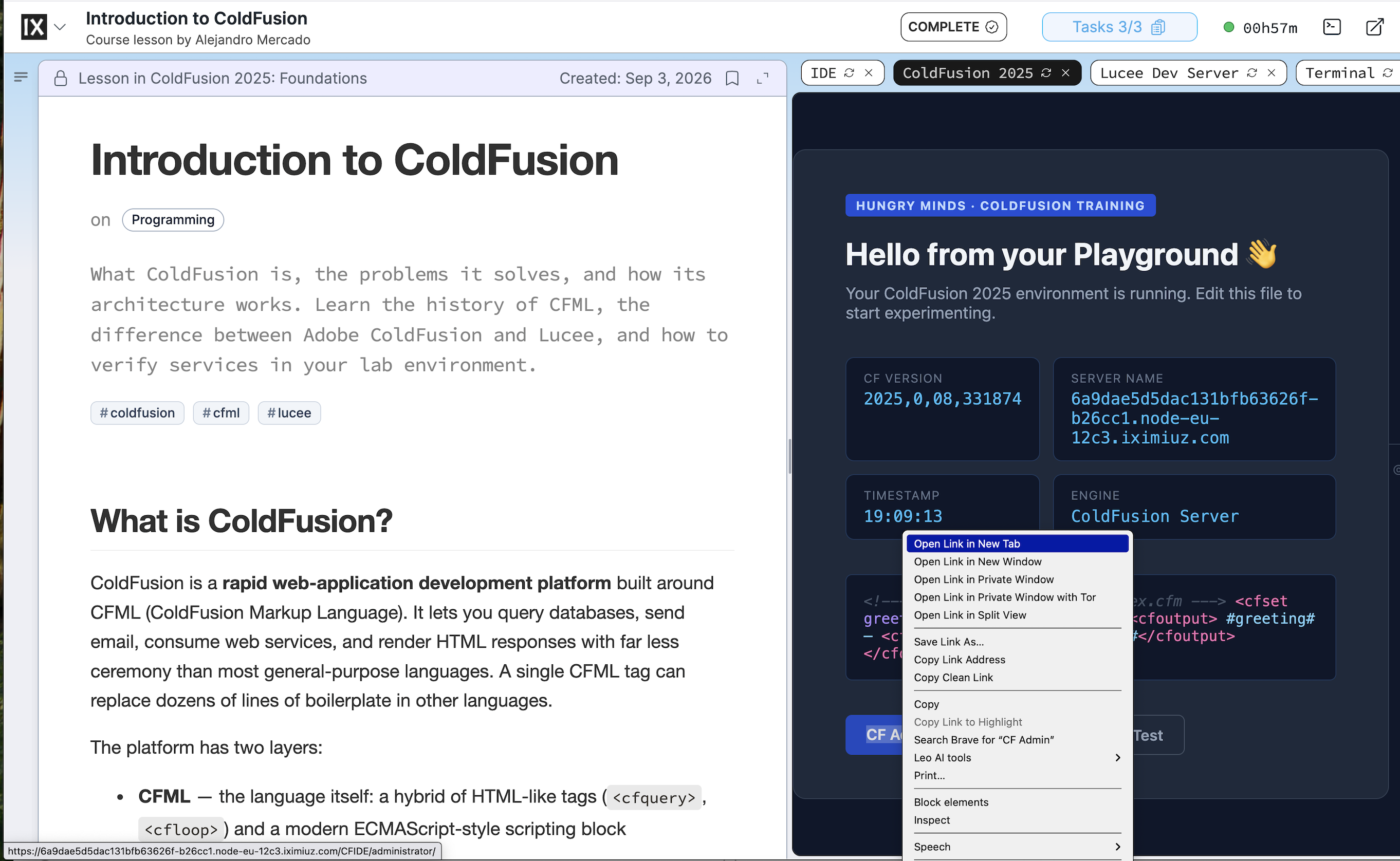
Right-click the CF Admin button → "Open Link in New Tab" to get a full-screen view.
Want the CF Admin or ColdFusion tab to fill your whole screen?
Right-click any lab tab (ColdFusion, Lucee, IDE) and choose "Open Link in New Tab". The lab environment opens in a full browser tab with no course sidebar — ideal when you need more room to work in the CF Admin console or browse your app.
--
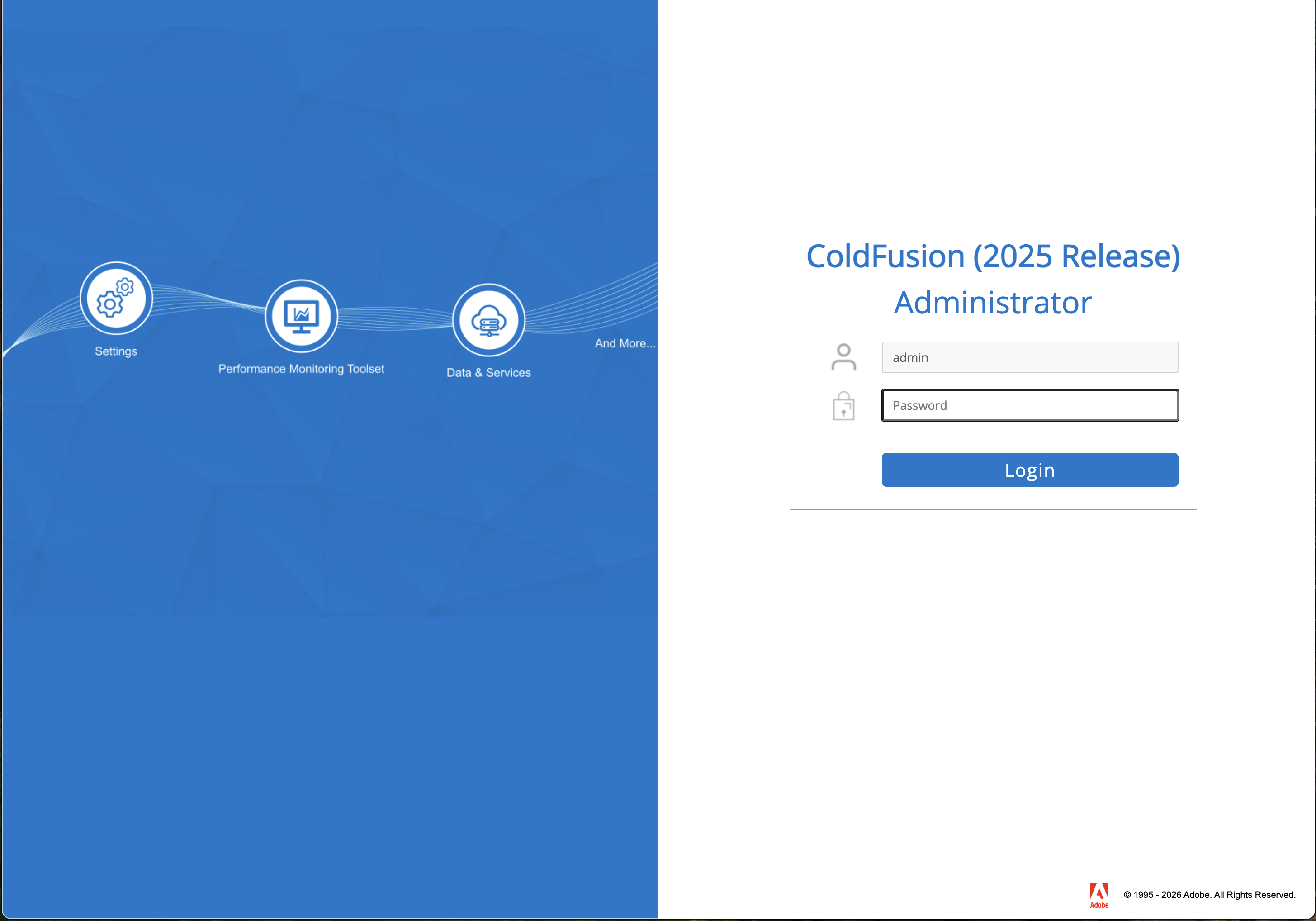
CF Admin in full-screen — enter password admin to log in.
Verify services
Open the Terminal tab in your lab and run each command. A 200 status code confirms the service is ready.
# Verify Adobe ColdFusion 2025 (should return HTTP 200)
curl -s -o /dev/null -w "%{http_code}\n" http://localhost:8500/index.cfm
# Verify Lucee via CommandBox (should return HTTP 200)
curl -s -o /dev/null -w "%{http_code}\n" http://localhost:8888/index.cfm
🖐 Hands-on activity: Create and test your first ColdFusion page
You are going to write a real .cfm file, have ColdFusion compile and execute it, and verify the output. Choose the option that feels more comfortable — both produce exactly the same result.
Where does the file need to live? Your working folder for all lesson exercises is:
/opt/coldfusion2025/cfusion/wwwroot/student/Any.cfmfile saved there is immediately accessible athttp://localhost:8500/student/<filename>.cfm— no restart needed. This folder is kept separate from the pre-built lab files in the webroot root so there is no risk of overwriting them.
Option A — Using the IDE tab (VS Code in the browser)
The IDE tab opens directly to your student/ working folder. If it shows a welcome screen or a different folder, navigate there in one step:
- Click the IDE tab in your lab environment.
- If the Explorer panel does not already show the
student/folder, click File → Open Folder… in the top menu bar.- A path input box appears at the top of the screen — clear it and type exactly:
/opt/coldfusion2025/cfusion/wwwroot/student - Press Enter or click OK.
- VS Code may ask "The folder does not exist. Would you like to create it?" — click Yes to create it.
- A path input box appears at the top of the screen — clear it and type exactly:
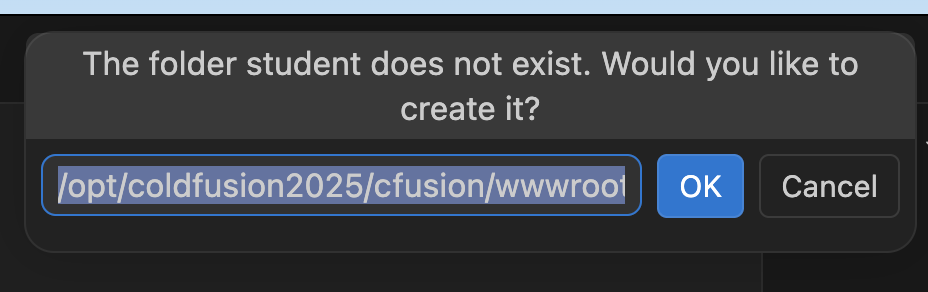
VS Code will offer to create the student folder — click Yes.
- The Explorer panel now shows your working directory —
student/is empty until you create your first file.
- Right-click anywhere in the empty space of the Explorer panel → New File → type
hello.cfm→ press Enter. - The new file opens in the editor. Paste this content:
<cfset greeting = "Hello from ColdFusion 2025!">
<cfoutput>#greeting#</cfoutput>
- Save the file:
Ctrl+S(Windows/Linux) orCmd+S(Mac). The dot on the editor tab disappears when the file is saved to disk.
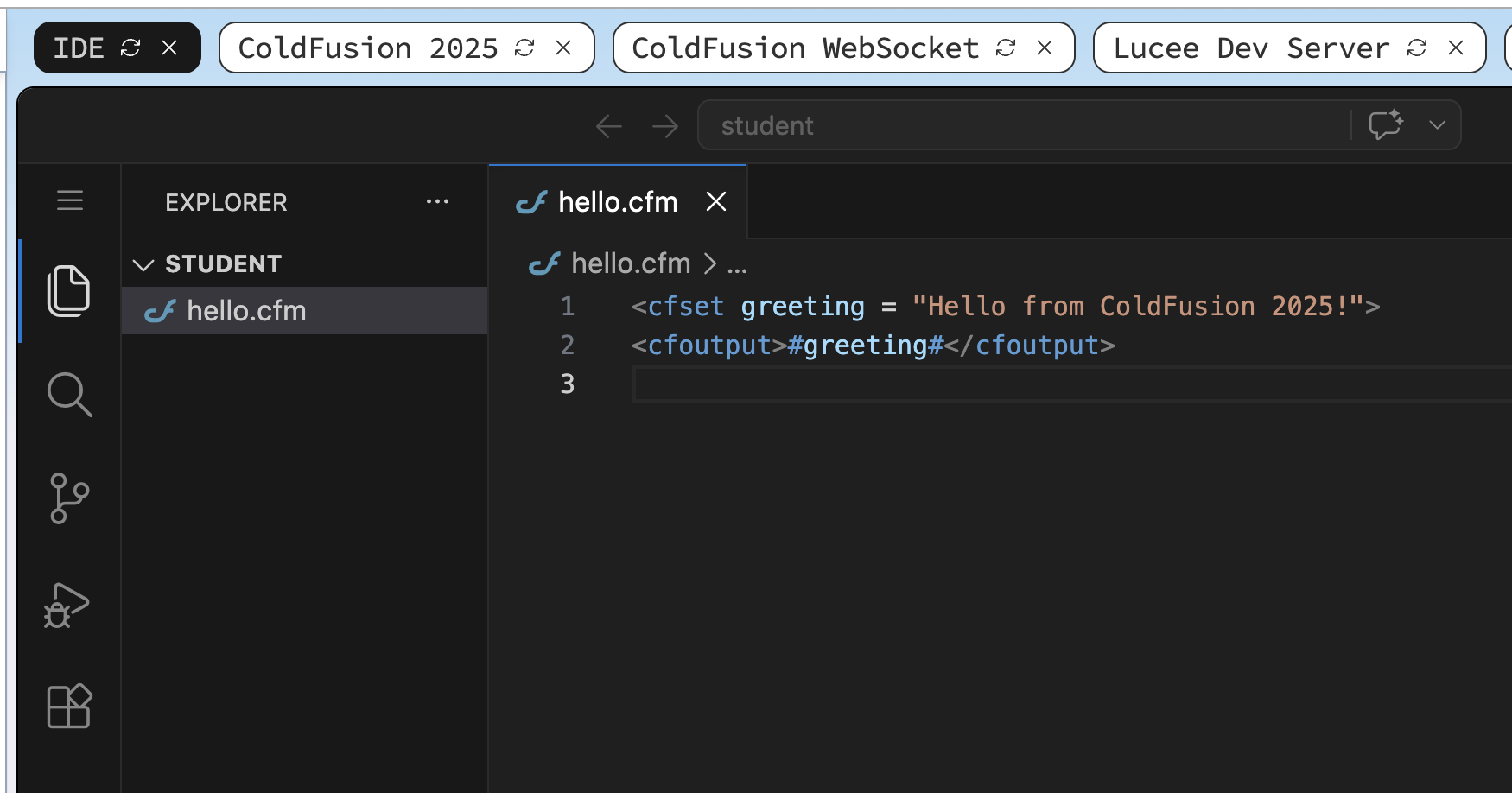
hello.cfm saved in the student/ folder — the tab shows no dot, meaning the file is written to disk.
💡 Tip — the IDE will remember this folder next time
Once you open /opt/coldfusion2025/cfusion/wwwroot/student in the IDE, VS Code saves it as your workspace. The next time you click the IDE tab it will reopen the same folder automatically — you only need to do this navigation once per session.
Option B — Using the Terminal (faster, no mouse needed)
- Click the Terminal tab in your lab environment.
- Run this single command — it creates the file and writes the content in one step:
sudo tee /opt/coldfusion2025/cfusion/wwwroot/student/hello.cfm << 'EOF'
<cfset greeting = "Hello from ColdFusion 2025!">
<cfoutput>#greeting#</cfoutput>
EOF
sudo teeis used here because it is the most reliable way to write to system paths from the terminal. Thelaborantuser also owns the wwwroot folder directly, so you could equally usecat >or create the file withnano— butteeworks everywhere with no editor knowledge needed.
Verify it ran correctly
Whichever option you used, confirm ColdFusion compiled and executed the file:
curl -s http://localhost:8500/student/hello.cfm
# Expected output: Hello from ColdFusion 2025!
If you see the greeting text — not the raw <cfset> source — the engine picked up your file, compiled it to bytecode, and returned the rendered output. That is the ColdFusion request pipeline working end to end.
When all the checks above are green, this lesson is complete. Your progress is saved automatically — move straight on to the next lesson.
Key concepts reference
| Term | Meaning |
|---|---|
| CFML | ColdFusion Markup Language — tag + script hybrid |
| CFM | ColdFusion page file (.cfm) — renders a response |
| CFC | ColdFusion Component (.cfc) — reusable class or service |
| Application.cfc | Framework entry point; defines app name, scope timeouts, lifecycle hooks |
| Datasource | Named JDBC connection pool configured in CF Admin or Application.cfc |
| CF Admin | Web-based admin console at /CFIDE/administrator (Adobe) |
| CommandBox | CLI + embedded server tool for Lucee; analogous to Node's npm + node |
| cfscript | Block tag (<cfscript>...</cfscript>) that enables ECMAScript-style syntax |
| Scope | Named variable namespace (e.g., variables, session, application, request) |
| JEE | Java Enterprise Edition — the platform ColdFusion runs on top of |
| Servlet container | The JEE runtime (Tomcat in the lab) that hosts the CF engine |
| JVM | Java Virtual Machine — the process CF runs inside; tuned via -Xmx/-Xms flags |
- Next lesson
- CFML Syntax — Tags and Script