SQL with cfquery & queryParam
The cfquery tag
ColdFusion's cfquery tag sends SQL to the datasource and returns a query object — a structured result set you can iterate, filter, and pass to other functions.
![[object Object]](/content/files/courses/ColdFusion-2025-Foundations-5151cba6/module-2/3.lesson-sql-cfquery/__static__/cfquery-object-structure-v1.png?v=1791349307475)
A cfquery returns a Query object — iterate it with cfoutput query= or cfloop query=.
<cfquery name="tickets" datasource="training_db">
  SELECT id, title, status, priority
  FROM   hd_tickets
  ORDER  BY created_at DESC
</cfquery>

<cfoutput query="tickets">
  #tickets.id# — #encodeForHTML(title)# [#status# / #priority#]<br>
</cfoutput>
Key properties on every query object:
| Property | Value |
|---|---|
tickets.recordCount | Number of rows returned |
tickets.columnList | Comma-separated list of column names |
tickets.currentRow | Current row number inside cfoutput query= |
Why cfqueryparam?
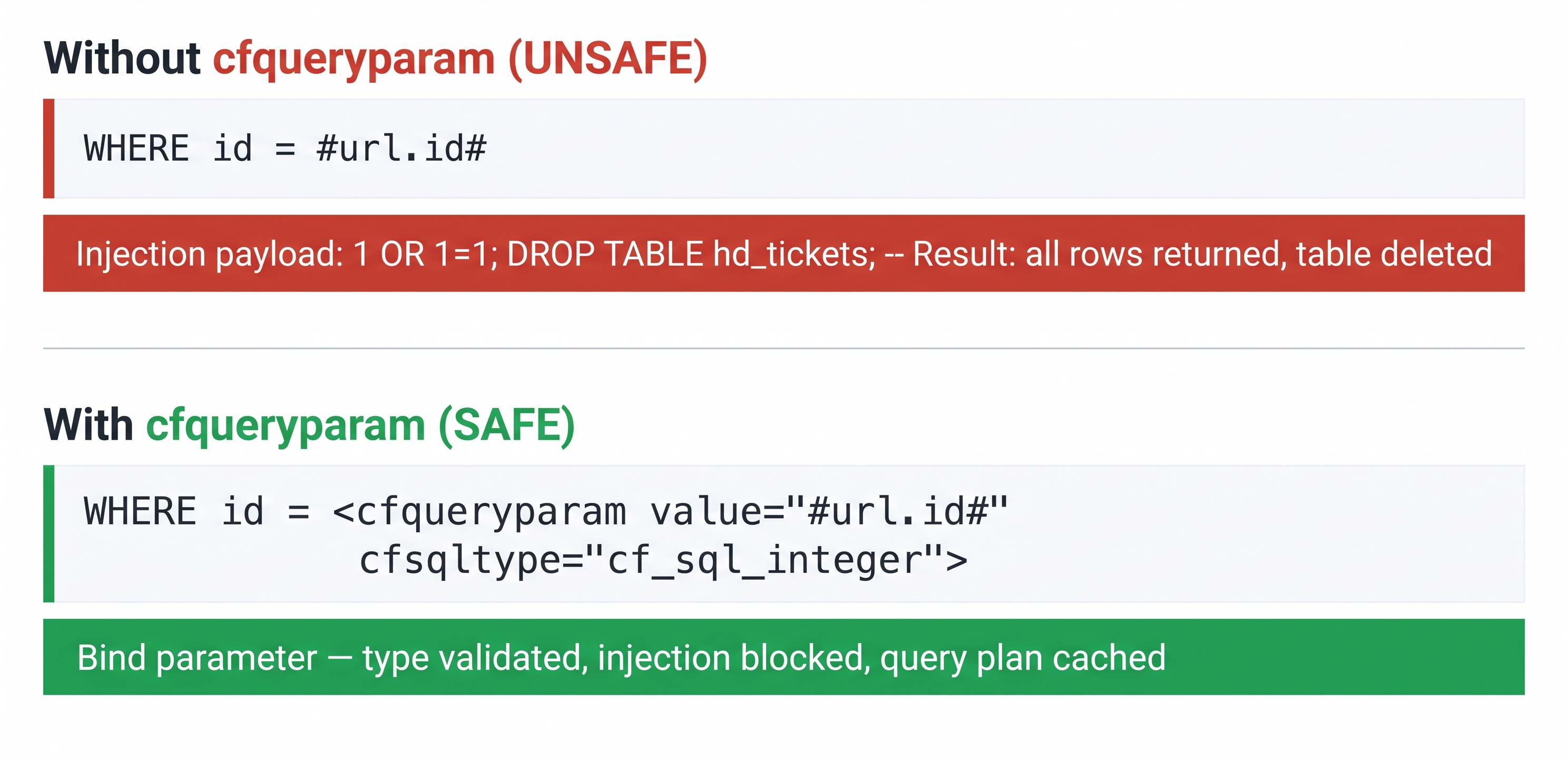
cfqueryparam is the single most important SQL security practice in CFML — never interpolate user input directly.
Without it — dangerous (SQL injection risk):
WHERE id = #url.id#
With it — safe (parameterised query):
WHERE id = <cfqueryparam value="#url.id#" cfsqltype="cf_sql_integer">
cfqueryparam does three things:
- Sends the value as a typed bind parameter — never interpolated into the SQL string
- Validates the type —
cf_sql_integerrejects"'; DROP TABLE --" - Lets the database cache the query plan across calls for better performance
Common cfsqltype values
| CFML type | SQL equivalent | Use for |
|---|---|---|
cf_sql_varchar | VARCHAR / TEXT | Strings, status, category |
cf_sql_integer | INT | IDs, counts |
cf_sql_bigint | BIGINT | Large integers |
cf_sql_double | DOUBLE / FLOAT | Decimals |
cf_sql_timestamp | DATETIME / TIMESTAMP | Dates and times |
cf_sql_boolean | BOOLEAN | True/false flags |
Modern queryExecute()
In CFScript, use the function form instead of the tag — cleaner syntax, same behaviour:
<cfscript>
  tickets = queryExecute(
    "SELECT id, title, status, priority
     FROM   hd_tickets
     WHERE  status = :status
     ORDER  BY created_at DESC",
    { status: { value: "open", cfsqltype: "cf_sql_varchar" } },
    { datasource: "training_db" }
  );
</cfscript>
Named parameters (:status) are the queryExecute equivalent of cfqueryparam — same security and caching benefits.
Activity 1 — SELECT tickets and display results
Activity: Create tickets.cfm — a page that queries all open tickets from hd_tickets and renders them in an HTML table.
Terminal tab:
sudo tee /opt/coldfusion2025/cfusion/wwwroot/student/tickets.cfm << 'EOF'
<!DOCTYPE html>
<html lang="en">
<head>
  <meta charset="UTF-8">
  <title>Help Desk Tickets</title>
  <style>
    body  { font-family: sans-serif; max-width: 860px; margin: 2rem auto; }
    table { width: 100%; border-collapse: collapse; margin-top: 1rem; }
    th    { background: #3b82d4; color: #fff; padding: .5rem .75rem; text-align: left; }
    td    { padding: .45rem .75rem; border-bottom: 1px solid #e5e7eb; }
    tr:hover td { background: #f7f8fa; }
  </style>
</head>
<body>
  <h1>Open Tickets</h1>

  <cfquery name="tickets" datasource="training_db">
    SELECT id, title, status, priority, category
    FROM   hd_tickets
    WHERE  status = <cfqueryparam value="open" cfsqltype="cf_sql_varchar">
    ORDER  BY created_at DESC
  </cfquery>

  <p><strong><cfoutput>#tickets.recordCount#</cfoutput></strong> open tickets found.</p>

  <table>
    <tr><th>ID</th><th>Title</th><th>Priority</th><th>Category</th></tr>
    <cfoutput query="tickets">
      <tr>
        <td>#id#</td>
        <td>#encodeForHTML(title)#</td>
        <td>#encodeForHTML(priority)#</td>
        <td>#encodeForHTML(category)#</td>
      </tr>
    </cfoutput>
  </table>
</body>
</html>
EOF
✏️ Using the IDE tab instead? Create the file here
In the IDE tab, click File → Open Folder…, type /opt/coldfusion2025/cfusion/wwwroot/student and press Enter. If VS Code asks "The folder does not exist. Would you like to create it?" — click Yes. Then right-click in the Explorer panel → New File → name it tickets.cfm, paste the content below, and save with Ctrl+S:
<!DOCTYPE html>
<html lang="en">
<head>
  <meta charset="UTF-8">
  <title>Help Desk Tickets</title>
  <style>
    body  { font-family: sans-serif; max-width: 860px; margin: 2rem auto; }
    table { width: 100%; border-collapse: collapse; margin-top: 1rem; }
    th    { background: #3b82d4; color: #fff; padding: .5rem .75rem; text-align: left; }
    td    { padding: .45rem .75rem; border-bottom: 1px solid #e5e7eb; }
    tr:hover td { background: #f7f8fa; }
  </style>
</head>
<body>
  <h1>Open Tickets</h1>

  <cfquery name="tickets" datasource="training_db">
    SELECT id, title, status, priority, category
    FROM   hd_tickets
    WHERE  status = <cfqueryparam value="open" cfsqltype="cf_sql_varchar">
    ORDER  BY created_at DESC
  </cfquery>

  <p><strong><cfoutput>#tickets.recordCount#</cfoutput></strong> open tickets found.</p>

  <table>
    <tr><th>ID</th><th>Title</th><th>Priority</th><th>Category</th></tr>
    <cfoutput query="tickets">
      <tr>
        <td>#id#</td>
        <td>#encodeForHTML(title)#</td>
        <td>#encodeForHTML(priority)#</td>
        <td>#encodeForHTML(category)#</td>
      </tr>
    </cfoutput>
  </table>
</body>
</html>
Verify the page loads and displays results:
curl -s http://localhost:8500/student/tickets.cfm | grep -i "open tickets"
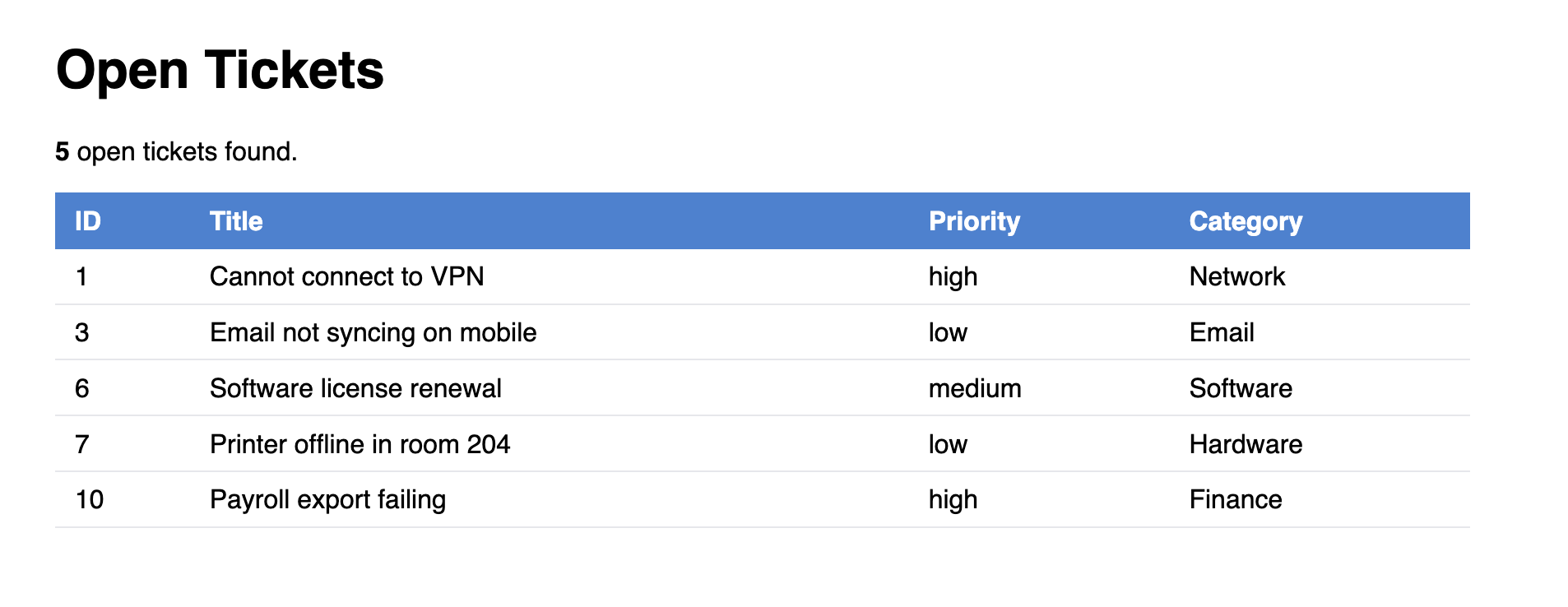
tickets.cfm displaying open tickets from hd_tickets using cfquery and cfqueryparam.
Activity 2 — Use cfqueryparam for safe parameterised queries
Activity: Create tickets_filter.cfm — filters tickets by priority using a URL parameter, with cfqueryparam keeping it safe.
Terminal tab:
sudo tee /opt/coldfusion2025/cfusion/wwwroot/student/tickets_filter.cfm << 'EOF'
<!DOCTYPE html>
<html lang="en">
<head>
  <meta charset="UTF-8">
  <title>Filter Tickets</title>
  <style>
    body  { font-family: sans-serif; max-width: 860px; margin: 2rem auto; }
    table { width: 100%; border-collapse: collapse; margin-top: 1rem; }
    th    { background: #3b82d4; color: #fff; padding: .5rem .75rem; text-align: left; }
    td    { padding: .45rem .75rem; border-bottom: 1px solid #e5e7eb; }
    tr:hover td { background: #f7f8fa; }
    form  { margin-bottom: 1.5rem; }
    select, button { padding: .4rem .8rem; }
  </style>
</head>
<body>
  <h1>Filter Tickets by Priority</h1>

  <cfset selectedPriority = url.priority ?: "">

  <form method="get">
    <label for="priority">Priority:</label>
    <select name="priority" id="priority">
      <option value="">— All —</option>
      <option value="high"   <cfif selectedPriority eq "high">selected</cfif>>High</option>
      <option value="medium" <cfif selectedPriority eq "medium">selected</cfif>>Medium</option>
      <option value="low"    <cfif selectedPriority eq "low">selected</cfif>>Low</option>
    </select>
    <button type="submit">Filter</button>
  </form>

  <cfif len(selectedPriority)>
    <cfquery name="tickets" datasource="training_db">
      SELECT id, title, status, priority, category
      FROM   hd_tickets
      WHERE  priority = <cfqueryparam value="#selectedPriority#" cfsqltype="cf_sql_varchar">
      ORDER  BY created_at DESC
    </cfquery>
  <cfelse>
    <cfquery name="tickets" datasource="training_db">
      SELECT id, title, status, priority, category
      FROM   hd_tickets
      ORDER  BY created_at DESC
    </cfquery>
  </cfif>

  <p><strong><cfoutput>#tickets.recordCount#</cfoutput></strong> ticket(s) found.</p>

  <table>
    <tr><th>ID</th><th>Title</th><th>Status</th><th>Priority</th><th>Category</th></tr>
    <cfoutput query="tickets">
      <tr>
        <td>#id#</td>
        <td>#encodeForHTML(title)#</td>
        <td>#encodeForHTML(status)#</td>
        <td>#encodeForHTML(priority)#</td>
        <td>#encodeForHTML(category)#</td>
      </tr>
    </cfoutput>
  </table>
</body>
</html>
EOF
✏️ Using the IDE tab instead? Create the file here
In the IDE tab, right-click in the Explorer panel → New File → name it tickets_filter.cfm, paste the content below, and save with Ctrl+S:
<!DOCTYPE html>
<html lang="en">
<head>
  <meta charset="UTF-8">
  <title>Filter Tickets</title>
  <style>
    body  { font-family: sans-serif; max-width: 860px; margin: 2rem auto; }
    table { width: 100%; border-collapse: collapse; margin-top: 1rem; }
    th    { background: #3b82d4; color: #fff; padding: .5rem .75rem; text-align: left; }
    td    { padding: .45rem .75rem; border-bottom: 1px solid #e5e7eb; }
    tr:hover td { background: #f7f8fa; }
    form  { margin-bottom: 1.5rem; }
    select, button { padding: .4rem .8rem; }
  </style>
</head>
<body>
  <h1>Filter Tickets by Priority</h1>

  <cfset selectedPriority = url.priority ?: "">

  <form method="get">
    <label for="priority">Priority:</label>
    <select name="priority" id="priority">
      <option value="">— All —</option>
      <option value="high"   <cfif selectedPriority eq "high">selected</cfif>>High</option>
      <option value="medium" <cfif selectedPriority eq "medium">selected</cfif>>Medium</option>
      <option value="low"    <cfif selectedPriority eq "low">selected</cfif>>Low</option>
    </select>
    <button type="submit">Filter</button>
  </form>

  <cfif len(selectedPriority)>
    <cfquery name="tickets" datasource="training_db">
      SELECT id, title, status, priority, category
      FROM   hd_tickets
      WHERE  priority = <cfqueryparam value="#selectedPriority#" cfsqltype="cf_sql_varchar">
      ORDER  BY created_at DESC
    </cfquery>
  <cfelse>
    <cfquery name="tickets" datasource="training_db">
      SELECT id, title, status, priority, category
      FROM   hd_tickets
      ORDER  BY created_at DESC
    </cfquery>
  </cfif>

  <p><strong><cfoutput>#tickets.recordCount#</cfoutput></strong> ticket(s) found.</p>

  <table>
    <tr><th>ID</th><th>Title</th><th>Status</th><th>Priority</th><th>Category</th></tr>
    <cfoutput query="tickets">
      <tr>
        <td>#id#</td>
        <td>#encodeForHTML(title)#</td>
        <td>#encodeForHTML(status)#</td>
        <td>#encodeForHTML(priority)#</td>
        <td>#encodeForHTML(category)#</td>
      </tr>
    </cfoutput>
  </table>
</body>
</html>
Test the filter with a URL parameter:
curl -s "http://localhost:8500/student/tickets_filter.cfm?priority=high" | grep -i "ticket"
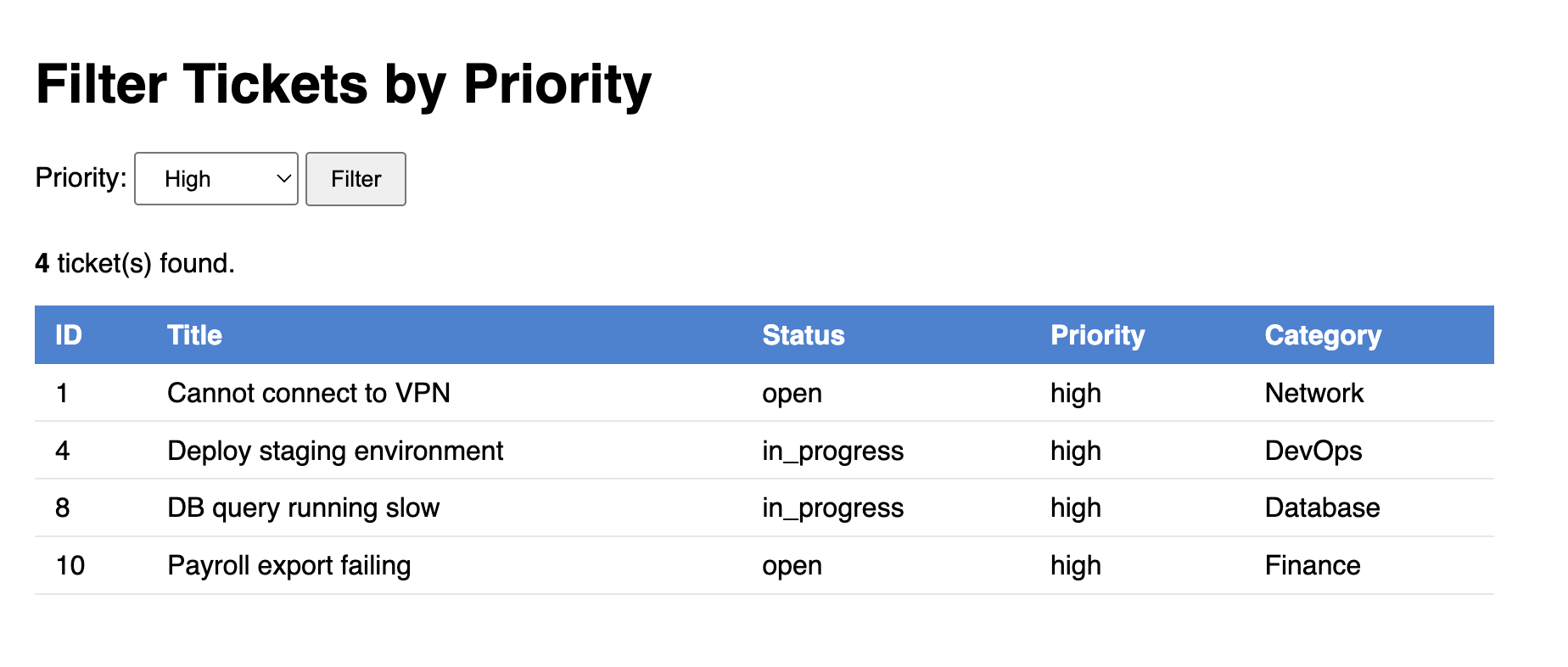
tickets_filter.cfm — URL parameter filtered safely through cfqueryparam, showing only high priority tickets.
Activity 3 — INSERT, UPDATE and DELETE with queryExecute
Activity: Create ticket_actions.cfm — demonstrates INSERT, SELECT, and UPDATE using queryExecute with named parameters.
Terminal tab:
sudo tee /opt/coldfusion2025/cfusion/wwwroot/student/ticket_actions.cfm << 'EOF'
<!DOCTYPE html>
<html lang="en">
<head>
  <meta charset="UTF-8">
  <title>Ticket Actions</title>
  <style>
    body { font-family: sans-serif; max-width: 700px; margin: 2rem auto; }
    .result { padding: 1rem; background: #f0f4ff; border-left: 4px solid #3b82d4; margin: 1rem 0; }
  </style>
</head>
<body>
  <h1>SQL Operations Demo</h1>

  <cfscript>

    // ── INSERT — add a test ticket ─────────────────────────────────────────
    queryExecute(
      "INSERT INTO hd_tickets (title, description, status, priority, category, requester_id, assignee_id, department_id)
       VALUES (:title, :desc, :status, :priority, :category, :requester, :assignee, :dept)",
      {
        title:     { value: "Test ticket from queryExecute", cfsqltype: "cf_sql_varchar" },
        desc:      { value: "Created by the SQL lesson activity.", cfsqltype: "cf_sql_varchar" },
        status:    { value: "open",     cfsqltype: "cf_sql_varchar" },
        priority:  { value: "low",      cfsqltype: "cf_sql_varchar" },
        category:  { value: "Training", cfsqltype: "cf_sql_varchar" },
        requester: { value: 1,          cfsqltype: "cf_sql_integer" },
        assignee:  { value: 1,          cfsqltype: "cf_sql_integer" },
        dept:      { value: 1,          cfsqltype: "cf_sql_integer" }
      },
      { datasource: "training_db" }
    );

    // ── SELECT — find the ticket we just inserted ──────────────────────────
    newTicket = queryExecute(
      "SELECT id, title, status FROM hd_tickets WHERE category = :cat ORDER BY id DESC",
      { cat: { value: "Training", cfsqltype: "cf_sql_varchar" } },
      { datasource: "training_db" }
    );

    newId = newTicket.id;

    // ── UPDATE — mark it resolved ──────────────────────────────────────────
    queryExecute(
      "UPDATE hd_tickets SET status = :status WHERE id = :id",
      {
        status: { value: "resolved", cfsqltype: "cf_sql_varchar" },
        id:     { value: newId,      cfsqltype: "cf_sql_integer" }
      },
      { datasource: "training_db" }
    );

    // ── SELECT again — confirm the update ─────────────────────────────────
    updated = queryExecute(
      "SELECT id, title, status FROM hd_tickets WHERE id = :id",
      { id: { value: newId, cfsqltype: "cf_sql_integer" } },
      { datasource: "training_db" }
    );

  </cfscript>

  <div class="result">
    <strong>INSERT:</strong> New ticket created<br>
    <strong>SELECT:</strong> Found ticket ID <cfoutput>#newId#</cfoutput> — "<cfoutput>#encodeForHTML(newTicket.title)#</cfoutput>"<br>
    <strong>UPDATE:</strong> Status set to resolved<br>
    <strong>Confirm:</strong> Ticket #<cfoutput>#updated.id#</cfoutput> status is now "<cfoutput>#encodeForHTML(updated.status)#</cfoutput>"
  </div>

</body>
</html>
EOF
✏️ Using the IDE tab instead? Create the file here
In the IDE tab, right-click in the Explorer panel → New File → name it ticket_actions.cfm, paste the content below, and save with Ctrl+S:
<!DOCTYPE html>
<html lang="en">
<head>
  <meta charset="UTF-8">
  <title>Ticket Actions</title>
  <style>
    body { font-family: sans-serif; max-width: 700px; margin: 2rem auto; }
    .result { padding: 1rem; background: #f0f4ff; border-left: 4px solid #3b82d4; margin: 1rem 0; }
  </style>
</head>
<body>
  <h1>SQL Operations Demo</h1>

  <cfscript>

    // ── INSERT — add a test ticket ─────────────────────────────────────────
    queryExecute(
      "INSERT INTO hd_tickets (title, description, status, priority, category, requester_id, assignee_id, department_id)
       VALUES (:title, :desc, :status, :priority, :category, :requester, :assignee, :dept)",
      {
        title:     { value: "Test ticket from queryExecute", cfsqltype: "cf_sql_varchar" },
        desc:      { value: "Created by the SQL lesson activity.", cfsqltype: "cf_sql_varchar" },
        status:    { value: "open",     cfsqltype: "cf_sql_varchar" },
        priority:  { value: "low",      cfsqltype: "cf_sql_varchar" },
        category:  { value: "Training", cfsqltype: "cf_sql_varchar" },
        requester: { value: 1,          cfsqltype: "cf_sql_integer" },
        assignee:  { value: 1,          cfsqltype: "cf_sql_integer" },
        dept:      { value: 1,          cfsqltype: "cf_sql_integer" }
      },
      { datasource: "training_db" }
    );

    // ── SELECT — find the ticket we just inserted ──────────────────────────
    newTicket = queryExecute(
      "SELECT id, title, status FROM hd_tickets WHERE category = :cat ORDER BY id DESC",
      { cat: { value: "Training", cfsqltype: "cf_sql_varchar" } },
      { datasource: "training_db" }
    );

    newId = newTicket.id;

    // ── UPDATE — mark it resolved ──────────────────────────────────────────
    queryExecute(
      "UPDATE hd_tickets SET status = :status WHERE id = :id",
      {
        status: { value: "resolved", cfsqltype: "cf_sql_varchar" },
        id:     { value: newId,      cfsqltype: "cf_sql_integer" }
      },
      { datasource: "training_db" }
    );

    // ── SELECT again — confirm the update ─────────────────────────────────
    updated = queryExecute(
      "SELECT id, title, status FROM hd_tickets WHERE id = :id",
      { id: { value: newId, cfsqltype: "cf_sql_integer" } },
      { datasource: "training_db" }
    );

  </cfscript>

  <div class="result">
    <strong>INSERT:</strong> New ticket created<br>
    <strong>SELECT:</strong> Found ticket ID <cfoutput>#newId#</cfoutput> — "<cfoutput>#encodeForHTML(newTicket.title)#</cfoutput>"<br>
    <strong>UPDATE:</strong> Status set to resolved<br>
    <strong>Confirm:</strong> Ticket #<cfoutput>#updated.id#</cfoutput> status is now "<cfoutput>#encodeForHTML(updated.status)#</cfoutput>"
  </div>

</body>
</html>
Open /student/ticket_actions.cfm in the ColdFusion 2025 browser tab to see all four operations confirmed.
curl -s http://localhost:8500/student/ticket_actions.cfm | grep -i "resolved"
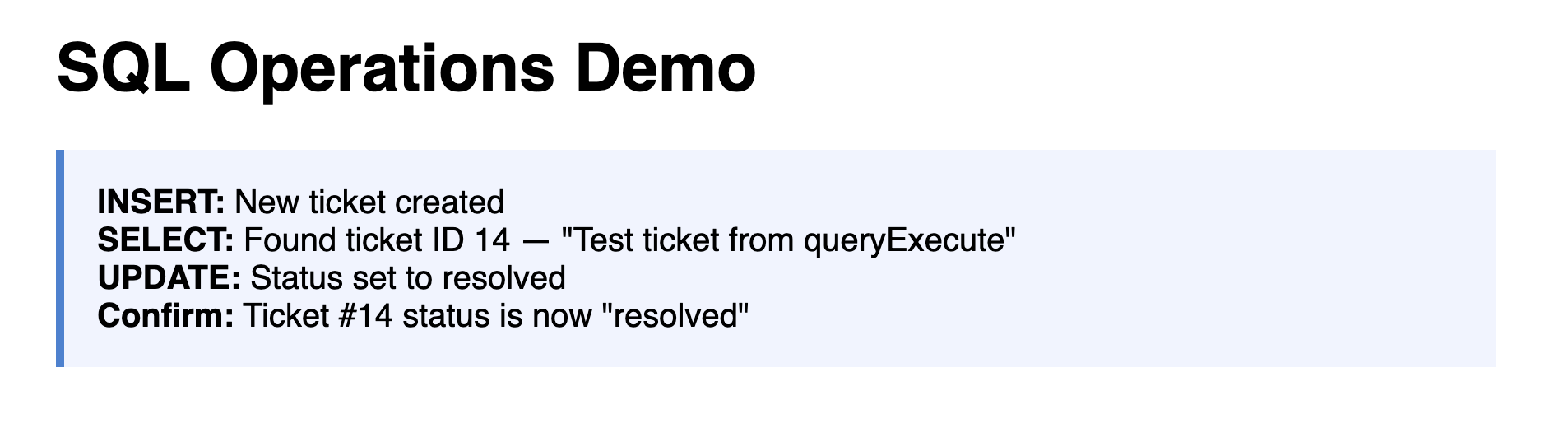
ticket_actions.cfm — INSERT, SELECT, and UPDATE all confirmed using queryExecute with named parameters.
When all the checks above are green, this lesson is complete. Your progress is saved automatically — move straight on to the next lesson.
- Previous lesson
- SQL Fundamentals — A Primer for ColdFusion Developers
- Next lesson
- ORM Basics — ColdFusion Hibernate ORM