CI/CD for CFML Applications
What is CI/CD?
CI (Continuous Integration) means every code change is automatically tested before it is merged. CD (Continuous Delivery) means every passing build is automatically packaged and ready to deploy.
For a ColdFusion application the full pipeline looks like this:
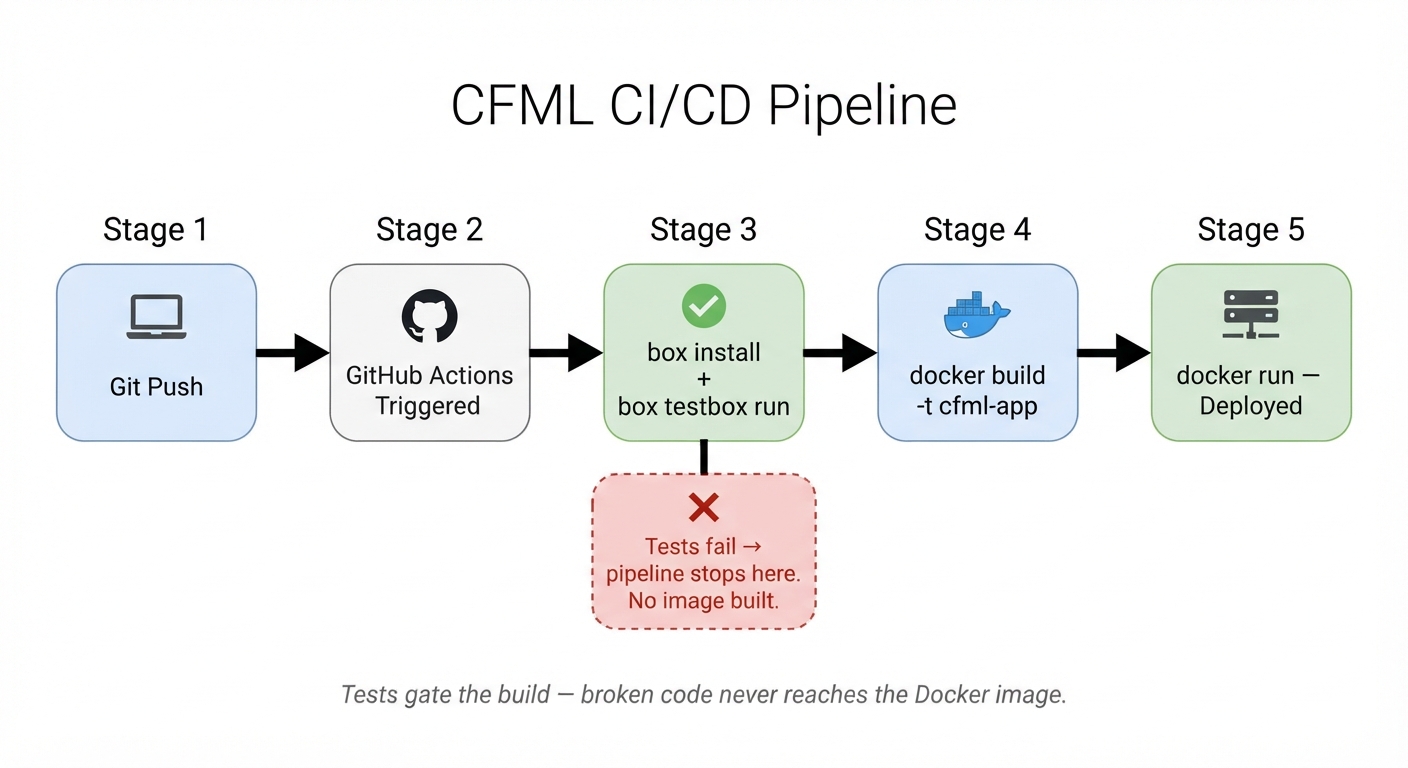
Tests gate the build — a failing TestBox run stops the Docker image from being created.
📌 Scope of this lesson
Running a complete CI/CD pipeline requires a Git server, a container registry, and a CI runner. That infrastructure is out of scope for this foundations course.
In this lesson you will build the two artefacts the pipeline depends on: a box.json manifest and a Dockerfile. Then you will build a Docker image locally — the same command the pipeline runs.
The full pipeline — Git server, registry, automated tests, and deployments using Gitea — is covered in the ColdFusion Advanced course.
1. box.json — the project manifest
box.json is the CommandBox project manifest. It declares your app name, version, and ForgeBox dependencies — similar to package.json in Node.js or composer.json in PHP.
{
  "name": "helpdesk-app",
  "version": "1.0.0",
  "dependencies": {
    "testbox": "^5.0.0"
  }
}
box install reads this file and installs all declared packages into a modules/ directory. In a CI pipeline the build agent runs box install first — this file is the only thing it needs to recreate the full dependency tree on a clean machine.
2. Dockerfile — containerise your app
What is a Dockerfile and why does CFML need one?
A Dockerfile is a plain-text recipe that tells Docker how to build a container image — a self-contained, portable package that includes your application code, its runtime, and all dependencies. Once built, the image runs identically on any machine that has Docker installed: a developer laptop, a CI server, or a cloud VM.
Why containerise a ColdFusion application?
| Without a container | With a container |
|---|---|
| "Works on my machine" — CF version, JVM flags, and file paths differ per server | One image runs the same everywhere |
| Manual server setup — install CF, configure datasources, set JVM heap | docker run does it all in one command |
| Deploying means copying files and restarting CF | Deploying means swapping one image tag for another |
How it relates to ColdFusion: your CFML files are just files — they need a running CF or Lucee engine to execute. The FROM ortussolutions/commandbox:latest base image provides that engine, so you only need to copy your code on top of it and install your dependencies.
A Dockerfile is always a text file named exactly Dockerfile (no extension). Docker reads it top to bottom, executes each instruction as a layer, and produces a tagged image you can push to a registry and pull anywhere.
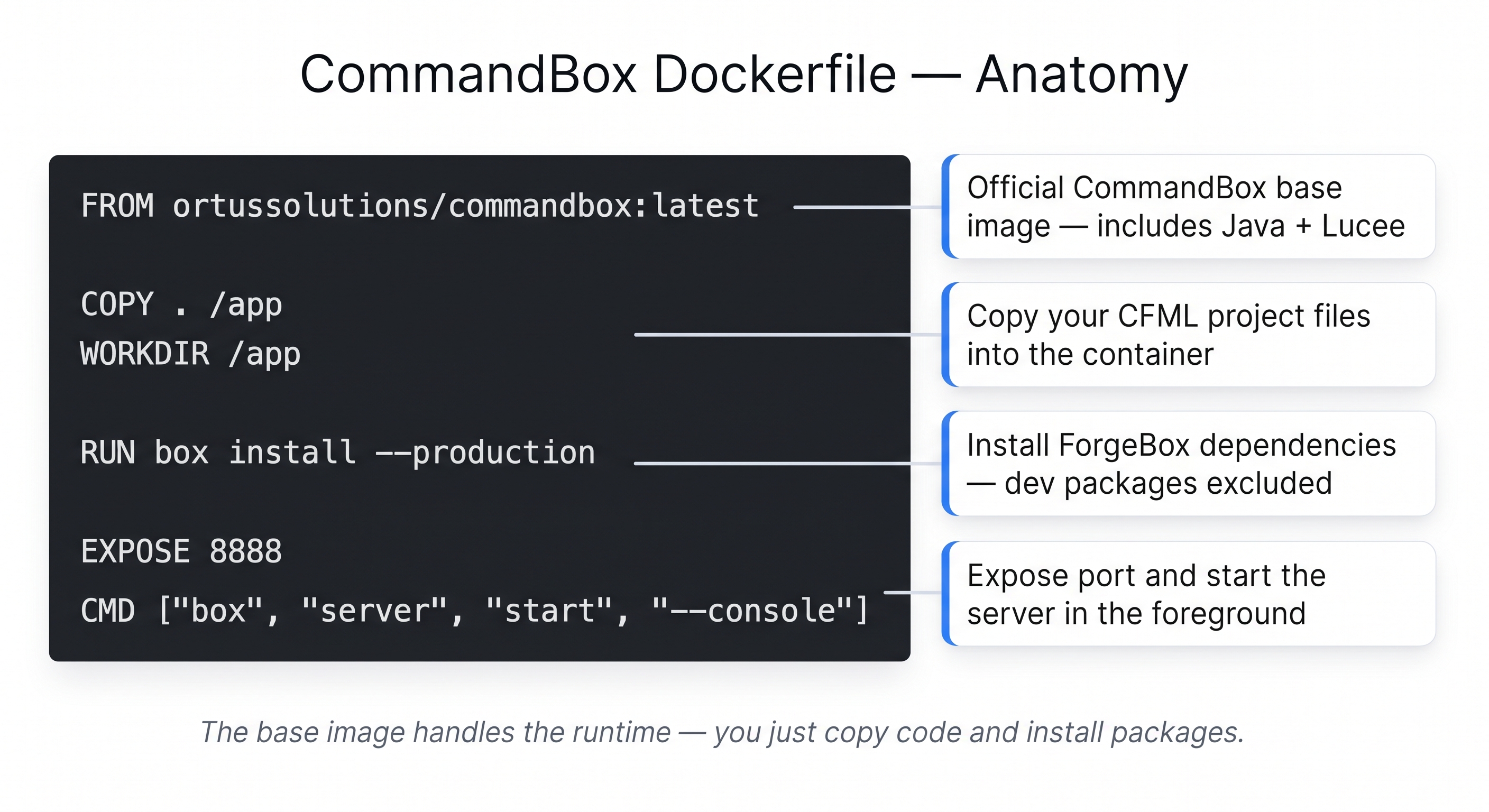
The base image handles the runtime — you just copy code and install packages.
FROM ortussolutions/commandbox:latest

COPY . /app
WORKDIR /app

RUN box install --production

EXPOSE 8888
CMD ["box", "server", "start", "--console"]
| Line | What it does |
|---|---|
FROM ortussolutions/commandbox:latest | Official CommandBox base — Java + Lucee already bundled |
COPY . /app | Copies your CFML project files into the image |
RUN box install --production | Installs ForgeBox dependencies, skips dev packages like TestBox |
EXPOSE 8888 | Documents which port the server listens on |
CMD [...] | Starts the Lucee server in the foreground when the container runs |
💡 Why not bake credentials into the Dockerfile?
A Docker image is a portable artefact — anyone who can pull it can inspect every layer. Credentials baked into the image (datasource passwords, API keys) are exposed to anyone with registry access, and they end up in git history too.
The right pattern is to inject credentials at runtime via environment variables. In a CI pipeline, secrets are stored in the CI server (GitHub Actions Secrets, Gitea Secrets) and passed to the container on start — never written into the image.
Activity 1 — Create box.json
Why /home/laborant/app/ and not wwwroot/student/?
box.json and Dockerfile are source code artefacts, not served files. They belong in a project directory — the kind you would commit to Git and hand to a CI runner. Putting them inside the CF web root (wwwroot/) would expose them over HTTP, which is a security risk.
/home/laborant/app/ is the student's project home — it already exists in the lab environment (it was seeded with the CommandBox server.json scaffold when the image was built). In a real project this would be your Git repository root.
Create /home/laborant/app/box.json:
Terminal tab (no sudo needed — /home/laborant/app/ is your home directory):
mkdir -p /home/laborant/app
tee /home/laborant/app/box.json << 'EOF'
{
  "name": "helpdesk-app",
  "version": "1.0.0",
  "dependencies": {
    "testbox": "^5.0.0"
  }
}
EOF
✏️ Using the IDE tab instead? Create the file here
In the IDE tab, click File → Open Folder…, type /home/laborant/app and press Enter. Right-click in the Explorer panel → New File → name it box.json, paste the content below, and save with Ctrl+S:
{
  "name": "helpdesk-app",
  "version": "1.0.0",
  "dependencies": {
    "testbox": "^5.0.0"
  }
}
Verify:
cat /home/laborant/app/box.json
Now create a .gitignore so modules/ is never committed to Git:
tee /home/laborant/app/.gitignore << 'EOF'
# CommandBox — never commit installed packages
modules/

# CommandBox server state
.server/
server.json.bak

# OS and editor noise
.DS_Store
.vscode/
EOF
✏️ Using the IDE tab instead? Create the file here
In the IDE tab, right-click in the Explorer panel → New File → name it .gitignore, paste the content below, and save with Ctrl+S:
# CommandBox — never commit installed packages
modules/

# CommandBox server state
.server/
server.json.bak

# OS and editor noise
.DS_Store
.vscode/
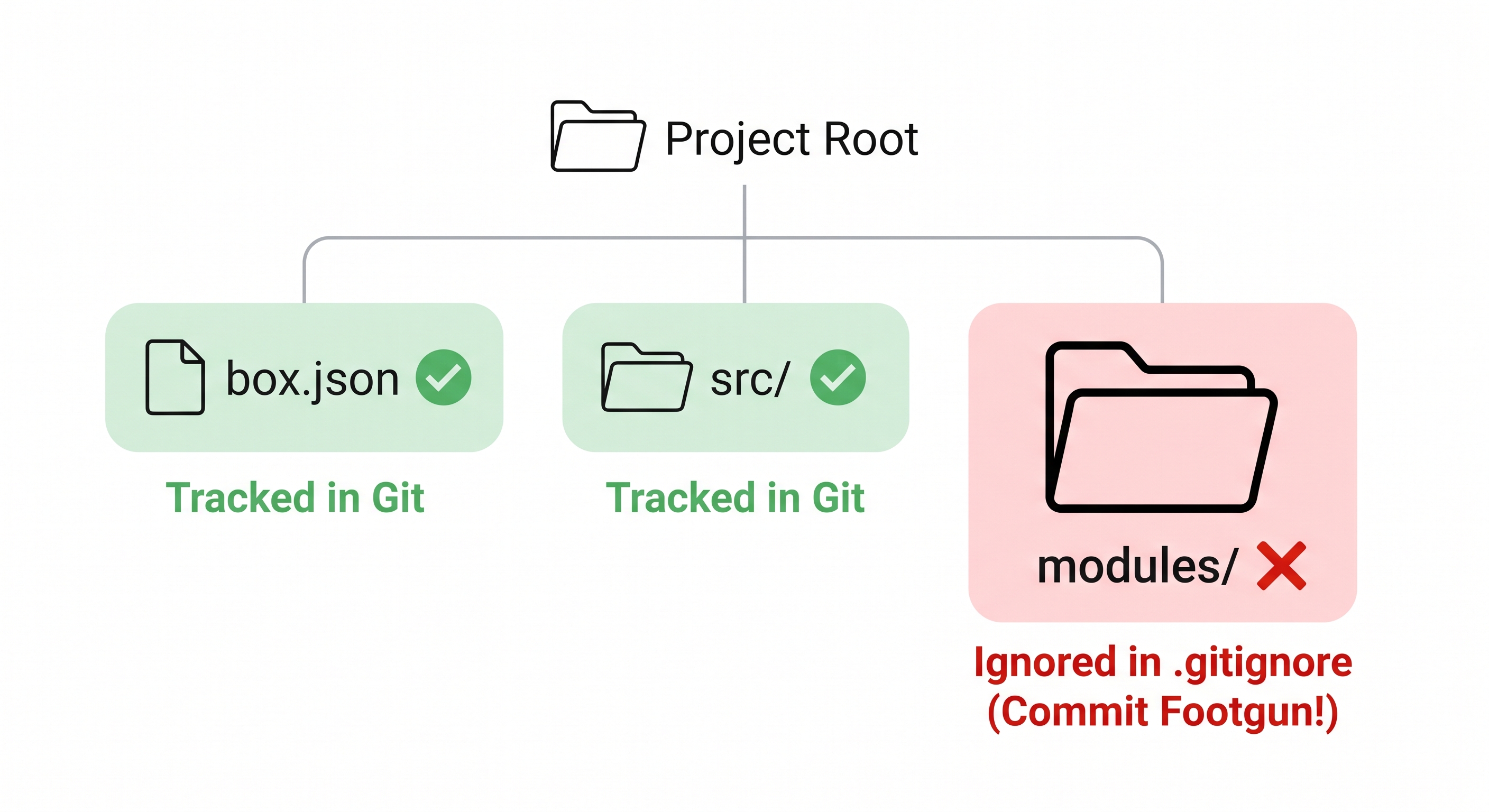
modules/ is never committed — box.json is the source of truth. Any developer or CI runner recreates it with box install.
Why must modules/ be in .gitignore?
box install downloads ForgeBox packages into a modules/ directory — the CFML equivalent of node_modules/ in Node.js. This directory can easily reach hundreds of MB and contains third-party code that is already versioned on ForgeBox.
Committing it to Git:
- Bloats your repository permanently
- Creates merge conflicts when teammates run
box installon different platforms - Makes
git clonepainfully slow for new team members
The correct workflow — identical to npm:
git clone <repo>        # no modules/ — just source code
box install             # recreates modules/ from box.json in seconds
Any CI runner does the same: git clone → box install → run tests → build image. The box.json file is the single source of truth.
Activity 2 — Create the Dockerfile
Create /home/laborant/app/Dockerfile:
Terminal tab:
tee /home/laborant/app/Dockerfile << 'EOF'
FROM ortussolutions/commandbox:6.3.4

COPY . /app
WORKDIR /app

RUN box install --production

EXPOSE 8888
CMD ["box", "server", "start", "--console"]
EOF
✏️ Using the IDE tab instead? Create the file here
In the IDE tab, right-click in the Explorer panel → New File → name it Dockerfile, paste the content below, and save with Ctrl+S:
FROM ortussolutions/commandbox:6.3.4

COPY . /app
WORKDIR /app

RUN box install --production

EXPOSE 8888
CMD ["box", "server", "start", "--console"]
💡 Why pin the version tag — and not use :latest?
FROM ortussolutions/commandbox:latest always pulls whichever version Ortus last published. That means:
- Two developers building on different days can get different images
- A pipeline that worked yesterday can silently fail today after an upstream update
- You cannot reproduce a past build reliably
Pin to a specific version tag instead:
FROM ortussolutions/commandbox:6.3.4
Now every build — locally, on CI, in production — uses the exact same base. If you need to upgrade, you change the tag deliberately and test the result. latest is convenient for demos; pinned tags are mandatory for production.
Now create a .dockerignore so COPY . /app doesn't bloat the image:
tee /home/laborant/app/.dockerignore << 'EOF'
# Never copy installed packages into the image — box install runs inside the build
modules/

# Git history has no place in a production image
.git/
.gitignore

# Local server state — not needed in the image
.server/
server.json.bak

# Editor files
.vscode/
.DS_Store
EOF
✏️ Using the IDE tab instead? Create the file here
In the IDE tab, right-click in the Explorer panel → New File → name it .dockerignore, paste the content below, and save with Ctrl+S:
# Never copy installed packages into the image — box install runs inside the build
modules/

# Git history has no place in a production image
.git/
.gitignore

# Local server state — not needed in the image
.server/
server.json.bak

# Editor files
.vscode/
.DS_Store
Why does .dockerignore matter — what happens without it?
COPY . /app copies everything in the build context to the image. Without a .dockerignore:
| What gets copied | Problem |
|---|---|
modules/ | Hundreds of MB of packages — then RUN box install adds them again. Double the size. |
.git/ | Full Git history baked into the image — leaks commit messages, author names, and potentially secrets from past commits |
.vscode/, .DS_Store | Noise — no effect but adds unnecessary bytes |
A .dockerignore works exactly like .gitignore — patterns listed there are excluded from the build context before Docker even starts processing the Dockerfile. The result is a smaller, cleaner, faster-to-push image.
Verify:
cat /home/laborant/app/Dockerfile
cat /home/laborant/app/.dockerignore
Activity 3 — Build the Docker image
Build the image tagged cfml-app:
docker build -t cfml-app /home/laborant/app/
You will see Docker work through the Dockerfile line by line — each instruction becomes a layer:
Step 1/5 : FROM ortussolutions/commandbox:6.3.4
 ---> pulling base image ...
Step 2/5 : COPY . /app
 ---> copied project files
Step 3/5 : WORKDIR /app
 ---> set working directory
Step 4/5 : RUN box install --production
 ---> installing ForgeBox dependencies ...
Step 5/5 : CMD ["box", "server", "start", "--console"]
 ---> set default start command
Successfully built a1b2c3d4e5f6
Successfully tagged cfml-app:latest
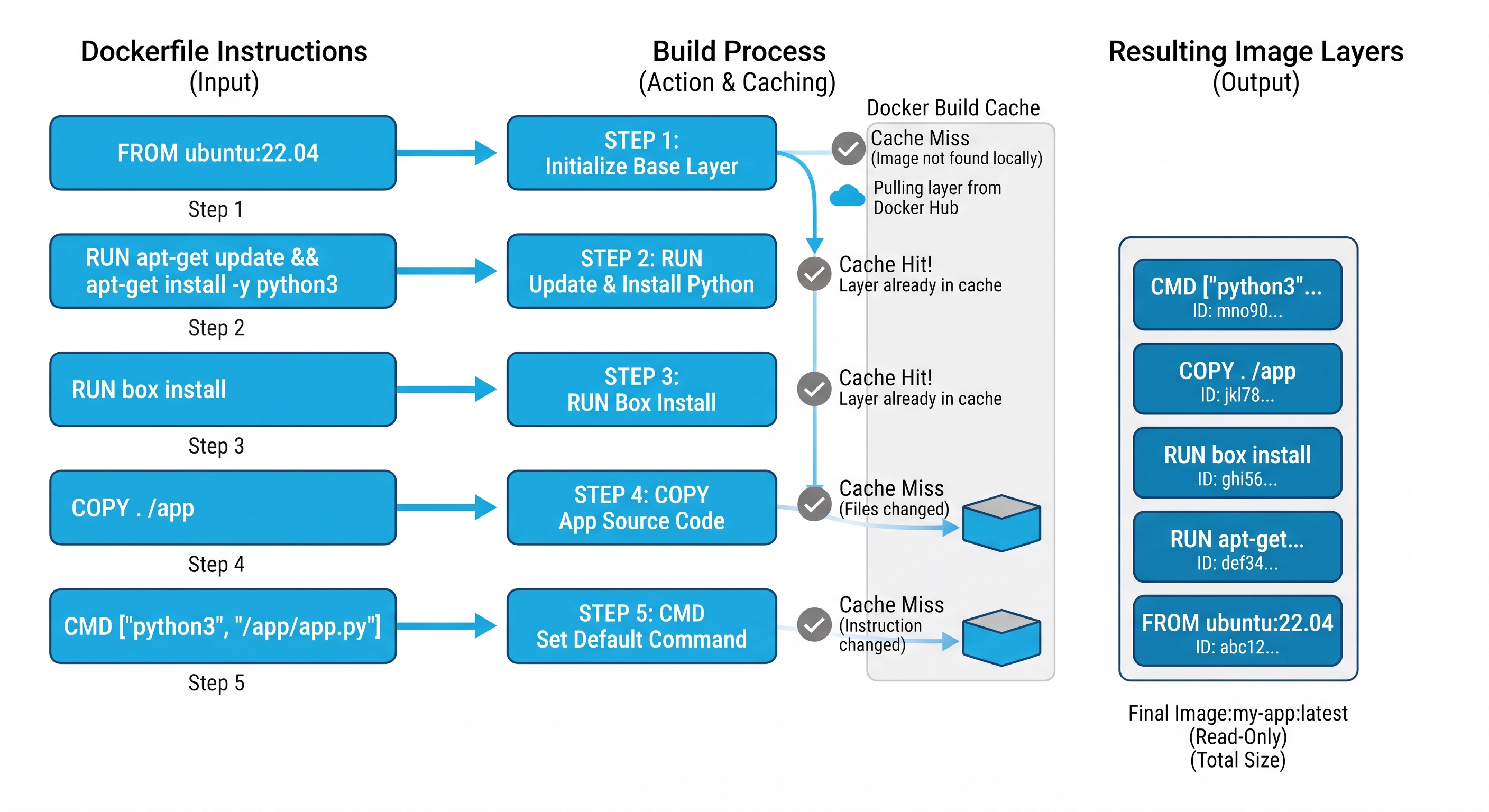
Each Dockerfile instruction creates one immutable layer — unchanged layers are reused from cache on every subsequent build.
Run the build a second time immediately — every step shows ---> Using cache. Docker detected that nothing changed and reused all five layers. This is why CI builds after the first are fast.
Confirm the image exists:
docker images | grep cfml
🐢 First build is slow — here is why and what each layer caches.
Docker pulls the ortussolutions/commandbox:6.3.4 base image on the first build — roughly 500 MB. After that it is cached locally and never downloaded again unless you change the FROM tag.
Each subsequent instruction is also cached independently:
| Layer | Invalidated when... |
|---|---|
FROM | You change the base image tag |
COPY . /app | Any file in the build context changes |
RUN box install --production | box.json changes (because COPY runs first) |
This is why COPY comes before RUN box install — if the order were reversed, a single .cfm file change would invalidate the box install cache and re-download all packages on every build.
When all the checks above are green, this lesson is complete. Your progress is saved automatically — move straight on to the next lesson.
Found a bug or an issue with this lesson? Please reach out — your feedback helps improve the course for everyone.
📧 Alex — mercadoalexatgmail.com
- Previous lesson
- Performance Tuning & JVM Configuration
- Next lesson
- Production Readiness & Monitoring