Object-Oriented Programming with CFCs
Is ColdFusion object-oriented?
Yes — fully. ColdFusion supports classes, properties, methods, inheritance, interfaces, and access modifiers. The building block is a CFC (ColdFusion Component) — a .cfc file that defines a reusable object.
| OOP concept | ColdFusion implementation |
|---|---|
| Class | CFC file (.cfc) — component { } |
| Instantiation | new TicketService() or createObject("component", "TicketService") |
| Properties | property name="title" type="string" |
| Methods | public string function getName() { } |
| Inheritance | component extends="BaseService" { } |
| Interfaces | component implements="IService" { } |
| Access modifiers | public, private, package, remote |
| Constructor | function init() { return this; } |
CF is not purely OOP — you can write procedural .cfm pages with no components at all. But for any serious application, CFCs are the standard pattern.
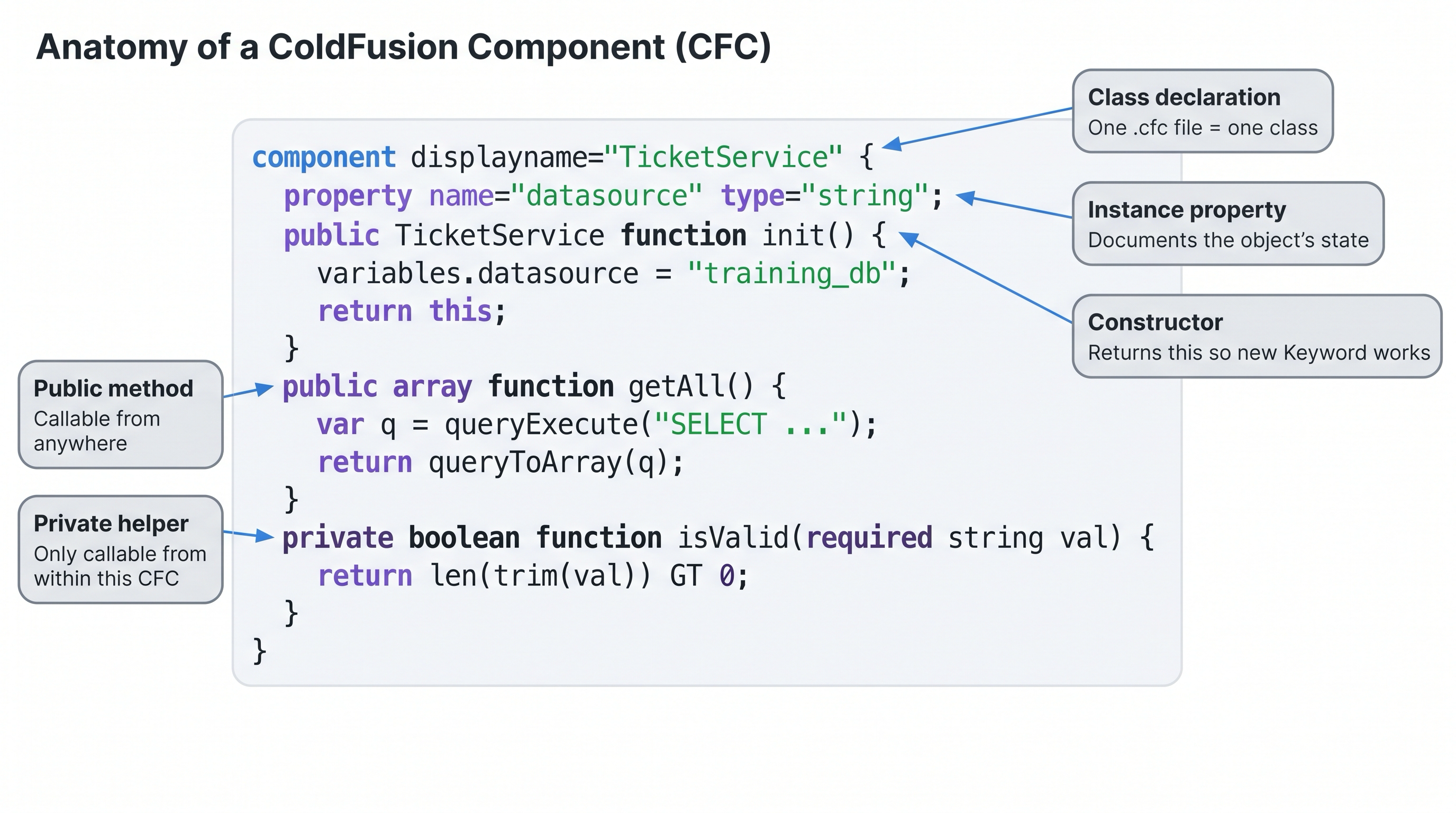
Anatomy of a CFC — one file defines the class, its properties, and all its methods.
Activity 1 — Create your first CFC
Activity: Create GreetingService.cfc — a simple CFC with a constructor, a public method, and a private helper.
Terminal tab:
sudo tee /opt/coldfusion2025/cfusion/wwwroot/student/GreetingService.cfc << 'EOF'
component displayname="GreetingService" hint="Returns greetings" {

  // Constructor
  public GreetingService function init() {
    variables.createdAt = now();
    return this;
  }

  // Public method
  public string function greet(required string name) {
    return _format("Hello, " & arguments.name & "!");
  }

  // Private helper — not callable from outside
  private string function _format(required string msg) {
    return "[" & timeFormat(now(), "HH:mm:ss") & "] " & arguments.msg;
  }

}
EOF
✏️ Using the IDE tab instead? Create the file here
In the IDE tab, click File → Open Folder…, type /opt/coldfusion2025/cfusion/wwwroot/student and press Enter. If VS Code asks "The folder does not exist. Would you like to create it?" — click Yes. Then right-click in the Explorer panel → New File → name it GreetingService.cfc, paste the content below, and save with Ctrl+S:
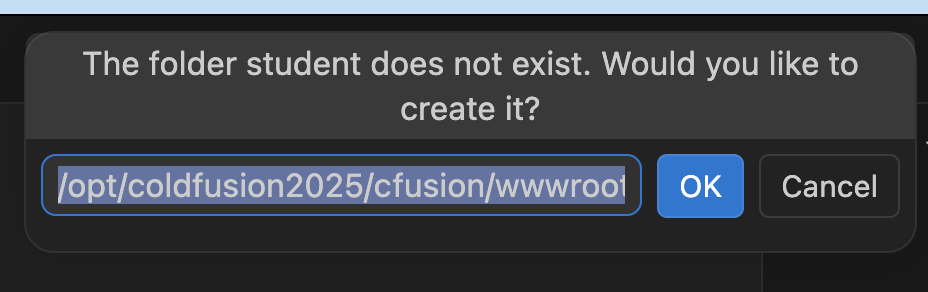
VS Code will offer to create the student folder — click Yes.
component displayname="GreetingService" hint="Returns greetings" {

  // Constructor
  public GreetingService function init() {
    variables.createdAt = now();
    return this;
  }

  // Public method
  public string function greet(required string name) {
    return _format("Hello, " & arguments.name & "!");
  }

  // Private helper — not callable from outside
  private string function _format(required string msg) {
    return "[" & timeFormat(now(), "HH:mm:ss") & "] " & arguments.msg;
  }

}
![[object Object]](/content/files/courses/ColdFusion-2025-Foundations-5151cba6/module-1/5.lesson-oop-cfc/__static__/greeting-service-v1.png?v=1791349307475)
UML representation of GreetingService — constructor, public method, and private helper.
Verify the file was created:
ls -lh /opt/coldfusion2025/cfusion/wwwroot/student/GreetingService.cfc
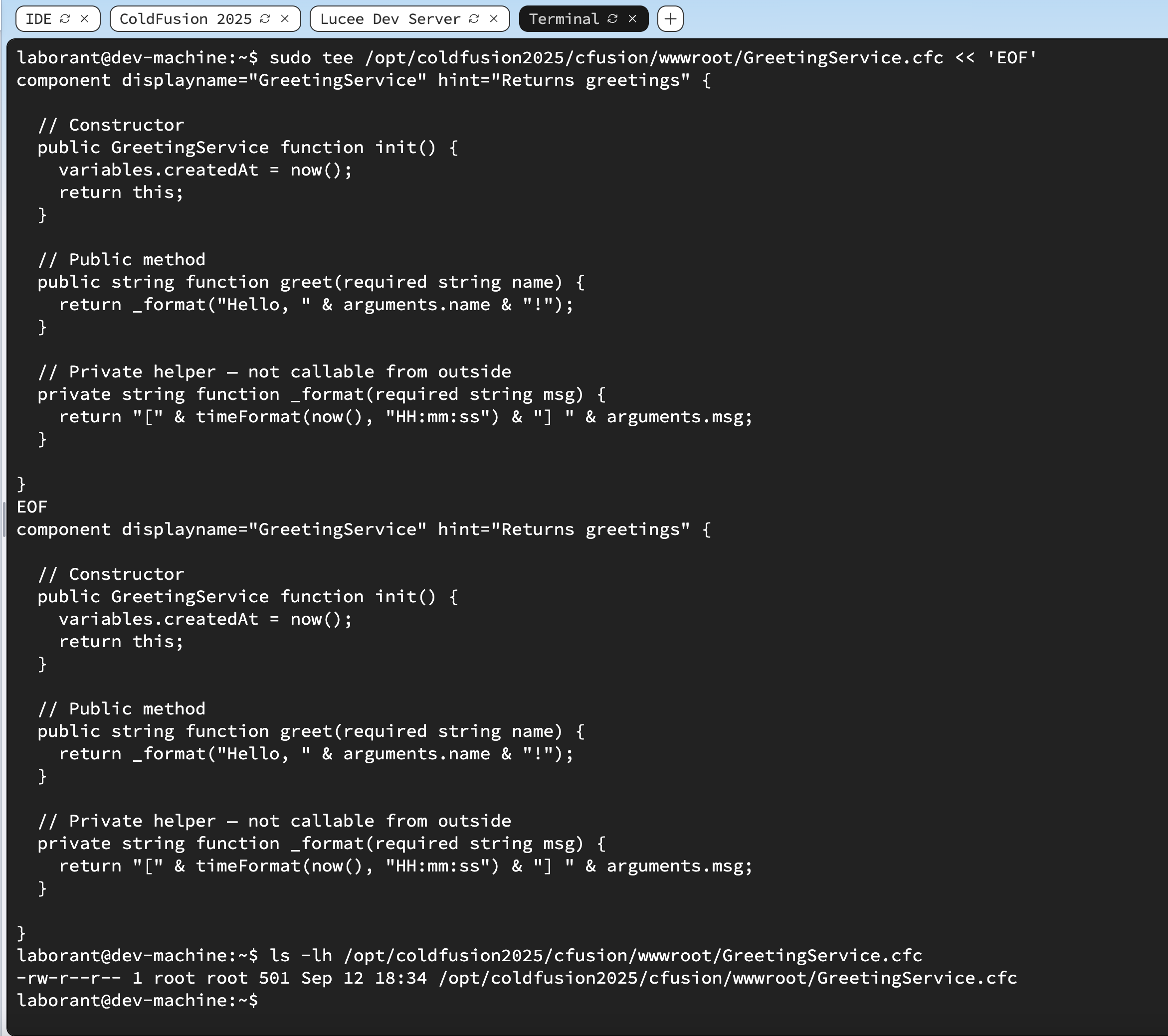
Terminal confirming GreetingService.cfc was created in the web root.
CFC anatomy
The example below is a reference CFC used throughout this lesson to label and explain each part of a component. You do not need to create it — the hands-on activities use GreetingService.cfc (Activity 1) and JavaUtilService.cfc (Activity 4).
// TicketService.cfc — reference example (read only, no activity)
component displayname="TicketService" hint="Manages help desk tickets" {

  // Properties (optional — document the object's state)
  property name="datasource" type="string" default="training_db";

  // Constructor
  public TicketService function init(string datasource = "training_db") {
    variables.datasource = arguments.datasource;
    return this;
  }

  // Public method
  public array function getAll() {
    var q = queryExecute(
      "SELECT id, title, status, priority FROM hd_tickets ORDER BY id DESC",
      {}, { datasource: variables.datasource }
    );
    return queryToArray(q);
  }

  // Public method with argument
  public struct function getById(required numeric id) {
    var q = queryExecute(
      "SELECT id, title, status, priority, description FROM hd_tickets WHERE id = :id",
      { id: { value: arguments.id, cfsqltype: "cf_sql_integer" } },
      { datasource: variables.datasource }
    );
    if (q.recordCount == 0) { return {}; }
    return queryToArray(q)[1];
  }

  // Private helper — not callable from outside
  private boolean function isValidPriority(required string priority) {
    return listFind("low,medium,high,critical", arguments.priority) GT 0;
  }

}
![[object Object]](/content/files/courses/ColdFusion-2025-Foundations-5151cba6/module-1/5.lesson-oop-cfc/__static__/TicketService-Component-v1.png?v=1791349307475)
UML representation of TicketService — property, constructor, two public methods, and a private helper.
Constructor naming across languages — how does CF compare?
The constructor is named differently across languages. Here's the full picture:
| Language | Constructor name | Must match class? |
|---|---|---|
| Java | Same as class name | ✅ Yes — public TicketService() {} |
| C# | Same as class name | ✅ Yes — public TicketService() {} |
| PHP | __construct() | ❌ No — always __construct |
| Python | __init__() | ❌ No — always __init__ |
| JavaScript | constructor() (in classes) | ❌ No — always constructor |
| ColdFusion | init() | ❌ No — always init |
The ColdFusion rule: the constructor is always init() regardless of the class (file) name. init() is also optional — if your CFC has no init() method, new GreetingService() still works and simply returns an uninitialised instance.
Access modifiers
| Modifier | Accessible from |
|---|---|
public | Anywhere — other CFCs, .cfm pages, remote callers |
private | Inside this CFC only |
package | This CFC and CFCs in the same directory |
remote | Public plus exposed as a web service (REST or SOAP) |
The remote modifier is unique to ColdFusion — it turns any method into an automatic web service endpoint with no extra configuration.
Activity 2 — Instantiate the CFC and call a method
Activity: Create test_cfc.cfm — a page that instantiates GreetingService and calls its greet() method.
Terminal tab:
sudo tee /opt/coldfusion2025/cfusion/wwwroot/student/test_cfc.cfm << 'EOF'
<cfscript>
  svc     = new GreetingService();
  message = svc.greet("ColdFusion Student");
  writeOutput("<strong>Result:</strong> " & message & "<br>");
  writeOutput("<strong>CFC type:</strong> " & getMetaData(svc).name & "<br>");
</cfscript>
EOF
✏️ Using the IDE tab instead? Create the file here
In the IDE tab, right-click in the Explorer panel → New File → name it test_cfc.cfm, paste the content below, and save with Ctrl+S:
<cfscript>
  svc     = new GreetingService();
  message = svc.greet("ColdFusion Student");
  writeOutput("<strong>Result:</strong> " & message & "<br>");
  writeOutput("<strong>CFC type:</strong> " & getMetaData(svc).name & "<br>");
</cfscript>
Open /test_cfc.cfm in the ColdFusion 2025 browser tab (right-click → Open Link in New Tab, change path). Or from the Terminal:
curl -s http://localhost:8500/student/test_cfc.cfm
# Expected: Result: [HH:mm:ss] Hello, ColdFusion Student!
![[object Object]](/content/files/courses/ColdFusion-2025-Foundations-5151cba6/module-1/5.lesson-oop-cfc/__static__/browser-test-cfc-output-v1.png?v=1791349307475)
test_cfc.cfm confirms the CFC was instantiated and the greet() method returned a value.
Instantiation
// Modern syntax (preferred)
svc = new GreetingService();

// With constructor argument
svc = new TicketService(datasource="training_db");

// Equivalent older syntax
svc = createObject("component", "GreetingService").init();

// Call a method
msg = svc.greet("World");
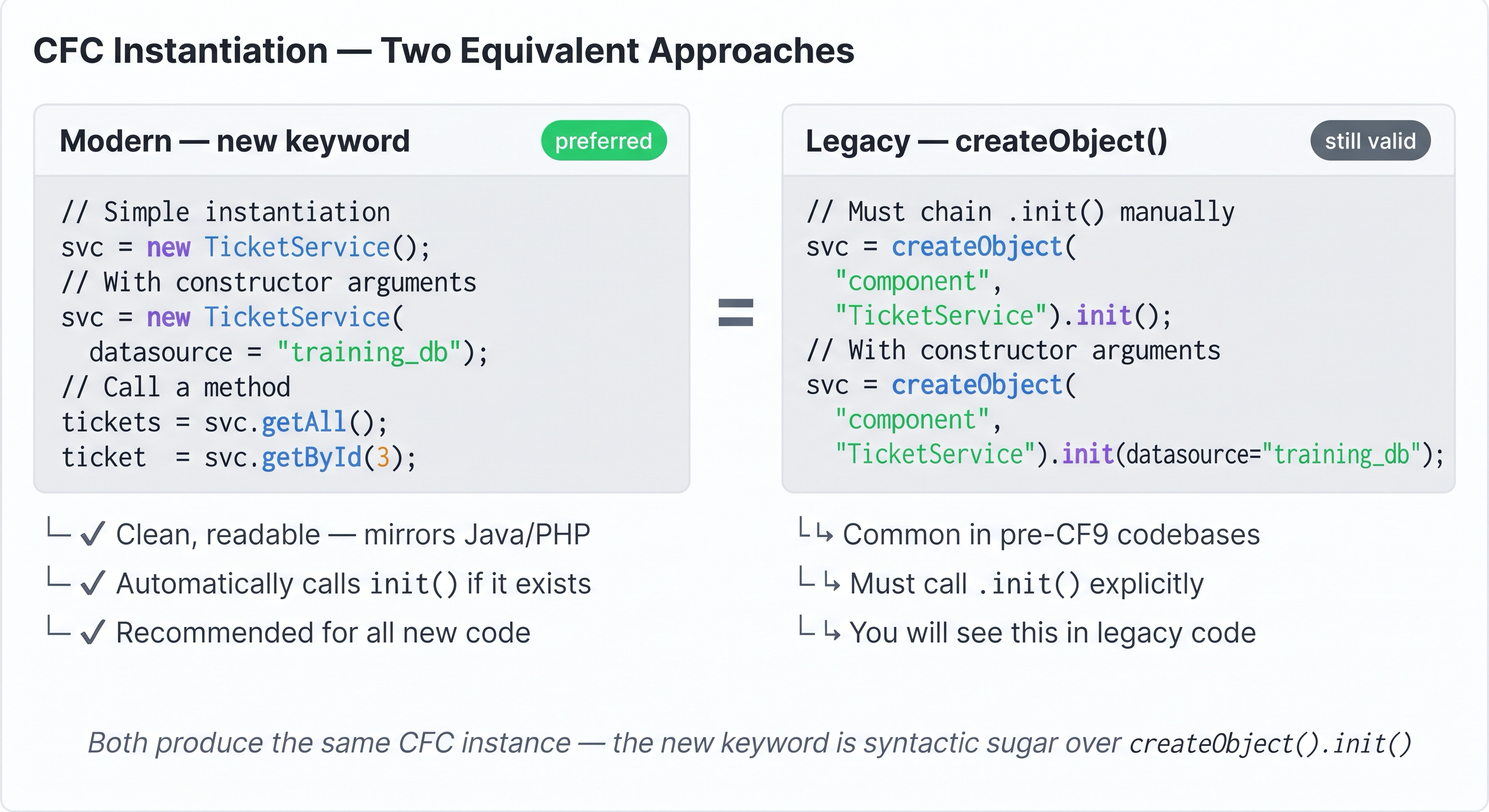
new GreetingService() and createObject("component","GreetingService").init() are identical — prefer the new syntax.
CFC packages — CFCs in subfolders
Java organises classes into packages (com.example.services). ColdFusion does the same thing using dot-notation paths that mirror the folder structure relative to the web root.
wwwroot/
├── index.cfm
└── services/
    └── greeting/
        └── GreetingService.cfc   ← package: services.greeting
To instantiate a CFC that lives in a subfolder, replace the slashes with dots:
// CFC is at wwwroot/services/greeting/GreetingService.cfc
svc = new services.greeting.GreetingService();

// Equivalent createObject form
svc = createObject("component", "services.greeting.GreetingService").init();
The dot-path is always relative to the web root (or a mapped path — see below). There is no import statement needed — ColdFusion resolves the path at runtime.
The extends attribute uses the same dot-notation:
// services/greeting/GreetingService.cfc extends services/BaseService.cfc
component extends="services.BaseService" {
  ...
}
CF mappings — using paths outside the web root
If your CFCs live outside the web root (e.g. /opt/app/components/) you need a ColdFusion mapping — an alias that tells CF where to look. Define it in Application.cfc:
component {
  this.name = "MyApp";

  // Map the alias "components" to an absolute filesystem path
  this.mappings["/components"] = "/opt/app/components";
}
Now instantiate using the mapping alias:
// Resolves to /opt/app/components/services/GreetingService.cfc
svc = new components.services.GreetingService();
CF mappings vs web root paths — when to use each
| Approach | When to use | Example path |
|---|---|---|
| Dot-path from web root | CFCs are inside wwwroot/ | new services.greeting.GreetingService() |
this.mappings in Application.cfc | CFCs are outside wwwroot/ — libraries, shared components | new components.services.GreetingService() |
Absolute path in createObject | One-off, no mapping needed | createObject("component", "/opt/app/Util.cfc") |
Most training and small projects keep everything under wwwroot/ and use dot-paths. Real applications typically move CFCs outside wwwroot/ (so they cannot be requested directly by a browser) and use mappings.
Quick reference — folder structure → instantiation path
wwwroot/
├── Application.cfc
├── index.cfm
├── services/
│   ├── GreetingService.cfc      → new services.GreetingService()
│   └── tickets/
│       └── TicketService.cfc    → new services.tickets.TicketService()
└── models/
    └── User.cfc                 → new models.User()
The dot separator is mandatory — new services/GreetingService() is a syntax error. Always use dots, never slashes, when referencing a CFC by path in CFML code.
Inheritance
// BaseService.cfc
component {
  public string function getTimestamp() {
    return dateTimeFormat(now(), "iso8601");
  }
}

// GreetingService.cfc — inherits getTimestamp()
component extends="BaseService" {
  public string function greet(required string name) {
    return "Hello, " & arguments.name & " — " & getTimestamp();
  }
}

// Usage
svc = new GreetingService();
svc.greet("World");       // defined in GreetingService
svc.getTimestamp();       // inherited from BaseService
Use super.methodName() to call the parent's version of an overridden method.
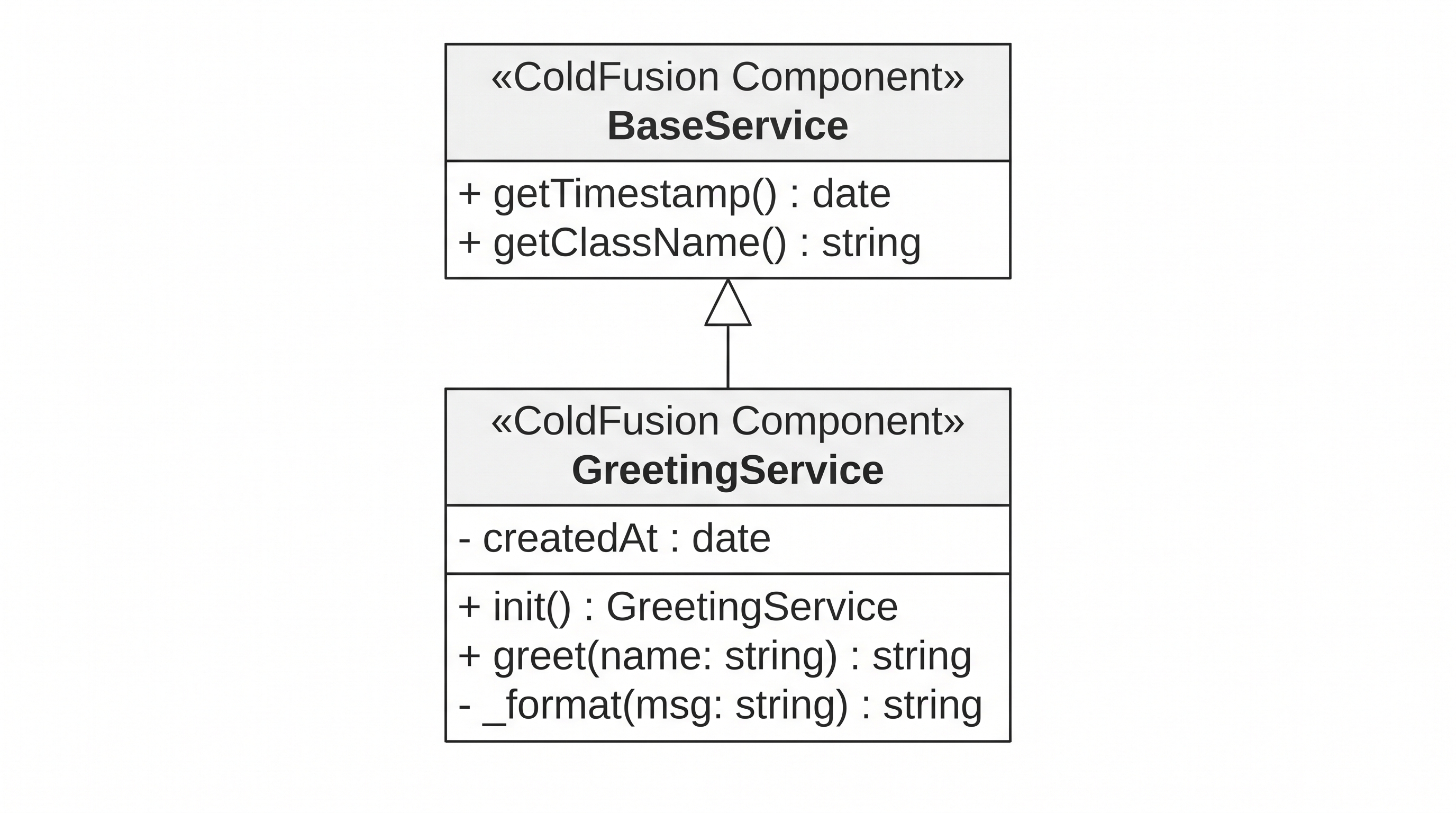
GreetingService extends BaseService — methods defined in the parent are callable on the child instance.
Activity 3 — Inherit from a base component
Activity: Create BaseService.cfc with a shared getTimestamp() method, then update GreetingService.cfc to extend it. Verify that the inherited method is accessible on the child instance.
Terminal tab — create BaseService.cfc:
sudo tee /opt/coldfusion2025/cfusion/wwwroot/student/BaseService.cfc << 'EOF'
component displayname="BaseService" hint="Shared base for all services" {

  public string function getTimestamp() {
    return dateTimeFormat(now(), "iso8601");
  }

  public string function getClassName() {
    return getMetaData(this).name;
  }

}
EOF
✏️ Using the IDE tab instead? Create the file here
In the IDE tab, right-click in the Explorer panel → New File → name it BaseService.cfc, paste the content below, and save with Ctrl+S:
component displayname="BaseService" hint="Shared base for all services" {

  public string function getTimestamp() {
    return dateTimeFormat(now(), "iso8601");
  }

  public string function getClassName() {
    return getMetaData(this).name;
  }

}
Terminal tab — update GreetingService.cfc to extend BaseService:
sudo tee /opt/coldfusion2025/cfusion/wwwroot/student/GreetingService.cfc << 'EOF'
component displayname="GreetingService" hint="Returns greetings" extends="BaseService" {

  public GreetingService function init() {
    variables.createdAt = now();
    return this;
  }

  public string function greet(required string name) {
    return _format("Hello, " & arguments.name & "!");
  }

  private string function _format(required string msg) {
    return "[" & timeFormat(now(), "HH:mm:ss") & "] " & arguments.msg;
  }

}
EOF
✏️ Using the IDE tab instead? Edit the file here
In the IDE tab, open GreetingService.cfc, select all, replace with the content below, and save with Ctrl+S:
component displayname="GreetingService" hint="Returns greetings" extends="BaseService" {

  public GreetingService function init() {
    variables.createdAt = now();
    return this;
  }

  public string function greet(required string name) {
    return _format("Hello, " & arguments.name & "!");
  }

  private string function _format(required string msg) {
    return "[" & timeFormat(now(), "HH:mm:ss") & "] " & arguments.msg;
  }

}
Terminal tab — update test_cfc.cfm to verify inheritance:
sudo tee /opt/coldfusion2025/cfusion/wwwroot/student/test_cfc.cfm << 'EOF'
<cfscript>
  svc = new GreetingService();
  writeOutput("<strong>greet():</strong> "        & svc.greet("ColdFusion Student") & "<br>");
  writeOutput("<strong>getTimestamp():</strong> " & svc.getTimestamp() & "<br>");
  writeOutput("<strong>getClassName():</strong> " & svc.getClassName() & "<br>");
</cfscript>
<cfdump var="#getMetaData(new GreetingService())#" label="GreetingService metadata">
EOF
✏️ Using the IDE tab instead? Edit the file here
In the IDE tab, open test_cfc.cfm, select all, replace with the content below, and save with Ctrl+S:
<cfscript>
  svc = new GreetingService();
  writeOutput("<strong>greet():</strong> "        & svc.greet("ColdFusion Student") & "<br>");
  writeOutput("<strong>getTimestamp():</strong> " & svc.getTimestamp() & "<br>");
  writeOutput("<strong>getClassName():</strong> " & svc.getClassName() & "<br>");
</cfscript>
<cfdump var="#getMetaData(new GreetingService())#" label="GreetingService metadata">
Reload /test_cfc.cfm in the browser — you should see the greeting, an ISO timestamp, the class name, and a cfdump of the full component metadata showing extends="BaseService" in the hierarchy.
Key observation:
getTimestamp()andgetClassName()are defined inBaseService.cfcbut callable directly on theGreetingServiceinstance — this is inheritance in action. ThecfdumpofgetMetaData()shows the full inheritance chain.
Activity 4 — Add a method and verify with cfdump
Activity: Update GreetingService.cfc to add a getInfo() method, then update test_cfc.cfm to verify it with cfdump.
Terminal tab — update GreetingService.cfc:
sudo tee /opt/coldfusion2025/cfusion/wwwroot/student/GreetingService.cfc << 'EOF'
component displayname="GreetingService" hint="Returns greetings" {

  public GreetingService function init() {
    variables.createdAt = now();
    return this;
  }

  public string function greet(required string name) {
    return _format("Hello, " & arguments.name & "!");
  }

  public struct function getInfo() {
    return {
      name:      "GreetingService",
      createdAt: variables.createdAt,
      age:       dateDiff("s", variables.createdAt, now()) & " seconds"
    };
  }

  private string function _format(required string msg) {
    return "[" & timeFormat(now(), "HH:mm:ss") & "] " & arguments.msg;
  }

}
EOF
✏️ Using the IDE tab instead? Edit the file here
In the IDE tab, open GreetingService.cfc, select all, replace with the content below, and save with Ctrl+S:
component displayname="GreetingService" hint="Returns greetings" {

  public GreetingService function init() {
    variables.createdAt = now();
    return this;
  }

  public string function greet(required string name) {
    return _format("Hello, " & arguments.name & "!");
  }

  public struct function getInfo() {
    return {
      name:      "GreetingService",
      createdAt: variables.createdAt,
      age:       dateDiff("s", variables.createdAt, now()) & " seconds"
    };
  }

  private string function _format(required string msg) {
    return "[" & timeFormat(now(), "HH:mm:ss") & "] " & arguments.msg;
  }

}
![[object Object]](/content/files/courses/ColdFusion-2025-Foundations-5151cba6/module-1/5.lesson-oop-cfc/__static__/Greeting-service-2-v2.png?v=1791349307475)
Updated GreetingService after Activity 3 — getInfo() added as a second public method.
Terminal tab — update test_cfc.cfm:
sudo tee /opt/coldfusion2025/cfusion/wwwroot/student/test_cfc.cfm << 'EOF'
<cfscript>
  svc = new GreetingService();
  writeOutput("<strong>Greeting:</strong> " & svc.greet("ColdFusion Student") & "<br><br>");
</cfscript>
<cfdump var="#new GreetingService().getInfo()#" label="GreetingService.getInfo()">
EOF
✏️ Using the IDE tab instead? Edit the file here
In the IDE tab, open test_cfc.cfm, select all, replace with the content below, and save with Ctrl+S:
<cfscript>
  svc = new GreetingService();
  writeOutput("<strong>Greeting:</strong> " & svc.greet("ColdFusion Student") & "<br><br>");
</cfscript>
<cfdump var="#new GreetingService().getInfo()#" label="GreetingService.getInfo()">
Reload /test_cfc.cfm in the browser — you should see the greeting and a cfdump table showing the struct with name, createdAt, and age.
![[object Object]](/content/files/courses/ColdFusion-2025-Foundations-5151cba6/module-1/5.lesson-oop-cfc/__static__/browser-cfdump-getinfo-v1.png?v=1791349307475)
cfdump renders the struct returned by getInfo() — a live view of the CFC's instance state.
The variables scope inside a CFC
Inside a CFC, variables.* is the instance scope — shared across all methods of the same instance, but private to that instance. It is the equivalent of instance fields in Java.
component {
  public function init() {
    variables.createdAt = now();  // instance field
    return this;
  }

  public function getAge() {
    return dateDiff("s", variables.createdAt, now()) & " seconds old";
  }
}
Gotcha: Always use
varfor local variables inside functions. Withoutvar, the variable bleeds into thevariablesscope and is shared across method calls — a classic CF concurrency bug.
public array function getAll() {
  var q = queryExecute(...);  // local — correct
  // NOT: q = queryExecute(...)  ← would be variables.q — shared!
  return queryToArray(q);
}
Calling Java from a CFC
Because ColdFusion runs on the JVM, you can instantiate any Java class directly from CFML:
// Use Java's UUID generator
uuid = createObject("java", "java.util.UUID").randomUUID().toString();

// Use Java's StringBuilder
sb = createObject("java", "java.lang.StringBuilder").init();
sb.append("Hello");
sb.append(", World!");
writeOutput(sb.toString());
This is rarely needed for everyday CF work, but the entire Java ecosystem is available when you need it.
Why no .jar, .war, or .jsp? How Java really works inside ColdFusion
ColdFusion is already a compiled Java application. When you install ColdFusion 2025, Adobe ships it as a fully compiled Java EE application deployed on an embedded Tomcat server. The CFML engine, all built-in tags, and all built-in functions are already JVM bytecode — you never compile anything yourself.
When you save a .cfc file, ColdFusion compiles it to JVM bytecode on the first request and caches the result. No javac, no build step.
What createObject("java", "...") actually does
It asks the already-running JVM for an instance of a class that is already loaded on the classpath. Classes like java.util.UUID and java.lang.StringBuilder ship with the Java standard library and are always available. If you wrote your own Java class, you would:
- Write the
.javasource and compile it to a.class/.jar - Drop the
.jarinto ColdFusion's classpath ({cf-root}/cfusion/lib/) - Call it the same way:
createObject("java", "com.yourpackage.YourClass")
Can a CFC call a JSP?
Not via createObject — a JSP is an HTTP endpoint, not a reusable class. Tomcat compiles a .jsp internally into a servlet, but that generated class has no stable name you can reference. The comparison by format looks like this:
| Format | What it is | CFC can call it? |
|---|---|---|
Java stdlib (java.util.* etc.) | Already on JVM classpath | ✅ Always |
.jar / .class | Compiled Java, added to CF classpath | ✅ Yes |
.jsp | HTTP endpoint compiled by Tomcat | ❌ Not directly |
If you need logic shared between a JSP and a CFC, extract it into a plain Java class (.jar), then both can call it independently.
The two CFCs in this lesson (GreetingService.cfc and JavaUtilService.cfc) are pure CFML — the Java integration is additive, showing that the full JVM class library is always within reach when you need it.
Activity 5 — Call Java from inside a CFC
Activity: Create JavaUtilService.cfc — a CFC whose methods each call a different Java class from the standard library.
JavaUtilService is a pure bridge component — it has no business logic of its own. Its sole responsibility is to expose four methods that each delegate to a different class from the Java standard library: java.util.UUID for generating unique identifiers, java.lang.StringBuilder for efficient string concatenation, java.lang.System for reading JVM system properties, and java.util.Collections for sorting a list using Java's native sort algorithm. It exists to demonstrate that the full JVM class library is directly reachable from CFML with nothing more than createObject("java", "...").
![[object Object]](/content/files/courses/ColdFusion-2025-Foundations-5151cba6/module-1/5.lesson-oop-cfc/__static__/JavaUtilService-Component-v1.png?v=1791349307475)
UML representation of JavaUtilService — four public methods, each bridging to a different Java standard-library class.
Terminal tab:
sudo tee /opt/coldfusion2025/cfusion/wwwroot/student/JavaUtilService.cfc << 'EOF'
component displayname="JavaUtilService" hint="Demonstrates calling Java from CFML" {

  public JavaUtilService function init() {
    return this;
  }

  // 1. java.util.UUID — generate a random unique identifier
  public string function generateUUID() {
    return createObject("java", "java.util.UUID")
           .randomUUID()
           .toString();
  }

  // 2. java.lang.StringBuilder — efficient string building
  public string function buildMessage(required array parts) {
    var sb = createObject("java", "java.lang.StringBuilder").init();
    for (var part in arguments.parts) {
      sb.append(part);
    }
    return sb.toString();
  }

  // 3. java.lang.System — read a JVM system property
  public string function getJavaVersion() {
    return createObject("java", "java.lang.System")
           .getProperty("java.version");
  }

  // 4. java.util.Collections — sort an array using Java's sort algorithm
  public array function sortList(required array items) {
    var javaList = createObject("java", "java.util.ArrayList").init();
    for (var item in arguments.items) {
      javaList.add(item);
    }
    createObject("java", "java.util.Collections").sort(javaList);
    var result = [];
    for (var item in javaList) {
      arrayAppend(result, item);
    }
    return result;
  }

}
EOF
✏️ Using the IDE tab instead? Create the file here
In the IDE tab, right-click in the Explorer panel → New File → name it JavaUtilService.cfc, paste the content below, and save with Ctrl+S:
component displayname="JavaUtilService" hint="Demonstrates calling Java from CFML" {

  public JavaUtilService function init() {
    return this;
  }

  // 1. java.util.UUID — generate a random unique identifier
  public string function generateUUID() {
    return createObject("java", "java.util.UUID")
           .randomUUID()
           .toString();
  }

  // 2. java.lang.StringBuilder — efficient string building
  public string function buildMessage(required array parts) {
    var sb = createObject("java", "java.lang.StringBuilder").init();
    for (var part in arguments.parts) {
      sb.append(part);
    }
    return sb.toString();
  }

  // 3. java.lang.System — read a JVM system property
  public string function getJavaVersion() {
    return createObject("java", "java.lang.System")
           .getProperty("java.version");
  }

  // 4. java.util.Collections — sort an array using Java's sort algorithm
  public array function sortList(required array items) {
    var javaList = createObject("java", "java.util.ArrayList").init();
    for (var item in arguments.items) {
      javaList.add(item);
    }
    createObject("java", "java.util.Collections").sort(javaList);
    var result = [];
    for (var item in javaList) {
      arrayAppend(result, item);
    }
    return result;
  }

}
Terminal tab — create test_java_cfc.cfm:
sudo tee /opt/coldfusion2025/cfusion/wwwroot/student/test_java_cfc.cfm << 'EOF'
<cfscript>
  svc = new JavaUtilService();

  writeOutput("<strong>1. UUID:</strong> "          & svc.generateUUID() & "<br>");
  writeOutput("<strong>2. StringBuilder:</strong> " & svc.buildMessage(["Hello", ", ", "Java", " from ", "CFML!"]) & "<br>");
  writeOutput("<strong>3. Java version:</strong> "  & svc.getJavaVersion() & "<br>");

  sorted = svc.sortList(["banana", "apple", "cherry", "date"]);
  writeOutput("<strong>4. Sorted list:</strong> "   & arrayToList(sorted) & "<br>");
</cfscript>
EOF
✏️ Using the IDE tab instead? Create the file here
In the IDE tab, right-click in the Explorer panel → New File → name it test_java_cfc.cfm, paste the content below, and save with Ctrl+S:
<cfscript>
  svc = new JavaUtilService();

  writeOutput("<strong>1. UUID:</strong> "          & svc.generateUUID() & "<br>");
  writeOutput("<strong>2. StringBuilder:</strong> " & svc.buildMessage(["Hello", ", ", "Java", " from ", "CFML!"]) & "<br>");
  writeOutput("<strong>3. Java version:</strong> "  & svc.getJavaVersion() & "<br>");

  sorted = svc.sortList(["banana", "apple", "cherry", "date"]);
  writeOutput("<strong>4. Sorted list:</strong> "   & arrayToList(sorted) & "<br>");
</cfscript>
Open /test_java_cfc.cfm in the ColdFusion 2025 browser tab, or from the Terminal:
curl -s http://localhost:8500/student/test_java_cfc.cfm
![[object Object]](/content/files/courses/ColdFusion-2025-Foundations-5151cba6/module-1/5.lesson-oop-cfc/__static__/browser-java-cfc-output-v1.png?v=1791349307475)
All four Java classes called from inside a CFC — UUID, StringBuilder, System properties, and Collections sort.
CFCs vs .cfm pages — when to use each?
Use a .cfm page when:
- You are rendering an HTTP response (a web page or an API endpoint)
- The logic is request-specific and not reused elsewhere
Use a .cfc component when:
- You are writing reusable business logic (a service, a DAO, a utility)
- You want to unit-test the logic with TestBox
- You are building an ORM entity (
persistent="true") - You are exposing a method as a web service (
access="remote")
The practical rule: keep your .cfm files thin — they receive the request, call a CFC service, and render the response. All real logic lives in CFCs.
Need to edit a CFC? Use vi
vi /opt/coldfusion2025/cfusion/wwwroot/student/GreetingService.cfc
| Key | What it does |
|---|---|
i | Enter insert mode |
Esc | Back to normal mode |
:wq + Enter | Save and quit |
:q! + Enter | Quit without saving |
When all the checks above are green, this lesson is complete. Your progress is saved automatically — move straight on to the next lesson.
- Previous lesson
- Application.cfc & Request Lifecycle
- Next lesson
- HTML5 and Advanced ColdFusion Features