Testing & Debugging CFML
Debugging and testing — two tools every CF developer needs
Writing code that works once in a happy path is easy. Writing code that keeps working as requirements change, that fails clearly when something is wrong, and that you can fix quickly when it breaks — that requires two disciplines: debugging and testing.
Debugging is how you understand what your code is actually doing right now. ColdFusion gives you cfdump, cflog, and the CF Admin debugger — tools that let you inspect any variable, trace execution, and read structured log entries without touching production.
Testing is how you prove your code does what it should — and keep proving it every time you change something. ColdFusion's testing ecosystem is built around TestBox, the de-facto standard BDD/TDD framework for CFML, built by Ortus Solutions and documented at testbox.ortusbooks.com.
In this lesson you will:
- Use
cfdumpto inspect live data structures in the browser - Write structured log entries with
cflogand read them from the terminal - Install TestBox and write a test spec against the
TicketServicealready running in your lab - Run the test suite and verify it passes
Who does this? Debugging tools are used by every developer daily. Unit testing is a developer responsibility — not something reserved for QA. In a well-run team, tests live alongside the code and run on every commit.
1. Debugging with cfdump
cfdump renders any ColdFusion variable as a colour-coded HTML table — the fastest way to inspect data during development.
<cfset data = {name: "Alex", scores: [95, 87, 72]}>
<cfdump var="#data#" label="Student data">
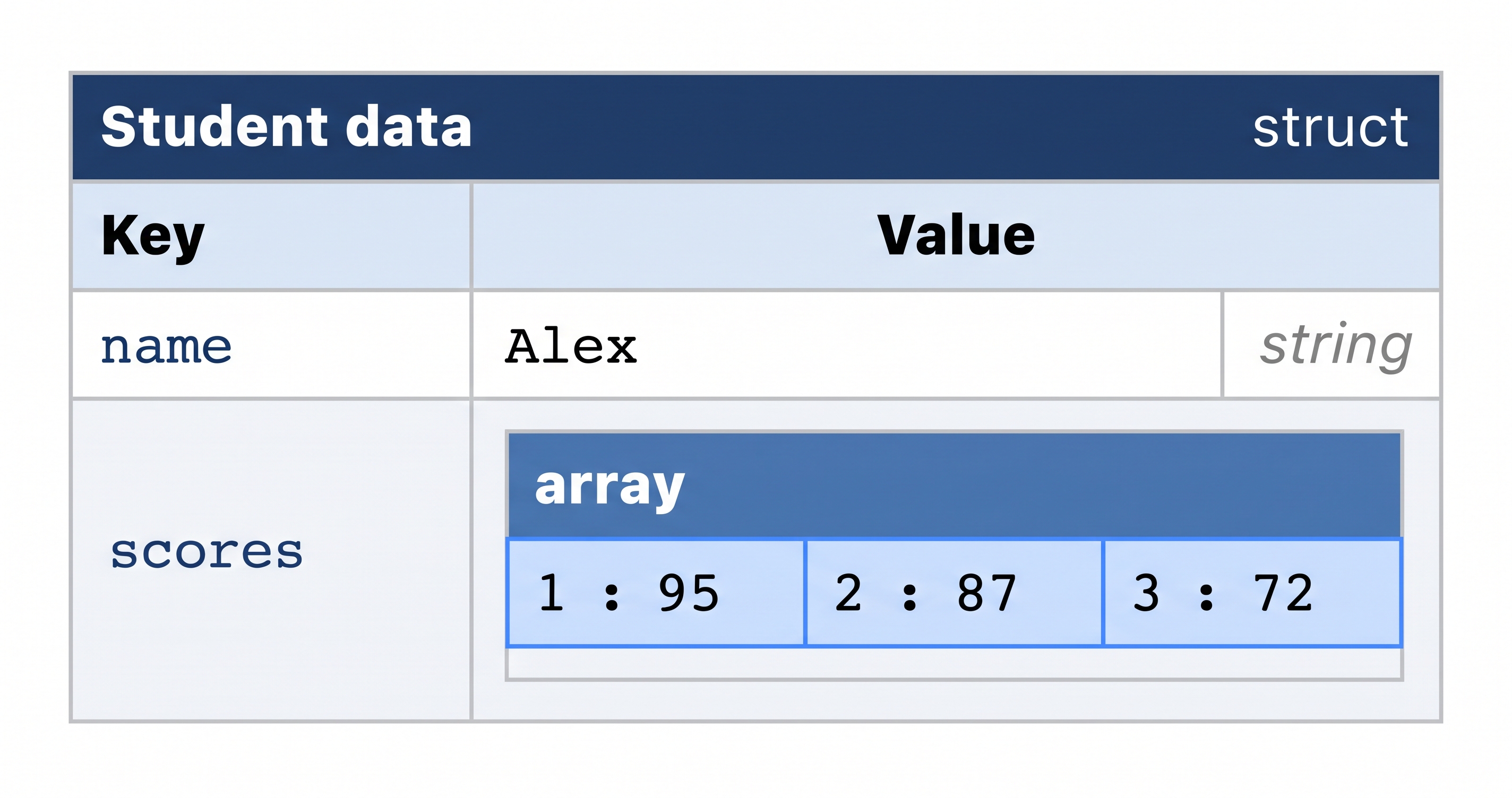
cfdump renders any CF variable as a colour-coded interactive table — the fastest debugging tool in CFML.
Useful cfdump attributes:
| Attribute | Purpose |
|---|---|
var | Variable to dump (required) |
label | Heading above the dump |
top | Limit depth of nested structures — prevents huge dumps |
expand | true (default) expands nested structures; false collapses them |
output | "browser" (default) renders HTML; "console" writes to the CF console log |
format | "html" (default) or "text" — use "text" for CLI output |
💡 Never leave cfdump in production code
cfdump outputs HTML directly into the response. If a cfdump call is left in a JSON API endpoint it will corrupt the JSON and break API consumers. Use it only during development, always remove it before committing. A quick check before deploy:
grep -r "cfdump" /opt/coldfusion2025/cfusion/wwwroot/
If that returns any hits, remove them before shipping.
2. Logging with cflog
cflog writes structured entries to a named log file in CF's log directory — visible in the terminal without touching the browser.
<cflog file="training" text="Processing ticket #url.id#"    type="information">
<cflog file="training" text="Ticket not found: #url.id#"    type="warning">
<cflog file="training" text="DB error: #cfcatch.message#"   type="error">
<cflog file="training" text="Server shutting down"          type="fatal">
cflog attributes:
| Attribute | Required | Description |
|---|---|---|
file | Yes | Log filename — CF creates <name>.log in the CF logs directory automatically |
text | Yes | Message to write — can include any CFML expressions |
type | No | Severity: information, warning, error, fatal — default is information |
application | No | true adds the application name to the entry; false (default) omits it |
thread | No | true adds the thread ID — useful for debugging async/scheduled tasks |
The file attribute sets the log filename — CF creates the file automatically on the first write. It will not exist until at least one cflog call has executed. Once it does, you can tail it live:
tail -f /opt/coldfusion2025/cfusion/logs/training.log
The log format includes a timestamp, thread ID, severity, and your message — structured and grep-friendly.
⚠️ "No such file or directory" — why tail fails before the first write
If you run tail -f before any cflog call has executed, you will see:
tail: cannot open '.../training.log' for reading: No such file or directory
tail: no files remaining
This is expected — ColdFusion does not create the log file until the first entry is written. The correct sequence is:
Step 1 — add a cflog call to a page (skip if you already have one):
sudo tee -a /opt/coldfusion2025/cfusion/wwwroot/student/debug-demo.cfm << 'EOF'
<cflog file="training" text="test entry from debug-demo.cfm" type="information">
EOF
Step 2 — trigger the first write:
curl -s http://localhost:8500/student/debug-demo.cfm > /dev/null
Step 3 — now tail the file:
tail -f /opt/coldfusion2025/cfusion/logs/training.log
If you want to open the tail first and wait, use -F instead of -f — it retries until the file appears:
tail -F /opt/coldfusion2025/cfusion/logs/training.log
💡 cflog vs cfdump — when to use which
cfdump— use during active development when you want to see a variable's full structure immediately in the browser. Remove before committing.cflog— use for persistent, structured audit trails: recording who did what, catching errors in background tasks, tracing slow queries. Leave it in production code — it writes to a file, not the response.
3. TestBox — unit testing for CFML
TestBox is the de-facto standard testing framework for CFML, built and maintained by Ortus Solutions. It is open source, actively maintained, and the framework you will encounter on almost every serious CFML project.
Full documentation: testbox.ortusbooks.com
What is TestBox — features, versions, and how it fits with ColdFusion
TestBox ships with everything a CFML developer needs to write and run tests:
| Feature | What it gives you |
|---|---|
| BDD syntax | describe, it, expect blocks that read like plain English specifications |
| TDD syntax | Traditional @Test annotation style for developers who prefer it |
| Mocking engine | createMock() and createStub() isolate a CFC from its dependencies |
| Multiple runners | StreamingRunner.cfm (plain text), HTMLRunner.cfm (browser), TextRunner.cfm (CI-friendly) |
| Rich reporters | Text, JSON, TAP, JUnit XML — integrates with GitHub Actions, Jenkins, GitLab CI |
| beforeEach / afterEach | Per-test setup and teardown — reset state between each it() block |
How it installs: TestBox is a CommandBox package — it installs into your project directory alongside your app code, not inside ColdFusion itself. The same test suite runs against Adobe CF, Lucee, or any CFML engine without changes.
Versions: The current stable release is TestBox 6.x, which requires CommandBox 6+ and Java 11+. The lab VM ships with both.
TestBox vs ColdFusion:
TestBox is not part of Adobe ColdFusion — it is a community package. Adobe CF ships with MXUnit (an older built-in test runner), but the CFML community has moved to TestBox as the standard. When you search for CFML testing examples online, TestBox is what you will find.
Further reading:
- Full docs: testbox.ortusbooks.com
- ForgeBox package: forgebox.io/view/testbox
- Source code: github.com/Ortus-Solutions/TestBox
💡 How TestBox fits into this lab — two servers, two roles
The lab runs two separate servers. It is important to understand which server does what:
| Server | Port | Runtime | Role |
|---|---|---|---|
| ColdFusion 2025 | 8500 | Adobe CF | Runs your CF application (/opt/coldfusion2025/cfusion/wwwroot/) |
| CommandBox / Lucee | 8888 | Lucee | Runs ~/app/ — including TestBox and the TicketService being tested |
TestBox itself runs on port 8888 (Lucee/CommandBox). Your test specs live in ~/app/tests/ and are served by that Lucee server. The TicketService.cfc and seed-db.cfm files in ~/app/ are what the specs test — they are not the same files in the CF wwwroot.
When you run:
curl "http://localhost:8888/testbox/system/runners/StreamingRunner.cfm?directory=tests"
You are asking the Lucee server to execute your specs. Lucee loads your TicketService.cfc from ~/app/, queries the in-memory H2 database declared in ~/app/Application.cfc, and reports the results.
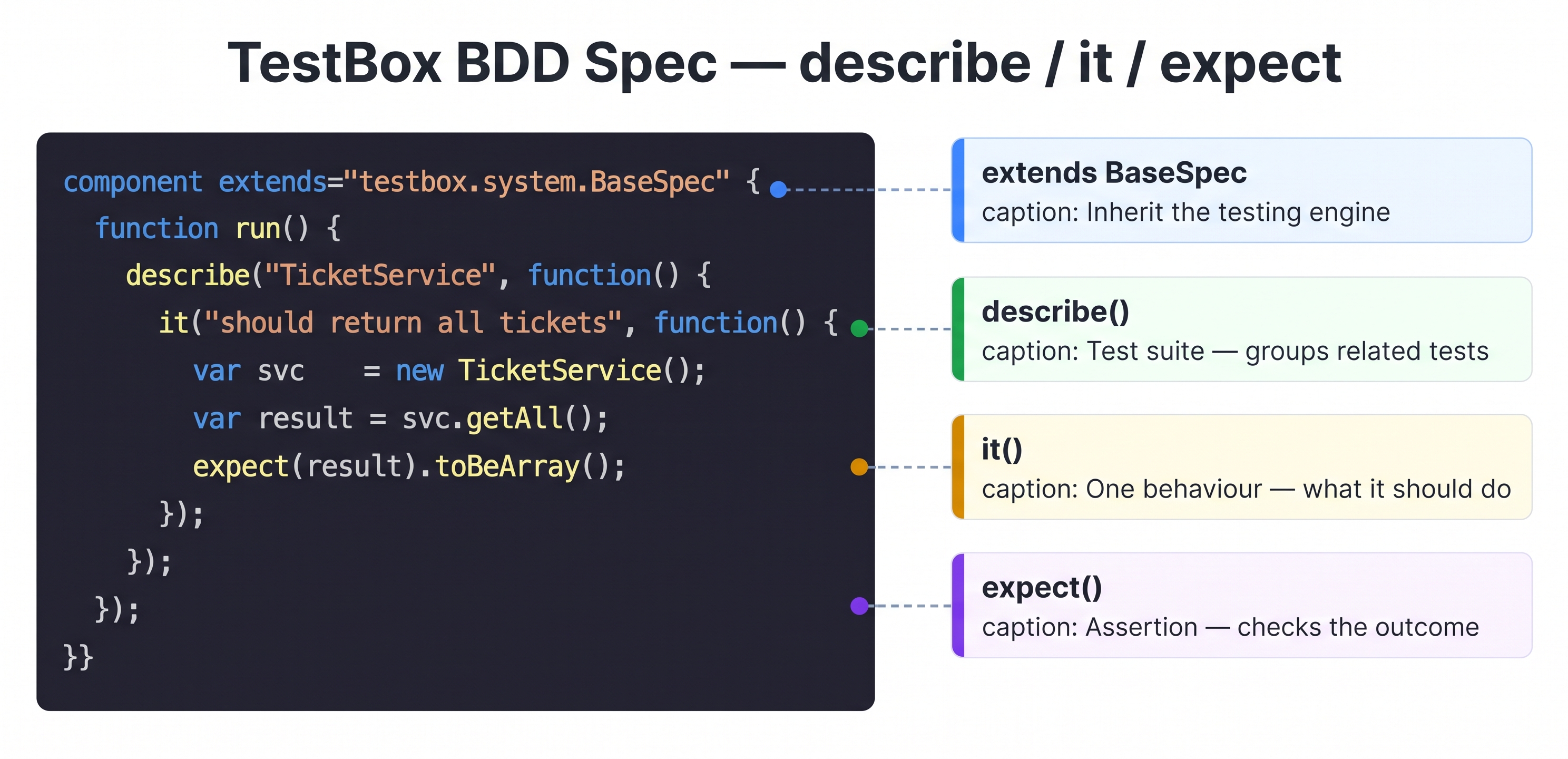
TestBox BDD structure: describe groups related tests, it defines one behaviour, expect asserts the outcome.
Install TestBox
TestBox installs into your student app directory via CommandBox:
cd ~/app
box install testbox
This downloads TestBox into ~/app/testbox/ and makes the test runner available at http://localhost:8888/testbox/.
![[object Object]](/content/files/courses/ColdFusion-2025-Foundations-5151cba6/module-3/4.lesson-testing-debugging/__static__/install-testbox-v1.png?v=1791349307475)
box install testbox pulls TestBox and its dependencies from ForgeBox. The "Initializing libraries" message only appears on the first run — subsequent installs are faster.
What TicketService does
Before writing the spec, understand what you are testing. TicketService.cfc in ~/app/ is a service CFC that queries the hd_tickets table in the Lucee-side H2 database. It exposes two methods:
| Method | What it returns |
|---|---|
getAll() | An array of ticket structs — every row in hd_tickets |
getById(id) | A single ticket struct for the given primary key |
The beforeAll block in the test spec calls seed-db.cfm via cfhttp to populate the in-memory H2 database before any test runs. Without that seed call, getAll() returns an empty array and getById(1) returns nothing — both tests would fail.
# Verify TicketService and seed-db.cfm exist in ~/app/
ls ~/app/TicketService.cfc ~/app/seed-db.cfm
Write a test spec
Create the tests directory and spec file:
mkdir -p ~/app/tests
tee ~/app/tests/TicketServiceTest.cfc << 'EOF'
component extends="testbox.system.BaseSpec" {

  function run() {

    describe("TicketService", function() {

      // Seed the database once before the tests are defined.
      // This TestBox version only has beforeEach/afterEach — no beforeAll.
      // Calling cfhttp here runs once when the describe closure is executed.
      cfhttp(url="http://localhost:8888/seed-db.cfm", method="GET");

      var svc = new TicketService();

      it("should return all tickets as an array", function() {
        var result = svc.getAll();
        expect(result).toBeArray();
        expect(arrayLen(result)).toBeGTE(1);
      });

      it("should return a single ticket by id", function() {
        var ticket = svc.getById(1);
        expect(ticket).toBeStruct();
        expect(ticket).toHaveKey("title");
      });

    });

  }
}
EOF
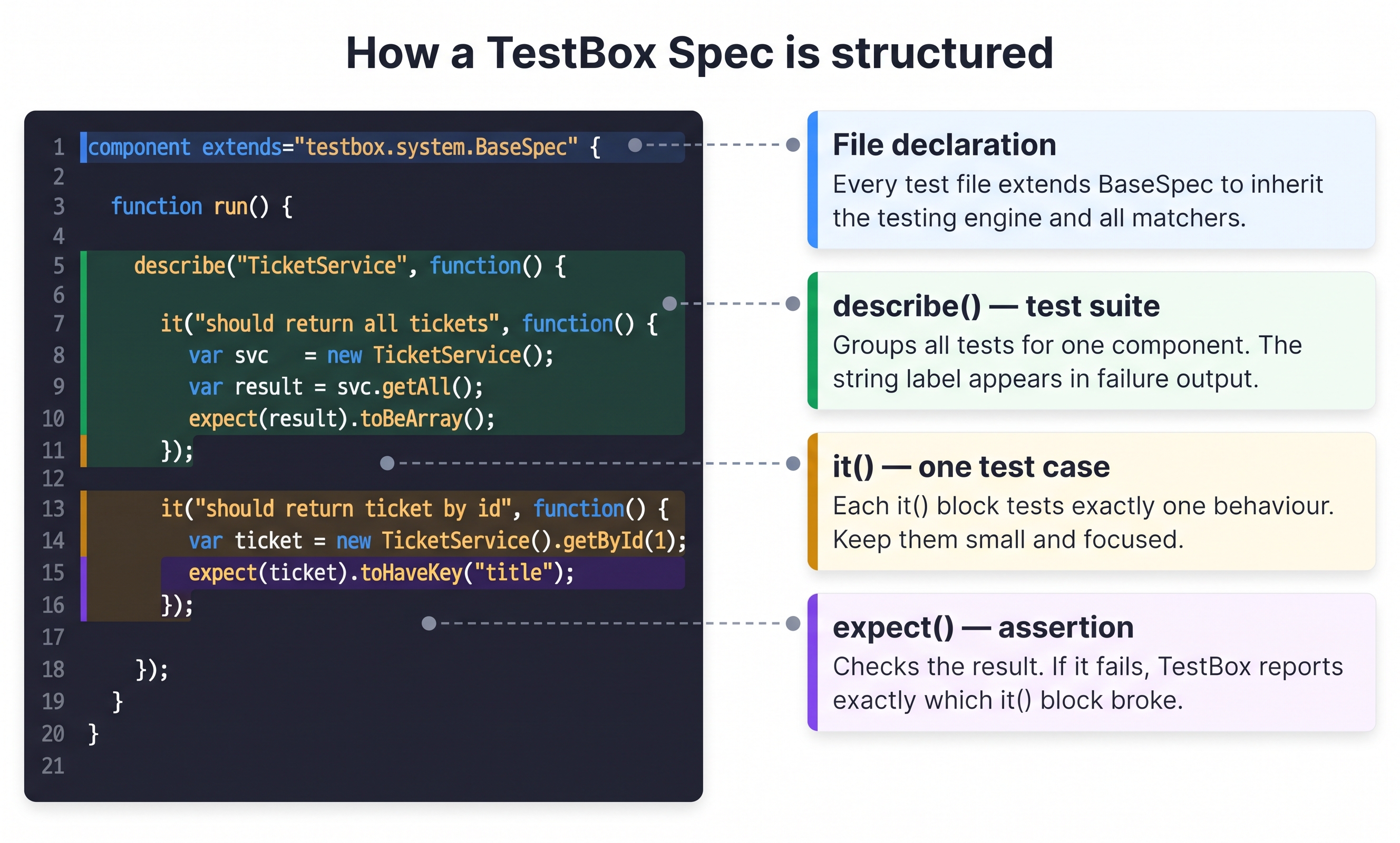
Anatomy of a TestBox spec: each part has a specific role — understand the structure before running the suite.
What each line does:
| Part | What it does |
|---|---|
extends="testbox.system.BaseSpec" | Required — gives the CFC all TestBox assertion and runner methods |
function run() | TestBox calls this automatically to discover and run all specs |
describe("TicketService", ...) | Groups related tests — the name appears in failure messages |
cfhttp(url="...seed-db.cfm") | Runs once when the describe closure executes — seeds the DB before any it() |
var svc = new TicketService() | Creates a fresh instance of the service — available to all it() blocks below |
it("should ...", function() {...}) | One test case — describes one expected behaviour |
expect(result).toBeArray() | Asserts the result is a CF array — throws if it is not |
expect(arrayLen(result)).toBeGTE(1) | Asserts at least one record exists — requires the seed to have run |
💡 Common TestBox matchers — quick reference
| Matcher | What it checks |
|---|---|
toBeArray() | Value is a CF array |
toBeStruct() | Value is a CF struct |
toBeTrue() / toBeFalse() | Boolean result |
toBe(value) | Strict equality (==) |
toBeNull() | Value is null |
toHaveKey("key") | Struct contains the named key |
toBeGTE(n) | Greater than or equal to n |
toBeLTE(n) | Less than or equal to n |
toInclude("text") | String or array contains value |
toBeEmpty() | Array, struct, or string is empty |
toThrow() | Wrapped function throws an exception |
toThrow(type="...") | Throws a specific exception type |
Full matcher list: testbox.ortusbooks.com/content/matchers
💡 TestBox and every other testing framework — the same pattern
TestBox follows the same BDD/TDD patterns used in every major language:
BDD style — describe / it / expect
| Framework | Language |
|---|---|
| TestBox | CFML |
| Jest / Vitest / Jasmine | JavaScript |
| RSpec | Ruby |
| pytest (with plugins) | Python |
TDD style — annotation-based
| Framework | Language |
|---|---|
TestBox @Test | CFML |
JUnit @Test | Java |
NUnit / xUnit [Test] / [Fact] | C# |
PHPUnit @test | PHP |
The one CFML-specific detail: instead of a CLI command like jest or pytest, you hit a URL — because the test engine runs inside the application server. Everything else maps directly.
Run the tests
Hit the StreamingRunner with curl — plain text output, no interactive CLI, no hanging:
curl -s "http://localhost:8888/testbox/system/runners/StreamingRunner.cfm?directory=tests"
A passing suite ends with:
Tests: 2 Passed: 2 Failed: 0 Errors: 0 Skipped: 0
A failing test shows exactly which it() block failed and why:
[FAIL] TicketService > should return all tickets as an array
  Expected [] to have a length greater than or equal to 1
  >> Did you forget to run seed-db.cfm in beforeAll?
📖 TDD, BDD, and SDD — testing approaches compared
Three approaches to testing — all valid, each framing the work differently:
TDD (Test-Driven Development) — write the test first, watch it fail, then write the code to make it pass. The test drives the implementation — you cannot write code without a failing test to justify it.
BDD (Behaviour-Driven Development) — write tests that describe expected behaviour in plain language: "it should return all tickets as an array." TestBox's describe/it/expect syntax is BDD. A failing test message tells both developers and product managers exactly what stopped working.
SDD (Specification-Driven Development) — the direction the industry is moving toward with AI-assisted development. The specification is the source of truth — both code and tests are generated or verified against it.
SDD is not a replacement for TDD or BDD — it is a layer above them. The generated tests still run as TDD or BDD tests.
🎓 AI-assisted development in ColdFusion — generating CFML from specs, building pipelines where a spec drives code generation and test validation — is covered in the Advanced Course.
4. CF Admin Debugger
For deeper request-level tracing, ColdFusion's built-in debugger appends a full diagnostic panel to every rendered page — showing SQL queries executed, their execution times, template load times, and variable scopes.
Enable it in CF Admin:
- Open CF Admin → Debugging & Logging → Debug Output Settings
- Check Enable Request Debugging Output
- Add
127.0.0.1to the IP address restriction list so only your terminal sees the output
Debugging output appears at the bottom of every CF page response. It is automatically hidden from any IP not on the list — safe to leave enabled in the lab, but always disable it before any public deployment.
Activity 1 — Inspect data with cfdump
Create a page that dumps a struct and array so you can see cfdump in action:
sudo tee /opt/coldfusion2025/cfusion/wwwroot/student/debug-demo.cfm << 'EOF'
<cfscript>
  ticket = {
    id:       1,
    title:    "Cannot connect to VPN",
    status:   "open",
    priority: "high",
    tags:     ["network", "remote", "urgent"]
  };
</cfscript>

<cfdump var="#ticket#" label="Sample ticket struct">
EOF
Open the ColdFusion browser tab and navigate to /student/debug-demo.cfm. You should see the colour-coded dump table with the nested tags array expanded inline.
Activity 2 — Write a log entry and read it
Add a cflog call to your debug page and tail the log file:
sudo tee -a /opt/coldfusion2025/cfusion/wwwroot/student/debug-demo.cfm << 'EOF'
<cflog file="training" text="debug-demo.cfm loaded by #cgi.REMOTE_ADDR#" type="information">
EOF
Now tail the log in a second terminal tab while you refresh the page:
tail -f /opt/coldfusion2025/cfusion/logs/training.log
Each page load should add a new timestamped line to the log.
Activity 3 — Install TestBox and write a test spec
First, verify the files TestBox will test are in place:
ls ~/app/TicketService.cfc ~/app/seed-db.cfm ~/app/Application.cfc
All three must exist. If any are missing, see the hint boxes below before continuing.
Install TestBox into your student app:
cd ~/app && box install testbox
Then create the spec:
mkdir -p ~/app/tests
tee ~/app/tests/TicketServiceTest.cfc << 'EOF'
component extends="testbox.system.BaseSpec" {

  function run() {

    describe("TicketService", function() {

      // Seed the database once before the tests are defined.
      // This TestBox version only has beforeEach/afterEach — no beforeAll.
      // Calling cfhttp here runs once when the describe closure is executed.
      cfhttp(url="http://localhost:8888/seed-db.cfm", method="GET");

      var svc = new TicketService();

      it("should return all tickets as an array", function() {
        var result = svc.getAll();
        expect(result).toBeArray();
        expect(arrayLen(result)).toBeGTE(1);
      });

      it("should return a single ticket by id", function() {
        var ticket = svc.getById(1);
        expect(ticket).toBeStruct();
        expect(ticket).toHaveKey("title");
      });

    });

  }
}
EOF
Activity 4 — Run the tests
curl -s "http://localhost:8888/testbox/system/runners/StreamingRunner.cfm?directory=tests"
All tests must pass — zero failures, zero errors.
⚠️ "Page StreamingRunner.cfm not found" — TestBox installed in the wrong directory
This error means Lucee cannot find ~/app/testbox/. Verify:
ls ~/app/testbox/system/runners/
You should see StreamingRunner.cfm. If the directory does not exist, re-install from the correct location:
cd ~/app && box install testbox
The cd ~/app is required — box install places packages relative to the current working directory. Installing from ~ or any other path puts testbox/ somewhere the Lucee server (rooted at ~/app/) cannot reach.
⚠️ "No matching function [BEFOREALL] found" — beforeAll does not exist in this TestBox version
The version of TestBox installed in this lab (box install testbox pulls the latest) only exposes beforeEach and afterEach as lifecycle hooks inside describe. There is no beforeAll.
Check what your installed version actually provides:
grep -n "function before\|function after\|function setUp\|function setup" ~/app/testbox/system/BaseSpec.cfc | head -20
Do not use beforeAll — it does not exist. Instead, place any one-time setup code (like the seed call) directly at the top of the describe closure body. It executes once when TestBox processes the suite:
describe("TicketService", function() {
  // Runs once when TestBox processes this describe block — no lifecycle hook needed
  cfhttp(url="http://localhost:8888/seed-db.cfm", method="GET");

  it("should ...", function() { ... });
});
⚠️ Tests fail with "Expected [] to have length GTE 1" — seed-db.cfm not running
This means the beforeAll seed call failed silently. The database is empty so getAll() returns an empty array. Debug steps:
Step 1 — test seed-db.cfm directly:
curl -s http://localhost:8888/seed-db.cfm
You should see output confirming rows were inserted. If you see an error, the seed file has a problem.
Step 2 — check the Lucee server is running:
curl -s -o /dev/null -w "%{http_code}" http://localhost:8888/
Should return 200. If not, restart: cd ~/app && box server restart
Step 3 — verify seed-db.cfm exists:
ls ~/app/seed-db.cfm
⚠️ Why curl and not box testbox run?
box testbox run starts an interactive CommandBox session that can hang indefinitely in a non-TTY terminal. Hitting the StreamingRunner URL directly with curl is equivalent — it calls the same runner, returns the same plain-text output, and never blocks.
💡 TicketService and seed-db.cfm — where they live
TicketService.cfc and seed-db.cfm are in ~/app/ — the Lucee web root. They are not the same files as in /opt/coldfusion2025/cfusion/wwwroot/. The ones in ~/app/ are what the TestBox runner uses. seed-db.cfm is called by the spec's beforeAll block via cfhttp to populate the Lucee-side in-memory H2 database before the tests run.
⚠️ "Datasource [training_db] doesn't exist" — Application.cfc missing or not loaded
TicketService.cfc queries a datasource named training_db declared in ~/app/Application.cfc. Verify it exists:
cat ~/app/Application.cfc
It should contain:
component {
  this.name = "cfTrainingApp";

  this.datasources["training_db"] = {
    class:            "org.h2.Driver",
    connectionString: "jdbc:h2:mem:training_db;DB_CLOSE_DELAY=-1;DATABASE_TO_UPPER=FALSE",
    username:         "sa",
    password:         ""
  };
}
If missing, create it and restart:
tee ~/app/Application.cfc << 'EOF'
component {
  this.name = "cfTrainingApp";

  this.datasources["training_db"] = {
    class:            "org.h2.Driver",
    connectionString: "jdbc:h2:mem:training_db;DB_CLOSE_DELAY=-1;DATABASE_TO_UPPER=FALSE",
    username:         "sa",
    password:         ""
  };
}
EOF
cd ~/app && box server restart
DATABASE_TO_UPPER=FALSE tells H2 to preserve column-name case exactly as written in SQL.
Further reading
- TestBox documentation — testbox.ortusbooks.com — full reference for matchers, mocking, reporters, and CI integration
- ForgeBox — forgebox.io/view/testbox — package listing, version history, changelog
- Ortus Solutions blog — www.ortussolutions.com/blog — tutorials and TestBox release announcements
- ColdFusion docs — cflog — helpx.adobe.com/coldfusion/cfml-reference/coldfusion-tags/tags-j-l/cflog.html
- ColdFusion docs — cfdump — helpx.adobe.com/coldfusion/cfml-reference/coldfusion-tags/tags-d-e/cfdump.html
When all the checks above are green, this lesson is complete. Your progress is saved automatically — move straight on to the next lesson.
- Previous lesson
- Building REST APIs with CFML
- Next lesson
- Real-Time Communication with WebSockets