Day-2 Operations
Backing Up the Rancher Management State
The single most important day-2 question is: if this cluster died right now, could you get it back? For a Rancher-managed environment, the answer starts with protecting Rancher's own state - the cluster registrations, users, role bindings, catalogs, and Fleet definitions that live in the management plane. Lose that and you lose the map of everything Rancher knows about, even if the downstream clusters survive.
Rancher ships a purpose-built tool for this: the Rancher Backup operator (rancher-backup). In this unit you install it and produce a real, completed backup. You drive everything from the dev-machine workstation, which has helm and kubectl configured against the cluster.
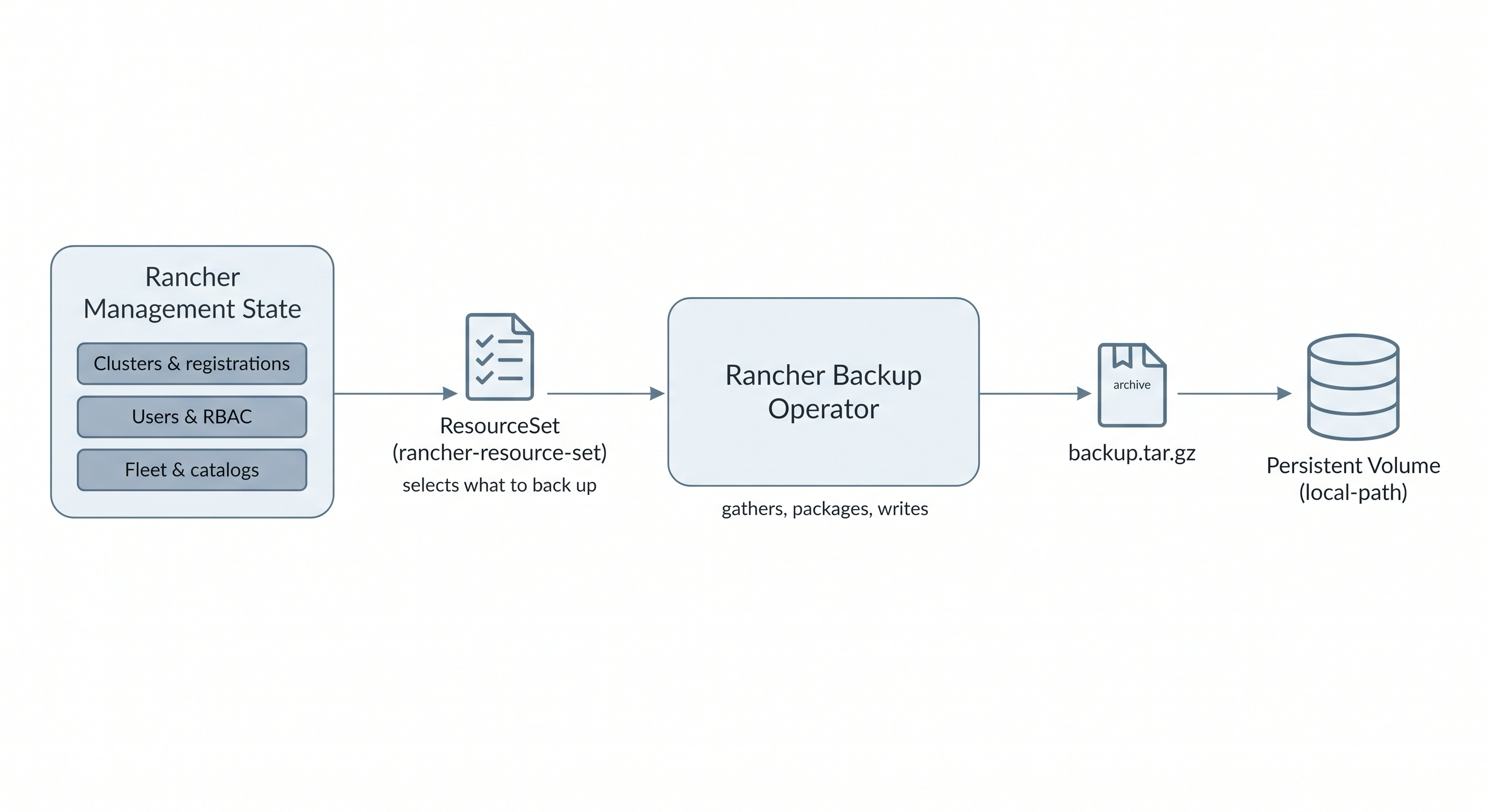
The Rancher Backup operator gathers the resources named by a ResourceSet and writes a tar.gz archive to its storage target.
Step 1: Install the Rancher Backup Operator
The operator is published as a Helm chart in the rancher-charts repository. It comes in two parts: a CRD chart that installs the Backup, Restore, and ResourceSet custom resource definitions, and the operator chart itself. Install both into the cattle-resources-system namespace, and point the operator's storage at the cluster's built-in local-path storage class so backups land on a persistent volume:
helm repo add rancher-charts https://charts.rancher.io
helm repo update

helm install rancher-backup-crd rancher-charts/rancher-backup-crd \
  -n cattle-resources-system --create-namespace

helm install rancher-backup rancher-charts/rancher-backup \
  -n cattle-resources-system \
  --set persistence.enabled=true \
  --set persistence.storageClass=local-path \
  --set persistence.size=2Gi
The operator is a single lightweight deployment. Wait for it to become available:
kubectl -n cattle-resources-system rollout status deploy/rancher-backup
Step 2: Tell the Operator What to Back Up
The operator does not decide on its own which objects matter. It reads a ResourceSet - a definition that selects exactly which resources belong in a backup. When you install rancher-backup through the Rancher UI catalog, Rancher seeds a standard ResourceSet named rancher-resource-set for you. Because you installed the chart directly with Helm, you create that ResourceSet yourself. It selects the Rancher management namespaces, all management.cattle.io objects, and the Rancher system secrets:
apiVersion: resources.cattle.io/v1
kind: ResourceSet
metadata:
  name: rancher-resource-set
controllerReferences:
  - apiVersion: "apps/v1"
    resource: "deployments"
    name: "rancher"
    namespace: "cattle-system"
resourceSelectors:
  - apiVersion: "v1"
    kindsRegexp: "^namespaces$"
    resourceNameRegexp: "^cattle-|^p-|^c-|^user-|^local$"
  - apiVersion: "management.cattle.io/v3"
    kindsRegexp: "."
  - apiVersion: "v1"
    kindsRegexp: "^secrets$"
    namespaceRegexp: "^cattle-system$"
Apply it:
kubectl apply -f - <<'EOF'
apiVersion: resources.cattle.io/v1
kind: ResourceSet
metadata:
  name: rancher-resource-set
controllerReferences:
  - apiVersion: "apps/v1"
    resource: "deployments"
    name: "rancher"
    namespace: "cattle-system"
resourceSelectors:
  - apiVersion: "v1"
    kindsRegexp: "^namespaces$"
    resourceNameRegexp: "^cattle-|^p-|^c-|^user-|^local$"
  - apiVersion: "management.cattle.io/v3"
    kindsRegexp: "."
  - apiVersion: "v1"
    kindsRegexp: "^secrets$"
    namespaceRegexp: "^cattle-system$"
EOF
What a ResourceSet actually captures
A ResourceSet is a list of selectors, each matching resources by API group, kind, name, or namespace using regular expressions. The rancher-resource-set above grabs the Rancher management namespaces (cattle-*, project namespaces p-*, cluster namespaces c-*, user namespaces, and local), every custom resource in the management.cattle.io group (clusters, users, role templates, catalogs, settings, and more), and the secrets in cattle-system that hold Rancher's own credentials. That set is enough to reconstruct the Rancher management plane on a fresh install. Without a ResourceSet the operator has nothing to gather and the backup fails with resourcesets.resources.cattle.io "rancher-resource-set" not found.
Step 3: Create a Backup
With the operator running and a ResourceSet in place, request a one-time backup. A Backup object simply names the ResourceSet to use:
apiVersion: resources.cattle.io/v1
kind: Backup
metadata:
  name: rancher-state-backup
spec:
  resourceSetName: rancher-resource-set
Apply it:
kubectl apply -f - <<'EOF'
apiVersion: resources.cattle.io/v1
kind: Backup
metadata:
  name: rancher-state-backup
spec:
  resourceSetName: rancher-resource-set
EOF
How to watch the backup after you apply it
The backup runs asynchronously, so it will not be ready the instant you apply the object. Poll its status in a loop until the Ready condition turns True and a filename appears:
for i in $(seq 1 24); do
  kubectl get backup rancher-state-backup \
    -o jsonpath='{.status.conditions[?(@.type=="Ready")].status} {.status.filename}{"\n"}'
  sleep 5
done
You can also watch the whole object update live with kubectl get backup rancher-state-backup -w, or read the full status with kubectl get backup rancher-state-backup -o yaml. It usually completes within a minute.
The operator gathers the selected resources, packages them into a tar.gz archive, and writes it to the persistent volume. It records progress on the Backup object itself. Watch it complete:
kubectl get backup rancher-state-backup \
  -o jsonpath='{.status.conditions[?(@.type=="Ready")].status} {.status.filename}{"\n"}'
When the backup finishes, the Ready condition becomes True and the filename field holds the name of the archive it produced.
The backup stays at Ready=Unknown
If the Backup object sits at Ready=Unknown, check the operator logs with kubectl -n cattle-resources-system logs deploy/rancher-backup. The most common cause on a Helm-based install is a missing ResourceSet - the operator keeps retrying and logs resourcesets.resources.cattle.io "rancher-resource-set" not found. Make sure Step 2 applied cleanly before creating the Backup.
Restoring: The Other Half
A backup is only useful if you can restore from it. The same operator handles restore through a Restore object that points at a backup archive. On a fresh Rancher installation, you install the operator, make the backup archive reachable (from the same volume, or from an S3 bucket), and create a Restore that names the file. The operator recreates the management resources, reconnecting Rancher to the downstream clusters it knew about - as long as those clusters are still reachable. Restoring is disruptive and reboots parts of the management plane, so this lesson gates on producing a verified backup rather than performing a full restore cycle.
The Wider Data-Protection Picture
The Rancher Backup operator protects one thing: the Rancher management state. A real recovery plan protects several layers, each with a different tool, because each layer holds different data. This unit maps those layers and where each fits, then covers the other recurring day-2 chores - upgrades and certificate rotation. It is a survey rather than a hands-on walk, because most of these controls depend on resources a small throwaway cluster does not have: an external storage backend, dedicated disks, or spare memory.
What Protects What
The options below are not competitors - they protect different things. A hardened environment layers several of them.
| Tool | What it protects | Weight | External dependency |
|---|---|---|---|
| Rancher Backup | Rancher management state (registrations, RBAC, Fleet) | Light operator | None for a PVC; S3 for off-cluster |
| etcd snapshot | Whole cluster/control-plane state | Built into K3s/RKE2 | None (local) or S3 |
| Longhorn | Application data in persistent volumes | Per-node pods | None for snapshots; NFS/S3 for backups |
| Ceph / Rook | Block, object, and file storage at scale | Heavy (MONs, OSDs) | Dedicated disks, several nodes |
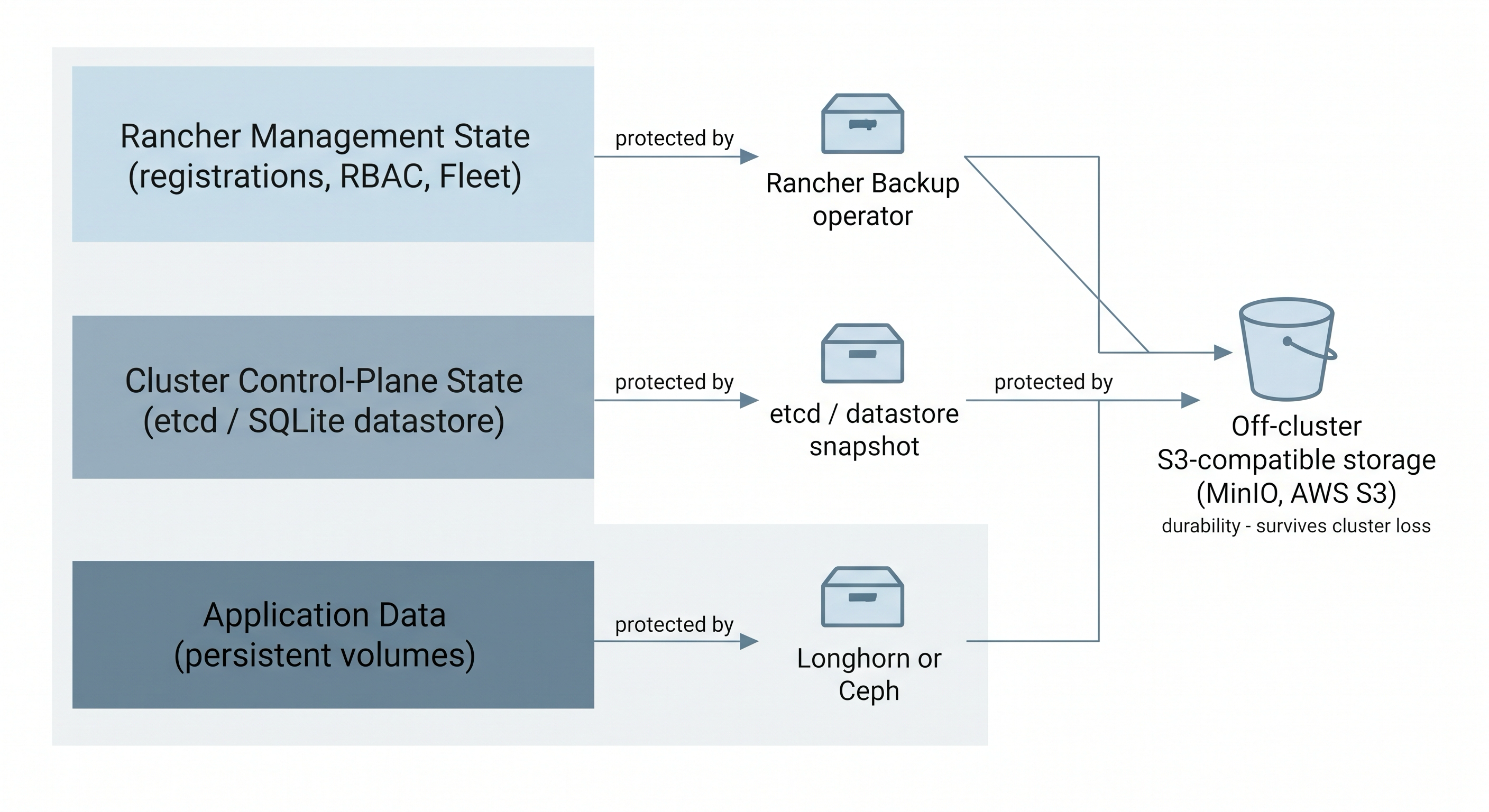
Each layer of the environment is protected by a different tool, and all of them can ship archives off-cluster to S3-compatible storage for durability.
etcd snapshots - the cluster's brain
Every Kubernetes object lives in the cluster datastore. On an etcd-backed K3s or RKE2 cluster, k3s etcd-snapshot save writes a point-in-time snapshot to disk (or to S3 with the --s3 flags), and you restore the whole control plane from it. It is the most complete cluster-level backup there is.
The catch is the datastore type. A single-server K3s often runs on SQLite rather than embedded etcd, and etcd-snapshot only works on an etcd datastore - on SQLite it fails with etcd datastore disabled. That is the case on this playground, which is why the hands-on unit used the Rancher Backup operator instead. To back up a SQLite-backed K3s you copy the datastore file (/var/lib/rancher/k3s/server/db/state.db) while the server is stopped, or you switch the cluster to embedded etcd.
Longhorn - protecting application data
Rancher Backup and etcd snapshots protect cluster and management state, not the data your applications write to persistent volumes. Longhorn is Rancher's own distributed block storage: it provisions volumes, replicates them across nodes, and takes snapshots (in-cluster, point-in-time) and backups (to an external NFS or S3 target). It is the natural choice for stateful workloads and integrates directly into the Rancher UI.
It is not hands-on here because it is not lightweight. Longhorn runs manager, engine, and instance-manager pods on every node plus CSI components, and this playground's nodes are already running Rancher with little spare memory. Standing it up would risk memory pressure rather than teach the concept cleanly.
Ceph and Rook - storage at scale
When Longhorn is not enough - very large clusters, or a need for object and file storage alongside block - teams reach for Ceph, usually deployed on Kubernetes through the Rook operator. Ceph is production-grade distributed storage with monitors, managers, and per-node object storage daemons (OSDs).
It sits firmly in the conceptual column for a lab. Ceph OSDs want dedicated raw block devices and meaningful memory per daemon, and it expects several capable nodes. On playground VMs with a single root disk and tight memory it would only run in a degraded, unrepresentative mode - so it is worth knowing as the enterprise tier, not demonstrating here.
Where Off-Cluster Backups Go: MinIO
Every option above can write its archives somewhere off the cluster, and that matters: a backup stored on the same disk that just failed does not help you. The common destination is S3-compatible object storage. In the cloud that is AWS S3, Azure Blob, or Google Cloud Storage. On-premises, the usual answer is MinIO - a self-hosted, S3-compatible object store you run yourself.
MinIO gives you a bucket with S3 semantics, so the Rancher Backup operator (with an S3 storage location), etcd snapshots (with --s3 flags), and Longhorn backups can all target it the same way they would target AWS. It is what you deploy to get durable, off-cluster backups without a cloud provider.
Why MinIO is not part of the hands-on
Running MinIO means standing up another stateful service - a deployment, a volume, credentials, a bucket - and wiring the backup tool to it. That teaches you about MinIO, not about the backup concept, and it adds moving parts to a throwaway cluster. The transferable skill is the idea: point your backup tool at an S3-compatible endpoint so the archive survives the loss of the cluster. Swapping the Rancher Backup operator's storage from a PVC to an S3 location is a configuration change, not a new concept.
Upgrading Rancher
Keeping Rancher current is the other half of day-2. Rancher upgrades follow the standard Helm path: review the release notes for breaking changes, take a backup (the unit you just did), update the repository with helm repo update, and run helm upgrade rancher rancher-latest/rancher with the same values you installed with. Then watch the rollout and confirm the UI is reachable.
Two rules matter. Rancher supports upgrading one minor version at a time (2.8 to 2.9, not 2.7 to 2.9), so plan a path through intermediate versions. And cert-manager may need upgrading alongside Rancher if the new version requires a newer API. Downstream cluster agents update themselves after the server upgrade.
Upgrading Downstream Clusters
For K3s and RKE2 clusters that Rancher provisions, upgrades run through the UI: select the cluster in Cluster Management, edit its configuration, change the Kubernetes version, and Rancher orchestrates a rolling upgrade of control-plane and worker nodes. Imported clusters are different - Rancher only manages what it provisions, so an imported cluster is upgraded by its own operators, independently of Rancher.
Certificate Rotation
Clusters run on certificates that expire. Rancher and K3s rotate most of their internal certificates automatically - K3s renews its certificates on restart when they are within 90 days of expiry - but a few are worth watching: the Rancher ingress TLS certificate that cert-manager renews, the K3s internal certificates, and the webhook certificates used by admission controllers. An expired certificate is a silent outage waiting to happen, so certificate expiry belongs on your monitoring dashboards from the observability lesson.
Putting It Together
A complete day-2 posture layers these controls: back up the Rancher management state with the Rancher Backup operator, snapshot the cluster datastore (etcd) or the SQLite file, protect application data with Longhorn, send archives off-cluster to S3 or MinIO for durability, upgrade one minor version at a time behind a fresh backup, and keep an eye on certificate expiry. No single tool covers everything - recoverability is the sum of the layers.
- Previous lesson
- Security and Access Control