In the previous lesson you saw Fleet deploy from a public example repository. That taught the mechanics, but it was read-only: you watched Fleet pull someone else's repo. This lesson closes the loop with a Git server you own. You point Fleet at a repository on a self-hosted Gitea server, then edit a manifest, commit, and push - and watch Fleet reconcile that change onto the cluster on its own. That is continuous delivery: the commit is the trigger, and the cluster follows Git.
This playground gives you three machines: your dev-machine workstation, the Rancher cluster (open the Rancher tab), and a gitea machine running a self-hosted Gitea Git server (open its web UI with the Gitea tab). Gitea already hosts a sample-app repository with a small nginx Deployment.
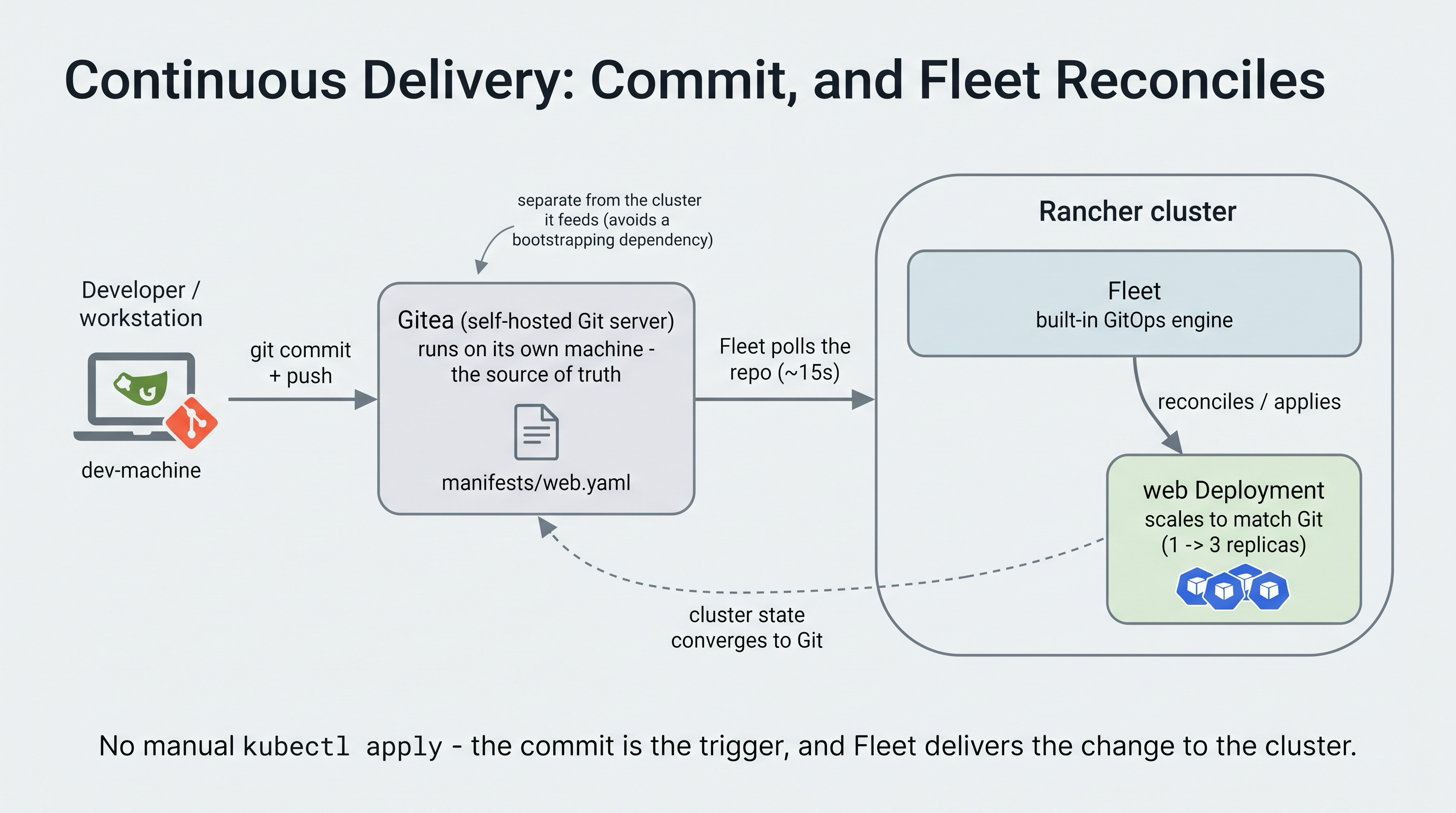
You commit to Gitea; Fleet pulls the change and reconciles it onto the cluster.
Pull-Based CD, Not a Push Pipeline
It is worth being precise about what "CI/CD" means here, because two different models often share the name.
- A push pipeline (for example a Gitea Actions or GitHub Actions workflow) runs steps on a commit and pushes changes to the cluster, often ending in a
kubectl apply. - Pull-based GitOps (what Fleet does) is the reverse: the cluster watches Git and pulls changes into itself. Nothing external applies to the cluster; the in-cluster agent reconciles it.
This lesson uses the pull-based model, because that is what Rancher Fleet is and what Rancher recommends for delivery. The commit still "triggers" the rollout, but the trigger is Fleet noticing a new commit and reconciling, not a pipeline running kubectl against your cluster.
Where do build pipelines fit, then?
Pull-based GitOps and build pipelines are complementary, not competing. In a full setup, a CI pipeline does the integration work: it builds and tests your container image, pushes it to a registry, and then updates the manifests in Git - for example, bumping the image tag. Fleet then does the delivery: it sees the new commit and rolls the change out to the clusters. The pipeline never touches the cluster directly; it just changes what is in Git, and Fleet takes it from there. In this lesson you play the part of the pipeline by editing and committing the manifest yourself, so you can see the delivery half clearly.
Can I use GitHub Actions, GitLab CI, Jenkins, or CircleCI with Fleet?
Yes - all of them, and you are not locked into any Rancher-specific pipeline. Fleet does not integrate with a CI tool through a plugin or a direct connection; the two meet at Git. Whatever builds your code just needs to commit the resulting manifest change (usually a new image tag) to the repository Fleet watches. Because "write a commit to Git" is something every CI system can do, they all work the same way:
- GitHub Actions and GitLab CI are the most common pairings, since the pipeline and the Git repository live in the same product - the "commit the change back to Git" step is built in.
- Jenkins and CircleCI integrate identically; they just need credentials to push to the manifest repository (or to open a pull request that gets merged).
- The same holds for Gitea Actions, Tekton, Argo Workflows, or any other runner.
A common and healthy shape is two repositories: an app-source repo that CI builds from, and a config repo that Fleet watches. CI bridges them - it builds the image and then commits the updated manifest to the config repo. The rule to remember is that the CI tool's job ends at the Git commit, and Fleet's job begins there. No pipeline ever runs kubectl against the cluster.
Why a Git Server You Own
Pointing Fleet at a public repository is fine for a demo, but real delivery runs against a Git server your organization controls. This playground models that faithfully: Gitea runs on its own machine, separate from the cluster, exactly as a real Git server would.
Why not run Gitea inside the cluster?
It is tempting to run the Git server as a pod on the same cluster Fleet deploys to, but that creates a bootstrapping problem: if the cluster has a bad day, you lose the Git server that holds the source of truth you need to recover it. A Git server should be independent of the clusters it feeds. That is why Gitea here lives on its own machine, and the cluster reaches it over the network - the production-faithful shape.
Step 1: Explore the Gitea Repository
Open the Gitea tab and log in with username student and password student.
The self-hosted Gitea server's sign-in page - log in with student / student.
Open the student/sample-app repository and look at manifests/web.yaml - a plain nginx Deployment with replicas: 1. This is the file Fleet will deploy, and the file you will change.
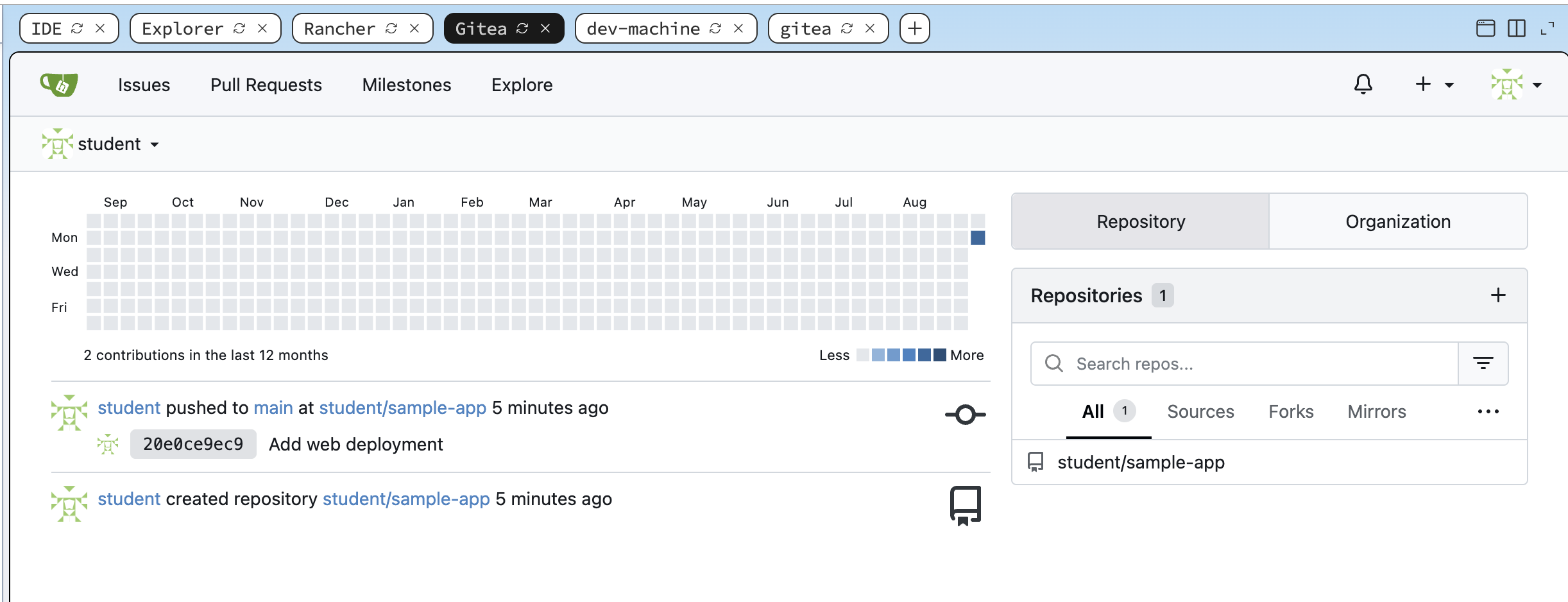
The student/sample-app repository in Gitea, holding manifests/web.yaml - the manifest Fleet watches.
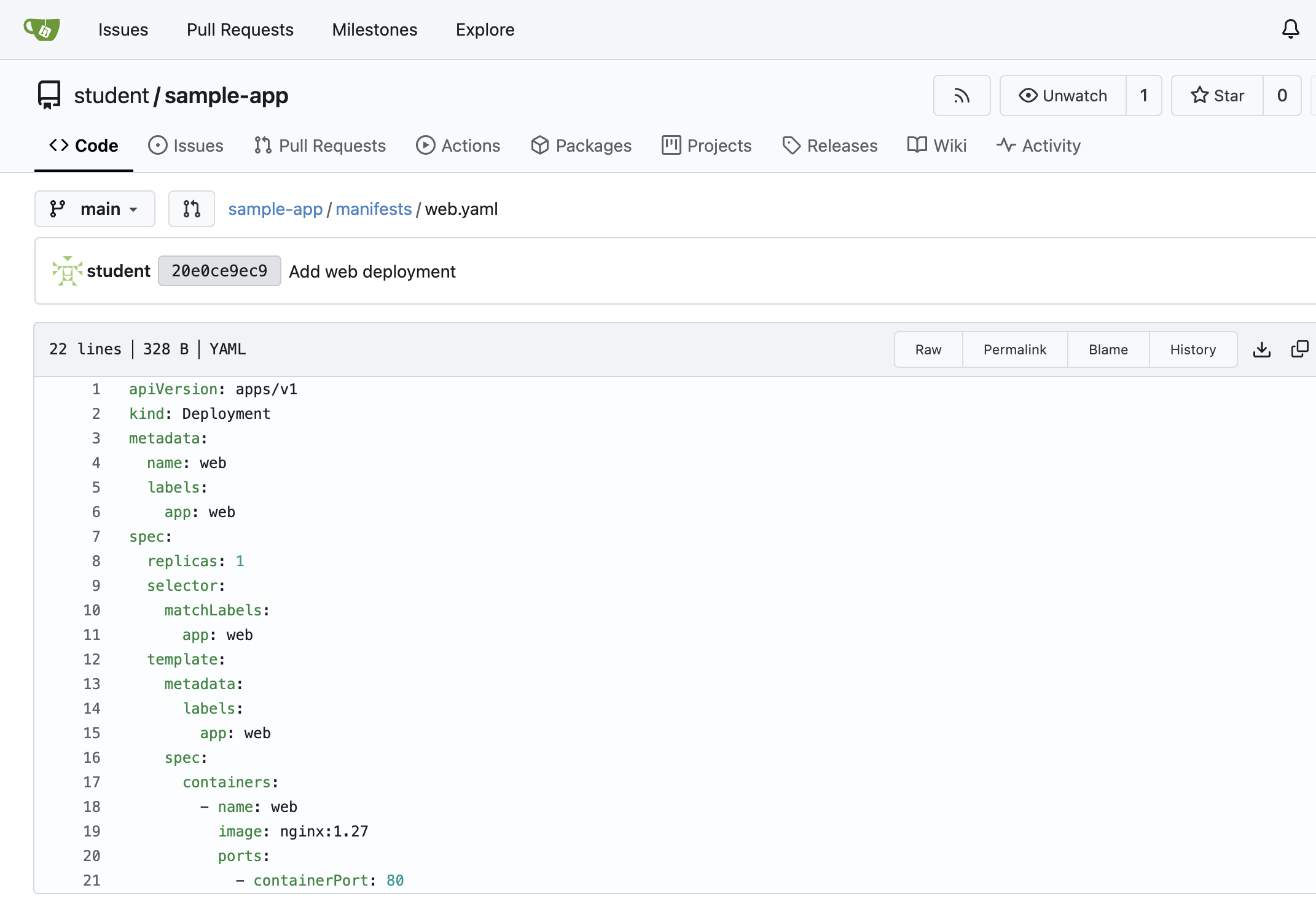
manifests/web.yaml in Gitea - an nginx Deployment at replicas: 1, the line you will change later.
Step 2: Point Fleet at the Gitea Repository
Give Fleet a couple of minutes first. Rancher installs Fleet as a follow-on step, so after the playground finishes loading Fleet still needs two to three minutes to register its custom resources and settle. If you create a GitRepo too early you will see an error like no matches for kind "GitRepo" - that just means Fleet is not ready yet, not that anything is broken. Confirm it is ready before you continue:
kubectl -n fleet-local get clusters.fleet.cattle.io
Wait until the local cluster shows a BUNDLES-READY count (for example 1/1) and a recent LAST-SEEN. Then proceed.
From the dev-machine terminal, create a GitRepo in the fleet-local namespace that points at the Gitea repo. Use the server's IP address, not its hostname. The here-document pipes the manifest straight into kubectl, so there is no file to create:
kubectl apply -f - <<'EOF'
apiVersion: fleet.cattle.io/v1alpha1
kind: GitRepo
metadata:
  name: web-app
  namespace: fleet-local
spec:
  repo: http://172.16.0.4:3000/student/sample-app
  branch: main
  paths:
    - manifests
  targets:
    - clusterSelector: {}
EOF
If you prefer working with a file, save the manifest between the EOF markers to web-app-gitrepo.yaml and run kubectl apply -f web-app-gitrepo.yaml instead - the result is identical.
Use the Gitea server's IP address 172.16.0.4:3000 in the GitRepo, not gitea:3000. Fleet clones the repository from a pod inside the cluster, and cluster pods resolve names through the cluster DNS, which does not know the gitea machine name. The IP always works.
Watch Fleet pick it up and deploy:
kubectl -n fleet-local get gitrepo
kubectl -n fleet-local get bundles
kubectl get deploy web
The GitRepo resolves a commit, a web-app-manifests bundle reaches Ready, and the web Deployment appears with one replica.
Step 3: Commit a Change and Watch Fleet Reconcile
Now the real loop. Clone the repository, change the replica count, commit, and push, all against Gitea. Fleet will notice the new commit and scale the Deployment for you.
Run these commands on the dev-machine terminal, the same workstation you have been using. It has git and can reach Gitea over the network, so you work exactly as a developer would - from your own machine. There is no need to log in to the Gitea machine or the cluster.
cd /tmp
git clone http://student:student@172.16.0.4:3000/student/sample-app.git
cd sample-app
sed -i 's/replicas: 1/replicas: 3/' manifests/web.yaml
git -c user.email=student@example.com -c user.name=student commit -am "Scale web to 3 replicas"
git push origin main
Could I just edit the file in the Gitea web UI instead?
Yes. Open manifests/web.yaml in Gitea, click the edit (pencil) icon, change replicas, and commit from the browser. That creates a commit on main exactly like git push does, and Fleet reconciles it the same way - because Fleet reacts to the commit, not to how you made it. We use the command line here because it mirrors how a real pipeline or a developer commits changes, and because it is scriptable, but the browser edit is the fastest way to watch the loop with no local git at all. Either path satisfies the challenge, which checks the end state (more than one replica), not the method.
Then watch the cluster follow Git, without any kubectl apply of your own:
kubectl get deploy web -w
Within a minute or so, web scales to three replicas - because Fleet polled Gitea, saw your commit, and reconciled the change.
How fast does Fleet notice a commit?
Fleet polls the Git repository on an interval (about 15 seconds by default), so a pushed change is usually reconciled within a minute. In production you can shorten the interval, or configure a webhook so Gitea notifies Fleet the instant a commit lands, removing the polling delay entirely. Either way the model is the same: the commit is the trigger, and Fleet does the applying.
You're Done
You ran the full continuous delivery loop against a Git server you control: Fleet watches your Gitea repository, and a commit you push is reconciled onto the cluster automatically. This is how teams ship changes to Rancher-managed clusters at scale - not by running kubectl against each cluster, but by committing to Git and letting Fleet deliver.
The challenge below has you drive this loop yourself: point Fleet at the Gitea repo, commit a change, and confirm Fleet reconciles it. Solving it records your progress.
- Previous lesson
- GitOps with Rancher Fleet
- Next lesson
- Observability and Monitoring