A Practical Guide to SSH Tunnels: Local and Remote Port Forwarding

SSH port forwarding explained in a clean and visual way. How to use local and remote port forwarding. What sshd settings may need to be adjusted. How to memorize the right flags.

Ivan Velichko has published 19 tutorials, 186 challenges, 4 courses, 12 skill paths, and 5 shell gyms, and prepared 8 playgrounds.
Learn how Linux containers are built from the ground up. Starting with the mount namespace and a root filesystem, see why PID, cgroup, UTS, and network namespaces naturally follow - and how this foundation makes concepts like bind mounts, volumes, and persistence in Docker or Kubernetes much easier to grasp.
Begin with the basics to understand Docker and Kubernetes networking: learn how to create and interconnect Linux network namespaces using only command-line tools.
A practical deep dive into container image internals that will help you build a clear mental model of how images are composed, identified, stored, and distributed across registries.
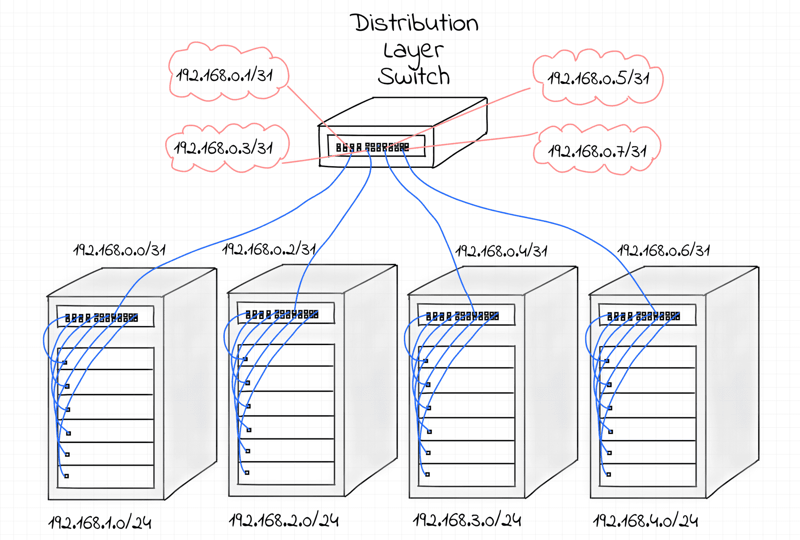
A heavily illustrated introduction to the first two layers of Computer Networking: Ethernet and IP. A must for any developer or DevOps engineer who wants to build solid understanding of computer networking before they move to the higher-level protocols like TCP, UDP, and even HTTP.
Your first hands-on session in a Linux terminal. Practice running commands, reading their output, using arguments and options, checking whether commands succeed or fail, and chaining commands together. No prior Linux experience is required.
Prove your SRE skills - deploy a resource-greedy application to a Kubernetes cluster and make it run for a while without disrupting the service.
SSH port forwarding explained in a clean and visual way. How to use local and remote port forwarding. What sshd settings may need to be adjusted. How to memorize the right flags.
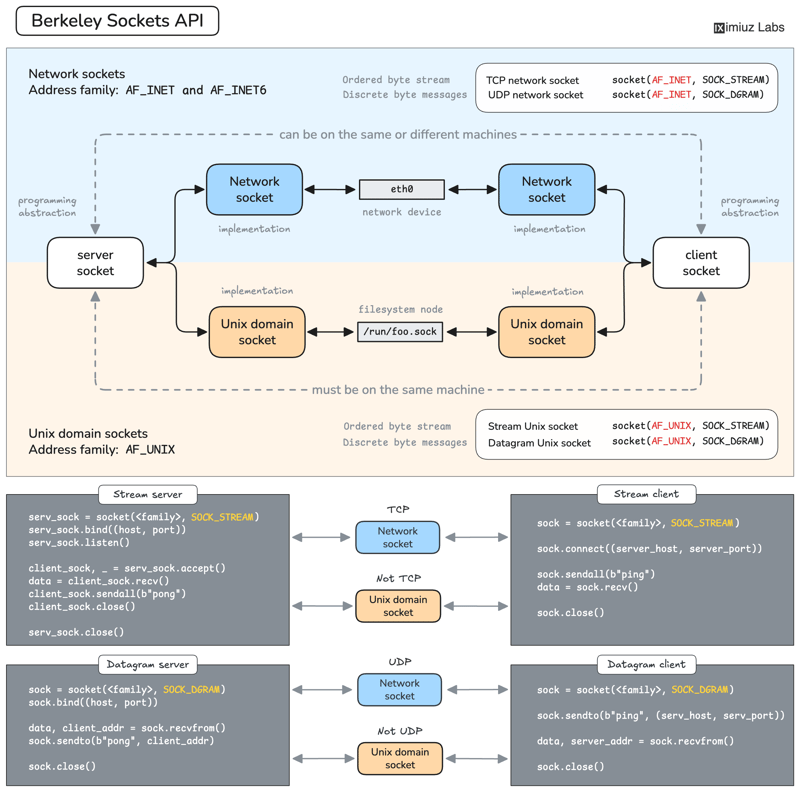
Learn how servers actually work by building a tiny TCP server and client from scratch. A hands-on introduction to sockets, TCP, and the network programming model every backend, DevOps, and platform engineer should go through at least once.
Container registries look simple until you need to debug what was actually pushed, why a pull picked the wrong image, or why deleting a tag didn't remove anything. Learn how registries work by pushing, pulling, inspecting, and deleting image data directly through the Registry API.

Are all containers just Linux processes? How does the OCI runtime specification define a container? What platforms do OCI containers support? What is a Docker container? Linux containers vs. Virtual Machine containers.

A practical deep dive into container image internals that will help you build a clear mental model of how images are composed, identified, stored, and distributed across registries.

How Virtual Machines were used to deploy services. What old problems containers solve and what new problems create. How Kubernetes used containers to recreate Virtual Machines in a better way?

Learn how to access a service bound to localhost of the Docker host from a bridge-networked container, without exposing the service to the local network or disabling network isolation.
Learn how to access services running on the Docker host from a bridge-networked container, without hardcoding host IP addresses or disabling network isolation.
Play a security researcher: identify the hosts a black-box container keeps making encrypted HTTPS calls to, route them through a MITM proxy, fake the certificate, and see what the container sends over the network.
Sometimes you need an app to talk to a different backend, but its configuration is unknown or the destination address is hard-coded. Practice overriding hostname resolution for a single Docker container to redirect its requests without modifying the app or rebuilding its image.
A distroless container serves a debug interface on its own loopback address. Can you reach this debug endpoint using nothing but standard Docker commands?
You are containerizing the dev workflows of a legacy Python service and you need to find out which external services its test suite talks to. Can you think of an easy way to do it?
A hands-on introduction to Firecracker that takes you from booting your first microVM to building secure, production-ready sandbox infrastructure. Learn how to launch and control microVMs, wire up networking, share data efficiently, and harden execution - the essential skills for running autonomous agents and untrusted workloads safely at scale.

A heavily illustrated introduction to the first two layers of Computer Networking: Ethernet and IP. A must for any developer or DevOps engineer who wants to build solid understanding of computer networking before they move to the higher-level protocols like TCP, UDP, and even HTTP.
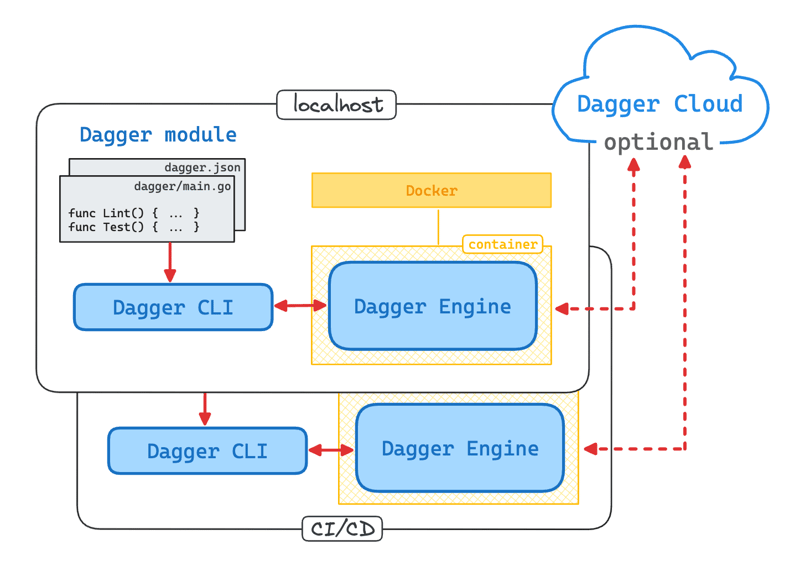
Build a mental model of how Dagger works by migrating an example software project from traditional script-based automation to a Dagger-powered development workflow, peeking under the hood of the new technology on the way.
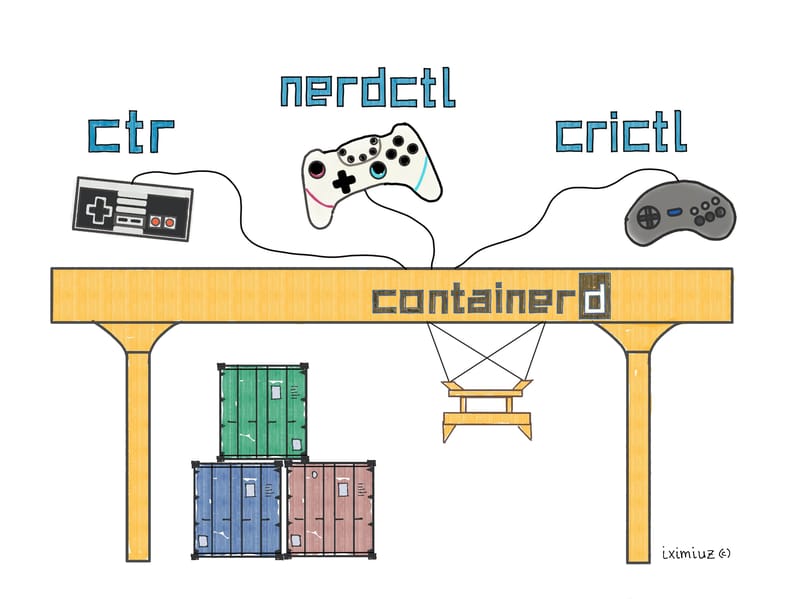
Explore containerd with ctr, its default command-line client, try nerdctl as a potential Docker alternative, and learn how to debug Kubernetes Pods with crictl.
Create files and directory structures from the Linux terminal. Practice using touch and mkdir, building nested directory trees, working with tricky names, and creating groups of files in one go.
Inspect directory contents from the Linux terminal, read what a listing tells you, sort it to find the entry you need faster, and use shell patterns to name groups of files.
Your third hands-on session in a Linux terminal. Learn how the Linux directory tree is organized and practice navigating it with absolute paths, relative paths, and common shell shortcuts.
Your second hands-on session in a Linux terminal. Find out what a command name really runs, learn how to get help with --help and man pages, and stop or suspend commands that do not give the prompt back.
Your first hands-on session in a Linux terminal. Practice running commands, reading their output, using arguments and options, checking whether commands succeed or fail, and chaining commands together. No prior Linux experience is required.
Practice Linux troubleshooting on deliberately broken servers. Investigate vague failures, find the root cause, and make the system work again.
Learn how to reach an internal port on a remote machine from the local system, jump through a bastion into a private VPC, expose a development server to the Internet through a reverse tunnel, publish a home network device, and spin up a full-fledged SOCKS proxy with nothing but a regular SSH connection.
Practice the most common Linux storage operations in a series of hands-on challenges: discover and mount drives, create partition tables, format partitions with different filesystems, map directories with bind mounts, and make mount points survive a reboot.
Learn how to move container images between your machine and container registries. Practice pulling images by tag, digest, and platform; tagging and pushing them to public and private registries; mirroring images across repositories; shipping images into air-gapped environments; and publishing multi-platform images.
Learn how to write Dockerfiles from scratch and build production-ready container images. Start with the basics of image building and progress through handling dependencies, compiling applications, inspecting image internals, and optimizing builds with multi-stage Dockerfiles. Then go deeper with advanced Dockerfile instructions, analyzing image internals, and producing multi-platform builds.
Go from zero to a confident Docker beginner. Learn how to run containers of all kinds, interact with them, and build a clear mental model of how Docker manages your applications behind the scenes.
Jaeger's HotROD demo app pre-deployed on a 3-node K3s cluster, wired to a Jaeger v2 all-in-one over OTLP. Click a customer, then read the trace.
A 3-node K3s cluster with gVisor (runsc), the kubernetes-sigs/agent-sandbox controllers, and the OpenClaw + gVisor example pre-deployed. OpenClaw's Control UI is available as a dedicated tab.
A snapshot-backed three-node k3s cluster with the complete OpenTelemetry Demo, including Jaeger and Grafana.
Five Ubuntu VMs across public and private subnets, joined by a dual-homed router. The private subnet has no direct Internet access.
Hands-on Docker on Btrfs: experiment with native snapshots, compression, and checksums; inspect setup, grow the filesystem live, and back up/restore images and containers.