Native SSH Access with Pomerium
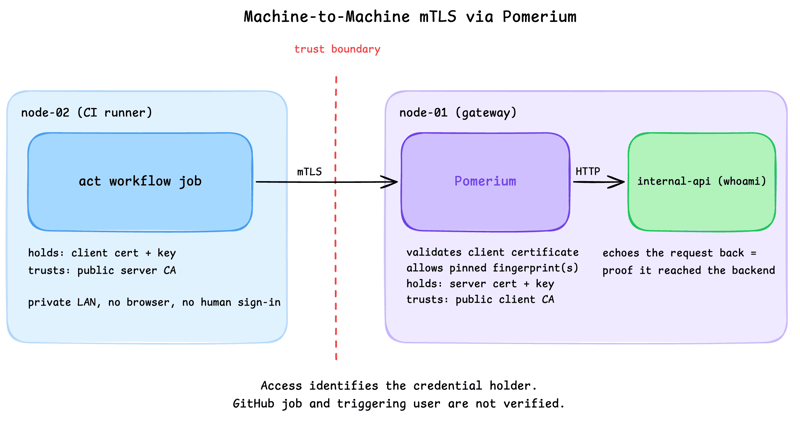
Pomerium can be used as a native SSH reverse proxy, adding OAuth authentication and flexible Pomerium policy enforcement to standard SSH connections, without the need for tunnels, or custom clients or servers.

Deep dives into DevOps and server-side topics, combining theory with hands-on examples. Run every command in an attached remote playground, from your browser or local terminal over SSH — no setup required.
Pomerium can be used as a native SSH reverse proxy, adding OAuth authentication and flexible Pomerium policy enforcement to standard SSH connections, without the need for tunnels, or custom clients or servers.
Use Pomerium's native SSH support to publish a local service through a standard reverse SSH tunnel, with OpenID Connect (OIDC) authentication and continuous authorization on every request. Reach services behind Network Address Translation (NAT) without firewall holes or custom agents, and control both who can use the service and who can open the tunnel. Application traffic stays on infrastructure you control.

Put OpenClaw, a self-hosted AI assistant with shell and file access, behind a web route and an SSH route, both gated by the same identity and Pomerium's context-aware policy. OpenClaw runs in trusted-proxy mode, trusting signed identity headers instead of its own login, while Pomerium's native SSH proxy signs short-lived certificates for shell access.

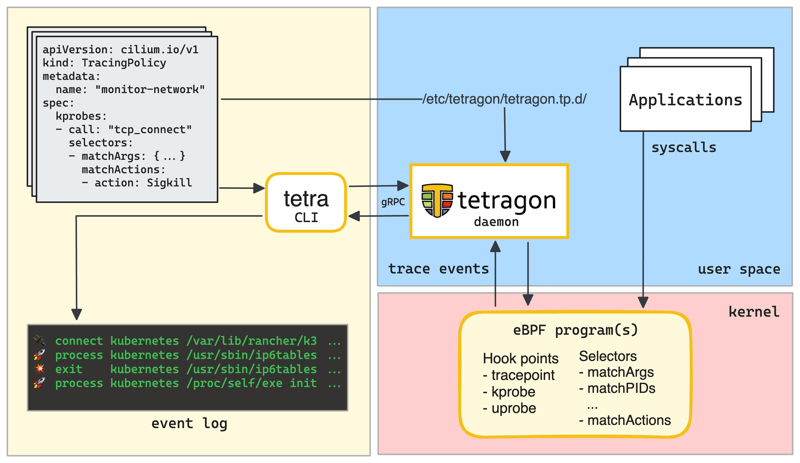
What is Tetragon, how it works, and how to use it to detect and react to security-significant events in your Kubernetes, Docker, or plain Linux environment.

Take a stock Debian SSH server and harden it the way you would in production: replace passwords with public-key auth, disable root login, add a TOTP second factor with PAM, and move off port 22, then prove it works by logging in, all inside the playground.