Secure Machine-to-Machine Access with mTLS and Pomerium
About This Tutorial
Mutual TLS (mTLS) proves possession of a client private key; it does not decide what that machine may reach. Trusting a certificate authority (CA) lets valid certificates chaining to that CA pass certificate validation; it does not limit access to the workload you intend to allow. This tutorial keeps those two questions separate: Pomerium trusts the CA broadly, then authorizes one continuous integration (CI) runner narrowly by certificate fingerprint. You'll prove the distinction directly: a second certificate from the same trusted CA gets rejected, then the authorized runner's access is revoked and restored through a live policy change without rotating its certificate. Finally, you will rotate to a new certificate and key, verify both identities during an overlap period, and retire the old one.
This tutorial is for platform and security engineers who need to authorize a headless caller such as a CI runner, continuous delivery (CD) pipeline, backup job, or batch process. You will run a GitHub Actions-compatible workflow on one playground machine and protect its call to an internal API with Pomerium on another machine. It's always the headless workload reaching out, never the other way around: a real pipeline in this position might be registering a build artifact, triggering an internal deployment step, or reporting job status to an internal service. No person signs in, and no browser session participates in authorization.
This is a practical example of authorizing a workload to call an internal API using mTLS and certificate policy. It fits when access should follow a dedicated workload credential and you control which processes can use that credential. The CI job makes the pattern concrete; choosing it for your own pipeline depends on which identity your API needs to trust and how you manage credentials.
A static API key or service-account token is a bearer credential: anyone who obtains it can use it while it remains valid. A client certificate proves possession of its private key during TLS without transmitting that key. Both approaches still require secure credential storage and appropriate lifetimes. An attacker who steals the client private key and certificate can impersonate the workload too.
Security scope. The playground stores CA signing keys on disk so you can inspect the complete trust chain. Production signing keys belong in a hardware security module (HSM) or a tightly controlled secrets service, with automated issuance and rotation.
By the end, you'll have:
- A CI runner and Pomerium on separate hosts connected over a private local area network (LAN)
- A real mTLS handshake in which the runner verifies Pomerium and Pomerium verifies the runner
- A GitHub Actions-compatible job authorized by one client-certificate fingerprint
- Proof that a policy change revokes and restores the same workflow's access without restarting Pomerium
- A replacement certificate and key, with verified overlap and retirement of the old identity
Knowledge Prerequisites
- Comfortable reading shell commands, YAML, and a small GitHub Actions workflow
- Familiar with the roles of a certificate, private key, and certificate authority
- Basic understanding of CI jobs and secrets
The playground provides both machines, Docker, OpenSSL, curl, and the pinned act runner. You do not need an external account or local installation.
How It Works
The two playground machines model a common production layout. Pomerium validates the client certificate and authorizes its fingerprint before forwarding the request to the internal API:
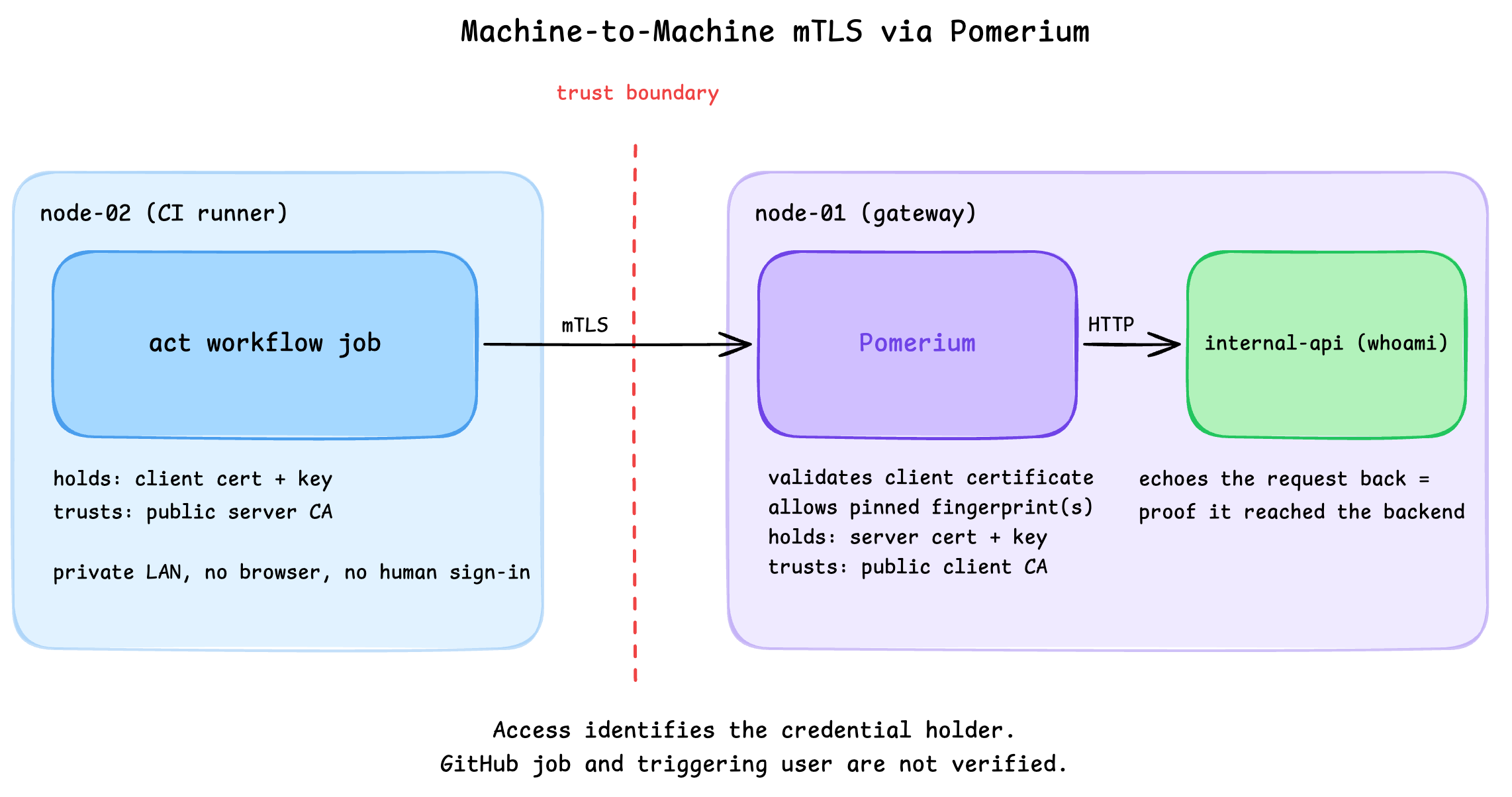
The runner uses a client private key, and the Pomerium container receives only its server private key and the public certificates it needs. The runner trusts the public server CA; Pomerium trusts the public client CA. As a lab shortcut, initialization generates all keys on the gateway host and you copy the client identities to the runner. In production, generate workload keys at the workload or through a controlled certificate issuance system, rather than keeping copies on the gateway.
The job connects directly across the private playground LAN. In production, the same connection could cross a private network, a virtual private network (VPN), a private interconnect, or the public internet. For this tutorial's certificate policy to work, the runner's TLS connection must terminate at Pomerium. A load balancer in front of Pomerium can use TCP/TLS passthrough to preserve that connection. If it terminates TLS and opens a new TLS connection to Pomerium, Pomerium sees the load balancer's client certificate, or no client certificate, rather than the runner's. The runner-fingerprint policy in this tutorial would reject that request. Authenticating the runner at the load balancer and securely conveying its identity downstream requires a different configuration and trust model; re-encrypting traffic alone does not preserve that identity.
mTLS Trust vs. Pomerium Authorization
mTLS and Pomerium's policy layer answer two different questions:
- mTLS asks: is this certificate cryptographically trusted?
- Pomerium PPL asks: is this trusted certificate authorized for this route?
The downstream mTLS handshake proves the runner holds the private key for a certificate that chains to the trusted client CA. A "yes" to that question only means the certificate is who it claims to be. It does not mean the certificate should be authorized to reach every route behind Pomerium.
Without a proxy in front, both sides of an mTLS connection would configure their own certificate, key, and CA trust, and independently validate each other during the handshake. Here, Pomerium terminates that downstream mTLS connection on the backend's behalf: internal-api never holds a certificate or key of its own, and only ever receives plain HTTP from Pomerium.
That second question belongs to Pomerium's policy layer. The client_certificate PPL matcher takes the identity already established during the downstream mTLS connection and lets policy decide, per route, whether that specific certificate is authorized. The matcher does not perform mTLS itself. It authorizes based on the client certificate presented during that connection. This tutorial pins the decision to one SHA-256 fingerprint, but the same matcher can also key off other certificate identity attributes, such as subject alternative names (SANs) or Subject Public Key Info (SPKI) hashes, when fingerprint pinning is not the right fit.
Step 7 makes the distinction concrete: a second certificate signed by the same trusted client CA passes mTLS trust validation but is denied by policy, because CA trust alone was never the authorization decision.
Pomerium's downstream mTLS settings establish certificate trust. downstream_mtls.ca_file points at the client CA, while enforcement: policy lets routes opt into certificate requirements. The explicit invalid_client_certificate deny rule rejects missing, expired, or untrusted certificates, and rejects revoked certificates when a CRL is configured. The fingerprint matcher alone does not perform that validation. The route also uses the client_certificate criterion in Pomerium Policy Language (PPL) to pin one SHA-256 fingerprint:
policy:
  - deny:
      and:
        - invalid_client_certificate: true
  - allow:
      and:
        - client_certificate:
            fingerprint: '...'
With enforcement: policy, certificate trust is enforced when Pomerium evaluates the request, rather than by rejecting the TLS connection. A second valid certificate from the same CA passes trust validation but fails the fingerprint allow rule. Later, you will replace the allowed fingerprint and rerun the same job to prove that authorization can be revoked without invalidating the certificate or restarting Pomerium.
The protected backend runs as the internal-api service, standing in for whatever internal system a pipeline might call in production (a deployment API, an artifact registry, a secrets or status endpoint). It uses the traefik/whoami image only as a tiny HTTP test API: it echoes back the request it receives, so a successful call gives you visible proof that the request reached the real upstream service and came back, not just that Pomerium's handshake succeeded. The tutorial does not configure Traefik as a proxy.
Step 1: Distribute the Runner Identity
The gateway machine generated two independent trust chains: a server CA and certificate for Pomerium, plus a client CA and two machine certificates. Copy only the runner's identity, the deliberately unauthorized identity, and the public server CA to node-02.
Initialize a local Git repository with an empty commit for act to run the workflow. Keep certificates, secrets, and generated output out of Git with .gitignore, then copy the test identities and restrict private-key permissions to their owner.
In the runner terminal:
cd ~/pommtls-runner
git init -q
git -c user.name="CI Lab" -c user.email="ci-lab@example.invalid" commit --allow-empty -qm "Initialize local CI lab"
printf 'certs/\n.act.secrets*\nresults/\nact-*.log\nresponse.txt\n' > .gitignore
mkdir -p certs
scp -B -o StrictHostKeyChecking=accept-new node-01:~/pommtls/certs/{server-ca-cert.pem,ci-runner-cert.pem,ci-runner-key.pem,other-service-cert.pem,other-service-key.pem} certs/
chmod 600 certs/*-key.pem
The runner does not receive either CA signing key or Pomerium's private key. Check the bundle:
find certs -maxdepth 1 -type f -printf '%f\n' | sort
act --version
You should see a list of certificates like this:
ci-runner-cert.pem
ci-runner-key.pem
other-service-cert.pem
other-service-key.pem
server-ca-cert.pem
act version 0.2.88
No client-ca-key.pem, server-ca-key.pem, or server-key.pem in that list. Those never leave node-01.
Step 2: Configure Pomerium
Switch to the gateway terminal and create the Pomerium configuration. The route uses node-01's private IP, which is also present in Pomerium's server certificate. Keep the - deny: and - allow: entries aligned; nesting one under the other changes or invalidates the policy.
cd ~/pommtls
GATEWAY_IP=$(hostname -I | awk '{print $1}')
FINGERPRINT=$(cat certs/ci-runner-fingerprint.txt | tr -d '[:space:]')

cat > pomerium-config/config.yaml << EOF
shared_secret: $(head -c32 /dev/urandom | base64)
cookie_secret: $(head -c32 /dev/urandom | base64)

address: :443
authenticate_service_url: https://authenticate.pomerium.app
idp_provider: hosted

downstream_mtls:
  ca_file: /etc/pomerium/certs/client-ca-cert.pem
  enforcement: policy

routes:
  - name: internal-api
    from: https://$GATEWAY_IP
    to: http://internal-api:80
    policy:
      - deny:
          and:
            - invalid_client_certificate: true
      - allow:
          and:
            - client_certificate:
                fingerprint: '$FINGERPRINT'
EOF
Pomerium mounts the public client-ca-cert.pem, not client-ca-key.pem. The all-in-one configuration still requires an identity provider even though this route never invokes it: it uses Pomerium's hosted authenticate service for quick setup and testing, since the route's policy contains no human identity criterion. In production, configure Pomerium to use your production identity provider.
Step 3: Launch the Gateway and API
Still in the gateway terminal, create the Docker Compose stack:
cat > docker-compose.yml << 'EOF'
services:
  pomerium:
    # Latest numbered Pomerium release checked 2026-09-08.
    image: pomerium/pomerium:v0.33.1
    restart: unless-stopped
    depends_on:
      - internal-api
    environment:
      CERTIFICATE_FILE: /etc/pomerium/certs/server-cert.pem
      CERTIFICATE_KEY_FILE: /etc/pomerium/certs/server-key.pem
    volumes:
      - ./pomerium-config:/pomerium:ro
      - ./certs/server-cert.pem:/etc/pomerium/certs/server-cert.pem:ro
      - ./certs/server-key.pem:/etc/pomerium/certs/server-key.pem:ro
      - ./certs/client-ca-cert.pem:/etc/pomerium/certs/client-ca-cert.pem:ro
      - pomerium-data:/var/pomerium
    ports:
      - "443:443"
    networks:
      - pommtls-net

  internal-api:
    image: traefik/whoami:v1.12.0
    restart: unless-stopped
    networks:
      - pommtls-net

networks:
  pommtls-net:

volumes:
  pomerium-data:
EOF
Start Pomerium and the protected API:
docker compose up -d
Follow Pomerium's startup logs:
docker compose logs -f pomerium
Press Ctrl+C to stop following the logs and return to the terminal. Pomerium and the protected API continue running in the background.
CERTIFICATE_FILE and CERTIFICATE_KEY_FILE are Pomerium's server identity. They are separate from downstream_mtls.ca_file, which controls which client CA Pomerium trusts.
If the task stays pending, run docker compose logs pomerium | tail -n 30. A YAML indentation error or malformed fingerprint appears there before any network request is attempted.
Step 4: Create the CI Workflow
Return to the runner terminal. Create a workflow that materializes its certificate secrets into temporary files, calls the protected API, and fails unless it receives HTTP 200:
cd ~/pommtls-runner
cat > .github/workflows/call-api.yaml << 'EOF'
name: Call protected API

on:
  workflow_dispatch:
    inputs:
      probe_id:
        description: Unique ID used to correlate this run with Pomerium logs
        required: true
        type: string

permissions: {}

jobs:
  call-protected-api:
    runs-on: ubuntu-latest
    steps:
      - name: Materialize the mTLS identity
        shell: bash
        env:
          CLIENT_CERT_B64: ${{ secrets.CLIENT_CERT_B64 }}
          CLIENT_KEY_B64: ${{ secrets.CLIENT_KEY_B64 }}
          SERVER_CA_B64: ${{ secrets.SERVER_CA_B64 }}
        run: |
          umask 077
          mkdir -p "$RUNNER_TEMP/pommtls"
          printf '%s' "$CLIENT_CERT_B64" | base64 -d > "$RUNNER_TEMP/pommtls/client-cert.pem"
          printf '%s' "$CLIENT_KEY_B64" | base64 -d > "$RUNNER_TEMP/pommtls/client-key.pem"
          printf '%s' "$SERVER_CA_B64" | base64 -d > "$RUNNER_TEMP/pommtls/server-ca.pem"

      - name: Call the protected API
        shell: bash
        env:
          ROUTE_URL: ${{ secrets.ROUTE_URL }}
          PROBE_ID: ${{ inputs.probe_id }}
        run: |
          STATUS=$(curl --silent --show-error --connect-timeout 10 --max-time 30 --output response.txt --write-out '%{http_code}' \
            --cacert "$RUNNER_TEMP/pommtls/server-ca.pem" \
            --cert "$RUNNER_TEMP/pommtls/client-cert.pem" \
            --key "$RUNNER_TEMP/pommtls/client-key.pem" \
            --user-agent "pommtls-ci-job-$PROBE_ID" \
            "$ROUTE_URL/")
          echo "Protected API returned HTTP $STATUS"
          test "$STATUS" = 200
          cat response.txt

      - name: Remove the temporary mTLS identity
        if: ${{ always() }}
        shell: bash
        run: rm -f "$RUNNER_TEMP/pommtls/client-cert.pem" "$RUNNER_TEMP/pommtls/client-key.pem" "$RUNNER_TEMP/pommtls/server-ca.pem"
EOF
This is a real GitHub Actions workflow executed locally by act. To run it on GitHub Actions, configure the four repository or environment secrets and give the selected runner network access to your Pomerium endpoint. The playground's private IP is not reachable from a GitHub-hosted runner by default.
Still in the runner terminal, create the local secret file:
umask 077
GATEWAY_IP=$(getent ahostsv4 node-01 | awk 'NR==1 {print $1}')
{
  echo "ROUTE_URL=https://$GATEWAY_IP"
  echo "CLIENT_CERT_B64=$(base64 -w0 certs/ci-runner-cert.pem)"
  echo "CLIENT_KEY_B64=$(base64 -w0 certs/ci-runner-key.pem)"
  echo "SERVER_CA_B64=$(base64 -w0 certs/server-ca-cert.pem)"
} > .act.secrets
chmod 600 .act.secrets
Create a small local runner script that records each workflow's exit status and a unique request marker. The checkpoints use these records to distinguish a new run from an earlier success:
cat > run-ci.sh << 'EOF'
#!/usr/bin/env bash
set -uo pipefail
cd "$(dirname "$0")"
PHASE=${1:?Usage: ./run-ci.sh PHASE [SECRET_FILE]}
case "$PHASE" in
  allowed|trust-denied|trust-restored|revoked|restored|overlap-old|overlap-new|retired-old|rotated-new) ;;
  *) echo "Unknown phase: $PHASE" >&2; exit 2 ;;
esac
SECRET_FILE=${2:-.act.secrets}
FINGERPRINT=$(sed -n 's/^CLIENT_CERT_B64=//p' "$SECRET_FILE" | base64 -d \
  | openssl x509 -noout -fingerprint -sha256 | sed 's/^.*=//; s/://g' | tr 'A-F' 'a-f')
[[ "$FINGERPRINT" =~ ^[0-9a-f]{64}$ ]] || exit 2
mkdir -p results
rm -f "results/$PHASE.json"
PROBE_ID=$(cat /proc/sys/kernel/random/uuid)
# Runner image pinned 2026-07-31. This workflow only requires bash and curl.
act workflow_dispatch --job call-protected-api \
  --input "probe_id=$PROBE_ID" \
  --secret-file "$SECRET_FILE" \
  --platform ubuntu-latest=node:22.18.0-bookworm@sha256:bb6834c0669aa71cbc8d94606561a721adf489f6b93d7b8b825f0cf1b498c2c4 \
  |& tee "act-$PHASE.log"
RESULT=${PIPESTATUS[0]}
printf '{"probe_id":"%s","exit_code":%s,"fingerprint":"%s"}\n' "$PROBE_ID" "$RESULT" "$FINGERPRINT" > "results/$PHASE.json.tmp"
mv "results/$PHASE.json.tmp" "results/$PHASE.json"
exit "$RESULT"
EOF
chmod +x run-ci.sh
The lab uses a local .act.secrets file so the entire exercise stays inside the playground. Do not commit that file. In GitHub Actions, store these values as encrypted secrets. In a production system, prefer short-lived certificates delivered from a secrets manager or workload identity system over a long-lived private key stored in CI settings.
Step 5: Prove a Certificate Is Required
Before running the job, call the same private endpoint without a client certificate from the runner terminal:
GATEWAY_IP=$(getent ahostsv4 node-01 | awk 'NR==1 {print $1}')
curl --silent --show-error --connect-timeout 10 --max-time 30 --output /dev/null --write-out '%{http_code}\n' \
  --cacert certs/server-ca-cert.pem \
  --user-agent pommtls-no-cert \
  "https://$GATEWAY_IP/"
You should see 495, Pomerium's certificate-required error. The runner verified Pomerium's server certificate, but it presented no machine identity for Pomerium to authorize.
Step 6: Run the Authorized CI Job
Still in the runner terminal, run the workflow:
./run-ci.sh allowed
The first run downloads the runner image and can take a few minutes. Its startup output looks like this:
time="2026-09-08T20:03:57Z" level=info msg="Using docker host 'unix:///var/run/docker.sock', and daemon socket 'unix:///var/run/docker.sock'"
[Call protected API/call-protected-api] ⭐ Run Set up job
[Call protected API/call-protected-api] 🚀  Start image=node:22.18.0-bookworm@sha256:bb6834c0669aa71cbc8d94606561a721adf489f6b93d7b8b825f0cf1b498c2c4
[Call protected API/call-protected-api]   🐳  docker pull image=node:22.18.0-bookworm@sha256:bb6834c0669aa71cbc8d94606561a721adf489f6b93d7b8b825f0cf1b498c2c4 platform= username= forcePull=true
...
Wait for the job to finish and confirm that the output includes Protected API returned HTTP 200. The backend hostname varies on each run; the HTTP status and completed job are what matter. The cleanup step removes its temporary certificate files even when the API request fails.
After the image download, look for output like this (trimmed, with the repeated act prefix omitted for readability):
Protected API returned HTTP 200
Hostname: b20e4cbfcc44
RemoteAddr: 172.18.0.3:47884
GET / HTTP/1.1
Host: internal-api:80
User-Agent: pommtls-ci-job-f3d168b8-eabd-4332-8f0a-909ccb5c88f7
X-Request-Id: 2dc6b5e0-2100-4eb2-9f52-58e2502e6e13
The hostname identifies the backend container, while RemoteAddr shows its immediate caller, Pomerium. Host: internal-api:80 shows the upstream destination. Your addresses, hostname, and request identifiers will differ. The checkpoint correlates this request with Pomerium's access and authorization logs and checks that the workflow succeeded.
Pomerium logs its authorization decision as its own JSON line, separate from the proxied request. Its access log fields and authorization log fields document the evidence used by these checkpoints. Switch to the gateway terminal and check the latest one:
docker compose logs pomerium --no-log-prefix > /tmp/pommtls-decisions.log
jq -Rsc '[split("\n")[] | fromjson? | select(.service == "authorize" and .path == "/")] | last | {allow, deny, "allow-why-true", "allow-why-false", "deny-why-true"} | with_entries(select(.value != null))' /tmp/pommtls-decisions.log
{"allow":true,"deny":false,"allow-why-true":["client-certificate-ok"]}
"allow": true with "allow-why-true": ["client-certificate-ok"] is Pomerium's own record of why it let this specific machine through.
If the job reports certificate verification failure, compare the IP in ROUTE_URL in .act.secrets with getent ahostsv4 node-01. The IP must match the subject alternative name in Pomerium's server certificate.
Step 7: Prove CA Trust Is Not Authorization
Switch back to the runner terminal and call the route with the second client certificate, signed by the same client CA and therefore valid under the configured trust policy:
GATEWAY_IP=$(getent ahostsv4 node-01 | awk 'NR==1 {print $1}')
curl --silent --show-error --connect-timeout 10 --max-time 30 --output /dev/null --write-out '%{http_code}\n' \
  --cacert certs/server-ca-cert.pem \
  --cert certs/other-service-cert.pem \
  --key certs/other-service-key.pem \
  --user-agent pommtls-wrong-cert \
  "https://$GATEWAY_IP/"
You should see 403. The handshake succeeded, but the route policy fingerprint did not match. Trusting an issuing CA and authorizing a specific machine are separate decisions.
Switch to the gateway terminal and confirm that in Pomerium's own words:
docker compose logs pomerium --no-log-prefix > /tmp/pommtls-decisions.log
jq -Rsc '[split("\n")[] | fromjson? | select(.service == "authorize" and .path == "/")] | last | {allow, deny, "allow-why-true", "allow-why-false", "deny-why-true"} | with_entries(select(.value != null))' /tmp/pommtls-decisions.log
{"allow":false,"deny":false,"allow-why-false":["client-certificate-unauthorized"]}
client-certificate-unauthorized means the fingerprint did not match. This differs from Step 5: the explicit deny rule rejects a missing certificate with client-certificate-required. Here, the certificate is valid, but the allow rule does not authorize it.
Step 8: Prove Certificate Trust Is Enforced
A mismatched fingerprint tests authorization, but not certificate validation. Keep the allowed fingerprint unchanged and temporarily replace the trusted client CA with the unrelated server CA. In the gateway terminal:
cd ~/pommtls
SERVER_CA=$(base64 -w0 certs/server-ca-cert.pem)
sed -i "s|  ca_file: /etc/pomerium/certs/client-ca-cert.pem|  ca: $SERVER_CA|" pomerium-config/config.yaml
In the runner terminal, run the same client identity again:
./run-ci.sh trust-denied
Expect output like this (trimmed, with act prefixes and timing details omitted):
Protected API returned HTTP 495
Failure - Main Call the protected API
exitcode '1': failure
Success - Main Remove the temporary mTLS identity
Job failed
Error: Job 'call-protected-api' failed
This failure is expected. The certificate fingerprint still matches, but its issuing CA is no longer trusted. The explicit deny rule must override the matching allow rule. The workflow requires HTTP 200, so it exits with an error. The cleanup step still removes the temporary certificate files. The checkpoint verifies the rejection using Pomerium's access and authorization logs.
Switch to the gateway terminal and inspect the latest authorization decision before restoring trust:
docker compose logs pomerium --no-log-prefix > /tmp/pommtls-decisions.log
jq -Rsc '[split("\n")[] | fromjson? | select(.service == "authorize" and .path == "/")] | last | {allow, deny, "allow-why-true", "allow-why-false", "deny-why-true"} | with_entries(select(.value != null))' /tmp/pommtls-decisions.log
{"allow":true,"deny":true,"allow-why-true":["client-certificate-ok"],"deny-why-true":["invalid-client-certificate"]}
deny: true takes precedence over the matching allow rule.
Restore the client CA in the gateway terminal:
sed -i 's|^ ca: .*| ca_file: /etc/pomerium/certs/client-ca-cert.pem|' pomerium-config/config.yaml
Then repeat the job in the runner terminal:
./run-ci.sh trust-restored
Expect HTTP 200 again. If either result still reflects the previous configuration, wait a few seconds for hot reload and rerun that phase before moving on.
Step 9: Revoke the Runner Through Policy
Still in the gateway terminal, replace the authorized fingerprint with a valid but nonexistent SHA-256 fingerprint:
cd ~/pommtls
REVOKED_FINGERPRINT=$(printf '0%.0s' {1..64})
sed -i -E "s/(fingerprint: ')[0-9a-f]{64}(')/\1${REVOKED_FINGERPRINT}\2/" pomerium-config/config.yaml
grep fingerprint pomerium-config/config.yaml
Pomerium hot-reloads its configuration and applies the change without a container restart. Return to the runner terminal and rerun the identical job:
./run-ci.sh revoked
Expect output like this (trimmed, with act prefixes and timing details omitted):
Protected API returned HTTP 403
Failure - Main Call the protected API
exitcode '1': failure
Success - Main Remove the temporary mTLS identity
Job failed
Error: Job 'call-protected-api' failed
A nonzero exit from run-ci.sh is expected here; the cleanup step still removes the temporary certificate files. The certificate remains valid and Pomerium still trusts its CA, but policy no longer authorizes its fingerprint. This is an authorization failure (HTTP 403), unlike the certificate-trust failure (HTTP 495) in Step 8.
Switch to the gateway terminal and check Pomerium's decision for that rerun:
docker compose logs pomerium --no-log-prefix > /tmp/pommtls-decisions.log
jq -Rsc '[split("\n")[] | fromjson? | select(.service == "authorize" and .path == "/")] | last | {allow, deny, "allow-why-true", "allow-why-false", "deny-why-true"} | with_entries(select(.value != null))' /tmp/pommtls-decisions.log
{"allow":false,"deny":false,"allow-why-false":["client-certificate-unauthorized"]}
Same runner, same certificate, same key. The fingerprint no longer matches, so allow is false. The checkpoint verifies the failed workflow request and checks that the Pomerium container has the same ID, start time, and restart count as the first successful run.
If the rerun still returns 200, wait a few seconds for Pomerium's configuration reload and run it once more.
Step 10: Restore the Runner
Still on the gateway, restore the original fingerprint:
FINGERPRINT=$(cat certs/ci-runner-fingerprint.txt | tr -d '[:space:]')
sed -i -E "s/(fingerprint: ')[0-9a-f]{64}(')/\1${FINGERPRINT}\2/" pomerium-config/config.yaml
Run the workflow again from the runner terminal:
./run-ci.sh restored
The job returns HTTP 200 again. No certificate was reissued, no secret changed, and Pomerium was never restarted.
Switch back to the gateway terminal one more time to see the full arc in Pomerium's own log:
docker compose logs pomerium --no-log-prefix > /tmp/pommtls-decisions.log
jq -Rsc '[split("\n")[] | fromjson? | select(.service == "authorize" and .path == "/")] | last | {allow, deny, "allow-why-true", "allow-why-false", "deny-why-true"} | with_entries(select(.value != null))' /tmp/pommtls-decisions.log
{"allow":true,"deny":false,"allow-why-true":["client-certificate-ok"]}
allow is true and deny is false again. This checkpoint verifies that this workflow completed successfully, its request reached the backend, and the same Pomerium container stayed running throughout the policy changes.
Step 11: Rotate the Runner Certificate with an Overlap Period
Restoring a fingerprint recovers access for the same credential. Now replace the certificate and its key, keeping the old identity authorized until the workflow has switched. This rotates one workload certificate, not the CA trust anchor.
In the runner terminal, generate the replacement key and a certificate signing request (CSR). Only the CSR leaves the runner:
cd ~/pommtls-runner
umask 077
openssl req -newkey rsa:2048 -nodes \
  -keyout certs/ci-runner-v2-key.pem \
  -out certs/ci-runner-v2.csr -subj "/CN=ci-runner.internal"
scp certs/ci-runner-v2.csr laborant@node-01:~/pommtls/certs/
Expect output like this (key-generation progress trimmed):
......+...+++++++++++++++++++++++++++++++++++++++++++++++++++++++++++++++++*...
.+.....+...+......+.+++++++++++++++++++++++++++++++++++++++++++++++++++++++++++++++++*...
-----
ci-runner-v2.csr                                                        100%  903     2.9MB/s   00:00
OpenSSL's progress characters vary on each run. The final line confirms that the certificate signing request was copied to the gateway; its size, transfer speed, and timing may differ. The replacement private key stays on the runner.
In the gateway terminal, use the OpenSSL certificate-signing command to sign it with the existing client CA and compute its new fingerprint:
cd ~/pommtls
umask 077
printf 'extendedKeyUsage=clientAuth\n' > certs/ci-runner-v2.ext
openssl x509 -req -in certs/ci-runner-v2.csr \
  -CA certs/client-ca-cert.pem -CAkey certs/client-ca-key.pem \
  -CAcreateserial -out certs/ci-runner-v2-cert.pem \
  -days 1 -extfile certs/ci-runner-v2.ext
openssl x509 -in certs/ci-runner-v2-cert.pem -noout -fingerprint -sha256 \
  | sed 's/^.*=//; s/://g' | tr 'A-F' 'a-f' > certs/ci-runner-v2-fingerprint.txt
OLD=$(tr -d '[:space:]' < certs/ci-runner-fingerprint.txt)
NEW=$(tr -d '[:space:]' < certs/ci-runner-v2-fingerprint.txt)
sed -i "s/fingerprint: '$OLD'/fingerprint: ['$OLD', '$NEW']/" pomerium-config/config.yaml
Expected output:
Certificate request self-signature ok
subject=CN = ci-runner.internal
self-signature ok means OpenSSL verified the signature on the certificate signing request. The issued certificate is signed by the client CA. The remaining commands save its fingerprint and update the policy without printing output.
The certificate matcher accepts a list of fingerprints, matching either value. The explicit certificate-validation deny rule stays in place. This short-lived replacement expires after one day; production issuance must renew it before expiration.
Back in the runner terminal, retrieve the signed public certificate, keep a temporary copy of the old secrets for the retirement test, and prove the old workflow still succeeds:
cd ~/pommtls-runner
scp laborant@node-01:~/pommtls/certs/ci-runner-v2-cert.pem certs/
cp .act.secrets .act.secrets.old
chmod 600 .act.secrets.old
./run-ci.sh overlap-old .act.secrets.old
Expect this line in the output:
[Call protected API/call-protected-api] | Protected API returned HTTP 200
Switch both credential values together by writing a replacement secret file and renaming it into place:
umask 077
{
  grep -E '^(ROUTE_URL|SERVER_CA_B64)=' .act.secrets
  echo "CLIENT_CERT_B64=$(base64 -w0 certs/ci-runner-v2-cert.pem)"
  echo "CLIENT_KEY_B64=$(base64 -w0 certs/ci-runner-v2-key.pem)"
} > .act.secrets.next
mv .act.secrets.next .act.secrets
./run-ci.sh overlap-new
Expect HTTP 200 again. If a run still sees the old policy, wait a few seconds for hot reload and rerun that phase. Do not retire the old fingerprint until this checkpoint passes.
Step 12: Retire the Old Credential
In production, first confirm all runners use the replacement and jobs using the old credential have finished. Here each act run has already completed. In the gateway terminal, narrow the policy to the replacement fingerprint:
cd ~/pommtls
NEW=$(tr -d '[:space:]' < certs/ci-runner-v2-fingerprint.txt)
sed -i -E "s/fingerprint: .*/fingerprint: '$NEW'/" pomerium-config/config.yaml
Use the saved old secrets for a fresh workflow run in the runner terminal:
./run-ci.sh retired-old .act.secrets.old
Expect this line and a failed workflow:
[Call protected API/call-protected-api] | Protected API returned HTTP 403
This failure is expected: the old certificate is still valid, but its fingerprint is no longer authorized. If it still succeeds, wait a few seconds and rerun before continuing.
Now verify that the default workflow still uses the replacement successfully:
./run-ci.sh rotated-new
Expect HTTP 200. In the gateway terminal, inspect the two correlated decisions. The checker reads each workflow's unique probe identifier, finds its access log, and matches its request ID to the authorization log:
cd ~/pommtls
./check-ci.sh retired-old 403 false false client-certificate-unauthorized
./check-ci.sh rotated-new 200 true false client-certificate-ok
for PHASE in retired-old rotated-new; do
  PROBE_ID=$(jq -r .probe_id "evidence/$PHASE-result.json")
  REQ_ID=$(jq -r --arg ua "pommtls-ci-job-$PROBE_ID" '[.[] | select(.service == "envoy" and .["user-agent"] == $ua)] | last | .["request-id"]' "evidence/$PHASE-logs.json")
  jq -c --arg id "$REQ_ID" --arg phase "$PHASE" '.[] | select(.service == "authorize" and .["request-id"] == $id) | {phase: $phase, allow, deny}' "evidence/$PHASE-logs.json"
done
{"phase":"retired-old","allow":false,"deny":false}
{"phase":"rotated-new","allow":true,"deny":false}
After the checkpoint passes, remove the retired credential copies from the runner terminal:
rm -f .act.secrets.old certs/ci-runner-key.pem certs/ci-runner-cert.pem
Also remove the original lab-generated private key from the gateway terminal:
rm -f ~/pommtls/certs/ci-runner-key.pem
You preserved an authorized identity through the overlap, switched the workflow, and proved retirement with fresh requests. These sequential probes and the unchanged container state demonstrate the rotation sequence; they do not establish uninterrupted service under production load.
Wrap-Up
You built a real machine-to-machine path from a CI runner to a protected internal API, on separate hosts, with Pomerium terminating and enforcing mTLS in between. The workflow verified Pomerium's server identity, Pomerium verified the runner's client identity, and route policy narrowed CA trust to one certificate. You then revoked and restored that workflow through live policy changes, rotated to a new certificate and key with an overlap period, and proved the retired credential could no longer reach the API.
Before Going to Production
mTLS is a good fit when your workloads support client certificates and you can manage their issuance, protection, renewal, and revocation. This tutorial's fingerprint policy authenticates the credential holder. It does not establish which GitHub repository, branch, job, or person used that credential.
Prefer an existing workload identity mechanism when it better matches your access requirements. For example, GitHub Actions OpenID Connect (OIDC) can provide repository, branch, and environment claims to a compatible destination or credential broker. A service account is a software identity that can authenticate through certificates or other credentials; use interactive or delegated authentication when access must follow a person. You can also require mTLS alongside a separately validated account or job identity, with both checks required by policy.
This tutorial demonstrates certificate authentication, explicit authorization, and live policy changes with evidence from Pomerium's logs. A production deployment also needs an operational plan for credentials, network isolation, availability, and incident response. Moving the workflow from act to GitHub Actions is only one part of that work.
- Scope both credentials and backend access. This certificate identifies whoever holds its private key, not a GitHub repository, branch, or workflow. Deliver it only to trusted jobs and environments. The test backend has no published host port, but other containers on its Docker network can reach it directly. In production, restrict upstream access to Pomerium and limit the permitted API paths and methods. The lab uses plain HTTP on the Docker network; use verified upstream TLS where that hop crosses an untrusted network.
- Protect both signing keys and workload keys. The gateway's
client-ca-key.pemcan issue any machine identity, while the runner's activeci-runner-v2-key.pemcan impersonate this one workload. Keep CA keys in an HSM or managed certificate authority, and deliver short-lived workload certificates from a secrets manager or workload identity system. - Policy revocation and certificate revocation solve different problems. Steps 9 and 10 removed and restored authorization without changing certificate trust. A certificate revocation list (CRL) configured through
downstream_mtls.crl_filemakes listed leaf certificates fail certificate validation. In this tutorial'spolicymode, the explicit deny rule enforces that result at request authorization;reject_connectionmode instead enforces trust during the TLS handshake. The CRL feature is beta as of this writing, so test it before relying on it for time-sensitive revocation. - The TLS termination point owns client authentication. The private-LAN layout is only one deployment option. The runner may connect across a VPN, private interconnect, or the internet, but its TLS connection must terminate at Pomerium. A TLS-terminating load balancer would authenticate the runner instead unless it provides TCP/TLS passthrough.
- Fingerprint pinning couples policy to certificate renewal. The certificate matcher is documented as beta, so retest policy behavior when upgrading Pomerium. A renewed certificate has a new fingerprint. If the service keeps the same key pair across renewals,
spki_hashprovides a stable public-key identity, though short-lived keys and automated policy updates are usually safer than deliberately reusing keys. - Prefer existing workload identity over a new CA. If your organization already uses workload identity through a service mesh or a cloud provider, connect Pomerium to that trust system instead of creating a parallel CA the way this tutorial does.
- Automate rotation and rehearse emergency revocation. Steps 11 and 12 use a manual overlap period. Automate issuance, secret delivery, policy rollout, and expiration monitoring before adopting short-lived credentials. A suspected compromised key should lose access promptly, without waiting for the normal overlap period.
- Plan for availability and recovery. This lab runs one Pomerium container and one test backend. Design redundancy for your service's availability requirements, validate configuration changes before rollout, and rehearse rollback. Monitor certificate expiration and authorization failures, and retain access and authorization logs with enough context to investigate a failed job without recording private keys or other secrets.
Next Steps
Try this with a real GitHub Actions workflow or whichever CI/CD pipeline your team uses. Start with a non-production API behind Pomerium and adapt the workflow's certificate setup and curl call. Configure ROUTE_URL, CLIENT_CERT_B64, CLIENT_KEY_B64, and SERVER_CA_B64 through your CI secret delivery system, using freshly issued credentials rather than the playground keys. Supply a unique probe_id when dispatching the GitHub workflow so you can find its request in Pomerium's logs.
Choose a runner that can reach your Pomerium endpoint: use a self-hosted runner on the appropriate network (and update runs-on), or configure private networking for a GitHub-hosted runner. Use an endpoint whose server certificate matches its hostname, keep server verification enabled, and ensure the client TLS connection terminates at Pomerium. Repeat the allowed, denied, restored, and credential-rotation requests against your test API. For production, prefer short-lived certificates issued through your organization's workload identity or secret delivery system.
- Read Pomerium's downstream mTLS documentation for client CA configuration, enforcement modes, and certificate revocation settings.
- Check out the rest of Pomerium's tutorials and courses on iximiuz Labs: go.pomerium.com/interactive
- Pomerium is open source. If this tutorial was useful, give it a star on GitHub; contributions are welcome too.
About the Author

Nick Taylor
Nick is a GitHub Star, AAIF Ambassador, Microsoft MVP, AWS Community Builder, Software Developer, and Developer Advocate. With over two decades in technology and a decade of open source contributions, plus six years of professional open source work at companies like OpenSauced, dev.to, Netlify and now Pomerium, he brings deep community knowledge to his work. You'll often find him live streaming tech content, either solo or with friends from the community.
Writes about
Frequently covers
More tutorials you might like
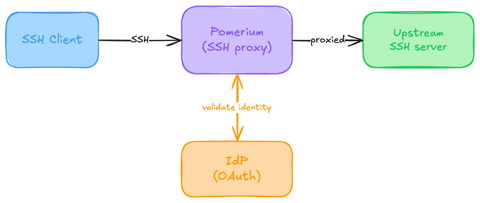
Native SSH Access with Pomerium
Pomerium can be used as a native SSH reverse proxy, adding OAuth authentication and flexible Pomerium policy enforcement to standard SSH connections, without the need for tunnels, or custom clients or servers.
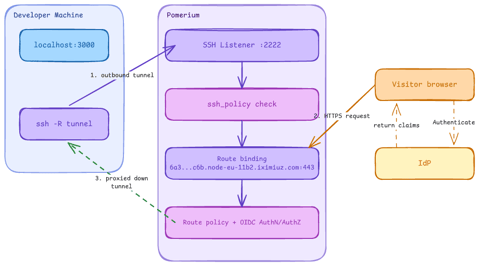
Native SSH Reverse Tunneling with Pomerium
Use Pomerium's native SSH support to publish a local service through a standard reverse SSH tunnel, with OpenID Connect (OIDC) authentication and continuous authorization on every request. Reach services behind Network Address Translation (NAT) without firewall holes or custom agents, and control both who can use the service and who can open the tunnel. Application traffic stays on infrastructure you control.
Harden Access to OpenClaw with Pomerium
Put OpenClaw, a self-hosted AI assistant with shell and file access, behind a web route and an SSH route, both gated by the same identity and Pomerium's context-aware policy. OpenClaw runs in trusted-proxy mode, trusting signed identity headers instead of its own login, while Pomerium's native SSH proxy signs short-lived certificates for shell access.
Gitless GitOps with Flux: Plugins, Mirrors, and Schema Validation
In this tutorial, we will learn how to use the new plugin system in Flux 2.9 to: validate manifests, mirror charts into local registries and deploy using Gitless GitOps principles.

Learn by doing, not just by reading or watching
Sign up for a free account to start a VM playground right on this page, track your progress, and get notified about new learning materials.