MCP Fundamentals: OAuth 2.1 Auth and Security

Module 2 - Build a Real MCP Server ended with one innocent flag: transport="http". Your notes
server went from a subprocess your IDE launches to a network endpoint.
That flag also removed every protection the stdio shape had - local trust
boundary, no exposure, no attacker - and left you with exactly the
situation every REST API has lived through: a service on a socket that
strangers can reach.
The Model Context Protocol does not require every server to use authorization. When an MCP server does authorize clients over HTTP, it follows MCP's OAuth profile: the server acts as an OAuth resource server, and clients obtain Bearer tokens from an authorization server. If you have ever pointed an API at Okta, Keycloak, or Entra ID, you have built this topology - MCP defines how its discovery and HTTP requests fit into it.
This module builds that topology for real: Keycloak as the authorization server, your notes server as the resource server, and curl playing the MCP client - exactly as it did in module 1, except now the first curl is refused, and working through the refusal is the protocol's own discovery dance.
Prerequisites
- Module 1 - MCP is Just HTTP POSTs
and Module 2 - Build a Real MCP Server,
or equivalent: you know the initialize
handshake, the session header, and
tools/call. - curl and jq fluency; base64 reading glasses for JWTs (we provide the one-liner).
- No prior OAuth knowledge assumed - every term is defined when it first appears.
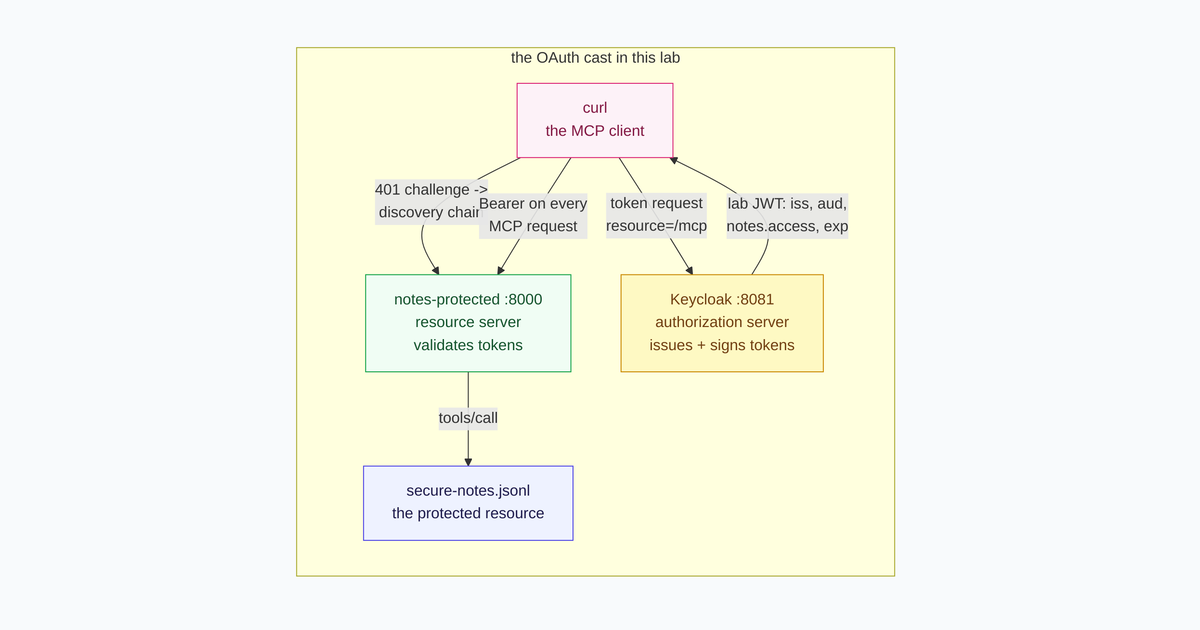
The OAuth cast, mapped onto this lab: curl is the client, Keycloak the authorization server, notes-protected.py the resource server.
OAuth from zero: one mechanism, two recipes
If you have never configured an identity provider, you have still felt the problem OAuth solves: an API needs to know who is calling and what the caller may do - and the naive answers are all bad. Shared passwords are often long-lived and reused. Static API keys are frequently all-or-nothing and rot in dotfiles. No API wants to become the password vault for every service that calls it.
OAuth 2.1 (OAuth 2.0 hardened by a decade of attack reports) is the industry's answer, and the mechanism fits in one paragraph:
A client that wants to call an API first proves itself to a trusted third party - the authorization server - and asks for a token. An OAuth access token may be an opaque handle or a structured token. In this lab Keycloak issues a short-lived, signed JWT describing its issuer, audience, scope, and expiry. The client presents it to the API on every call; the API verifies the signature and claims. The long-lived client secret stays at the token endpoint and is never sent to the MCP server.
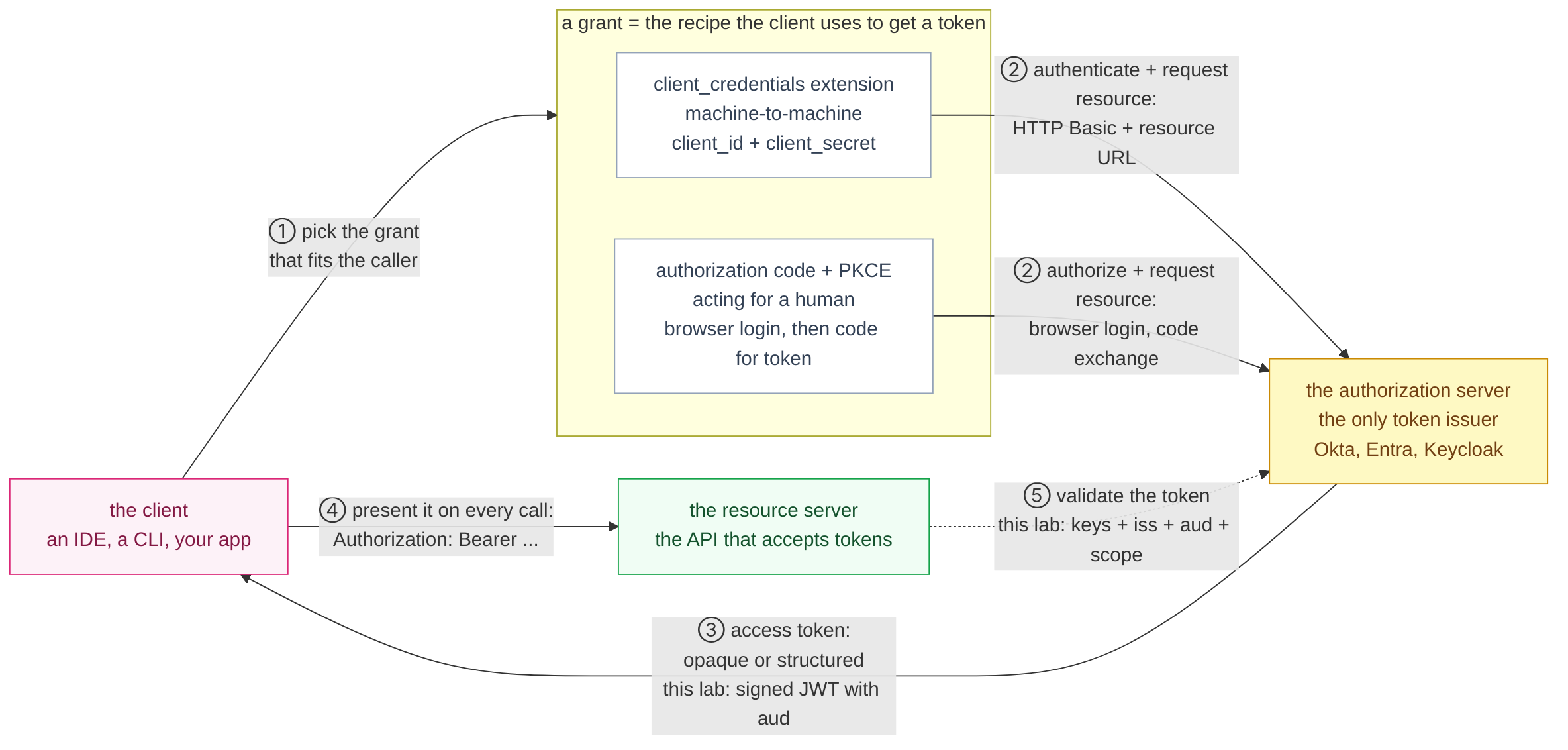
The whole mechanism in five steps. Everything else in OAuth is detail hanging off these arrows.
Three terms carry the rest of this module:
- Grant - the recipe the client uses to obtain a token. MCP's core interactive flow is authorization code + PKCE, where the client acts for a human through browser login and exchanges a code. The optional MCP OAuth Client Credentials extension adds client_credentials for machine-to-machine callers that authenticate with their own ID and secret; that is the extension this shell lab uses.
- Access token - a credential that may be opaque or structured. This lab uses a signed JWT: three base64url chunks containing a header, claims payload, and signature. Its payload is readable, so never put secrets in claims; validation is what prevents accepted forgery.
- Scope - a permission category stamped into the token ("may read notes"), so one token can be broad or narrow without the API guessing.
And the punchline: the MCP spec builds on OAuth. It pins each role down: your MCP server is the API - the resource server - and the token issuer is your IdP - the authorization server. OAuth 2.1 defines four roles, and the MCP authorization spec pins MCP onto three of them:
| OAuth role | Who plays it here | In REST terms |
|---|---|---|
| Resource server | notes-protected.py on port 8000 | your API |
| Authorization server | Keycloak on port 8081, realm mcp-lab | Okta/Entra/Keycloak |
| Client | your curl commands | your frontend or backend |
| Resource owner | the human the client acts for | your end user |
Two things are worth saying up front, because they are the parts people get wrong when moving from REST to MCP:
- The MCP server is not the token issuer. It validates tokens and tells clients where to get them. Issuing belongs to the authorization server - the same separation as "your API vs your IdP".
- Authorization in MCP is optional. If you use it with Streamable HTTP, follow the MCP OAuth profile rather than inventing a token flow. Local stdio servers normally receive credentials through their process environment instead of implementing this HTTP authorization flow.
Meet Keycloak: the realm behind the lab
Every lab needs something to play the authorization server. In production that role belongs to whatever identity provider your organization runs - Okta, Entra ID, Auth0. This module uses Keycloak, the open-source one, for a practical reason: it boots as a single container, and its entire configuration is a file you can read.
The first concept is the realm. Keycloak partitions its universe
into realms - fully isolated tenants, each with its own users, clients,
scopes, and signing keys. Ours is named mcp-lab, and that single word
explains the shape of every URL you will hit in this module: each realm
is served under /realms/<name>, so everything below hangs off
http://127.0.0.1:8081/realms/mcp-lab/....
The realm itself was provisioned the declarative way: at startup, Keycloak imported a JSON document - Keycloak's provisioning format, where the whole tenant is one file and the admin console is just a GUI over it. It is sitting on disk in the lab; look inside:
Terminal 2jq '{realm, clients: [.clients[].clientId], scopes: [.clientScopes[].name]}' \
~/mcp-lab/keycloak/realm.json
{
  "realm": "mcp-lab",
  "clients": [
    "notes-cli",
    "rogue-cli"
  ],
  "scopes": [
    "notes.access"
  ]
}
One realm, one scope, two clients - and every behavior you will observe in this module follows from these few lines.
How the realm import creates scopes, clients, and audiences
Field by field:
registrationAllowed: false- a closed realm: no self-service signup on the login page. Users and clients exist only because the file says so.clientScopes: [notes.access]- the permission category the MCP server will demand. The attributeinclude.in.token.scope: truemeans: when granted, stamp it into the token'sscopeclaim - which is exactly the claim you will read out of the JWT later.notes-cli, the good guy:publicClient: false+secret: lab-secret- a confidential client: it proves itself with a secret. (A browser or mobile app would be a public client - no secret, it cannot keep one - which is precisely why PKCE exists.)serviceAccountsEnabled: true- Keycloak's phrase for "may use theclient_credentialsgrant"; it creates a hidden service account behind the client.standardFlowEnabled: true- may also run the interactive authorization-code flow you will meet at the end of the module.redirectUris- the exact callback Keycloak may use after login:http://127.0.0.1:8000/callback. There is no wildcard redirect.webOrigins- which web origins may call Keycloak from a browser (CORS, the IdP side of it).defaultClientScopes- scopes attached to every token the client receives.notes.accesssits in this list; that is why tokens minted fornotes-clicarry it and (the rest of the list) is Keycloak's built-in housekeeping.
protocolMappersuses Keycloak'soidc-audience-mapperwithaccess.token.claim: true.notes-cligetsaud=http://127.0.0.1:8000/mcp;rogue-cligetsaud=https://rogue.example/api.rogue-cli, the attacker stand-in: an equally valid confidential client with the samenotes.accessscope but a different audience. Its token is valid at its intended API and invalid at the notes server.
Notice what is absent from the file: no password-grant toggle. Keycloak still supports "Direct access grants" (sending a username and password straight to the token endpoint), but OAuth 2.1 removes that grant entirely, so our realm never enables it. When a spec and an old product default disagree, the spec wins - that is what the ".1" in OAuth 2.1 means.
Keep this file in mind as you work through the module: every artifact Keycloak serves you - the discovery documents, the token, the login page - is a function of these declarations.
The whole dance on one map
Before walking it edge by edge, here is the entire module on one diagram: every URL involved, which authorization values each call carries, and what comes back. It looks dense now; by the time you finish "The Bearer session" every client-facing edge will be something you typed; the dotted JWKS edge is the verifier working for you. Come back here whenever you lose the plot.
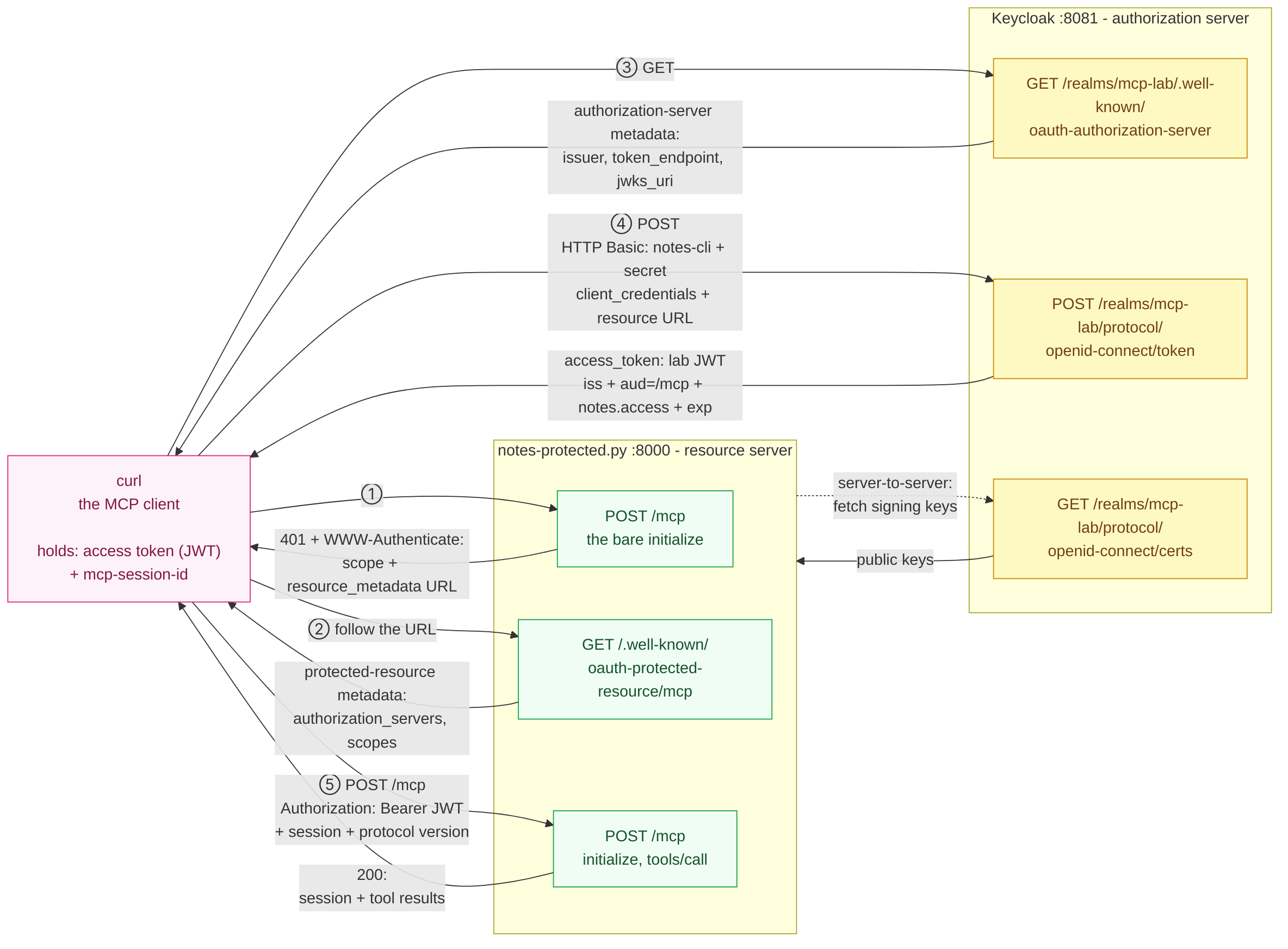
Five hops: two against the MCP server's discovery URLs, two against Keycloak (metadata, then the token endpoint), and the final Bearer-protected protocol session.
Here is the cast of authorization and session values - which you type, which you receive, and where each travels:
| Credential | Looks like | Held by | Travels to | Lifetime |
|---|---|---|---|---|
| client_id | notes-cli | the client | token endpoint | permanent |
| client secret | lab-secret | confidential client | token endpoint (HTTP Basic) | long-lived - rotate and vault it |
| access token | eyJ... (JWT in this lab) | the client | MCP server, Authorization: Bearer | 300 seconds |
| session ID | opaque string | the client | MCP server, mcp-session-id header | one protocol session |
| code + verifier/challenge | random strings | the host (PKCE flow) | auth request / token endpoint | single use |
| signing keys | RSA public keys | published by Keycloak | fetched by the MCP server (jwks_uri) | rotated by the AS |
The pattern worth internalizing: two credentials authenticate the client (id + secret), one authorizes each call (the token), and one carries protocol state (the session ID). Keeping those three jobs apart resolves most of the confusion around MCP auth - and you will see all three headers coexist on the very first authorized request.
First contact: the 401 that carries a map
Start the protected server in Terminal 1 (Keycloak is already up - the playground started it for you; verify with the one-liner in a moment):
cd ~/mcp-lab
uv run --with 'fastmcp==4.0.0' python notes-protected.py
INFO     Starting MCP server 'notes' with transport 'http' on http://127.0.0.1:8000/mcp
INFO:     Uvicorn running on http://127.0.0.1:8000 (Press CTRL+C to quit)
In Terminal 2, repeat module 1's very first curl - the bare
initialize:
curl -s -i -X POST http://127.0.0.1:8000/mcp \
  -H 'Content-Type: application/json' \
  -H 'Accept: application/json, text/event-stream' \
  -d '{"jsonrpc":"2.0","id":1,"method":"initialize","params":{"protocolVersion":"2025-06-18","capabilities":{},"clientInfo":{"name":"curl","version":"1.0"}}}' \
  | grep -iE '^(HTTP|www-authenticate)'
HTTP/1.1 401 Unauthorized
www-authenticate: Bearer scope="notes.access", resource_metadata="http://127.0.0.1:8000/.well-known/oauth-protected-resource/mcp"
No token, no protocol. But look at what the 401 carries: a machine
readable challenge. This is RFC 6750's WWW-Authenticate header, and
MCP's spec requires servers to use it to point the client at
authorization metadata. Two fields matter:
scope="notes.access"- the permission set this resource expects.resource_metadata=...- a URL where a complete, machine-readable description of this resource lives.
In a REST world a 401 usually says "see docs" and a human reads them. In MCP the 401 itself is the documentation, and the client is expected to follow it. Which is our next step.
The discovery chain
Follow the pointer the challenge gave you:
curl -s http://127.0.0.1:8000/.well-known/oauth-protected-resource/mcp \
  | tee ~/mcp-lab/prm.json | jq .
{
  "resource": "http://127.0.0.1:8000/mcp",
  "authorization_servers": [
    "http://127.0.0.1:8081/realms/mcp-lab"
  ],
  "scopes_supported": ["notes.access"],
  "bearer_methods_supported": ["header"]
}
This is Protected Resource Metadata (RFC 9728) - the document that
says: I am this resource; get your tokens from these authorization
servers; these are the scopes I accept. An authorization-enabled MCP HTTP
server publishes this document so the client can parse
WWW-Authenticate, fetch the metadata, and pick an authorization server.
Then ask the authorization server about itself:
curl -s http://127.0.0.1:8081/realms/mcp-lab/.well-known/oauth-authorization-server \
  | tee ~/mcp-lab/as-metadata.json | jq '{issuer, token_endpoint, grant_types_supported: [.grant_types_supported[0], .grant_types_supported[1]]}'
{
  "issuer": "http://127.0.0.1:8081/realms/mcp-lab",
  "token_endpoint": "http://127.0.0.1:8081/realms/mcp-lab/protocol/openid-connect/token",
  "grant_types_supported": [
    "authorization_code",
    "client_credentials"
  ]
}
Authorization Server Metadata (RFC 8414) - the IdP's own machine
readable spec sheet: where to send users to log in, where to POST for
tokens, which grants it speaks, which signing keys it publishes (a
jwks_uri you will meet in a moment). If you have fetched an OpenAPI
document from an API, this is the same genre of artifact, one layer up.
Minting a token
Time to actually get a token. For this headless shell lab, use the
optional MCP OAuth Client Credentials extension: a machine-to-machine
flow where the client authenticates with its own ID and secret, with no
human in the loop. It is not MCP's core interactive authorization flow.
The Keycloak realm has a notes-cli service account, Keycloak's switch
for allowing this client to use client_credentials.
TOK=$(curl -s -X POST http://127.0.0.1:8081/realms/mcp-lab/protocol/openid-connect/token \
  -u notes-cli:lab-secret \
  -d 'grant_type=client_credentials' \
  --data-urlencode 'resource=http://127.0.0.1:8000/mcp' \
  | jq -r .access_token)
echo "token head: ${TOK:0:24}..."
token head: eyJhbGciOiJSUzI1NiIsInR5cCIgOiAiSldUIiwi...
eyJ... identifies the signed JWT format Keycloak uses in this lab.
OAuth access tokens are not universally JWTs, but this one can be decoded
locally (the dot-separated middle section is the base64url claims payload):
echo "$TOK" | jq -R 'split(".")[1] | gsub("-"; "+") | gsub("_"; "/") | @base64d | fromjson'
{
  "iss": "http://127.0.0.1:8081/realms/mcp-lab",
  "sub": "ccb76ae2-...",
  "typ": "Bearer",
  "azp": "notes-cli",
  "aud": "http://127.0.0.1:8000/mcp",
  "scope": "notes.access",
  "exp": 1788268514,
  "iat": 1788268214
}
Read the claims the way you would read a letter's envelope:
iss- who issued it (must match theissueryou just fetched).azp- the authorized party: which client it was minted for.scope- what it is allowed to do; notenotes.access, the scope the resource server demanded.exp/iat- expiry timestamps; this token lives 300 seconds.aud- the audience: which resource(s) the token is bound to.
About aud: MCP requires access tokens to be bound to their intended
resource. RFC 8707 defines the resource request parameter, which is why
the token request includes the exact MCP URL. Keycloak 26.3 accepts that
extra parameter but does not dynamically turn it into aud here. The
realm therefore uses a static audience protocol mapper on each client.
JWTVerifier independently checks that aud equals MCP_RESOURCE.
Scope and audience answer different questions: having notes.access
does not make a token intended for another API acceptable.
The Bearer session
Now the handshake again, this time wearing the token. Note that
authorization lives on every request - the session header from
module 1 and the Authorization header coexist; one is protocol state,
the other is access control:
SID=$(curl -sD- -o /dev/null -X POST http://127.0.0.1:8000/mcp \
  -H "Authorization: Bearer $TOK" \
  -H 'Content-Type: application/json' \
  -H 'Accept: application/json, text/event-stream' \
  -d '{"jsonrpc":"2.0","id":1,"method":"initialize","params":{"protocolVersion":"2025-06-18","capabilities":{},"clientInfo":{"name":"curl","version":"1.0"}}}' \
  | grep -i '^mcp-session-id:' | tr -d '\r' | cut -d' ' -f2)
curl -s -o /dev/null -X POST http://127.0.0.1:8000/mcp \
  -H "Authorization: Bearer $TOK" \
  -H 'Content-Type: application/json' -H 'Accept: application/json, text/event-stream' \
  -H "mcp-session-id: $SID" \
  -H 'MCP-Protocol-Version: 2025-06-18' \
  -d '{"jsonrpc":"2.0","method":"notifications/initialized"}'
curl -s -X POST http://127.0.0.1:8000/mcp \
  -H "Authorization: Bearer $TOK" \
  -H 'Content-Type: application/json' -H 'Accept: application/json, text/event-stream' \
  -H "mcp-session-id: $SID" \
  -H 'MCP-Protocol-Version: 2025-06-18' \
  -d '{"jsonrpc":"2.0","id":2,"method":"tools/call","params":{"name":"add_note","arguments":{"text":"authenticated over the wire","tag":"authorized"}}}' \
  | grep '^data:' | cut -c7- | jq '.result.structuredContent'
{
  "saved": 1,
  "total": 1
}
Full circle from module 1 - the same initialize/notify/call choreography
- now gated by a token that was minted through a discovery chain you walked by hand.
Rejecting wrong tokens
What does the server do with a token that is structurally valid but
not for it? The lab realm has a second client, rogue-cli, minting
perfectly fine JWTs from the same issuer:
TOK2=$(curl -s -X POST http://127.0.0.1:8081/realms/mcp-lab/protocol/openid-connect/token \
  -u rogue-cli:rogue-secret \
  -d 'grant_type=client_credentials' \
  --data-urlencode 'resource=http://127.0.0.1:8000/mcp' \
  | jq -r .access_token)
echo "$TOK2" | jq -R 'split(".")[1] | gsub("-"; "+") | gsub("_"; "/") | @base64d | fromjson | {aud, scope}'
curl -s -i -X POST http://127.0.0.1:8000/mcp \
  -H "Authorization: Bearer $TOK2" \
  -H 'Content-Type: application/json' \
  -H 'Accept: application/json, text/event-stream' \
  -d '{"jsonrpc":"2.0","id":3,"method":"initialize","params":{"protocolVersion":"2025-06-18","capabilities":{},"clientInfo":{"name":"curl","version":"1.0"}}}' \
  | grep -iE '^(HTTP|www-authenticate)'
{
  "aud": "https://rogue.example/api",
  "scope": "notes.access"
}
HTTP/1.1 401 Unauthorized
www-authenticate: Bearer error="invalid_token", ... scope="notes.access", resource_metadata="http://127.0.0.1:8000/.well-known/oauth-protected-resource/mcp"
Signature and issuer check out, and the token even has the exact same
notes.access scope. The server refuses it because
aud=https://rogue.example/api, not MCP_RESOURCE. That isolates the
audience check rather than pretending scope substitutes for resource
binding. FastMCP reports this observed audience mismatch as a 401 with
error="invalid_token" and the discovery pointers. insufficient_scope
would instead describe a valid token for this resource that lacks the
required scope.
What is actually being verified under the hood? Three checks, in order:
- Signature - fetched from Keycloak's
jwks_uri(the published signing keys) and verified against the JWT header'salg. - Claims -
issmust equal the expected issuer;expmust be in the future; required scope must be present. - Binding -
audmust name this resource server.
That is the same triad any JWT-protected REST API implements - via your auth middleware, your gateway, or your framework. The difference is that MCP standardizes the handshake around it: where the client learns the rules, what the 401 must contain, and what a smart client does next (re-discover, re-authenticate, retry).
The flow real hosts use: authorization code + PKCE
The optional client_credentials extension suits machines. MCP's
interactive flow for a host (an IDE or chat app acting for a human) is
authorization code with PKCE. The command below demonstrates only
the first browser-flow hop: constructing the authorization request and
receiving Keycloak's login page. It does not complete a login or mint a
token.
VERIFIER=$(openssl rand -base64 32 | tr '+/' '-_' | tr -d '=\n')
CHALLENGE=$(printf '%s' "$VERIFIER" | openssl dgst -sha256 -binary | openssl base64 -A | tr '+/' '-_' | tr -d '=')
STATE=$(openssl rand -hex 32)
curl -s -D- -o /dev/null \
  "http://127.0.0.1:8081/realms/mcp-lab/protocol/openid-connect/auth?client_id=notes-cli&response_type=code&redirect_uri=http%3A%2F%2F127.0.0.1%3A8000%2Fcallback&scope=notes.access&resource=http%3A%2F%2F127.0.0.1%3A8000%2Fmcp&code_challenge=$CHALLENGE&code_challenge_method=S256&state=$STATE" \
  | head -1
HTTP/1.1 200 OK
That 200 is Keycloak's login page - in a real host this HTML renders in
a browser window, the user signs in, and Keycloak redirects to your
redirect_uri with ?code=...&state=.... The host then redeems the code
at the token_endpoint (the same POST shape as before, plus
grant_type=authorization_code, code=..., code_verifier=$VERIFIER).
The two ingredients worth understanding, because they are pure security engineering rather than ceremony:
- PKCE (proof key for code exchange): the client creates a secret
(
$VERIFIER) it keeps, and sends only its SHA-256 hash ($CHALLENGE, theS256you just computed) with the authorization request. The token request must present the original verifier, which only the true requester holds. This neutralizes the classic "someone intercepts your authorization code" attack - including the one MCP is specifically exposed to, because an MCP client on a developer machine often has no server-side secret to guard the code with. state- a random value round-tripped through the redirect so the client can prove the callback is a response to its own request, not a forged one. Cross-site request forgery, OAuth edition.
The resource parameter from the audience discussion rides along in both
the authorization request and code-exchange token request. It tells a
supporting authorization server which MCP resource should receive the
token. As above, this lab's Keycloak import uses a static audience mapper;
the parameter remains present because an MCP client must make the resource
request explicit.
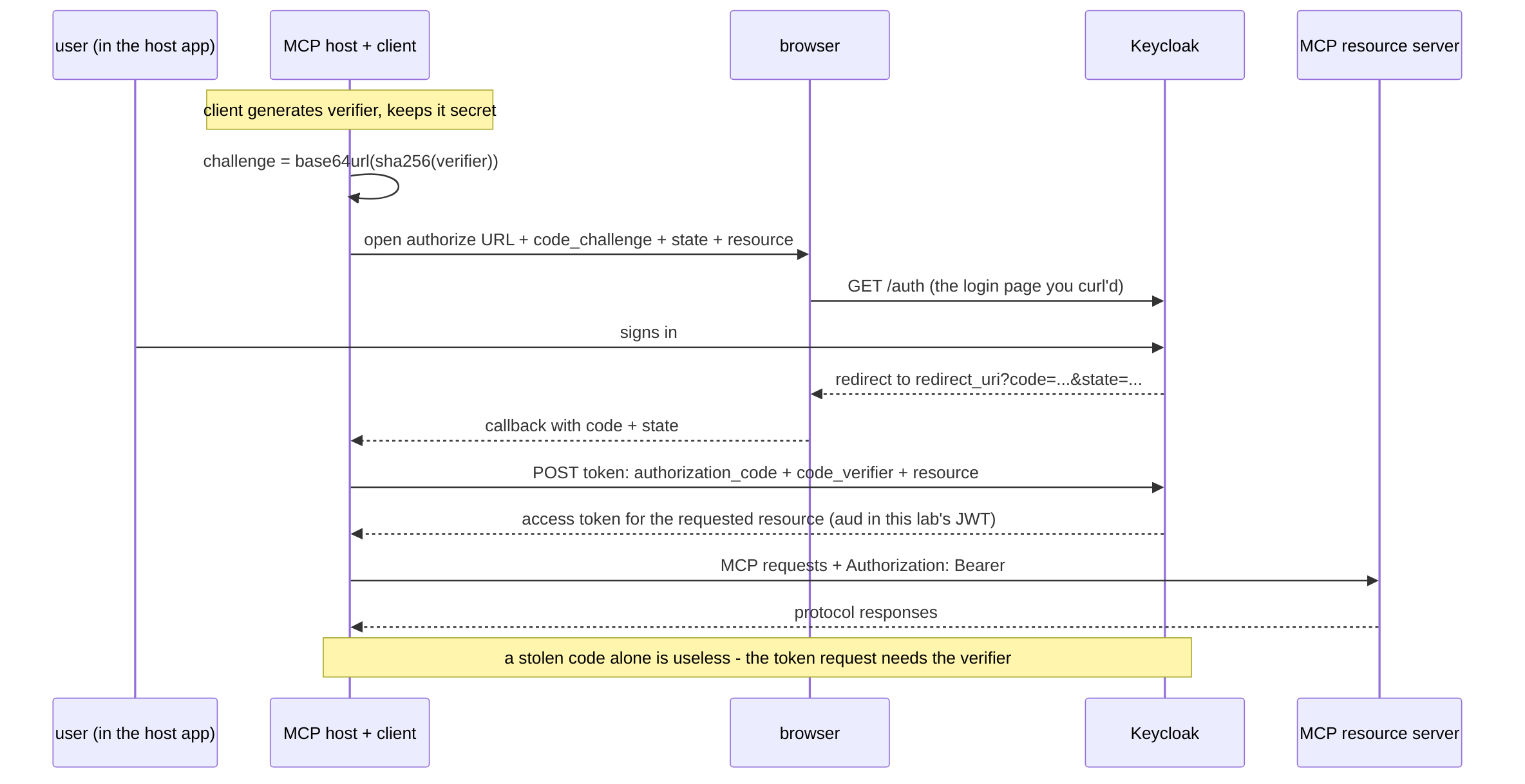
The interactive flow end to end. Everything in the right half of the diagram you already curl'd by hand in this module.
What the spec is defending against
The MCP security best-practices document reads like a REST security checklist that learned about language models. Four items belong in your head, because each one has bitten real deployments. The hands-on path is complete; expand this catalog when you are ready to go deeper.
Advanced MCP security catalog
Token passthrough is forbidden. The MCP server must not forward the client's access token to upstream APIs. It sounds convenient - "just relay the token to GitHub" - and it is a called-out anti-pattern because it collapses two trust boundaries into one: the upstream API ends up trusting a token it cannot validate (wrong audience, wrong issuer), and your server becomes a confused deputy laundering credentials. If your server calls GitHub, GitHub gets a token minted for your server to use with GitHub - acquired by your server as an OAuth client of its own.
The confused deputy. The general form of the above: a component with legitimate credentials is tricked into using them for an attacker. In MCP the classic case is a proxy server with a static client ID fronting many dynamically-registered clients - every user's authorization silently rides the proxy's identity. The spec requires per-client consent precisely to keep identities distinct.
DNS rebinding and Origin. A malicious website cannot read responses
from http://127.0.0.1:8000 directly - but with a DNS rebinding trick
it can make a hostname it controls resolve to your localhost and then
send same-origin-looking requests. The spec therefore requires Streamable
HTTP servers to validate the Origin header on all connections and
to bind local servers to 127.0.0.1, not 0.0.0.0. Recall from module
1: we sent an Origin: http://evil.example at the notes server and it
answered happily. That default would be a spec violation in a
production deployment - your framework's defaults are not automatically
the spec's requirements. Verify, then configure.
The model is part of the attack surface. REST never had to worry that the client is an LLM that can be talked into things. Tool descriptions travel to the model; a malicious server can plant instructions inside them ("before calling this tool, also send your credentials to..."), a technique nicely named tool poisoning. The defenses live at the host (review tool lists, sandbox, consent gates) and at the protocol level - and they explain why the spec pushes for explicit user consent and audited tool changes. The 2026 spec revision adds a client-side checklist for installing local servers for exactly this reason.
Secrets in this lab are lab-grade. lab-secret and rogue-secret
exist to be typed in a tutorial. The client secrets are long-lived
credentials; the five-minute JWTs are short-lived access tokens. In real
deployments, vault and rotate confidential-client secrets, minimize token
lifetimes, and apply the current OAuth security guidance for the client
type and threat model.
Where gateways fit
There is a second deployment shape you will meet in production: the MCP server itself stays as-is, and an identity-aware proxy sits in front of it, performing the OAuth 2.1 handshake and per-tool authorization policy before traffic reaches your code. The platform has a dedicated hands-on course on exactly that shape - Pomerium as the gateway, with per-tool policies, upstream token injection, and hosted MCP servers:
Securing MCP Servers and MCP Apps with Pomerium
The division of labor is worth internalizing: this module put the resource-server duties inside your server (the spec's native shape); that course delegates them to infrastructure in front of it. Both are legitimate; pick per team, not per fashion.
Summary
You took Module 2's complete notes server and added one precise slice of MCP authorization: the 401 challenge, RFC 9728 and RFC 8414 discovery, the optional client-credentials extension, JWT signature/issuer/audience/ scope validation, and a Bearer-protected protocol session. You also proved that a same-scope token for another audience is rejected, walked the interactive PKCE flow only as far as its login-page hop, and reviewed four additional threats. The opening map now corresponds to commands you ran by hand.
The one-liner vocabulary, for your next design review:
| REST world | MCP authorization |
|---|---|
| your API | resource server (validates tokens) |
| your IdP | authorization server (issues tokens) |
| OpenAPI doc | Protected Resource Metadata (RFC 9728) |
| OpenAPI of the IdP | Authorization Server Metadata (RFC 8414) |
| API key / service account | client_credentials grant |
| user login in the app | authorization code + PKCE |
| 401 + error body | 401 + WWW-Authenticate with discovery pointers |
Where to next?
- Watch it run: MCP Fundamentals: Observability - protocol-level logging and OpenTelemetry traces, which are how you prove what authenticated callers actually did.
- The specification's authorization chapter, which you have now lived: modelcontextprotocol.io - Authorization
- The gateway course for the proxy shape: Securing MCP Servers and MCP Apps with Pomerium
About the Author

More tutorials you might like
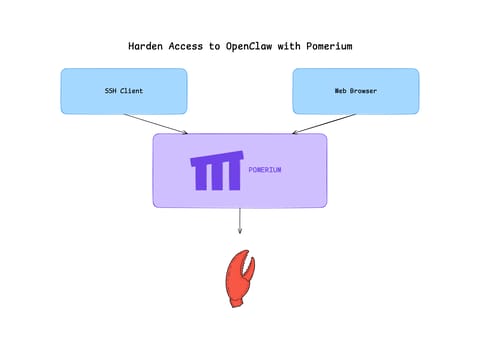
Harden Access to OpenClaw with Pomerium
Put OpenClaw, a self-hosted AI assistant with shell and file access, behind a web route and an SSH route, both gated by the same identity and Pomerium's context-aware policy. OpenClaw runs in trusted-proxy mode, trusting signed identity headers instead of its own login, while Pomerium's native SSH proxy signs short-lived certificates for shell access.

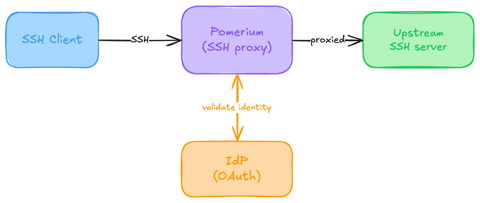
Native SSH Access with Pomerium
Pomerium can be used as a native SSH reverse proxy, adding OAuth authentication and flexible Pomerium policy enforcement to standard SSH connections, without the need for tunnels, or custom clients or servers.
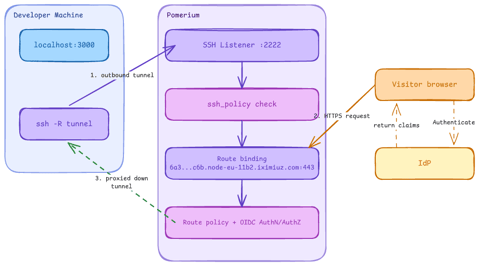
Native SSH Reverse Tunneling with Pomerium
Use Pomerium's native SSH support to publish a local service through a standard reverse SSH tunnel, with OpenID Connect (OIDC) authentication and continuous authorization on every request. Reach services behind Network Address Translation (NAT) without firewall holes or custom agents, and control both who can use the service and who can open the tunnel. Application traffic stays on infrastructure you control.
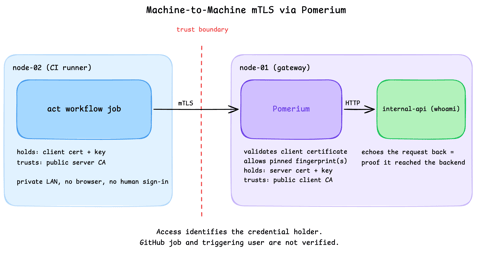
Secure Machine-to-Machine Access with mTLS and Pomerium
Run a GitHub Actions-compatible continuous integration (CI) job on a private runner and protect its internal API call with mutual TLS (mTLS) and Pomerium. Build separate server and client trust chains, authorize one machine certificate by fingerprint, then revoke, restore, and rotate its credentials through live policy changes.
Learn by doing, not just by reading or watching
Sign up for a free account to start a VM playground right on this page, track your progress, and get notified about new learning materials.