Securing MCP Servers and MCP Apps with Pomerium
A hands-on course on securing Model Context Protocol (MCP) servers and MCP apps with Pomerium, covering OAuth 2.1, upstream OAuth to APIs like GitHub, and per-user, per-tool authorization from dev to production.
About This Course
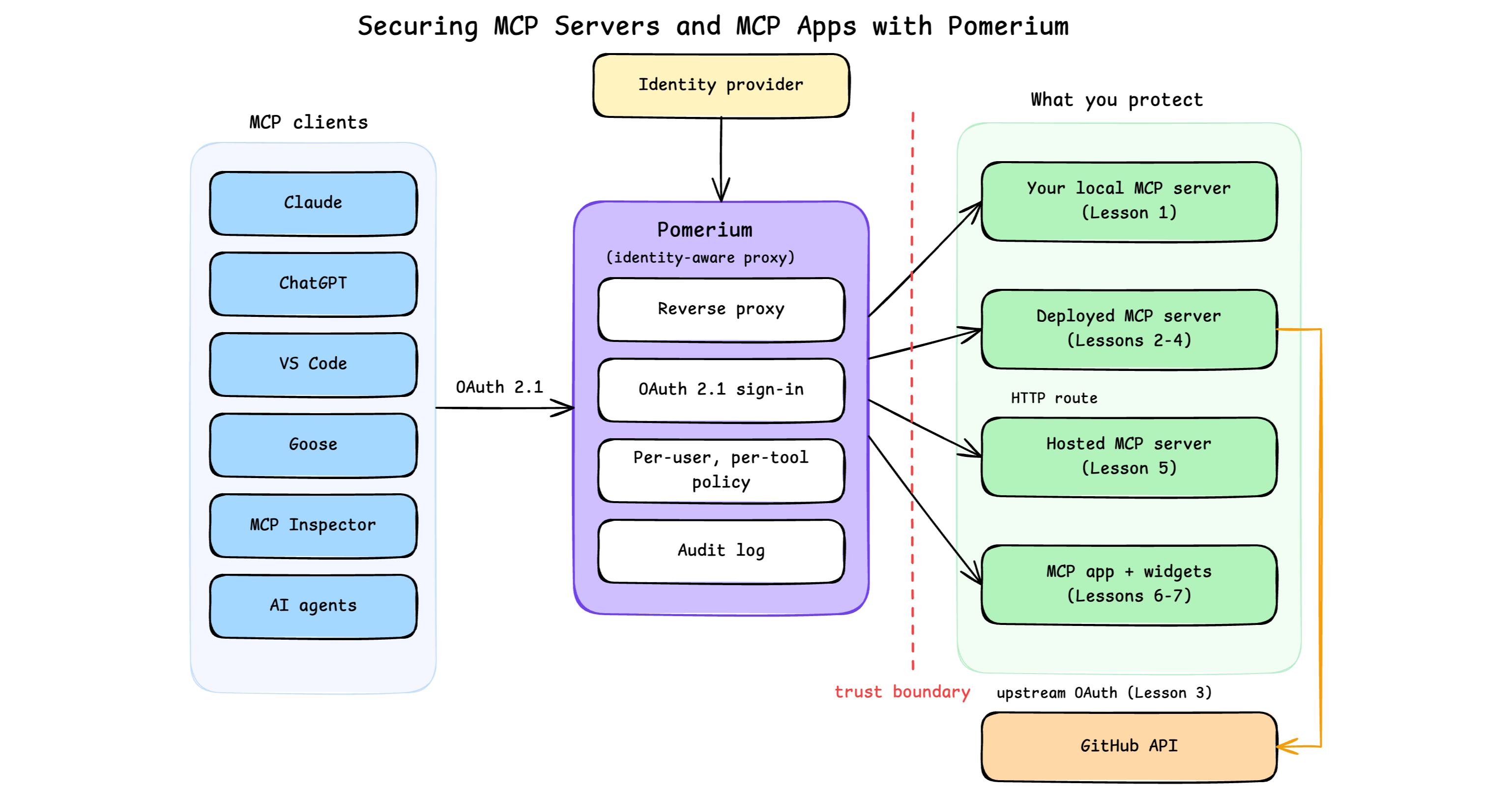
Model Context Protocol (MCP) servers are landing on the public internet faster than anyone is securing them: a 2025 Knostic scan found roughly 1,862 of them exposed with no authentication at all, and Astrix Research's analysis of more than 5,200 open source MCP servers found that only 8.5% implement OAuth. This course is about not being one of them, without writing auth code into every server you build.
You'll work hands-on, in live playgrounds, with Pomerium, an open source identity and context-aware access proxy that brings zero-trust access to applications and services. Its native MCP support lets it act as an MCP gateway. Everything runs on free infrastructure: open source tooling, MCP Inspector as the client, and at most a free GitHub account for the identity and API lessons. No paid accounts are required. The playgrounds use Pomerium's hosted authenticate service for quick setup and testing; in production, configure Pomerium to use your production identity provider. The reverse tunnel you'll build in the first lesson also exists as a hosted service, pom.run, where a single ssh -R command does the whole job; this course builds the self-hosted version, so you own every moving part.
The course builds in three arcs:
- Securing MCP servers. Put OAuth 2.1, policy, and an audit log in front of an MCP server without writing auth code. The first lesson does it in dev-loop form, using a reverse SSH tunnel for the one case that needs it: testing a server that hasn't shipped yet against a remote MCP client like ChatGPT or Claude, which can only call a public URL. The second does the same securing with no tunnel at all, an MCP route with a fixed upstream, the shape most deployments use. Then give your server upstream OAuth so its tools can call real APIs on the user's behalf.
- Governing tool calls. Move from "who can connect" to "who can call which tool": fine-grained, per-user, per-tool policies, applied both to your own servers and to hosted MCP servers you don't control.
- Securing MCP apps. Apply the same patterns to MCP apps (servers that ship interactive widgets), from local development through deployment on permanent HTTP routes.
Each lesson is a self-contained playground with verified tasks, and later lessons build on the patterns (and occasionally the configs) of earlier ones, so taking them in order works best. The last lesson carries every pattern from the rest of the course onto a real production deployment.
By the end, you'll be able to take any MCP server or app, yours or someone else's, and put authentication, authorization, and an audit trail in front of it without touching its code.
What's Inside?
About the Author

Nick Taylor
Nick is a GitHub Star, AAIF Ambassador, Microsoft MVP, AWS Community Builder, Software Developer, and Developer Advocate. With over two decades in technology and a decade of open source contributions, plus six years of professional open source work at companies like OpenSauced, dev.to, Netlify and now Pomerium, he brings deep community knowledge to his work. You'll often find him live streaming tech content, either solo or with friends from the community.
Writes about
Frequently covers