MCP Fundamentals: MCP is Just HTTP POSTs

You know REST. You can already fire a request at any API with curl, read a status code, and get on with your day. Then someone mentions MCP - Model Context Protocol - and suddenly there are hosts, clients, servers, tools, resources, prompts, JSON-RPC 2.0, and at least three different transport names from the last two years. It sounds like a new world to learn from scratch.
Here is the secret this tutorial exploits: an MCP server speaking the Streamable HTTP transport is just a web API that accepts JSON-RPC envelopes via HTTP POSTs. You already know HTTP POSTs. You already know JSON. By the end of this tutorial you will have driven a real MCP server - the initialize handshake, the session header, tool calls, resource reads - using nothing but curl, and you will have mapped every MCP concept onto REST vocabulary you already own.
One more thing no intro admits: MCP itself is mid-rewrite. This lab is pinned
to FastMCP 4.0.0 and deliberately speaks the stateful, session-oriented
2025-06-18 protocol; the current 2026-07-28 specification deletes sessions
and the initialize handshake entirely, moving the protocol closer to plain
REST. Understanding both
sides of that divide - and why it happened - is the difference between
copy-pasting SDK snippets and actually knowing MCP. We will get there with
curl, not slides.
Prerequisites
- Comfort with curl, HTTP headers, status codes, and JSON.
- Basic shell skills (pipes, environment variables).
- No AI, LLM, or agent knowledge required - we treat the LLM as a client you will impersonate.
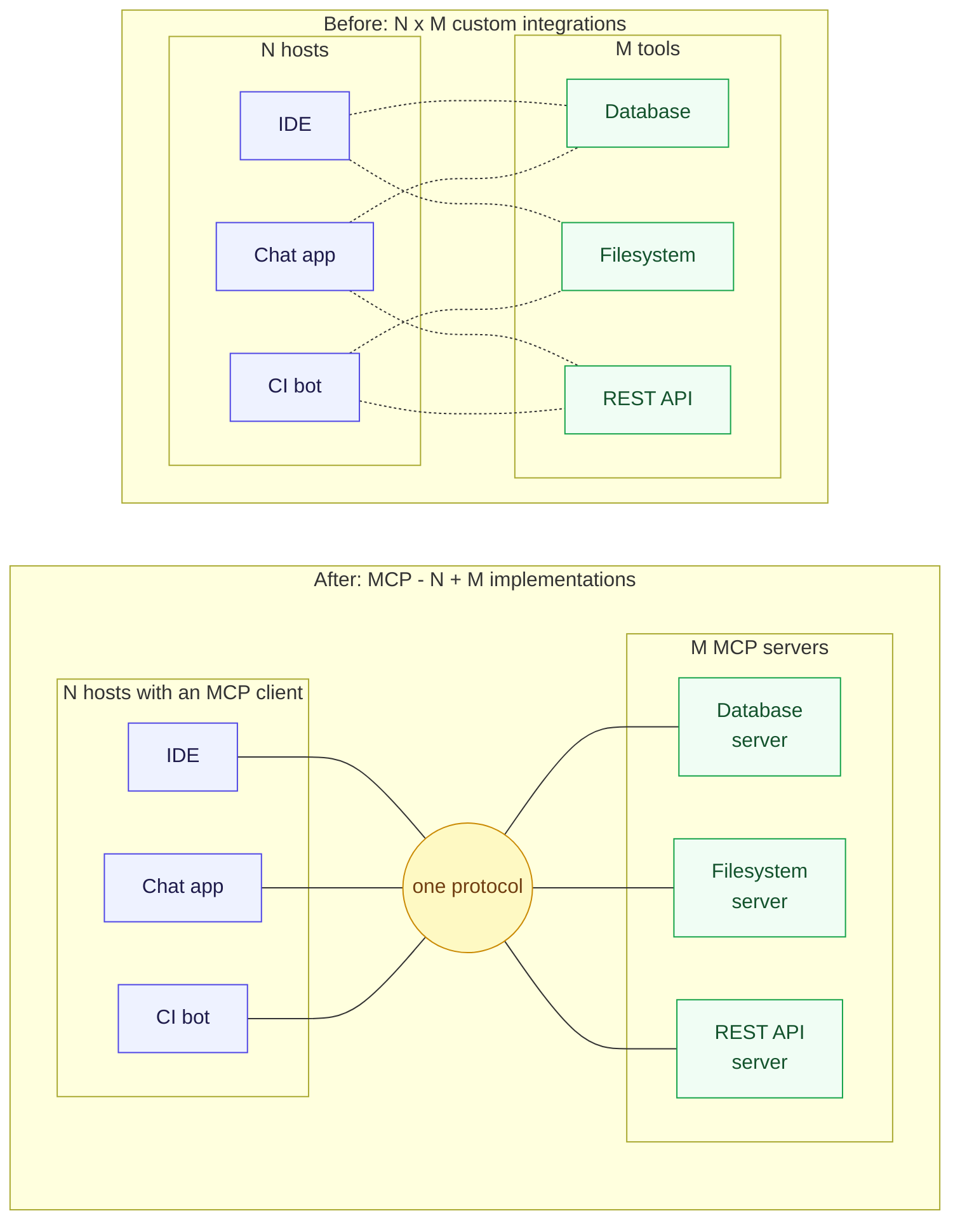
MCP did to AI integrations what HTTP did to documents: one protocol instead of a mesh of custom ones.
What problem is MCP actually solving?
Before we touch wire formats, one paragraph of motivation. Applications that
want to use AI (called hosts - think an IDE, a chat app, a coding
assistant) need to connect the model to capabilities: files, databases,
APIs, shell commands. Every host-vendor had a plugin format, every tool had
an SDK, and every host-tool pair needed its own adapter. N hosts times M
tools means N*M integrations.
MCP standardizes both sides of that connection:
- A host embeds an MCP client, which speaks the protocol.
- A MCP server wraps some capability - a database, a filesystem, a REST API, anything - behind the same protocol.
Now it is N + M: each side implements MCP once. If you have written an
OpenAPI-described REST API and consumed one from a generated client, you
have already lived this movie - MCP is the same standardization play, one
layer up, with the caller being a language model instead of your frontend
code.
Vocabulary locked in: host (the application), client (the protocol peer inside the host), server (the capability provider). The protocol messages travel only between client and server.
The server: up before you arrived
Everything lives in ~/mcp-lab. The server is ~80 lines of Python using
FastMCP, a thin layer over the official mcp Python SDK - but today it is
just the thing we poke. Skim server.py in the editor tab; you will
recognize ordinary Python functions decorated with @mcp.tool and
@mcp.resource - no networking code in sight. The framework turns those
functions into protocol endpoints.
A boot task already started the server for you, with exactly the command you would run by hand:
cd ~/mcp-lab
uv run --with fastmcp==4.0.0 server.py
It runs detached from your terminals and logs to /tmp/notes-server.log.
In Terminal 1, tail the log and leave it running - every request you fire below will scroll past here:
tail -f /tmp/notes-server.log
INFO:     Started server process [2076]
INFO:     Waiting for application startup.
INFO:     Application startup complete.
INFO:     Uvicorn running on http://127.0.0.1:8000 (Press CTRL+C to quit)
Two things worth noticing in the startup banner:
- The server is plain uvicorn - an ordinary ASGI web server. There is no magic AI infrastructure here.
- The endpoint is
http://127.0.0.1:8000/mcp- the Streamable HTTP transport uses a single endpoint path for everything.
From Terminal 2, confirm it answers. This one-liner is your health check for the rest of the tutorial:
curl -s -i http://127.0.0.1:8000/mcp
HTTP/1.1 400 Bad Request
server: uvicorn
content-type: application/json
mcp-session-id: 3747be792721485f9241ffae7065bf3a
content-length: 95

{"jsonrpc":"2.0","id":null,"error":{"code":-32600,"message":"Bad Request: Missing session ID"}}
A 400 is still a healthy answer: the server is up, and even its errors
speak JSON-RPC. The complaint - Missing session ID - is the protocol
announcing its first rule: negotiate a session, then talk. Every request
below goes to the same address, POST http://127.0.0.1:8000/mcp.
Connection refused anywhere below? The server process died. Restart it
in Terminal 1 with the command shown above (cd ~/mcp-lab && uv run --with fastmcp==4.0.0 server.py), wait for the Uvicorn running on ... banner, then
recapture $SID: sessions live in the server's memory and do not
survive a restart.
Anatomy of an MCP request
Every JSON-RPC message you send is one HTTP POST. Here is the first request
any client must send - initialize - with the response headers included:
Important - which protocol version is this? Everything you send below
speaks MCP 2025-06-18, the version pinned in the protocolVersion field
of the initialize request. It is the newest revision that still has
sessions and the initialize handshake. The current specification,
2026-07-28, deletes both - the section on how the protocol evolved shows
what that rewrite changes and how version negotiation bridges the gap.
INIT=$(curl -s -i -X POST http://127.0.0.1:8000/mcp \
  -H 'Content-Type: application/json' \
  -H 'Accept: application/json, text/event-stream' \
  -d '{
    "jsonrpc": "2.0",
    "id": 1,
    "method": "initialize",
    "params": {
      "protocolVersion": "2025-06-18",
      "capabilities": {},
      "clientInfo": {"name": "curl", "version": "1.0"}
    }
  }')
printf '%s\n' "$INIT"
SID=$(printf '%s\n' "$INIT" | grep -i '^mcp-session-id:' | tr -d '\r' | cut -d' ' -f2)
HTTP/1.1 200 OK
server: uvicorn
cache-control: no-cache, no-transform
content-type: text/event-stream
mcp-session-id: 35a464ffaba84738ac4c685a8e9bc05d
x-accel-buffering: no
Transfer-Encoding: chunked

event: message
data: {"jsonrpc":"2.0","id":1,"result":{"protocolVersion":"2025-06-18","capabilities":{"logging":{},"prompts":{"listChanged":true},"resources":{"subscribe":false,"listChanged":true},"tools":{"listChanged":true}},"serverInfo":{"name":"notes","version":"4.0.0"}}}
The initialize response is only the first half of the handshake. Before
discovery or tool calls, the client must send notifications/initialized to
say "I accepted the negotiation and I am ready":
curl -s -o /dev/null -w '%{http_code}\n' -X POST http://127.0.0.1:8000/mcp \
  -H 'Content-Type: application/json' \
  -H 'Accept: application/json, text/event-stream' \
  -H "mcp-session-id: $SID" \
  -H 'MCP-Protocol-Version: 2025-06-18' \
  -d '{"jsonrpc":"2.0","method":"notifications/initialized"}'
202
There is no id, so this is a JSON-RPC notification, not a request.
HTTP 202 Accepted and a zero-byte body mean the server acknowledged receipt
and owes no JSON-RPC response. Other notifications use the same shape: no
id, no response.
That is the entire protocol on one screen. Map it onto what you know:
POST /api/notes HTTP/1.1
Host: api.example.com
Content-Type: application/json

{"text": "buy oat milk"}
The URL path selects the operation (/api/notes). The HTTP method
(POST) carries the verb. Parameters live in path, query, and body.
The REST-versus-MCP dictionary, so far:
| REST | MCP (Streamable HTTP) |
|---|---|
| URL path per operation | one endpoint path (/mcp), method field per operation |
| HTTP method carries the verb | always POST (plus GET/DELETE for stream/session control) |
| request body | params object inside the JSON-RPC envelope |
| correlation implicit (one request, one response) | explicit id, echoed in the response |
| OpenAPI-like discovery | tools/list, resources/list, prompts/list (a useful analogy, not an equivalent document) |
Two mandatory headers, both visible in the request above:
Content-Type: application/json- the envelope is UTF-8 JSON. (Trytext/plainand the server refuses with400.)Accept: application/json, text/event-stream- the client must declare it accepts both plain JSON and Server-Sent Events, because the server may answer either way. Ask for onlyapplication/jsonand you get rejected:
curl -s -w '\nHTTP %{http_code}\n' -X POST http://127.0.0.1:8000/mcp \
  -H 'Content-Type: application/json' -H 'Accept: application/json' \
  -H "mcp-session-id: $SID" \
  -H 'MCP-Protocol-Version: 2025-06-18' \
  -d '{"jsonrpc":"2.0","id":2,"method":"tools/list"}'
{"jsonrpc":"2.0","id":null,"error":{"code":-32600,"message":"Not Acceptable: Client must accept both application/json and text/event-stream"}}
HTTP 406
$SID is an ordinary shell variable: it lives only in the terminal where
you captured it. If it is empty, the initialize failed - the server was not
running (restart it per the warning above, then retry). If you initialize a
fresh session, always follow it immediately with notifications/initialized
before making any discovery or tool calls.
Note how the refusal itself is a JSON-RPC-shaped error object with "id": null wrapped in an HTTP 406. HTTP transport status and JSON-RPC/MCP payload
semantics are related, but they are not two perfectly isolated layers:
- HTTP errors (such as 400/404/406) report transport or session problems, and an implementation may include a JSON-RPC-shaped error body as FastMCP does here.
- JSON-RPC errors use an
"error"object for an invalid or failed RPC and commonly arrive with HTTP 200 after transport acceptance. Tool execution failures are different again: they are successfultools/callresults withisError: true.
Why did the answer come back as SSE?
The response Content-Type was text/event-stream, and the JSON-RPC
envelope arrived inside an SSE event: message frame. This is the
"Streamable" in Streamable HTTP: the server may answer a POST either
with application/json (one plain JSON body - the simple case) or by
opening an SSE stream (the flexible case). The spec requires clients to
handle both; FastMCP's default is the stream.
Why would an answer to a synchronous call need to be a stream? Because one POST can produce multiple protocol messages: the actual result, plus progress notifications while a long tool runs, plus log lines the server pushes mid-call. Over plain HTTP-per-request that is impossible - a response has exactly one body. SSE gives the server a write channel that outlives the single response. When nothing extra needs to be said, the stream carries exactly one frame - as ours did - and closes.
For curl the difference is cosmetic: with -N (no buffering) you see each
data: line as it arrives. For an MCP client it is the difference between
"render a spinner" and "show the model a progress bar while the tool
works".
A previous era is hiding in this design. The original 2024-11-05
transport, called HTTP+SSE, used two endpoints: a GET to /sse that
stayed open forever and told the client where to POST, and a separate POST
endpoint for messages. Streamable HTTP (2025-03-26) collapsed that into the
single /mcp endpoint you are using. The evolution section at the end
walks the whole timeline.
Sessions: the part REST does not have
Look again at the response headers from initialize:
mcp-session-id: 35a464ffaba84738ac4c685a8e9bc05d
In the 2025-06-18 protocol you are speaking, the server mints a session ID
at initialize and every subsequent request must carry it back in the
mcp-session-id header. This is a cookie, minus the cookie jar - same
mental model, explicit header instead.
The negotiated version moves too: after initialize, it leaves the JSON
body and travels as MCP-Protocol-Version: 2025-06-18 on every subsequent
HTTP request. This header is required, even when the server could infer
the version from the session ID. FastMCP tolerates its absence because it
remembers the negotiation in session state, but a client must not rely on
that convenience. The session header says which conversation; the
protocol version header says which MCP dialect that conversation speaks.
Always send the version the server returned, not merely the version the
client requested. They are identical in this session, but if a client asks
for 2026-07-28 and the server counters with 2025-11-25, subsequent
requests must carry MCP-Protocol-Version: 2025-11-25. If the header is
missing and the server cannot recover the negotiation from session state,
the 2025-06-18 specification says it should assume 2025-03-26 for
backward compatibility.
What happens without it is a proper HTTP 400:
curl -s -i -X POST http://127.0.0.1:8000/mcp \
  -H 'Content-Type: application/json' \
  -H 'Accept: application/json, text/event-stream' \
  -H 'MCP-Protocol-Version: 2025-06-18' \
  -d '{"jsonrpc":"2.0","id":3,"method":"tools/list"}' | tail -2
HTTP/1.1 400 Bad Request

{"jsonrpc":"2.0","id":null,"error":{"code":-32600,"message":"Bad Request: Missing session ID"}}
Sessions end the way you would hope, with the HTTP verb for deletion:
curl -s -o /dev/null -w '%{http_code}\n' -X DELETE http://127.0.0.1:8000/mcp \
  -H "mcp-session-id: $SID" \
  -H 'MCP-Protocol-Version: 2025-06-18'
curl -s -i -X POST http://127.0.0.1:8000/mcp \
  -H 'Content-Type: application/json' \
  -H 'Accept: application/json, text/event-stream' \
  -H "mcp-session-id: $SID" \
  -H 'MCP-Protocol-Version: 2025-06-18' \
  -d '{"jsonrpc":"2.0","id":4,"method":"tools/list"}' | head -1
200
HTTP/1.1 404 Not Found
DELETE returns 200, and the very next POST with the same session ID
lands on 404 - the session is gone, the client must re-initialize.
Because the rest of the tutorial needs a live session, initialize again and
replace $SID with the new session ID before continuing:
SID=$(curl -sD- -o /dev/null -X POST http://127.0.0.1:8000/mcp \
  -H 'Content-Type: application/json' \
  -H 'Accept: application/json, text/event-stream' \
  -d '{"jsonrpc":"2.0","id":1,"method":"initialize","params":{"protocolVersion":"2025-06-18","capabilities":{},"clientInfo":{"name":"curl","version":"1.0"}}}' \
  | grep -i '^mcp-session-id:' | tr -d '\r' | cut -d' ' -f2)
echo "session: $SID"
curl -s -o /dev/null -w '%{http_code}\n' -X POST http://127.0.0.1:8000/mcp \
  -H 'Content-Type: application/json' \
  -H 'Accept: application/json, text/event-stream' \
  -H "mcp-session-id: $SID" \
  -H 'MCP-Protocol-Version: 2025-06-18' \
  -d '{"jsonrpc":"2.0","method":"notifications/initialized"}'
session: 94eb527682ab4aefb16e90ea18e2f831
202
Fresh session, immediate initialized notification - now discovery calls are valid again.
This is exactly the part of MCP that the current specification deletes.
Server-side sessions are why this pinned 2025-era server may need sticky
sessions behind a load balancer. The 2026-07-28 revision removes
Mcp-Session-Id and the
whole initialize handshake, making every POST independent - much closer to
the stateless REST model you know. Details in the evolution section.
What can this server do?
Before poking further, step back and ask what an MCP server actually offers. Exactly three kinds of things - the protocol's three primitives:
- Tools - functions the model may execute:
add_noteandnote_statshere; query an API, file a ticket, run a query in real servers. The verbs. A REST eye seesPOSThandlers. - Resources - data the model may read: the notebook contents here; a
config file, a table snapshot elsewhere. The nouns, addressed by URI.
A REST eye sees
GEThandlers. - Prompts - message templates the server ships, so every client starts from the same versioned wording. A REST eye sees stored email templates.
Your notes server exposes all three - you skimmed them in server.py as
plain functions wearing @mcp.tool, @mcp.resource, and @mcp.prompt
decorators. The rest of this tutorial lists and exercises each in turn;
when you build your own server, the rule of thumb is: a tool for act,
a resource for read, a prompt for canned wording.
Discovery is protocol messages, not sidecar files: one list call per
primitive enumerates the entire surface. Start with the one an LLM host
leans on hardest - tools/list - fired with your $SID:
curl -s -X POST http://127.0.0.1:8000/mcp \
  -H 'Content-Type: application/json' \
  -H 'Accept: application/json, text/event-stream' \
  -H "mcp-session-id: $SID" \
  -H 'MCP-Protocol-Version: 2025-06-18' \
  -d '{"jsonrpc":"2.0","id":5,"method":"tools/list"}' | grep '^data:' | cut -c7- | jq .
{
  "jsonrpc": "2.0",
  "id": 5,
  "result": {
    "tools": [
      {
        "name": "add_note",
        "title": "Add Note",
        "description": "Append a note to the shared notebook.",
        "inputSchema": {
          "type": "object",
          "properties": {
            "text": {"type": "string", "description": "The note body."},
            "tag": {"type": "string", "default": "general",
                    "description": "Short label grouping related notes."}
          },
          "required": ["text"],
          "additionalProperties": false
        },
        "outputSchema": {"type": "object", "additionalProperties": true}
      },
      {
        "name": "note_stats",
        "description": "Count notes per tag in the notebook.",
        "inputSchema": {"type": "object", "properties": {},
                        "additionalProperties": false}
      }
    ]
  }
}
If you have written an OpenAPI spec, inputSchema made you feel at home:
it is JSON Schema, the same language OpenAPI uses for request bodies.
That makes tools/list a useful discovery analogy to OpenAPI, but not an
equivalent description format: it catalogs callable tools and their schemas,
not paths, HTTP operations, status responses, or the rest of an OpenAPI
document. The client (usually an LLM host) reads these schemas and decides
which tool fits the user's request and how to fill its arguments. The schema
is the model's tool documentation.
Calling a tool
Here is the POST that does real work - the MCP equivalent of POST /api/notes:
curl -s -X POST http://127.0.0.1:8000/mcp \
  -H 'Content-Type: application/json' \
  -H 'Accept: application/json, text/event-stream' \
  -H "mcp-session-id: $SID" \
  -H 'MCP-Protocol-Version: 2025-06-18' \
  -d '{
    "jsonrpc": "2.0",
    "id": 6,
    "method": "tools/call",
    "params": {
      "name": "add_note",
      "arguments": {"text": "buy oat milk", "tag": "shopping"}
    }
  }' | grep '^data:' | cut -c7- | jq .
{
  "jsonrpc": "2.0",
  "id": 6,
  "result": {
    "content": [
      {"type": "text", "text": "{\"saved\": 1, \"total\": 1}"}
    ],
    "structuredContent": {"saved": 1, "total": 1},
    "isError": false
  }
}
Dissect the result, because its shape is universal:
contentis a list of typed blocks - text here, but images and other types exist. This is what gets shown to the model: one or more self-describing chunks.structuredContent(since 2025-06-18) is the machine-readable twin - the same payload as real JSON, matching the tool'soutputSchema, for when the caller is code rather than a language model.isErroris the interesting one. Tool execution failures are in-band: watch what happens when a known tool starts running and deliberately fails:
curl -s -X POST http://127.0.0.1:8000/mcp \
  -H 'Content-Type: application/json' \
  -H 'Accept: application/json, text/event-stream' \
  -H "mcp-session-id: $SID" \
  -H 'MCP-Protocol-Version: 2025-06-18' \
  -d '{
    "jsonrpc": "2.0",
    "id": 7,
    "method": "tools/call",
    "params": {
      "name": "reject_note",
      "arguments": {"reason": "notebook is read-only"}
    }
  }' | grep '^data:' | cut -c7- | jq .
{
  "jsonrpc": "2.0",
  "id": 7,
  "result": {
    "content": [
      {"type": "text", "text": "Error calling tool 'reject_note': notebook is read-only"}
    ],
    "isError": true
  }
}
HTTP 200 - the RPC and tool lookup were fine; the known tool's execution failed. Compare that with a typical REST failure:
HTTP/1.1 404 Not Found
Content-Type: application/problem+json

{"type": "not-found", "detail": "note 42"}
The failure is transport-level. Retries, circuit breakers, and dashboards key off the status code. The caller is code that bails.
An unknown tool is not the same thing as a tool that ran and failed. MCP
specifies an unknown tool name as an invalid tools/call request, normally a
JSON-RPC -32602 error. FastMCP 4.0.0 currently reports unknown tools as an
isError: true tool result instead; that is framework behavior, not the
distinction to learn here. Module 2 - Build a Real MCP Server introduces ToolError and controlled
application failures when you build the server yourself.
And the JSON-RPC layer has its own errors, for when the message itself is wrong - an unknown method, say:
curl -s -X POST http://127.0.0.1:8000/mcp \
  -H 'Content-Type: application/json' \
  -H 'Accept: application/json, text/event-stream' \
  -H "mcp-session-id: $SID" \
  -H 'MCP-Protocol-Version: 2025-06-18' \
  -d '{"jsonrpc":"2.0","id":8,"method":"posts/list"}' | grep '^data:' | cut -c7- | jq .
{
  "jsonrpc": "2.0",
  "id": 8,
  "error": {
    "code": -32601,
    "message": "Method not found",
    "data": "posts/list"
  }
}
-32601 comes straight from the JSON-RPC 2.0 specification, as do
-32700 (parse error), -32600 (invalid request), and -32602 (invalid
params). FastMCP used -32600 in the 400 and 406 responses above. JSON-RPC
reserves -32099 through -32000 for implementation-defined server errors;
MCP assigns specific protocol errors within that reserved range.
Reading a resource
Second primitive: resources. Where a tool acts, a resource is data
the server exposes for reading, addressed by URI. In REST terms: a GET
endpoint that lives inside the POST world, identified by URI instead of
path.
curl -s -X POST http://127.0.0.1:8000/mcp \
  -H 'Content-Type: application/json' \
  -H 'Accept: application/json, text/event-stream' \
  -H "mcp-session-id: $SID" \
  -H 'MCP-Protocol-Version: 2025-06-18' \
  -d '{"jsonrpc":"2.0","id":9,"method":"resources/list"}' | grep '^data:' | cut -c7- | jq '.result.resources[] | {uri, name, mimeType}'
curl -s -X POST http://127.0.0.1:8000/mcp \
  -H 'Content-Type: application/json' \
  -H 'Accept: application/json, text/event-stream' \
  -H "mcp-session-id: $SID" \
  -H 'MCP-Protocol-Version: 2025-06-18' \
  -d '{"jsonrpc":"2.0","id":10,"method":"resources/read","params":{"uri":"notes://all"}}' \
  | grep '^data:' | cut -c7- | jq '.result.contents'
{
  "uri": "notes://all",
  "name": "all_notes",
  "mimeType": "text/plain"
}
{
  "uri": "notes://stats",
  "name": "note_stats_resource",
  "mimeType": "text/plain"
}
[
  {
    "uri": "notes://all",
    "mimeType": "text/plain",
    "text": "#1 [shopping] buy oat milk"
  }
]
resources/list is the catalog; resources/read fetches by URI. The
contents array carries typed payloads with a MIME type - the server told
the client it is handing back text/plain, and could equally hand back
application/pdf or image/png blobs. When would a model use this?
"We attached the notes://all resource to the context window" - resources
are how servers say here is data to read, while tools say here is
something to do.
Getting a prompt
The third primitive, prompts, are pre-written message templates the server ships. Not "prompt" in a magical sense - literally strings with arguments, stored server-side so every client gets the same, versioned wording.
curl -s -X POST http://127.0.0.1:8000/mcp \
  -H 'Content-Type: application/json' \
  -H 'Accept: application/json, text/event-stream' \
  -H "mcp-session-id: $SID" \
  -H 'MCP-Protocol-Version: 2025-06-18' \
  -d '{"jsonrpc":"2.0","id":11,"method":"prompts/get","params":{"name":"review_notes","arguments":{"tag":"shopping"}}}' \
  | grep '^data:' | cut -c7- | jq '.result.messages'
[
  {
    "role": "user",
    "content": {
      "type": "text",
      "text": "Read the notes resource notes://all, pick the notes tagged 'shopping', and suggest how to organize them into a checklist."
    }
  }
]
A prompt returns messages with role and content - the exact shape a
chat API expects. The host can drop these messages straight into the
conversation with the model. Prompts are the least-used primitive, but they
show the protocol's ambition: everything an app might want to standardize
about talking to models - capabilities to call, data to read, words to
start from - lives server-side behind one endpoint.
The GET stream: a channel that opens toward you
One protocol feature has no REST analogue at all. A client may issue a
GET to the endpoint to open a standing SSE stream on which the server
can push messages unprompted:
timeout 3 curl -s -N -D - -o /dev/null http://127.0.0.1:8000/mcp \
  -H 'Accept: text/event-stream' \
  -H "mcp-session-id: $SID" \
  -H 'MCP-Protocol-Version: 2025-06-18' | head -8
HTTP/1.1 200 OK
server: uvicorn
cache-control: no-cache, no-transform
content-type: text/event-stream
mcp-session-id: 64695068bc1041a68591b044fd54db7d
x-accel-buffering: no
Transfer-Encoding: chunked
The stream opens and, on this quiet server, says nothing for three seconds
until timeout kills curl. On a louder server this is where
"the tools list just changed, re-list" announcements arrive. In REST your
server cannot call you; with MCP's 2025-era design it can - at the cost of
all the statefulness that the newest spec revision is now unwinding. Which
is our last stop.
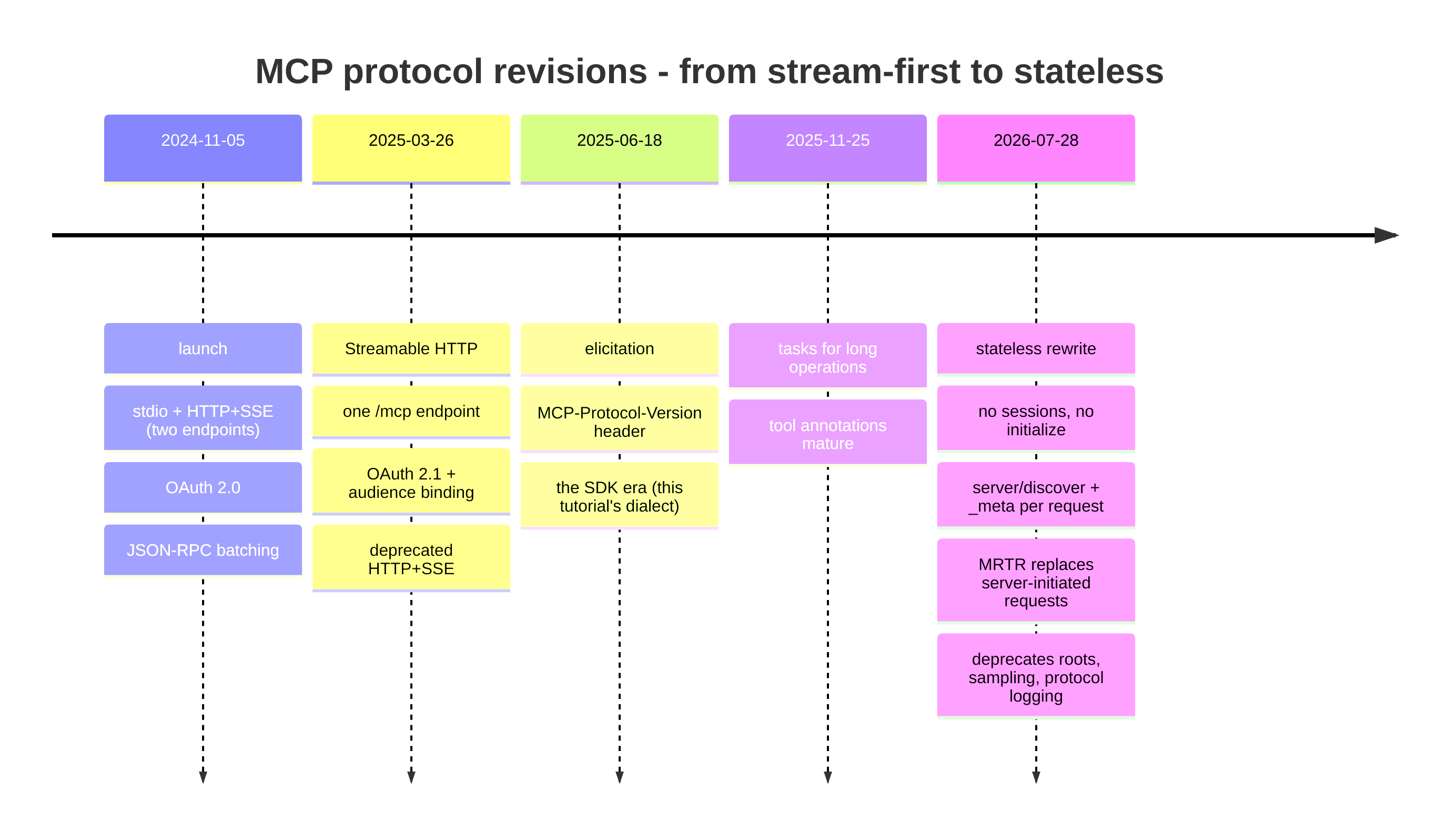
Five protocol revisions in under two years. The arrow to internalize: from stateful and stream-first toward stateless and request-scoped.
How the protocol evolved (and why you should care)
You have been speaking revision 2025-06-18: initialize handshake,
mcp-session-id sessions, optional GET stream. That is the lab protocol,
chosen deliberately for this exercise and pinned through FastMCP 4.0.0; the
server can negotiate at most 2025-11-25. The current specification is
2026-07-28, and it is a different world. Version negotiation is not
paperwork; it decides which protocol you actually get. Probe this server
with the current version:
curl -s -X POST http://127.0.0.1:8000/mcp \
  -H 'Content-Type: application/json' \
  -H 'Accept: application/json, text/event-stream' \
  -d '{"jsonrpc":"2.0","id":20,"method":"initialize","params":{"protocolVersion":"2026-07-28","capabilities":{},"clientInfo":{"name":"curl","version":"1.0"}}}' \
  | grep '^data:' | cut -c7- | jq -r '.result.protocolVersion'
2025-11-25
You asked for 2026-07-28; the server answered with a version it supports:
2025-11-25. This is a counter-offer, not proof of a common dialect. The
client must already support 2025-11-25 before it can accept, send
notifications/initialized, and continue; otherwise it must end the
connection. (It resembles HTTP content negotiation, one level up, but the
client still has to validate the answer.)
The complete version history is useful reference material, but not required to finish the lab:
Optional - five protocol revisions from launch to the current spec
2024-11-05 - the launch
- Transports: stdio and HTTP+SSE - two endpoints:
GET /sseopens a forever stream that tells the client where to POST. - OAuth 2.0, no required audience binding.
- JSON-RPC batching allowed.
- The N-by-M pitch ships; the wire design still shows its streaming-first origins.
2025-03-26 - one endpoint
- Streamable HTTP replaces HTTP+SSE (which became deprecated): one
/mcpendpoint, POST-per-message, optional SSE responses - what you used all tutorial. - Authorization rebuilt on OAuth 2.1 with Protected Resource Metadata and audience-bound tokens (the auth tutorial in this series lives here).
- Structured tool output arrives; batching is removed.
2025-06-18 - the lab protocol
- Elicitation: servers can ask the client's user questions mid-operation.
MCP-Protocol-Versionheader required on requests after initialize.- The revision you drove throughout this pinned lab.
2025-11-25 - long tasks
- Tasks: long-running operations get handles, status, and results instead of holding a request open.
- Tool annotations mature (
readOnlyHint,destructiveHint) so hosts can gate dangerous calls.
2026-07-28 - the current stateless rewrite
- No sessions.
initializeandMcp-Session-Idare deleted; list endpoints no longer vary per connection. - No initialize handshake. Every request carries its protocol version
and capabilities in
_meta; a newserver/discoverRPC replaces the handshake as an optional probe. - Server-initiated requests (sampling, roots, elicitation) replaced by
Multi Round-Trip Requests: a tool returns
input_required, the client retries with answers - no standing GET stream needed. - The GET notification stream is replaced by an opt-in
subscriptions/listenPOST stream; Roots, Sampling, and protocol Logging are deprecated (OpenTelemetry takes over logging's job - see the observability tutorial).
Why did the protocol move this way? Every removal attacks the same enemy:
server-side state. Sticky-session load balancing, reconnect storms,
caches defeated by per-connection list endpoints - all the operational
pain that REST taught the industry to avoid a decade ago. The 2026
revision makes each POST self-contained, so plain HTTP infrastructure
(load balancers, CDNs for tools/list responses with their new ttlMs
caching hints, retry-safe idempotent requests) just works. If REST habits
are your instinct, the protocol is moving toward you.
What should you do with this knowledge today?
- Learn the 2025-06-18 shapes first for this lab: they expose the session lifecycle clearly, while core concepts such as envelopes and primitives carry into the current revision.
- Write servers that keep no session state beyond what tools themselves own, so the stateless future is a transport upgrade, not a redesign.
- Treat the diffs above as your review checklist when reading SDK changelogs.
Summary
Look back at the opening request:
POST /mcp HTTP/1.1
Content-Type: application/json
Accept: application/json, text/event-stream

{"jsonrpc": "2.0", "id": 1, "method": "initialize", ...}
You now read this the way you read a REST call. The JSON-RPC envelope is
the request line and body; the method is the path; the id is the
correlation token; the session header is the cookie; tools/list is the
self-description analogue to an API catalog, not an OpenAPI document; tool
execution failures are in-band on purpose,
because the reader is a model, not a middleware. You drove a real server
through its full lifecycle - initialize, notify, list, call, read, get,
delete session - with nothing but curl, and you saw version negotiation
answer a request from the future.
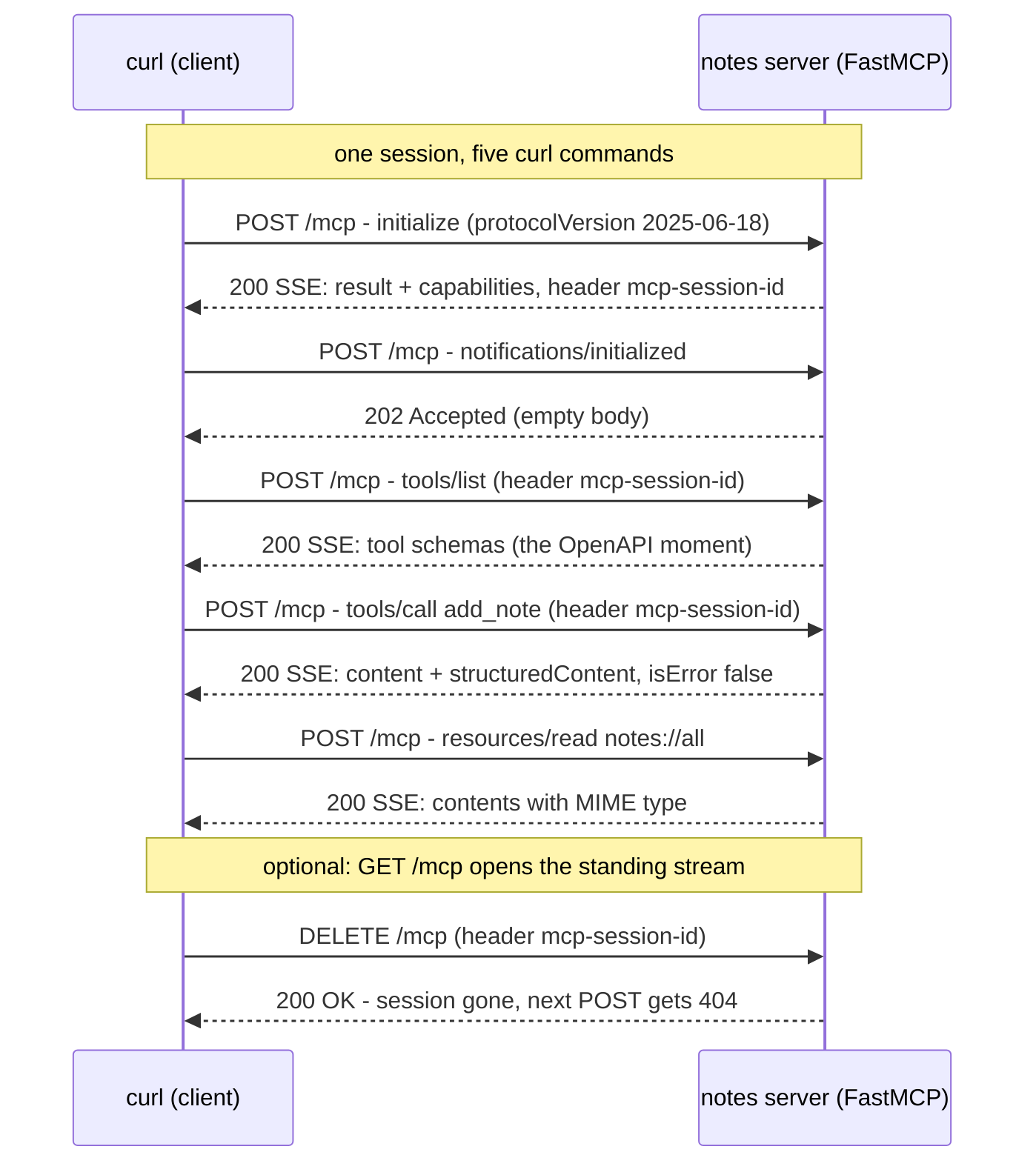
The full session you just executed by hand, on one diagram. Every arrow is one curl command you typed.
Now hold the current spec next to it. 2026-07-28 pursues the same task -
add a note, delete notes, read them back - with the state deleted
(illustrative: the lab server is pinned to 2025-06-18):
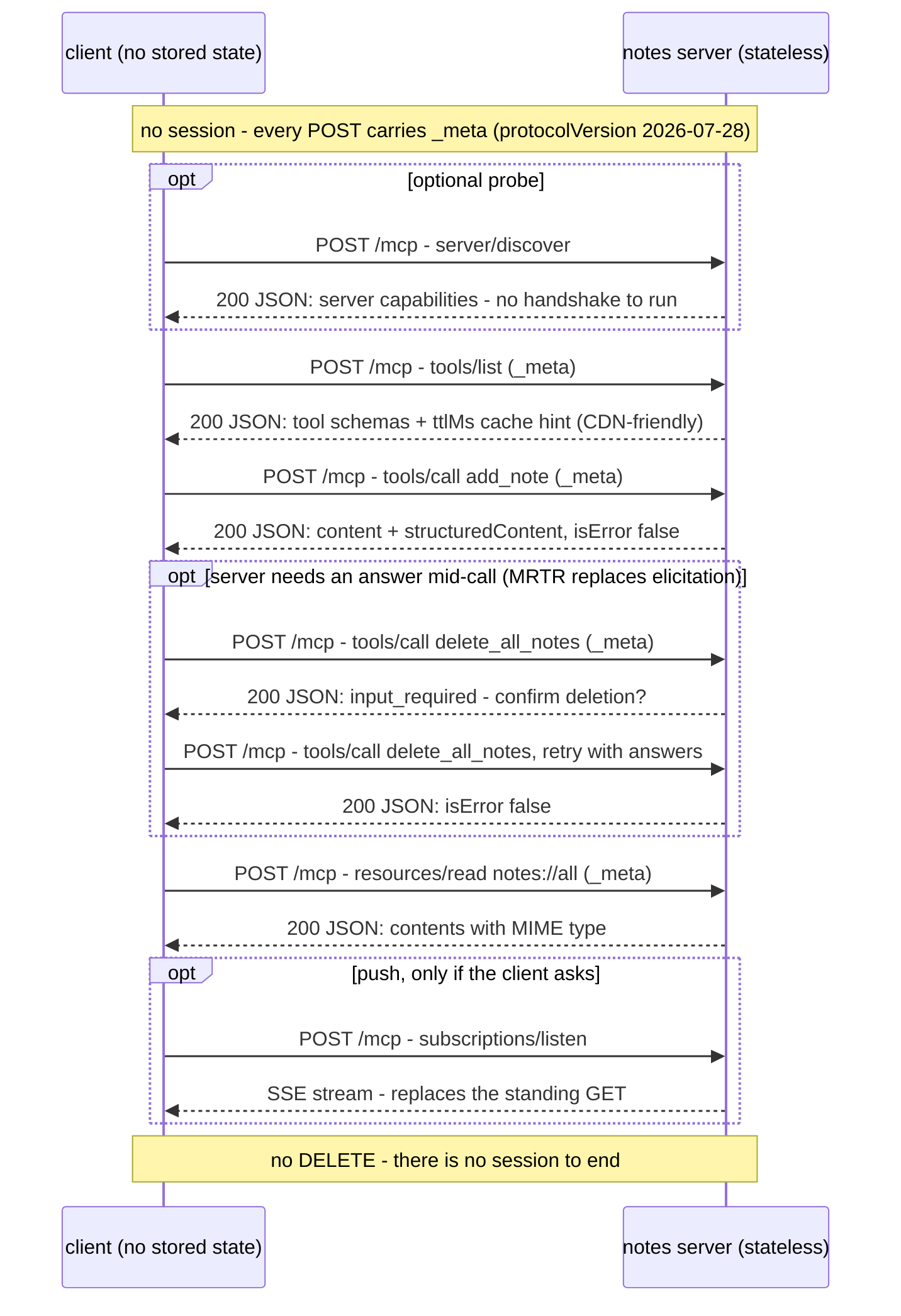
The stateless rewrite, one diagram. Compare arrow by arrow: the handshake
collapses into an optional server/discover probe and _meta fields on
every POST; the session header disappears, so tools/list becomes a
cacheable response with a ttlMs hint; the server asks mid-call via
input_required round trips instead of holding a session open; the
standing GET stream becomes opt-in subscriptions/listen; and there is
nothing to DELETE. Same envelope, same primitives - only the state is gone.
Where to next?
- Build your own server instead of driving ours: MCP Fundamentals: Build a Real MCP Server - tools, resources, and prompts written by you, in both stdio and HTTP transports.
- Lock the endpoint down:
MCP Fundamentals: OAuth 2.1 Auth and Security -
the full OAuth dance with curl - discovery, PKCE, audience-bound tokens
- and the attacks the spec is defending against.
- Watch it run: MCP Fundamentals: Observability - protocol-level logging and OpenTelemetry traces for tool calls.
- Specification, versioned honestly:
modelcontextprotocol.io/specification
- read the transports page with the REST dictionary from this tutorial nearby.
About the Author

More tutorials you might like
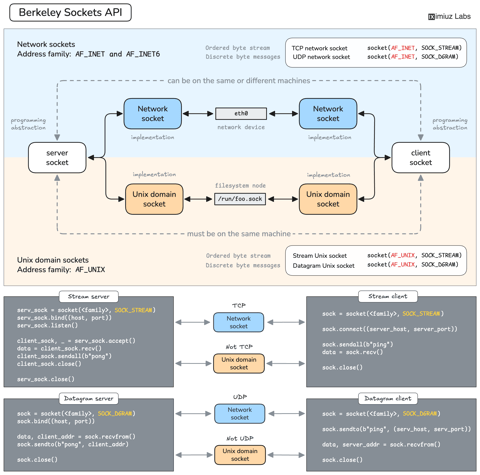
How Servers Work: A Hands-On Introduction to TCP Sockets
Learn how servers actually work by building a tiny TCP server and client from scratch. A hands-on introduction to sockets, TCP, and the network programming model every backend, DevOps, and platform engineer should go through at least once.

Harden Access to OpenClaw with Pomerium
Put OpenClaw, a self-hosted AI assistant with shell and file access, behind a web route and an SSH route, both gated by the same identity and Pomerium's context-aware policy. OpenClaw runs in trusted-proxy mode, trusting signed identity headers instead of its own login, while Pomerium's native SSH proxy signs short-lived certificates for shell access.

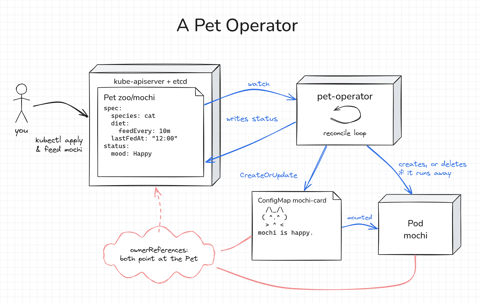
How Kubernetes Operators Work: Building a Controller From Scratch
Build a Kubernetes operator for a small Pet API, first as a 15-line bash loop and then as a Go controller with controller-runtime. Every Pet gets a Pod to live in, gets hungry as time passes, and runs away if nobody feeds it. Along the way, you'll see how the reconcile loop works.

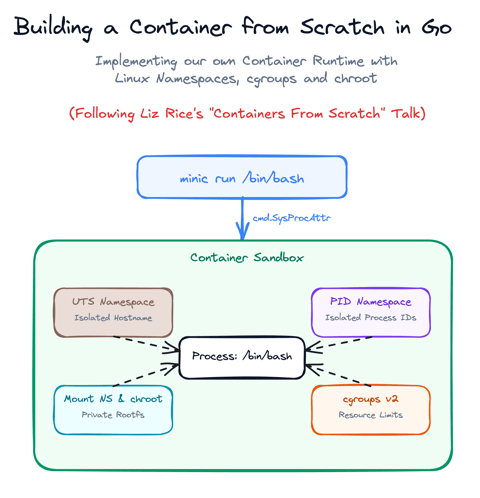
Build a Container from Scratch in Go (Liz Rice GOTO 2018)
Follow along with Liz Rice's classic GOTO 2018 presentation and build your own container runtime in under 100 lines of Go using Linux namespaces, chroot, and cgroups.

Learn by doing, not just by reading or watching
Sign up for a free account to start a VM playground right on this page, track your progress, and get notified about new learning materials.