Build a Container from Scratch in Go (Liz Rice GOTO 2018)
Disclaimer: This tutorial is meant to be a companion to Liz Rice's awesome talk: Containers From Scratch • GOTO 2018.
In 2018, Liz Rice demonstrated what a container really is. In just about 60 lines of Go code live on stage, she demonstrated that containers are not virtual machines or magical black boxes. Instead, a container is simply a standard Linux process created with a specific isolated environment utilizing Linux kernel's namespaces and cgroups features.
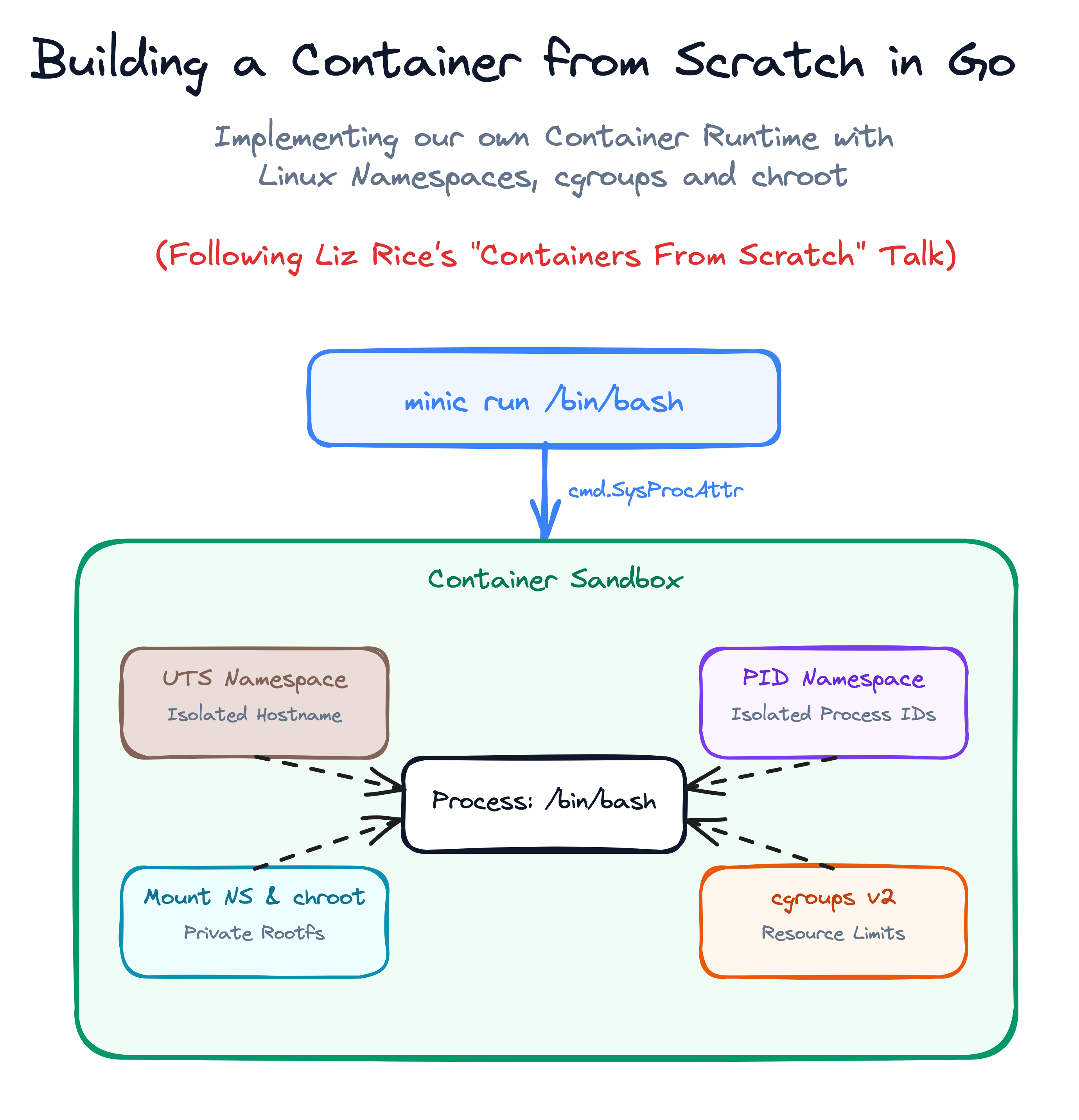
In this tutorial, you will code along step-by-step with the concepts from that talk, starting from a basic program runner and turning it into a working container runtime named minic.
Step 1: The Simplest Command Runner
Navigate to your workspace directory:
cd /home/laborant/container-lab
A container runtime's primary job is executing a command on behalf of the user (e.g. docker run <cmd> <args>).
Create main.go with our starting skeleton:
package main

import (
    "fmt"
    "os"
    "os/exec"
)

// Usage: ./minic run <cmd> <args>
// Example: ./minic run /bin/bash
func main() {
    // Simple CLI dispatcher matching Docker's 'run' subcommand syntax
    switch os.Args[1] {
    case "run":
        run()
    default:
        panic("invalid command")
    }
}

func run() {
    fmt.Printf("Running %v as PID %d\n", os.Args[2:], os.Getpid())

    // Prepare the user command (e.g., /bin/bash with any optional arguments)
    cmd := exec.Command(os.Args[2], os.Args[3:]...)

    // Connect container standard I/O streams directly to your terminal
    cmd.Stdin = os.Stdin
    cmd.Stdout = os.Stdout
    cmd.Stderr = os.Stderr

    // Start the command and wait for it to finish
    must(cmd.Run())
}

// Helper function to panic on unexpected errors
func must(err error) {
    if err != nil {
        panic(err)
    }
}
Build and test running a shell with your program:
go build -o minic main.go
./minic run /bin/bash
Output:
Running [/bin/bash] as PID 1842
Inside this shell, check your hostname:
hostname
Output:
main-01
You are running directly on the host system with zero isolation. If you were to change the hostname here, it would change the hostname for the entire machine.
Exit the shell:
exit
Step 2: Isolating the Hostname (UTS Namespace)
The first step in container isolation is creating a private UTS Namespace (CLONE_NEWUTS), which isolates the system hostname.
Update main.go to import "syscall" and configure SysProcAttr with CLONE_NEWUTS:
package main

import (
    "fmt"
    "os"
    "os/exec"
    "syscall"
)

// Usage: ./minic run <cmd> <args>
// Example: ./minic run /bin/bash
func main() {
    switch os.Args[1] {
    case "run":
        run()
    default:
        panic("invalid command")
    }
}

func run() {
    fmt.Printf("Running %v as PID %d\n", os.Args[2:], os.Getpid())

    cmd := exec.Command(os.Args[2], os.Args[3:]...)
    cmd.Stdin = os.Stdin
    cmd.Stdout = os.Stdout
    cmd.Stderr = os.Stderr

    // SysProcAttr holds OS-specific process attributes.
    // CLONE_NEWUTS instructs the Linux kernel to create a brand new UTS namespace
    // for the spawned process, giving it an independent hostname and domain name.
    cmd.SysProcAttr = &syscall.SysProcAttr{
        Cloneflags: syscall.CLONE_NEWUTS,
    }

    must(cmd.Run())
}

func must(err error) {
    if err != nil {
        panic(err)
    }
}
Rebuild and run with sudo (creating namespaces requires root privileges):
go build -o minic main.go
sudo ./minic run /bin/bash
Output:
Running [/bin/bash] as PID 1890
Inside this new shell, change the hostname:
hostname container-demo
hostname
Output:
container-demo
Now exit this shell:
exit
Check the host's hostname:
hostname
Output:
main-01
The host hostname is unchanged! The child process had its own private copy of the UTS namespace.
Step 3: The /proc/self/exe Re-Exec Trick
We want the container runtime to automatically set properties (such as setting the container hostname, configuring mount points, or dropping capabilities) inside the new namespace before handing control over to the user's shell.
However, calling syscall.Sethostname() inside run() would change the host's hostname because run() runs before the child process is spawned.
To solve this, Liz Rice demonstrates the famous fork / re-exec pattern:
- When
minicruns withrun, it calls/proc/self/exe child <args>with clone namespace flags. /proc/self/exeis a special symlink in Linux pointing to the currently running executable binary (minic).- The new process starts in
child(), where it already resides inside the new namespaces and can configure everything before executing the target binary!
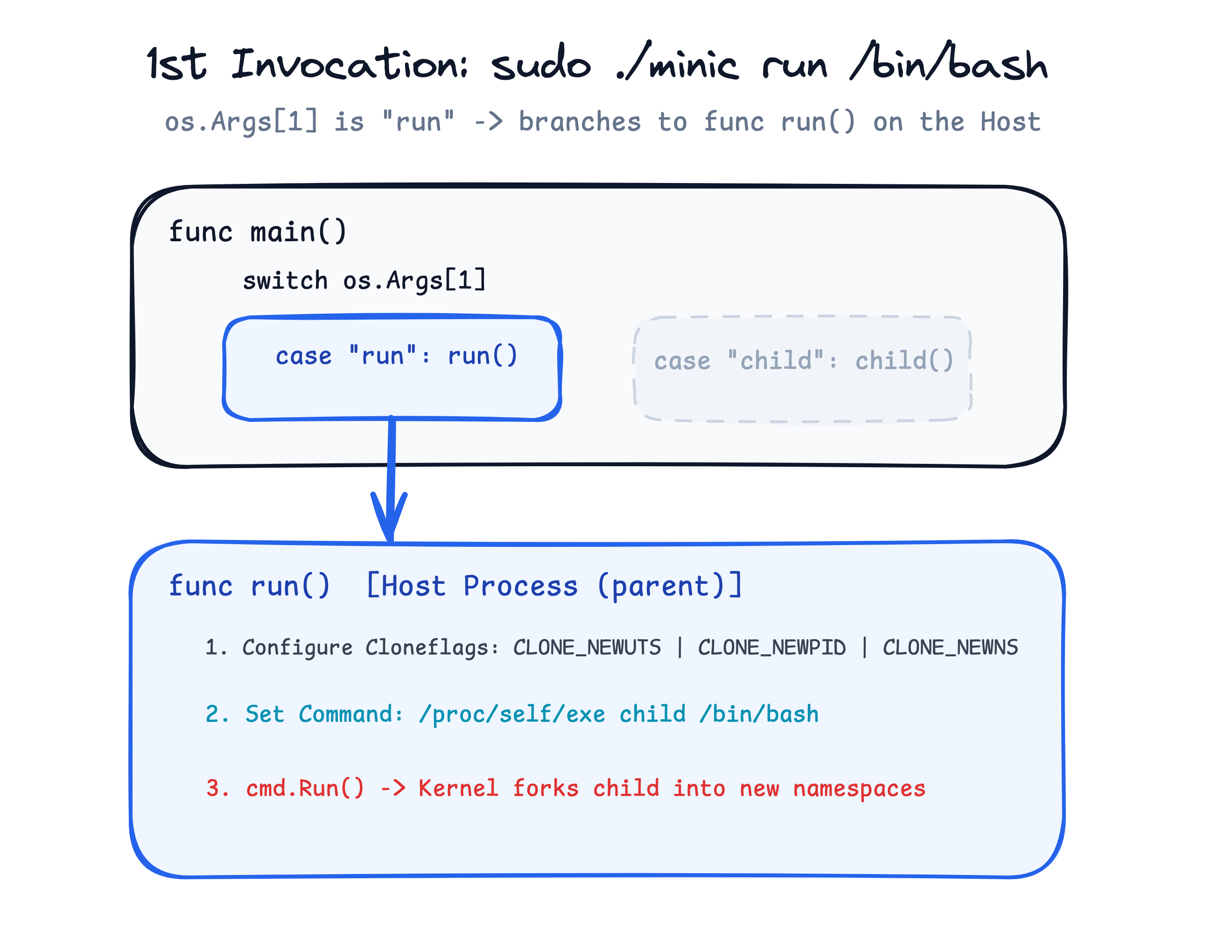
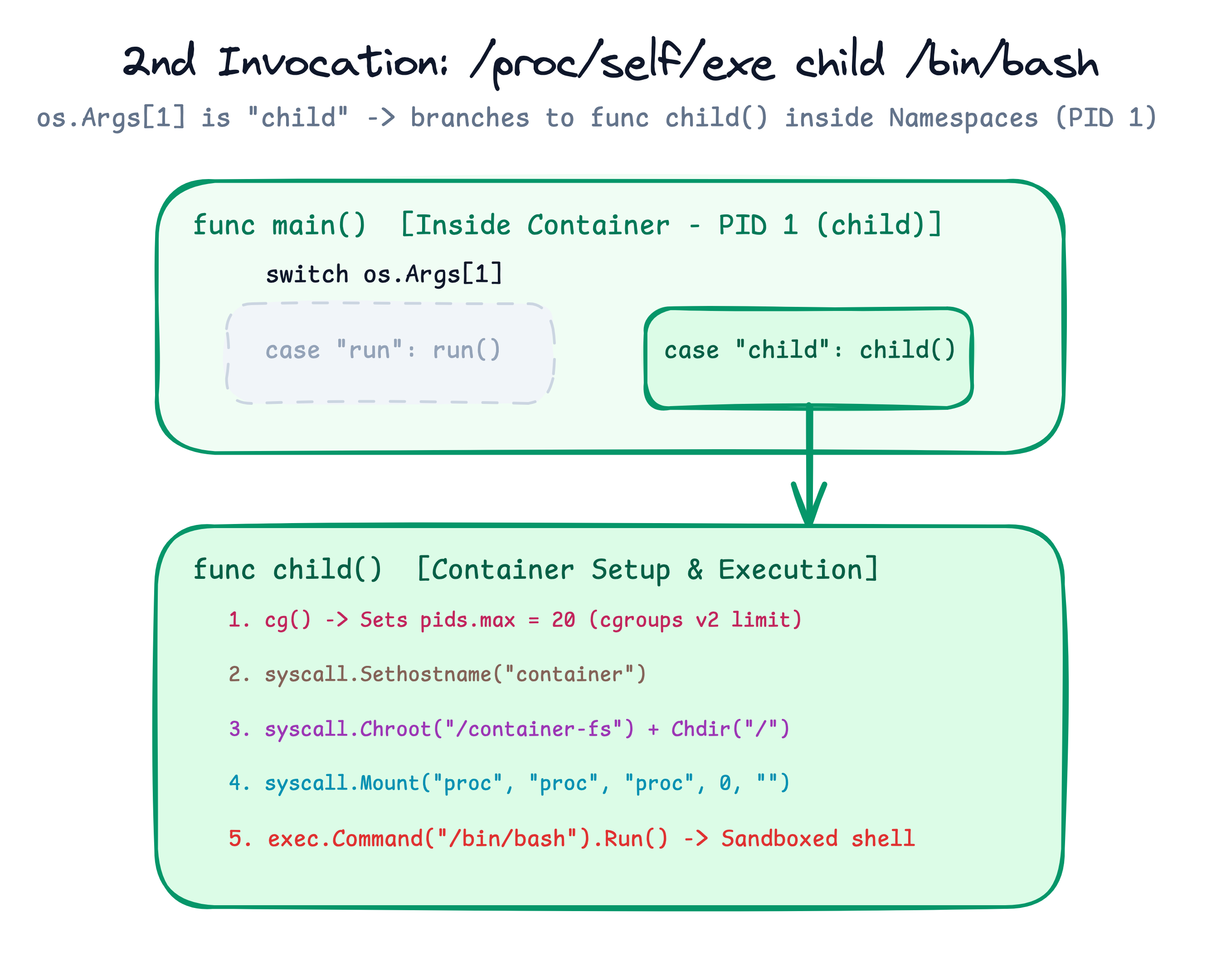
Update main.go to implement the re-exec pattern and add the child() function:
package main

import (
    "fmt"
    "os"
    "os/exec"
    "syscall"
)

// Usage: ./minic run <cmd> <args>
// Example: ./minic run /bin/bash
func main() {
    switch os.Args[1] {
    case "run":
        run()
    case "child":
        child()
    default:
        panic("invalid command")
    }
}

func run() {
    fmt.Printf("Parent running %v as PID %d\n", os.Args[2:], os.Getpid())

    // Re-execute this exact binary with the 'child' argument.
    // /proc/self/exe resolves to our own compiled executable on disk.
    cmd := exec.Command("/proc/self/exe", append([]string{"child"}, os.Args[2:]...)...)
    cmd.Stdin = os.Stdin
    cmd.Stdout = os.Stdout
    cmd.Stderr = os.Stderr

    // The parent spawns the child process into a new UTS namespace
    cmd.SysProcAttr = &syscall.SysProcAttr{
        Cloneflags: syscall.CLONE_NEWUTS,
    }

    must(cmd.Run())
}

func child() {
    fmt.Printf("Container running %v as PID %d\n", os.Args[2:], os.Getpid())

    // Because we are already inside the new UTS namespace, this only sets
    // the hostname for our container, completely isolated from the host!
    must(syscall.Sethostname([]byte("container")))

    // Now launch the actual user command (e.g. /bin/bash) inside the configured container
    cmd := exec.Command(os.Args[2], os.Args[3:]...)
    cmd.Stdin = os.Stdin
    cmd.Stdout = os.Stdout
    cmd.Stderr = os.Stderr

    must(cmd.Run())
}

func must(err error) {
    if err != nil {
        panic(err)
    }
}
Build and test:
go build -o minic main.go
sudo ./minic run /bin/bash
Output:
Parent running [/bin/bash] as PID 1940
Container running [/bin/bash] as PID 1941
Inside the shell, verify the hostname:
hostname
Output:
container
It is already automatically set to container! Exit the shell:
exit
Step 4: Isolating Process IDs (PID Namespace)
Currently, the child process can still see and interact with all processes running on the host system.
Let's add the PID Namespace (syscall.CLONE_NEWPID). When a process is created with CLONE_NEWPID, it becomes PID 1 (the init process) within its new process hierarchy.
Inside run(), add syscall.CLONE_NEWPID to Cloneflags:
    // CLONE_NEWPID creates a new process hierarchy where the child starts as PID 1
    cmd.SysProcAttr = &syscall.SysProcAttr{
        Cloneflags: syscall.CLONE_NEWUTS | syscall.CLONE_NEWPID,
    }

    must(cmd.Run())
}
Rebuild and run:
go build -o minic main.go
sudo ./minic run /bin/bash
Output:
Parent running [/bin/bash] as PID 1990
Container running [/bin/bash] as PID 1
Inside the container shell, check your current shell PID:
echo $$
Output:
1
Now try running ps:
ps aux
Output:
USER       PID %CPU %MEM    VSZ   RSS TTY      STAT START   TIME COMMAND
root         1  0.0  0.1 169000 13000 ?        Ss   12:00   0:00 /sbin/init
root       520  0.0  0.1  25000  8000 ?        Ss   12:00   0:00 /usr/sbin/sshd
...
Wait, why does ps aux still list all the host processes?
Because ps does not make a syscall asking the kernel for process lists; instead, ps simply reads the directory contents of /proc, and because our container is still using the host's root filesystem, /proc is still pointing to the host's /proc mount.
Exit the shell:
exit
Step 5: Filesystem Isolation (chroot & Private /proc)
To completely confine the container and fix process inspection, we need to address filesystem root confinement and /proc mounting.
Our playground environment has a pre-extracted Ubuntu rootfs ready at /container-fs.
Part A: Confining the Root Directory with chroot
Inside child(), add syscall.Chroot and syscall.Chdir to confine the process to /container-fs, without mounting /proc yet:
func child() {
    fmt.Printf("Container running %v as PID %d\n", os.Args[2:], os.Getpid())

    // 1. Set container hostname
    must(syscall.Sethostname([]byte("container")))

    // 2. Change the root directory for this process and its children to /container-fs
    must(syscall.Chroot("/container-fs"))
    must(syscall.Chdir("/"))

    cmd := exec.Command(os.Args[2], os.Args[3:]...)
    cmd.Stdin = os.Stdin
    cmd.Stdout = os.Stdout
    cmd.Stderr = os.Stderr

    must(cmd.Run())
}
Rebuild and test:
go build -o minic main.go
sudo ./minic run /bin/bash
Inside the container:
- Check Root Directory:
ls /
Output:bin boot dev etc home lib lib64 media mnt opt proc root run sbin srv sys tmp usr var
The process is confined inside/container-fs. Host directories like/home/laborantare completely inaccessible. - Now try running
ps:ps
Output:Error: /proc must be mounted To mount /proc at /proc you can run the following command: mount -t proc proc /proc
Why did ps fail? Because inside /container-fs, /proc is simply an empty directory. The ps command relies on the Linux kernel's proc pseudo-filesystem to query process metadata.
Exit the container:
exit
Part B: Mounting a Private /proc (Mount Namespace)
To allow ps to work without exposing host processes or leaking mounts to the host system:
- Add
syscall.CLONE_NEWNS(Mount Namespace) toSysProcAttrinrun(). - Mount a fresh
procpseudo-filesystem at/procusingsyscall.Mountinsidechild(). - Cleanly unmount
/procwithsyscall.Unmountwhen the container exits. - Update
run():
func run() {
    // ...
    cmd.SysProcAttr = &syscall.SysProcAttr{
        Cloneflags: syscall.CLONE_NEWUTS | syscall.CLONE_NEWPID | syscall.CLONE_NEWNS,
    }

    must(cmd.Run())
}
- Update
child():
func child() {
    fmt.Printf("Container running %v as PID %d\n", os.Args[2:], os.Getpid())

    must(syscall.Sethostname([]byte("container")))
    must(syscall.Chroot("/container-fs"))
    must(syscall.Chdir("/"))

    // Mount a fresh, private /proc pseudo-filesystem
    must(syscall.Mount("proc", "proc", "proc", 0, ""))

    cmd := exec.Command(os.Args[2], os.Args[3:]...)
    cmd.Stdin = os.Stdin
    cmd.Stdout = os.Stdout
    cmd.Stderr = os.Stderr

    must(cmd.Run())

    // Cleanly unmount /proc on container exit
    must(syscall.Unmount("/proc", 0))
}
Let's test filesystem isolation by creating a test file on the host before launching the container:
echo "confidential host data" > /home/laborant/host-secret.txt
Rebuild and run the container:
go build -o minic main.go
sudo ./minic run /bin/bash
Output:
Parent running [/bin/bash] as PID 2040
Container running [/bin/bash] as PID 1
Inside the container:
- Check Process Table:
ps aux
Output:USER PID %CPU %MEM VSZ RSS TTY STAT START TIME COMMAND root 1 0.0 0.0 1225852 1904 ? Sl 12:12 0:00 /proc/self/exe child /bin/bash root 6 0.0 0.0 8280 4204 ? R 12:12 0:00 ps auxpsnow works cleanly and displays only the processes running inside your container! - Check Root Directory:
ls /
Output:bin boot dev etc home lib lib64 media mnt opt proc root run sbin srv sys tmp usr var - Verify Host Isolation (Try reading the host file):
cat /home/laborant/host-secret.txt
Output:cat: /home/laborant/host-secret.txt: No such file or directory
You are confined inside/container-fs. The host's files are completely inaccessible.
Exit the container:
exit
Step 6: Resource Limits with cgroups (Defeating Fork Bombs)
Namespaces control what a process can see (hostname, PIDs, mounts). Control Groups (cgroups) control how much resources a process can use (CPU, memory, process count).
In the talk, Liz Rice demonstrates setting a limit on the maximum number of processes (pids.max) to protect the host against a fork bomb.
- Add
"path/filepath"and"strconv"to your imports inmain.go:
import (
    "fmt"
    "os"
    "os/exec"
    "path/filepath"
    "strconv"
    "syscall"
)
- Add the
cg()helper function to configure cgroups v2 limits:
func cg() {
    cgroup := "/sys/fs/cgroup/demo-container"

    // 1. Create a cgroup node directory
    os.Mkdir(cgroup, 0755)

    // 2. Limit the container process hierarchy to at most 20 concurrent PIDs
    must(os.WriteFile(filepath.Join(cgroup, "pids.max"), []byte("20"), 0700))

    // 3. Attach our current process (os.Getpid()) to this cgroup controller
    must(os.WriteFile(filepath.Join(cgroup, "cgroup.procs"), []byte(strconv.Itoa(os.Getpid())), 0700))
}
- Call
cg()at the beginning ofchild():
func child() {
    fmt.Printf("Container running %v as PID %d\n", os.Args[2:], os.Getpid())

    // Configure cgroup resource limits before entering the jail
    cg()

    must(syscall.Sethostname([]byte("container")))
    must(syscall.Chroot("/container-fs"))
    must(syscall.Chdir("/"))
    must(syscall.Mount("proc", "proc", "proc", 0, ""))

    cmd := exec.Command(os.Args[2], os.Args[3:]...)
    cmd.Stdin = os.Stdin
    cmd.Stdout = os.Stdout
    cmd.Stderr = os.Stderr

    must(cmd.Run())

    must(syscall.Unmount("/proc", 0))
}
Now, let's test our container and see cgroups in action!
Rebuild and start the container:
go build -o minic main.go
sudo ./minic run /bin/bash
Inside the container shell, launch the classic bash fork bomb (just like in Liz Rice's live demo):
:() { :|:& }; :
Output:
bash: fork: retry: Resource temporarily unavailable
bash: fork: retry: Resource temporarily unavailable
bash: fork: retry: Resource temporarily unavailable
bash: fork: Resource temporarily unavailable
Watch what happens:
- The function recursively spawns background processes to exhaust system resources.
- As soon as the total process count in the container reaches 20, the Linux kernel's cgroups controller intervenes and refuses to fork any more processes (
bash: fork: retry: Resource temporarily unavailable). - The host system (and all other processes outside the cgroup) remain completely unaffected and responsive!
Press Ctrl+C and exit the container:
exit
Summary
In fewer than 100 lines of Go code, you built a working container runtime that implements:
- Hostname Isolation: UTS namespace (
CLONE_NEWUTS) - Process ID Isolation: PID namespace (
CLONE_NEWPID) - Filesystem & Mount Isolation: Mount namespace (
CLONE_NEWNS),chroot, and/procmount - Resource Constraints:
cgroups(pids.max)
You now understand the fundamental primitives powering every Docker, Podman, and Kubernetes container running in production today!
Click here to view the complete final main.go code
package main

import (
    "fmt"
    "os"
    "os/exec"
    "path/filepath"
    "strconv"
    "syscall"
)

func main() {
    switch os.Args[1] {
    case "run":
        run()
    case "child":
        child()
    default:
        panic("invalid command")
    }
}

func run() {
    fmt.Printf("Parent running %v as PID %d\n", os.Args[2:], os.Getpid())

    cmd := exec.Command("/proc/self/exe", append([]string{"child"}, os.Args[2:]...)...)
    cmd.Stdin = os.Stdin
    cmd.Stdout = os.Stdout
    cmd.Stderr = os.Stderr

    cmd.SysProcAttr = &syscall.SysProcAttr{
        Cloneflags: syscall.CLONE_NEWUTS | syscall.CLONE_NEWPID | syscall.CLONE_NEWNS,
    }

    must(cmd.Run())
}

func child() {
    fmt.Printf("Container running %v as PID %d\n", os.Args[2:], os.Getpid())

    cg()

    must(syscall.Sethostname([]byte("container")))
    must(syscall.Chroot("/container-fs"))
    must(syscall.Chdir("/"))
    must(syscall.Mount("proc", "proc", "proc", 0, ""))

    cmd := exec.Command(os.Args[2], os.Args[3:]...)
    cmd.Stdin = os.Stdin
    cmd.Stdout = os.Stdout
    cmd.Stderr = os.Stderr

    must(cmd.Run())

    must(syscall.Unmount("/proc", 0))
}

func cg() {
    cgroup := "/sys/fs/cgroup/demo-container"

    os.Mkdir(cgroup, 0755)

    must(os.WriteFile(filepath.Join(cgroup, "pids.max"), []byte("20"), 0700))
    must(os.WriteFile(filepath.Join(cgroup, "cgroup.procs"), []byte(strconv.Itoa(os.Getpid())), 0700))
}

func must(err error) {
    if err != nil {
        panic(err)
    }
}
Check out Liz's Other Awesome Talks
If you enjoyed this deep dive, check out more of Liz Rice's talks:
About the Author

Writes about
Frequently covers
More tutorials you might like
Using Go for Systems Programming
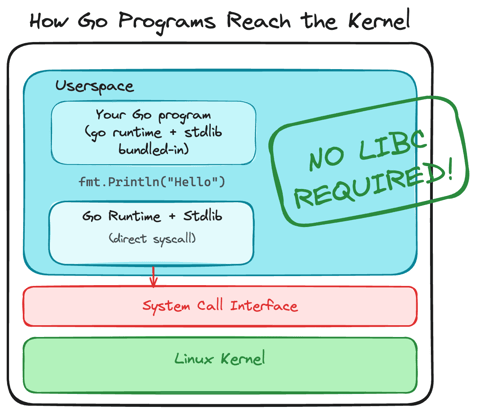
Discover how Go functions under the hood as a modern systems programming language. Learn how Go makes system calls directly, resulting in self-contained binaries that have no libc dependencies.

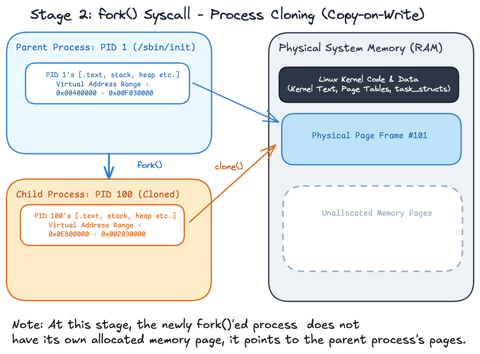
Linux Processes: From a Program to a Process
Explore what a program is, when it actually becomes a process and how the Linux scheduler manages process execution.
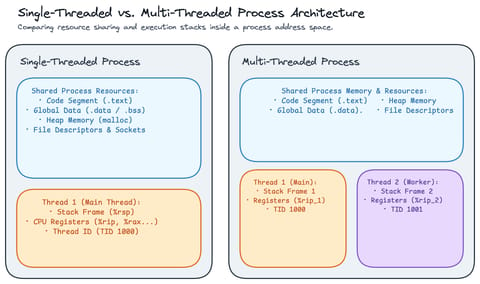
Linux Processes: Threads & Concurrency
Explore what a thread actually is in Linux, how threads relate to processes, how the Linux kernel treats both as tasks (task_struct), and how kernel scheduling enables concurrency.
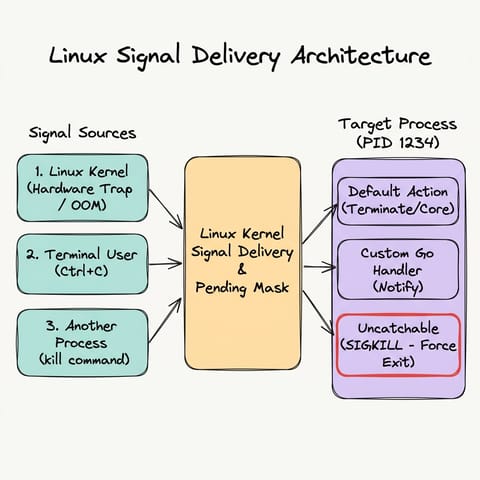
Linux Processes: Understanding Signals
Explore Linux/Unix signals in Go, how signals act as asynchronous notifications, who can send them, default kernel behaviors, sending signals with kill and Go, graceful signal handling with os/signal, and why SIGKILL cannot be trapped.
Learn by doing, not just by reading or watching
Sign up for a free account to start a VM playground right on this page, track your progress, and get notified about new learning materials.