How Kubernetes Operators Work: Building a Controller From Scratch

Welcome wanderer!
If you've landed on this tutorial, you've probably installed an operator or two, like cert-manager or Argo CD, or you're about to write your own and want to know how they work.
An operator has two parts. A CustomResourceDefinition (CRD) adds a new resource type to the Kubernetes API, and a controller watches the resources of that type and changes the cluster to match them.
By the end of this tutorial, you will have an operator running against your cluster that looks after pets. Every Pet gets a Pod to live in and gets hungry as time passes. If nobody feeds it for too long, the pet runs away, and the operator deletes its Pod.
Here's the whole picture of what you'll end up with:
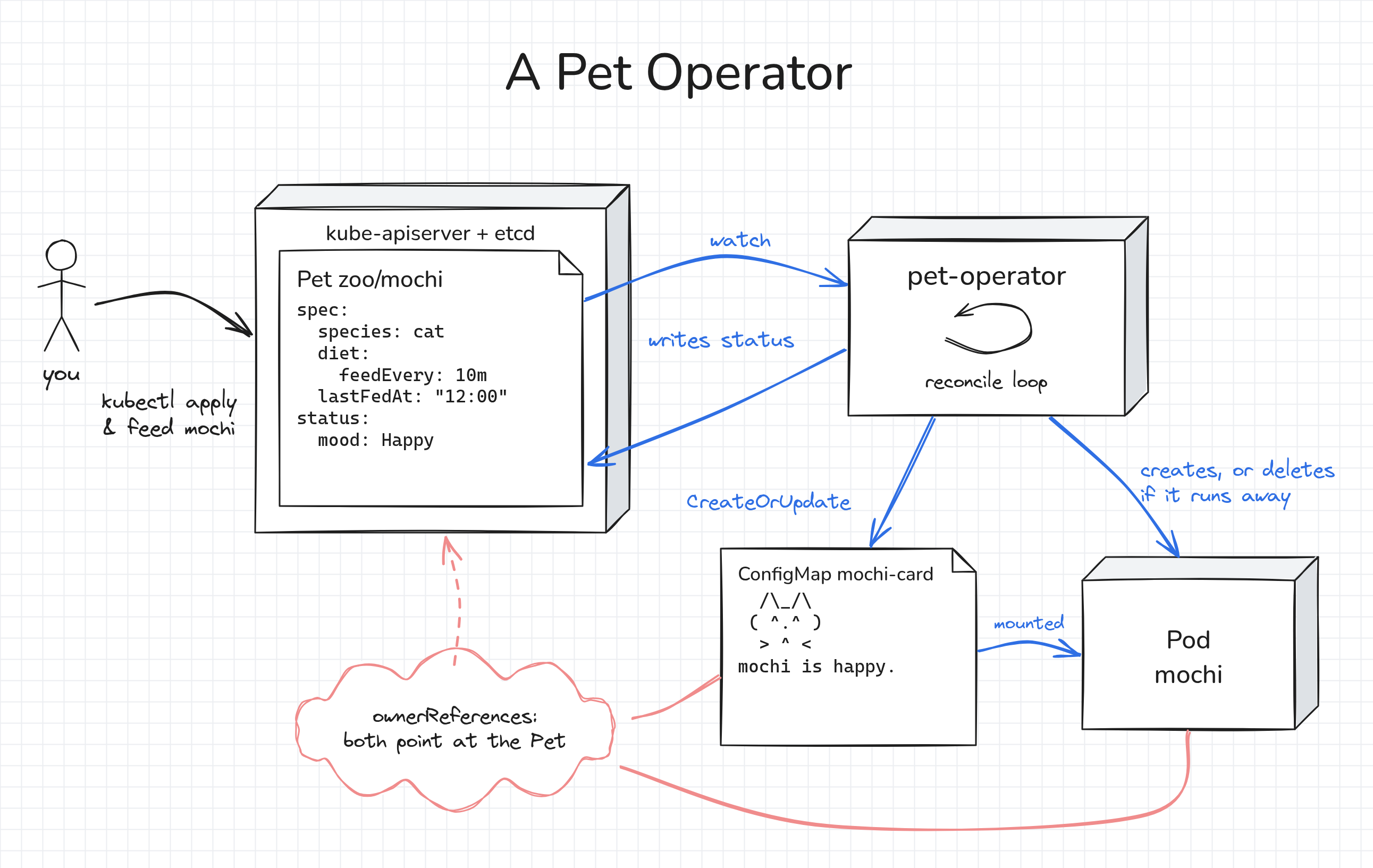
I picked pets for this one because hunger depends on time, and reacting to time passing is one of the less obvious things a controller has to handle.
We'll get there in steps: first the CRD, then a controller in 15 lines of bash, and once we've seen where that falls short, a real controller in Go.
You won't have to type out any long files.
The whole project is already waiting in ~/pet-operator on the playground.
In the tutorial, I'll show the parts that matter and explain them, and you can open the full files in the IDE tab whenever you want the bigger picture.
Prerequisites
You need basic kubectl knowledge.
Knowing Go helps, but don't worry if you don't: all the code is given to you, and I'll explain the parts that matter.
The playground already has a multi-node Kubernetes cluster, and kubectl on the dev-machine is set up to talk to it.
Go is installed too, and the zoo namespace is waiting for its first resident.
If the playground asks you to choose a networking plugin, keep the default one (flannel), because the pets need running Pods.
Setting up the Pet API
This section goes through CRD design quickly. If schemas, CEL rules, and defaults are new to you, How Kubernetes CRDs Work: Designing a Validated API From Scratch builds the same CRD step by step.
Creating the smallest CRD
Let's start small.
A CRD needs a group, a kind with its plural and singular names, and at least one version with a schema.
The smallest one is already in ~/pet-operator/config/crd-minimal.yaml, and it has two parts.
The first part names the new resource:
metadata:
  name: pets.zoo.example.com
spec:
  group: zoo.example.com
  scope: Namespaced
  names:
    kind: Pet
    plural: pets
    singular: pet
    shortNames: [pt]
    categories: [zoo]
groupbecomes the first half of every Pet'sapiVersion, so it'szoo.example.com/v1alpha1.metadata.namemust be<plural>.<group>. The API server rejects the CRD if it isn't.scope: Namespacedmakes Pets live in a namespace, like Pods. The alternative isCluster, like Nodes.pluralgoes in the URL (/apis/zoo.example.com/v1alpha1/namespaces/zoo/pets), andkindgoes in the manifests.shortNamesandcategoriesare aliases forkubectl, sokubectl get ptandkubectl get zoowork too.
The second part lists the versions:
  versions:
  - name: v1alpha1
    served: true
    storage: true
    schema:
      openAPIV3Schema:
        type: object
        x-kubernetes-preserve-unknown-fields: true
served: truemeans the API server answers requests forv1alpha1.storage: truemeans objects are stored in etcd in this version. When there are several versions, exactly one of them has it.- The schema is required, but this one accepts anything:
x-kubernetes-preserve-unknown-fieldstells the API server to keep every field it doesn't know. We'll make it strict in the next section.
Apply it:
kubectl apply -f ~/pet-operator/config/crd-minimal.yaml
If everything goes well, you should see a new REST endpoint right away:
kubectl api-resources --api-group=zoo.example.com
kubectl get --raw /apis/zoo.example.com/v1alpha1 | jq
NAME   SHORTNAMES   APIVERSION                 NAMESPACED   KIND
pets   pt           zoo.example.com/v1alpha1   true         Pet
{
  "kind": "APIResourceList",
  "apiVersion": "v1",
  "groupVersion": "zoo.example.com/v1alpha1",
  "resources": [
    {
      "name": "pets",
      "singularName": "pet",
      "namespaced": true,
      "kind": "Pet",
      "verbs": [
        "delete",
        "deletecollection",
        "get",
        "list",
        "patch",
        "create",
        "update",
        "watch"
      ],
      "shortNames": [
        "pt"
      ],
      "categories": [
        "zoo"
      ],
      "storageVersionHash": "rsi7zQxickQ="
    }
  ]
}
Now, let's adopt the first Pet:
kubectl apply -f - <<'EOF'
apiVersion: zoo.example.com/v1alpha1
kind: Pet
metadata:
  name: mochi
  namespace: zoo
spec:
  species: cat
  toy: yarn
EOF

kubectl get pets -n zoo
pet.zoo.example.com/mochi created
NAME    AGE
mochi   0s
Next, try a Pet that makes no sense. We'll use a server-side dry run, so the API server checks the Pet but doesn't store it:
kubectl apply --dry-run=server -f - <<'EOF'
apiVersion: zoo.example.com/v1alpha1
kind: Pet
metadata:
  name: sparkles
  namespace: zoo
spec:
  species: unicorn
  toy: 42
  favoriteColor: rainbow
EOF
pet.zoo.example.com/sparkles created (server dry run)
The API server accepts it, because the schema allows any spec.
And nothing else happens.
Every pet is supposed to live in its own Pod, which keeps running for as long as the pet is around.
But there's no Pod for mochi:
kubectl get pods -n zoo
No resources found in zoo namespace.
It's important to know that a CRD on its own only stores objects. The controller is what acts on them, and we'll write one soon. But first, let's make the API strict.
Adding validation, defaults, and a status
The complete CRD is in ~/pet-operator/config/crd-by-hand.yaml.
The most interesting part is the validation rules on spec:
            x-kubernetes-validations:
            - rule: "self.species != 'cactus' || !has(self.toy)"
              message: "cacti don't play with toys"
            - rule: "self.species != 'dragon' || duration(self.diet.feedEvery) >= duration('1h')"
              message: "dragons eat at most once an hour: diet.feedEvery must be at least 1h"
The table below goes through the rest of the file:
| Part of the CRD | What the API server does with it |
|---|---|
openAPIV3Schema with type, required, enum, maxLength, pattern, format | Rejects invalid objects before they reach etcd. kubectl gets an error for unknown fields, and less strict clients get them pruned. |
x-kubernetes-validations | Evaluates CEL rules that OpenAPI can't express, such as "a cactus can't have a toy". The cactus rule and the dragon rule are on spec, because each of them reads two fields. |
duration(...) | Compares durations as time, not as text. As strings, '59m' >= '1h' would be true. |
A rule on feedEvery | Keeps feedEvery between 1s and a year. The pattern alone accepts 0s and 9999999h, which the controller can't use. |
default | Fills in missing fields, so every client, including the controller, reads the same complete object. |
diet: default: {} | Defaults only apply when the parent object exists. Without this line, a Pet without a diet block never gets food: snacks or feedEvery: 10m. |
subresources: status: {} | Gives .status a separate endpoint. Users write the spec and the controller writes the status through separate endpoints, so a write to one doesn't change the other. |
additionalPrinterColumns | Adds columns to kubectl get. Once you define custom columns, AGE is no longer added automatically, so it's on the list. |
Apply it:
kubectl apply -f ~/pet-operator/config/crd-by-hand.yaml
Now, let's send a few invalid Pets to the API server and see what happens:
for spec in \
  '{"species":"unicorn"}' \
  '{"species":"cactus","toy":"tennis ball"}' \
  '{"species":"dragon","diet":{"feedEvery":"15m"}}' \
  '{"species":"dragon"}' \
  '{"species":"dog","diet":{"feedEvery":"whenever"}}'
do
  echo "{\"apiVersion\":\"zoo.example.com/v1alpha1\",\"kind\":\"Pet\",\"metadata\":{\"name\":\"nope\",\"namespace\":\"zoo\"},\"spec\":$spec}" \
    | kubectl apply --dry-run=server -f - 2>&1 | head -2
  echo
done
The Pet "nope" is invalid:
* spec.species: Unsupported value: "unicorn": supported values: "cat", "dog", "dragon", "cactus"

The Pet "nope" is invalid: spec: Invalid value: cacti don't play with toys

The Pet "nope" is invalid: spec: Invalid value: dragons eat at most once an hour: diet.feedEvery must be at least 1h

The Pet "nope" is invalid: spec: Invalid value: dragons eat at most once an hour: diet.feedEvery must be at least 1h

The Pet "nope" is invalid:
* spec.diet.feedEvery: Invalid value: "whenever": spec.diet.feedEvery in body should match '^[0-9]+(s|m|h)$'
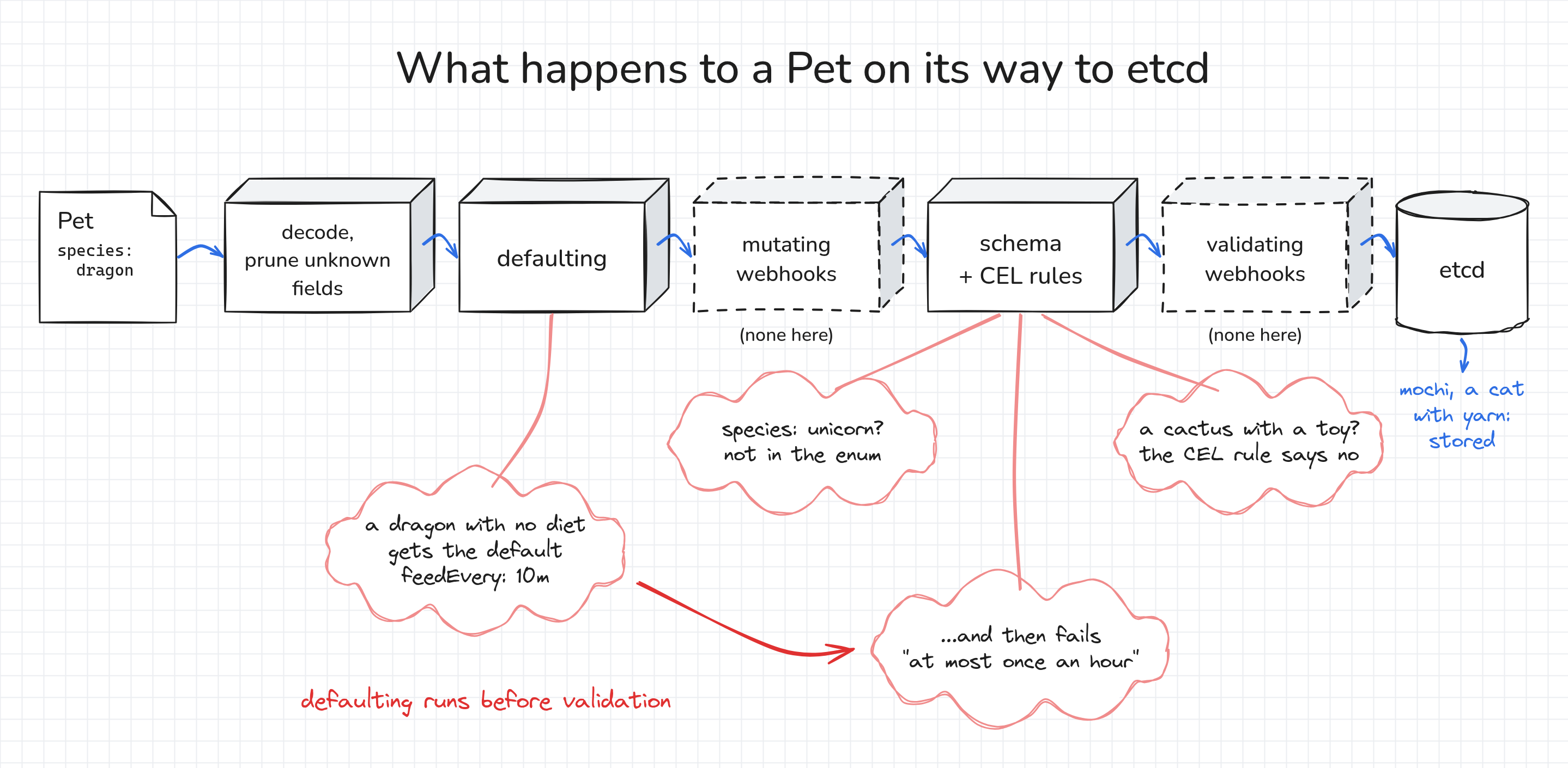
Take a look at the fourth one, a dragon without a diet.
It gets the default feedEvery: 10m, and only then fails the dragon rule.
The API server always applies defaults before it validates an object.
The existing mochi Pet got the defaults too, even though its manifest has no diet.
The API server also applies defaults when it reads an object from etcd, so objects created before the defaults existed get them as well:
kubectl get pet -n zoo mochi -o yaml | grep -A8 '^spec:'
kubectl get pets -n zoo
spec:
  diet:
    feedEvery: 10m
    food: snacks
  species: cat
  toy: yarn
NAME    SPECIES   FACE   MOOD   TOY    LAST FED   AGE
mochi   cat                     yarn              4s
Writing a controller in bash
Now that the API is in place, it's time to write the controller. A controller is a loop. It reads the desired state, compares it with the actual state, changes the actual state to match, and then repeats.
For our pets, the desired state is the Pet: mochi is a cat that likes yarn.
The actual state is a Pod where mochi lives, and a Pet without one is a pet that doesn't exist yet.
So the controller reads Pets and creates Pods.
A Deployment works the same way: you write the Deployment, and controllers turn it into Pods.
The loop fits in a few lines of bash, in ~/pet-operator/bash/naive-controller.sh.
Every 5 seconds, it goes through all Pets and creates a Pod for each Pet that doesn't have one yet:
while true; do
  for pet in $(kubectl get pets -A -o jsonpath='{range .items[*]}{.metadata.namespace}/{.metadata.name}{" "}{end}'); do
    ns=${pet%/*}; name=${pet#*/}
    species=$(kubectl get pet -n "$ns" "$name" -o jsonpath='{.spec.species}')

    if ! kubectl get pod -n "$ns" "$name" >/dev/null 2>&1; then
      kubectl run "$name" -n "$ns" --image=public.ecr.aws/docker/library/busybox:1.37 --restart=Never -- \
        sh -c "while true; do echo \"I am $name the $species\"; sleep 10; done"
    fi
  done
  sleep 5
done
Open a second terminal tab (the + button next to the terminal tabs) and start the script there:
bash ~/pet-operator/bash/naive-controller.sh
In the first tab, check the Pods:
kubectl get pods -n zoo
kubectl wait -n zoo --for=condition=Ready pod/mochi --timeout=90s
kubectl logs -n zoo mochi
NAME    READY   STATUS    RESTARTS   AGE
mochi   1/1     Running   0          10s
pod/mochi condition met
I am mochi the cat
Now, delete the Pod and watch it come back.
The shell in the Pod runs as PID 1 and has no SIGTERM handler, so it ignores the signal, and --grace-period=1 saves you a 30-second wait:
kubectl delete pod -n zoo mochi --grace-period=1
kubectl get pods -n zoo -w    # Ctrl+C to stop watching
pod "mochi" deleted from zoo namespace
NAME    READY   STATUS    RESTARTS   AGE
mochi   0/1     Pending   0          0s
mochi   0/1     Pending   0          0s
mochi   0/1     ContainerCreating   0          0s
mochi   0/1     ContainerCreating   0          1s
mochi   1/1     Running             0          1s
A quick clarification about what just happened: the script never saw the deletion.
On its next pass, it found no Pod for mochi and created one.
Think of it as a thermostat. It doesn't care why the room got cold, it only compares the current temperature with the one you asked for.
This approach is called level-triggered reconciliation, and it means that a missed event doesn't matter, because the next pass fixes the state anyway.
Finding the limits of the bash controller
The loop works, but it has a few problems. First, change the species of mochi:
kubectl patch pet -n zoo mochi --type=merge -p '{"spec":{"species":"dog"}}'
sleep 10
kubectl logs -n zoo mochi --tail=1
pet.zoo.example.com/mochi patched
I am mochi the cat
The Pod still says that mochi is a cat.
The script only checks that a Pod exists, not that it matches the Pet.
Fixing that isn't easy, because most of a Pod's spec can't be changed after the Pod is created.
Revert the change:
kubectl patch pet -n zoo mochi --type=merge -p '{"spec":{"species":"cat"}}'
Next, create another Pet, wait for its Pod, and delete the Pet:
kubectl apply -f - <<'EOF'
apiVersion: zoo.example.com/v1alpha1
kind: Pet
metadata:
  name: goldie
  namespace: zoo
spec:
  species: dog
EOF
sleep 8
kubectl delete pet -n zoo goldie
sleep 8
kubectl get pods -n zoo
pet.zoo.example.com/goldie created
pet.zoo.example.com "goldie" deleted from zoo namespace
NAME     READY   STATUS    RESTARTS   AGE
goldie   1/1     Running   0          14s
mochi    1/1     Running   0          40s
The goldie Pod is still running, but the Pet it was created for is gone.
The script only knows how to create Pods, never how to delete them.
And there's more:
- On every pass, it lists all Pets and sends two more requests for each of them, even when nothing has changed. With 5,000 Pets, that's about 10,000 requests on every pass.
- It doesn't write a status, so the Pet doesn't show whether its Pod is running.
- Nothing links a Pod to the Pet it was created for.
- Pets should get hungry over time. Polling makes that easy, since the script wakes up every 5 seconds anyway. But a good controller only wakes up when something in the cluster changes, and time passing doesn't count as a change. We'll see how a real controller handles that.
That's enough bash. Stop the script with Ctrl+C in the second tab, and delete the Pods it created:
kubectl delete pods -n zoo --all --grace-period=1
Don't skip the cleanup!
The Go controller never takes over a Pod it didn't create.
If the old mochi Pod is still around, the controller reports PodNameTaken in the Pet's status instead of creating its own Pod.
Writing a controller in Go
Setting up the project
controller-runtime is the library that Kubebuilder and Operator SDK generate code for.
I want you to see every file of the project, so we'll use it directly, without a scaffolding tool.
Here's what's in ~/pet-operator:
pet-operator/
├── api/v1alpha1/              the Pet type in Go
├── internal/controller/       the reconcile loop
├── config/                    the CRDs (the two you applied, and soon a generated one)
├── bash/                      the bash controller
├── go.mod, go.sum             the dependencies, controller-runtime v0.25.1
└── main.go                    creates the manager and starts the controller
Download the dependencies and install controller-gen, a code generator from the Kubebuilder project:
export PATH=$PATH:/usr/local/go/bin:$HOME/go/bin
cd ~/pet-operator

go mod download
go install sigs.k8s.io/controller-tools/cmd/controller-gen@v0.22.0
The downloads take about a minute. Meanwhile, let's go through the code.
Defining the Pet type in Go
The controller works with Go structs that mirror the CRD schema.
They live in api/v1alpha1/pet_types.go.
Pay attention to the +kubebuilder: comments above the fields, which are called markers:
// +kubebuilder:validation:XValidation:rule="self.species != 'cactus' || !has(self.toy)",message="cacti don't play with toys"
// +kubebuilder:validation:XValidation:rule="self.species != 'dragon' || duration(self.diet.feedEvery) >= duration('1h')",message="dragons eat at most once an hour: diet.feedEvery must be at least 1h"
type PetSpec struct {
    // +kubebuilder:validation:Enum=cat;dog;dragon;cactus
    Species string `json:"species"`

    // +kubebuilder:validation:MaxLength=20
    // +optional
    Toy string `json:"toy,omitempty"`

    // +kubebuilder:default={}
    // +optional
    Diet Diet `json:"diet,omitempty"`

    // When the pet was last fed. Feed it by setting this to the current time.
    // +optional
    LastFedAt *metav1.Time `json:"lastFedAt,omitempty"`
}
Each marker corresponds to a line of the CRD you applied: Enum, MaxLength, default, and XValidation for the CEL rules.
The Pet type itself carries the rest, like the status subresource and the printer columns:
// +kubebuilder:subresource:status
// +kubebuilder:resource:shortName=pt,categories=zoo
// +kubebuilder:printcolumn:name="Species",type=string,JSONPath=`.spec.species`
// +kubebuilder:printcolumn:name="Face",type=string,JSONPath=`.status.face`
// +kubebuilder:printcolumn:name="Mood",type=string,JSONPath=`.status.mood`
// +kubebuilder:printcolumn:name="Toy",type=string,JSONPath=`.spec.toy`
// +kubebuilder:printcolumn:name="Last Fed",type=date,JSONPath=`.spec.lastFedAt`
// +kubebuilder:printcolumn:name="Age",type=date,JSONPath=`.metadata.creationTimestamp`
// +kubebuilder:object:root=true
type Pet struct {
    metav1.TypeMeta   `json:",inline"`
    metav1.ObjectMeta `json:"metadata,omitempty"`

    Spec   PetSpec   `json:"spec"`
    Status PetStatus `json:"status,omitempty"`
}
The status also has three new fields: the name of the Pod the pet lives in, and two fields that most controllers report, observedGeneration and conditions.
The other file in the folder, groupversion_info.go, only registers the zoo.example.com/v1alpha1 group and version.
Generating the CRD
Every Kubernetes object type in Go needs deep-copy methods.
They're pure boilerplate, so we'll let controller-gen write them.
The same tool also generates the CRD from the markers:
controller-gen object paths=./api/...
controller-gen crd paths=./api/... output:crd:dir=config

ls api/v1alpha1 config
api/v1alpha1:
groupversion_info.go  pet_types.go  zz_generated.deepcopy.go

config:
crd-by-hand.yaml  crd-minimal.yaml  zoo.example.com_pets.yaml
Compare the generated CRD with the one you applied by hand:
diff <(kubectl create --dry-run=client -o yaml -f config/crd-by-hand.yaml) \
     <(kubectl create --dry-run=client -o yaml -f config/zoo.example.com_pets.yaml) | less
The names and the whole spec schema, including the defaults and the CEL rules, are the same.
The differences are the field descriptions (taken from the Go comments), the new status fields,
and a few details that controller-gen always adds, such as listKind.
One difference changes the behavior: spec is now required, because the Go field has no omitempty tag.
Kubebuilder projects run the same two commands in make generate and make manifests.
From now on, the Go types are the source of truth, and the CRD is generated from them.
Replace the hand-written CRD with the generated one:
kubectl apply -f config/zoo.example.com_pets.yaml
Writing the reconciler
This is the main file of the operator: internal/controller/pet_controller.go.
It's about 250 lines, so let's go through it piece by piece.
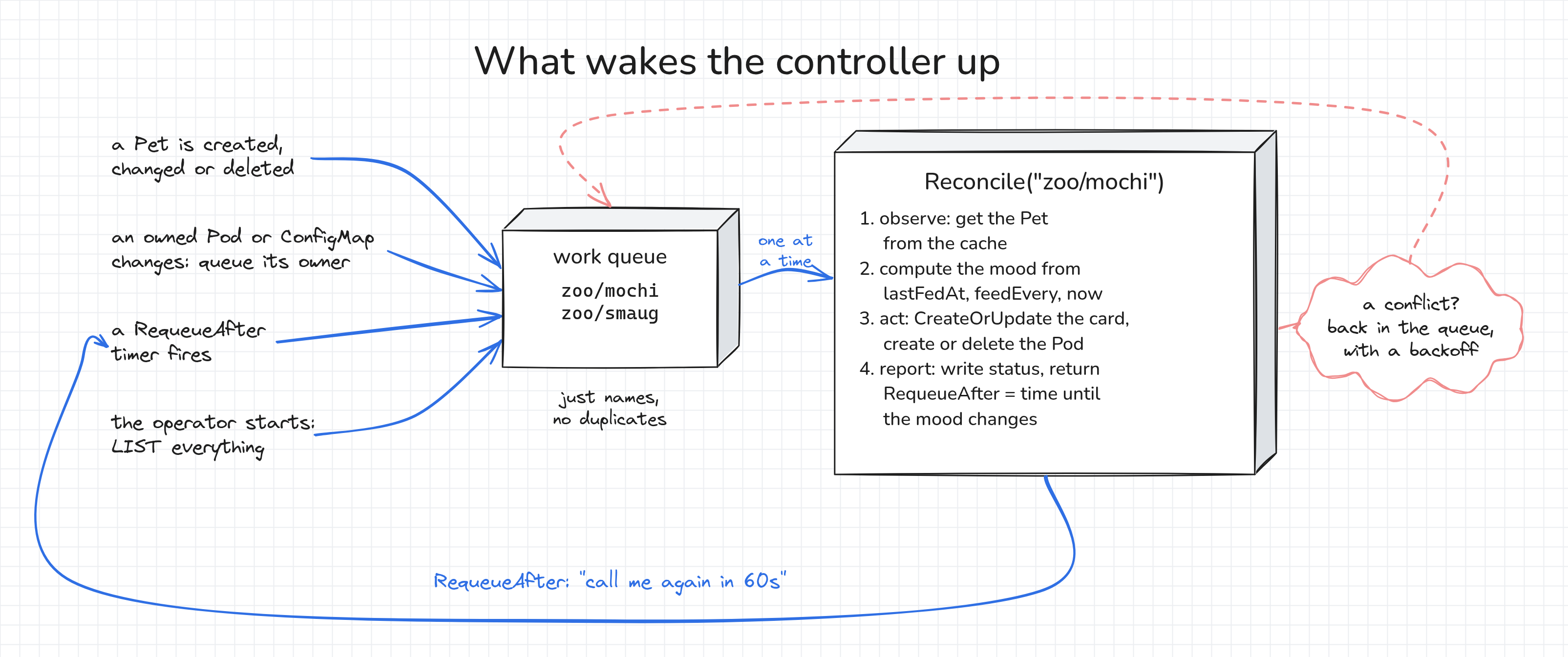
Everything starts with Reconcile:
// Reconcile makes the world match one Pet. It is called with just a namespace/name,
// never with "what changed", so it always starts by reading the current state.
func (r *PetReconciler) Reconcile(ctx context.Context, req ctrl.Request) (ctrl.Result, error) {
    // 1. Observe: fetch the desired state.
    var pet zoov1alpha1.Pet
    if err := r.Get(ctx, req.NamespacedName, &pet); err != nil {
        // Deleted? Nothing to do: owner references let the garbage collector remove the Pod and ConfigMap.
        return ctrl.Result{}, client.IgnoreNotFound(err)
    }
Reconcile gets only the namespace and name of a Pet.
It doesn't get the event, the diff, or the old object.
Just like the bash loop, it reads the current state and works from there.
If the Pet is gone, there's nothing to do. We'll see why at the end of the tutorial.
Next, the controller works out how hungry the pet is:
    // How hungry is it? Nothing in the cluster changes when time passes,
    // so the controller has to work this out itself on every run.
    feedEvery, err := time.ParseDuration(pet.Spec.Diet.FeedEvery)
    if err != nil {
        return ctrl.Result{}, err
    }
    lastFed := pet.CreationTimestamp.Time
    if pet.Spec.LastFedAt != nil {
        lastFed = pet.Spec.LastFedAt.Time
    }
    now := time.Now()
    mood, moodChangesAt := moodAt(now, lastFed, feedEvery)
The mood isn't stored anywhere.
Nothing in the cluster changes when time passes, so every run calculates the mood from lastFedAt and the current time.
moodAt also returns when the mood changes next, which we'll need in a moment.
Then it acts. The pet's "card" goes into a ConfigMap, and the Pod shows it:
    // 2. Act: the ConfigMap holds the pet's "card", the Pod shows it.
    // takenBy names the kind of object in the way, if someone else owns the name we need.
    card := &corev1.ConfigMap{ObjectMeta: metav1.ObjectMeta{Name: pet.Name + "-card", Namespace: pet.Namespace}}
    takenBy, podName := "", ""
    cardTaken, err := r.reconcileCard(ctx, &pet, card, mood)
    if err != nil {
        return ctrl.Result{}, err
    }
The Pod only mounts the card, and the controller never updates the Pod. Everything that can change lives in the ConfigMap, which solves the bash controller's problem with the stale species.
Here's how the card gets written:
func (r *PetReconciler) reconcileCard(ctx context.Context, pet *zoov1alpha1.Pet, card *corev1.ConfigMap, mood string) (taken bool, err error) {
    if err := r.Get(ctx, client.ObjectKeyFromObject(card), card); err == nil && !metav1.IsControlledBy(card, pet) {
        r.Recorder.Eventf(pet, card, corev1.EventTypeWarning, "ConfigMapNameTaken", "UpdateCard", "ConfigMap %s already exists and doesn't belong to %s", card.Name, pet.Name)
        return true, nil
    } else if client.IgnoreNotFound(err) != nil {
        return false, err
    }

    // CreateOrUpdate creates the ConfigMap, or updates it only if the function changed something.
    op, err := controllerutil.CreateOrUpdate(ctx, r.Client, card, func() error {
        card.Data = map[string]string{"card": renderCard(pet, mood)}
        return controllerutil.SetControllerReference(pet, card, r.Scheme)
    })
    if err == nil && op != controllerutil.OperationResultNone {
        log.FromContext(ctx).Info("card updated", "mood", mood, "operation", op)
    }
    return false, err
}
CreateOrUpdate reads the ConfigMap and applies your function to it.
If the ConfigMap doesn't exist, it creates it. Otherwise, it sends an update only if the function changed something.
SetControllerReference adds an owner reference with controller: true that points to the Pet. We'll use it at the end.
It's important to know that a controller never uses or deletes objects it doesn't own.
Before touching the card, reconcileCard checks who owns it, and reconcilePod does the same for the Pod:
    // Never use, or delete, what you don't own.
    if exists && !metav1.IsControlledBy(&pod, pet) {
        if mood == RanAway {
            return "", false, nil
        }
        r.Recorder.Eventf(pet, &pod, corev1.EventTypeWarning, "PodNameTaken", "CreatePod", "Pod %s already exists and doesn't belong to %s", pod.Name, pet.Name)
        return "", true, nil
    }
If a Pod named mochi or a ConfigMap named mochi-card exists but isn't controlled by the Pet, the controller leaves it alone.
It reports PodNameTaken or ConfigMapNameTaken in the Pet's AtHome condition, records an event, and checks again every 10 seconds.
Recorder.Eventf records Kubernetes events, which show up in kubectl describe pet.
After acting, the controller reports what it saw in the status:
    // 3. Report: write what we observed to status.
    base := pet.DeepCopy()
    pet.Status.Mood = mood
    pet.Status.Face = faces[pet.Spec.Species][mood]
    pet.Status.PodName = podName
    pet.Status.ObservedGeneration = pet.Generation
The rest of that block sets the AtHome condition and saves the status with r.Status().Patch(), which goes through the /status endpoint.
A merge patch sends only the fields that changed.
An Update would send the whole object, and the API server would reject it whenever the controller's cached copy of the Pet is a step behind, which happens right after the controller's own writes.
Why is status a separate subresource?
Without a status subresource, .status is an ordinary field.
Any client that can update a Pet can change its status, and every status update by the controller increases metadata.generation.
With the subresource enabled:
- Writes to the main resource ignore
.status. - Writes to
/statusignore everything except.status. metadata.generationincreases only when thespecchanges.
The last point is what makes observedGeneration useful: the controller copies the metadata.generation it has acted on, and a status write doesn't bump the generation it just copied.
And finally, the part that makes the pets get hungry:
    // 4. Come back when the mood is due to change, even if nothing else happens.
    var wake time.Duration
    if !moodChangesAt.IsZero() {
        wake = moodChangesAt.Sub(now) + time.Second
    }
    // Only events on objects we own queue a reconcile, so nothing tells us when
    // someone else's Pod or ConfigMap goes away. Check back soon, even if the pet
    // ran away and has no mood change coming (wake == 0).
    if takenBy != "" && (wake == 0 || wake > 10*time.Second) {
        wake = 10 * time.Second
    }
    return ctrl.Result{RequeueAfter: wake}, nil
RequeueAfter tells controller-runtime to call Reconcile again after the given delay: one second after the mood is due to change.
The controller doesn't poll, and your code doesn't manage any timers. The work queue handles that.
At the bottom of the file, SetupWithManager decides what the controller watches:
// SetupWithManager wires up the watches: every Pet event, and every event on a
// Pod or ConfigMap a Pet owns, ends up as a Reconcile call for that Pet.
func (r *PetReconciler) SetupWithManager(mgr ctrl.Manager) error {
    return ctrl.NewControllerManagedBy(mgr).
        For(&zoov1alpha1.Pet{}).
        Owns(&corev1.Pod{}).
        Owns(&corev1.ConfigMap{}).
        Complete(r)
}
For watches Pets.
Owns makes controller-runtime reconcile the owner Pet whenever one of its Pods or ConfigMaps changes or is deleted.
Starting the manager
main.go creates a manager:
    // The manager owns the shared informer cache, the clients, and the controllers' lifecycle.
    mgr, err := ctrl.NewManager(ctrl.GetConfigOrDie(), ctrl.Options{
        Scheme:  scheme,
        Metrics: metricsserver.Options{BindAddress: "0"},
    })
    if err != nil {
        setupLog.Error(err, "unable to create manager")
        os.Exit(1)
    }
And then registers our controller with it:
    if err := (&controller.PetReconciler{
        Client:   mgr.GetClient(),
        Scheme:   mgr.GetScheme(),
        Recorder: mgr.GetEventRecorder("pet-operator"),
    }).SetupWithManager(mgr); err != nil {
        setupLog.Error(err, "unable to set up controller")
        os.Exit(1)
    }
A quick clarification about the manager: it keeps a local cache of the objects we watch.
At startup, it lists them once and then keeps a watch open.
The r.Get calls in the reconciler read from this cache, not from the API server.
This is how a controller stays cheap with thousands of objects, and it fixes the polling problem of the bash controller.
Running the operator
In production, operators run inside the cluster.
During development, it's faster to run them locally with your kubeconfig, which is what make run does in Kubebuilder projects:
go build -o pet-operator . && ./pet-operator
The first build takes a couple of minutes, because it compiles client-go and controller-runtime. Keep the operator running, and use the other terminal tab from now on.
A pet gets hungry when feedEvery (10 minutes by default) has passed since its last feeding.
If it was never fed, the timer starts when it's created. After three times feedEvery, it runs away.
Poor mochi was adopted in the first section and hasn't been fed since.
Depending on how long ago that was, it's happy, hungry, or already gone:
kubectl get pets,pods -n zoo
Whatever happened, feeding fixes it.
(A note on the outputs below: I went through these steps quickly, so the ages in my outputs are shorter than yours will be.) A pet is fed by setting spec.lastFedAt to the current time, so let's add a small helper to the shell:
grep -q '^feed()' ~/.bashrc || cat >> ~/.bashrc <<'EOF'
feed() {
  kubectl patch pet "$1" -n zoo --type=merge \
    -p "{\"spec\":{\"lastFedAt\":\"$(date -u +%Y-%m-%dT%H:%M:%SZ)\"}}"
}
EOF
source ~/.bashrc

feed mochi
kubectl get pets,pods -n zoo
pet.zoo.example.com/mochi patched
NAME                        SPECIES   FACE   MOOD    TOY    LAST FED   AGE
pet.zoo.example.com/mochi   cat       😺      Happy   yarn   3s         78s

NAME        READY   STATUS    RESTARTS   AGE
pod/mochi   1/1     Running   0          7s
Now, check what the operator created, who owns it, and what it reported:
kubectl get pod,configmap -n zoo -o custom-columns=KIND:.kind,NAME:.metadata.name,OWNER:.metadata.ownerReferences[0].kind
kubectl get pet -n zoo mochi -o jsonpath='{.status}' | python3 -m json.tool
KIND        NAME               OWNER
Pod         mochi              Pet
ConfigMap   kube-root-ca.crt   <none>
ConfigMap   mochi-card         Pet
{
    "conditions": [
        {
            "lastTransitionTime": "2026-09-28T19:51:10Z",
            "message": "mochi lives in Pod mochi",
            "observedGeneration": 4,
            "reason": "Happy",
            "status": "True",
            "type": "AtHome"
        }
    ],
    "face": "\ud83d\ude3a",
    "mood": "Happy",
    "observedGeneration": 4,
    "podName": "mochi"
}
Once the Pod is running, say hi:
kubectl wait -n zoo --for=condition=Ready pod/mochi --timeout=90s
kubectl logs -n zoo mochi
pod/mochi condition met
--- 19:51:10
mochi is happy.

  /\_/\
 ( ^.^ )
  > ^ <
playing with: yarn
Testing the operator
Now, let's break a few things and see how the operator reacts. Keep the operator logs visible in one tab, and run the experiments in the other one.
Letting time pass
Waiting ten minutes for a pet to get hungry is a bit long for a tutorial.
Set feedEvery to one minute, and feed mochi right away:
kubectl patch pet -n zoo mochi --type=merge -p '{"spec":{"diet":{"feedEvery":"1m"}}}'
feed mochi
kubectl get pets -n zoo -w    # Ctrl+C to stop watching
To follow the pet's card while you wait, open a third terminal tab and run the command below. The kubelet refreshes mounted ConfigMaps periodically, so the card changes within a minute or two after the mood does:
kubectl logs -n zoo mochi -f
Now, don't touch anything.
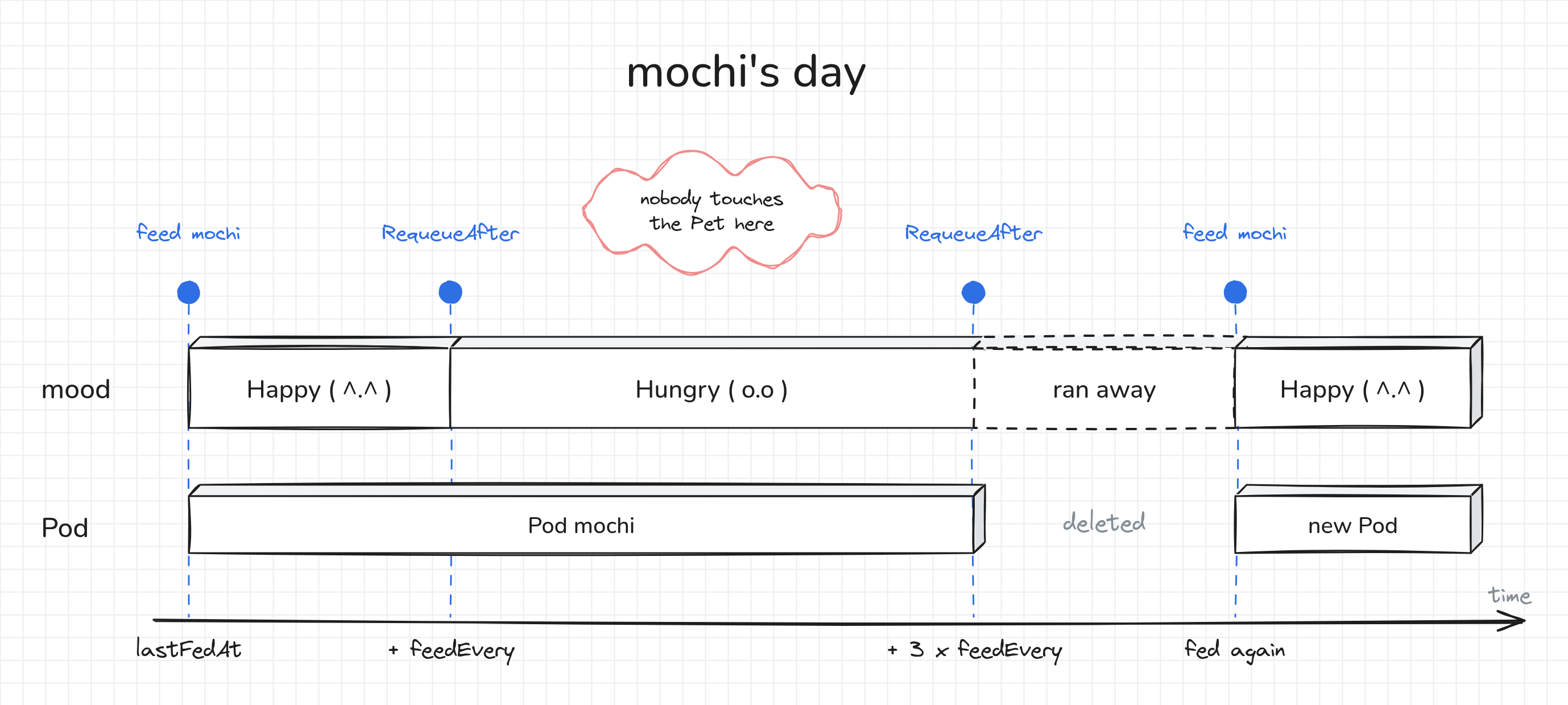
After a minute, the mood changes to Hungry.
After three minutes, mochi runs away, and the operator deletes its Pod:
NAME    SPECIES   FACE   MOOD    TOY    LAST FED   AGE
mochi   cat       😺      Happy   yarn   0s         79s
mochi   cat       😾      Hungry   yarn   61s        2m20s
mochi   cat       💨      RanAway   yarn   3m1s       4m20s
Nobody changed the Pet's spec during those three minutes.
Each reconcile returned a RequeueAfter that ends one second after the next mood change, so controller-runtime called Reconcile again right when the mood was due to change.
Wait for the checkpoint above to turn green before you feed mochi, or it might not notice that mochi was gone.
Meanwhile, check the events that the operator recorded:
kubectl describe pet -n zoo mochi | tail -n 8
  Face:                    💨
  Mood:                    RanAway
  Observed Generation:     6
Events:
  Type     Reason   Age    From          Message
  ----     ------   ----   ----          -------
  Normal   MovedIn  3m28s  pet-operator  mochi moved into Pod mochi
  Warning  RanAway  19s    pet-operator  mochi got too hungry and ran away
Once the checkpoint is green, feed mochi to bring it back:
feed mochi
kubectl get pets,pods -n zoo
pet.zoo.example.com/mochi patched
NAME                        SPECIES   FACE   MOOD    TOY    LAST FED   AGE
pet.zoo.example.com/mochi   cat       😺      Happy   yarn   5s         4m44s

NAME        READY   STATUS    RESTARTS   AGE
pod/mochi   1/1     Running   0          5s
Put mochi back on a relaxed diet, so that it doesn't run away during the next experiments:
kubectl patch pet -n zoo mochi --type=merge -p '{"spec":{"diet":{"feedEvery":"10m"}}}'
feed mochi
Deleting the Pod
kubectl delete pod -n zoo mochi
kubectl get pods -n zoo -w    # Ctrl+C to stop watching
pod "mochi" deleted from zoo namespace
NAME    READY   STATUS    RESTARTS   AGE
mochi   0/1     Pending   0          0s
mochi   0/1     Pending   0          0s
mochi   0/1     ContainerCreating   0          0s
mochi   0/1     ContainerCreating   0          0s
mochi   1/1     Running             0          1s
The Pod deletion triggered a reconcile of its owner Pet, and the controller created a new Pod.
Editing the card by hand
Next, try to change the pet's card behind the operator's back:
kubectl patch configmap -n zoo mochi-card --type=merge -p '{"data":{"card":"mochi is a dog now"}}'
kubectl get configmap -n zoo mochi-card -o jsonpath='{.data.card}'
configmap/mochi-card patched
mochi is happy.

  /\_/\
 ( ^.^ )
  > ^ <
playing with: yarn
By the time you read the card, the change is already gone. The ConfigMap update triggered a watch event, controller-runtime queued the owner Pet, and the reconcile wrote the correct card back.
Changing the spec
Unlike with the bash controller, a change to the Pet's spec now updates the pet's card:
kubectl patch pet -n zoo mochi --type=merge -p '{"spec":{"toy":"laser pointer"}}'

kubectl get configmap -n zoo mochi-card -o jsonpath='{.data.card}'
kubectl get pet -n zoo mochi \
  -o jsonpath='generation={.metadata.generation} observedGeneration={.status.observedGeneration}{"\n"}'
pet.zoo.example.com/mochi patched
mochi is happy.

  /\_/\
 ( ^.^ )
  > ^ <
playing with: laser pointer
generation=10 observedGeneration=10
observedGeneration is equal to generation, which means that the controller has processed the latest version of the spec.
Restarting the operator
Stop the operator with Ctrl+C in its tab.
While it's stopped, change the spec in the other tab:
kubectl patch pet -n zoo mochi --type=merge -p '{"spec":{"toy":"cardboard box"}}'
kubectl get configmap -n zoo mochi-card -o jsonpath='{.data.card}'   # still the laser pointer
Start the operator again in its tab with ./pet-operator, and check the card once more in the other tab:
kubectl get configmap -n zoo mochi-card -o jsonpath='{.data.card}'
mochi is happy.

  /\_/\
 ( ^.^ )
  > ^ <
playing with: cardboard box
On startup, the cache LISTs all Pets, and the controller reconciles each of them. The controller doesn't need to see every event, only the current state, so the change it missed while it was stopped doesn't matter.
Deleting a Pet
Remember how deleting goldie left its Pod running under the bash controller?
Let's try that again with the operator. Create a second Pet:
kubectl apply -f - <<'EOF'
apiVersion: zoo.example.com/v1alpha1
kind: Pet
metadata:
  name: smaug
  namespace: zoo
spec:
  species: dragon
  diet:
    food: sheep
    feedEvery: 6h
EOF

kubectl get pets,pods,configmaps -n zoo
pet.zoo.example.com/smaug created
NAME                        SPECIES   FACE   MOOD    TOY             LAST FED   AGE
pet.zoo.example.com/mochi   cat       😺      Happy   cardboard box   30s        5m14s
pet.zoo.example.com/smaug   dragon    🐲      Happy                              5s

NAME        READY   STATUS    RESTARTS   AGE
pod/mochi   1/1     Running   0          23s
pod/smaug   1/1     Running   0          5s

NAME                         DATA   AGE
configmap/kube-root-ca.crt   1      5m17s
configmap/mochi-card         1      4m3s
configmap/smaug-card         1      5s
Once the checkpoint above turns green, smaug has to move to a bigger zoo, so delete the Pet.
If you delete it earlier, the checkpoint might miss smaug's Pod, and you'll need to create the Pet again.
kubectl delete pet -n zoo smaug
kubectl get pods,configmaps -n zoo
pet.zoo.example.com "smaug" deleted from zoo namespace
NAME        READY   STATUS    RESTARTS   AGE
pod/mochi   1/1     Running   0          29s

NAME                         DATA   AGE
configmap/kube-root-ca.crt   1      5m23s
configmap/mochi-card         1      4m9s
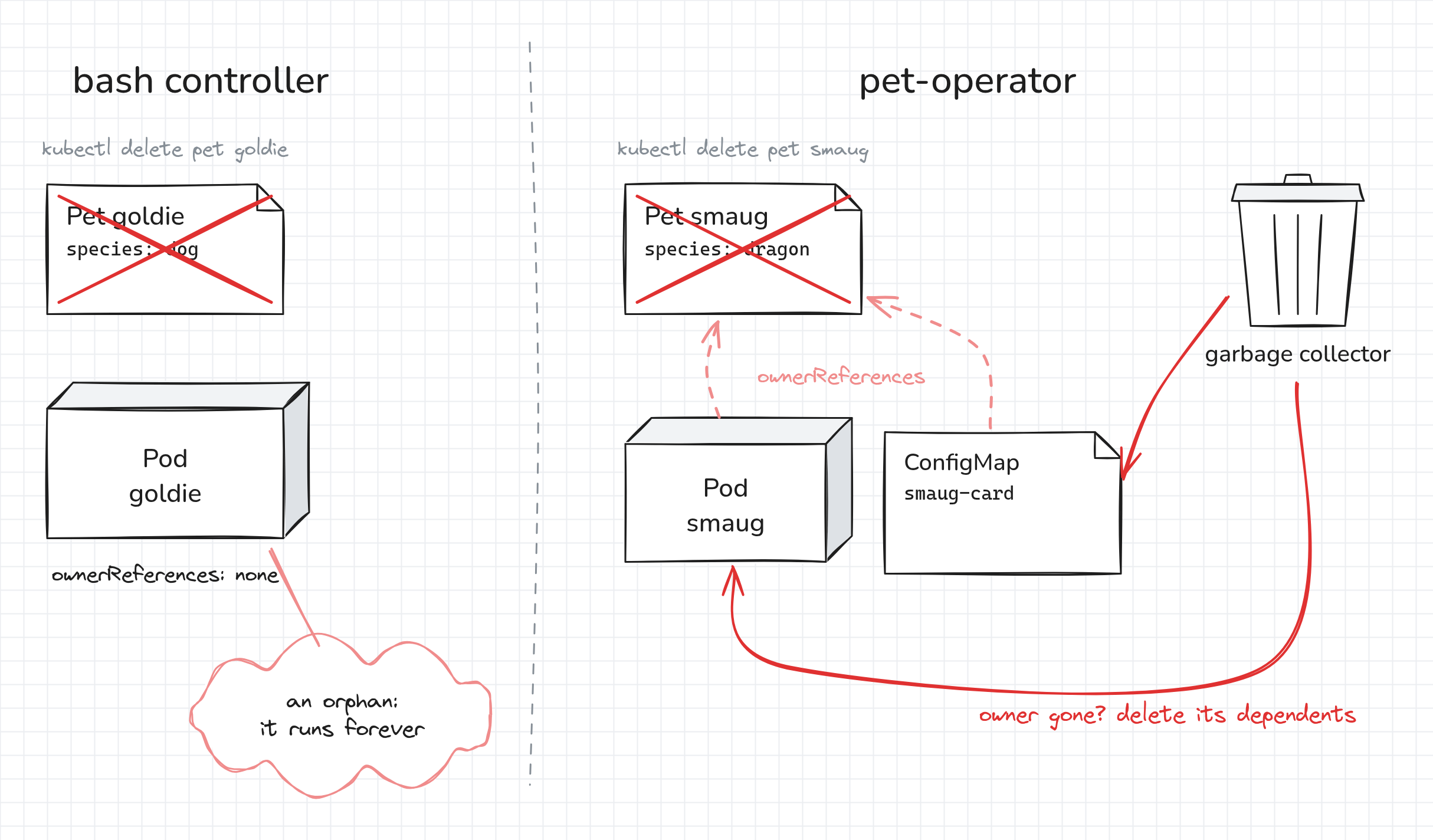
The Pod and the ConfigMap are gone, but the operator didn't delete them.
Its Reconcile got a "not found" error for the Pet and returned.
The Kubernetes garbage collector deleted them, because it deletes objects whose owner was deleted.
That's what the owner references are for.
Common points to debug
If something doesn't behave the way you expect:
- If
controller-genorgoisn't found, make sure yourPATHhas both Go directories:export PATH=$PATH:/usr/local/go/bin:$HOME/go/bin. - If
go buildfails with missing packages, rungo mod tidyin~/pet-operatoragain. - If
mochinever gets a Pod, check its conditions withkubectl describe pet -n zoo mochi.PodNameTakenmeans a Pod from the bash controller is still there. Delete it, and the operator movesmochiin within 10 seconds. - If a Pod is stuck in
PendingorContainerCreating, checkkubectl get events -n zoo. The Pod needs to pull thepublic.ecr.aws/docker/library/busybox:1.37image, and the cluster needs a working networking plugin. - If the checkpoint after starting the operator doesn't turn green and
kubectl get pet -n zoo mochi -o jsonpath='{.status.observedGeneration}'is empty, the API server still uses the hand-written CRD, which drops that field. Applyconfig/zoo.example.com_pets.yaml. - If
kubectl describe pet -n zoo mochishowsPodNameTakenorConfigMapNameTaken, an object that the Pet doesn't own is using the name the operator needs. Delete it, and the operator takes over within 10 seconds. If you just deleted and re-created the Pet, wait 10 seconds instead: the old Pet's objects are still being cleaned up. - If a change doesn't show up, check the operator logs. Every card update is logged, and so is every failed reconcile.
- If the card in the Pod logs looks out of date, give the kubelet a minute or two to refresh the mounted ConfigMap.
kubectl get configmap -n zoo mochi-card -o jsonpath='{.data.card}'shows the current card right away.
Wrapping up
That's it! You've built an operator from scratch. The CRD defines the API, and the API server checks every Pet against it. The controller gets a name, reads the current state, and fixes the cluster to match. Because it only looks at the current state, deleted Pods, manual edits, and restarts are all handled the same way.
Real operators like cert-manager use the same pieces: a status with conditions, RequeueAfter, Owns(), and owner references.
Production operators usually add a few more things:
- Finalizers, for cleanup that the garbage collector can't do, such as deleting resources outside the cluster.
- RBAC rules generated from
+kubebuilder:rbacmarkers, a ServiceAccount, and a Deployment to run the operator inside the cluster. - Predicates, such as
GenerationChangedPredicate, to skip reconciles that can't change anything, like the one triggered by the controller's own status update. - Tests with
envtest, which runs a real kube-apiserver and etcd. - Admission webhooks, for validation and defaulting that CEL can't express.
- A project generated by Kubebuilder, with a similar layout plus a Makefile, a Dockerfile, and kustomize manifests.
References
About the Author

Writes about
Frequently covers
More tutorials you might like
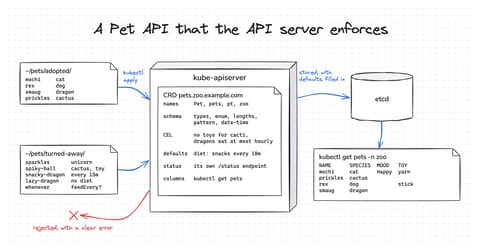
How Kubernetes CRDs Work: Designing a Validated API From Scratch
Build a CustomResourceDefinition for a small Pet API one layer at a time, and see how much the API server does with it on its own. By the end, it rejects invalid Pets, fills in defaults, keeps status separate, and prints useful columns. No controller and no code needed.
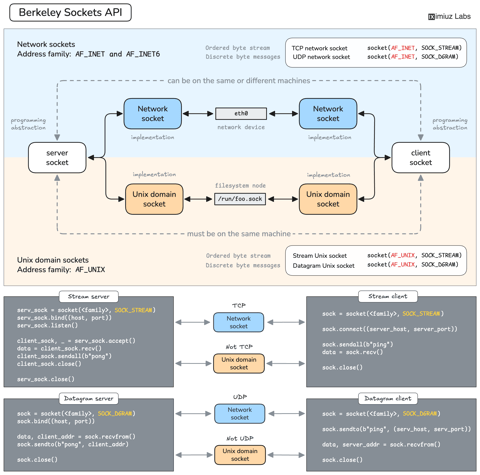
How Servers Work: A Hands-On Introduction to TCP Sockets
Learn how servers actually work by building a tiny TCP server and client from scratch. A hands-on introduction to sockets, TCP, and the network programming model every backend, DevOps, and platform engineer should go through at least once.

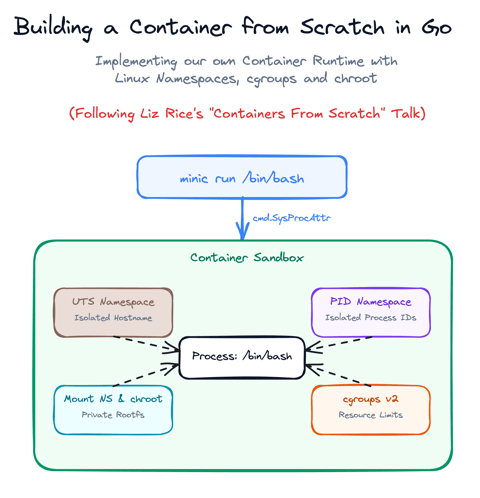
Build a Container from Scratch in Go (Liz Rice GOTO 2018)
Follow along with Liz Rice's classic GOTO 2018 presentation and build your own container runtime in under 100 lines of Go using Linux namespaces, chroot, and cgroups.

Using Go for Systems Programming
Discover how Go functions under the hood as a modern systems programming language. Learn how Go makes system calls directly, resulting in self-contained binaries that have no libc dependencies.
Learn by doing, not just by reading or watching
Sign up for a free account to start a VM playground right on this page, track your progress, and get notified about new learning materials.