PathViz Playground
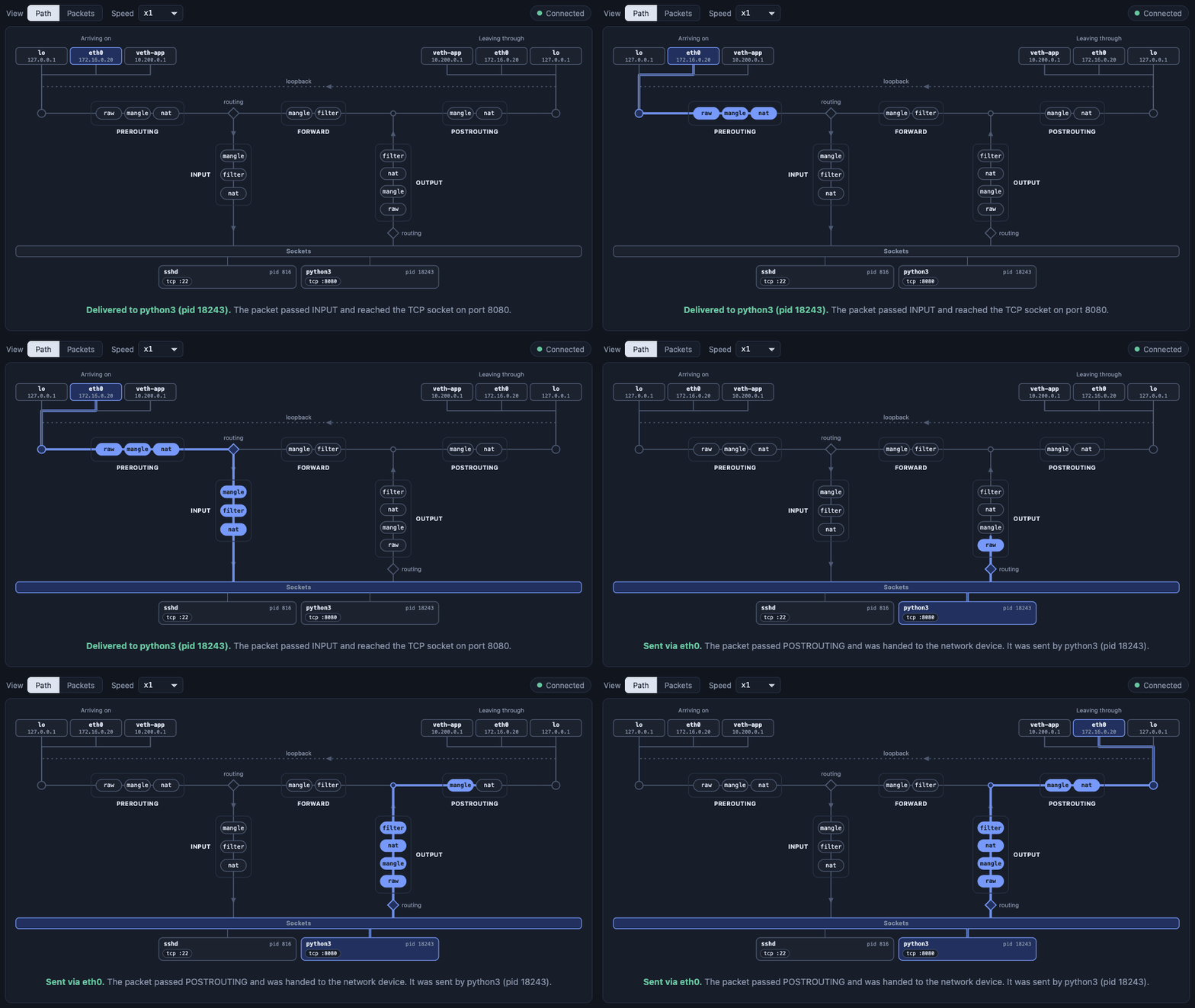
PathViz is a small packet path visualizer for Linux. This playground is an Ubuntu VM with PathViz running next to a simple web server and a client that sends it requests.
- eth0
- /
- golang
PathViz is a small packet path visualizer for Linux. It shows which netfilter hooks (PREROUTING, INPUT, FORWARD, OUTPUT, POSTROUTING) and which stages inside them (raw, mangle, nat, filter) a packet crosses on the machine, live, in a web page.
This playground is a vanilla Ubuntu VM with Go preinstalled. The
pathviz repo is cloned to ~/pathviz, built from
the main branch, and started together with its local demo: a web server on port 8080
and a client that sends it a request every two seconds. The web UI is open on the right.
Use it to:
- Watch packets cross the hooks. The demo requests go over the loopback interface, so every packet crosses OUTPUT, POSTROUTING, PREROUTING, and INPUT.
- See what a firewall rule does. Add an
iptablesornftrule in the terminal (e.g.sudo iptables -A INPUT -p tcp --dport 8080 -j DROP) and watch where the packets stop. - Trace your own traffic. Change the filter in the web UI, then use
curl,ping, or a container to produce the packets. - Hack on PathViz. Modify the code, then run
make demo-local LISTEN=0.0.0.0:7070in~/pathvizto rebuild and restart it.
A real VM, not a container
Get root on a VM with its own kernel, so Docker, Kubernetes, and systemd just work.
Read the docs →
SSH from browser or CLI
Use the built-in web terminal, or connect with labctl ssh, plain ssh, scp, or rsync.
Read the docs →
Drive it with AI
Let Claude, Codex, or any MCP client start this playground and run commands in it.
Read the docs →
Expose HTTP(S) ports
Give any web app running inside the VM a public URL - for yourself or to share with others.
Read the docs →
Share terminals
Invite others into your terminal session, or open it yourself from another device.
Read the docs →
Customize with init scripts
Add shell scripts that run at boot to install packages, clone repos, or seed test data.
Read the docs →
Private networking
VMs reach the internet via NAT with no public IP; several VMs share bridge networks.
Read the docs →
Ephemeral or persistent
By default, VMs are destroyed when the session ends; enable persistence to keep the disks for next time.
Read the docs →
Built-in container registry
A private registry.iximiuz.com for every playground to share images across services and VMs.
Read the docs →