Coding Agent Base Playground
Get a disposable agentic coding environment in seconds. Claude Code, Codex, Gemini CLI, and Opencode pre-installed and ready to use.

- eth0
- /
- coding-agent-base
What is This and Why?
This playground gives you a quick way to clone any GitHub repository into a preconfigured coding environment and unleash the full power of coding agents on it without being afraid of damaging your host OS or compromising your sensitive local data.
This playground is meant to be used only with public repositories and non-critical API keys. However, this restriction is not specific to the playground - this should already be a requirement, given that you're trusting your code and/or access keys to a potentially vulnerable coding agent.
Quick Start
- Enter a repository name (optionally)
- Click Start Playground (or use
labctl playground start --ssh coding-agent-base) - The login shell will end up in the
$HOME/workspace - Fire up your favorite agent in the YOLO mode 🙈
Example:
# Authenticate to Claude API
claude setup-token

# Try out an ad hoc prompt
claude -p "what does this project do?"

# Add any number of MCP servers
claude mcp add postgres-server

# Run a coding session with the YOLO mode on
claude --dangerously-skip-permissions
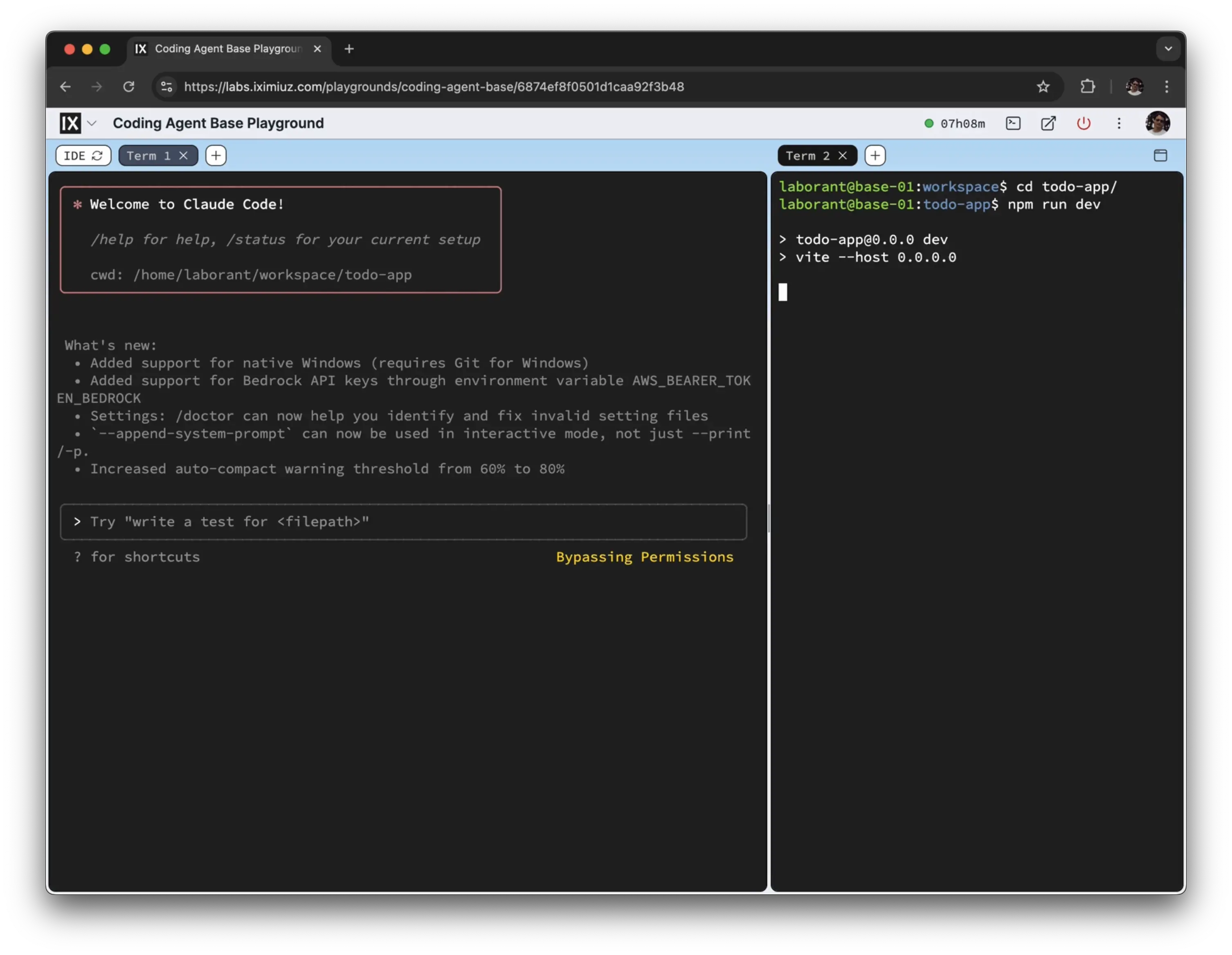
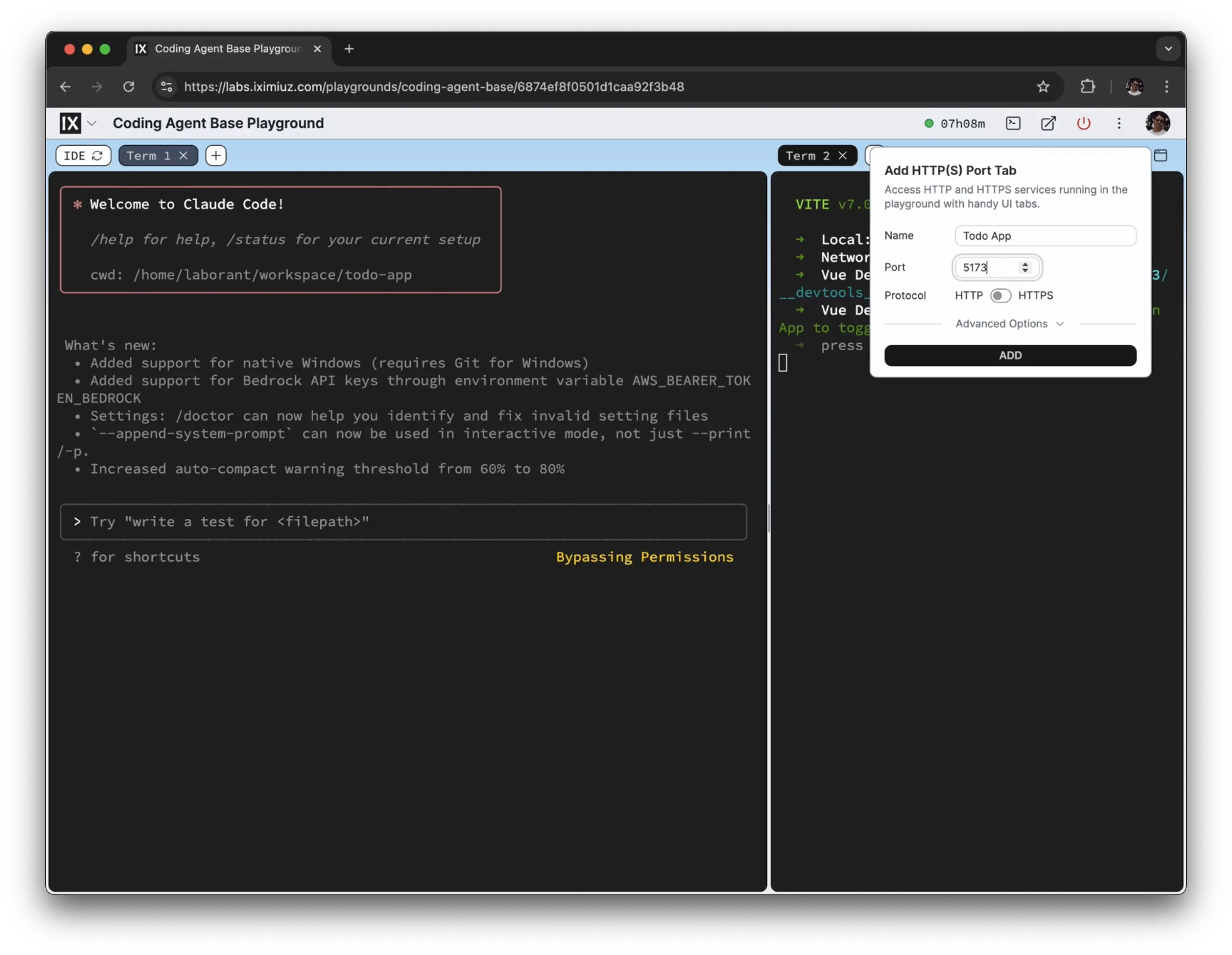
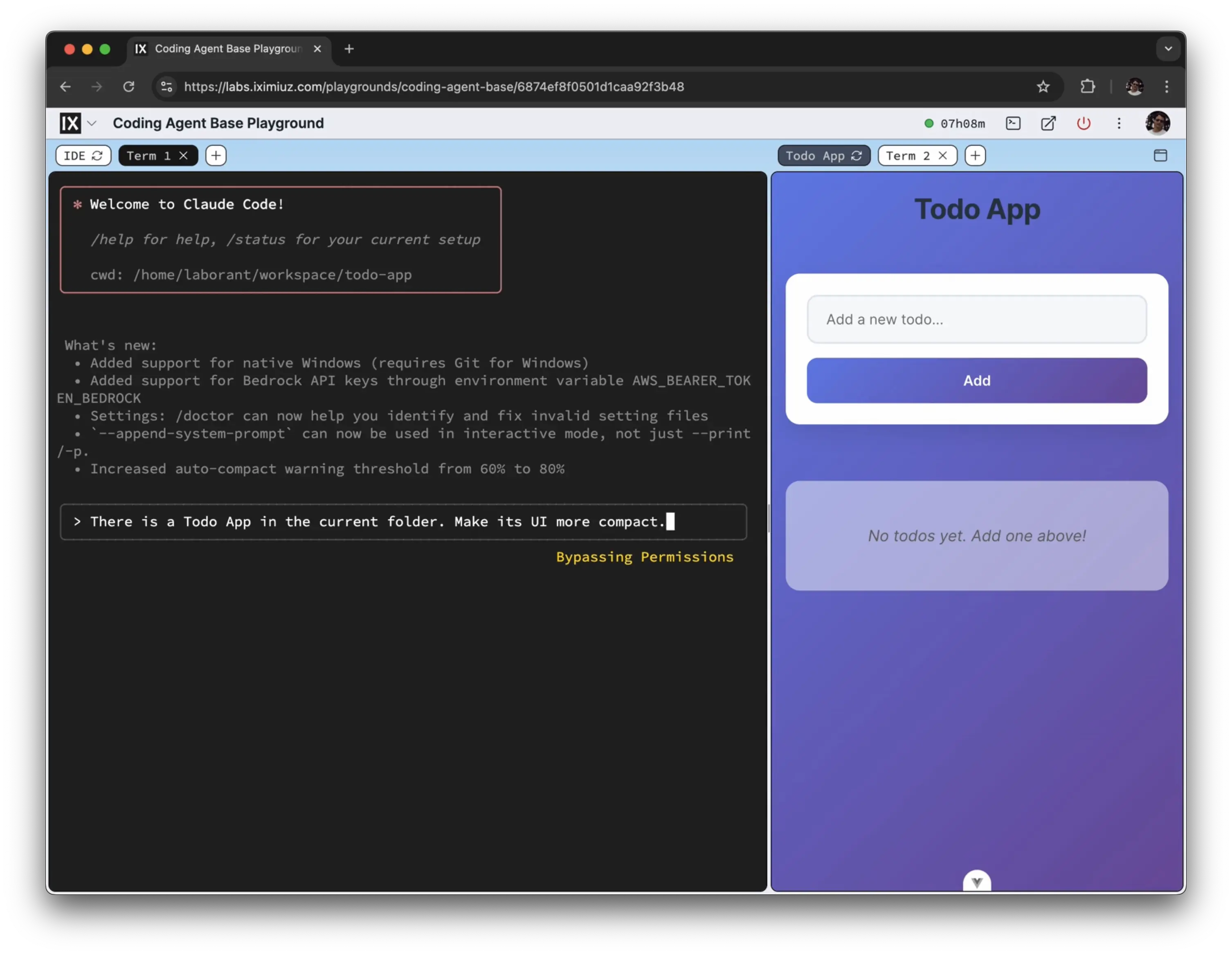
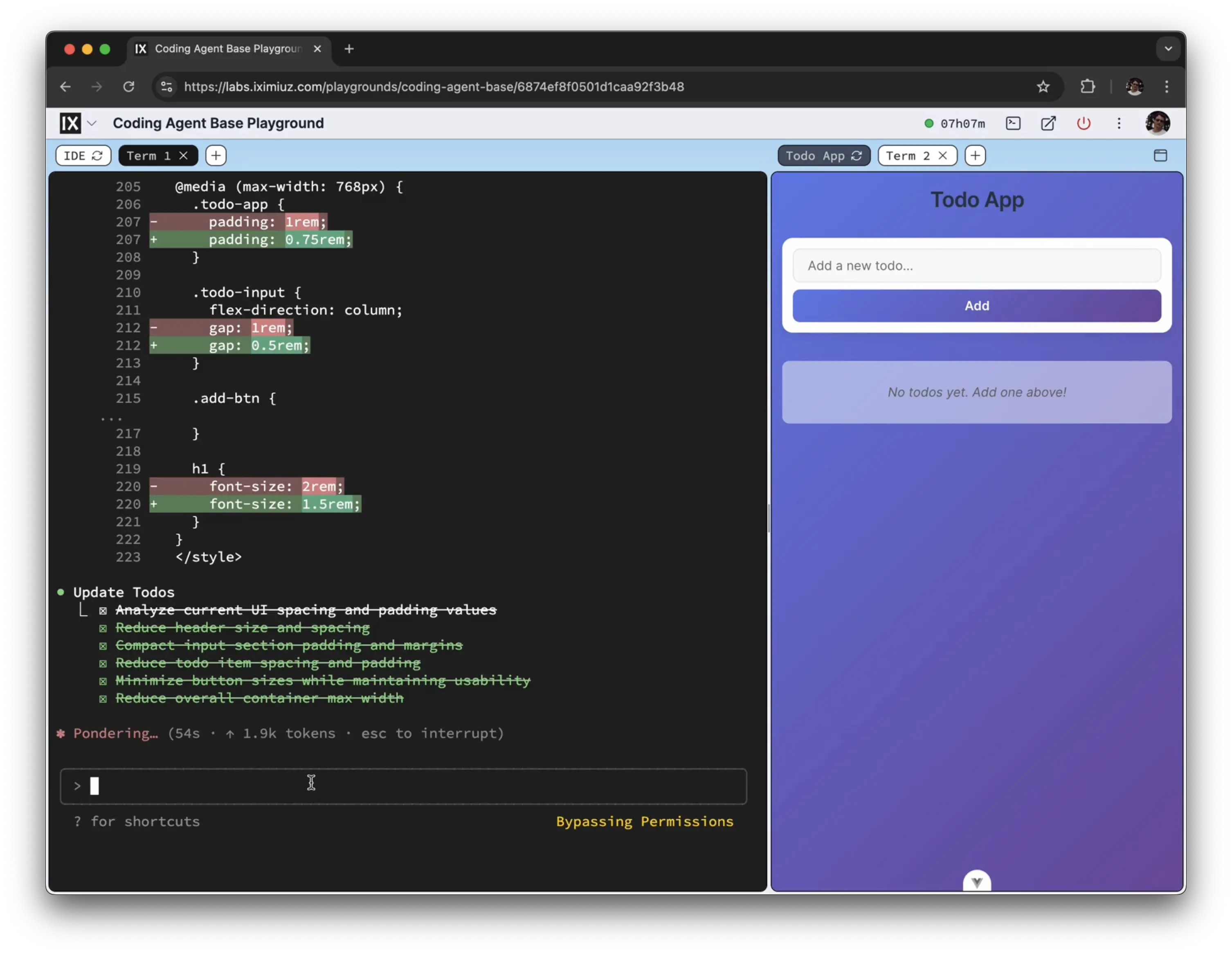
If you're developing a web application, ask the agent to start a dev server on 0.0.0.0:3000,
and use a split view (cmd + \) with a web tab on the right.
Familiar Developer Experience
The playground provides tools all developers are most familiar with:
- A full-fledged Linux VM with Docker preinstalled
- Terminal access with tabs and split view support
- A dynamically reloaded "web page" sidebar to review changes
- A built-in web IDE (VS Code) for fine-tuning generated code
- Access from a local terminal via
labctl ssh - Exposing the work with a public (or authentication-protected) URL
- Sharing playground terminal sessions with colleagues
- Coming soon - Snapshot and recover the results
The above capabilities should make development in the playground as convenient as running agents locally. At the same time, the remote nature of the playground allows for publishing results and sharing access, while the fully isolated VM sandbox should provide additional peace of mind.
Supported Application Stacks
At the moment, the following language runtimes and the corresponding development tools are preinstalled (but we're happy to add more upon request):
- Python
- Node.js
- Go
Agents
Enjoy all SOTA coding agents and a couple of contenders. Mix, match, and combine them at your own risk 🧪
| Agent | Command | Repository | Getting Started |
|---|---|---|---|
| Claude Code | claude | anthropics/claude-code | Quickstart |
| Codex CLI | codex | openai/codex | OpenAI Codex Documentation |
| Gemini CLI | gemini | google-gemini/gemini-cli | Gemini CLI Documentation |
| GitHub Copilot CLI | copilot | github/copilot-cli | About GitHub Copilot CLI |
| OpenCode | opencode | anomalyco/opencode | OpenCode Documentation |
| Qwen Code | qwen | QwenLM/qwen-code | Quick Start |
| Crush | crush | charmbracelet/crush | Getting Started |
| Cline | (via web IDE plugin) | cline/cline | Getting Started |
More LLM Tools
The playground also has a few general-purpose LLM tools in it.
Ollama
Ollama allows you to run large language models locally. It's great for experimenting with different models without sending your code to external services.
To get started with Ollama:
# Start the Ollama server
ollama serve
# Pull a model and start using it
ollama pull llama3.2:latest
ollama run llama3.2:latest
LLM (simonw/llm)
llm is a command-line tool and Python library for interacting with Large Language Models, both via remote APIs and models that can be installed and run on your own machine.
To use it with Ollama:
# Use it with local models (assuming you ollama pull'ed llama3.2:latest)
llm -m llama3.2:latest 'What is the capital of France?'

# Or with remote APIs (requires API key configuration)
llm keys set openai
llm -m gpt-4 'Explain how async/await works in JavaScript'
You can also use llm to manage different model configurations and maintain conversation history across multiple interactions.
MCP Inspector
MCP Inspector is the official developer tool for testing and debugging MCP (Model Context Protocol) servers.
The mcp-inspector binary bundles three clients: a scriptable CLI (--cli), a TUI (--tui), and a web UI (the default).
Example:
# List all available tools from a filesystem server
mcp-inspector --cli \
    npx @modelcontextprotocol/server-filesystem ~ \
    --method tools/list

# Call a specific tool
mcp-inspector --cli \
    npx @modelcontextprotocol/server-filesystem ~ \
    --method tools/call --tool-name read_text_file --tool-arg path=$HOME/workspace/README.md

# Inspect a remote server
mcp-inspector --cli https://my-mcp-server.example.com --transport http --method tools/list

# Open an interactive TUI
mcp-inspector --tui npx @modelcontextprotocol/server-filesystem ~
The web UI (mcp-inspector) listens on 127.0.0.1:6274 only; reach it from your laptop with labctl port-forward <playground> -L 6274:6274.
A real VM, not a container
Get root on a VM with its own kernel, so Docker, Kubernetes, and systemd just work.
Read the docs →
SSH from browser or CLI
Use the built-in web terminal, or connect with labctl ssh, plain ssh, scp, or rsync.
Read the docs →
Drive it with AI
Let Claude, Codex, or any MCP client start this playground and run commands in it.
Read the docs →
Expose HTTP(S) ports
Give any web app running inside the VM a public URL - for yourself or to share with others.
Read the docs →
Share terminals
Invite others into your terminal session, or open it yourself from another device.
Read the docs →
Customize with init scripts
Add shell scripts that run at boot to install packages, clone repos, or seed test data.
Read the docs →
Private networking
VMs reach the internet via NAT with no public IP; several VMs share bridge networks.
Read the docs →
Ephemeral or persistent
By default, VMs are destroyed when the session ends; enable persistence to keep the disks for next time.
Read the docs →
Built-in container registry
A private registry.iximiuz.com for every playground to share images across services and VMs.
Read the docs →