Sealed Secrets: Kubernetes Secrets the Control Plane Cannot Read

A Kubernetes Secret is only base64-encoded. Everyone who administers the cluster can read it: through the API server, in etcd, on the node that runs the pod. Confidential Containers removes the cluster and its nodes from the trusted computing base, so a confidential pod cannot take its secrets from them.
A sealed secret solves this without changing how secrets are deployed. It is a pointer that only a verified confidential pod can resolve. You can still put it into a normal Kubernetes Secret and reference it from the pod spec. Kubernetes stores and delivers it like any other value, and the plaintext only appears inside the pod VM after attestation. Red Hat OpenShift sandboxed containers supports sealed secrets in this form.
In this tutorial you create one, look at it from the cluster's point of view, and unseal it with the real guest components and Trustee.
There is no TEE in this playground. The guest components use the sample attester, so the evidence is not backed by hardware. Everything else, including the sealed secret format and its verification, is the real code.
1. Prepare Trustee and the guest components
Trustee (KBS, Attestation Service, RVPS) is already running in ~/trustee. The guest
components (attestation-agent, confidential-data-hub, api-server-rest) are copied out
of the Kata confidential guest image while the playground starts, which takes about two
minutes.
Store the secret value in the KBS, register the reference values of the sample platform and release secrets only to an affirming attestation result. The tutorial Trustee Hands-On explains each step.
cd ~/trustee
echo "s3cr3t-db-password" > ~/db-password.txt
kbs-client config set-resource --path default/app/db-password --resource-file ~/db-password.txt
kbs-client config set-resource-policy --affirming
kbs-client config set-sample-reference-value launch_digest abcde
kbs-client config set-sample-reference-value svn 1
kbs-client config set-sample-reference-value major_version 1 --as-integer --as-single-value
kbs-client config set-sample-reference-value minimum_minor_version 4 --as-integer --as-single-value
2. Create a signing key
A sealed secret is signed. Without a signature, anyone who can edit the Kubernetes Secret could point it at a different resource, for example a key the attacker controls. The guest verifies the signature before it acts on the sealed secret.
The secret CLI is built from the Confidential Data Hub's source. Generate a P-256 key
pair in JWK format:
mkdir -p ~/sealing
secret keygen --kid sealing-key --output-dir ~/sealing
cat ~/sealing/sealing-key-public.json
The guest needs the public key to verify signatures. Publish it through the KBS, so the guest receives it only after attestation:
kbs-client config set-resource --path default/sealing/public-key --resource-file ~/sealing/sealing-key-public.json
Keep sealing-key-private.json where your deployment pipeline runs. It never goes into
the cluster.
3. Seal the secret
There are two kinds of sealed secrets:
- vault: a signed pointer to a resource held by a key broker or KMS. The secret value never leaves the KBS until the pod is verified.
- envelope: the encrypted value travels inside the sealed secret, and the key broker only releases the key that decrypts it.
Create a vault sealed secret that points at the password in the KBS:
secret seal --signing-kid kbs:///default/sealing/public-key \
            --signing-jwk-path ~/sealing/sealing-key-private.json \
  vault --resource-uri kbs:///default/app/db-password --provider kbs \
  | grep '^sealed\.' > ~/sealed.txt
cat ~/sealed.txt
The format is sealed. followed by a JSON Web Signature: header, payload and signature,
separated by dots. Decode the header and the payload:
cut -d. -f2 ~/sealed.txt | basenc --base64url -d 2>/dev/null; echo
cut -d. -f2-4 ~/sealed.txt | jwt-claims
The header names the verification key (kid), and the payload names the resource. The
password itself is not in it.
4. Put it into a Kubernetes Secret
From here on the sealed secret is handled like any other secret value. Generate the
manifest your pipeline would apply (--dry-run=client only renders it, no cluster
needed):
kubectl create secret generic db-credentials \
  --from-literal=password="$(cat ~/sealed.txt)" \
  --dry-run=client -o yaml > ~/db-secret.yaml
cat ~/db-secret.yaml
This is everything the API server, etcd and the node ever see. Decode it as a cluster administrator would:
awk '$1 == "password:" {print $2}' ~/db-secret.yaml | base64 -d | cut -c1-60; echo
You get the sealed string, not the password.
A confidential pod uses it like any secret. Nothing in the pod spec marks it as sealed:
apiVersion: v1
kind: Pod
metadata:
  name: app
spec:
  runtimeClassName: kata-qemu-coco-dev   # kata-qemu-snp / kata-qemu-tdx on TEE hardware
  containers:
  - name: app
    image: registry.example.com/app:1.0
    env:
    - name: DB_PASSWORD
      valueFrom:
        secretKeyRef:
          name: db-credentials
          key: password
When the Kata agent inside the pod VM creates the container, it notices that the value of
DB_PASSWORD starts with sealed. and asks the Confidential Data Hub to unseal it. The
container starts with the plaintext in its environment. Secrets mounted as volumes are
handled the same way.
5. Unseal it the way the guest does
This playground cannot boot a pod VM, so you run the unsealing step yourself with the same code. Start the guest components:
sudo coco-guest start
secret unseal runs the Confidential Data Hub's unsealing code and uses the running
attestation agent for the KBS handshake, just as the CDH does inside the guest:
export AA_SOCKET=unix:///run/confidential-containers/attestation-agent/attestation-agent.sock
export AA_KBC_PARAMS=cc_kbc::http://127.0.0.1:8080
sudo --preserve-env=AA_SOCKET,AA_KBC_PARAMS \
  secret unseal --aa-kbc-params "$AA_KBC_PARAMS" --file-path ~/sealed.txt
cat ~/sealed.txt.unsealed
Three things happened in order:
- The CLI attested to the KBS through the attestation agent and fetched
default/sealing/public-key. - It verified the signature of the sealed secret with that key.
- It fetched the resource the payload points to,
default/app/db-password, and wrote it to~/sealed.txt.unsealed.
6. Try to forge one
Someone with write access to the Kubernetes Secret wants the pod to fetch a different resource. They keep the header and signature, and replace the payload:
payload=$(printf '%s' '{"version":"0.1.0","type":"vault","name":"kbs:///default/attacker/key","provider":"kbs","provider_settings":{},"annotations":{}}' \
  | basenc --base64url -w0 | tr -d '=')
echo "sealed.$(cut -d. -f2 ~/sealed.txt).$payload.$(cut -d. -f4 ~/sealed.txt)" > ~/forged.txt

sudo --preserve-env=AA_SOCKET,AA_KBC_PARAMS \
  secret unseal --aa-kbc-params "$AA_KBC_PARAMS" --file-path ~/forged.txt 2>&1 | grep -m1 Failed
The signature no longer matches the payload, and unsealing stops with SignatureError
before the resource in the payload is ever requested. Without the private key, which never entered the
cluster, a valid sealed secret cannot be produced.
7. Revoke unsealing at the key broker
The sealed secret in the cluster never changes, so who can unseal it is decided entirely by Trustee. Mark the platform's security version 1 as no longer acceptable, then try again:
cd ~/trustee
kbs-client config set-sample-reference-value svn 2
sudo rm -f ~/sealed.txt.unsealed
sudo --preserve-env=AA_SOCKET,AA_KBC_PARAMS \
  secret unseal --aa-kbc-params "$AA_KBC_PARAMS" --file-path ~/sealed.txt 2>&1 | grep -o -m1 'Access denied by policy'
The attestation result is no longer affirming, so the KBS releases neither the verification key nor the password. A pod using this Secret would not start with the plaintext.
Stop the guest components when you are done:
sudo coco-guest stop
Sealed secrets on OpenShift with Red Hat build of Trustee
- Red Hat's bare-metal guide builds the sealed string by hand as
sealed.fakejwsheader.<payload>.fakesignature. That unsigned form only unseals when the guest skips signature verification. The upstream guest components used here verify the signature by default. - The resource behind
kbs:///default/<name>/<key>is an OpenShift secret listed underkbsSecretResourcesin theKbsConfig. - The pod also needs initdata that points its Confidential Data Hub at your Trustee, and a
kata-cc(or TEE-specific) runtime class.
What's next
- Inside the Pod VM shows how initdata binds secret release to the pod's configuration.
- Sealed secret format in the guest-components repository.
- Red Hat: Deploy sensitive workloads with OpenShift confidential containers.
Learn by doing, not just by reading or watching
Sign up for a free account to start a VM playground right on this page, track your progress, and get notified about new learning materials.
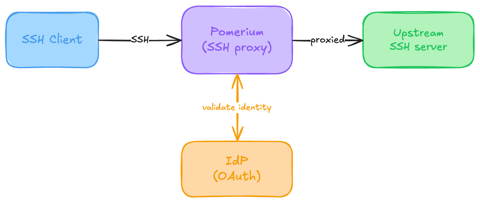
Native SSH Access with Pomerium
Pomerium can be used as a native SSH reverse proxy, adding OAuth authentication and flexible Pomerium policy enforcement to standard SSH connections, without the need for tunnels, or custom clients or servers.

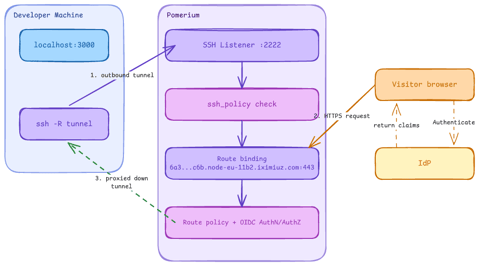
Native SSH Reverse Tunneling with Pomerium
Use Pomerium's native SSH support to publish a local service through a standard reverse SSH tunnel, with OpenID Connect (OIDC) authentication and continuous authorization on every request. Reach services behind Network Address Translation (NAT) without firewall holes or custom agents, and control both who can use the service and who can open the tunnel. Application traffic stays on infrastructure you control.
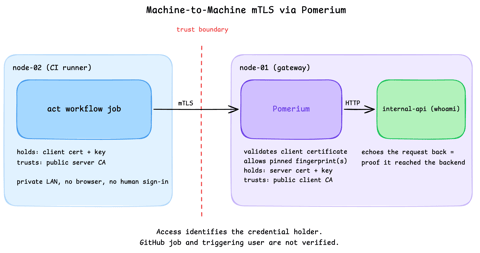
Secure Machine-to-Machine Access with mTLS and Pomerium
Run a GitHub Actions-compatible continuous integration (CI) job on a private runner and protect its internal API call with mutual TLS (mTLS) and Pomerium. Build separate server and client trust chains, authorize one machine certificate by fingerprint, then revoke, restore, and rotate its credentials through live policy changes.
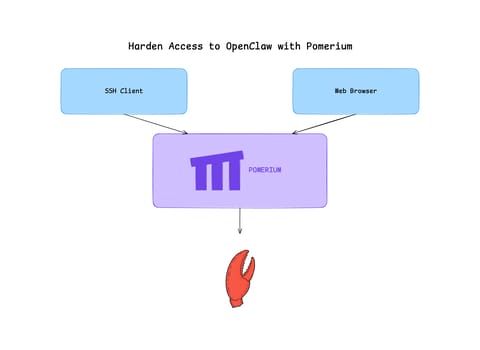
Harden Access to OpenClaw with Pomerium
Put OpenClaw, a self-hosted AI assistant with shell and file access, behind a web route and an SSH route, both gated by the same identity and Pomerium's context-aware policy. OpenClaw runs in trusted-proxy mode, trusting signed identity headers instead of its own login, while Pomerium's native SSH proxy signs short-lived certificates for shell access.