Control MCP Tool Access with Fine-Grained Policies
From Who Can Connect to Who Can Call What
Every policy in this course so far has been connection-level: one route, one email check. You either reach the whole Model Context Protocol (MCP) server, every tool it exposes, or you reach none of it. That's been true of echo, whoami, and list_repos alike: whichever of the three a caller invokes, the policy has never looked past the connection to notice which one.
This lesson gives your MCP server a tool that does: create_repo, which calls GitHub's POST /user/repos and actually creates a repository under your account. It makes the gap in a connection-level policy concrete: once you're allowed to reach the server, you're allowed to call every tool on it, whoami and list_repos, but also create_repo. That gap shows up for more than one reason. The same route is often reached by more than one kind of caller: an SRE team might reasonably need every tool the server exposes, while other engineers calling the same server need a smaller set, all through the same connection-level allow. It also shows up because upstream OAuth scopes are coarser than the tools built on them: GitHub's repo scope, the same one this course's server already requests, covers reading a repository and creating one alike, so nothing about the scope itself tells create_issue apart from create_repo. An organization might be fine with an MCP client opening issues or pull requests but not creating repositories, a line the OAuth scope alone cannot draw. Pomerium's per-tool policy can draw it instead, deciding per request regardless of what the token's scope allows. A single email-based policy can't express either kind of narrowing, because it never looks past "who is this?" to "what are they asking to do?"
Pomerium's mcp_tool policy criterion closes that gap. It matches on the tool name inside a tools/call request, so a policy can allow or deny individual tools, independent of whether the connection itself is allowed. Two policy blocks on the same route, an allow on email and a deny on a specific tool name, do not conflict: Pomerium computes an overall allow and an overall deny by combining every block, and a deny anywhere wins. The mcp_tool criterion only ever fires on tools/call requests, too, so it never touches initialize, tools/list, or any other part of the connection handshake, only actual tool invocations.
By the end of this lesson, you'll have:
- Added a mutating tool,
create_repo, and called it once with no per-tool policy in place, to see the actual risk a connection-only policy leaves open - Written an
mcp_tooldeny rule blocking that one tool by name, which takes effect immediately - Removed that same rule, just as immediately, and watched the tool become callable again
- Read the resulting audit log entries: which tool was called, by whom, and whether policy let it through
What you should already know
- Everything from the previous lesson: upstream OAuth, the
whoamiandlist_repostools, and the shape of a Pomerium route withmcp: server: {} - Comfortable reading and writing a small amount of TypeScript (you'll add one tool) and editing YAML by hand (you'll edit the gateway's policy directly this time, not through a paste-back task)
- A GitHub account with an OAuth App you can register or reuse, same requirement as the previous lesson. If you still have that lesson's app, you can reuse it here: you'll just update its callback URL to this lesson's route address. The
reposcope it already requests covers repository creation, so no re-consent is needed for the new tool.
Everything else (Node.js, the MCP server template, Pomerium) is preinstalled in the playground. This lesson builds on the previous one's shape but does not require you to have completed it.
The setup
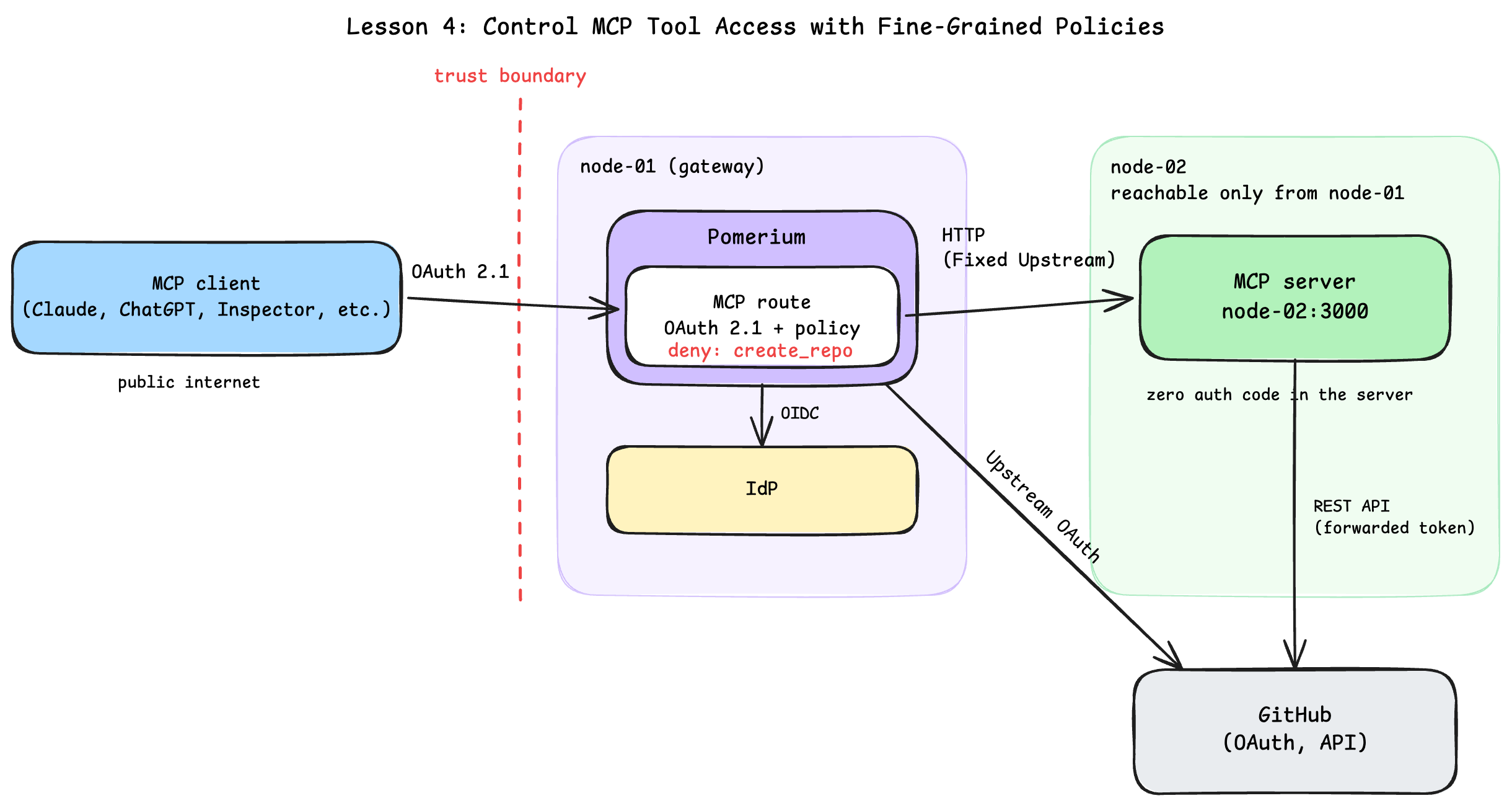
The playground has the same two machines as the previous lesson, with one addition:
- node-02 (the server): runs the MCP server. Its tabs: server for the MCP server and its logs, client for everything you run as a caller, inspector for MCP Inspector, and server-ide to edit
tools.ts. - node-01 (the gateway): runs Pomerium. Its tabs: gateway for its terminal, and a new gateway-ide tab. Every previous lesson only ever had you paste values into placeholders; this is the first lesson where you edit the gateway's
config.yamlby hand, so it gets its own editor.
Start the server
The MCP server is the same mcp-typescript-template, already cloned to ~/mcp-server on node-02 with dependencies installed, and it ships with echo, whoami, and list_repos, exactly where the previous lesson left off.
In the server terminal on node-02, start the MCP server in dev mode. Piping through tee also saves everything to a log file, so a later unit's checks can confirm what the log shows without changing what you see here:
cd ~/mcp-server
npm run dev | tee /tmp/mcp-server.log
You should see a log line ending with MCP TypeScript Template Server running on port 3000.
Add a tool worth restricting
Every tool on this server so far only reads. To make per-tool policy worth writing, you need a tool that writes something. Open the server-ide terminal and edit ~/mcp-server/src/tools.ts. Add a create_repo tool inside registerTools(), next to the existing registerTool calls:
server.registerTool(
  "create_repo",
  {
    title: "Create Repo",
    description: "Create a new private repository under the authenticated GitHub user's account",
    inputSchema: z.object({
      name: z.string().describe("The name of the repository to create"),
    }),
    outputSchema: z.object({
      full_name: z.string().nullable().describe("The full name (owner/repo) of the created repository, or null on failure"),
      html_url: z.string().nullable().describe("The URL of the created repository, or null on failure"),
      error: z.string().optional().describe("Error message, present only on failure"),
    }),
    annotations: {
      readOnlyHint: false,
      idempotentHint: false,
      openWorldHint: true,
    },
  },
  (args, ctx) => createRepo(args, ctx),
);
And its handler, alongside whoami and listRepos:
async function createRepo(
  args: { name: string },
  ctx: ServerContext,
): Promise<CallToolResult> {
  const token = bearerToken(ctx);
  if (!token) {
    return createErrorResult({ full_name: null, html_url: null, error: "No upstream GitHub token on this request" });
  }
  const res = await fetch("https://api.github.com/user/repos", {
    method: "POST",
    headers: {
      Authorization: `Bearer ${token}`,
      Accept: "application/vnd.github+json",
      "Content-Type": "application/json",
      "User-Agent": "mcp-typescript-template",
    },
    body: JSON.stringify({ name: args.name, private: true }),
  });
  if (!res.ok) {
    const body = await res.text();
    return createErrorResult({ full_name: null, html_url: null, error: `GitHub API returned ${res.status}: ${body.slice(0, 300)}` });
  }
  const repo = (await res.json()) as { full_name: string; html_url: string };
  logger.info({ toolName: "create_repo" }, "Tool executed");
  return createTextResult({ full_name: repo.full_name, html_url: repo.html_url });
}
readOnlyHint: false and idempotentHint: false in the tool annotations are not decorative: they are this tool telling any client that calls it (an agent, MCP Inspector, anything) that it changes state and cannot be safely retried like whoami can. The same bearerToken() helper you read through last lesson does all the work here too; create_repo never touches OAuth any more than whoami did.
Save the file. The dev server runs with --watch, so it restarts on its own; check the server terminal for a fresh startup line.
If the server fails to restart, check that terminal for a TypeScript error; a missing comma after the previous registerTool(...) call is the usual suspect.
There is no way to call it yet: Pomerium is not even running, and nothing has told it about GitHub. Configuring the route, same as last lesson, is next.
Configure the Route
The route itself is unchanged from the previous lesson: from, to, an mcp: server: {} block with upstream_oauth2 wired to GitHub, and a policy that checks one email. Nothing here is new; this unit gets the same stack running again so unit 3 has something to test a per-tool policy against.
The gateway machine (node-01) already has everything generated for you in ~/pomerium-gateway. Take a look in the gateway terminal:
cat ~/pomerium-gateway/pomerium-config/config.yaml
The parts that matter, all familiar from the previous lesson:
idp_provider: hostedhandles downstream sign-in with Pomerium's hosted authenticate service, used here for quick setup and testing. In production, configure Pomerium to use your production identity provider.mcp.server.upstream_oauth2: the same GitHub OAuth client configuration,client_id,client_secret,scopes: ["read:user", "repo"], and GitHub'sauth_url/token_url.- The route's policy: one
allowblock checking one email. This is the connection-level policy from every previous lesson. By the end of this lesson, it will not be the only policy block on this route. authorize_log_fields: already includesmcp-method,mcp-tool, andmcp-tool-parameters, alongsiderequest-id,path,host, andemail. Without these, tool calls would still be allowed or denied, but they would not show up in the authorize log at all. Unit 3 reads that log entry by entry to prove exactly which tool ran and why policy let it through or blocked it.
The config still contains REPLACE_WITH_... placeholders, including two for the GitHub OAuth App.
Expose the ports
First, the authenticate service URL, where downstream OAuth callbacks land:
copy the auth URLNext, the MCP route URL:
copy the MCP URLRegister or reuse a GitHub OAuth App
If you still have the OAuth App from the previous lesson, you can reuse it: open its settings on GitHub and update its Authorization callback URL to this lesson's route URL plus /.pomerium/mcp/client/oauth/callback (the exact command below prints it). Its repo scope already covers repository creation, so nothing else about it needs to change.
Otherwise, follow GitHub's instructions to create a new OAuth App with these values:
- Application name: anything you like (e.g.
MCP Tool Policy Lesson) - Homepage URL: required by GitHub. Reuse your MCP route URL from above.
- Authorization callback URL: your MCP route URL with
/.pomerium/mcp/client/oauth/callbackappended, same as the previous lesson. Print the exact value, still in the gateway terminal:
ROUTE_URL=$(cat /tmp/mcp-lesson.route-address | tr -d '[:space:]' | sed 's|/$||')
echo "$ROUTE_URL/.pomerium/mcp/client/oauth/callback"
Copy the client ID and, if you registered a new app, generate and copy a client secret immediately; GitHub only shows it once. Paste them below:
If GitHub ever shows redirect_uri_mismatch later in this lesson, the callback URL registered on the app does not exactly match your route URL plus /.pomerium/mcp/client/oauth/callback, scheme included. If you reused the previous lesson's app, this is almost always a stale callback URL from that lesson's own route address.
Secure the route with your email
Same as every previous lesson:
If you're curious, cat the config again to confirm every placeholder is filled in, still in the gateway terminal:
cat ~/pomerium-gateway/pomerium-config/config.yaml
The checks below can only verify that no placeholder is left, not that each value landed in the right field. If a value ended up in the wrong spot, the placeholders are already consumed: fix it by editing ~/pomerium-gateway/pomerium-config/config.yaml directly before starting the stack. You'll be editing this file by hand again in the next unit anyway.
Start the stack
With every placeholder filled in, bring up Pomerium, still in the gateway terminal:
cd ~/pomerium-gateway
docker compose up -d
docker compose logs -f
Wait for the startup burst of log lines to settle (a few seconds), then press Ctrl+C to stop following the logs.
If up -d fails with a name conflict from a previous attempt, run docker compose down -v first.
Right now this route has exactly one policy block, and it says nothing about tools. Every tool the server has, including the one you just added, is equally reachable to anyone the email check lets in. The next unit shows exactly why that is a problem, then fixes it.
Prove the Risk, Then Lock It Down
Prove the front door is still locked
Switch to the client terminal, and read the route URL you pasted in the previous unit into a variable:
URL=$(cat /tmp/mcp-lesson.route-address | tr -d '[:space:]' | sed 's|/$||')
echo $URL
Then knock without credentials:
curl -si "$URL/mcp" | head -n 5
HTTP/1.1 401 Unauthorized
strict-transport-security: max-age=31536000; includeSubDomains; preload
x-frame-options: SAMEORIGIN
x-xss-protection: 1; mode=block
access-control-allow-headers: Authorization, Content-Type, Accept, MCP-Protocol-Version, MCP-Session-Id, Last-Event-ID
Connect and prove the risk
MCP Inspector normally runs on localhost. Expose its two ports so your browser can reach it at a public URL instead, same as the previous lessons; this part is just MCP Inspector plumbing, not Pomerium-specific.
Start MCP Inspector in the MCP Inspector terminal:
~/mcp-inspector.sh
Wait for Proxy server listening on 0.0.0.0:6277 and MCP Inspector is up and running before opening the printed URL.
Click Connect. Same two consents as last lesson, back to back: sign in on Pomerium's hosted authenticate page, then authorize the GitHub OAuth App.
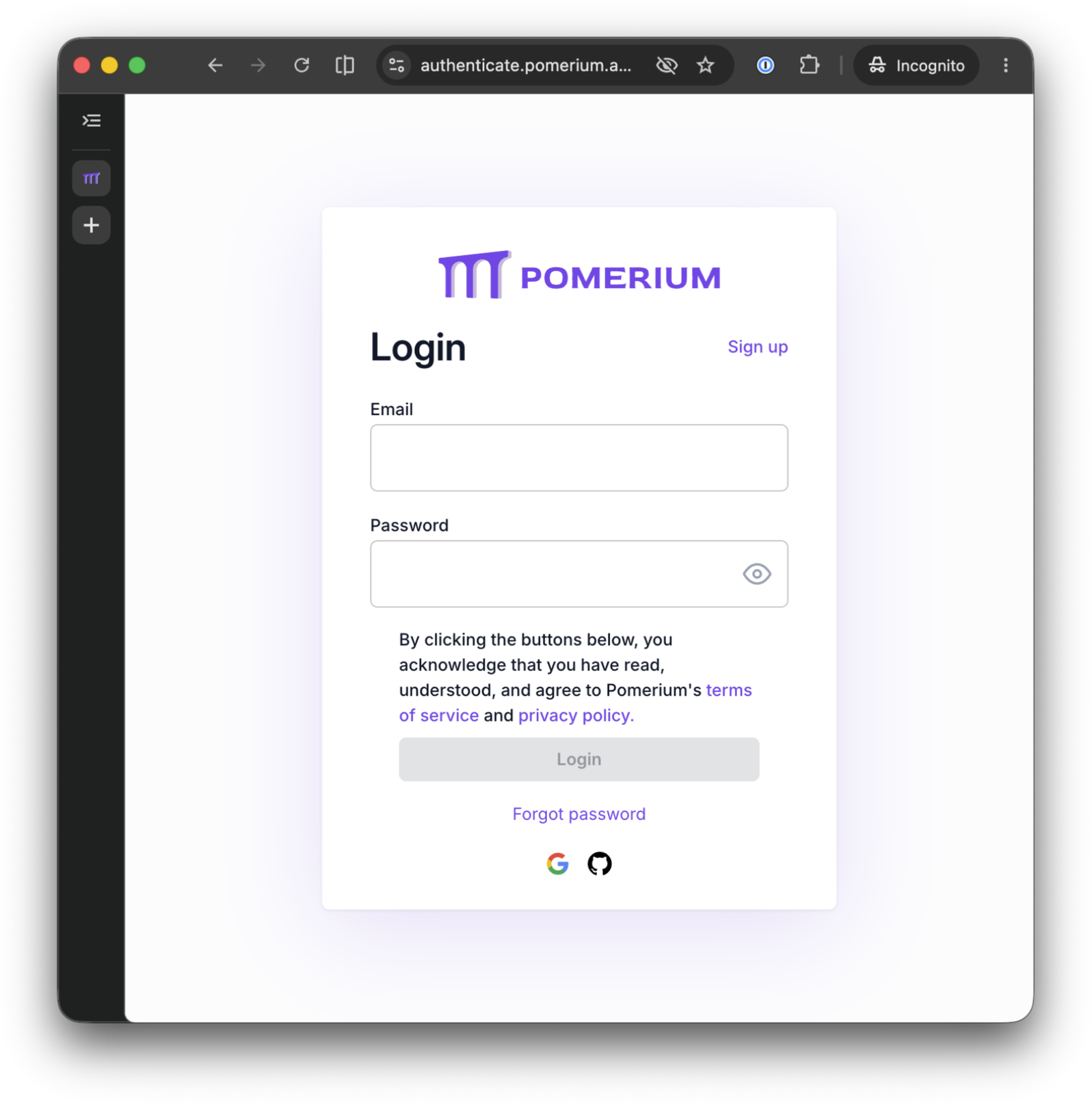
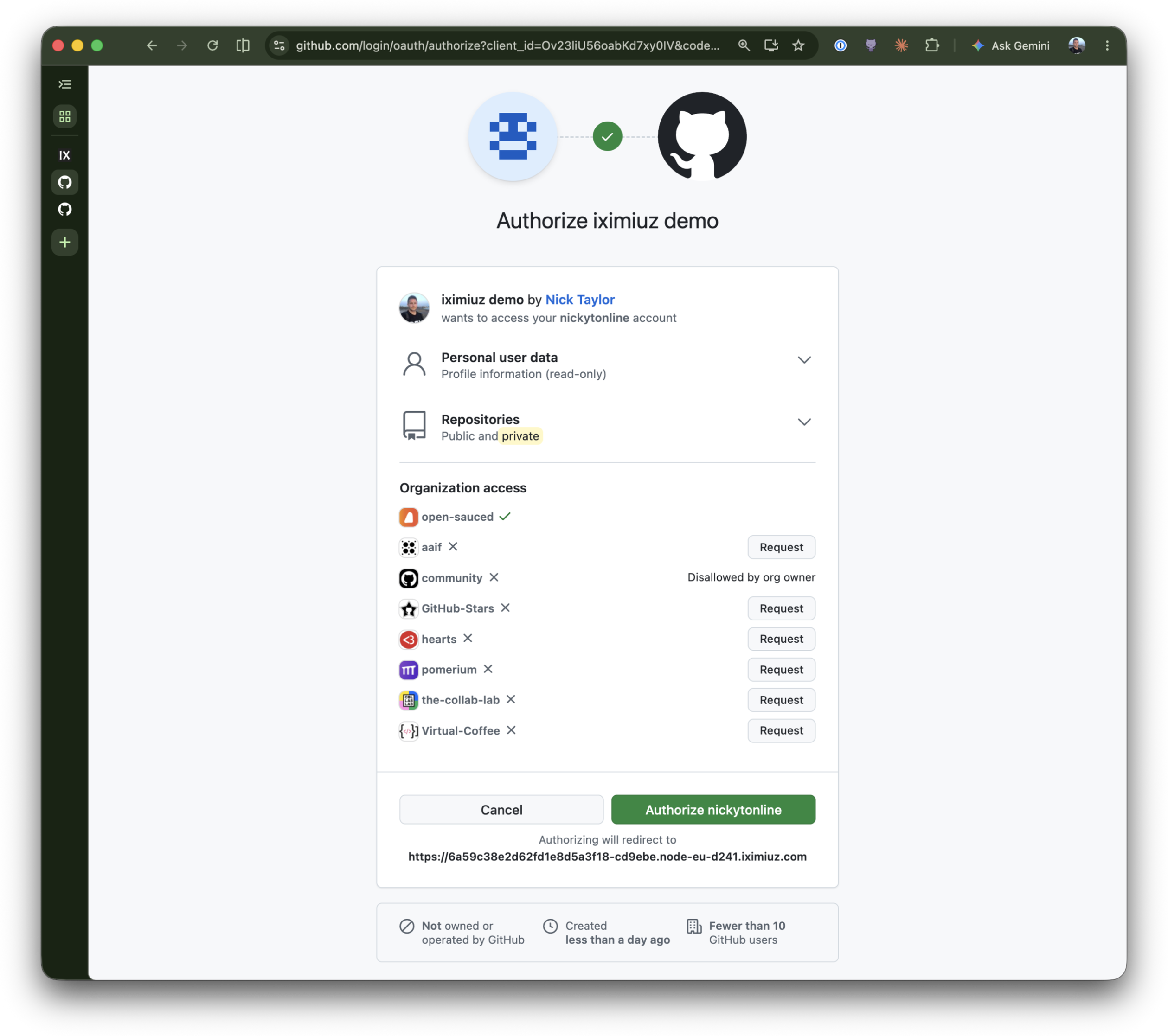
In the Tools tab, List Tools shows all four: Echo, Whoami, List Repos, and Create Repo. Call Echo with any message to confirm the connection works end to end.
Now run Create Repo with any name you like (something throwaway, e.g. mcp-lesson-scratch). It succeeds: a real, private repository is created under your GitHub account, and the result comes back with its full name and URL.
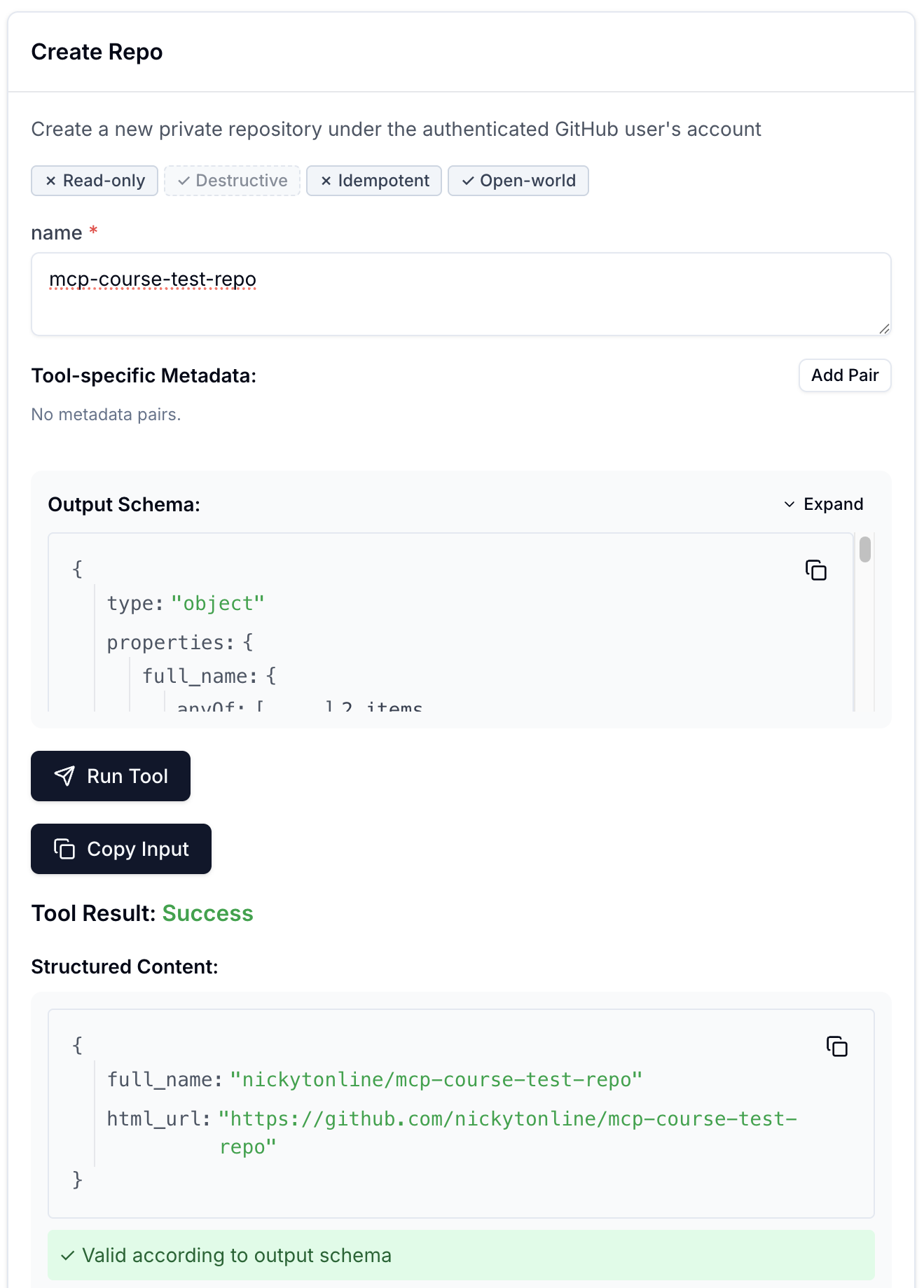
This is a real mutation against your real account. Feel free to delete the repository afterwards; nothing in this lesson depends on it still existing.
That is the risk this lesson opened with, made concrete: nothing about the route's policy distinguishes create_repo from whoami. The same email that can read your repositories can also create new ones, because the policy never looks past the connection.
Write a policy that blocks one tool
Open the gateway-ide terminal and edit ~/pomerium-gateway/pomerium-config/config.yaml. Add a second block to the route's policy list, alongside the existing email allow:
  - deny:
      and:
        - mcp_tool:
            is: create_repo
The full policy now looks like this:
policy:
  - allow:
      and:
        - email:
            is: you@example.com
  - deny:
      and:
        - mcp_tool:
            is: create_repo
The - deny: line must line up exactly with the - allow: line above it: both are items in the same policy: list. YAML is indentation-sensitive, so if - deny: ends up nested under allow instead of alongside it, or at any other indent level, the file either fails to parse or Pomerium loads a different policy structure than the one shown here, and the tool call is never actually denied.
Two independent blocks, not one combined rule. Pomerium computes an overall allow and an overall deny across every policy block on the route, and a deny anywhere wins, so this new block only ever subtracts from what the first block grants; it never needs to repeat the email check. The mcp_tool criterion also supports starts_with, ends_with, contains, in, and not_in, the same string-matching operators email and domain use elsewhere in Pomerium Policy Language (PPL), in case one tool name is never the whole story.
This lesson matches on the literal name, is: create_repo, because there is exactly one tool worth denying so far. That is a choice specific to this example, not a limit of the criterion: a server that names its mutating tools by convention, create_repo, delete_repo, create_issue, could deny the whole category in one block with starts_with: create_ or starts_with: delete_. A tool that does not follow the convention still needs its own rule, since mcp_tool only ever matches the name Pomerium sees on the wire, not what the tool does.
Save the file. Do not restart anything: Pomerium watches its config file and reloads on save. Watch the gateway terminal (rerun docker compose logs -f pomerium if you already stopped following it):
pomerium-1  | {"level":"info","paths":["/pomerium/config.yaml"],"time":"2026-07-23T18:51:17Z","message":"fileutil/watcher: file change event"}
pomerium-1  | {"level":"info","time":"2026-07-23T18:51:17Z","message":"config: file updated, reconfiguring..."}
pomerium-1  | {"level":"info","config-change-id":"5ff49bac-1db8-4f50-a908-395fe08f77f5","time":"2026-07-23T18:51:17Z","message":"config: loaded configuration"}
These two config:-prefixed lines only ever appear as a result of a real file change; neither is logged when the container first starts. If you see them, Pomerium has already reloaded with your new policy, no docker compose restart required.
Back in MCP Inspector, run Create Repo again (any name). It fails with a clean tool error, not a dropped connection:
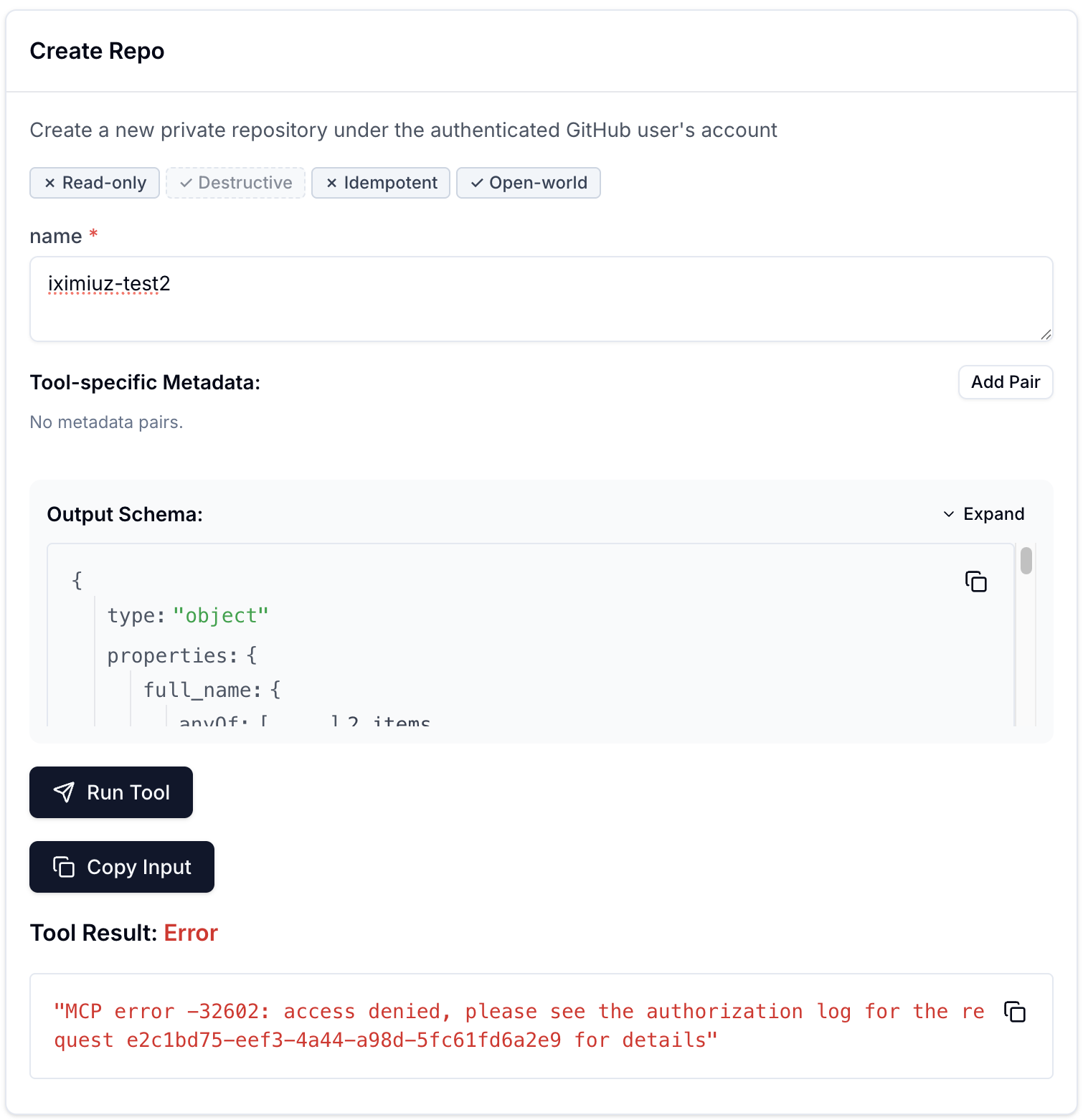
Unlike the "No upstream GitHub token" error from the previous lesson's disconnect exercise (which came from your server's own code), this one comes from Pomerium itself: the request never reached your server at all. The error even hands you the exact request-id to look up if you want to see the policy decision that produced it, in the gateway log you're about to check below.
Check the gateway's view of what just happened, on the gateway terminal (press Ctrl+C first if you still have the logs running from the previous unit):
docker compose -f ~/pomerium-gateway/docker-compose.yml logs pomerium --no-log-prefix \
  | grep '"mcp-tool":"create_repo"' | tail -n 1 | jq
Your output will look similar to this (captured from a live run; your own request-id, host, email, and time will differ):
{
  "level": "info",
  "server-name": "all",
  "service": "authorize",
  "request-id": "e2c1bd75-eef3-4a44-a98d-5fc61fd6a2e9",
  "path": "/mcp",
  "host": "XXXX.node-eu-XXXX.iximiuz.com",
  "email": "you@example.com",
  "mcp-method": "tools/call",
  "mcp-tool": "create_repo",
  "mcp-tool-parameters": {
    "name": "some-repo"
  },
  "allow": true,
  "allow-why-true": ["email-ok"],
  "deny": true,
  "deny-why-true": ["mcp-tool-match"],
  "time": "2026-07-23T13:36:29Z",
  "message": "authorize check"
}
Email allowed, tool denied: the email block still says allow: true, exactly as it did before this lesson, because it never learned anything about tools and does not need to. It is the mcp_tool block that decides the outcome here: deny: true, deny-why-true: ["mcp-tool-match"]. Pomerium denies the request whenever any policy block denies it, regardless of what the others allow, which is exactly why this block never needed to repeat the email check.
Run Whoami or List Repos again to confirm they still work: the new block only ever names create_repo, so nothing else on the route changed.
Pomerium's own guidance is to keep mcp_tool under deny, not allow: identity checks (email, domain, groups) belong in allow, tool restrictions in deny. Putting mcp_tool in allow risks blocking tools/list and other non-tool-call requests if that block ever ends up carrying access on its own, since mcp_tool only ever matches tools/call. Every policy in this lesson follows that split.
You've now seen an mcp_tool deny rule block one specific tool by name, hot-reload with no restart, and leave every other tool untouched. The next unit removes that same rule, just as easily.
Remove the Restriction
Adding the mcp_tool deny rule took effect the moment you saved the file, no restart. Removing it works exactly the same way.
Remove the deny rule
Back in the gateway-ide terminal, edit ~/pomerium-gateway/pomerium-config/config.yaml one more time. Delete the second policy block entirely, leaving only the original email allow:
policy:
  - allow:
      and:
        - email:
            is: you@example.com
Save the file. Same as before, no restart needed; the gateway log shows the same config: file updated, reconfiguring... / config: loaded configuration pair.
Back in MCP Inspector, run Create Repo again with a different name than your earlier attempt (GitHub returns an error if you reuse one that already exists under your account). It succeeds: the tool is exactly as callable as it was before this lesson ever wrote a policy for it.
Check the gateway's view once more, on the gateway terminal:
docker compose -f ~/pomerium-gateway/docker-compose.yml logs pomerium --no-log-prefix \
  | grep '"mcp-tool":"create_repo"' | tail -n 1 | jq
{
  "level": "info",
  "server-name": "all",
  "service": "authorize",
  "request-id": "3f9c2a1d-6b4e-4a8c-9d2f-7e1b5c3a8f60",
  "path": "/mcp",
  "host": "XXXX.node-eu-XXXX.iximiuz.com",
  "email": "you@example.com",
  "mcp-method": "tools/call",
  "mcp-tool": "create_repo",
  "mcp-tool-parameters": {
    "name": "some-other-repo"
  },
  "allow": true,
  "allow-why-true": ["email-ok"],
  "deny": false,
  "deny-why-false": [],
  "time": "2026-07-23T13:40:00Z",
  "message": "authorize check"
}
Sample values above are illustrative; capture your own during a live run.
deny: false, deny-why-false: [] this time, because the block that produced deny: true a moment ago no longer exists in the config at all. Same email-ok reason as ever, same route, same tool. Only the policy changed, and only in the file you edited.
Before you take this to production
Everything from the previous lesson's production notes still applies (the TLS certificate, the hosted identity provider, GitHub OAuth App secret hygiene, minimal scopes). Two things are specific to per-tool policy:
is: create_repois a literal match, not a safety net. It denies exactly that name and nothing else: a renamed tool, or a new mutating tool the server adds later (delete_repo,create_issue), is wide open again until someone writes a rule for it too. Whether you cover that withstarts_with:/in:against a naming convention, or keep enumerating tools one at a time, is a judgment call for your own server; either way, a policy written for today's tool list needs a plan for revisiting it as the server's tools change.mcp-tool-parametersinauthorize_log_fieldslogs the tool call's actual arguments. Forcreate_repothat was just a repo name, harmless to see in a log line. A tool whose arguments carry something sensitive, a search query, a file path, an access token passed as a parameter instead of a header, puts that value in the authorize log too. Decide per tool whether the audit value of seeing the call is worth the exposure of logging its arguments, and dropmcp-tool-parametersfromauthorize_log_fieldsif it is not.
What you built
- A mutating tool,
create_repo, added to a server that previously only ever had read-only tools - An
mcp_tooldeny rule that blocked one tool by name, watched Pomerium hot-reload it with no restart, then removed just as easily - An audit trail that names the exact policy reason behind every allow and every deny,
mcp-tool-matchincluded - Optional: this route works from a real MCP client too (ChatGPT, Claude, VS Code, Goose), no extra config
If you want to try it, grab your route's MCP URL in the client terminal:
ROUTE_URL=$(cat /tmp/mcp-lesson.route-address | tr -d '[:space:]' | sed 's|/$||')
echo "$ROUTE_URL/mcp"
Every policy so far in this course has answered one question: can this identity reach this route at all. This lesson added a second question underneath it: given that they can, which of this route's tools are they actually allowed to call. The next lesson points that same question at an MCP server you do not operate at all, GitHub's own hosted one, where per-tool policy is the only lever you have.
- Previous lesson
- Configure Upstream OAuth for an MCP Server
- Next lesson
- Control an MCP Server You Don't Host