If you don't understand iptables, you are cooked - Part 1: Building a Router

If you are a sysadmin, a DevOps engineer, or just a Linux enthusiast, you hear about iptables all the time.
So what the hell is it, and why is it so important?
This is Part 1 of a two-part series that will beautifully explain iptables, and the underlying related concepts that make it work. In the labs comming with this tutorial, you will learn to use iptables to actually manipulate packets flowing through the network stack of a linux machine, and you will be surprised by how close these concepts are to your every task with linux.
Prerequisites. This tutorial assumes you are comfortable with virtual network interfaces
(veth pairs), network namespaces, and the Linux routing table.
If any of that sounds unfamiliar, start with
How Container Networking Works: Building a Bridge Network From Scratch
and come back after.
Netfilter: Five Checkpoints in the Kernel
When packets flow through the network stack of a Linux machine, the designers of the kernel were clever enough to leave us a way to intercept that flow at specific points, so that user space can inspect or modify the packets in flight.
With that design, you can define rules to drop every packet coming from a specific IP address, or make the machine act as a router by rewriting the destination address of everything it receives, and much more.
The framework in the Linux kernel that makes this possible is called Netfilter. It exposes five checkpoints along the path of a packet through the network stack. User-space programs can register rules (technically, callbacks) at each checkpoint, and the kernel applies them to every packet passing through. These checkpoints are officially called hooks:
NF_IP_PRE_ROUTING- triggered the very second a packet hits the network stack, before any routing decision.NF_IP_LOCAL_IN- triggered for packets that have been routed and are destined for this host.NF_IP_FORWARD- triggered for packets that have been routed and are to be forwarded to another host.NF_IP_LOCAL_OUT- triggered for packets originated by a process on this host, before the routing decision.NF_IP_POST_ROUTING- triggered for any outgoing traffic after routing, no matter whether it was forwarded through the host or originated from it.
Keep in mind that a packet never goes through all five hooks. Which checkpoints it hits depends entirely on what kind of packet it is - ingress or egress - and on the routing decision made for it. For ingress packets, the flow looks like this:
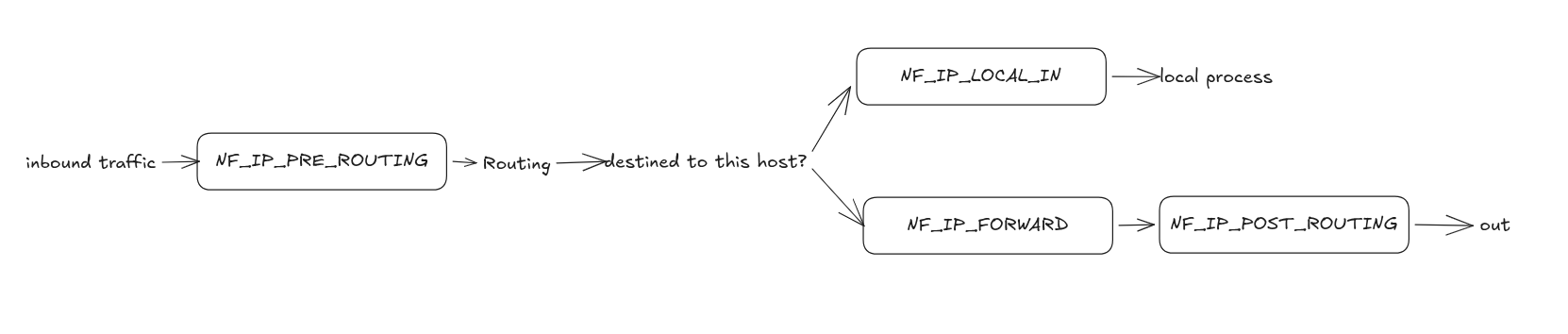
The flow of ingress packet through the checkpoints.
While for packets that generated and sent by local process, in other words, egress packets, the flow looks like this:

The flow of egress packet through the checkpoints.
By registering rules at these checkpoints, you can literally decide the fate of any packet going through the machine!
The next question is: how do you register a rule? That's where iptables comes in.
iptables: Tables and Chains
iptables is the CLI tool we use to register rules in the Netfilter hooks.
Through it, we get a way to inspect and manipulate every packet flowing through the Linux network stack.
Two terms come up constantly when working with iptables: table and chain.
Neither of them is defined by Linux or by Netfilter itself - they are scoped to iptables only,
which uses them to categorize and organize the rules. Let's take them one by one.
Tables
iptables categorizes rules by their purpose and functionality (which also determines
their order of execution within a hook). Such a category is called a table.
There are five of them:
filter- security decisions (ACCEPT,DROP,REJECT).nat- network address translation (SNAT,DNAT,MASQUERADE).mangle- altering specialized packet headers (like TTL or QoS bits).raw- exempting packets from connection tracking.security- applying SELinux labels.
Most of the time, you will only ever work with filter, nat, and mangle.
Chains
Remember that a table is just a set of rules grouped together because they share the same purpose. So what do we call a table's rules registered in a particular hook? That's right - a chain. A chain is the set of rules of one table registered in one hook.
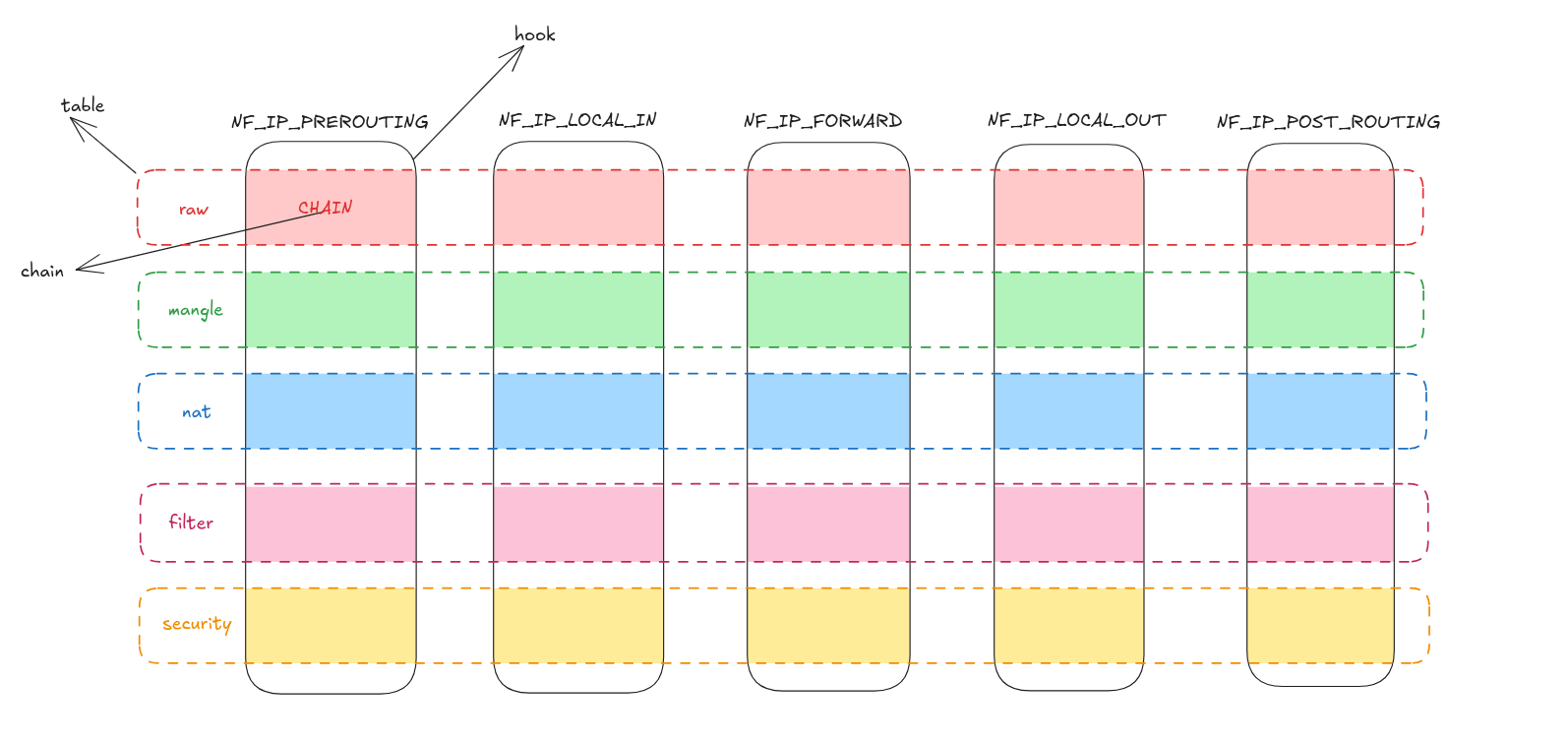
A chain is what you get where a table crosses a hook.
All the chains registered at the NF_IP_PRE_ROUTING hook are referred to as PREROUTING chains.
Similarly, NF_IP_LOCAL_IN, NF_IP_FORWARD, NF_IP_LOCAL_OUT, and NF_IP_POST_ROUTING host
the INPUT, FORWARD, OUTPUT, and POSTROUTING chains, respectively.
Note that PREROUTING by itself is not a chain - it's the collective name for all the chains
registered in the same NF_IP_PRE_ROUTING hook.
To refer to a specific chain, you always have to include the table it belongs to -
the nat table's PREROUTING chain, or the mangle table's PREROUTING chain.
And keep in mind that a table might not have a chain in every hook.
For instance, the nat table has no chain in the NF_IP_FORWARD hook -
in other words, "nat's FORWARD chain" simply does not exist. Here is the corrected version of the previous illustration, the striped cell means the corresponding chain doesn't exist.
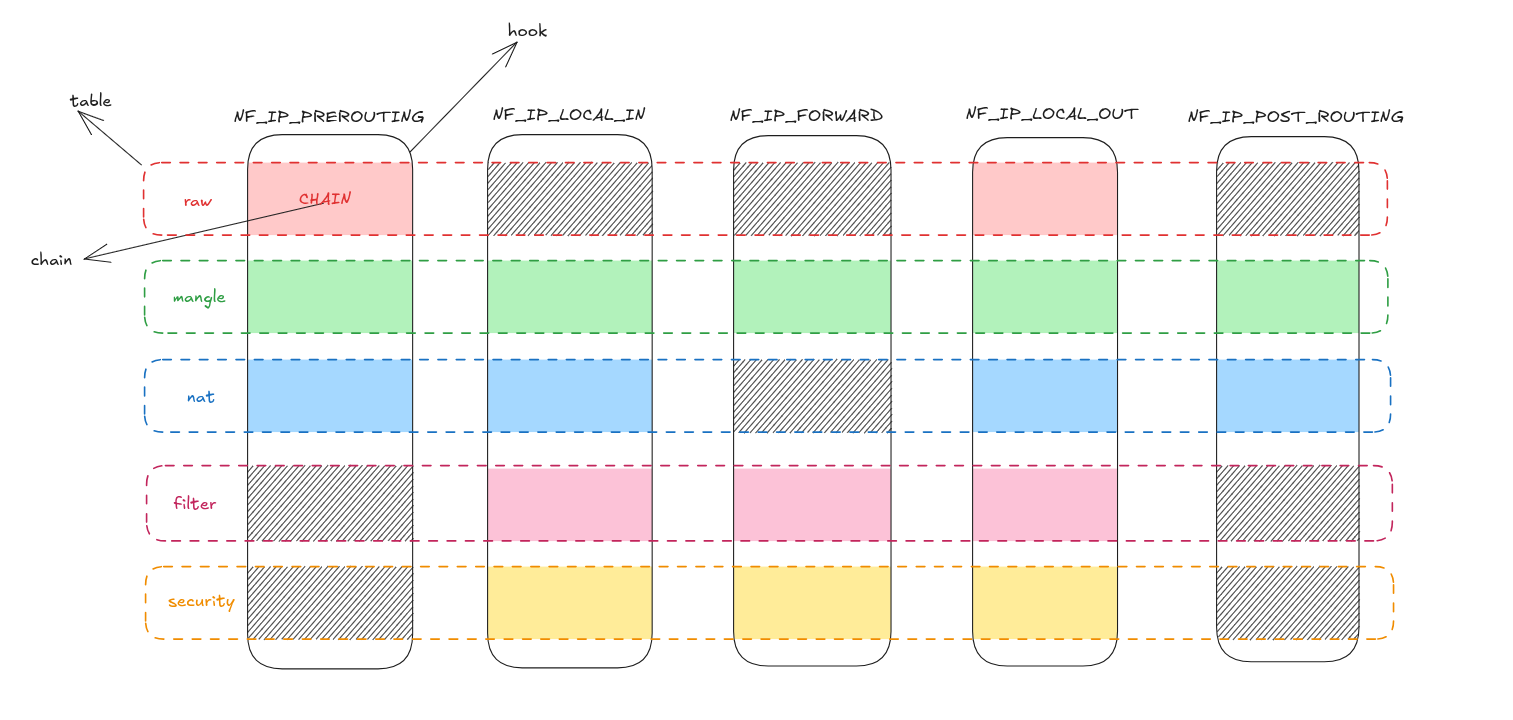
A striped cell means the corresponding chain simply doesn't exist.
That's a lot of explanation for two words, but it's the explanation that clears up the confusion around table and chain that so many people have.
💡 Within a single hook, chains are traversed in a fixed order: raw → mangle → nat → filter → security.
That's why the table a rule lives in matters just as much as the chain.
The Lab: Turn a Linux Machine Into a Router
We just learned that the nat table holds the rules that deal with network address translation -
the rules that can modify the source and destination IP of a packet.
With that, we can literally turn a Linux machine into a router. That's what we'll do in this lab -
live, in the playground attached to this tutorial. Go ahead and start it if you haven't already.
The playground gives you two Linux machines, no-internet and have-internet, joined by a private LAN:
no-internet sits on 192.168.0.10/24 (its only interface, eth0), and have-internet sits on the
same LAN at 192.168.0.11/24 through its second interface, eth1. have-internet also has a real
uplink to the internet on its first interface, eth0.
ping -c 3 8.8.8.8 # 👍 replies come back
ping -c 3 8.8.8.8 # 👎 "connect: Network is unreachable"
Using the conceptual understanding from the previous section, we'll turn have-internet into a router
and make no-internet reach the internet through it.
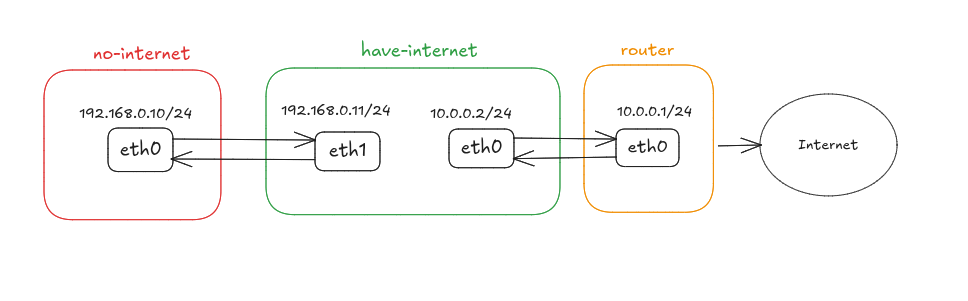
The lab environment.
Step 1: Point the client at the router
First, we configure no-internet to use the IP of have-internet as its default gateway.
This way, every packet destined for the internet will be sent to have-internet.
Run this from the no-internet terminal:
sudo ip route add default via 192.168.0.11 dev eth0
Step 2: Enable forwarding on the router
By default, a Linux machine won't act as a router - it drops packets that enter the network stack but aren't meant for itself. To turn it into a router, we must enable IP forwarding. Run this from the have-internet terminal:
sudo sysctl -w net.ipv4.ip_forward=1
Step 3: Are we done?
ping -c 3 8.8.8.8 # 👎 100% packet loss
Not quite - though notice the failure has changed. We no longer get
"Network is unreachable": the packets now leave no-internet, get forwarded by
have-internet, and really do reach the internet. What we don't get is a single reply.
The reason is the source address. The packets leaving have-internet still carry the source IP
of no-internet, 192.168.0.10 - an address that exists only on the private LAN between our two
machines. The upstream router happily delivers the request to 8.8.8.8, but the response is
addressed back to 192.168.0.10, and nothing out there has the faintest idea what that is:
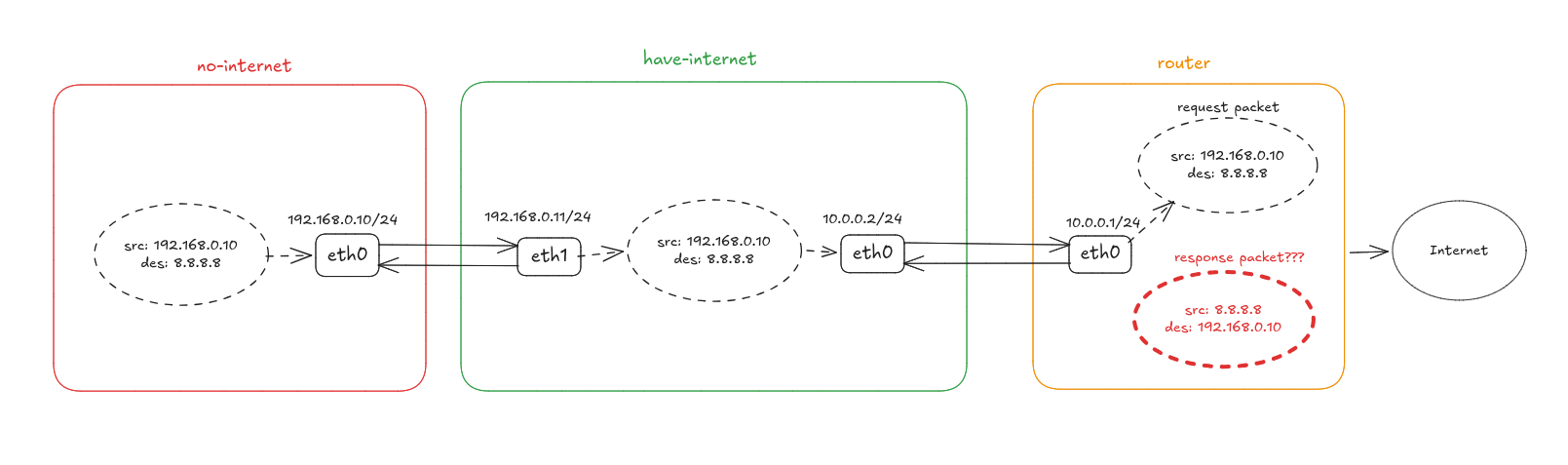
The request gets out just fine. The response has nowhere to go.
Step 4: Masquerade the source address
To fix this, we need to mask the source IP of no-internet with the IP of have-internet
before the packet leaves the router.
Because the source IP now belongs to have-internet, the response packet will come back to have-internet,
which then restores the original address and forwards the response to no-internet.
To do that, we append a rule to the POSTROUTING chain of the nat table on have-internet:
sudo iptables -t nat -A POSTROUTING -s 192.168.0.10 -o eth0 -j MASQUERADE
Let's dissect the command:
-t nat- the table to add the rule to.-A POSTROUTING- the chain to append the rule to.-s 192.168.0.10- the first match condition: apply this rule only to packets whose source IP is192.168.0.10.-o eth0- the second match condition: apply it only to packets leaving througheth0- the interface facing the internet, not the LAN.-j MASQUERADE- the target, i.e. the action itself: replace the source IP of the packet with the IP of the interface the packet is leaving through.
Let's verify the rule was actually added:
sudo iptables -t nat -L -n -v
Chain PREROUTING (policy ACCEPT 0 packets, 0 bytes)
 pkts bytes target     prot opt in     out     source               destination

Chain INPUT (policy ACCEPT 0 packets, 0 bytes)
 pkts bytes target     prot opt in     out     source               destination

Chain OUTPUT (policy ACCEPT 0 packets, 0 bytes)
 pkts bytes target     prot opt in     out     source               destination

Chain POSTROUTING (policy ACCEPT 0 packets, 0 bytes)
 pkts bytes target     prot opt in     out     source               destination
    0     0 MASQUERADE  0    --  *      eth0    192.168.0.10         0.0.0.0/0
As you can see, the nat table has four chains - and no FORWARD among
them, exactly as the table-chain matrix promised. Three of them are empty; our rule was added to
POSTROUTING, matching packets from 192.168.0.10 on their way out of eth0.
With the rule in place, the request leaves have-internet wearing its address, 10.0.0.2. The upstream router
knows that one perfectly well, so the response finds its way back to have-internet - which
consults its NAT table, restores the original destination 192.168.0.10, and forwards the
reply down the LAN to no-internet:
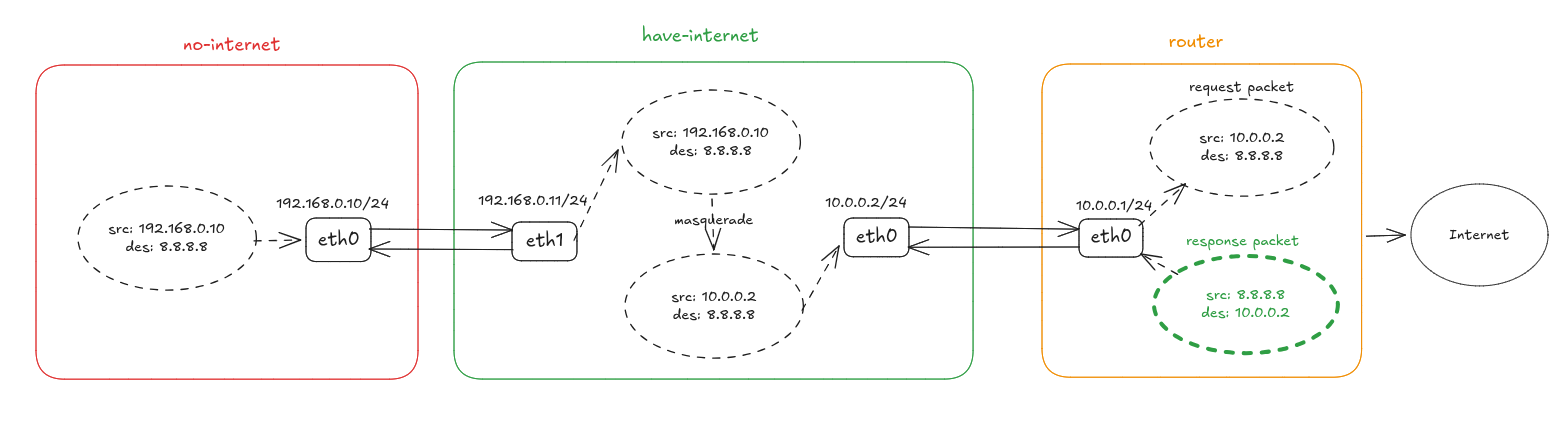
With the source address masqueraded, the response has a route home.
Step 5: Try again
ping -c 3 8.8.8.8 # 👍 replies come back!
Conclusion
Let's recap what we've got:
- Netfilter is the kernel framework that exposes five hooks along a packet's path through the network stack.
iptablesis the user-space tool that registers rules in those hooks.- A table groups rules by purpose (
filter,nat,mangle,raw,security); a chain is one table's rules in one hook. Not every (table, hook) combination exists. - Turning a Linux box into a router takes exactly two things:
ip_forward=1so it agrees to forward at all, and onenatrule so the replies can find their way home.
That last point is the whole idea behind NAT, and it's the same machinery that sits under every container runtime on the planet. Which brings us to Part 2.
Up Next: Part 2
In Part 2, we take
the same nat table and use it to reproduce docker run -p 8080:80 by hand - on a machine with no
Docker on it at all.
Or, if you'd rather prove what you've learned so far, try these challenges:
Learn by doing, not just by reading or watching
Sign up for a free account to start a VM playground right on this page, track your progress, and get notified about new learning materials.

How Container Networking Works: Building a Bridge Network From Scratch
Begin with the basics to understand Docker and Kubernetes networking: learn how to create and interconnect Linux network namespaces using only command-line tools.

How Servers Work: A Hands-On Introduction to TCP Sockets
Learn how servers actually work by building a tiny TCP server and client from scratch. A hands-on introduction to sockets, TCP, and the network programming model every backend, DevOps, and platform engineer should go through at least once.
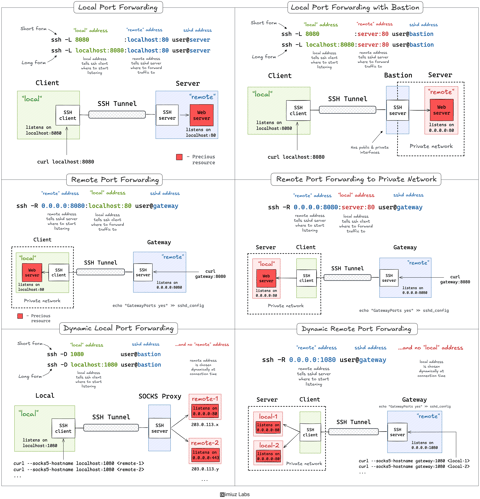
A Practical Guide to SSH Tunnels: Local and Remote Port Forwarding
SSH port forwarding explained in a clean and visual way. How to use local and remote port forwarding. What sshd settings may need to be adjusted. How to memorize the right flags.
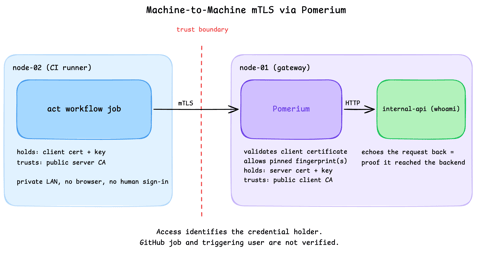
Secure Machine-to-Machine Access with mTLS and Pomerium
Run a GitHub Actions-compatible continuous integration (CI) job on a private runner and protect its internal API call with mutual TLS (mTLS) and Pomerium. Build separate server and client trust chains, authorize one machine certificate by fingerprint, then revoke, restore, and rotate its credentials through live policy changes.
