How Kubernetes CRDs Work: Designing a Validated API From Scratch

Welcome wanderer!
If you've landed on this tutorial, you've probably seen CRDs come along with an operator you installed, or you're about to write your own and want to know what the API server actually does with one.
By the end of this tutorial, you will have a CustomResourceDefinition (CRD) for a small Pet API that the API server enforces on its own.
It will reject invalid Pets with clear errors, fill in the fields you leave out, keep the status separate from the spec, and show useful columns in kubectl get.
There's no controller and no code involved, only YAML and kubectl.
Here's the whole picture of what you'll end up with:
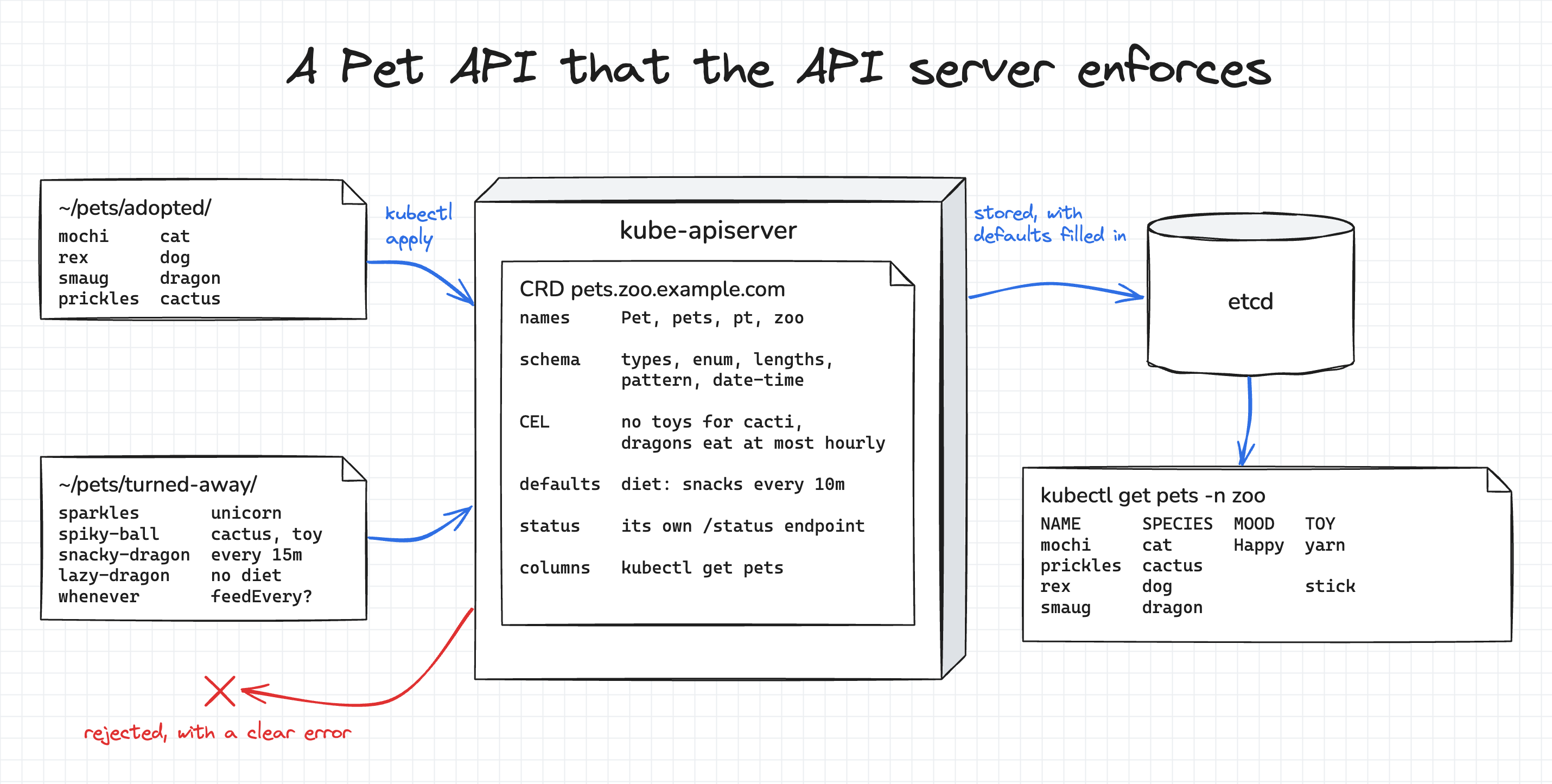
I went with pets because the API is small enough to keep in your head. It still has a couple of rules that are hard to express in a schema, and those rules show what CRD validation can do.
We'll build the CRD one layer at a time.
All five versions of it are already in the ~/pet-crd folder of the playground, so you don't have to type any YAML.
In the tutorial, I'll show only what's new in each version, and you can open the full files in the IDE tab.
After every change, we'll send the same set of valid and invalid Pets to the API server and see which ones get in.
Prerequisites
All you need is basic kubectl knowledge.
If you've never written a CRD before, don't worry, we'll build this one from scratch.
The playground already has a multi-node Kubernetes cluster, and kubectl on the dev-machine is set up to talk to it.
The checkpoints along the way turn green on their own once the cluster is in the right state, so there's nothing to click.
Meeting the Pet API
To begin with, let's look at what we're building. The specification is waiting in your home directory:
cat ~/pet-api.md
A Pet has a required species, an optional toy, an optional diet with a default value, and a lastFedAt timestamp.
Two rules involve more than one field: a cactus can't have a toy, and a dragon can't be fed more often than once an hour.
The status section is for a controller that doesn't exist yet, so we'll leave it alone until the end.
There are also two folders of Pet manifests in ~/pets.
The ones in adopted/ follow the specification, and the ones in turned-away/ each break it in a different way:
ls ~/pets/adopted ~/pets/turned-away
/home/laborant/pets/adopted:
mochi.yaml
prickles.yaml
rex.yaml
smaug.yaml

/home/laborant/pets/turned-away:
lazy-dragon.yaml
snacky-dragon.yaml
sparkles.yaml
spiky-ball.yaml
whenever.yaml
By the end, the API server should accept every Pet in adopted/ and reject every Pet in turned-away/.
Let's see where we stand. Right now, kubectl can't even send them, because the API server has never heard of a Pet:
kubectl apply --dry-run=server -f ~/pets/adopted/mochi.yaml
error: resource mapping not found for name: "mochi" namespace: "zoo" from "/home/laborant/pets/adopted/mochi.yaml": no matches for kind "Pet" in version "zoo.example.com/v1alpha1"
ensure CRDs are installed first
Whenever we only want to test the API, we'll use --dry-run=server.
The request goes through the full API server pipeline, including defaulting and validation, but nothing is written to etcd, so you can try as many invalid Pets as you like.
Registering the Pet resource
Let's start with the smallest CRD that works.
It tells the API server what the new resource is called, which versions it has, and whether it lives in a namespace.
One thing to keep in mind: the CRD itself must be named <plural>.<group>.
Every version also needs a schema.
For now, we'll use one that accepts anything (x-kubernetes-preserve-unknown-fields: true) and tighten it in the next step.
This first version is short, so here it is in full:
apiVersion: apiextensions.k8s.io/v1
kind: CustomResourceDefinition
metadata:
  name: pets.zoo.example.com
spec:
  group: zoo.example.com
  scope: Namespaced
  names:
    kind: Pet
    plural: pets
    singular: pet
    shortNames: [pt]
    categories: [zoo]
  versions:
  - name: v1alpha1
    served: true
    storage: true
    schema:
      openAPIV3Schema:
        type: object
        x-kubernetes-preserve-unknown-fields: true
Here's where each name shows up:
| Field | Value | Where it shows up |
|---|---|---|
group and versions[].name | zoo.example.com, v1alpha1 | The apiVersion of every Pet manifest |
names.kind | Pet | The kind of every Pet manifest |
names.plural, names.singular | pets, pet | The URL path (/apis/zoo.example.com/v1alpha1/namespaces/zoo/pets) and kubectl get pet(s) |
names.shortNames | pt | kubectl get pt |
names.categories | zoo | kubectl get zoo, similar to how kubectl get all works |
scope | Namespaced | Pets live in namespaces, like Pods |
Apply it:
kubectl apply -f ~/pet-crd/1-names.yaml
kubectl wait --for=condition=Established crd/pets.zoo.example.com
If everything goes well, you should see the new resource right away. You don't need to restart anything:
kubectl api-resources --api-group=zoo.example.com
NAME   SHORTNAMES   APIVERSION                 NAMESPACED   KIND
pets   pt           zoo.example.com/v1alpha1   true         Pet
The short name and the category work, too:
kubectl get pt -n zoo
kubectl get zoo -n zoo
No resources found in zoo namespace.
No resources found in zoo namespace.
Now, let's try the Pets that should be rejected:
kubectl apply --dry-run=server -f ~/pets/turned-away/
pet.zoo.example.com/lazy-dragon created (server dry run)
pet.zoo.example.com/snacky-dragon created (server dry run)
pet.zoo.example.com/sparkles created (server dry run)
pet.zoo.example.com/spiky-ball created (server dry run)
pet.zoo.example.com/whenever created (server dry run)
All five would get in, including a unicorn (sparkles).
That's expected. With x-kubernetes-preserve-unknown-fields: true, the API server would store whatever it receives, so nothing is validated yet.
Let's fix that.
Adding a schema
Now that the Pet has a name, let's describe its fields.
A CRD schema is written in OpenAPI v3.
Kubernetes requires it to be structural.
Every field must have a type, and the fields of an object must be listed under properties, unless the schema explicitly allows unknown fields, as the first version did.
The second version replaces the "accept anything" schema with a real one. Here's the new part:
          spec:
            type: object
            required: [species]
            properties:
              species:
                type: string
                enum: [cat, dog, dragon, cactus]
              toy:
                type: string
                maxLength: 20
              diet:
                type: object
                properties:
                  food:
                    type: string
                    maxLength: 20
                  feedEvery:
                    type: string
                    maxLength: 10
                    pattern: '^[0-9]+(s|m|h)$'
              lastFedAt:
                type: string
                format: date-time
Most lines of the specification map to a single schema keyword:
| The specification says | Schema keyword |
|---|---|
species is required | required: [species] on spec |
| One of cat, dog, dragon, cactus | enum |
| At most 20 characters | maxLength |
| A number followed by s, m or h | pattern |
lastFedAt is a date-time | format: date-time |
To see every change between two versions, run diff ~/pet-crd/1-names.yaml ~/pet-crd/2-schema.yaml.
Apply it:
kubectl apply -f ~/pet-crd/2-schema.yaml
The adopted Pets would still get in:
kubectl apply --dry-run=server -f ~/pets/adopted/
pet.zoo.example.com/mochi created (server dry run)
pet.zoo.example.com/prickles created (server dry run)
pet.zoo.example.com/rex created (server dry run)
pet.zoo.example.com/smaug created (server dry run)
And two of the five turned-away Pets are rejected now:
kubectl apply --dry-run=server -f ~/pets/turned-away/
pet.zoo.example.com/lazy-dragon created (server dry run)
pet.zoo.example.com/snacky-dragon created (server dry run)
pet.zoo.example.com/spiky-ball created (server dry run)
Error from server (Invalid): error when creating "/home/laborant/pets/turned-away/sparkles.yaml": Pet.zoo.example.com "sparkles" is invalid: spec.species: Unsupported value: "unicorn": supported values: "cat", "dog", "dragon", "cactus"
Error from server (Invalid): error when creating "/home/laborant/pets/turned-away/whenever.yaml": Pet.zoo.example.com "whenever" is invalid: spec.diet.feedEvery: Invalid value: "whenever": spec.diet.feedEvery in body should match '^[0-9]+(s|m|h)$'
The other three would still get in, because they break rules that are hard or impossible to express with OpenAPI keywords alone:
spiky-ballis a cactus with a toy. Atoyis valid on its own, and only invalid in combination withspecies: cactus.snacky-dragonwants to be fed every15m. The value matches the pattern, but dragons must wait at least an hour.lazy-dragonhas nodietat all. We'll come back to this one later.
The pattern keyword has another catch.
It only checks what a string looks like, not the value behind it.
^[0-9]+(s|m|h)$ accepts 0s, which is not a valid feeding interval,
and 9999999h, which doesn't fit into Go's time.Duration, the type a controller would parse this field into.
What happens to fields that the schema doesn't mention?
Try creating a Pet with a favoriteColor field:
kubectl create --dry-run=server -f - <<'EOF'
apiVersion: zoo.example.com/v1alpha1
kind: Pet
metadata: {name: picky, namespace: zoo}
spec: {species: cat, favoriteColor: blue}
EOF
Error from server (BadRequest): error when creating "STDIN": Pet in version "v1alpha1" cannot be handled as a Pet: strict decoding error: unknown field "spec.favoriteColor"
kubectl asks the API server for strict field validation, so the request fails.
Clients that don't ask for it get the unknown fields pruned instead, with a warning in the response.
Either way, fields that the schema doesn't describe never reach etcd.
Adding validation rules with CEL
OpenAPI can't express these rules, but the
Common Expression Language (CEL) can.
You add CEL rules to the x-kubernetes-validations list at any level of the schema.
There, self is the value at that level.
The API server checks the rules on create and update requests, before it stores the object.
For our Pets, we need three rules:
- Cacti don't play with toys. The rule needs both
speciesandtoy, so it goes onspec, whereselfhas access to both fields:self.species != 'cactus' || !has(self.toy). A rule placed ontoywould only run when a toy is present, and it couldn't read the species. - Dragons eat at most once an hour. This rule also goes on
spec. It must compare durations, not strings. As strings,'59m' >= '1h'istrue, because5sorts after1. CEL's built-induration()function fixes this:duration('59m') >= duration('1h')isfalse. feedEveryis between 1s and a year. This rule only needs the field itself, so it goes onfeedEvery.
Here are the two rules on spec:
            x-kubernetes-validations:
            - rule: "self.species != 'cactus' || !has(self.toy)"
              message: "cacti don't play with toys"
            - rule: "self.species != 'dragon' || duration(self.diet.feedEvery) >= duration('1h')"
              message: "dragons eat at most once an hour: diet.feedEvery must be at least 1h"
And the range rule on feedEvery:
                  feedEvery:
                    type: string
                    maxLength: 10
                    pattern: '^[0-9]+(s|m|h)$'
                    x-kubernetes-validations:
                    - rule: "duration(self) >= duration('1s') && duration(self) <= duration('8760h')"
                      message: "feedEvery must be between 1s and 8760h (a year)"
Apply the third version:
kubectl apply -f ~/pet-crd/3-rules.yaml
Now all five turned-away Pets are rejected:
kubectl apply --dry-run=server -f ~/pets/turned-away/
Error from server (Invalid): error when creating "/home/laborant/pets/turned-away/lazy-dragon.yaml": Pet.zoo.example.com "lazy-dragon" is invalid: spec: Invalid value: "object": no such key: diet evaluating rule: dragons eat at most once an hour: diet.feedEvery must be at least 1h
Error from server (Invalid): error when creating "/home/laborant/pets/turned-away/snacky-dragon.yaml": Pet.zoo.example.com "snacky-dragon" is invalid: spec: Invalid value: dragons eat at most once an hour: diet.feedEvery must be at least 1h
Error from server (Invalid): error when creating "/home/laborant/pets/turned-away/sparkles.yaml": Pet.zoo.example.com "sparkles" is invalid: [spec.species: Unsupported value: "unicorn": supported values: "cat", "dog", "dragon", "cactus", <nil>: Invalid value: null: some validation rules were not checked because the object was invalid; correct the existing errors to complete validation]
Error from server (Invalid): error when creating "/home/laborant/pets/turned-away/spiky-ball.yaml": Pet.zoo.example.com "spiky-ball" is invalid: spec: Invalid value: cacti don't play with toys
Error from server (Invalid): error when creating "/home/laborant/pets/turned-away/whenever.yaml": Pet.zoo.example.com "whenever" is invalid: [spec.diet.feedEvery: Invalid value: "whenever": spec.diet.feedEvery in body should match '^[0-9]+(s|m|h)$', spec.diet.feedEvery: Invalid value: "string": type conversion error from 'string' to 'google.protobuf.Duration' evaluating rule: feedEvery must be between 1s and 8760h (a year)]
Note that the API server doesn't stop at the first error.
The whenever Pet fails both the pattern and the duration rule.
Some schema errors do stop the CEL rules, though.
A value outside the enum, like unicorn, or a field of the wrong type means the CEL rules are skipped, and the error for sparkles says so.
Now, take a closer look at the error for lazy-dragon:
spec: Invalid value: "object": no such key: diet evaluating rule: dragons eat at most once an hour ...
This Pet has no diet block, so the rule failed while trying to read self.diet.feedEvery.
The Pet is rejected, but not for the reason we want.
A cat without a diet gets in for a lucky reason: for a cat, self.species != 'dragon' is true,
and when one side of || is true, CEL ignores an error on the other side.
The specification says that a Pet without a diet eats snacks every 10 minutes, so let's teach the CRD that too.
Adding defaults
The default keyword fills in a field when it's missing.
The API server does this for incoming requests and for objects it reads from etcd.
It's important to know that a default only works if the parent object exists.
A default on diet.food does nothing for a Pet without a diet block, because there's nowhere to put food.
To fix this, we set default: {} on diet itself.
The API server then adds an empty diet first and fills in its fields.
Defaulting also runs before validation.
So the lazy dragon gets feedEvery: 10m first, and only then does the API server check the CEL rules.
By the time a rule reads self.diet.feedEvery, the field is always there.
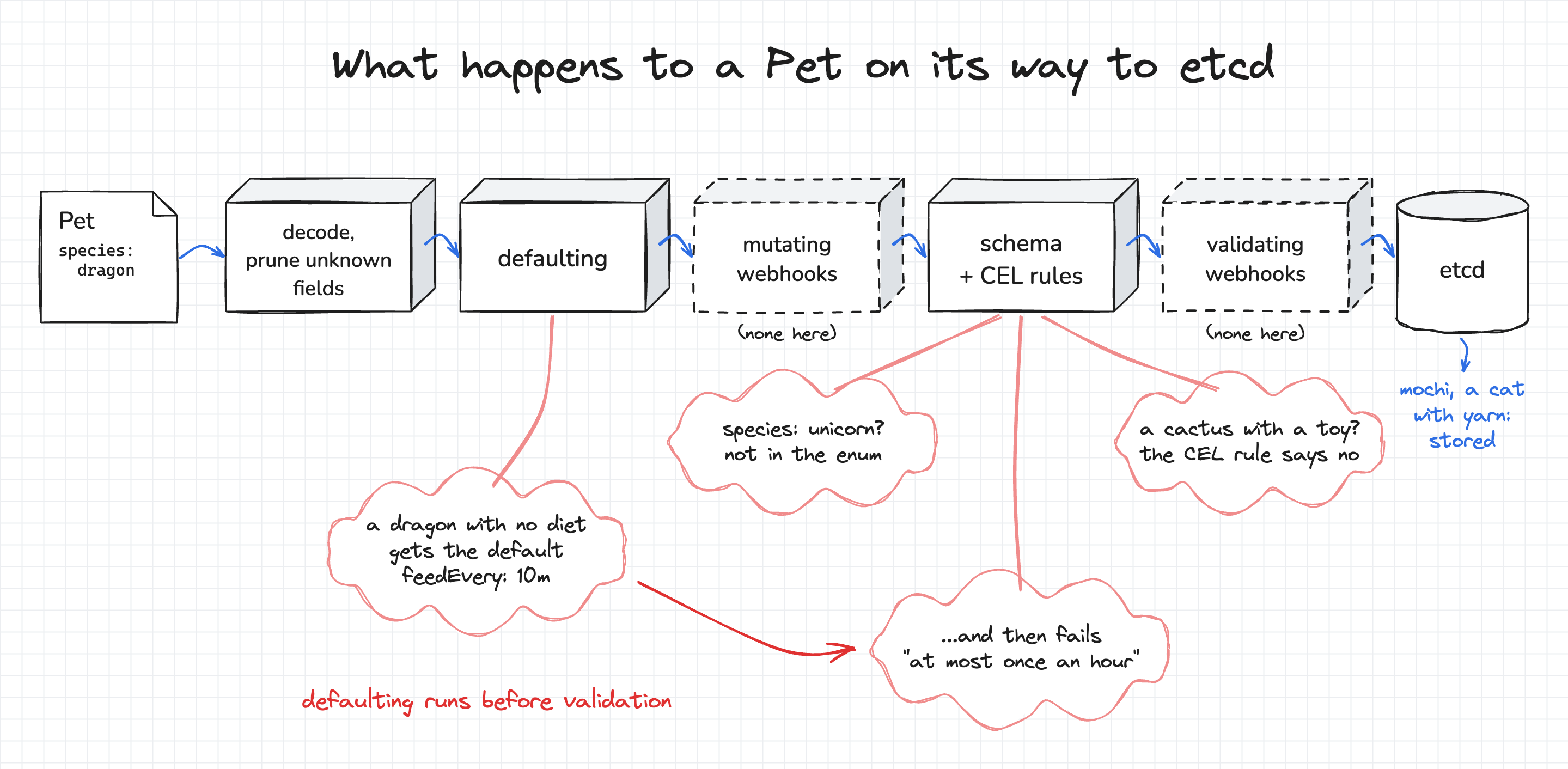
Here's the diet block of the fourth version, with its three defaults:
              diet:
                type: object
                default: {}
                properties:
                  food:
                    type: string
                    maxLength: 20
                    default: snacks
                  feedEvery:
                    type: string
                    maxLength: 10
                    pattern: '^[0-9]+(s|m|h)$'
                    default: 10m
Apply it, and try the lazy dragon again:
kubectl apply -f ~/pet-crd/4-defaults.yaml
kubectl apply --dry-run=server -f ~/pets/turned-away/lazy-dragon.yaml
The lazy dragon is still rejected, but this time for the right reason:
The Pet "lazy-dragon" is invalid: spec: Invalid value: dragons eat at most once an hour: diet.feedEvery must be at least 1h
To see the defaults in action, create a minimal Pet and print the object that the API server would store:
kubectl create --dry-run=server -o yaml -f - <<'EOF'
apiVersion: zoo.example.com/v1alpha1
kind: Pet
metadata: {name: minimal, namespace: zoo}
spec: {species: cat}
EOF
apiVersion: zoo.example.com/v1alpha1
kind: Pet
metadata:
  creationTimestamp: "2026-09-28T19:46:35Z"
  generation: 1
  name: minimal
  namespace: zoo
  uid: 9d82f0db-8d20-4950-b6fc-b9dbed9c5d9d
spec:
  diet:
    feedEvery: 10m
    food: snacks
  species: cat
Adding a status
A quick clarification before we add a status.
Think of the spec as what the pet's owner asks for, and the status as the controller's report on what actually happened, such as the pet's mood.
Different clients write these two parts, and the CRD can keep them apart.
Setting subresources.status: {} gives Pets a separate /status endpoint.
The main endpoint ignores changes to .status, and the /status endpoint ignores changes to everything else.
On top of that, metadata.generation only goes up when the spec changes, so a controller can compare it with the generation it last handled.
The schema must describe status too, or the API server prunes its fields in the same way it prunes unknown spec fields.
The last version of the CRD adds all of that, plus the printer columns we'll look at next:
    subresources:
      status: {}
    ...
          status:
            type: object
            properties:
              mood:
                type: string
              face:
                type: string
Apply it:
kubectl apply -f ~/pet-crd/5-status-and-columns.yaml
Adding printer columns
The CRD you just applied also has an additionalPrinterColumns list:
    additionalPrinterColumns:
    - {name: Species,  type: string, jsonPath: .spec.species}
    - {name: Face,     type: string, jsonPath: .status.face}
    - {name: Mood,     type: string, jsonPath: .status.mood}
    - {name: Toy,      type: string, jsonPath: .spec.toy}
    - {name: Last Fed, type: date,   jsonPath: .spec.lastFedAt}
    - {name: Age,      type: date,   jsonPath: .metadata.creationTimestamp}
Without it, kubectl get pets shows only NAME and AGE.
It's important to know that the API server drops AGE once you define your own columns, so I added it back to the list.
Now that the CRD is complete, it's time to let the adopted Pets in for real:
kubectl apply -f ~/pets/adopted/
kubectl get pets -n zoo
NAME       SPECIES   FACE   MOOD   TOY     LAST FED   AGE
mochi      cat                     yarn               0s
prickles   cactus                                     0s
rex        dog                     stick              0s
smaug      dragon                                     0s
The stored objects have the default diet filled in:
kubectl get pet -n zoo mochi -o jsonpath='{.spec.diet}{"\n"}'
{"feedEvery":"10m","food":"snacks"}
Writing the status by hand
The FACE and MOOD columns are empty, because nothing has written a status yet.
Normally, that's the controller's job, but we can do it by hand to see how the status subresource behaves.
First, try the obvious way and patch the status through the main endpoint:
kubectl patch pet mochi -n zoo --type=merge -p '{"status":{"mood":"Happy","face":"😺"}}'
pet.zoo.example.com/mochi patched (no change)
(no change) means the API server ignored the .status part of the patch.
To change the status, send the patch to the /status subresource instead:
kubectl patch pet mochi -n zoo --subresource=status --type=merge \
  -p '{"status":{"mood":"Happy","face":"😺"}}'

kubectl get pets -n zoo
NAME       SPECIES   FACE   MOOD    TOY     LAST FED   AGE
mochi      cat       😺      Happy   yarn               0s
prickles   cactus                                      0s
rex        dog                      stick              0s
smaug      dragon                                      0s
The status change didn't affect metadata.generation, which is still 1:
kubectl get pet mochi -n zoo -o jsonpath='{.metadata.generation}{"\n"}'
1
A controller does the same thing in a loop. It reads the spec, acts on it, and writes the result to the status.
Common points to debug
If something doesn't behave the way you expect:
- If applying a CRD version fails, read the error carefully. The API server validates the CRD itself, so a field without a
typeor a CEL rule that doesn't compile is rejected before anything changes. - If a valid Pet is rejected, run the same command with
--dry-run=serverand read the full error. It names the field and the rule that failed. - If
kubectl get ptorkubectl get zoodoesn't work, checkspec.names.shortNamesandspec.names.categoriesin the CRD. - If a default doesn't show up, check that every parent object on the way to the field has a default too, like
diet: default: {}. - If the status doesn't change, make sure you used
--subresource=status, and that the CRD schema still describesstatus.moodandstatus.face.
Wrapping up
That's it! The API server now validates Pets, fills in defaults, keeps the status separate from the spec, and prints useful columns, all without a controller.
Nothing in the cluster reacts to a Pet yet, so mochi will never get hungry.
In the next tutorial, we write the controller that takes care of that:
How Kubernetes Operators Work: Building a Controller From Scratch.
References
About the Author

Writes about
Frequently covers
More tutorials you might like
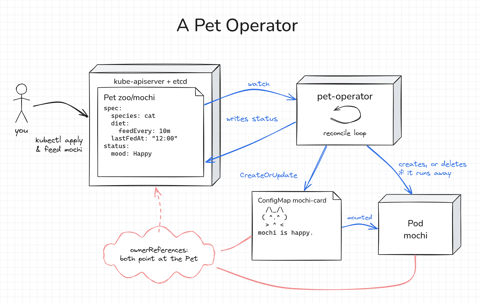
How Kubernetes Operators Work: Building a Controller From Scratch
Build a Kubernetes operator for a small Pet API, first as a 15-line bash loop and then as a Go controller with controller-runtime. Every Pet gets a Pod to live in, gets hungry as time passes, and runs away if nobody feeds it. Along the way, you'll see how the reconcile loop works.
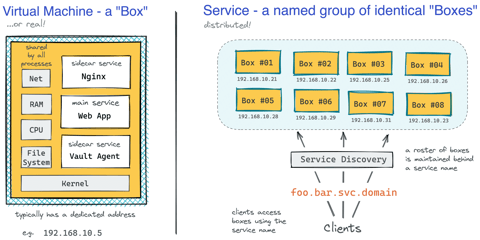
How Kubernetes Reinvented Virtual Machines - In a Good Sense
How Virtual Machines were used to deploy services. What old problems containers solve and what new problems create. How Kubernetes used containers to recreate Virtual Machines in a better way?

Docker Containers vs. Kubernetes Pods - Taking a Deeper Look
Can a Kubernetes Pod be created with plain Docker commands? Learn the difference between Containers and Pods by exploring how they are implemented under the hood.
Making Sense Out of Native Sidecar Containers in Kubernetes
Understand the "native" sidecar containers, learn their difference from regular and init containers and discover their advantages in this focused and highly practical tutorial.
Learn by doing, not just by reading or watching
Sign up for a free account to start a VM playground right on this page, track your progress, and get notified about new learning materials.