Getting Started with shirudo: Signed BPF Packages, Measured in the TPM

shirudo (Japanese シールド, "shield") is a BPF-based security platform. Linux targets run only the BPF their operator signed, every change is measured into the TPM, and functionality ships as signed upatches that targets pull from OCI registries.
In this tutorial you play both roles:
- The operator: this playground machine. It holds the signing key, builds and publishes packages, and verifies evidence.
- The target: a protected test VM running inside it, with a bpf-next kernel, the BPF LSM, a dm-verity runtime image and a software TPM (swtpm).
You will build a signed package, publish it to an OCI registry, install it on the target, watch the TPM register record the change, verify the target's evidence, and remove the package again.
iximiuz playgrounds offer no nested KVM, so the target VM runs under QEMU's software emulation (TCG). Everything works, it is just slower than on real hardware.
Prepare the lab
Preparing the lab started automatically when the playground booted: it installs clang/LLVM 23, builds shirudo, builds the target's images and boots the target. This takes about 8 minutes. Follow along in the terminal:
tail -f ~/lab-setup.log
Press Ctrl+C to stop tail -f once it prints [test-vm] VM ready.
If the log stops with an error instead, run systemctl status shirudo-lab-setup,
then re-run the setup with shirudo-lab all 2>&1 | tee -a ~/lab-setup.log
(or shirudo-lab target 2>&1 | tee -a ~/lab-setup.log if only the boot failed).
Two helpers make life easier in every new terminal:
t '<command>'runs one command on the target as root, whereshirudois the target's trusted runtime binary. It runs in/workspace/shirudoon the target, which is~/shirudohere, and the target's/mnt/shirudo-outis~/shirudo/build/test-vm/vms/quickstart/resulthere.shirudo-lab sshopens an interactive root shell on the target.
1. Inspect shirudo's scope
Start with what the target says about itself:
t 'shirudo status'
Every condition should be OK:
LsmAttached: shirudo's BPF LSM programs are attached and their links pinned.KeyringSealed: the kernel's.bpfkeyring holds the operator's certificates and is sealed. No new signer can be added until the next boot.ChainIntact: the TPM measurement register equals the replay of the eventlog.TpmMeasured: the register lives in a TPM NV index.
Now print the sections the report folds while they are healthy:
t 'shirudo status --show-full'
The TPM measurement section holds the register value (Chain) and the
eventlog size. Save them, so you can compare after you install a package:
t "shirudo status --show-full | grep -E 'Chain:|Eventlog:'" | tee ~/boot-chain.txt
Only one binary on the target has authority over shirudo's state: the one
executed from the dm-verity runtime image. The target keeps an identical copy
under /usr/local/bin. Ask it:
t '/usr/local/bin/shirudo status'
Same bytes, different origin: Permission denied. Now try what an attacker with
root would do, and open one of shirudo's pinned maps:
t 'cat /run/shirudo/bpffs/tamper'
t 'shirudo status'
The cat fails with Permission denied; that is the point. The status report
counts the attempt under ObjGet.
What this test environment does and does not prove
- Proves: signature enforcement in the kernel (
.bpfkeyring), the runtime-authority model, measured loads and unloads, and TPM-signed evidence with a nonce. - Differs from production: the TPM is software (swtpm), QEMU starts the kernel and initrd directly instead of a signed unified kernel image (so nothing measures the boot phases into PCR 11), the signing key is a throwaway generated for this VM, and the CPU is emulated.
2. Build a shirudo package
A package is a .bee archive built from a Beefile. It holds the signed
upatches, a signed unload directive for each, and the certificate of the
signing key. Create the package directory:
mkdir -p ~/hello && ln -sfn ~/shirudo/vendor ~/hello/vendor
The vendor link gives the compiler the target kernel's vmlinux.h and the
libbpf headers the program includes.
Review the BPF program. It attaches to the kernel function do_nanosleep()
and counts the calls in a one-entry array map named calls:
cat > ~/hello/hello.bpf.c <<'EOF'
// SPDX-License-Identifier: GPL-2.0 OR BSD-2-Clause
#include "vmlinux.h"
#include <bpf/bpf_helpers.h>
#include <bpf/bpf_tracing.h>

char _license[] SEC("license") = "Dual BSD/GPL";

struct {
        __uint(type, BPF_MAP_TYPE_ARRAY);
        __uint(max_entries, 1);
        __type(key, __u32);
        __type(value, __u64);
} calls SEC(".maps");

SEC("fentry/do_nanosleep")
int BPF_PROG(count_calls)
{
        __u32 key = 0;
        __u64 *n = bpf_map_lookup_elem(&calls, &key);

        if (n)
                __sync_fetch_and_add(n, 1);
        return 0;
}
EOF
Describe the package in a Beefile:
cat > ~/hello/Beefile <<'EOF'
[package]
name = "hello"
description = "Counts do_nanosleep() calls"
license = "GPL-2.0 OR BSD-2-Clause"

[[upatches]]
source = "hello.bpf.c"
EOF
Build it with the operator key ($KEYS, generated for this test VM):
cd ~ && shirudo bpm build hello --version 1.0.0 --keys-dir "$KEYS"
shirudo bpm info upatches hello-1.0.0.bee --all
The builder compiled the program against the kernel types, turned it into a
signed loader, signed an unload directive bound to its payload, and wrote
hello-1.0.0.bee. The archive itself is not signed: what protects the target are the
signatures inside it. A target accepts a package only if its certificate holds
the same public key as the operator certificate the target enrolled
(/var/lib/shirudo/keys/cert.der). Compare the package's fingerprint with
the ones the target lists under Package certificates::
cd ~ && shirudo bpm key fingerprint hello-1.0.0.bee
t 'shirudo bpm key list'
3. Publish, install, and measure
Run a registry on the operator's loopback. The target VM reaches it as
10.0.2.2, QEMU's address for the host:
docker run -d --name shirudo-registry -p 127.0.0.1:5000:5000 registry:3
Push the package. With --keys-dir it is also added to the namespace's signed
index; BPM_OCI_SCHEME=http drops TLS, which suits only a local registry:
cd ~ && BPM_OCI_SCHEME=http shirudo bpm push hello-1.0.0.bee oci://127.0.0.1:5000/example/hello --keys-dir "$KEYS" --new-index
Install it on the target by direct reference. The target downloads it, checks
its digest against the manifest, checks the package certificate against the
operator certificate it enrolled, then the kernel checks every loader signature against the sealed
.bpf keyring, and shirudo measures each load into the TPM register:
t 'BPM_OCI_SCHEME=http shirudo bpm install oci://10.0.2.2:5000/example/hello:1.0.0' 2>&1 | tee ~/install.txt
t 'shirudo bpm list'
Generate some calls and read the map. Only the runtime binary can read it:
t 'sleep 1; sleep 1; sleep 1; shirudo upatch map hello calls' | tee ~/map.txt
Look at the measurement: the register (Chain) moved from its boot value,
and the eventlog gained a record of the load:
cat ~/boot-chain.txt
t "shirudo status --show-full | grep -E '^ +hello|Chain:|Eventlog:'"
4. Verify evidence and uninstall
The status report is what the target says about itself. TPM-signed evidence lets
the operator check the same facts with nothing but the evidence and its own
certificates. The block below makes a fresh nonce, so old evidence cannot be
replayed, and has the target write its evidence to /mnt/shirudo-out, which is
shared with the operator. Then it verifies the evidence against the
certificates enrolled at boot, accepting the events after boot. Run it as one
block: $NONCE lives only in this shell.
cd ~/shirudo
NONCE=$(openssl rand -hex 32)
t "shirudo attest --nonce=$NONCE --output=/mnt/shirudo-out/ev.json"
EV=build/test-vm/vms/quickstart/result/ev.json
OWN=build/test-vm/host-bundle-bpf-next-verity/fixtures/own.der
shirudo attest verify --evidence="$EV" --nonce="$NONCE" --ak-name="$(jq -r .ak.name "$EV")" \
  --cert="$KEYS/cert.der" --cert="$OWN" --allow-runtime-events | tee ~/verify.txt
The checks prove that the target's TPM signed this evidence for your nonce, and
that the eventlog replays to the register value the TPM certified. The notes
list the events after boot: your hello load.
Here the attestation key's name comes from the evidence itself, which proves
nothing about which TPM signed it. In production you pin the key once, with a
credential challenge only the target's TPM can answer (shirudo attest challenge).
Uninstall the package. The target runs the signed unload directive that shipped in the package and measures the unload too:
t 'shirudo bpm uninstall hello' 2>&1 | tee ~/uninstall.txt
t "shirudo status --show-full | grep -E 'Chain:|Eventlog:'"
The register did not go back to an earlier value: it moved forward again. It only starts over when the TPM resets at the next boot.
5. Exam 🏁
Ship version 1.1.0 of hello that counts file opens instead of sleeps:
- Change the program to attach to
fentry/do_sys_openat2. - Build version
1.1.0in~(so it writes~/hello-1.1.0.bee) and publish it tooci://127.0.0.1:5000/example/hello. - Install it on the target and save the install output to
~/exam-install.txt. - Open some files, read the counter and save that output to
~/exam-map.txt. - Remove it from the target.
Hint 1
The index already exists, so push without --new-index:
sed -i 's|fentry/do_nanosleep|fentry/do_sys_openat2|' ~/hello/hello.bpf.c
cd ~ && shirudo bpm build hello --version 1.1.0 --keys-dir "$KEYS"
cd ~ && BPM_OCI_SCHEME=http shirudo bpm push hello-1.1.0.bee oci://127.0.0.1:5000/example/hello --keys-dir "$KEYS"
Hint 2
t 'BPM_OCI_SCHEME=http shirudo bpm install oci://10.0.2.2:5000/example/hello:1.1.0' 2>&1 | tee ~/exam-install.txt
t 'cat /etc/hostname /etc/os-release >/dev/null; shirudo upatch map hello calls' | tee ~/exam-map.txt
t 'shirudo bpm uninstall hello'
What's next
- How it works follows one upatch through each step.
- The quick guides cover attesting a target with a pinned key, live patching a kernel CVE, sandboxing Apache and runtime observability.
Learn by doing, not just by reading or watching
Sign up for a free account to start a VM playground right on this page, track your progress, and get notified about new learning materials.
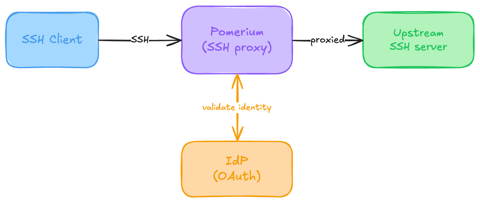
Native SSH Access with Pomerium
Pomerium can be used as a native SSH reverse proxy, adding OAuth authentication and flexible Pomerium policy enforcement to standard SSH connections, without the need for tunnels, or custom clients or servers.

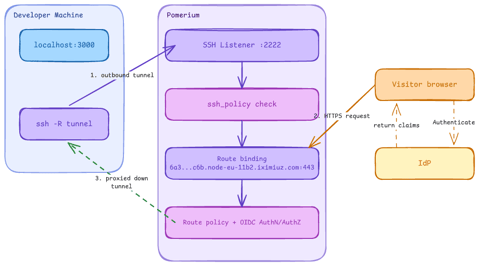
Native SSH Reverse Tunneling with Pomerium
Use Pomerium's native SSH support to publish a local service through a standard reverse SSH tunnel, with OpenID Connect (OIDC) authentication and continuous authorization on every request. Reach services behind Network Address Translation (NAT) without firewall holes or custom agents, and control both who can use the service and who can open the tunnel. Application traffic stays on infrastructure you control.
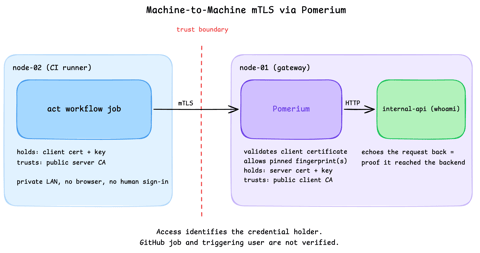
Secure Machine-to-Machine Access with mTLS and Pomerium
Run a GitHub Actions-compatible continuous integration (CI) job on a private runner and protect its internal API call with mutual TLS (mTLS) and Pomerium. Build separate server and client trust chains, authorize one machine certificate by fingerprint, then revoke, restore, and rotate its credentials through live policy changes.
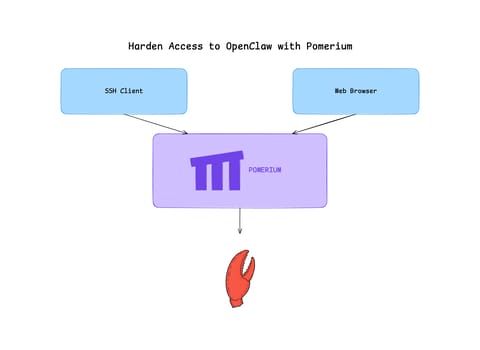
Harden Access to OpenClaw with Pomerium
Put OpenClaw, a self-hosted AI assistant with shell and file access, behind a web route and an SSH route, both gated by the same identity and Pomerium's context-aware policy. OpenClaw runs in trusted-proxy mode, trusting signed identity headers instead of its own login, while Pomerium's native SSH proxy signs short-lived certificates for shell access.