OpenBao 2.6: Discovering secrets with AppRole and least-priviledge policies.
In particular, we will cover how to:
- Carve out a dedicated, least-privilege area of the secrets store for one application
- Write a least-priviledge policy that grants read and scan access to the required secrets
- Create a machine identity with AppRole for our application
- Use OpenBao 2.6's
scancommand to recursively fetch every secret the app is allowed to see
The environment
The playground for this tutorial boots with OpenBao already installed and running in dev mode. This means you can jump right into action!
⚠️ Dev mode provides exactly what we need here: an ephemeral learning environment. It skips storage configuration, TLS, and the unseal process. Never run it that way in production!
Start the playground and confirm OpenBao is up and running:
bao status
Key             Value
---             -----
Seal Type       shamir
Initialized     true
Sealed          false
Total Shares    1
Threshold       1
Version         2.6.0
...
Let's log in using the iximiuz root token, so we can further configure OpenBao for this tutorial:
bao login iximiuz
The learning objective
Our goal is to stand up a small representative service, and it needs two things from OpenBao at startup:
- Database credentials, to connect to its own database
- An API key and webhook secret, to talk to an external service
The service should be able to read exactly those secrets and nothing else.
Furthermore, it should authenticate as an application, i.e., not as a human operator, but as an application acting in its own scope.
Give the app its own secrets area
It is a best-practice to give each team or application their own key-value (KV) mount rather than piling everything into a shared secret/ path. It keeps policies simple (one prefix per mount) and makes the mount itself a natural access boundary.
Create a dedicated KV v2 mount for the app:
bao secrets enable -path=myapp kv-v2
Then, write the required secrets:
bao kv put -mount=myapp db/creds username=app_svc password=s3cr3t-db-pw
bao kv put -mount=myapp external-api/api-key key=h1dd3n-api-key
bao kv put -mount=myapp external-api/webhook-secret value=unhackable
Write a least-privilege policy
Policies in OpenBao are deny by default. This means an empty policy grants nothing. In order to craft a least-priviledge token, we need to state exactly the permissions our token needs.
For the KV v2 engine, reading a secrets value and listing a secrets name, are exposed as two different paths: secret values live under data/, and both list and the new scan operate on metadata/.
Let's create the policy file:
cat > myapp-policy.hcl <<'EOF'
path "myapp/data/*" {
  capabilities = ["read"]
}

path "myapp/metadata/*" {
  capabilities = ["list", "scan"]
}
EOF
and write it to OpenBao:
bao policy write myapp-policy myapp-policy.hcl
The machine identity: AppRole
Humans log in to OpenBao with a username, password and MFA. A piece of software needs a different way to authenticate itself. The AppRole auth method is for this.
It enables machines or apps to authenticate with OpenBao-defined roles. The request states both the role_id (which identity is this?) and a secret_id (prove it), and trades them for a token. This is the app's login flow.
Enable the AppRole feature:
bao auth enable approle
Then create a role, bound to the policy we created before:
bao write auth/approle/role/myapp \
    token_policies="myapp-policy" \
    token_ttl=15m \
    token_max_ttl=2h \
    secret_id_ttl=2h
💡 In production you'd also tune secret_id_bound_cidrs and secret_id_num_uses to constrain where and how many times a secret_id can be redeemed.
Let's fetch the role_id and secret_id, and store them for our app to pick up:
mkdir -p ~/myapp

bao read -field=role_id auth/approle/role/myapp/role-id > ~/myapp/role_id
bao write -f -field=secret_id auth/approle/role/myapp/secret-id > ~/myapp/secret_id
chmod 600 ~/myapp/secret_id
Log in as the app
Forget you're an administrator for a moment. This is what the app itself does at startup:
ROLE_ID="$(cat ~/myapp/role_id)"
SECRET_ID="$(cat ~/myapp/secret_id)"

bao write auth/approle/login role_id="${ROLE_ID}" secret_id="${SECRET_ID}"
Key                     Value
---                     -----
token                   s.xxxxxxxxxxxxxxxxxxxxxxxx
token_accessor          ...
token_duration          15m
token_renewable         true
token_policies          ["default" "myapp-policy"]
As we can see the token is tied to both the default and our custom myapp-policy policy.
Let's capture the token so we can execute the new few commands as the app:
APP_TOKEN="$(bao write -field=token auth/approle/login role_id="${ROLE_ID}" secret_id="${SECRET_ID}")"
Testing the limits
If we try to use the app's token to touch something outside its scope, for example the default secret/ mount:
BAO_TOKEN="${APP_TOKEN}" bao kv list -mount=secret ""
Error making API request.
...
Code: 403. Errors:
* preflight capability check returned 403, please ensure client's policies grant access to path "secret/"
The access is denied! As we would expect.
list vs scan
Now look inside the app's own area:
BAO_TOKEN="${APP_TOKEN}" bao kv list -mount=myapp ""
Keys
----
db/
external-api/
list only shows what's in the stated folder: two folders. Let's compare this to scan:
BAO_TOKEN="${APP_TOKEN}" bao kv scan -mount=myapp ""
Keys
----
db/creds
external-api/api-key
external-api/webhook-secret
bao scan (and its bao kv scan sibling) is a new command, which was shipped in OpenBao 2.6.0. It walks the whole prefix recursively in a single call instead of making you list each folder by hand.
Put it together: Our app's start-up script
Let's write a shell script that demonstrates how an app (of any language) would use this to load secrets during start-up:
cat > ~/myapp/fetch-secrets.sh <<'EOF'
#!/usr/bin/env bash
set -euo pipefail

ROLE_ID="$(cat ~/myapp/role_id)"
SECRET_ID="$(cat ~/myapp/secret_id)"

TOKEN="$(bao write -field=token auth/approle/login \
  role_id="${ROLE_ID}" secret_id="${SECRET_ID}")"

for key in $(BAO_TOKEN="${TOKEN}" bao kv scan -mount=myapp -format=json "" | jq -r '.[]'); do
  echo "=== ${key} ==="
  BAO_TOKEN="${TOKEN}" bao kv get -mount=myapp -format=json "${key}" | jq '.data.data'
done
EOF

chmod +x ~/myapp/fetch-secrets.sh
Run it:
~/myapp/fetch-secrets.sh
=== db/creds ===
{
  "password": "s3cr3t-db-pw",
  "username": "app_svc"
}
=== external-api/api-key ===
{
  "key": "abc123xyz"
}
=== external-api/webhook-secret ===
{
  "value": "whsec_000111"
}
No hardcoded credentials! No overly-broad access! Using a dedicated app identity that enables us to manage secrets and their life-cycle comfortably outside of the app.
A note on cleanup and TTLs
The token you captured in APP_TOKEN expires on its own (token_ttl=15m). If you wanted to cut the app off immediately instead of waiting execute:
bao token revoke "${APP_TOKEN}"
Finally, you can verify that the token was revoked:
BAO_TOKEN="${APP_TOKEN}" bao token lookup
This should return HTTP 403, if the token was revoked.
Congratulations! 🎉
You have successfully bootstrapped secrets for a small application using modern best practices such a machine identity and least-priviledge policies!
What's next?
- Try swapping AppRole for the JWT/OIDC auth method if your app already gets a JWT from somewhere, such as a Kubernetes service account token, a CI system, or another identity provider.
- Explore dynamic secrets to replace the static
db/credsentry. OpenBao will generate short-lived (database) credentials per request. - If you are curious about the bootstrapping of OpenBao itself, you can learn how to Get Started with OpenBao and Auto Unseal with the Transit Secrets Engine
Enterprise for OpenBao
Learn more about Enterprise for OpenBao which includes Enterprise Support.
Or talk to us, if you are curious about a migration assessment.
References
To dive deeper into the concepts covered in this tutorial, check out the resources below.
About the Author

Fabian Kammel
Principal Security Consultant at ControlPlane - focusing on cloud native and container security & post-quantum cryptography.
Writes about
Frequently covers
More tutorials you might like
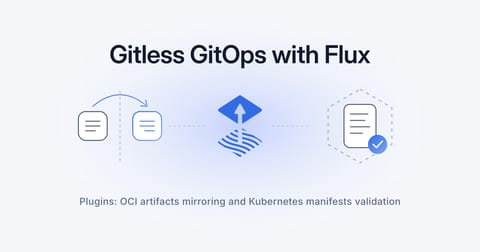
Gitless GitOps with Flux: Plugins, Mirrors, and Schema Validation
In this tutorial, we will learn how to use the new plugin system in Flux 2.9 to: validate manifests, mirror charts into local registries and deploy using Gitless GitOps principles.
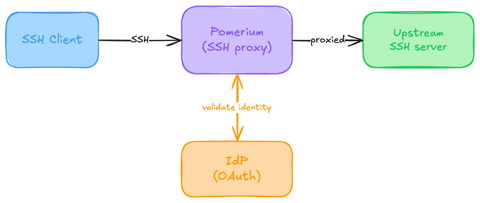
Native SSH Access with Pomerium
Pomerium can be used as a native SSH reverse proxy, adding OAuth authentication and flexible Pomerium policy enforcement to standard SSH connections, without the need for tunnels, or custom clients or servers.

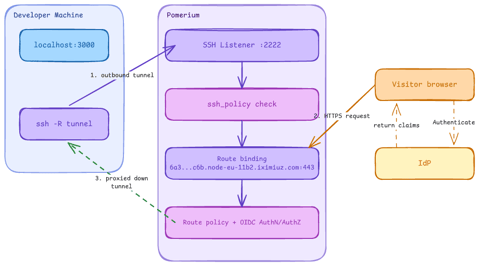
Native SSH Reverse Tunneling with Pomerium
Use Pomerium's native SSH support to publish a local service through a standard reverse SSH tunnel, with OpenID Connect (OIDC) authentication and continuous authorization on every request. Reach services behind Network Address Translation (NAT) without firewall holes or custom agents, and control both who can use the service and who can open the tunnel. Application traffic stays on infrastructure you control.
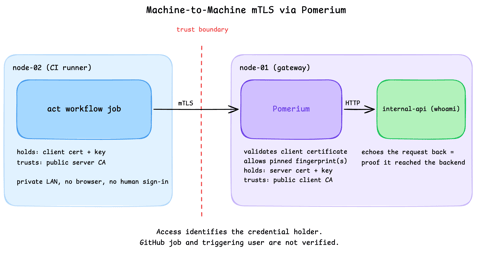
Secure Machine-to-Machine Access with mTLS and Pomerium
Run a GitHub Actions-compatible continuous integration (CI) job on a private runner and protect its internal API call with mutual TLS (mTLS) and Pomerium. Build separate server and client trust chains, authorize one machine certificate by fingerprint, then revoke, restore, and rotate its credentials through live policy changes.
Learn by doing, not just by reading or watching
Sign up for a free account to start a VM playground right on this page, track your progress, and get notified about new learning materials.