Restrict Access to a Docker-Published Port with Firewall Rules

Publishing a container port on a specific host IP address is a common way to limit where a containerized service can be reached.
For example, -p 10.20.0.10:3000:3000 publishes the container's port 3000 on the host's 10.20.0.10 address instead of all host addresses.
The Publish a Redis Container Port on a Private IP Address challenge uses this technique to keep Redis off the Internet.
However, binding to an internal IP address doesn't necessarily limit access to the corresponding network. Linux follows the weak end host model: the kernel accepts packets destined for any of its local IP addresses, regardless of which network interface they arrive through. In the Reach a Linux Service Through an Interface It Doesn't Listen On challenge, this behavior made a service bound to an internal IP reachable from the primary network.
Docker-published ports can be reached in the same unexpected way. But Docker also changes how incoming connections pass through the Linux firewall, so protecting these ports requires a Docker-aware approach.
Your task is to prevent unexpected access to a Docker-published port without breaking legitimate connections.
This challenge assumes Docker is using its default iptables firewall backend.
Docker Engine 29 introduced an alternative nftables backend, but it's still experimental and must be explicitly enabled. The nftables backend doesn't create the DOCKER-USER chain and requires a different approach to configuring firewall rules.
The underlying networking behavior is the same with both backends, but this challenge focuses on the more established iptables setup.
See Docker with nftables for more details.
The setup
The app-server machine has two network interfaces:
eth0(192.168.10.10) is connected to the office network (192.168.10.0/24).eth1(10.20.0.10) is connected to the management network (10.20.0.0/24).
The server runs two Docker containers.
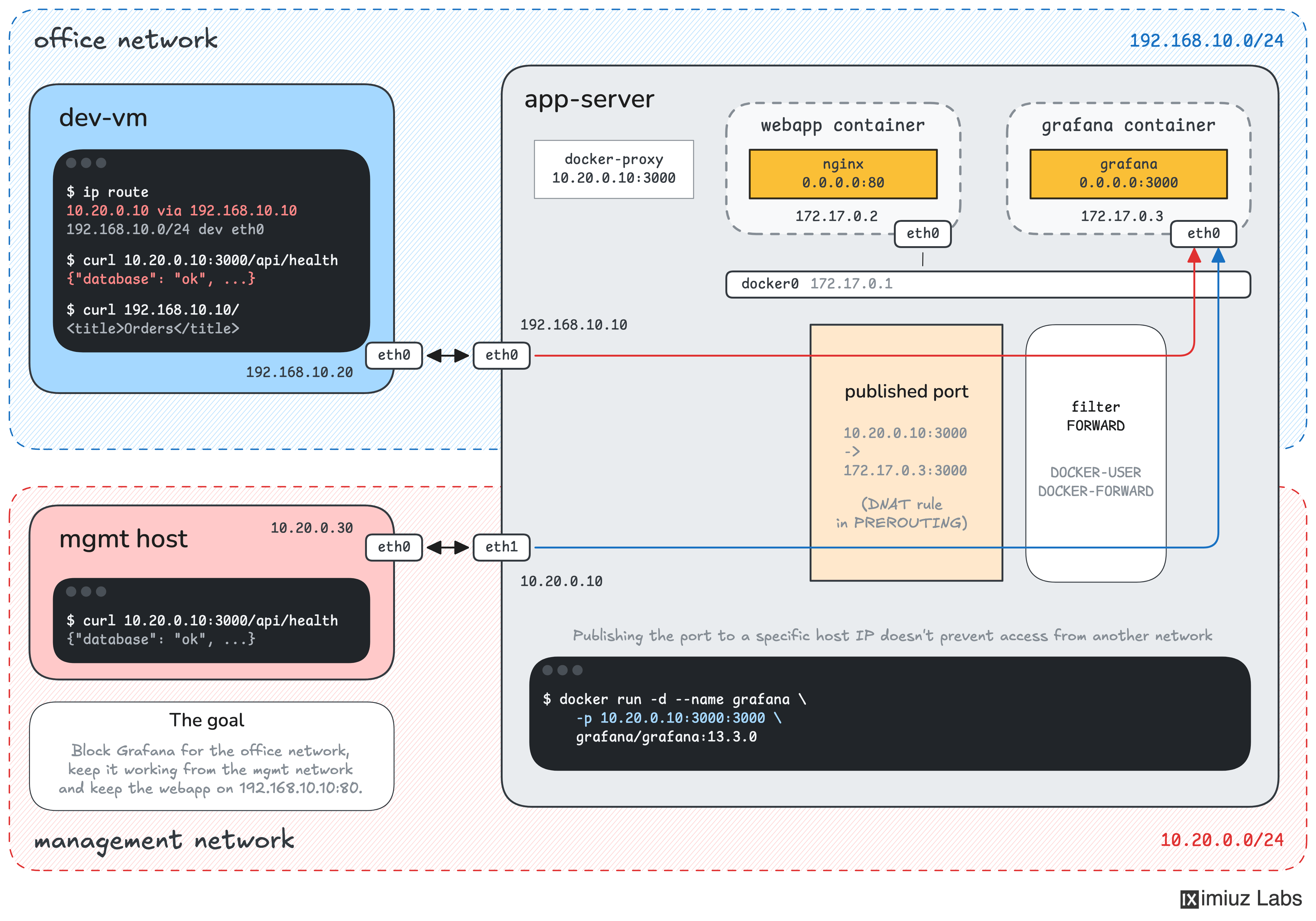
The company's web application is published on 192.168.10.10:80, while a monitoring Grafana dashboard for the operations team is published only on the management IP:
docker run -d --name grafana \
    -p 10.20.0.10:3000:3000 \
    grafana/grafana:13.3.0
The team assumed this configuration would keep the dashboard accessible only from the management network. However, someone discovered that Grafana is reachable from the office network, too.
The development VM, dev-vm (192.168.10.20), has a static route to 10.20.0.10 through 192.168.10.10.
As a result, requests to http://10.20.0.10:3000 reach app-server through eth0, and Docker forwards them to Grafana.
Prevent Grafana from being accessed through the office network, while keeping it available to legitimate monitoring clients.
When you are done:
- Requests to
10.20.0.10:3000arriving througheth0must be blocked. - Requests to
10.20.0.10:3000arriving througheth1must continue to work. - The web application at
http://192.168.10.10/must remain accessible from the office network.
Apply the fix on app-server.
Keep the grafana container running with its existing port mapping, and don't change the Docker daemon configuration, the network routes, or the firewall rules installed by Docker.
The playground uses Docker's default bridge networking with the iptables firewall backend.
You can add your own firewall rules using either iptables or nftables.
Use dev-vm to test your changes from the office network.
The final check runs from a separate machine connected to both networks, so modifying dev-vm won't help you pass it.
Hint 1
Start by reproducing the problem on dev-vm:
curl http://10.20.0.10:3000/api/health
On app-server, inspect the published ports and listening sockets:
docker port grafana
sudo ss -ltnp | grep ':3000'
You may see a docker-proxy process listening on 10.20.0.10:3000.
This makes the published port look like an ordinary host service that could be protected with an INPUT firewall rule, as in the Block Unexpected Access to a Service on a Dual-Homed Linux Server challenge.
However, a listening socket doesn't necessarily tell you how incoming packets reach the service.
If you've tried an INPUT rule, inspect its packet counters:
sudo iptables -L INPUT -v -n
Make another request from dev-vm. Does the rule see any packets?
Hint 2
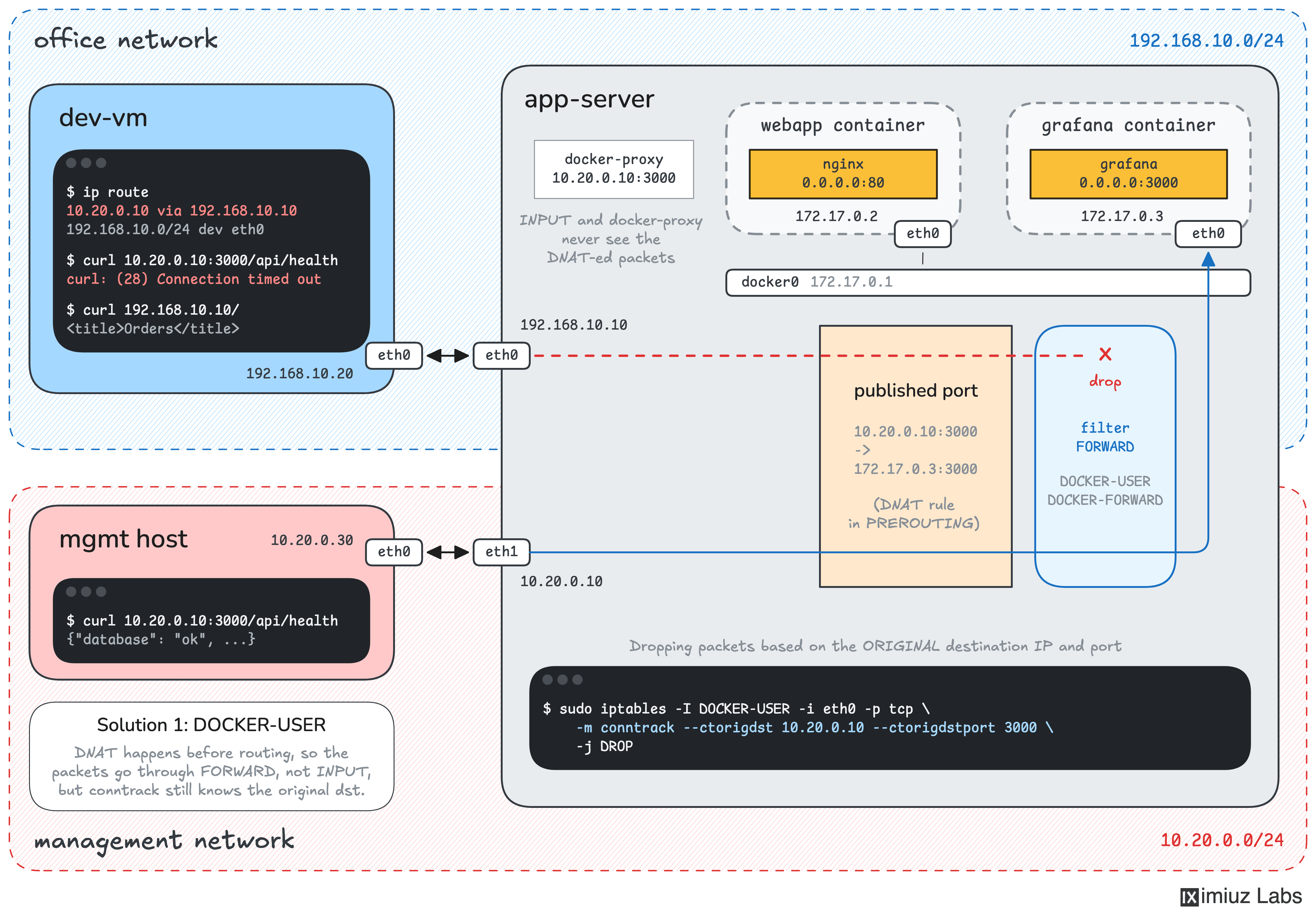
Docker doesn't rely only on listening sockets to publish container ports. With its default bridge networking, it also installs firewall rules that translate incoming connections to the corresponding container addresses. The How Container Networking Works tutorial shows how to publish a port with such rules by hand.
Inspect these rules on app-server:
sudo iptables -t nat -S DOCKER
Look for a DNAT rule that maps 10.20.0.10:3000 to Grafana's container IP and port.
DNAT happens before the kernel decides whether an incoming packet should be delivered locally or forwarded to another destination.
After Docker changes the destination to the container's IP, the packet takes the FORWARD path rather than the INPUT path.
Inspect the forwarding rules:
sudo iptables -S FORWARD
Notice that Docker adds several chains of its own. One of them is intended specifically for user-defined firewall rules.
See Docker with iptables for more details.
Hint 3
Docker provides the DOCKER-USER chain for filtering forwarded container traffic before Docker's own forwarding rules process it.
Inspect the chain:
sudo iptables -S DOCKER-USER
There's one important detail: packets reaching DOCKER-USER have already passed through DNAT.
At this point, the destination of a request to Grafana is the container's IP address and port, not 10.20.0.10:3000.
A regular destination-IP match against 10.20.0.10 won't work here.
There are different ways to identify the traffic you want to block:
- Match the incoming interface and Grafana's translated container destination.
- Use the
conntrackextension to match the connection's original destination IP and port, before DNAT. Look up the--ctorigdstand--ctorigdstportoptions in the Docker firewall documentation.
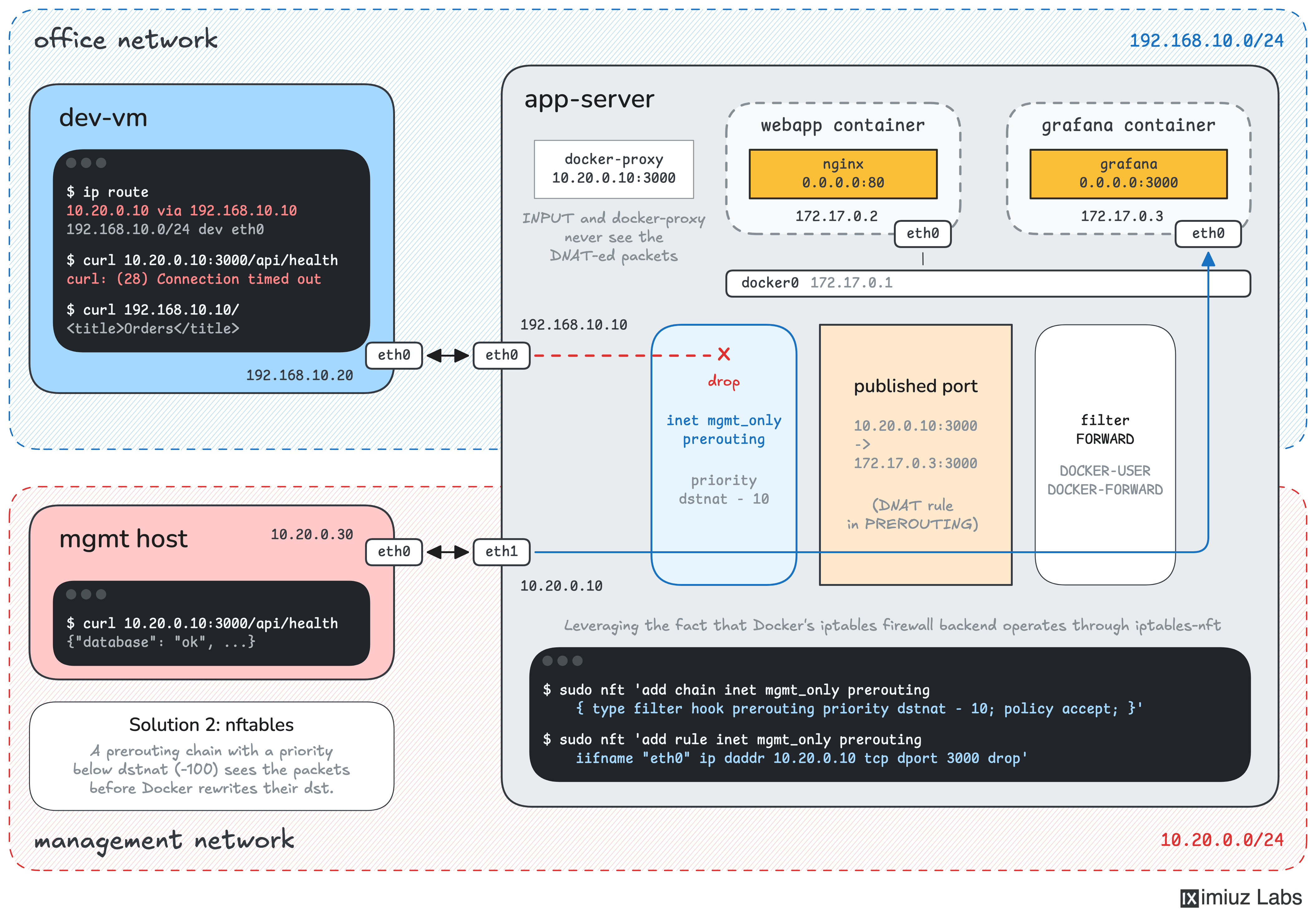
Alternatively, you can filter packets before Docker performs DNAT.
An nftables chain attached to the prerouting hook, with a priority earlier than dstnat, can inspect the original destination directly.
Whichever approach you choose, make sure you restrict only the unwanted Grafana connections, without interfering with other published ports or traffic arriving through the management interface.