Reach a Linux Service Through an Interface It Doesn't Listen On

In 2002, a surprising Linux networking behavior was documented:
on a multi-homed machine, a service listening on the IP address assigned to eth1 could still be reached through eth0, even with IP forwarding disabled.
This happens because Linux follows the weak end host model (described in Section 3.3.4.2 of RFC 1122). The kernel treats IP addresses as belonging to the host as a whole, not exclusively to individual network interfaces. As a result, binding a service to an IP address restricts which destination address it accepts connections on, but not which interface those connections can arrive through.
This behavior is still relevant today. For instance, during Railway's July 2026 outage, a routing failure caused dual-homed servers to silently fall back to a slower secondary network (intended for management use cases only). Linux servers continued serving application traffic destined for their primary IP addresses through that network, causing severe performance degradation.
The same behavior can also undermine network isolation. A service that appears accessible only from an internal network might actually be reachable from another network, provided the packets can find their way to the host. Your task is to demonstrate this behavior in a small, two-machine setup.
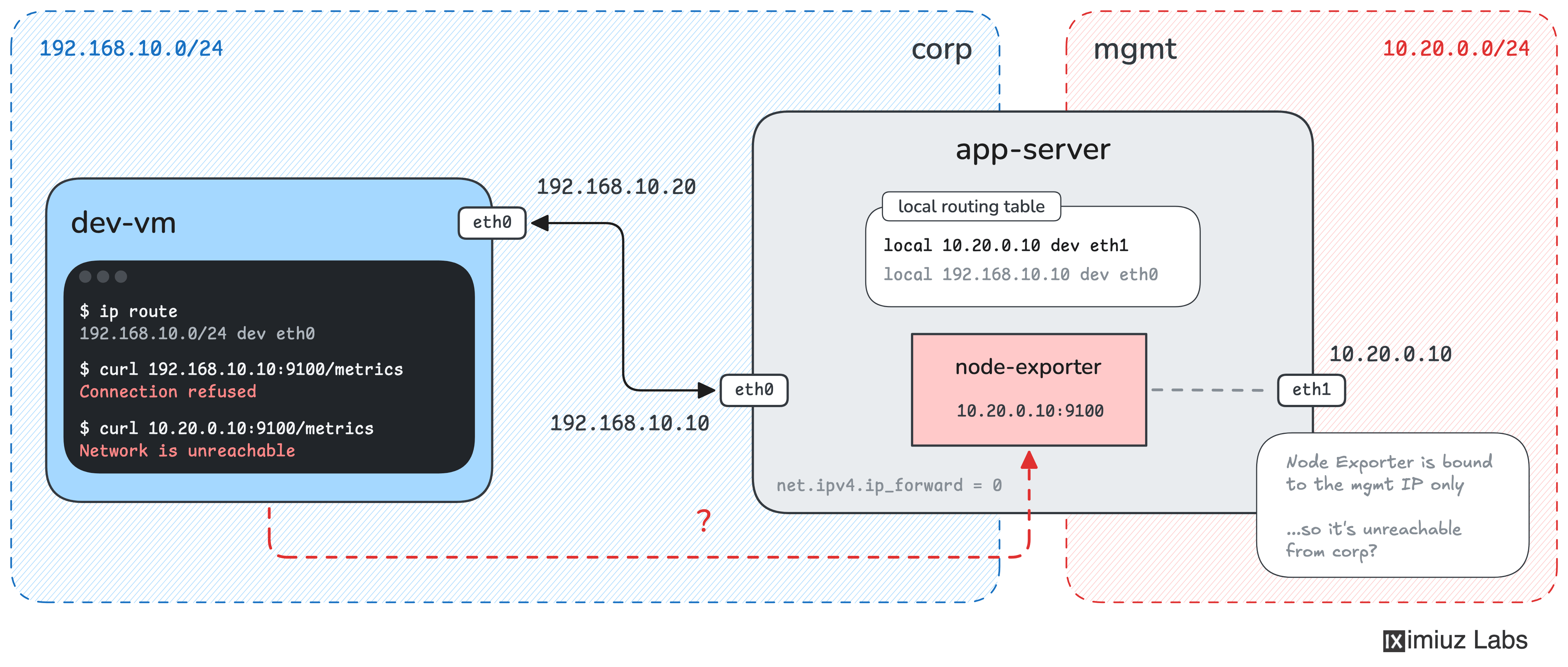
The app-server machine has two network interfaces:
eth0(192.168.10.10) is connected to the corporate network (192.168.10.0/24).eth1(10.20.0.10) is connected to the management network (10.20.0.0/24).
The server runs a web application on 192.168.10.10:80 and Prometheus Node Exporter on 10.20.0.10:9100. Node Exporter listens only on the management IP, so the team assumes its metrics endpoint is inaccessible from the corporate network.
You have a development VM, dev-vm (192.168.10.20), connected only to the corporate network.
From dev-vm, neither of these requests works:
http://192.168.10.10:9100/metrics- nothing is listening on this address and port.http://10.20.0.10:9100/metrics-dev-vmhas no route to the management IP.
You cannot SSH into or modify app-server from dev-vm. You may only change the network configuration of dev-vm.
Prove the team's assumption wrong by fetching http://10.20.0.10:9100/metrics from dev-vm.
Hint 1
Start by checking how dev-vm would reach the two IP addresses of app-server:
ip route get 192.168.10.10
ip route get 10.20.0.10
The first address is on the same network as dev-vm, while the second belongs to a different network.
Can you tell Linux how to reach the second address using the corporate network?
Hint 2
Although dev-vm cannot reach the management network directly, it can reach app-server through 192.168.10.10.
Remember that both 192.168.10.10 and 10.20.0.10 belong to the same Linux host.
What if you told dev-vm to send packets destined for 10.20.0.10 to 192.168.10.10 instead?
You can do this with a static route, using the server's corporate IP as the next-hop gateway.
Hint 3
Use ip route add to create a route to the management IP:
sudo ip route add <destination>/32 via <gateway>
Here:
<destination>is the management IP ofapp-server.<gateway>is the corporate IP ofapp-server, whichdev-vmcan already reach./32means the route applies to one specific IP address, rather than the entire management subnet.
You don't need to enable IP forwarding on app-server. The packet's destination is one of the server's own addresses, so Linux will deliver it locally.