Block Unexpected Access to a Service on a Dual-Homed Linux Server

Binding a Linux service to a private IP address doesn't necessarily make it accessible only from the network that address belongs to.
Because Linux follows the weak end host model, the kernel accepts packets for any of its local IP addresses, regardless of which interface they arrive through. This means that a service intended for one network may also be reachable from another, provided the packets can find their way to the host.
In the previous challenge, you took advantage of this behavior to reach a supposedly isolated monitoring endpoint. This time, you'll learn how to prevent such unexpected access.
Your task is to close this gap on the server itself, without breaking legitimate connections.
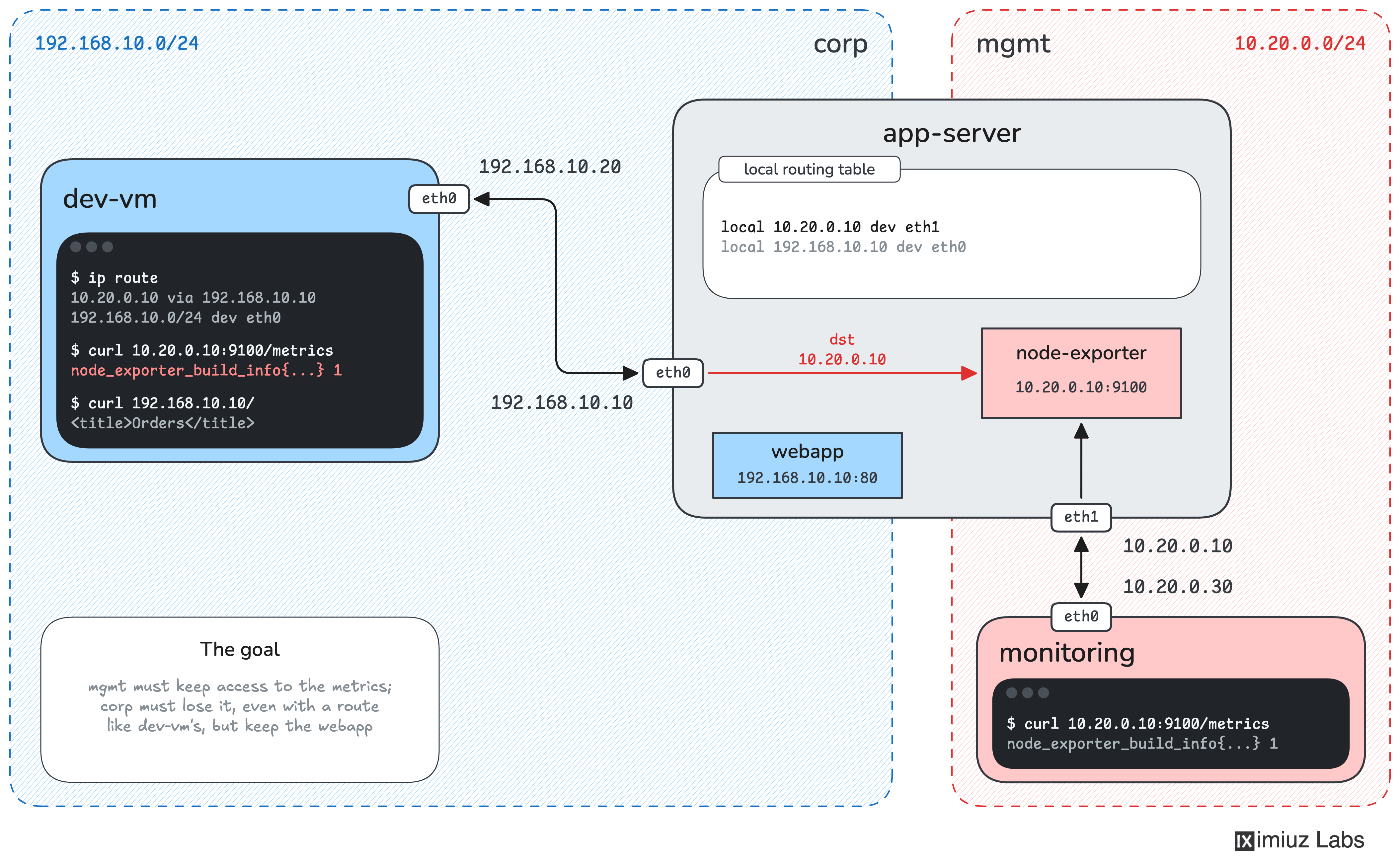
The setup is the same as before. The app-server machine has two network interfaces:
eth0(192.168.10.10) is connected to the corporate network (192.168.10.0/24).eth1(10.20.0.10) is connected to the management network (10.20.0.0/24).
The server runs a web application on 192.168.10.10:80 and Prometheus Node Exporter on 10.20.0.10:9100.
The development VM, dev-vm (192.168.10.20), is connected only to the corporate network. It still has the static route from the previous challenge (10.20.0.10 via 192.168.10.10), allowing it to access Node Exporter's metrics through eth0, even though the service listens only on the management IP.
You now have access to app-server and can change its configuration.
Prevent Node Exporter from being accessed through the corporate network, while keeping it available to legitimate monitoring clients.
When you are done:
- Requests to
http://10.20.0.10:9100/metricsarriving througheth0must be blocked, even if the client has a route to the management IP. - Requests arriving through
eth1must continue to work. - The web application at
http://192.168.10.10/must remain accessible from the corporate network.
In other words, Node Exporter should only be reachable through the management interface.
Use dev-vm to test your changes from the corporate network, but make sure the fix is applied on app-server. The final check runs from a separate machine connected to both networks, so modifying dev-vm won't help you pass it.
Hint 1
Node Exporter already listens only on the management IP. You can verify this on app-server:
sudo ss -ltnp | grep ':9100'
Changing its listening address won't solve the problem.
Remember that under the weak end host model, the kernel considers 10.20.0.10 a local address even when packets destined for it arrive through eth0.
To prevent this, you need a way to filter incoming traffic based on which interface the packets arrive through, rather than just their destination IP address.
Hint 2
A Linux firewall can match packets by their incoming interface, destination IP address, and destination port.
On app-server, both iptables and nft are available. You can use either one. If you prefer ufw, you can install it with apt.
Try creating a rule that drops connections to Node Exporter arriving through eth0, without affecting traffic arriving through eth1 or connections to the web application.
If you're new to Linux firewalls, the Protect an Unintentionally Exposed Server Port with Firewall Rules challenge is a good place to start.
Hint 3
A firewall is not the only way to solve this problem.
If Node Exporter runs as a systemd service, you can use systemd's RestrictNetworkInterfaces= setting to limit which network interfaces the service can communicate through.
See man systemd.resource-control for more details.