Linux Processes: Understanding Signals
In the previous tutorials in this series (Linux Processes: From a Program to a Process and Linux Processes: Threads & Concurrency), you learned how the Linux kernel manages virtual address spaces, process creation via fork(2), and task scheduling (task_struct).
However, running processes do not execute in isolation. The operating system, terminal users, and other processes frequently need to communicate with a running process asynchronously: to tell it to stop, reload its configuration, clean up resources, or report a hardware fault.
This is where signals come in. Signals are one of the oldest, simplest, and most fundamental forms of Inter-Process Communication (IPC) in Unix and Linux systems.
In this hands-on tutorial, you will learn what signals are under the hood, who can send them, how the Linux kernel handles default signal actions, how to send signals using kill and Go, how to trap and handle signals gracefully with os/signal, and why certain signals like SIGKILL cannot be intercepted.
Step 1: What is a Signal?
A signal is a software interrupt delivered by the Linux kernel to a process to inform it that an asynchronous event has occurred.
When a signal is sent to a process, the normal execution of the process is interrupted. Depending on how the process is configured, the kernel will either execute a signal handler (a custom function defined by the application), execute the default kernel action for that signal, or ignore the signal altogether.
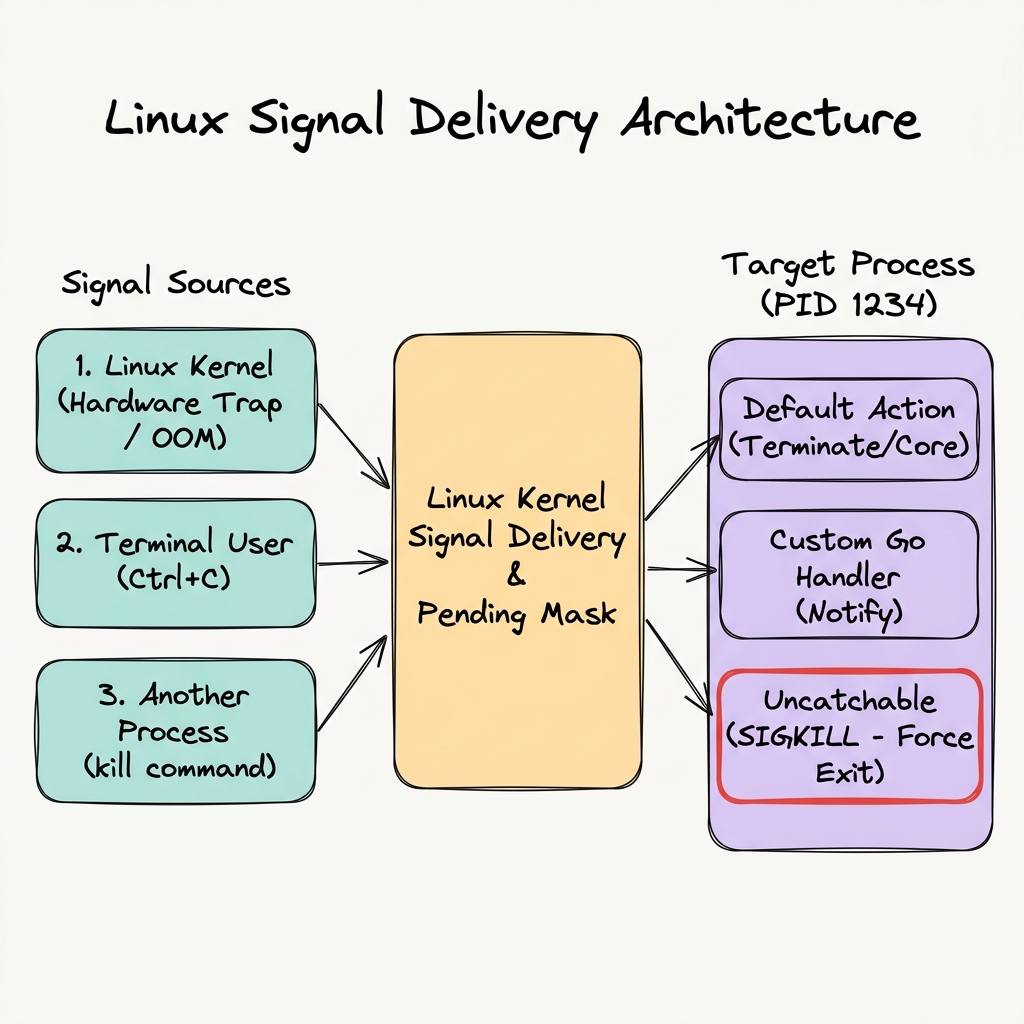
The Linux Signal Delivery Architecture: Signals generated by the kernel, terminal users, or other processes pass through the kernel to the target process.
Who Can Send a Signal?
Signals do not only originate from user commands. They come from three main sources:
- The Linux Kernel (Hardware Traps & OS Events):
- When a process attempts an invalid memory access (e.g., dereferencing a null pointer), CPU hardware raises a fault, and the kernel sends a
SIGSEGV(Segmentation Fault) signal to the process. - When a process attempts integer division by zero, the kernel sends
SIGFPE(Floating-Point Exception). - When a child process terminates, stops or resumes, the kernel automatically sends
SIGCHLDto its parent process to notify it. - When system memory is dangerously exhausted, the kernel's Out-Of-Memory (OOM) Killer selects a process and sends
SIGKILL.
- When a process attempts an invalid memory access (e.g., dereferencing a null pointer), CPU hardware raises a fault, and the kernel sends a
- Terminal Users (Keyboard Shortcuts):
- Pressing
Ctrl+Cin your terminal sendsSIGINT(Interrupt) to the foreground process group. - Pressing
Ctrl+\sendsSIGQUIT(Quit with core dump). - Pressing
Ctrl+ZsendsSIGTSTP(Terminal Stop) to suspend execution.
- Pressing
- Other Processes (System Calls & Commands):
- A process manager (like
systemd), container runtime (likecontainerd), or a user can send signals using thekill(2)system call or thekillcommand.
- A process manager (like
Step 2: Signal Numbers, Names, and Default Behaviors
Every signal in Linux is identified by a standard symbolic name (e.g., SIGINT) and an integer signal number (e.g., 2).
You can inspect the full list of signals supported by your Linux kernel using the kill -l command in terminal:
kill -l
Output:
 1) SIGHUP   2) SIGINT   3) SIGQUIT  4) SIGILL   5) SIGTRAP
 6) SIGABRT  7) SIGBUS   8) SIGFPE   9) SIGKILL 10) SIGUSR1
11) SIGSEGV 12) SIGUSR2 13) SIGPIPE 14) SIGALRM 15) SIGTERM
...
Common Signals
| Signal Name | Number | Default Action | Typical Trigger / Purpose |
|---|---|---|---|
SIGHUP | 1 | Terminate process | Terminal hangup; commonly trapped by daemons to reload config without restarting. |
SIGINT | 2 | Terminate process | Interactive interrupt from keyboard (Ctrl+C). |
SIGQUIT | 3 | Terminate & Core Dump | Interactive quit request from keyboard (Ctrl+\). |
SIGKILL | 9 | Immediate Termination | Unconditional kill signal. Cannot be caught, blocked, or ignored. |
SIGSEGV | 11 | Terminate & Core Dump | Invalid memory reference (Segmentation Fault). |
SIGALRM | 14 | Terminate process | Timer alarm signal set by alarm(2). |
SIGTERM | 15 | Terminate process | Standard termination request sent by kill or container runtimes for graceful exit. |
SIGCHLD | 17 | Ignore | Sent to parent process when a child process terminates or stops. |
SIGSTOP | 19 | Stop execution | Unconditional stop signal. Cannot be caught, blocked, or ignored. |
Default Signal Dispositions
When a process receives a signal that it has not explicitly registered a custom handler for, the kernel applies one of five default actions (known as signal dispositions):
- Term (Terminate): The process is immediately terminated.
- Core (Core Dump): The process is terminated, and a core dump file containing the process memory state is written to disk.
- Ign (Ignore): The signal is silently discarded; process execution continues uninterrupted.
- Stop: The process is paused (suspended) in background.
- Cont (Continue): Resumes execution of a paused process.
Step 3: Sending Signals with the kill Command
A common misconception is that the kill command is only used to destroy or terminate processes. In reality, kill is a CLI wrapper around the kill(2) system call. It can send any specified signal to a target process or process group.
Hands-On Exercise: Sending Signals via Terminal
- In your terminal, launch a background process:
sleep 300 &
Note the printed Process ID (PID), e.g.,[1] 12345. - Send a
SIGINT(2) interrupt signal using the signal name:kill -SIGINT 12345 - Alternatively, you can specify the signal by its integer number:
kill -2 12345 - If no signal flag is passed,
killsendsSIGTERM(Signal 15) by default:kill 12345
When the target process receives SIGTERM or SIGINT, the kernel applies the default Term action and terminates the process:
[1]+ Terminated sleep 300
Useful CLI Variations of kill
pkill <name>: Sends a signal to all processes matching a process name (e.g.,pkill -SIGTERM nginx).kill -9 <PID>: Forcefully terminates a process by sendingSIGKILL.kill -0 <PID>: Sends signal0(null signal). The kernel performs error checking without actually sending a signal, which is useful for verifying whether a process with<PID>is running and accessible.
Step 4: Sending Signals Programmatically in Go
Instead of executing shell commands, applications often need to deliver signals to other processes programmatically. In Go, you can send signals using the standard library's os and syscall packages.
Writing a Go Signal Sender (sender.go)
Create a file named sender.go:
package main

import (
    "fmt"
    "os"
    "strconv"
    "syscall"
)

func main() {
    if len(os.Args) < 3 {
        fmt.Println("Usage: go run sender.go <pid> <signal_number>")
        os.Exit(1)
    }

    pid, err := strconv.Atoi(os.Args[1])
    if err != nil {
        fmt.Printf("Invalid PID: %v\n", err)
        os.Exit(1)
    }

    sigNum, err := strconv.Atoi(os.Args[2])
    if err != nil {
        fmt.Printf("Invalid signal number: %v\n", err)
        os.Exit(1)
    }

    // Find the target process by PID
    proc, err := os.FindProcess(pid)
    if err != nil {
        fmt.Printf("Failed to find process: %v\n", err)
        os.Exit(1)
    }

    // Convert integer to syscall.Signal
    sig := syscall.Signal(sigNum)
    fmt.Printf("Sending signal %s (%d) to PID %d...\n", sig, sigNum, pid)

    // Send signal via Process.Signal()
    err = proc.Signal(sig)
    if err != nil {
        fmt.Printf("Error sending signal: %v\n", err)
        os.Exit(1)
    }

    fmt.Println("Signal sent successfully!")
}
Testing the Go Signal Sender
- Start another background target process:
sleep 300 &
Note the target PID (e.g.,54321). - Execute your Go sender program to send
SIGTERM(15):go run sender.go 54321 15
Output:
Sending signal terminated (15) to PID 54321...
Signal sent successfully!
Checking your background job will confirm that sleep 300 received SIGTERM from your Go program and terminated.
Step 5: Catching and Handling Signals in Go (os/signal)
In lower-level C programming, developers use the sigaction(2) system call to register signal handlers. However, writing signal handlers in C is notoriously tricky because signal handlers interrupt execution at arbitrary points, meaning only async-signal-safe functions (like raw write()) can be called inside them.
Go simplifies signal handling by using channels. The Go runtime intercepts incoming POSIX signals via internal C runtime handlers and forwards them as values into a Go channel.
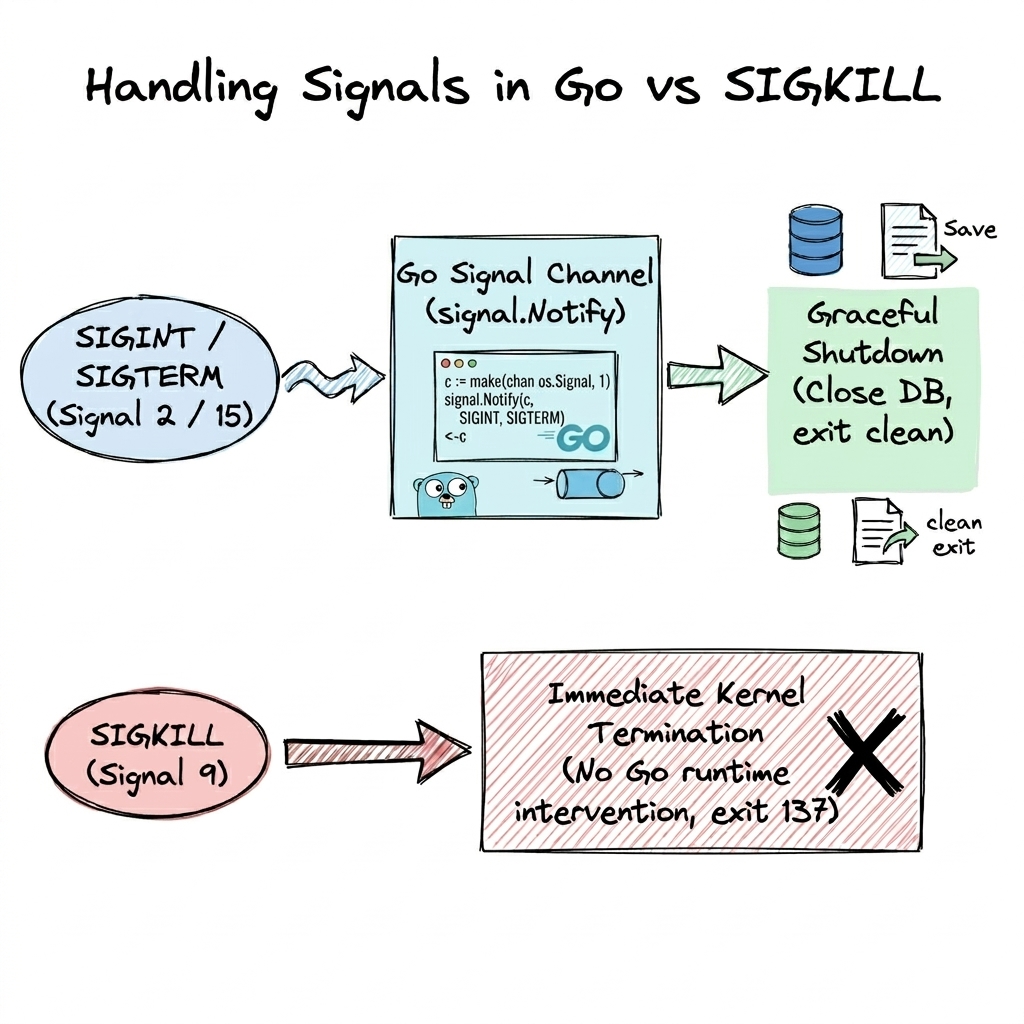
Handling Catchable Signals (SIGINT/SIGTERM) gracefully in Go vs Uncatchable Signals (SIGKILL).
Implementing Graceful Shutdown in Go
In production environments (including Docker and Kubernetes), process management relies on graceful termination patterns: sending SIGTERM (Signal 15) requests a graceful shutdown, allowing the application a grace period (typically 10 to 30 seconds) to close active network sockets, finish in-flight requests, and flush data to disk.
Let's write a production-ready Go program (server.go) that listens for termination signals (SIGINT and SIGTERM) and performs a graceful shutdown by completing pending work before exiting cleanly:
package main

import (
    "context"
    "fmt"
    "os"
    "os/signal"
    "syscall"
    "time"
)

func main() {
    fmt.Printf("Worker service started. PID: %d\n", os.Getpid())

    // Create a context that is cancelled when SIGINT or SIGTERM is received
    ctx, stop := signal.NotifyContext(context.Background(), os.Interrupt, syscall.SIGTERM, syscall.SIGHUP)
    defer stop()

    ticker := time.NewTicker(2 * time.Second)
    defer ticker.Stop()

    // Simulate background worker goroutine
    done := make(chan bool)
    go func() {
        for {
            select {
            case <-ctx.Done():
                fmt.Println("\n[Signal Received] Initiating graceful shutdown...")
                fmt.Println("[Shutdown] Closing database connections...")
                time.Sleep(1 * time.Second) // Simulate flushing state to disk
                fmt.Println("[Shutdown] All background tasks finished cleanly.")
                done <- true
                return
            case <-ticker.C:
                fmt.Println("Processing job batch...")
            }
        }
    }()

    // Wait until signal context is cancelled and cleanup finishes
    <-done
    fmt.Println("Exiting application cleanly with exit code 0.")
}
Running the Graceful Shutdown Example
Compile and run the program:
go run server.go
While the worker is printing Processing job batch..., press Ctrl+C (SIGINT) in your terminal. You will observe:
Worker service started. PID: 54321
Processing job batch...
Processing job batch...
^C
[Signal Received] Initiating graceful shutdown...
[Shutdown] Closing database connections...
[Shutdown] All background tasks finished cleanly.
Exiting application cleanly with exit code 0.
Instead of crashing or leaving corrupted data on disk, the Go application intercepted the signal, ran its cleanup sequence, and exited cleanly!
Step 6: The Magnum Opus: SIGKILL (Signal 9)
While applications can trap and handle most signals (like SIGINT, SIGTERM, SIGHUP, SIGUSR1), there are two special signals in Linux that cannot be caught, blocked, or ignored:
SIGKILL(Signal 9): Unconditional immediate termination.SIGSTOP(Signal 19): Unconditional execution pause.
Why Is SIGKILL Uncatchable?
If a process could catch or block all the signals, a buggy or malicious application could trap SIGKILL and become an unkillable rogue process that consumes 100% CPU or holds system resources forever.
When SIGKILL is sent, the Linux kernel scheduler bypasses the process user-space code entirely:
- The kernel immediately changes the task state in
task_structtoTASK_DEAD. - The process virtual memory space, file descriptors, and CPU resources are reclaimed by the kernel.
- The process's exit status is set to
137(128 + 9).
Why SIGKILL Should Always Be the Last Resort
Because SIGKILL causes immediate kernel-level termination, it should never be your first choice for stopping a running application.
When you send SIGKILL:
- No Graceful Cleanup: The application's Go runtime or signal handlers are completely bypassed. Defer functions, database connection closures, and log flushes will not execute.
- Risk of Data Corruption: In-memory write buffers (such as database WAL logs or file streams) are lost instantly, which can leave database files or state storage in a corrupted state.
- Leaked System Resources: Locks, IPC semaphores, or distributed mutexes held by the application may remain locked.
For a great visual dive into Linux signals and custom interrupt handling, check out Signals: Make Ctrl+C Do Anything You Want by Core Dumped.
Conclusion
In this tutorial, you explored the fundamentals of signals in Linux systems programming using Go:
- Asynchronous IPC: Signals serve as software interrupts delivered by the Linux kernel, hardware faults, terminal users (
Ctrl+C), or external processes. - Signal Dispositions: The kernel applies default actions (Terminate, Core Dump, Ignore, Stop, Continue) unless a process defines custom handling.
- CLI vs Code: You can send signals from the shell using
kill,pkill, or programmatically in Go usingos.FindProcessandproc.Signal(). - Go Signal Channels: Go replaces low-level C
sigactionhandlers with type-safe channels viaos/signal.Notifyandsignal.NotifyContext. - Graceful Shutdown: Always handle
SIGTERMandSIGINTin production applications to close database connections and flush logs cleanly. SIGKILLGuarantee: Signal9(SIGKILL) is the ultimate override: it bypasses application code entirely and cannot be trapped or ignored.
About the Author

Writes about
Frequently covers
More tutorials you might like
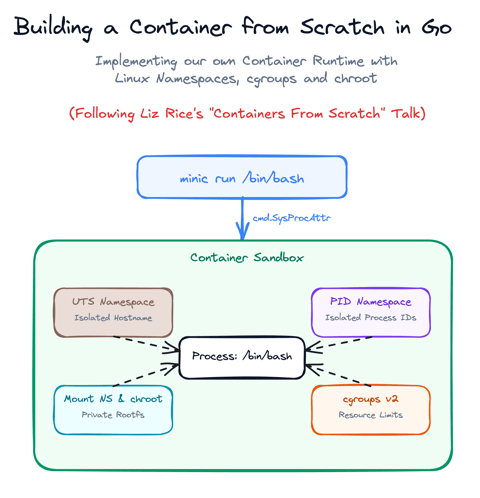
Build a Container from Scratch in Go (Liz Rice GOTO 2018)
Follow along with Liz Rice's classic GOTO 2018 presentation and build your own container runtime in under 100 lines of Go using Linux namespaces, chroot, and cgroups.

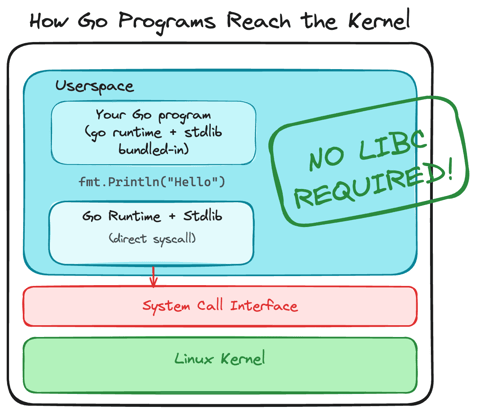
Using Go for Systems Programming
Discover how Go functions under the hood as a modern systems programming language. Learn how Go makes system calls directly, resulting in self-contained binaries that have no libc dependencies.
Linux Processes: From a Program to a Process
Explore what a program is, when it actually becomes a process and how the Linux scheduler manages process execution.
Linux Processes: Threads & Concurrency
Explore what a thread actually is in Linux, how threads relate to processes, how the Linux kernel treats both as tasks (task_struct), and how kernel scheduling enables concurrency.
Learn by doing, not just by reading or watching
Sign up for a free account to start a VM playground right on this page, track your progress, and get notified about new learning materials.