Linux Processes: Threads & Concurrency
In the previous tutorial (Linux Processes: From a Program to a Process), you learned how the Linux kernel creates independent processes via fork(2) and execve(2). Each process gets its own isolated virtual address space.
However, modern software often needs to perform multiple operations at the exact same time, such as handling network requests while updating a user interface, or distributing computation across multiple CPU cores. While launching multiple distinct processes works, sharing data between isolated processes requires Inter-Process Communication (IPC) mechanisms like shared memory or sockets.
This is where threads come in. In this tutorial, you will explore what a thread actually is, how threads relate to processes, how the Linux kernel represents both processes and threads using task_struct, and how kernel scheduling enables concurrent execution.
Step 0: Memory Layout of a Process
Before diving into threads, let's see how a single-threaded Linux process resides in virtual memory.
When an ELF executable binary is loaded into memory, the kernel sets up a continuous Virtual Address Space for the process. This address space is divided into distinct segments:
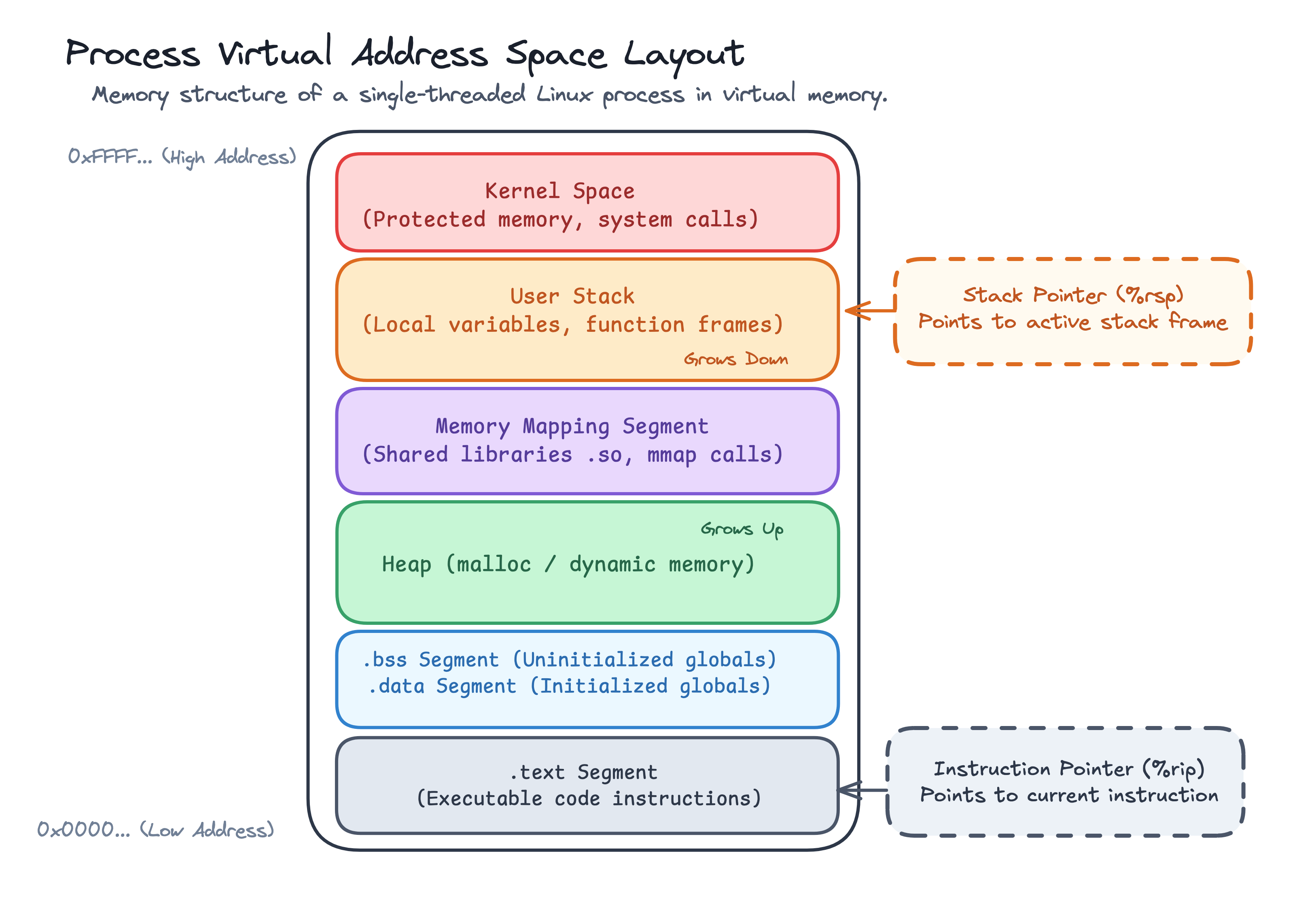
The virtual address space segments of a single-threaded process, extending from low memory addresses (0x0000...) to high memory addresses (0xFFFF...).
Anatomy of Virtual Address Space Segments
- Text Segment (
.text): Located at lower memory addresses. Contains the compiled machine code instructions executed by the CPU. This segment is read-only and executable to prevent self-modifying code. - Data & BSS Segments (
.data/.bss):.data: Holds global and static variables initialized by the programmer (e.g.,int count = 10;)..bss: Holds uninitialized global and static variables (e.g.,int buffer[1024];), which the kernel zero-initializes at program startup.
- Heap: Used for dynamic memory allocation requested at runtime (
malloc(3),calloc,reallocin C,newin C++). The heap grows upward toward higher memory addresses via thebrk(2)orsbrksystem calls. - Memory Mapping Segment: Located between the heap and stack. The kernel uses
mmap(2)to load shared C libraries (libc.so), map file contents into memory, or allocate large memory regions. - User Stack: Located at high memory addresses. Stores function stack frames, local variables, function parameters, and return addresses. The stack grows downward toward lower memory addresses.
- Kernel Space: Reserved for the kernel. Mapped into the top region of every process's virtual address space, but protected by CPU privilege levels so userspace code cannot access it directly.
In a traditional single-threaded process:
- One Virtual Address Space: Contains the program code, global variables, heap allocations, and loaded shared libraries.
- One Execution Context: The CPU maintains a single Instruction Pointer (
%rip) indicating the current instruction being executed, and a single Stack Pointer (%rsp) pointing to the active stack frame.
Inspecting Process Memory Layout in C
You can inspect where variables reside in memory by printing their memory addresses in C (single_thread.c):
#include <stdio.h>
#include <stdlib.h>

// Global variable stored in the Data Segment (.data)
int global_var = 42;

int main(void) {
    // Local stack variable allocated on the main thread stack
    int stack_var = 10;
    // Dynamically allocated variable stored on the Heap
    int *heap_var = malloc(sizeof(int));

    printf("Global address: %p\n", (void*)&global_var);
    printf("Heap address:   %p\n", (void*)heap_var);
    printf("Stack address:  %p\n", (void*)&stack_var);

    free(heap_var);
    return 0;
}
Compiling and running (gcc single_thread.c -o single_thread && ./single_thread) outputs the memory addresses of each segment:
Global address: 0x55d8a9b24010
Heap address:   0x55d8aa1bc2a0
Stack address:  0x7ffe8b4c52bc
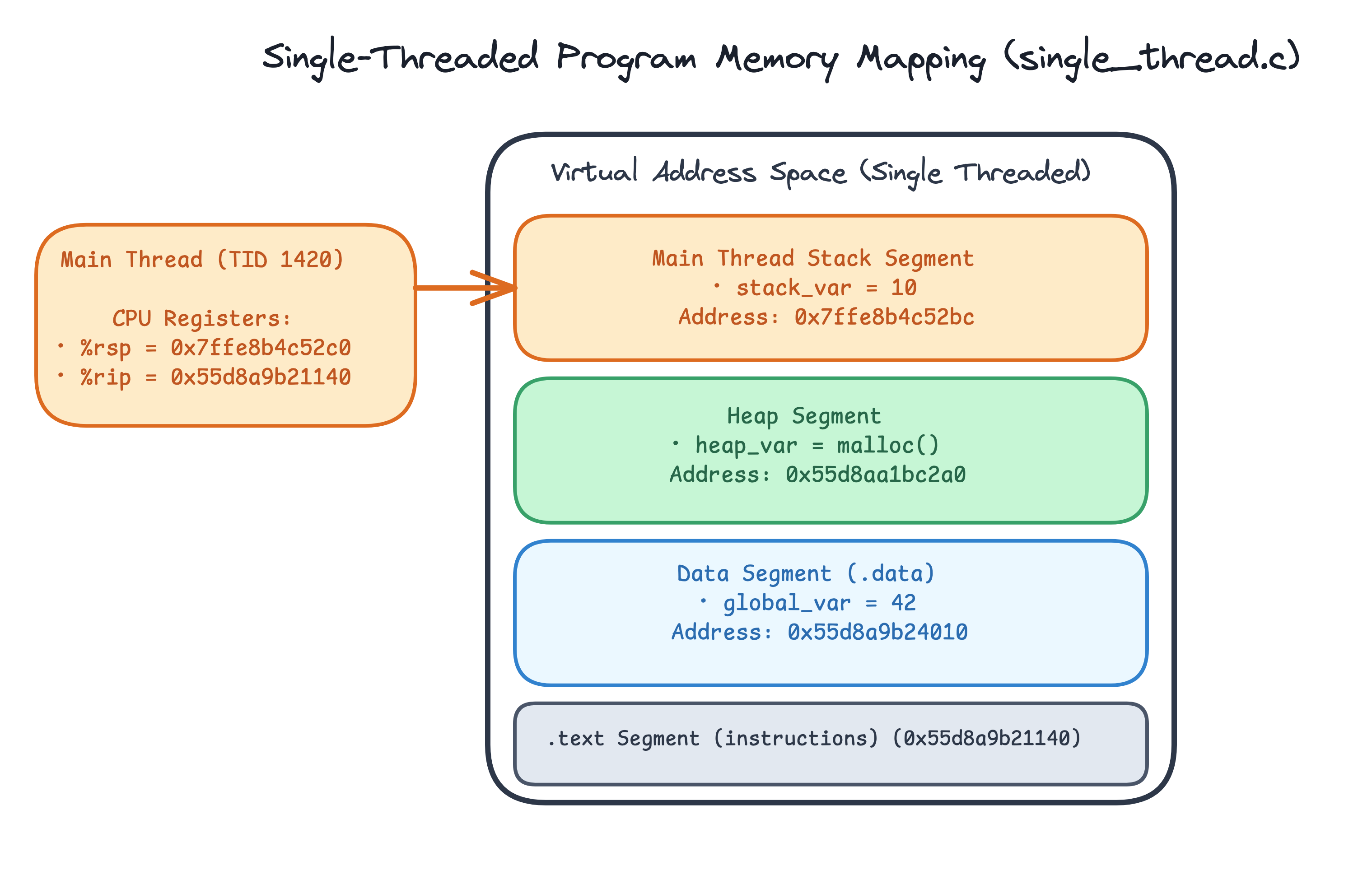
Memory mapping of single_thread.c: CPU registers in Main Thread point to stack frame (0x7ffe8b4c52bc) and executable code.
Step 1: What is a Thread?
A thread (or thread of execution) is the smallest sequence of programmed instructions that can be managed independently by an operating system scheduler.
While a process provides an isolated execution environment and resource boundary (virtual memory space, file descriptor table, environment variables), a thread represents an active line of execution within that process's environment.
Threads are an Operating System abstraction: At the hardware level, the physical CPU core does not know or care what a "thread" or "process" is. The CPU simply executes instructions pointed to by its Instruction Pointer (%rip) using stack pointers (%rsp) and registers.
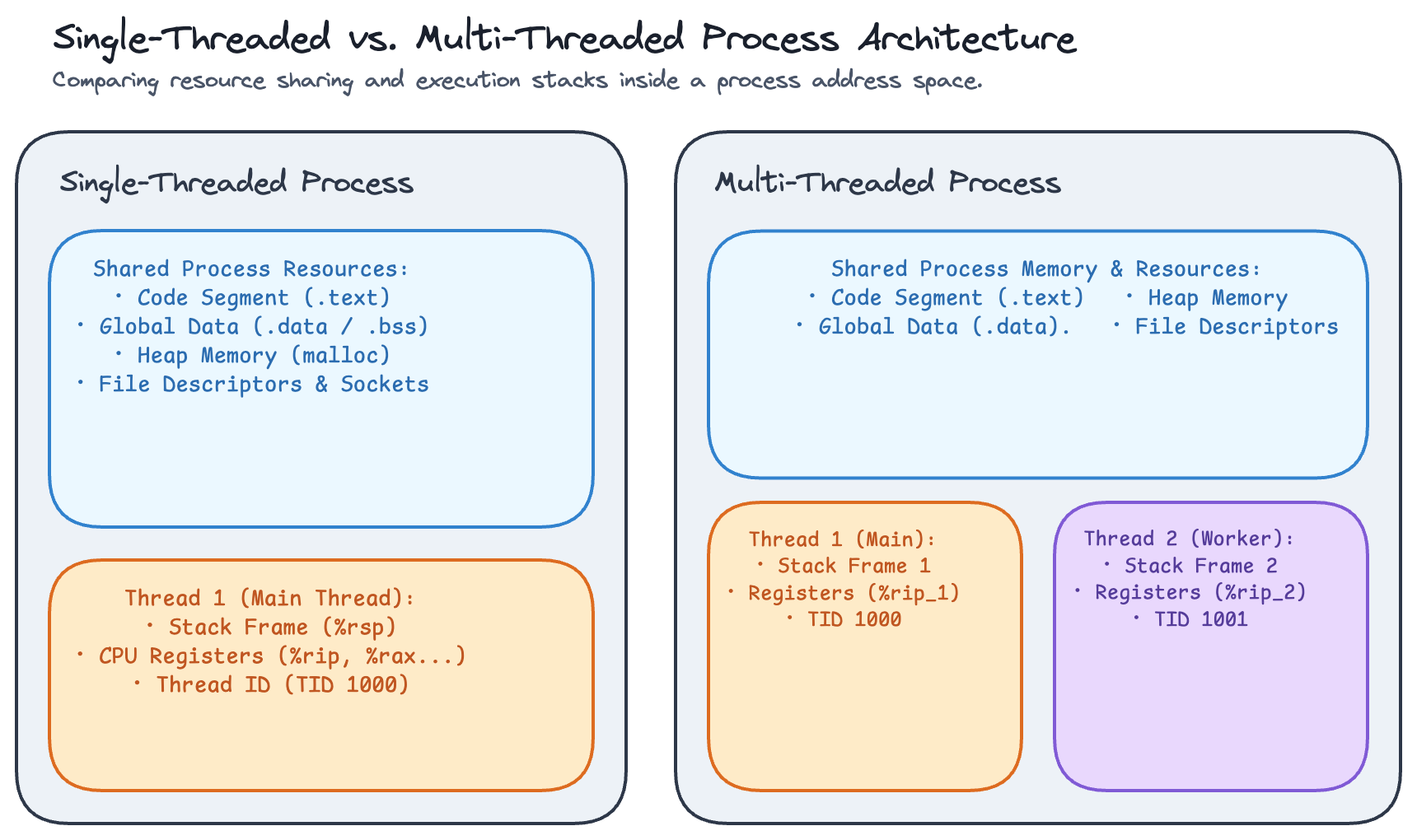
Single-threaded process with one execution stack vs. a multi-threaded process sharing Code, Data, and Heap memory across multiple dedicated thread stacks.
Shared vs. Thread-Private Resources
When multiple threads run inside the same process:
- Shared Resources (Accessible by all threads in the process):
- Text Segment (
.text): Executable program instructions. Any thread can execute any function in the program. - Data & BSS Segments (
.data/.bss): Global and static variables. Any thread can read or modify global state. - Heap Memory: Dynamically allocated memory (
malloc). A memory pointer allocated by Thread 1 can be passed to and read/written by Thread 2. - File Descriptors: Open files, network sockets, pipes. If Thread 1 opens a file descriptor, Thread 2 can read from or write to it.
- Process Credentials & Environment: User ID, Group ID, current working directory, and environment variables.
- Text Segment (
- Thread-Private Resources (Unique to each individual thread):
- CPU Registers: Instruction Pointer (
%rip), Stack Pointer (%rsp), frame pointer (%rbp), and general-purpose registers. Each thread tracks its own instruction execution point. - Execution Stack: Dedicated stack memory allocated within the shared address space. Holds the thread's local variables, function arguments, and call chain history.
- Thread ID (TID): Unique numeric identifier assigned to the thread by the OS kernel.
- Signal Mask: Which signals the individual thread currently blocks or receives.
- Thread-Local Storage (TLS): Special variables declared with
__threadorthread_localthat have independent values per thread.
- CPU Registers: Instruction Pointer (
Converting to a Multi-Threaded Program with POSIX Threads (pthreads)
To see thread memory sharing in action, you can convert the single-threaded example into a multi-threaded program using POSIX Threads (pthread_create(3) and pthread_join(3)):
#include <stdio.h>
#include <stdlib.h>
#include <pthread.h>

// Global variable stored in the shared Data Segment (.data)
int global_var = 42;

// Worker thread function executed asynchronously by the new thread
void* worker(void *arg) {
    // Local stack variable allocated inside the Worker Thread's private stack
    int worker_stack_var = 20;

    printf("Worker Thread:\n");
    printf("  Global address: %p\n", (void*)&global_var);
    printf("  Stack address:  %p\n", (void*)&worker_stack_var);
    return NULL;
}

int main(void) {
    pthread_t thread;
    // Local stack variable allocated inside the Main Thread's private stack
    int main_stack_var = 10;

    printf("Main Thread:\n");
    printf("  Global address: %p\n", (void*)&global_var);
    printf("  Stack address:  %p\n", (void*)&main_stack_var);

    // Spawn a new worker thread and wait for its completion
    pthread_create(&thread, NULL, worker, NULL);
    pthread_join(thread, NULL);

    return 0;
}
Compiling (gcc multi_thread.c -pthread -o multi_thread) and running (./multi_thread) demonstrates memory sharing vs thread-private stacks:
Main Thread:
  Global address: 0x55d8a9b24010
  Stack address:  0x7ffe8b4c52bc
Worker Thread:
  Global address: 0x55d8a9b24010
  Stack address:  0x7f4b821feec4
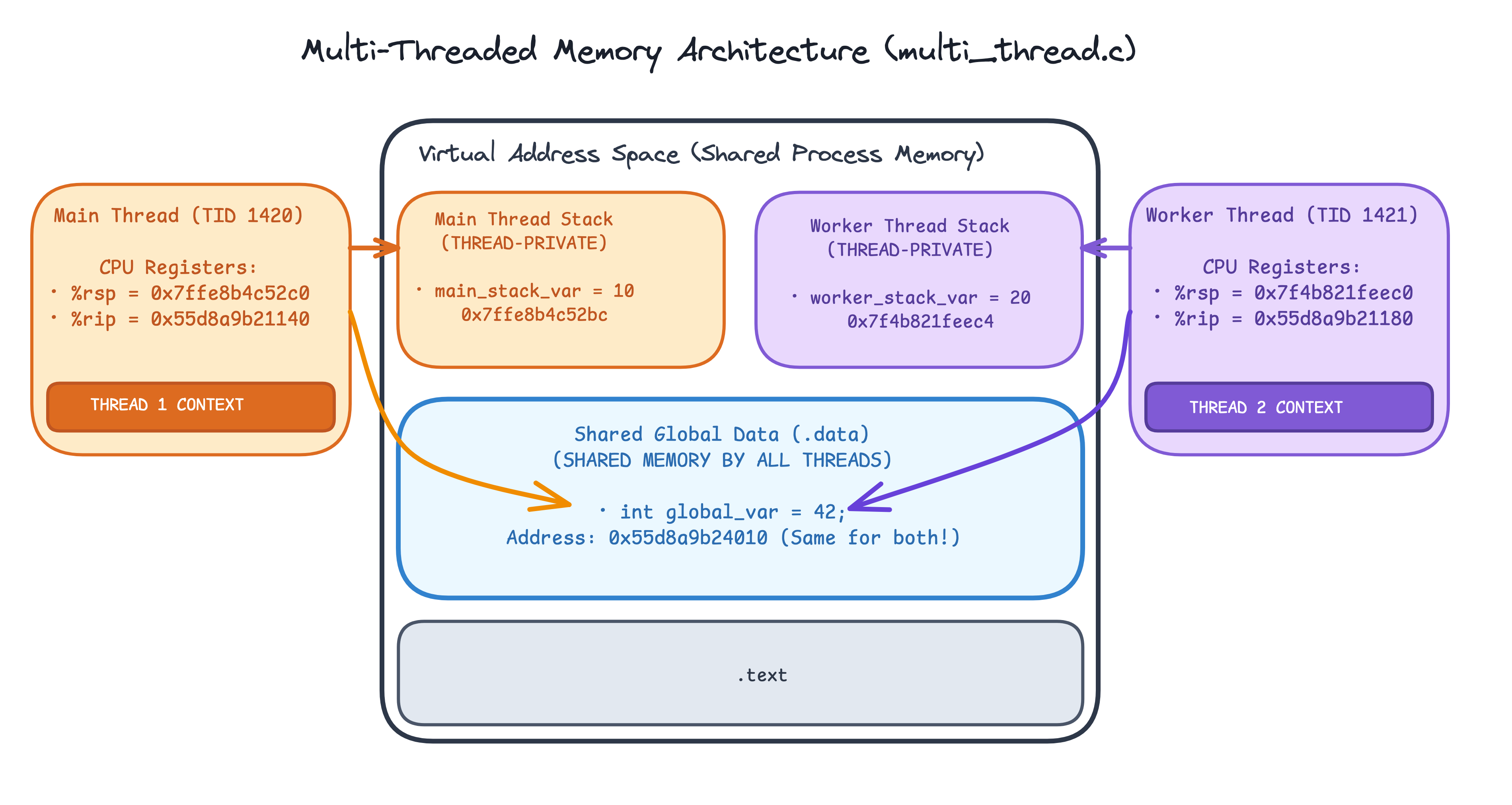
Memory mapping of multi_thread.c: Main Thread and Worker Thread run outside the address space, both accessing shared global_var (0x55d8a9b24010) while holding private execution stacks (0x7ffe... vs 0x7f4b...).
Step 2: How Threads Relate to Processes
As covered in the tutorial Linux Processes: From a Program to a Process, the Linux kernel manages execution units using task_struct entities. Instead of maintaining separate data structures for threads, Linux implements threads as Lightweight Processes (LWPs) created via the clone(2) system call with flags like CLONE_VM, CLONE_FILES, and CLONE_THREAD that share resources with the parent task.
Because every thread is represented by its own task_struct, the kernel requires a clear identification scheme to manage thread groups and maintain POSIX compliance. This is where PID, TGID, and TID come into play.
PID, TGID, and TID
In Linux, a distinction exists between how task identifiers are defined in kernel space versus how they are exposed to userspace:
- POSIX Requirement (Userspace): POSIX compliance requires all threads belonging to the same process to share the same Process ID (PID). A call to
getpid(2)from any thread must return the process's ID. - Kernel Reality: The kernel scheduler requires a unique identifier for every schedulable
task_structto allocate CPU time and track task state.
To satisfy both requirements, the kernel maintains two ID fields inside each task_struct:
task->pid(Kernel Process ID / Thread ID): The unique numeric identifier assigned by the kernel scheduler to every individual task (task_struct).task->tgid(Thread Group ID): Thepidof the Main Thread (the initial task created when the process started). All threads spawned within the same process share the sametgid.
This creates a clear mapping between kernel internals and userspace system calls:
| Identifier Concept | Kernel Field (task_struct) | Userspace System Call | Description |
|---|---|---|---|
| Process ID (PID) | task->tgid | getpid(2) | Returns the Thread Group ID (tgid), which is identical for all threads in the process. |
| Thread ID (TID) | task->pid | gettid(2) | Returns the kernel's unique task identifier (pid) for that specific thread. |
| Main Thread | task->pid == task->tgid | getpid() == gettid() | For the initial thread, its kernel PID and TGID are identical. |
| Worker Threads | task->pid != task->tgid | getpid() != gettid() | Worker threads receive unique kernel PIDs (task->pid), but inherit the main thread's tgid. |
pthread_t vs Kernel TID (gettid()):
The handle returned by pthread_self() (pthread_t) is a userspace memory pointer managed by NPTL (glibc), not the kernel Thread ID. To obtain the kernel scheduler's unique Thread ID, call gettid(2).
Demonstrating PID vs. TID in C
You can verify how getpid() (TGID) and gettid() (kernel TID) behave across threads with a small C program (pid_tid_demo.c):
// Enable Linux/GNU-specific extensions in glibc (required to expose gettid() in <unistd.h>)
#define _GNU_SOURCE

#include <stdio.h>
#include <unistd.h>
#include <pthread.h>

void* worker(void *arg) {
    // getpid() returns the shared process TGID; gettid() returns the worker's unique kernel TID
    printf("Worker Thread: PID (TGID) = %d, TID = %d\n", getpid(), gettid());
    return NULL;
}

int main(void) {
    pthread_t thread;

    // For the main thread, PID (TGID) and TID are identical
    printf("Main Thread:   PID (TGID) = %d, TID = %d\n", getpid(), gettid());
    // Spawn a new worker thread and wait for its completion
    pthread_create(&thread, NULL, worker, NULL);
    pthread_join(thread, NULL);

    return 0;
}
gcc pid_tid_demo.c -pthread -o pid_tid_demo && ./pid_tid_demo
Main Thread:   PID (TGID) = 48201, TID = 48201
Worker Thread: PID (TGID) = 48201, TID = 48204
Notice that PID (TGID) stays the same (48201) across both threads, while the worker thread receives its own unique kernel TID (48204).
Step 3: Concurrency
Concurrency is when a CPU core is making progress on multiple tasks within the same time window, not necessarily at the exact same instant, but interleaved so nothing sits completely idle.
Think about it, if the Linux Scheduler scheduled a single task and nothing else until it completed execution, then the other processes (tasks) would sit idle and be starved of any CPU time that they need.
To avoid this, the Linux Scheduler quickly switches between tasks, giving each a small slice of time to run. This switching happens hundreds of times per second. From the outside, it looks like tasks appear to run simultaneously.
In our programs we might have things that we can do independently of each other, but if the program is single-threaded, it must execute these tasks sequentially.
Let's look at how can we utilize threads to solve these kinds of performance issues.
A Single-Threaded Program
Here is a simple example: a program that processes three tasks one after the other.
// blocking.c
#include <stdio.h>
#include <unistd.h>

void process_task(int id) {
    printf("Task %d: started\n", id);
    sleep(3);  // blocks: simulates waiting for a database reply, a file read, etc.
    printf("Task %d: done\n", id);
}

int main(void) {
    process_task(1);
    process_task(2);
    process_task(3);
    return 0;
}
gcc blocking.c -o blocking && ./blocking
Task 1: started
Task 1: done      ← 3 seconds pass
Task 2: started
Task 2: done      ← 3 more seconds
Task 3: started
Task 3: done      ← 3 more seconds
Total time: ~9 seconds. Tasks 2 and 3 sit idle the entire time Task 1 sleeps. The program is blocked; the kernel has put the process to sleep and taken it off the CPU run queue. Nothing else can run in its place.
This is the fundamental problem: a blocking operation makes a single thread useless while it waits.
The Multi-threaded Solution: Use Threads to Avoid Blocking
The fix is to give each task its own thread. Instead of waiting for one to finish before starting the next, spawn a thread per task so they all run concurrently:
// concurrent.c
#include <stdio.h>
#include <unistd.h>
#include <pthread.h>

void* process_task(void *arg) {
    int id = *(int*)arg;
    printf("Task %d: started\n", id);
    sleep(3);  // each thread blocks independently
    printf("Task %d: done\n", id);
    return NULL;
}

int main(void) {
    pthread_t t1, t2, t3;
    int ids[] = {1, 2, 3};

    pthread_create(&t1, NULL, process_task, &ids[0]); // creates a new thread for task 1
    pthread_create(&t2, NULL, process_task, &ids[1]); // creates a new thread for task 2
    pthread_create(&t3, NULL, process_task, &ids[2]); // creates a new thread for task 3

    pthread_join(t1, NULL);
    pthread_join(t2, NULL);
    pthread_join(t3, NULL);
    // The main thread waits for all child threads to complete before terminating

    return 0;
}
gcc concurrent.c -pthread -o concurrent && ./concurrent
Task 1: started // thread 1 picks the task up
Task 2: started // thread 2 picks the task up
Task 3: started // thread 3 picks the task up
Task 3: done // thread 3 is done with its task
Task 1: done // thread 1 is done with its task
Task 2: done // thread 2 is done with its task
Total time: ~3 seconds instead of 9. All three tasks sleep concurrently: each thread blocks independently on its own sleep(3), so the others aren't held up.
This is concurrency, the kernel context-switches between the sleeping threads and, when each one's timer fires, wakes it up to finish. From the outside, all three tasks appear to run simultaneously even on a single CPU core.
Concurrency is not Parallelism. On a single-core CPU, only one thread/task physically executes at any given moment. The kernel is rapidly switching between them, not running them at the same time. True parallelism, where two threads execute instructions simultaneously, requires multiple CPU cores.
The Threading Ceiling: Context Switching and Memory
For each OS thread the kernel creates and maintains:
- Execution stack: 2–8 MB of virtual memory by default.
task_struct: kernel bookkeeping structure that must be saved and restored on every context switch.
At 10,000 concurrent connections, a thread-per-connection server has 10,000 sleeping threads. Even if most are blocked waiting for I/O, the kernel still has to:
- Allocate ~20 GB of stack memory (10,000 × 2 MB).
- Perform thousands of context switches per second, saving and restoring all CPU registers (
%rip,%rsp,%rbp, and the full register file) for every thread switch.
The CPU spends more time shuffling register state than doing actual work.
A Single Threaded Alternative for I/O Tasks: Non-Blocking I/O
Instead of blocking a thread per I/O task, we can use epoll(7) to ask the kernel to notify us when a task is ready.
The key idea: set sockets to O_NONBLOCK. When you call read() on a non-blocking socket with no data, instead of sleeping, the kernel returns immediately with EAGAIN ("try again later"). You then register the socket with epoll and ask it: "wake me up when something is ready."
// 1. Create an epoll instance
int epfd = epoll_create1(0);

// 2. Tell the kernel: "notify me when fd has data to read"
epoll_ctl(epfd, EPOLL_CTL_ADD, fd, &(struct epoll_event){.events = EPOLLIN, .data.fd = fd});

// 3. Event loop: one thread, any number of fds
struct epoll_event ready[MAX_EVENTS];
while (1) {
    int n = epoll_wait(epfd, ready, MAX_EVENTS, -1); // sleeps until something is ready
    for (int i = 0; i < n; i++)
        handle(ready[i].data.fd); // called only when data is actually there
}
With epoll, a single thread can watch tens of thousands of sockets at the same time. It only wakes up when a socket actually has data. No sleeping threads, no stack allocations per connection, no context switching overhead.
This is the model behind Node.js (libuv). A single JavaScript thread runs an event loop on top of epoll. It registers callbacks for I/O events and processes them one at a time. The thread is never blocked waiting for the network, it only runs when there's something useful to do.
Conclusion
Congratulations! You've explored how the Linux kernel handles threads and concurrency under the hood, from process memory layout and task_struct representation (PID, TGID, TID), to thread execution, context switching, and scaling I/O using non-blocking event loops with epoll.
If you'd like to see an animated and in-depth explanation of threads, check out the Why Are Threads Needed On Single Core Processors video made by core dumped.
About the Author

Writes about
Frequently covers
More tutorials you might like
Build a Container from Scratch in Go (Liz Rice GOTO 2018)
Follow along with Liz Rice's classic GOTO 2018 presentation and build your own container runtime in under 100 lines of Go using Linux namespaces, chroot, and cgroups.

Using Go for Systems Programming
Discover how Go functions under the hood as a modern systems programming language. Learn how Go makes system calls directly, resulting in self-contained binaries that have no libc dependencies.
Linux Processes: From a Program to a Process
Explore what a program is, when it actually becomes a process and how the Linux scheduler manages process execution.
Linux Processes: Understanding Signals
Explore Linux/Unix signals in Go, how signals act as asynchronous notifications, who can send them, default kernel behaviors, sending signals with kill and Go, graceful signal handling with os/signal, and why SIGKILL cannot be trapped.
Learn by doing, not just by reading or watching
Sign up for a free account to start a VM playground right on this page, track your progress, and get notified about new learning materials.