Container Internals - A Hands-On Guide

Check out the full playground Container from Scratch
Docker containers aren't magic—they're Linux processes with restricted views of system resources. In this hands-on tutorial, we'll build a container from scratch to understand what happens under the hood. In the end we will have an automation script that can build a container with networking capability and tear down its namespaces.
Get the Debian Image Filesystem
First, we'll combine the Debian filesystem layers into a single tarball and extract it to serve as the root filesystem (rootfs), which will be stored at /opt/containers/rootfs.
A container image is made up of multiple stacked layers, plus a writeable layer that tracks any changes you make while the container is running. To get a usable filesystem, these layers need to be flattened ("squashed") into one — the result is a tarball that gets extracted into the container's rootfs.
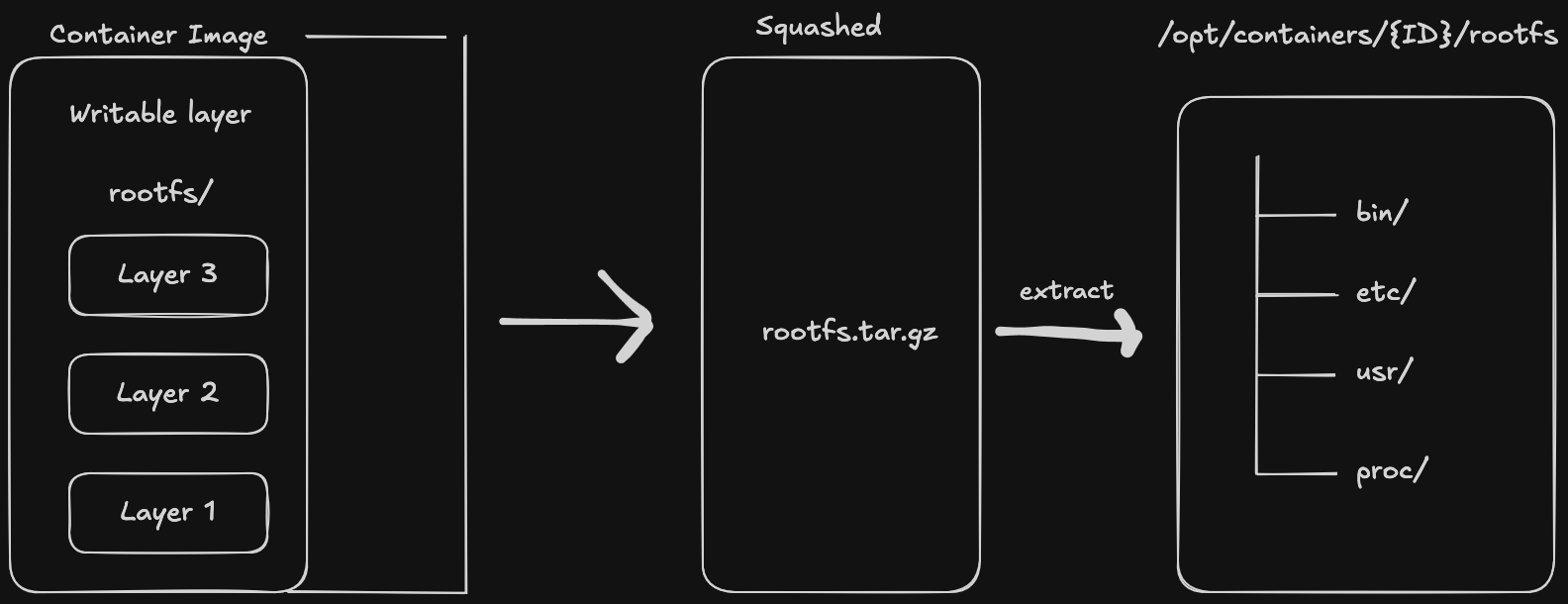
The extracted tarball showing the flattened container filesystem layers.
Every container needs a root filesystem. We'll extract a Debian image using crane - a tool used for managing images:
# Upgrade system
sudo dnf --refresh -y upgrade

# Install crane
VERSION=$(curl -s https://api.github.com/repos/google/go-containerregistry/releases/latest | grep tag_name | cut -d'"' -f4)
curl -sL "https://github.com/google/go-containerregistry/releases/download/${VERSION}/go-containerregistry_Linux_x86_64.tar.gz" | tar -xz crane
sudo mv crane /usr/local/bin/

# Create container directory structure
CONTAINER_DIR=/opt/containers
ROOTFS_DIR=${CONTAINER_DIR}/rootfs
mkdir -p $ROOTFS_DIR

# Export Debian image and extract to rootfs
sudo crane export debian:stable-slim debian-rootfs.tar
sudo tar -xvf debian-rootfs.tar -C $ROOTFS_DIR
Verify the filesystem:
ls /opt/container-1/rootfs/
cat $ROOTFS_DIR/etc/os-release

The rootfs directory showing the Debian filesystem structure.
Create Container Configuration Files
These files are container-specific settings, so we create them in $CONTAINER_DIR (not in rootfs) and bind-mount them at runtime.
Create /etc/hosts:
sudo vim $CONTAINER_DIR/hosts
127.0.0.1 localhost container-1
::1 localhost ip6-localhost ip6-loopback
Set hostname:
sudo vim $CONTAINER_DIR/hostname
container-1
Copy DNS configuration:
sudo cp /etc/resolv.conf $CONTAINER_DIR/resolv.conf
Create Namespaces
Namespaces provide the isolation layer. Create a new set of isolated namespaces:
sudo unshare --mount --pid --net --cgroup --uts --fork --propagation slave bash
This creates an isolated environment with separate:
- mount: Filesystem mount points
- pid: Process IDs (container's PID 1 is its init)
- net: Network stack
- cgroup: Control groups
- uts: Hostname and domain name
The --fork flag is important here because unshare itself would otherwise become PID 1 inside the new namespace. By using --fork, unshare forks a child process — in this case bash — which then becomes PID 1. This matters because containers expect PID 1 to be their own process (the init process), not the host tool that launched them
Verify namespace isolation:
findmnt -o TARGET,PROPAGATION,FSTYPE
readlink /proc/self/ns/{mnt,pid,net,uts,cgroup}
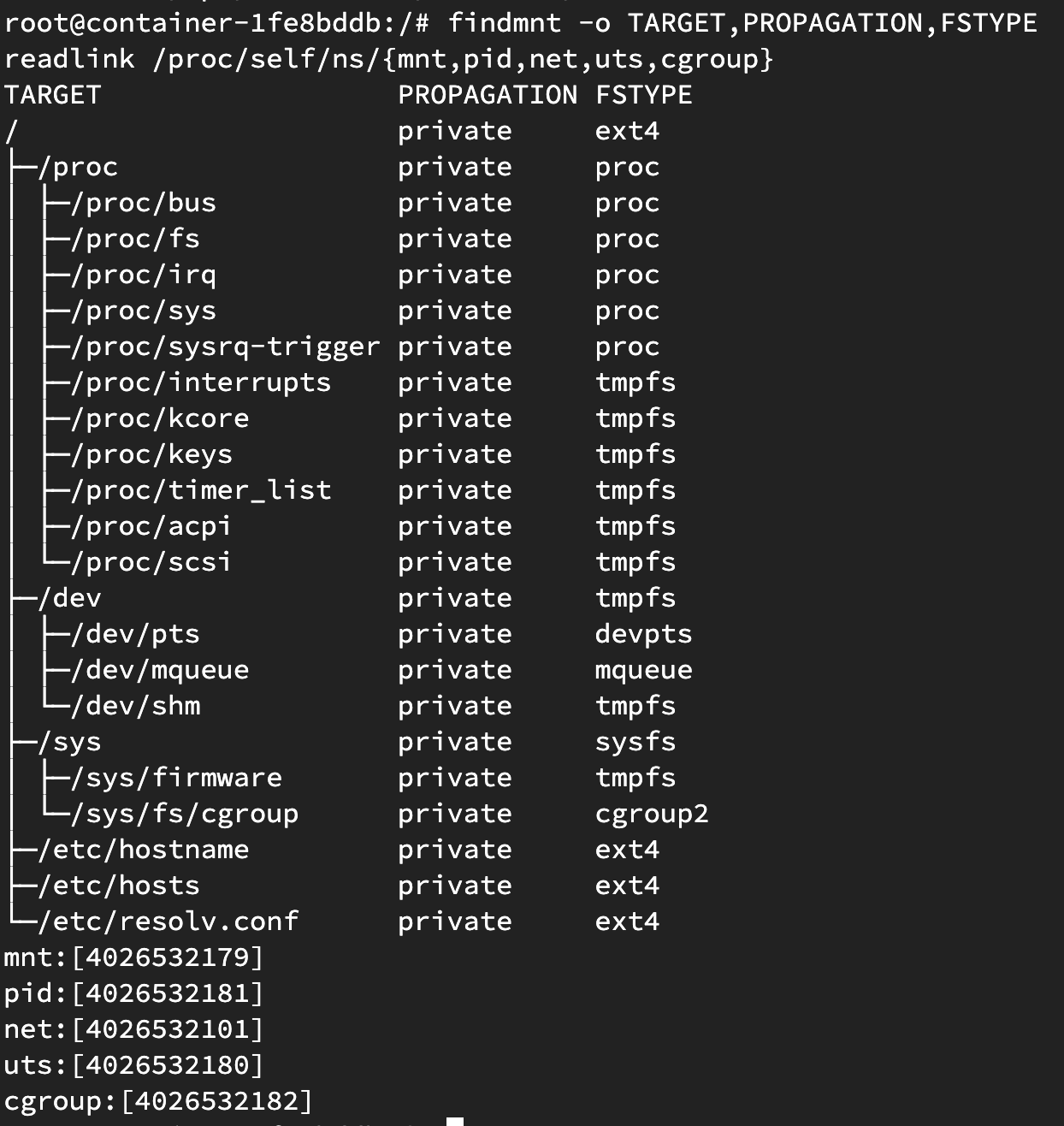
Container namespaces
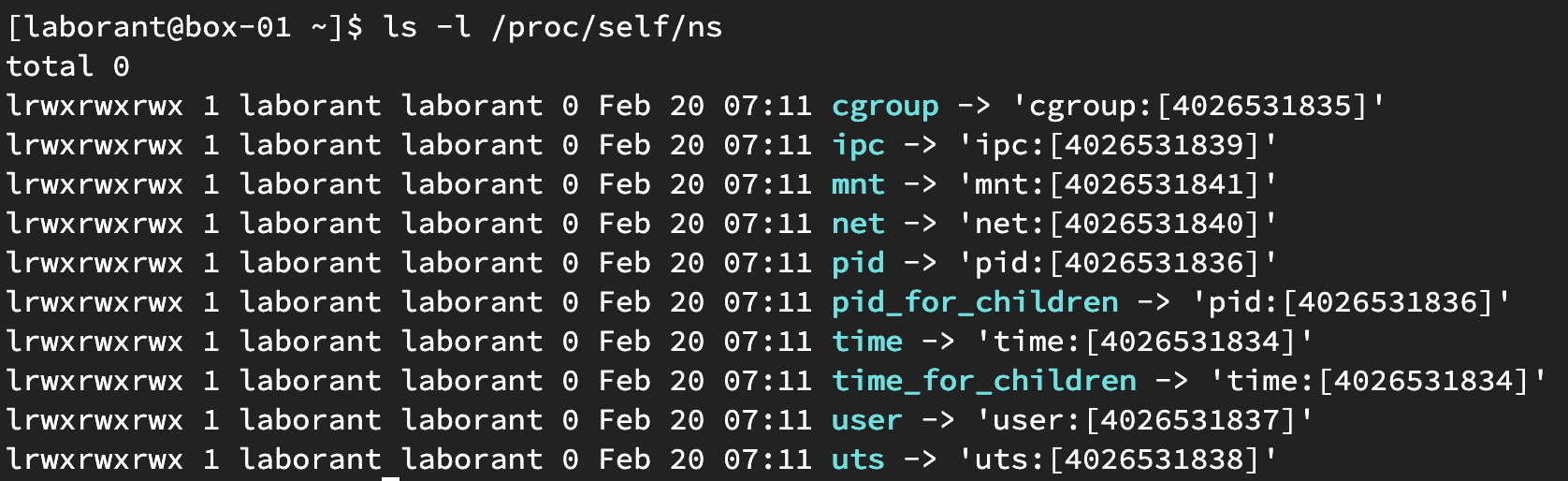
Host namespaces
Namespace IDs inside the unshared bash differ from the host system.
The --propagation slave flag prevents mount changes in the child namespace from propagating to the parent.
Set Up Networking
Create a bridge network to connect the container to the host:
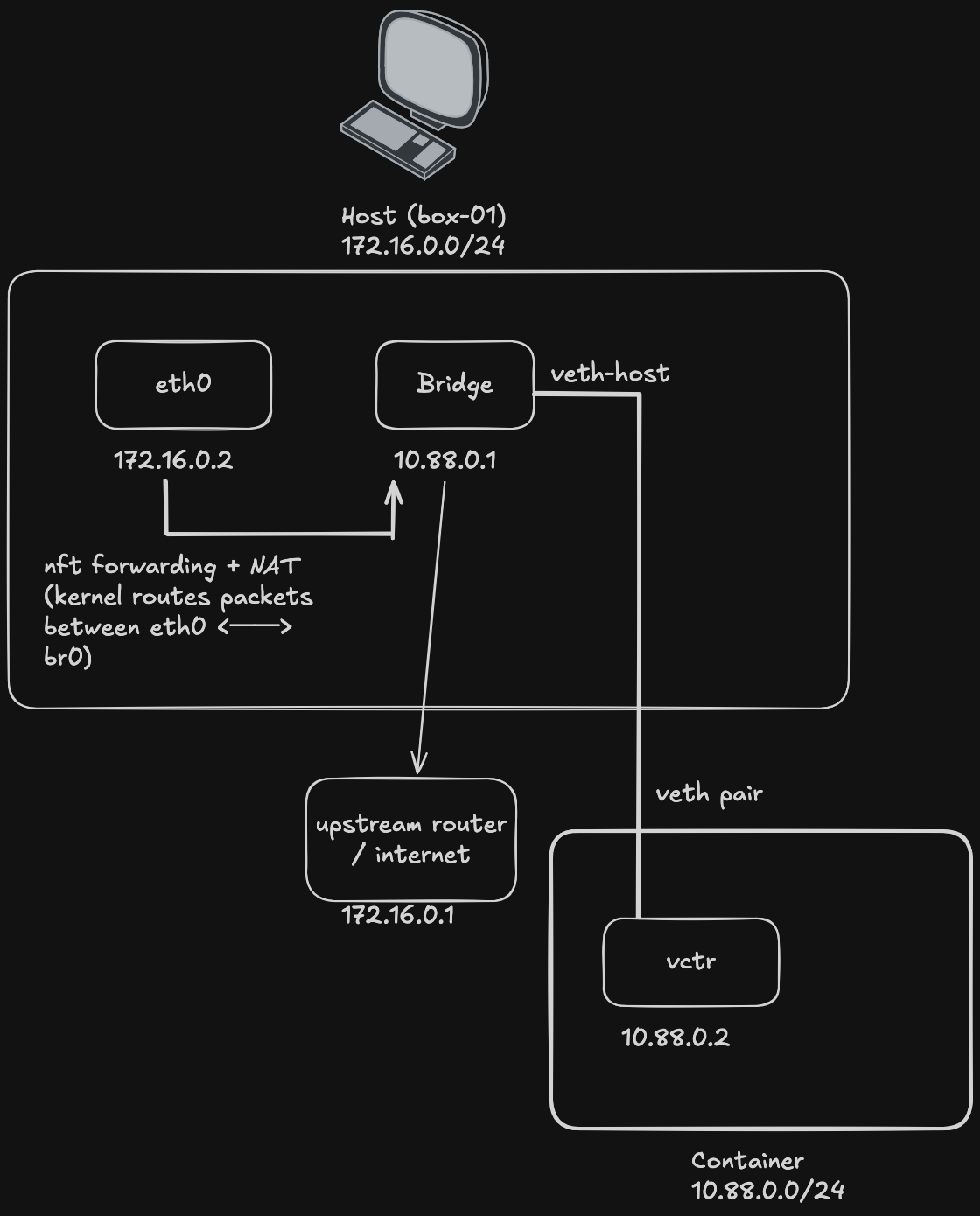
Bridge network with veth pair connecting container to host.
# Create bridge
sudo ip link add name br0 type bridge
sudo ip addr add 10.0.0.1/24 dev br0
sudo ip link set br0 up

# Create veth pair
sudo ip link add veth0 type veth peer name veth1

# Configure veth0 (host side)
sudo ip link set veth0 master br0
sudo ip link set veth0 up
Putting It All Together
Now let's combine all the pieces into a complete container management script. The script will:
- Create a bridge for container networking
- Generate a container ID for unique identification
- Set up the root filesystem from a container image
- Configure networking with named network namespaces and veth pairs
- Isolate the container with proper mount points and device nodes
- Clean up resources when stopping the container
Key Features
The script uses several important Linux features:
Named Network Namespaces: Instead of creating a new empty network namespace and trying to move veth interfaces into it, we create a named namespace (ip netns add) and then enter it with nsenter. This preserves our configured veth interface.
Pivot Root: The pivot_root system call safely switches the root filesystem from the host to the container's rootfs, placing the old root at .oldroot so we can unmount it.
Pseudo Filesystems: A proper container needs several kernel virtual filesystems mounted:
/proc- Process information/dev- Device nodes with proper permissions/sys- Kernel and hardware information/sys/fs/cgroup- Control groups for resource management
Hardening the Container
A real container runtime applies security hardening. Our script:
- Makes proc subdirectories read-only to prevent tampering with kernel information
- Masks sensitive paths like
/proc/keys,/proc/kcore,/sys/firmwareby mounting tmpfs over them - Uses device-specific permissions on
/devnodes
This prevents processes from accessing host kernel structures or sensitive hardware information.
The Complete Script
#!/bin/bash
set -e

export PATH="/usr/bin:/usr/sbin:/usr/local/bin:/usr/local/sbin:/bin:/sbin"

# Must be run as root
if [ "$EUID" -ne 0 ]; then
    echo "Please run as root: sudo $0 $*"
    exit 1
fi

BRIDGE="br0"
SUBNET="10.88.0"
CONTAINER_BASE="/opt/containers"
IMAGE="debian:stable-slim"
SCRIPT_PATH=$(realpath "$0")

ensure_bridge() {
    nft insert rule inet firewalld filter_FORWARD iifname "br0" oifname "eth0" accept
    nft insert rule inet firewalld filter_FORWARD iifname "eth0" oifname "br0" accept
    # firewall-cmd --permanent --direct --add-rule ipv4 filter FORWARD 0 -i "$BRIDGE" -o eth0 -j ACCEPT
    # firewall-cmd --permanent --direct --add-rule ipv4 filter FORWARD 0 -i eth0 -o "$BRIDGE" -j ACCEPT
    # firewall-cmd --reload

    if ! ip link show "$BRIDGE" &>/dev/null; then
        echo "Bridge $BRIDGE not found, creating..."
        ip link add "$BRIDGE" type bridge
        ip addr add "${SUBNET}.1/24" dev "$BRIDGE"
        ip link set "$BRIDGE" up
        sysctl -w net.ipv4.ip_forward=1 >/dev/null
        firewall-cmd --add-masquerade 2>/dev/null || true
        echo "Bridge $BRIDGE created"
    else
        echo "Bridge $BRIDGE already exists"
    fi
}

container_create() {
    ensure_bridge

    # 1. generate ID
    ID=$(head -c4 /dev/urandom | xxd -p)
    echo "Creating container: $ID"

    # 2. create directories
    CONTAINER_DIR="${CONTAINER_BASE}/${ID}"
    ROOTFS_DIR="${CONTAINER_DIR}/rootfs"
    mkdir -p "$ROOTFS_DIR"

    # 3. get rootfs from image
    echo "Pulling rootfs from ${IMAGE}..."
    crane export "$IMAGE" | tar -xC "$ROOTFS_DIR"

    # 4. create hostname/hosts/resolv.conf
    echo "container-${ID}" > "$CONTAINER_DIR/hostname"
    cat <<EOF > "$CONTAINER_DIR/hosts"
127.0.0.1   localhost container-${ID}
::1         localhost ip6-localhost ip6-loopback
EOF
    cp /etc/resolv.conf "$CONTAINER_DIR/resolv.conf"

    # 5. create named netns
    ip netns add "ctr-${ID}"

    # 6. create veth pair
    ip link add "veth-${ID}" type veth peer name "vctr-${ID}"

    # 7. attach host end to bridge
    ip link set "veth-${ID}" master "$BRIDGE"
    ip link set "veth-${ID}" up

    # 8. move container end into netns
    ip link set "vctr-${ID}" netns "ctr-${ID}"

    # 9. configure container-side networking
    ip netns exec "ctr-${ID}" ip link set lo up
    ip netns exec "ctr-${ID}" ip addr add "${SUBNET}.2/24" dev "vctr-${ID}"
    ip netns exec "ctr-${ID}" ip link set "vctr-${ID}" up
    ip netns exec "ctr-${ID}" ip route add default via "${SUBNET}.1"

    # 10. save container state for cleanup
    echo "$ID" > "$CONTAINER_DIR/id"
    echo "veth-${ID}" > "$CONTAINER_DIR/veth"

    echo "Container $ID ready"
    echo "  Network namespace: ctr-${ID}"
    echo "  IP: ${SUBNET}.2"
    echo "  Rootfs: $ROOTFS_DIR"

    # 11. launch container inside namespaces
    nsenter --net=/var/run/netns/ctr-${ID} \
    unshare --mount --pid --fork --uts --cgroup \
        env PATH="$PATH" \
        "$SCRIPT_PATH" --inner "$ID"
}

container_inner() {
    export PATH="/usr/bin:/usr/sbin:/usr/local/bin:/usr/local/sbin:/bin:/sbin"

    local ID=$1
    local CONTAINER_DIR="${CONTAINER_BASE}/${ID}"
    local ROOTFS_DIR="${CONTAINER_DIR}/rootfs"

    # isolate mount namespace
    mount --make-rslave /
    mount --rbind "$ROOTFS_DIR" "$ROOTFS_DIR"
    mount --make-private "$ROOTFS_DIR"

    # mount pseudo filesystems
    mkdir -p "$ROOTFS_DIR/proc"
    mount -t proc proc "$ROOTFS_DIR/proc"

    mkdir -p "$ROOTFS_DIR/dev"
    mount -t tmpfs -o nosuid,strictatime,mode=0755 tmpfs "$ROOTFS_DIR/dev"

    # minimal device nodes
    mknod -m 666 "$ROOTFS_DIR/dev/null"    c 1 3
    mknod -m 666 "$ROOTFS_DIR/dev/zero"    c 1 5
    mknod -m 666 "$ROOTFS_DIR/dev/random"  c 1 8
    mknod -m 666 "$ROOTFS_DIR/dev/full"    c 1 7
    mknod -m 666 "$ROOTFS_DIR/dev/urandom" c 1 9
    mknod -m 666 "$ROOTFS_DIR/dev/tty"     c 5 0
    ln -sf /proc/kcore     "$ROOTFS_DIR/dev/core"
    ln -sf /proc/self/fd   "$ROOTFS_DIR/dev/fd"
    ln -sf /proc/self/fd/0 "$ROOTFS_DIR/dev/stdin"
    ln -sf /proc/self/fd/1 "$ROOTFS_DIR/dev/stdout"
    ln -sf /proc/self/fd/2 "$ROOTFS_DIR/dev/stderr"

    chown root:root "$ROOTFS_DIR/dev/"{null,zero,full,random,urandom,tty}

    mkdir -p "$ROOTFS_DIR/dev/pts"
    mount -t devpts -o newinstance,ptmxmode=0666,mode=0620 devpts $ROOTFS_DIR/dev/pts
    ln -sf /dev/pts/ptmx "$ROOTFS_DIR/dev/ptmx"

    mkdir -p "$ROOTFS_DIR/dev/mqueue"
    mount -t mqueue -o nosuid,nodev,noexec mqueue $ROOTFS_DIR/dev/mqueue

    mkdir -p "$ROOTFS_DIR/dev/shm"
    mount -t tmpfs -o nosuid,nodev,noexec,mode=1777,size=67108864 tmpfs $ROOTFS_DIR/dev/shm

    mkdir -p "$ROOTFS_DIR/sys"
    mount -t sysfs -o ro,nosuid,nodev,noexec sysfs "$ROOTFS_DIR/sys"

    mkdir -p "$ROOTFS_DIR/sys/fs/cgroup"
    mount -t cgroup2 -o ro,nosuid,nodev,noexec cgroup2 "$ROOTFS_DIR/sys/fs/cgroup"

    # bind identity files
    for p in hostname hosts resolv.conf; do
        touch "$ROOTFS_DIR/etc/$p"
        mount --bind "$CONTAINER_DIR/$p" "$ROOTFS_DIR/etc/$p"
    done

    # pivot into rootfs
    cd "$ROOTFS_DIR"
    mkdir -p .oldroot
    pivot_root . .oldroot

    # clean up old root
    mount --make-rslave /
    umount -l .oldroot
    rmdir .oldroot

    # set hostname
    hostname "$(cat /etc/hostname)"

    # harden - make proc subdirs read-only
    for d in bus fs irq sys sysrq-trigger; do
        if [ -e "/proc/$d" ]; then
            mount --bind "/proc/$d" "/proc/$d"
            mount -o remount,bind,ro "/proc/$d"
        fi
    done

    # harden - mask sensitive paths
    for p in \
        /proc/asound \
        /proc/interrupts \
        /proc/kcore \
        /proc/keys \
        /proc/latency_stats \
        /proc/timer_list \
        /proc/timer_stats \
        /proc/sched_debug \
        /proc/acpi \
        /proc/scsi \
        /sys/firmware; do
        if [ -d "$p" ]; then
            mount -t tmpfs -o ro tmpfs "$p"
        elif [ -f "$p" ]; then
            mount --bind /dev/null "$p"
        fi
    done

    exec /bin/bash
}

container_destroy() {
    local ID=$1
    local CONTAINER_DIR="${CONTAINER_BASE}/${ID}"

    echo "Destroying container: $ID"

    # delete veth (deleting one end removes both)
    ip link del "veth-${ID}" 2>/dev/null || true

    # delete netns
    ip netns del "ctr-${ID}" 2>/dev/null || true

    # remove directories
    rm -rf "$CONTAINER_DIR"

    echo "Container $ID destroyed"
}

case "$1" in
    start)   container_create ;;
    stop)    container_destroy "$2" ;;
    --inner) container_inner "$2" ;;
    *)       echo "Usage: $0 start|stop <id>" ;;
esac
Save this script as container.sh and make it executable:
chmod +x container.sh
Start a container:
sudo ./container.sh start
When you're done, stop it:
sudo ./container.sh stop <container-id>
What You've Built
You've created a fully functional container runtime from scratch:
- Root filesystem from container images (using
crane export) - Unique container identification
- Container identity configuration (hostname, hosts, resolv.conf)
- Network isolation with named network namespaces
- Network connectivity via bridge and veth pairs
- Complete isolation with all required namespaces
- Proper pseudo filesystems and device nodes
- Security hardening (read-only proc, masked sensitive paths)
- Resource cleanup on container stop
- Persistent bridge configuration
Key Concepts
- Namespaces isolate resources: Each namespace type restricts access to a specific system resource
- Rootfs provides the filesystem: Container images are just filesystems
- Veth pairs connect namespaces: Virtual ethernet pairs bridge container and host networks
- Named network namespaces allow configuring networking before entering the namespace
- Pivot root safely switches the root filesystem without chroot limitations
- Pseudo filesystems provide essential kernel interfaces inside the container
- Security hardening protects the host kernel from container processes
About the Author

More tutorials you might like
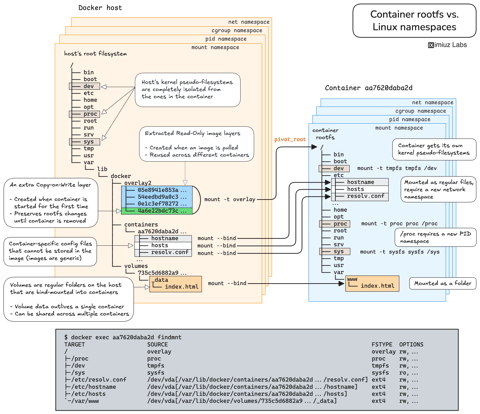
How Container Filesystem Works: Building a Docker-like Container From Scratch
Learn how Linux containers are built from the ground up. Starting with the mount namespace and a root filesystem, see why PID, cgroup, UTS, and network namespaces naturally follow - and how this foundation makes concepts like bind mounts, volumes, and persistence in Docker or Kubernetes much easier to grasp.

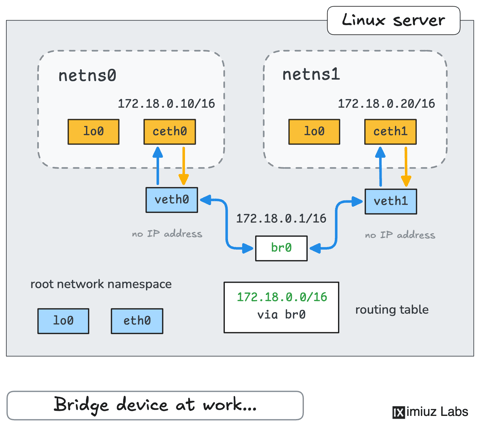
How Container Networking Works: Building a Bridge Network From Scratch
Begin with the basics to understand Docker and Kubernetes networking: learn how to create and interconnect Linux network namespaces using only command-line tools.
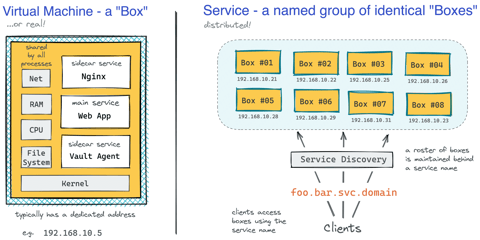
How Kubernetes Reinvented Virtual Machines - In a Good Sense
How Virtual Machines were used to deploy services. What old problems containers solve and what new problems create. How Kubernetes used containers to recreate Virtual Machines in a better way?
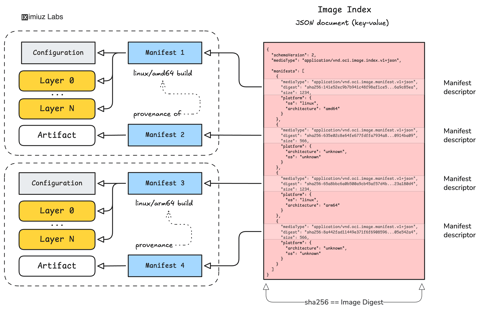
How Container Images Actually Work: Layers, Configs, Manifests, Indexes, and More
A practical deep dive into container image internals that will help you build a clear mental model of how images are composed, identified, stored, and distributed across registries.
Learn by doing, not just by reading or watching
Sign up for a free account to start a VM playground right on this page, track your progress, and get notified about new learning materials.