Tutorial  on  Containers

How Container Images Actually Work: Layers, Configs, Manifests, Indexes, and More

This write-up is my attempt to explain the container image format as it's described by the OCI Image Specification and, to a lesser extent, the OCI Distribution Specification. The post will focus on such well-known (but not so well understood) concepts as image layers, image configuration, image manifests, and image indexes. We'll also talk about image IDs and image digests, and how images are stored and addressed locally and in registries. Traditionally, the idea is to show why each of these moving parts is needed, when it's used, and how the parts work together instead of just describing them in dry terms, rehashing the spec(s).

By the end of it, you should be able to explain how the same docker pull nginx:alpine command ends up fetching different images on an amd64 Linux server and an arm64 macOS laptop, why the exact same image may get different digests when moved from one registry to another (but its ID will never change), and what exactly constitutes a single- and multi-platform container image.

The knowledge will come in handy if you often deal with:

  • Building multi-platform images
  • Moving images between registries
  • Performing provenance attestations
  • Comparing images (by digests or IDs)
  • Running images across container runtimes (e.g., Lima in development, Docker in CI/CD, and Kubernetes in production)

Sounds relevant? Buckle up for a deep dive!

Disclaimer: This write-up is by no means as complete as the OCI Image Specification - the spec is (likely intentionally) more abstract, and because of that more generic, while this post tries to be rather concrete and focuses on the most typical day-to-day applications of container images. The post may not be utterly accurate either, but I'm doing my best to not deviate from the spec too much or interpret it too freely.

What Is a Container Image?

At its core, a container image is an archive with the application, all its direct and transitive dependencies, required OS packages, and a container execution configuration inside.

In other words, an image binds together two key "things":

  • Filesystem (rootfs) - one or more tar archives, which often (but not always) produce a typical Linux root filesystem layout when unpacked.
  • Configuration - a piece of JSON, which describes the image itself and also defines the default parameters for containers started from it (e.g., the command to run, the environment variables to set, etc.).

The purpose of a container image is to hold all necessary information for an OCI runtime (e.g., runc) to prepare and start a container.
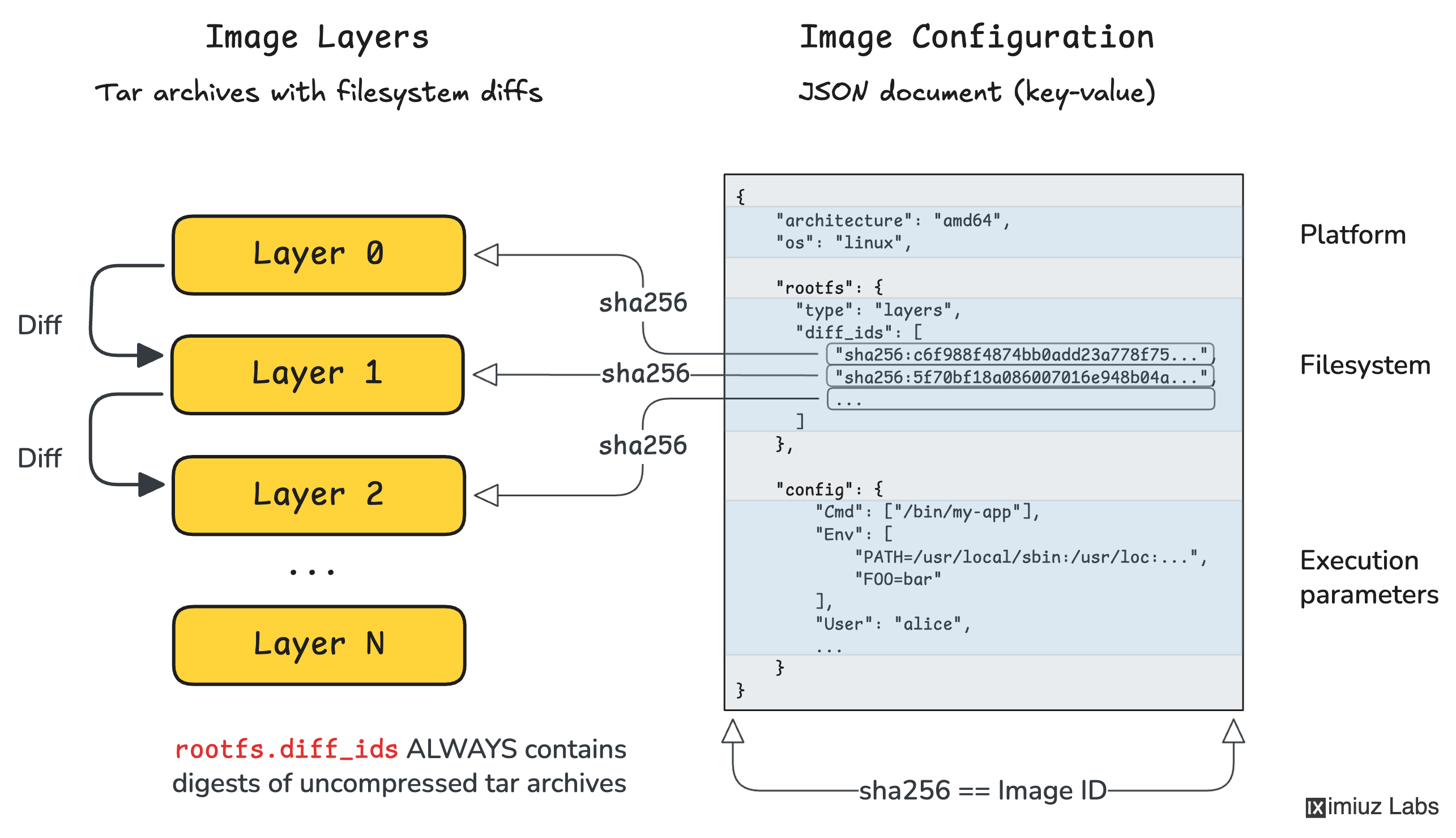
At its core, a container image is two-fold: it bears a filesystem and a runtime configuration.

OCI Image Configuration

The image configuration JSON format is standardized by the OCI spec. And it's actually a pretty simple and straightforward one!

Here is a minimal example of an image configuration that shows ALL required fields (there are just 3) and one optional but usually present field called config (yep, it's configuration's config, you got it right):

OCI Image Configuration Example
{
    "architecture": "amd64",   // required field
    "os": "linux",             // required field

    "rootfs": {                // required field
      "type": "layers",        // required value
      "diff_ids": [
          "sha256:c6f988f4874bb0add23a778f753...b66bbd1",
          "sha256:5f70bf18a086007016e948b04ae...ce3c6ef",
          ...
      ]
    },

    "config": {                // optional but usually present
        "Cmd": ["/bin/my-app"],
        "Env": [
            "PATH=/usr/local/sbin:/usr/local/bin:...",
            "FOO=bar"
        ],
        "User": "alice"
    }
}

There are two important observations about the image configuration format we should make as they will be important for connecting the dots later on:

  1. OCI Image Configuration is an inherently single-platform construct - i.e., given an image configuration, you should always be able to tell its target platform (e.g., linux/amd64).
  2. In addition to the application's runtime parameters (.config), the configuration also references the application's filesystem (.rootfs).

Thus, OCI Image Configuration is not just a bag of environment variables and an entrypoint. It also says "this runtime configuration goes with exactly this container filesystem template."

OCI Image Filesystem Layers

Before we jump to image layers, or as the spec calls them Image Layer Filesystem Changesets, we need to understand what a container filesystem is.

In its simplest form, a container filesystem can be just a folder with a single statically linked binary inside:

mkdir rootfs
mv ./build/app rootfs/

Technically, a container filesystem is a mix of static files that come from the image and dynamic files and directories that are added at runtime (e.g., /proc and /sys virtual filesystems, or /etc/hosts and /etc/resolv.conf files). But for this particular explanation, we can ignore the dynamic part and assume a(n oversimplified) equivalence of a container filesystem and an image filesystem.

Even statically linked applications often depend on OS-provided files and folders like /etc/passwd or /usr/share/zoneinfo, so a more realistic yet simple container filesystem will have a typical Linux rootfs layout:

/
├── bin/
├── dev/
├── etc/
├── lib/
├── proc/
├── sys/
└── usr/

Dynamically linked applications would require shared libraries to reside somewhere in the filesystem, and interpreted languages like Python or JavaScript would expect the filesystem to contain the entire language runtime (often 100MB+ of files). But in any case, a container filesystem is just a folder with a bunch of files and subfolders inside.

If we take such a folder and archive it with tar, compute its SHA-256 digest, and put that digest in the .rootfs.diff_ids list of the image configuration, we'd get a valid single-layer image:

tar --numeric-owner --xattrs --acls -C rootfs -cf layer.tar .

DIGEST=$(sha256sum layer.tar | awk '{print $1}')
mv layer.tar "$DIGEST.tar"

jq '.rootfs.diff_ids = ["sha256:'"$DIGEST"'"]' config.json > config.v2.json

An important observation: .rootfs.diff_ids always contains digests of uncompressed tar archives. These are not necessarily the same digests you'll later see in an OCI Image Manifest.

Most real-world images though have more than one rootfs layer - this is done for build, storage, and transfer efficiency reasons.

Suppose your application needs an Ubuntu base. You find an Ubuntu filesystem layout somewhere, download it, unpack the tar archive into an empty directory, and now you need to write your application files over it. But instead of creating a full copy of the archive, you only archive the diff: files to be added and files to be modified go straight into the diff archive, and files that exist in the base layer but need to be deleted in the final image get represented by special whiteout files.

A simplified example:

# base layer contains:
#   /bin/bash
#   /etc/os-release
#   /var/log/bootstrap.log
#   ...

mkdir diff
mkdir -p diff/usr/local/bin diff/var/log

# add the application binary
cp ./my-app diff/usr/local/bin/my-app

# remove the bootstrap log file and replace it with a whiteout file
rm -f diff/var/log/bootstrap.log
touch diff/var/log/.wh.bootstrap.log

# archive only the diff
tar --numeric-owner -C diff -cf app-layer.tar .

The .wh.<name> file is the whiteout marker meaning: when applying this layer, remove <name> from the lower layer view. OCI layers use whiteout files to describe deletions in a tar-friendly way.

Now when you have another application also based on Ubuntu, you don't need to duplicate the base layer(s) - just prepare another diff. And when you push both application images to a remote registry, the shared underlying layer(s) will be transferred only once, saving bandwidth and storage.

That is why the image filesystem is stored not as a single tar with the final set of files and folders, but as a stack of filesystem layers, each represented by its own tar archive containing only the files that were added, changed, or deleted compared to the previous level. The spec calls such layers Filesystem Changesets.

How OCI image filesystem layers are applied

Conceptually, applying layers is simple:

  1. Unpack the first layer into an empty directory.
  2. Unpack the second layer on top of it.
  3. If a path already exists, overwrite it.
  4. If a whiteout file is encountered, remove the corresponding lower-level path.
  5. Repeat until all layers are applied.

This yields the final flat root filesystem that a runtime can use.

In practice, runtimes often don't literally untar all layers into one directory every time. They may instead use OverlayFS union mounts, Btrfs snapshots, ZFS clone volumes, or other tricks. But logically the result must be equivalent to applying the changesets in order.

Union mounting container image layers using OverlayFS to produce a flat, container-like root filesystem.

OCI ImageID

An image config file and the set of its layers (as local tar archives) are the only things you need to produce a rootfs bundle - an input artifact an OCI container runtime (e.g., runc) needs to create and start a container. No other input is required.

What is an OCI Runtime Bundle

A bundle is a regular folder with the final "flat" container filesystem (only the static part of it) and a config.json file. You can think of the bundle config file as just a converted image configuration. And the "flat" filesystem is created by unarchiving the very first layer of the image into an empty directory and then consequently unarchiving the diff layers on top of it, adding, overwriting, and "whiting-out" (removing) files.

A typical OCI container runtime (runc) workflow.

Since the image configuration file pins the rootfs layers by their digests, you can consider it a document that uniquely defines the entire image - its execution parameters and its filesystem.

And here is a clever trick: if you hash an image configuration (e.g., sha256sum config.json), the resulting digest will serve as a perfect identifier of the image. Even the slightest change to the image's configuration or any of its filesystem layers will result in a completely different digest, hence a new ID.

And this is exactly the behavior we want, because any such change means there is now a different image.

The OCI Image Spec actually defines an ImageID exactly this way, and many container runtimes (Docker until version 29, Podman, and CRI tooling for a long time) have employed this definition.

A few important properties of ImageID follow immediately:

  • It is determined by the image config JSON alone.
  • It is a property of a single-platform image (because the image config is a single-platform construct).
  • It changes if either the runtime config changes or the ordered set of rootfs diff IDs changes.
  • It does not depend on filesystem layers compression (because the diff IDs are of uncompressed layers)
  • It does not depend on image tags or annotations (because the image config doesn't contain them)

Docker 29 and containerd-based tooling changed what they often show as the image identifier in some contexts, especially for pulled images that are represented by manifests or indexes in the content store. Read more: The Container Image Identity Crisis.

OCI Image Manifest

If the image config and its layers are the only things actually needed to create containers, why does the spec also define Manifest and Index entities?

With the machinery introduced so far - JSON configuration plus filesystem layers - we can:

  • Create new images (by manipulating tar archives, hashing them, and writing some JSON configs)
  • Create containers from images (by applying filesystem changesets from tar archives and converting one JSON format into another)
  • Uniquely identify single-platform uncompressed images using an Image ID (SHA-256 hash of the image config JSON)

However, the image distribution problem remains to be solved!

How can we push images to remote container registries and pull them back if they are just disjoint sets of tar and JSON files?

Most Docker (and other container runtimes') commands that work with images use a single reference. The three most typical examples are:

docker pull ghcr.io/repo/image:tag
docker push ghcr.io/repo/image:tag
docker run ghcr.io/repo/image:tag

A single reference identifying the image means there must be exactly one entity on the registry side that lists all the image's components. But this entity cannot be:

  • A single upper-level archive containing both the image's configuration and all its layers. Otherwise, we wouldn't be able to fetch individual layers and reuse them across different images.
  • The image configuration file itself, because its rootfs.diff_ids field contains digests of uncompressed layers, while registries typically store and serve compressed blobs.

So, we need a new roster-like entity that lists all image components in one place, and this entity is called an OCI Image Manifest.

Now an image reference like ghcr.io/repo/image:tag can point to a single manifest document on the registry side, which in turn points to the image's configuration and filesystem layers.

An OCI Image Manifest has a relatively simple format:

OCI Image Manifest Example
{
  "schemaVersion": 2,  // required field & value
  "mediaType": "application/vnd.oci.image.manifest.v1+json",

  "config": {          // required field
    "mediaType": "application/vnd.oci.image.config.v1+json",
    "digest": "sha256:b5b2b2c507a0944348e030311...2a537bc7",
    "size": 7023
  },

  "layers": [          // at least one layer is required
    {
      "mediaType": "application/vnd.oci.image.layer.v1.tar+gzip",
      "digest": "sha256:9834876dcfb05cb167a5c24...907ee8f0",
      "size": 32654
    },
    ...
  ],

  // 'subject' and 'annotations' are optional fields
}

What we see above is the familiar config and layers attributes. The former contains a digest of the image's configuration file, and the latter contains the digests of the image's filesystem layers as stored in the registry.

There are two important observations that are important for understanding the OCI Image Manifest:

  1. The manifest points to exactly one OCI Image Configuration blob.
  2. The manifest points to one or more Filesystem Layers, which MAY be compressed (notice how the mediaType field in the above example has a tar+gzip suffix).

Note that OCI Image Manifest says nothing about the image's platform directly. But it does point to the image configuration file, where os and architecture are mandatory fields. And it makes the OCI Image Manifest a single-platform construct, too.

An OCI Image Manifest pointing to an OCI Image Configuration and one or more filesystem layers.

How to Inspect Manifests of Real-World Images

If you want to inspect a manifest of a real-world image, there are several ways to do it:

  1. Docker:
docker buildx imagetools inspect --raw registry.iximiuz.com/single:latest
  1. Crane:
crane manifest registry.iximiuz.com/single:latest
  1. Call the registry API directly:
curl -s -H "Accept: application/vnd.oci.image.manifest.v1+json" \
    https://registry.iximiuz.com/v2/single/manifests/latest | jq .

Since registries use content-addressable storage, you can download the config and layer blobs referenced by the manifest using their digests. Here is a couple of examples:

First, record the digest of the image configuration blob:

CONFIG_DIGEST=$(crane manifest registry.iximiuz.com/single:latest | jq -r .config.digest)

Then download the config blob using its digest:

crane blob registry.iximiuz.com/single:latest@${CONFIG_DIGEST}

For a filesystem layer blob, you will want to stream the stdout of the crane blob command to a file:

LAYER_DIGEST=$(crane manifest registry.iximiuz.com/single:latest | jq -r .layers[0].digest)
crane blob registry.iximiuz.com/single:latest@${LAYER_DIGEST} > layer.tar.gz

And of course, a direct API call should also work:

curl -s \
    https://registry.iximiuz.com/v2/single/blobs/${CONFIG_DIGEST}

Using Manifests to Store Arbitrary Data

Container registries turned out to be a surprisingly good general-purpose blob store.

Technically, nothing prevents you from creating an image that contains not a runnable container rootfs but some arbitrary files. Yes, that would be hacky and could confuse container tooling if somebody later tried to run it as a container. But the distribution capabilities were just too useful to ignore, so people started actively using OCI registries for non-container artifacts.

The OCI ecosystem eventually embraced this use case by introducing extra mediaType values to the config and layers fields of the manifest.

Today, the common pattern is:

  • Store your payload as one or more blobs
  • Describe it with a manifest
  • Set the config or layer media types to something artifact-specific

This allows registries to store things like:

  • SBOMs
  • Provenance attestations
  • Helm charts
  • WASM modules
  • Arbitrary build outputs

So while manifests were originally introduced to solve image distribution, they turned out to be generic enough to model artifact distribution as well.

See ORAS for more details.

OCI Image Index

We got through so much stuff and still haven't talked about multi-platform images yet. How come? The reason is that multi-platform support was added later and rather "bolt-on".

Up to this point, every object we discussed was inherently single-platform:

So if we want a single reference like ghcr.io/repo/image:tag to resolve differently on different platforms, we need one more indirection level.

That indirection is the OCI Image Index.

An image index is basically a list of manifests, each annotated with a target platform. A simplified example:

OCI Image Index Example
{
  "schemaVersion": 2,  // required field & value
  "mediaType": "application/vnd.oci.image.index.v1+json",

  "manifests": [
    {
      "mediaType": "application/vnd.oci.image.manifest.v1+json",
      "digest": "sha256:141e52ec9b7b941c48f98af1ce5...6a9c85ea",
      "size": 1234,
      "platform": {
        "os": "linux",
        "architecture": "amd64"
      }
    },
    {
      "mediaType": "application/vnd.oci.image.manifest.v1+json",
      "digest": "sha256:65a8bbc6a0b500a9cb45af57d4b...23a180d4",
      "size": 1234,
      "platform": {
        "os": "linux",
        "architecture": "arm64"
      }
    }
  ]
}

So now an image reference in a registry can point to either:

  • A OCI Image Manifest, for a single-platform image, or
  • An OCI Image Index, for a multi-platform image

This adds much more flexibility while preserving the existing distribution model.

An OCI Image Index doesn't describe the image directly. Instead, it points to one or more OCI Image Manifests, each of which then points to the actual OCI Image Configuration and filesystem layers.

An OCI Image Index pointing to one or more OCI Image Manifests, each of which points to an OCI Image Configuration and one or more filesystem layers.

How to Inspect Indexes of Real-World Images

Interesting enough, the exact same commands and API calls that work for inspecting manifests also work for inspecting indexes. This only further reinforces the impression that the multi-platform image support was added rather bolt-on.

Here is how to inspect the index of a real-world multi-platform image:

  1. Docker:
docker buildx imagetools inspect --raw registry.iximiuz.com/multi:latest
  1. Crane:
crane manifest registry.iximiuz.com/multi:latest
  1. Call the registry API directly:
curl -s -H "Accept: application/vnd.oci.image.index.v1+json" \
    https://registry.iximiuz.com/v2/multi/manifests/latest | jq .

Once you read the image's index, you can look up the manifest for the required platform, and then fetch that manifest by its digest:

MANIFEST_DIGEST=$(
  crane manifest registry.iximiuz.com/multi:latest \
      | jq -r '.manifests[] | select(.platform.architecture == "amd64") | .digest'
)
crane blob registry.iximiuz.com/multi:latest@${MANIFEST_DIGEST} | jq .

And the rest of the image pulling logic is the same as for single-platform images - given the manifest, you can always fetch the OCI Image Configuration and filesystem layers referenced by that manifest.

How Multi-Platform Images Work

Before the introduction of image indexes, a container image was always a single-platform construct. You could still publish platform-specific images, but it required an explicit tagging scheme. Two images, two distinct references, two platforms:

# A linux/amd64 build
docker build --platform linux/amd64 -t my-img:v1-amd64
docker push my-img:v1-amd64

# A linux/arm64 build
docker build --platform linux/arm64 -t my-img:v1-arm64
docker push my-img:v1-arm64

But now we can do this:

docker build --platform linux/amd64,linux/arm64 -t my-img:v1
docker push my-img:v1

Which on the one hand looks much more convenient, but on the other hand makes things more convoluted because now a single image reference my-img:v1 can resolve to two totally different single-platform images when pulled from different machines.

So what actually happens during docker pull my-img:v1?

Pull on an amd64 host

A simplified flow:

  1. The client asks the registry for my-img:v1.
  2. The registry returns an OCI Image Index.
  3. The client inspects the manifests[] list in that index.
  4. It selects the OCI Image Manifest whose platform matches linux/amd64.
  5. It downloads that OCI Image Manifest.
  6. It downloads the OCI Image Configuration and filesystem layers referenced by that OCI Image Manifest.

Pull on an arm64 host

The same logic applies, but the selected manifest will be different.

So a multi-platform image is not one magical image containing all architectures in one filesystem. It is a bunch of single-platform image manifests, tied together by a single OCI Image Index.

A logical view of an OCI Image Index pointing to several OCI Image Manifests (one per platform).

A logical view of an OCI Image Index pointing to several OCI Image Manifests (one per platform).

Image (Repository) Digest

Now we're ready to talk about image digests, which is a surprisingly trickier concept compared to the Image ID.

Unlike the Image ID construct, an Image Digest is not formally defined by the OCI Image Spec. Practically though, most if not all container tools use the term to mean: the digest of the top-level document resolved by an image reference. For a single-platform image, that usually means the digest of the manifest JSON. For a multi-platform image, that usually means the digest of the image index JSON.

If the only difference between ImageID and image digest is the target JSON file that gets hashed, why is image digest trickier? The answer is:

The exact same image - defined by its config plus its rootfs history - can legitimately have multiple manifests.

Two main reasons are:

  1. Different compression choices for layers. The exact same raw image can be stored with gzip, zstd, or even as uncompressed tar blobs. Since the manifest records digests of those stored blobs, different compression choices produce different manifests. Hence, different digests.
  2. Annotations and repository-specific metadata. Unlike OCI Image Configuration, OCI Image Manifests and OCI Image Indexes may contain annotations, and image build tools are fairly free to add them. Even a harmless annotation change means a different manifest/index JSON, therefore a different digest.

This is why an image digest is often called a Image Repository Digest - it identifies a particular manifest as stored in a particular location.

Here is a quick "proof of concept" that demonstrates that exactly the same image can have different digests:

  1. Copy the image to a new location changing its compression algorithm on the way:
skopeo copy \
    --dest-compress-format zstd \
    --dest-compress-level 10 \
    --dest-force-compress-format \
    docker://registry.iximiuz.com/single:latest \
    docker://registry.iximiuz.com/single:zstd

Now if you check the image configuration and compute the image IDs of both images, you will see that they are the same:

crane config registry.iximiuz.com/single:latest | sha256sum
crane config registry.iximiuz.com/single:zstd | sha256sum

But the manifests, hence the image digests, are different:

single:latest
single:zstd
crane manifest registry.iximiuz.com/single:latest | jq .
{
  "schemaVersion": 2,
  "mediaType": "application/vnd.oci.image.manifest.v1+json",
  "config": {
    "mediaType": "application/vnd.oci.image.config.v1+json",
    "digest": "sha256:68838b1e71a48b104cc2cd697c9928cf0620c0b170600263a76146c435a4c9af",
    "size": 5410
  },
  "layers": [
    {
      "mediaType": "application/vnd.oci.image.layer.v1.tar+gzip",
      "digest": "sha256:589002ba0eaed121a1dbf42f6648f29e5be55d5c8a6ee0f8eaa0285cc21ac153",
      "size": 3861821
    },
    ...
  ]
}
crane manifest registry.iximiuz.com/single:latest | sha256sum
76d822da72eca8d151be12322d54f9ee5ffc330b74f0da29344f06d85761d114
crane manifest registry.iximiuz.com/single:zstd | jq .
{
  "schemaVersion": 2,
  "mediaType": "application/vnd.oci.image.manifest.v1+json",
  "config": {
    "mediaType": "application/vnd.oci.image.config.v1+json",
    "digest": "sha256:68838b1e71a48b104cc2cd697c9928cf0620c0b170600263a76146c435a4c9af",
    "size": 5410
  },
  "layers": [
    {
      "mediaType": "application/vnd.oci.image.layer.v1.tar+zstd",
      "digest": "sha256:359707302b0036bb7616e9af9d671ac061e73bf336812c4ce0a1faef9fc29cc2",
      "size": 3613572
    },
    ...
  ]
}
crane manifest registry.iximiuz.com/single:zstd | sha256sum
c7299a7ee09665d4de6dc1667c4008a3d321effff0c63a7d2413fab0e5be779a

A few important conclusions follow:

  • Image-to-ID is a 1:1 relationship.
  • Image-to-Digest is often a 1:N relationship.
  • Pinning by digest makes sense within one concrete push → registry → pull pipeline.
  • If two images have different digests, it does not necessarily mean they are different images.
  • If two images have the same ImageID, they represent the same single-platform config+rootfs history, even if their repository digests differ.

Attaching Provenance (and Other) Data to Images

In the Using Manifests to Store Arbitrary Data section, we saw that an OCI Image Manifest can reference not only a runnable container image but some arbitrary artifacts. Adding OCI Image Indexes to the picture makes this capability even more powerful.

A single OCI Image Index can bind together not only multiple single-platform image manifests but also one or more manifests for arbitrary artifacts.

In practice, this capability is widely used for distributing:

  • Provenance attestations
  • SBOM attachments
  • Vulnerability scan results

Thus, an OCI image, represented by an index can store not only the rootfs and configuration you run for different platforms, but also the metadata proving where it came from, how it was built, and what it contains. This is one of the reasons OCI registries became such an important building block for software supply-chain tooling.

OCI Image Layout

Now when you already have a good understanding of the key moving parts - image config and rootfs layers, image manifest, and image index - we can introduce the last entity that the OCI Image Spec defines: Image Layout.

The OCI Image Layout is a standardized on-disk directory structure for OCI blobs and references.

Conceptually, it's what you get if you take the content-addressable registry model and save it into a regular local directory.

A typical layout looks roughly like this:

oci-layout
index.json
blobs/
└── sha256/
    ├── 1a...
    ├── 2b...
    ├── 3c...
    └── ...

Where:

  • oci-layout is a tiny marker file saying this directory follows the OCI layout format
  • index.json is an extra OCI Image Index that points to one or more actual indexes or manifests in the blobs/ directory
  • blobs/sha256/* contains all content-addressable blobs: configs, layers, manifests, indexes, artifacts, etc.

Here is how you can save a multi-platform image as an OCI layout:

  1. Pull the same image for at least two platforms:
docker pull --platform linux/amd64 registry.iximiuz.com/multi:latest
docker pull --platform linux/arm64 registry.iximiuz.com/multi:latest
  1. Save the image as an OCI layout:
docker save -o multi-layout.tar registry.iximiuz.com/multi:latest
  1. Inspect the OCI layout:
mkdir -p multi-layout
tar -xf multi-layout.tar -C multi-layout/

The nice thing about OCI layout is that it makes all the previously discussed abstractions tangible. You can literally inspect the blobs/ directory using ls, cat, or jq, and see:

  • OCI Image Manifest JSON document(s)
  • OCI Image Configuration blob(s)
  • OCI Image filesystem layers (often compressed)
  • OCI Image Index JSON document(s) (optional)

An OCI layout is a great learning and debugging format. And it is also a convenient transport format for tools that don't want to speak the registry HTTP API but still want to exchange OCI content in a standard way.

An OCI Image Layout directory structure with OCI Image Manifest, OCI Image Configuration, OCI Image filesystem layers, and OCI Image Index.

Summarizing

A quick recap before we wrap up:

  • Filesystem Layers describe the image filesystem as a sequence of changesets (diffs).
  • Image Configuration describes runtime defaults and lists the uncompressed filesystem layers.
  • Image Manifest binds one config blob to the layer blobs as stored for distribution.
  • Image Index binds multiple manifests under one top-level entry point document.
  • ImageID (as defined by the OCI Image Spec) is the digest of the image configuration JSON.
  • Repository Digest is typically the digest of a manifest or index JSON document.
  • OCI layout stores all of the above in a standardized local directory structure.

A single-platform image is:

  • One OCI Image Configuration
  • One ordered list of OCI Image filesystem layers
  • Exactly one target platform implied by the OCI Image Configuration
  • Exactly one OCI Image Manifest binding together the config and layers

A multi-platform image is:

  • One OCI Image Index
  • Pointing to multiple OCI Image Manifests
  • Each manifest pointing to its own single-platform image

Once you internalize that hierarchy, most image-related mysteries will become much easier to reason about.

Conclusion

Docker made container images look deceptively simple from the outside: you docker build, docker push, and docker run, and everything just works. But under the hood, the image format is an involved graph of content-addressed objects, each solving a different problem.

The moment you start building, scanning, and verifying images at scale, understanding the image format becomes increasingly important. But the good news is that there is a way to actually understand the image format instead of just memorizing all the moving parts. You just need to approach it from the right angle.