Reach Internal Servers Through a "No Shell" SSH Bastion

Premium Challenge
Upgrade your membership to unlock this and all other premium materials.
You're a platform engineer at Acme.
The application fleet runs inside a private VPC (172.16.0.0/24),
and two servers are currently misbehaving:
- app-01 - an application server,
172.16.0.40 - db-01 - a database server,
172.16.0.50
You need to log in and investigate them.
The catch: a scheduled provisioning job (Ansible) periodically rotates fleet nodes,
wiping and re-imaging anything it manages.
To keep it from recycling a host while you're still poking at it,
the runbook says to drop a maintenance lock on the box:
the rotation job skips any server that carries the file /etc/ops/maintenance.lock with the text under-investigation in it.
The ops user is set up for you on the workstation, with its SSH key already authorized on all VPC servers.
However, the misbehaving servers are reachable only from inside the VPC.
Your workstation sits on a separate
network and has no route into the VPC, so it cannot talk to either server directly:
sudo -u ops ssh ops@app-01 # times out - no route into the VPC
The only VPC host you can access directly from the workstation is a public-facing bastion
(203.0.113.20, also on the VPC as 172.16.0.30).
But this bastion is locked down:
you cannot "hop" through it manually by logging into the bastion first and SSH-ing onward from there:
sudo -u ops ssh ops@bastion ssh ops@app-01
This is a jump-only account.
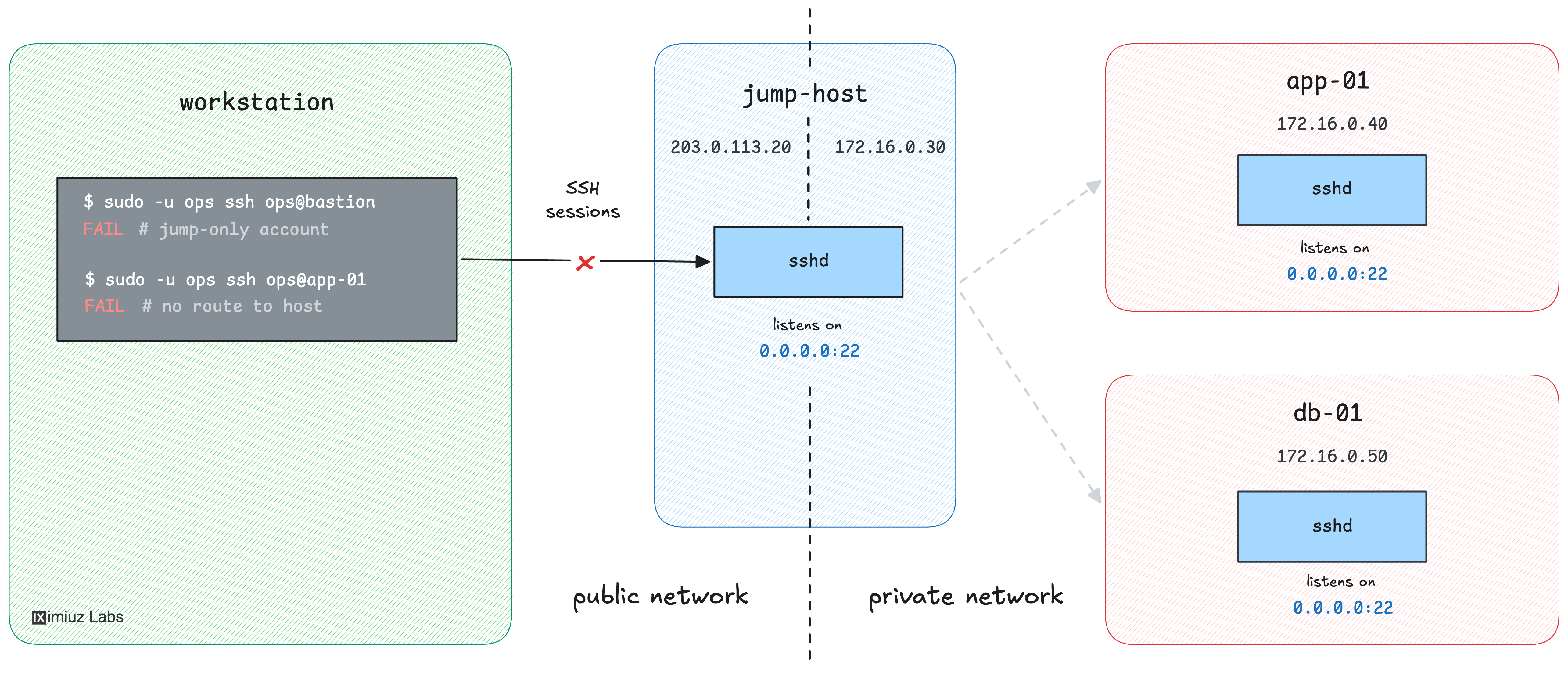
Your task: take both servers out of the rotation by creating the maintenance lock
/etc/ops/maintenance.lock with the text under-investigation in it -
on both app-01 (172.16.0.40) and db-01 (172.16.0.50).
Hint: What is a jump host?
A jump host (or bastion) is a single, hardened entry point into an otherwise unreachable network. Instead of exposing every internal server to the outside world, you expose one well-guarded machine and route all access through it.
If you have never used SSH bastions before, this slightly simpler challenge is a good warm-up: Reach a Private VPC Service Through an SSH Bastion.
Hint: Jump through the bastion
You cannot start an SSH session on the bastion because it's locked down.
However, SSH can chain through one or more intermediate hosts in a single command with the
-J (ProxyJump) option:
ssh -J <jump-user>@<jump-host> <target-user>@<target-host>
SSH first connects to the jump host, then asks it to open a TCP connection onward to the target and tunnels your real SSH session through it.
The jump host only relays bytes - it never runs a shell or a command for you - so our locked down bastion will still work as a jump host.