Build and Push a Multi-Platform Container Image

Premium Challenge
Upgrade your membership to unlock this and all other premium materials.
In the previous challenges, you explored three different approaches to building container images for non-native CPU architectures:
- QEMU emulation - running the entire build locally under emulation.
- Cross-compilation - compiling natively for a foreign target (Go, Rust, etc.).
- Remote builders - offloading foreign platform builds to machines with the target architecture support.
Each of these challenges though required you to build a single-platform image - an image built for one specific os/arch combination.
But in the real world, you often need to support multiple platforms from the same image reference.
That's where multi-platform images come in.
What is a multi-platform image?
A multi-platform image is not one giant image containing all architectures. It is a set of single-platform images tied together by an OCI Image Index - a document that lists one manifest per platform:
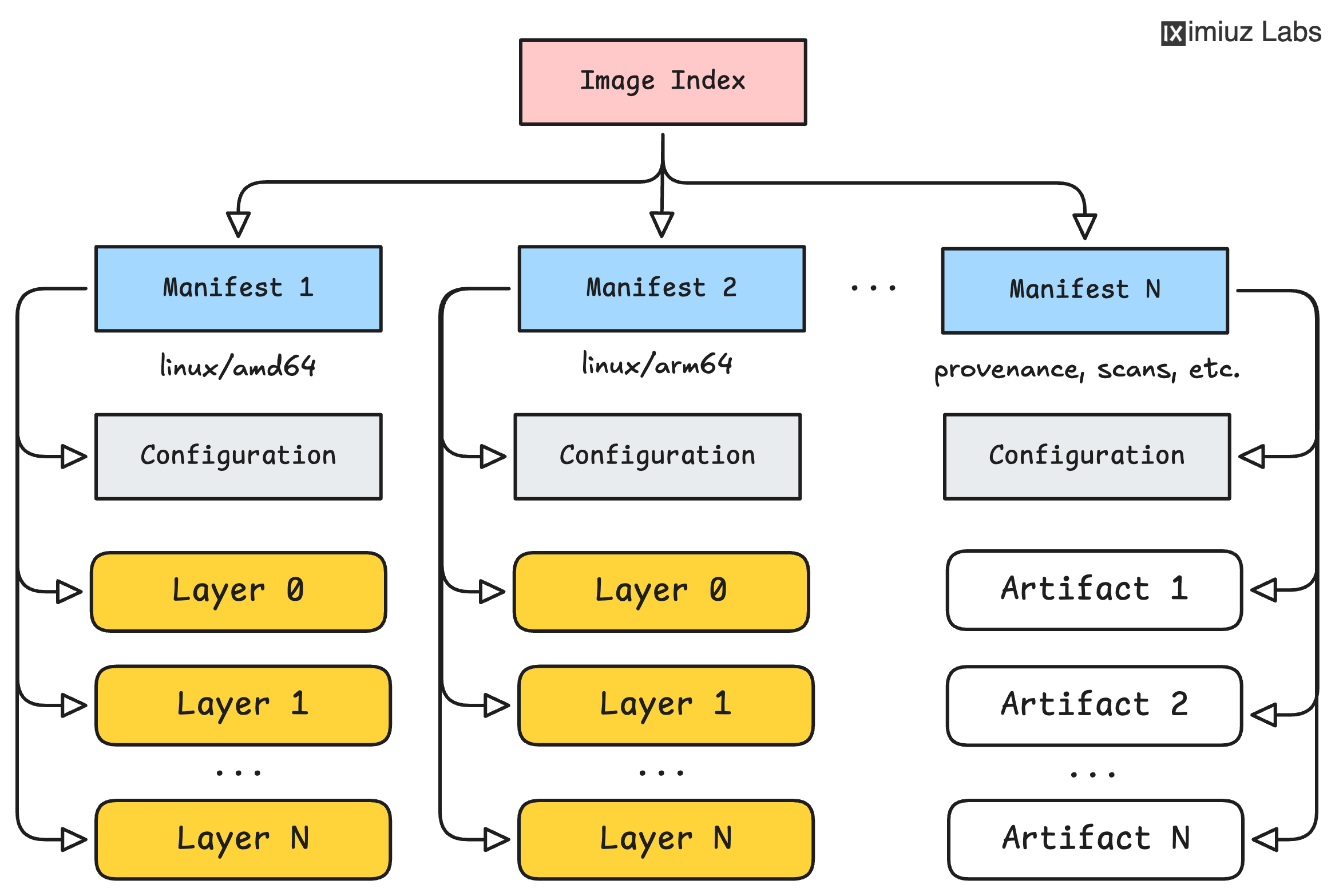
When a client pulls such an image, it reads the index, selects the manifest matching the local platform,
and downloads only that platform's layers and configuration.
This way, the same docker pull app:v1 command fetches an amd64 image on an amd64 host
and an arm64 image on an arm64 host - transparently.
For a deeper dive into image internals - layers, configs, manifests, and indexes - see How Container Images Actually Work.
The environment
- dev-01 (this terminal) - your amd64 development machine with Go and Docker installed.
- builder-01 - a remote machine with Docker and arm64 build support, accessible via SSH as
laborant@builder-01. - A private container registry at
registry.iximiuz.com.
Explore the application
The ~/app/ directory contains a Go web server and a basic Dockerfile:
cat ~/app/main.go
cat ~/app/Dockerfile
Take a moment to explore the application and understand its requirements.
The task
Build a multi-platform image for linux/amd64 and linux/arm64 and push it to the registry as registry.iximiuz.com/app:v1.0.0.
The image reference in the registry must point to an OCI Image Index (a.k.a. manifest list) containing manifests for both platforms. Pushing two separate single-platform images under the same or different tags won't do the trick.
You are free to choose any approach (or a combination of approaches) to achieve this:
- QEMU emulation (on the
dev-01machine) - Cross-compilation (on the
dev-01machine) - Remote builder (using the
builder-01machine)
Hint 1
Docker Buildx can build for multiple platforms in a single command:
docker build --platform <platform1>,<platform2>,... ...
Hint 2
If the verifier says the image is a single-platform manifest rather than an index,
make sure you're building for both platforms in a single docker build command.
Building and pushing each platform separately will create two independent single-platform images,
and only the last push will be associated with the v1.0.0 tag.
Architecture verification
The verifier will pull each platform variant separately and confirm the architectures:
Application tests
Each platform variant will be started as a container and tested: