Build a Container Image for Another Platform Using Cross-Compilation

Premium Challenge
Upgrade your membership to unlock this and all other premium materials.
In this challenge, you will build a container image for the arm64 architecture on an amd64 host machine using cross-compilation instead of full QEMU emulation.
Cross-compilation vs. QEMU emulation
In the QEMU emulation challenge,
you built an arm64 image by running the entire build process under QEMU emulation.
Every RUN instruction in the Dockerfile executed arm64 binaries on an amd64 host,
translated instruction-by-instruction by QEMU.
This approach works for any language but non-trivial builds can become painfully slow.
For compiled languages like Go, there's a much faster alternative: cross-compilation. The Go compiler runs natively on the host (amd64) but produces a binary for the target architecture (arm64). No emulation is needed during the build - the compiler simply writes machine code for a different CPU.
Explore the application
The ~/app/ directory contains a Go web server and a pre-written Dockerfile.
Take a moment to explore the code:
cat ~/app/main.go
cat ~/app/Dockerfile
If you build the application using the provided Dockerfile, it produces an image for the host's native architecture (amd64):
docker build -t test ~/app/
docker image inspect test | jq '.[0].Architecture'
At the same time, go build can produce an arm64 binary while running on an amd64 host if used as follows:
GOARCH=arm64 CGO_ENABLED=0 go build -o ./server .
file ./server
server: ELF 64-bit LSB executable, ARM aarch64, version 1 (SYSV), statically linked
The task
Your goal is to:
- Modify the
Dockerfilein~/app/to enable cross-compilation support. - Build the image for the
linux/arm64platform. - Push the image to the playground's container registry as
registry.iximiuz.com/app:v1.0.0.
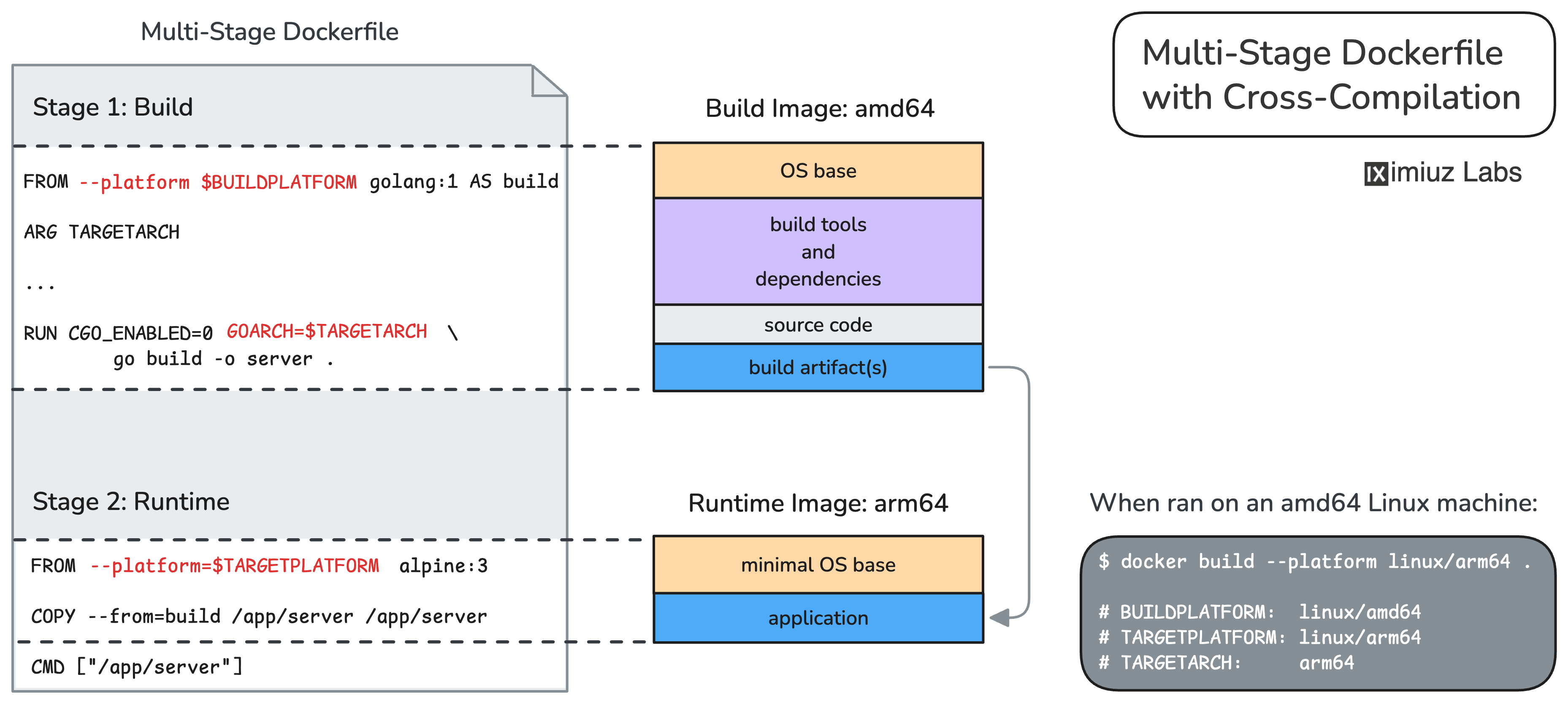
Modify the Dockerfile
Modify the Dockerfile in ~/app/ to:
- Keep the build stage running on the host architecture (amd64).
- Cross-compile the Go binary for the target architecture (arm64).
- Ensure the runtime stage uses the target architecture (arm64).
Hint 1
If you run the docker build command with the --platform=linux/arm64 flag,
it will use arm64 base images for all stages of the Dockerfile,
making the build process fail (rather expectedly) on amd64 hosts without QEMU preinstalled (like in this challenge).
The trick is to use another --platform=linux/amd64 flag, but this time on the build stage's FROM instruction,
overriding the effect of the docker build's --platform=linux/amd64 flag
(while letting the runtime stage use the target architecture).
Hint 2
Hardcoding the platform architecture in the Dockerfile is a valid approach, but in most cases you'll want to use a more flexible technique.
Docker provides special build arguments that can be used in Dockerfiles to implement cross-compilation:
BUILDPLATFORM- the platform of the machine running the buildTARGETPLATFORM- the platform you're building forTARGETARCH- the architecture component of the target platform
These build arguments are available in FROM instructions by default,
but to use them in RUN commands, you need to explicitly declare them with ARG.
Build and push the image
Once your Dockerfile is ready, build the image for the linux/arm64 platform
and push it to the playground's container registry as registry.iximiuz.com/app:v1.0.0.
You can verify the image architecture locally before pushing:
docker image inspect registry.iximiuz.com/app:v1.0.0 | jq '.[0].Architecture'
Application test
The image will be pulled and tested on a separate machine:
Hint 4
If the application test fails, try running the image locally to debug:
docker run --rm registry.iximiuz.com/app:v1.0.0
Note that you will need to rebuild the image for the host's architecture (amd64) to test it locally.