Access a Private Kubernetes API Server Through an SSH SOCKS Proxy

Premium Challenge
Upgrade your membership to unlock this and all other premium materials.
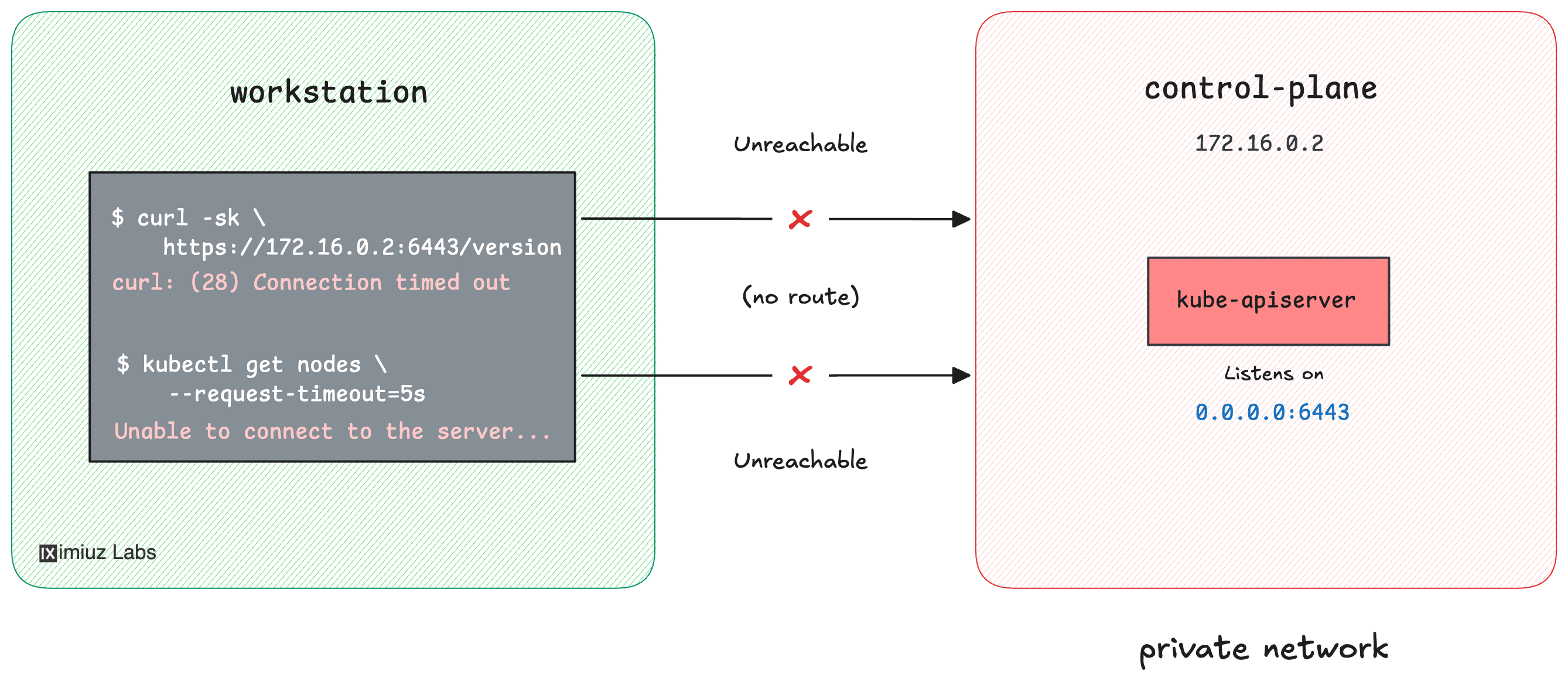
You're a platform engineer at Acme. The production Kubernetes cluster runs inside a
private VPC, and, as is common for hardened setups, its API server has no public endpoint:
the control plane node (cplane-01) listens on
172.16.0.2:6443, an address that only machines inside the VPC can reach.
You have the cluster's admin credentials in ~/.kube/config on your
workstation, but the workstation has
no route into the VPC, so every kubectl command just hangs and eventually times out:
kubectl get nodes --request-timeout=5s
E0901 16:19:02.264814    1566 memcache.go:265] "Unhandled Error" err="couldn't get current server API group list: Get \"https://172.16.0.2:6443/api?timeout=5s\": net/http: request canceled while waiting for connection (Client.Timeout exceeded while awaiting headers)"
...
Unable to connect to the server: net/http: request canceled while waiting for connection (Client.Timeout exceeded while awaiting headers)
There is a public-facing bastion (jump host) (bastion, 203.0.113.20)
that you can SSH into, and it is connected to the VPC - so it can reach the API server.
You could forward a single local port to 172.16.0.2:6443
and point the kubeconfig at localhost instead, but that means rewriting the server address,
which might make its certificate not valid.
Kubernetes has a cleaner answer to this, documented in the official
Use a SOCKS5 Proxy to Access the Kubernetes API
task: run a SOCKS proxy over SSH and tell kubectl to send its API traffic through it.
kubectl keeps connecting to the real API server address, so certificates keep working.
Your task consists of two steps:
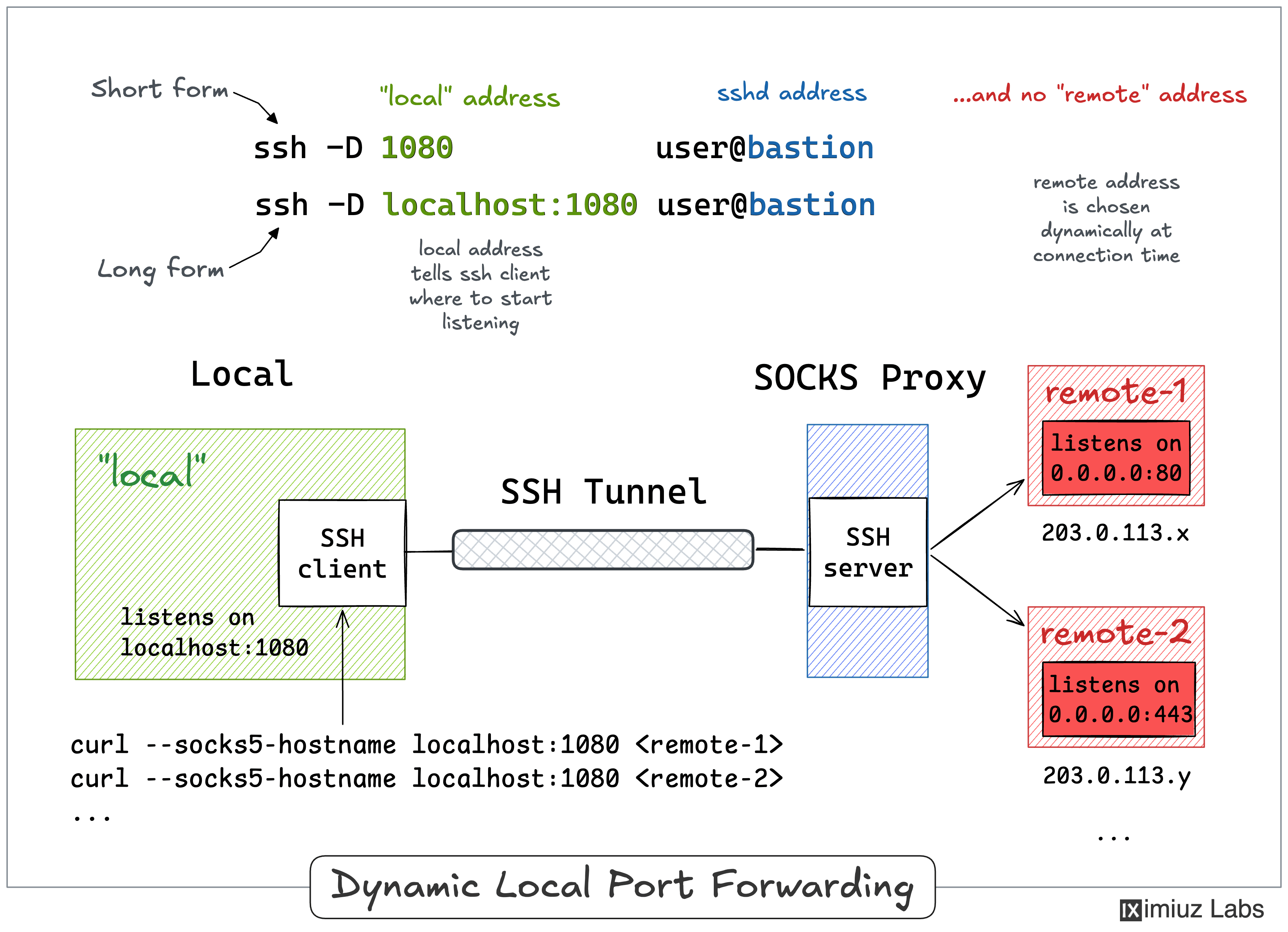
First, set up an SSH dynamic local port forwarding session through the bastion so that
a SOCKS proxy on the workstation's localhost:1080 can reach the API server inside the VPC:
Then, make kubectl use that proxy persistently, by configuring the cluster entry in
~/.kube/config, so that a plain kubectl get nodes works from any new terminal on the
workstation, without extra environment variables:
Hint 1: How dynamic local port forwarding works
A regular local tunnel (ssh -L local_port:host:port bastion) pins the forwarding to a single destination.
Dynamic local forwarding does not specify a destination:
with ssh -D and only a single local port, OpenSSH turns your ssh client into a SOCKS proxy.
Each connection made through that proxy is sent over your SSH link and connected to whatever address the
SOCKS client asks for - resolved and reached from the bastion's side of the network.
Run man ssh and read the -D section, or walk through the example in the
SSH Tunnels tutorial.
If you have never used a SOCKS proxy over SSH before, solve
Reach a Whole VPC Through an SSH SOCKS Proxy first.
Hint 2: Checking the proxy without kubectl
curl speaks SOCKS, too. Before touching the kubeconfig, you can point curl at the proxy
(see the --socks5-hostname option) and request https://172.16.0.2:6443/version.
An HTTP 401 Unauthorized response is a good sign here - it means you reached the API server
and it is asking for credentials.
Hint 3: How kubectl can be told to use a proxy
kubectl honors the usual HTTPS_PROXY and https_proxy environment variables, and it also understands SOCKS
URLs in it (socks5://...). That is a quick way to test the tunnel, but it only affects the
shell where the variable is exported, and it applies to every cluster you talk to from that shell.
The persistent, per-cluster way is the proxy-url field of a cluster entry in the kubeconfig
file. You can add it by editing ~/.kube/config directly or with kubectl config set-cluster
(see its --help output). Both approaches are described in the
official task.