Building an eBPF/XDP NAT-Based (Weighted) Round Robin Load Balancer from Scratch

In the previous tutorial, we built a NAT-based eBPF/XDP load balancer using (weighted) least-connection backend selection. A key benefit of that setup was that client requests were distributed across backends based on their capacity, as well as the number of connections they were handling at that point in time.
However, least-connection selection is just one of many load-balancing strategies, and it’s natural to also demonstrate how to implement other algorithms, such as (weighted) round-robin.
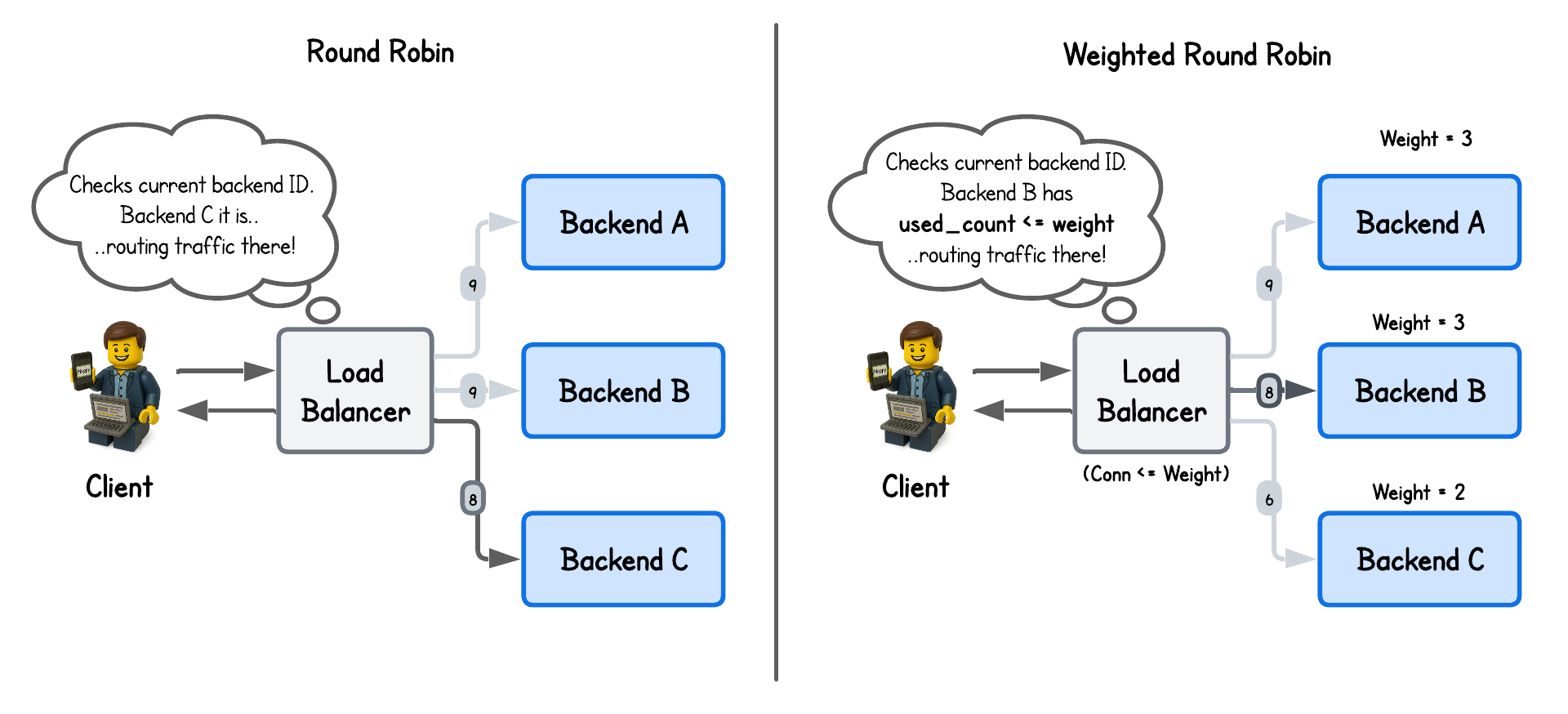
While round-robin is conceptually straightforward—it simply cycles through available backends—it provides a solid foundation upon which more complex algorithms can be implemented with eBPF/XDP.
💡 All packet parsing, NAT rewriting, FIB lookup, and checksum logic remain unchanged from the NAT-based XDP load balancer lab and won't be re-explained here.
💡 This lab was built in collaboration with Hanuman Sarode and Sambhav Singh, an Executive Member of ACM.
Round Robin Load Balancing
The earliest uses of round-robin–style load distribution can be traced back to the mid-1980s, when DNS servers began rotating responses among multiple hosts to spread traffic across functionally similar machines.
Despite its limitations—such as the lack of built-in health checks—it remains a popular choice for stateless applications, where simplicity and ease of implementation often outweigh the need for perfectly optimized load balancing.
To enable this strategy in our eBPF/XDP program, we only need to track which backend the next request to forward to. For that, we define a simple eBPF map:
struct {
  __uint(type, BPF_MAP_TYPE_ARRAY);
  __uint(max_entries, 1);
  __type(key, __u32);
  __type(value, __u32); // Holds the next backend ID to sent traffic to
} scheduler_state SEC(".maps");
Then inside our eBPF/XDP program we simply lookup and increment this value on every new client connection, while redirecting already initialized connection to previously selected backends:
SEC("xdp")
int xdp_load_balancer(struct xdp_md *ctx) {
  ...
  // Lookup conntrack (connection tracking) information:
  // - No Connection:    client request
  // - Connection exist: backend response
  struct endpoint *out = bpf_map_lookup_elem(&conntrack, &in);
  if (!out) {
    // bpf_printk("Packet from client..");
    // Check for an existing connection
    ...
    __u32 *backend_idx = bpf_map_lookup_elem(&statetrack, &five_tuple);
    if (backend_idx) {
      // Existing connection found in statetrack map - proceed with the same backend
      backend = bpf_map_lookup_elem(&backends, backend_idx);
      ...
    } else {
      // New connection - select backend with round-robin scheduling
      __u32 zero = 0;
      __u32 *curr_idx = bpf_map_lookup_elem(&scheduler_state, &zero);
      if (!curr_idx) {
        return XDP_ABORTED;
      }
      __u32 key = *curr_idx;
      backend = bpf_map_lookup_elem(&backends, &key);
      if (!backend) {
        return XDP_ABORTED;
      }
      bpf_printk("Selected backend index: %d with IP: %pI4", key, &backend->ip);

      // Increment the count to point to the next backend and update the entry in scheduler_state map
      // Perform modulo operation to get a number in the range of backend indexes
      __u32 next_idx = (key + 1) % NUM_BACKENDS;
      if (bpf_map_update_elem(&scheduler_state, &zero, &next_idx, BPF_ANY) != 0) {
        return XDP_ABORTED;
      }
      ...
    }
  } else {
    // bpf_printk("Packet from backend..");
    // Packets from backends are just sent back to client - nothing else to do
    ...
  }
  ...
}
It really doesn’t get more complicated than that.
And if there’s one detail worth calling out, it’s how we ensure the selected backend stays within bounds by applying a modulo (%) operation to the current counter/backend ID, effectively wrapping the index so it always falls within the valid range.
Weighted Round Robin Load Balancing
While round-robin load balancing evenly distributes traffic across backend servers, those servers may have different capacities—CPU, memory, and so on.
Weighted round-robin addresses this by assigning more traffic to higher-capacity nodes, proportionally to their weight.
To implement this, we assign the weight parameter to each backend as well as used_count that is used to count the number of times the backend has be chosen (code in the lab-wrr directory):
struct backend {
  // Backend endpoint information (currently only IP, but could be extended with port or other metadata)
  struct endpoint endpoint;
  // Backend weight for weighted load balancing algorithms
  __u32 weight;
  // Number of connections handled by this backend
  __u32 used_count;
};
Then in the eBPF/XDP program we redirect the requests to backends until the used_count is equal to the weight assigned to the backend:
SEC("xdp")
int xdp_load_balancer(struct xdp_md *ctx) {
  ...
  // Lookup conntrack (connection tracking) information:
  // - No Connection:    client request
  // - Connection exist: backend response
  struct endpoint *out = bpf_map_lookup_elem(&conntrack, &in);
  if (!out) {
    //bpf_printk("Packet from client..");
    // Check for existing connections
    ...
    __u32 *backend_idx = bpf_map_lookup_elem(&statetrack, &five_tuple);
    if (backend_idx) {
      // Existing connection found in statetrack map - update state and proceed with the same backend
      backend = bpf_map_lookup_elem(&backends, backend_idx);
      ...
    } else {
      // No existing connection found in statetrack map
      // Select a backend using weighted round robin algorithm
      __u32 zero = 0;
      __u32 *curr_idx = bpf_map_lookup_elem(&scheduler_state, &zero);
      if (!curr_idx) {
        return XDP_ABORTED;
      }
      __u32 selected = *curr_idx;
      backend = bpf_map_lookup_elem(&backends, &selected);
      if (!backend) {
        return XDP_ABORTED;
      }

      // Increment used_count as we are adding a new connection to this backend
      backend->used_count += 1;

      // Check whether used_count is equal to the backend's weight
      // This means that this backend has handled the number of connections equal to its weight and
      // we can move to the next backend for the future connections
      if (backend->used_count >= backend->weight) {
        backend->used_count = 0;                         // Rest used_count to 0 when it's equal its weight
        __u32 next_idx = (selected + 1) % NUM_BACKENDS;  // Increment the index to point to the next backend
        if (bpf_map_update_elem(&scheduler_state, &zero, &next_idx, BPF_ANY) != 0) {
          return XDP_ABORTED;
        }
      }
      bpf_printk("Selected backend index: %d with IP: %pI4", selected, &backend->endpoint.ip);
      ...
    }
    ...
  } else {
    //bpf_printk("Packet from backend..");
    // Packets from backends are just sent back to client - nothing else to do
    ...
  }
  ...
}
Running the Load Balancer
This playground has a network topology with five separate machines on two different networks:
lbin network192.168.178.10/24backend-01in network192.168.178.11/24backend-02in network192.168.178.12/24clientin network10.0.0.20/16gatewaybetween networks192.168.178.2/24and10.0.0.2/16
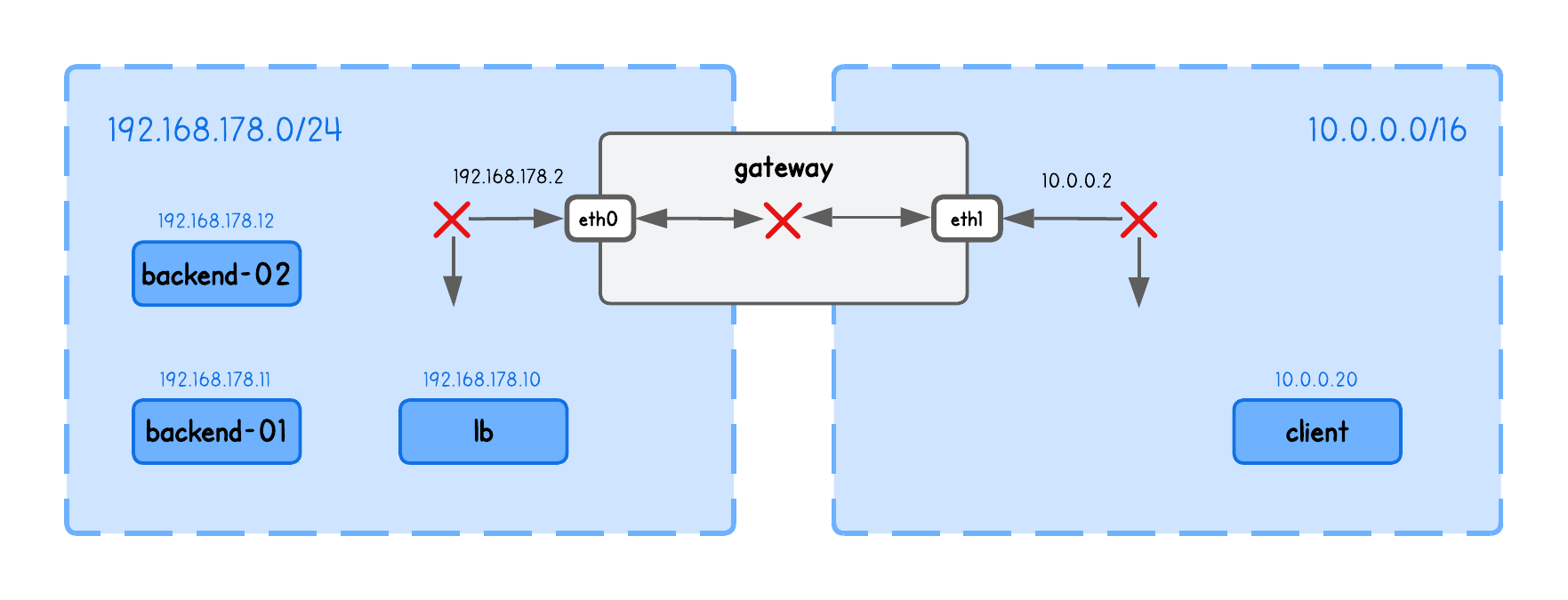
Before we can actually run our load balancer, we also need to enable packet forwarding between network interfaces (in the lb tab):
sudo sysctl -w net.ipv4.ip_forward=1
This allows the kernel to route packets it receives on one interface out through another — a requirement for the load balancer to forward client traffic to backend nodes.
⚠️ Make sure you've populated the ARP table with backends information using (in the lb tab):
sudo ping -c1 192.168.178.11
sudo ping -c1 192.168.178.12
See the previous section above for an explanation of why this is required.
Now build and run the XDP Load Balancer in the lb tab (inside the /lab-rr directory), using:
go generate
go build
sudo ./lb -i eth0 -backends 192.168.178.11,192.168.178.12
What are these input parameters?
In short:
iexpects the network interface on which this XDP Load Balancer program will runbackendsThe list of backend IPs in this playground (you need to provide exactly two backends, due to the simplification described above for simple hashing)
Now run an HTTP server on every backend node in tabs backend-1, backend-2, using:
python3 -m http.server 8000
And query the Load Balancers node IP from the client tab, using:
curl http://192.168.178.10:8000
and confirm you see the requests indeed get routed through the load balancer node to one of the backends, by inspect eBPF load balancer logs (in the lb tab):
sudo bpftool prog trace
Query the load balancer multiple times and you will see the round-robin algorithm in action.
302.157627: bpf_trace_printk: Selected backend index: 1 with IP: 192.168.178.12
306.487576: bpf_trace_printk: Selected backend index: 0 with IP: 192.168.178.11
309.848455: bpf_trace_printk: Selected backend index: 1 with IP: 192.168.178.12
396.465177: bpf_trace_printk: Selected backend index: 0 with IP: 192.168.178.11
397.295716: bpf_trace_printk: Selected backend index: 1 with IP: 192.168.178.12
If you repeat the same steps for the weighted round robin load balancer in the lab-wrr directory you will observe:
1369.900544: bpf_trace_printk: Selected backend index: 0 with IP: 192.168.178.11
1370.923575: bpf_trace_printk: Selected backend index: 1 with IP: 192.168.178.12
1376.244044: bpf_trace_printk: Selected backend index: 1 with IP: 192.168.178.12
1379.221418: bpf_trace_printk: Selected backend index: 0 with IP: 192.168.178.11
1380.407861: bpf_trace_printk: Selected backend index: 1 with IP: 192.168.178.12
1381.396259: bpf_trace_printk: Selected backend index: 1 with IP: 192.168.178.12
Congrats, you've came to the end of this lab 🥳
About the Author
Writes about
Frequently covers
More tutorials you might like
Building an eBPF/XDP NAT-Based (Weighted) Least Connection Load Balancer from Scratch
In this lab, you will extend the eBPF/XDP-based NAT load balancer implementation with the least-connections to a weighted least-connections algorithm that accounts for backend capacity.
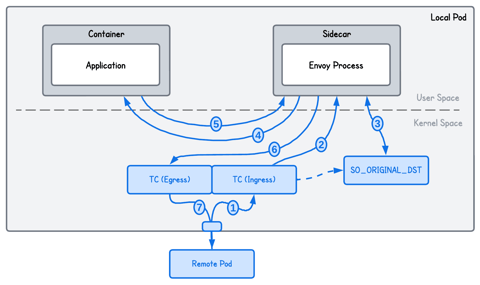
Accelerating Transparent Ingress Proxy with eBPF and Envoy
This lab teaches you how to use eBPF socket acceleration to speed up communication between processes on localhost and optimize a transparent Envoy proxy setup. You will implement techniques that bypass parts of the kernel networking stack, allowing data to be transferred more directly between sockets to improve throughput and reduce latency.
Transparent Ingress Proxy with eBPF and Envoy
This lab shows how to use eBPF to transparently redirect inbound traffic through an Envoy proxy on the server side, without modifying the application or client. You’ll learn how eBPF can intercept and restore connections so the service remains unaware of the proxy in the network path.
Transparent Egress Proxy with eBPF and Envoy
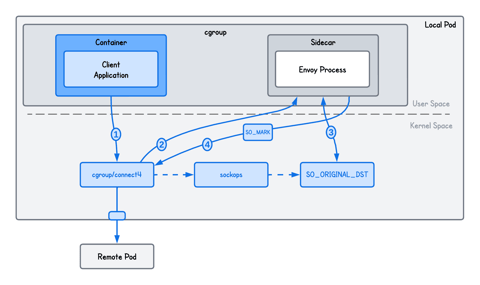
This lab teaches you how to use eBPF to transparently intercept and redirect a client's outgoing traffic to an Envoy proxy without requiring any changes to the application code. You will build a system that recovers original connection metadata via socket-level hooks and uses SO_MARK to prevent infinite routing loops, replacing traditional, complex iptables rules with a high-performance eBPF alternative.
Learn by doing, not just by reading or watching
Sign up for a free account to start a VM playground right on this page, track your progress, and get notified about new learning materials.