Assemble and Publish a Multi-Platform Image from Single-Platform Variants

Premium Challenge
Upgrade your membership to unlock this and all other premium materials.
The most common way to build a multi-platform image with modern Docker is a single docker build command with the --platform=platform1,platform2,... flag.
Being able to build a multi-platform image in one go is very convenient,
but it only works if the same Dockerfile and source tree can produce every variant of the image (e.g., linux/amd64 and linux/arm64).
But what if the per-platform builds use different codebases and/or Dockerfiles?
The scenario
You're shipping metrics-api, an internal HTTP service that's halfway through a Python-to-Go rewrite:
- amd64 has already been migrated. The new Go implementation lives in
~/app-amd64/and has been the canonical amd64 build sincev2.0.0. The team picked Go for a much lower memory footprint and faster cold starts. - arm64 is still on the legacy Python code in
~/app-arm64/. The arm64 rewrite is paused but not abandoned - the existing CI fleet is all amd64, and Go's compile step is too slow under QEMU emulation to run on every PR. Once the arm64-native CI runner pool is provisioned, the arm64 build will get its Go port too. Until then, arm64 keeps shipping the original Python implementation.
Two codebases. Two completely different Dockerfiles. From a consumer's point of view, though,
registry.iximiuz.com/metrics-api:v2.0.0 should still be one image -
docker pull from amd64 and arm64 hosts should transparently pick the variant that matches the host's platform.
A single docker build --platform linux/amd64,linux/arm64 won't do the trick:
each platform needs its own Dockerfile and codebase.
So you need to build the amd64 and arm64 variants separately, and then stitch them together into one multi-platform image.
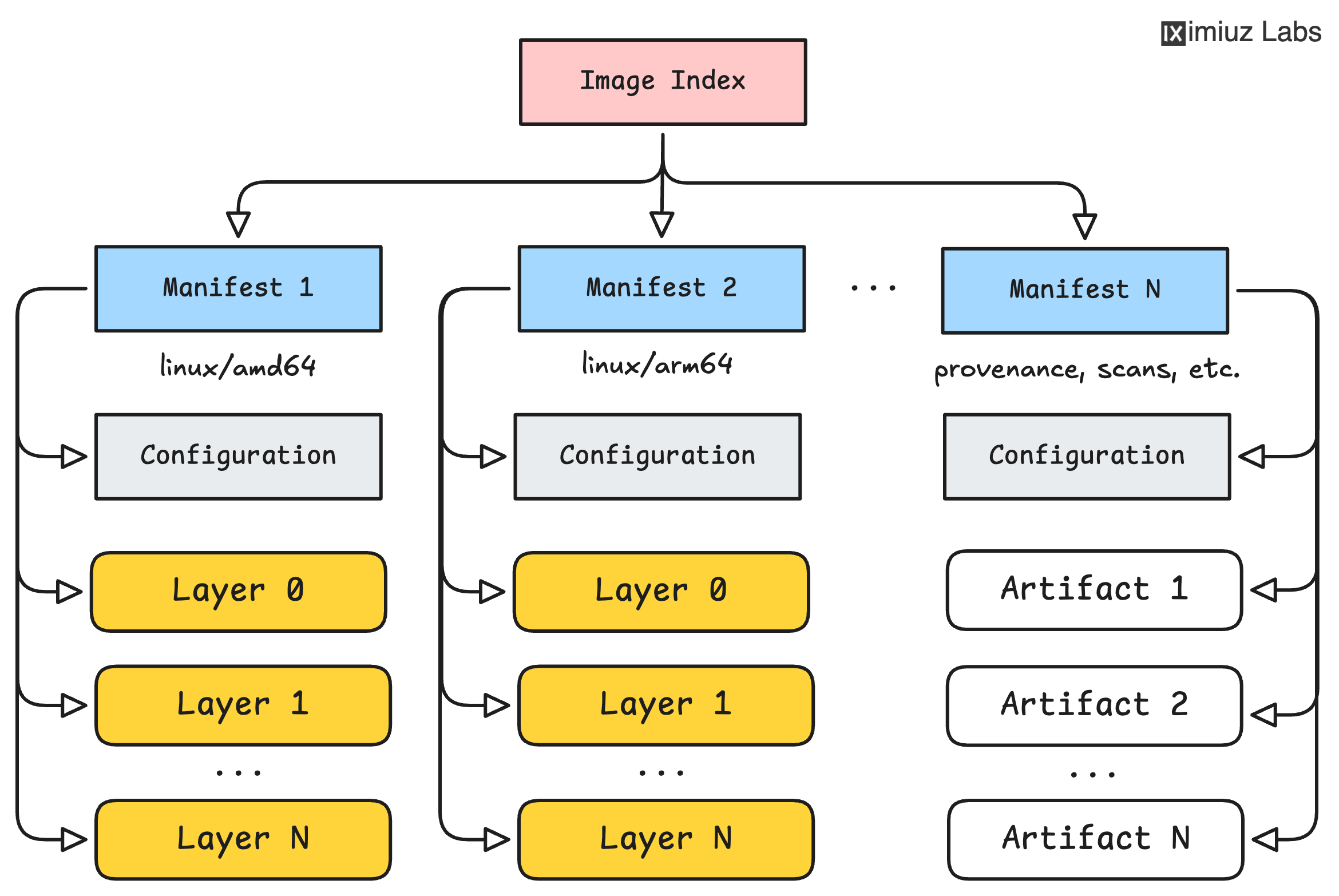
The environment
This machine has two source folders, each accompanied by its own Dockerfile:
~/app-amd64/- the new Go implementation (only available on amd64 hosts)~/app-arm64/- the legacy Python implementation (still used on arm64 hosts)
No images are pre-built - that's part of your job. A private container registry
is available at registry.iximiuz.com (no authentication required).
Part 1: Build each variant locally
Build each variant locally from its own folder, simulating what the two native CI runners would do independently:
registry.iximiuz.com/metrics-api:v2.0.0-amd64from~/app-amd64/, built forlinux/amd64registry.iximiuz.com/metrics-api:v2.0.0-arm64from~/app-arm64/, built forlinux/arm64
Part 2: Push the per-platform variants to the registry
Push each locally-built variant under its own per-platform tag to registry.iximiuz.com/metrics-api:
Hint 1
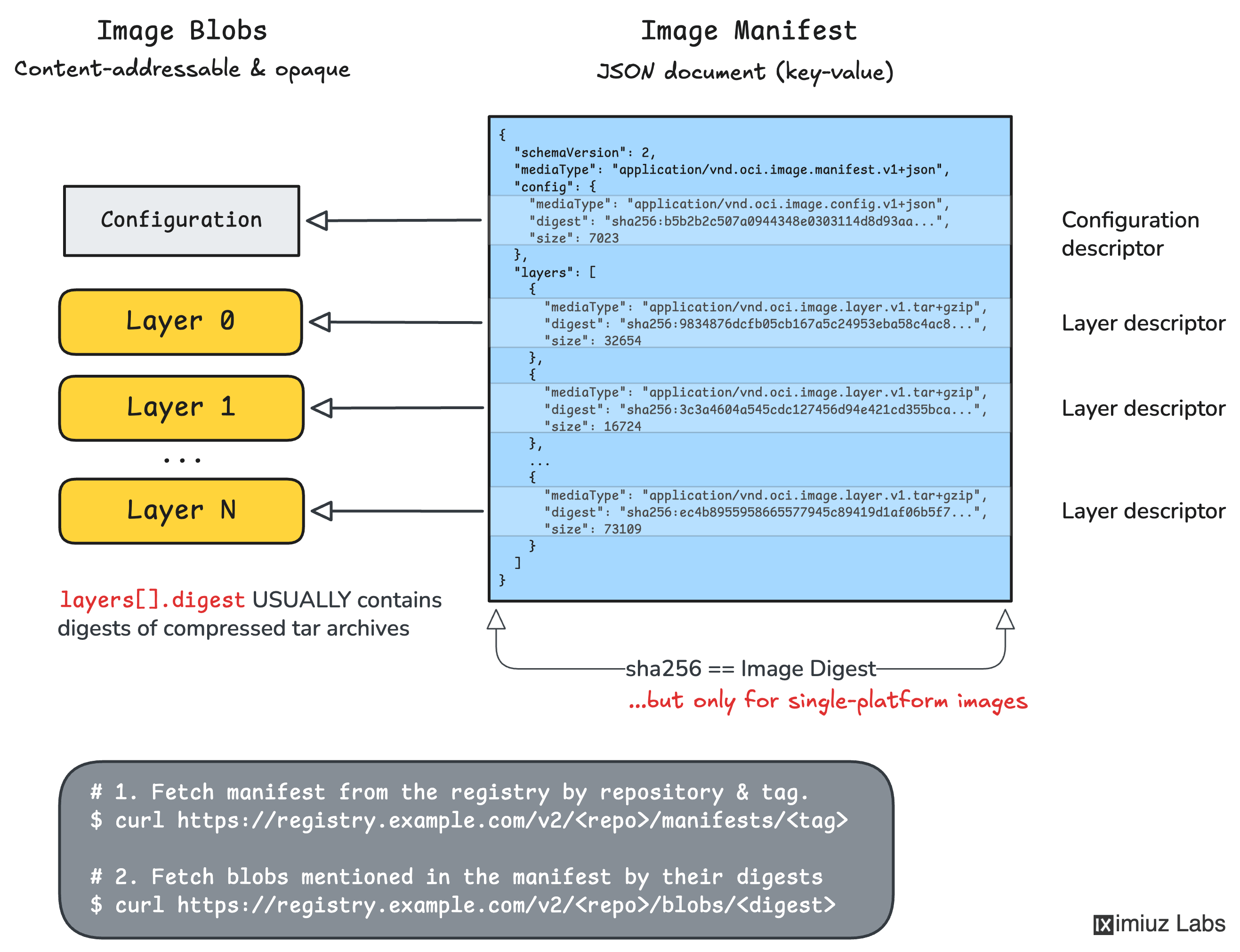
When you docker build and docker push a single-platform image with Docker 29 or later,
it does not upload a flat single-platform image manifest.
By default it uploads an OCI Image Index that wraps two children:
- The actual single-platform image manifest
- An SLSA-style provenance attestation manifest (annotated with platform
unknown/unknown).
You can see both children with docker manifest inspect <image>.
Note that the digest printed by docker push at the end of its output is the digest of the wrapping index,
not of the single-platform image manifest.
For the next part, you need the digest of the single-platform image manifest.
Part 3: Assemble and publish the multi-platform image
Combine the two per-platform variants into a single multi-platform reference metrics-api:v2.0.0 so that:
docker pull --platform linux/amd64 registry.iximiuz.com/metrics-api:v2.0.0pulls the amd64 variant (Go).docker pull --platform linux/arm64 registry.iximiuz.com/metrics-api:v2.0.0pulls the arm64 variant (Python).docker manifest inspect registry.iximiuz.com/metrics-api:v2.0.0lists both manifests under one top-level index.
Hint 2
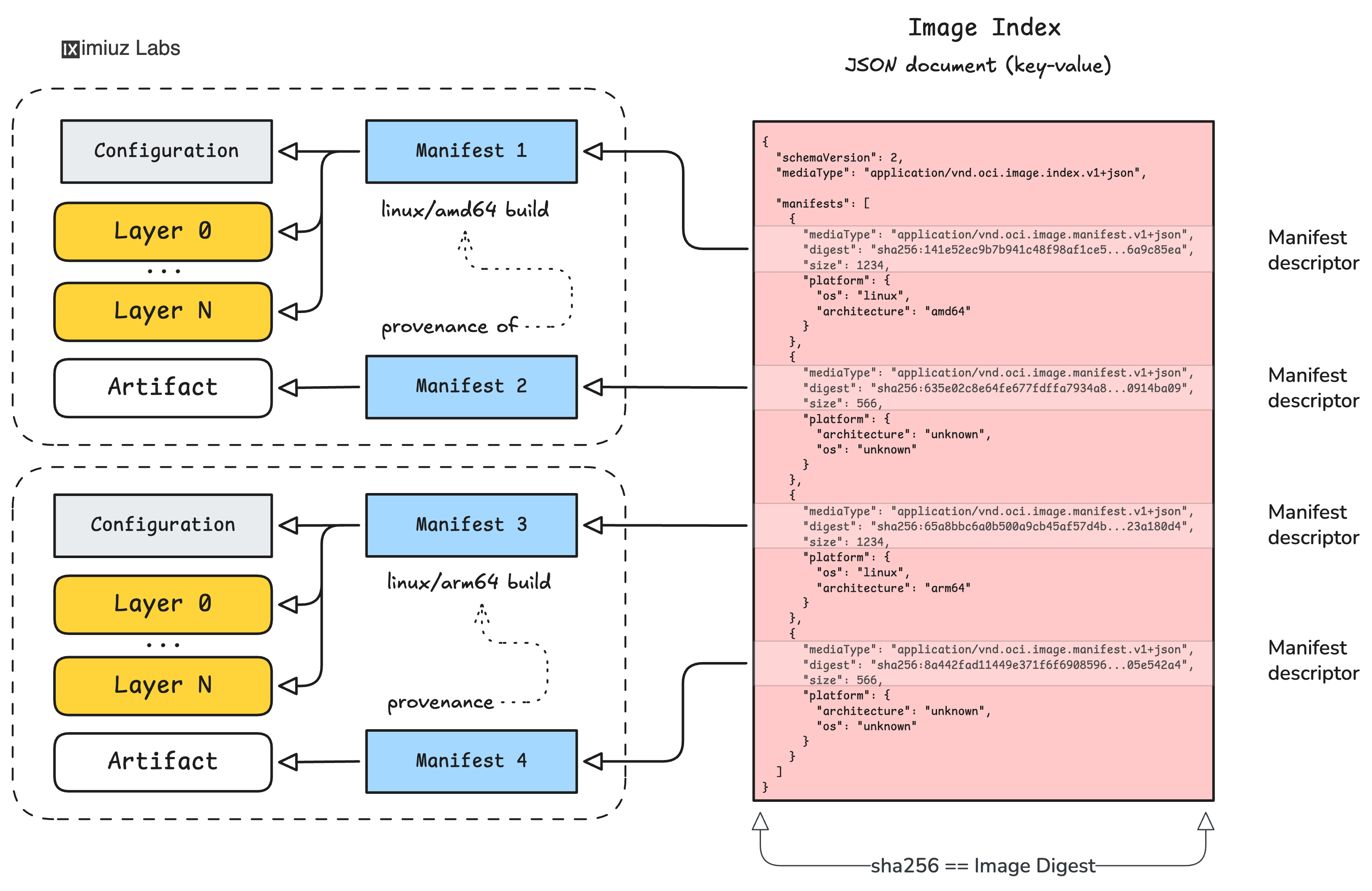
A bird's-eye view of the multi-platform image construction process:
- For each per-platform variant you pushed in Part 2, look up the digest of its platform-specific manifest (see Hint 1).
- Build a fresh OCI Image Index using the
docker manifest createcommand and reference those platform-specific manifests by their digests (not by tag). - Push the multi-platform image manifest under the
v2.0.0tag.
Hint 3
To get the digest of the platform-specific manifest, use docker manifest inspect <single-platform-image>.
Each entry of the output's .manifests[] array has a .digest and a .platform field.
Pick the one whose platform.architecture matches (amd64 or arm64) and whose platform.os is linux.
The other entry there is the provenance attestation - skip it.
To make sure the v2.0.0 index actually references the per-platform variants you pushed
in Part 2 (and not some other random image), the verifier compares the manifest digests
of the platform entries inside the v2.0.0 index with the inner manifest digests it
recorded when each variant was pushed: