Redirect a Container's Requests Without Modifying the App

The billing team has spotted odd requests in the logs of the company's billing API at billing.acme.corp,
and they suspect the old invoices dashboard of the finance team.
Nobody remembers much about this app.
There is only its container image, invoices:2.0, and you do not know whether the address of the billing API can be changed in the app, or how.
To study the app's requests without touching the real API, the billing team has set up a request sink. The sink answers like the billing API, with test data, and records every request that it receives.
http://billing-sink.acme.corp
You have been asked to help with the investigation. Your workstation is part of the corp network, and a copy of the dashboard already runs on it, started with the following command:
docker run -d --name invoices -p 80:8080 invoices:2.0
Use curl localhost:80 or the Invoices tab to quickly access the local invoices instance.
Make the app on your workstation send its requests to the sink without changing the app or its image.
This is a one-off task for the investigation, so a quick fix on your workstation is enough. Recreate the app's container as many times as you need, and keep it published on port 80, so that the Invoices tab continues working. After each change, open the page and check where the data comes from.
Hint 1
Both billing.acme.corp and billing-sink.acme.corp names are in the company's DNS zone,
and your workstation uses the company's DNS server, so it and any containers running on it can resolve them.
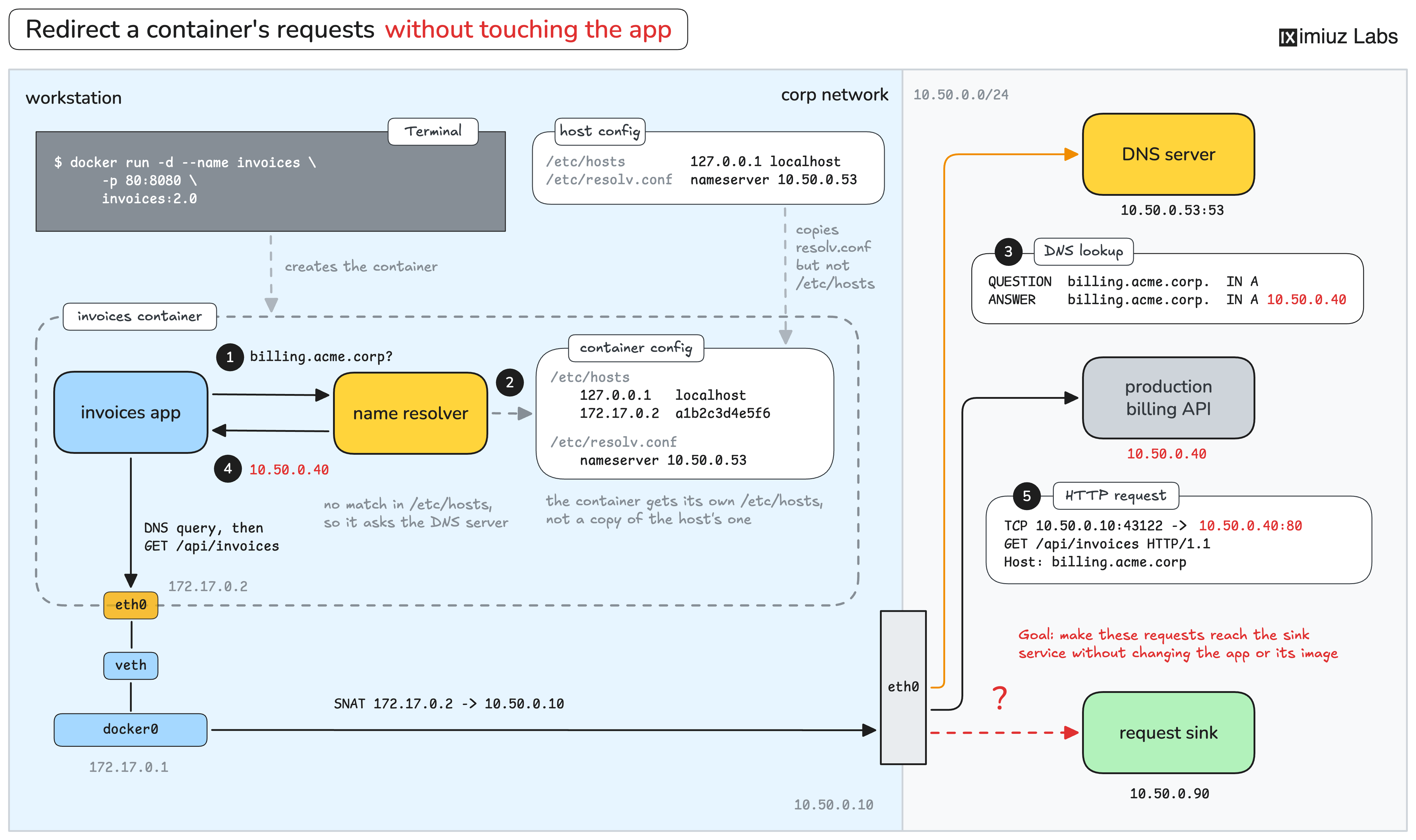
Your task is to trick the invoices container into accessing the IP address of billing-sink.acme.corp while it tries to reach billing.acme.corp.
The override works because the sink accepts requests without checking the HTTP Host header
and because the app talks plain HTTP instead of HTTPS (so no TLS certificate validation required).
Hint 2
An entry in the /etc/hosts file usually wins over the DNS record with the same name,
so you could try something like this:
<ip-of-the-sink-service> billing.acme.corp
But Docker generates a separate /etc/hosts file for every container,
so doing it in the host's /etc/hosts file won't really help.
You need to find a way to add such an entry to the container's /etc/hosts.
Hint 3
The --add-host flag of docker run adds an entry to the container's /etc/hosts file:
docker run --add-host HOSTNAME:IP_ADDR ...
Hint 4
To use the --add-host flag, you'll need to know the IP address(es) behind the billing-sink.acme.corp hostname.
If you don't know how to resolve a hostname to an IP address,
try this DNS 101 challenge first.