DNS 101: Resolve Public, Internal, and Local Hostnames

Premium Challenge
Upgrade your membership to unlock this and all other premium materials.
Most of the time, when you use curl, ssh, or open a page in a browser, you point the client to a hostname.
When a network request uses a hostname instead of an IP address, the name has to be resolved first.
Usually, it happens transparently, so it's easy to forget about this important and sometimes brittle step.
In this challenge, you will practice manually resolving public domains, internal hostnames, and local names defined in /etc/hosts.
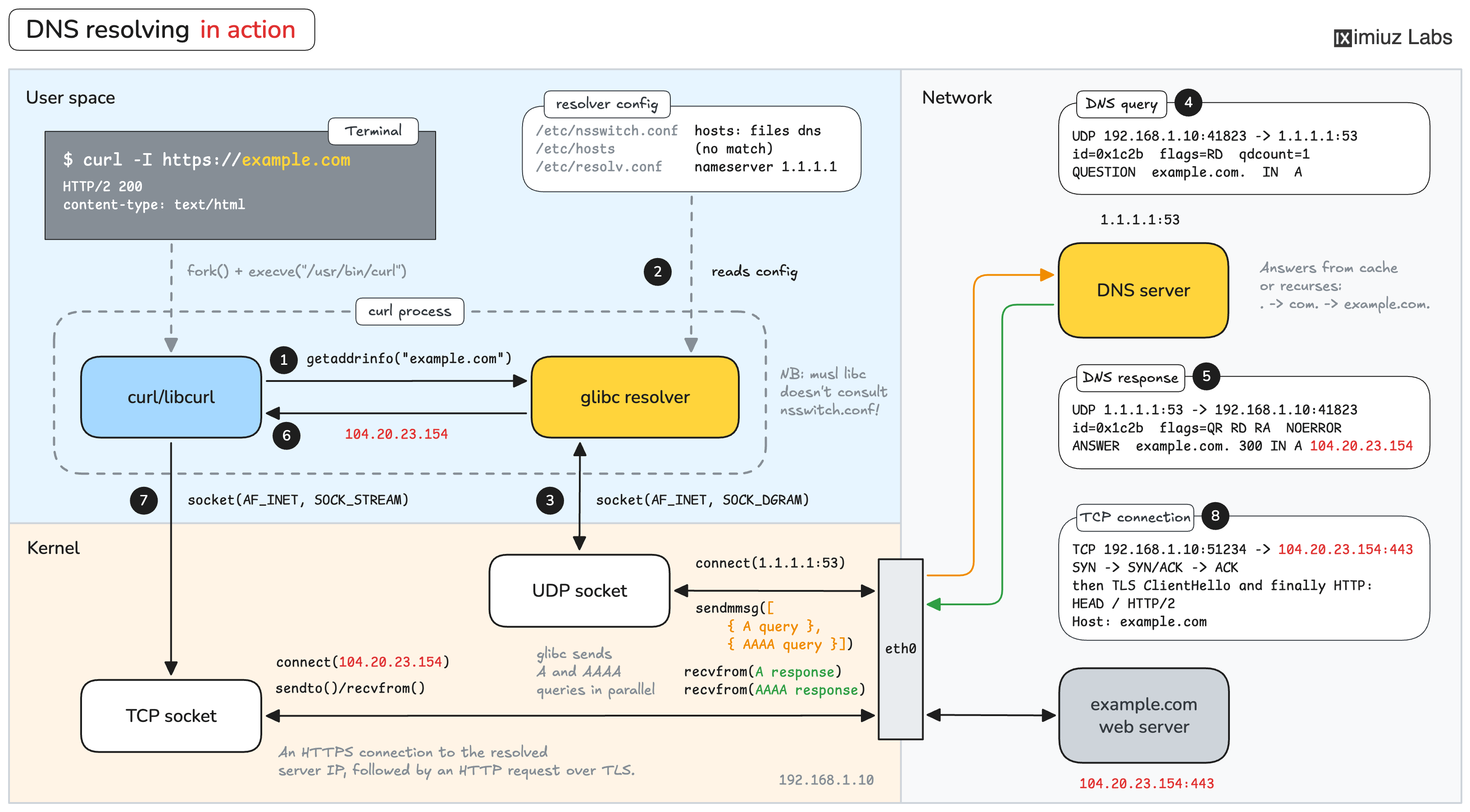
DNS resolving in action: curl uses libc's getaddrinfo() to resolve a hostname to the corresponding IP address.
Part 1: Public Hostnames
workstation-01 is a machine on a home network.
Before curl https://github.com on this machine can open a connection to GitHub,
it needs the address of github.com. Curl does it automagically,
but knowing how to find the address behind a domain name is an important troubleshooting skill.
What IPv4 address does github.com resolve to on workstation-01?
Do the same for wikipedia.org.
Hint 1
There is a number of tools for the job: getent, dig, host, nslookup.
The getent hosts <name> command resolves a name exactly the way applications do (see the above diagram for details).
The dig, host, and nslookup tools query a DNS server directly and show the raw answer.
For the Part 1 tasks there should be no practical difference, so you can use any (or all).
Hint 2
A single name can resolve to several addresses, and the answer can differ between regions and change over time. Any of the addresses the name resolves to on workstation-01 is accepted.
Part 2: Internal Hostnames
Mapping public domains to IP addresses is not the only use of DNS. Company networks often run their own DNS servers with records for internal hosts, and every machine on such a network is configured to use it.
dev-01 is a machine in a corp intranet.
The company domain is corp.internal.
Which DNS server does dev-01 send its queries to?
Hint 3
The resolver configuration lives in /etc/resolv.conf.
The nameserver line(s) in it list the DNS servers to query.
Compare the file on dev-01 with the one on workstation-01.
What IPv4 address does db.corp.internal resolve to on dev-01?
And what about api.corp.internal?
Public names keep working on dev-01 too.
What IPv4 address does github.com resolve to on dev-01?
Even though the company DNS server has no record for github.com,
it knows how to forward your DNS query to an upstream DNS server and then how to relay its answer back.
This is how a single DNS server in dev-01's /etc/resolv.conf can resolve both internal and public names.
Check the output of nslookup github.com - what nameserver address does it show? Is the answer authoritative?
Part 3: Local-Only Hostnames
In Parts 1 and 2, a remote DNS server maintained the mapping of names to addresses. Sometimes you need to be in control of a mapping yourself and define or override names on your own machine only.
Running a local DNS server is an option, but in most cases it is overkill.
The /etc/hosts file allows defining names locally - with a single line per name -
and the absolute majority of resolvers, including libc's getaddrinfo(), consult it before calling a DNS server (local or remote).
An entry in the /etc/hosts file usually wins over the DNS record with the same name.
Task 1: Override a Name
A new version of the company API has been deployed to a staging server at 10.50.0.90.
The staging server has no DNS name, and the api.corp.internal record keeps pointing to production.
Make programs on dev-01 reach the staging server when they connect to api.corp.internal:
curl http://api.corp.internal should return the staging instance.
Hint 4
Each line of /etc/hosts holds an IP address followed by one or more names, separated by whitespace.
The file already contains a few lines that show the format.
Editing it requires root privileges.
Task 2: Add a Local-Only Name
A development server runs on dev-01 itself, listening on its localhost 127.0.0.1:80.
Many web applications behave differently when accessed by a bare IP address,
so developers usually give a local server a name.
Make curl http://myapp.test on dev-01 return the development server's page.
Before you leave, resolve api.corp.internal on dev-01 once with getent hosts and once with dig.
The first command goes through /etc/hosts and shows the staging address.
The second command asks the DNS server directly and still shows production.